



Glimbyte SSL Guardian
Complete SSL management plugin: force HTTPS, fix mixed content, monitor certificates, and enable HSTS. Easy setup in 5 minutes.

Consider an alternative
Glimbyte SSL Guardian shows warning signs in 2026 — compare the alternatives below before installing. Was last updated 9 months ago, and scores 36/100 on our health check.
- Small user base (<10 active installs)
- Very few reviews so far
- Only tested up to WordPress 6.9 (latest is 7.1)
How does it stack up?
Side-by-side on installs, updates, ratings & support


Daily downloads
Download spikes usually follow a new release — each site that auto-updates counts as a download.
Rankings
Where Glimbyte SSL Guardian stands todayWordPress.org search rankings
Live position in the plugin search, top 100| Keyword | Position |
|---|---|
| certificate | >100 |
| https | >100 |
| mixed content | >100 |
| security | >100 |
| ssl | >100 |
About Glimbyte SSL Guardian
From the official readme · v1.1.2Description
Complete SSL Security Management for WordPress
Glimbyte SSL Guardian is a comprehensive yet simple SSL management plugin for WordPress. Set up HTTPS security in just 5 minutes and protect your visitors with automatic SSL certificate monitoring, mixed content fixing, and HSTS security headers.
Ideal for:
- WordPress site owners migrating to HTTPS
- Developers managing multiple client sites
- E-commerce stores requiring SSL compliance
- Anyone who wants secure SSL management
Key Features
HTTPS Enforcement
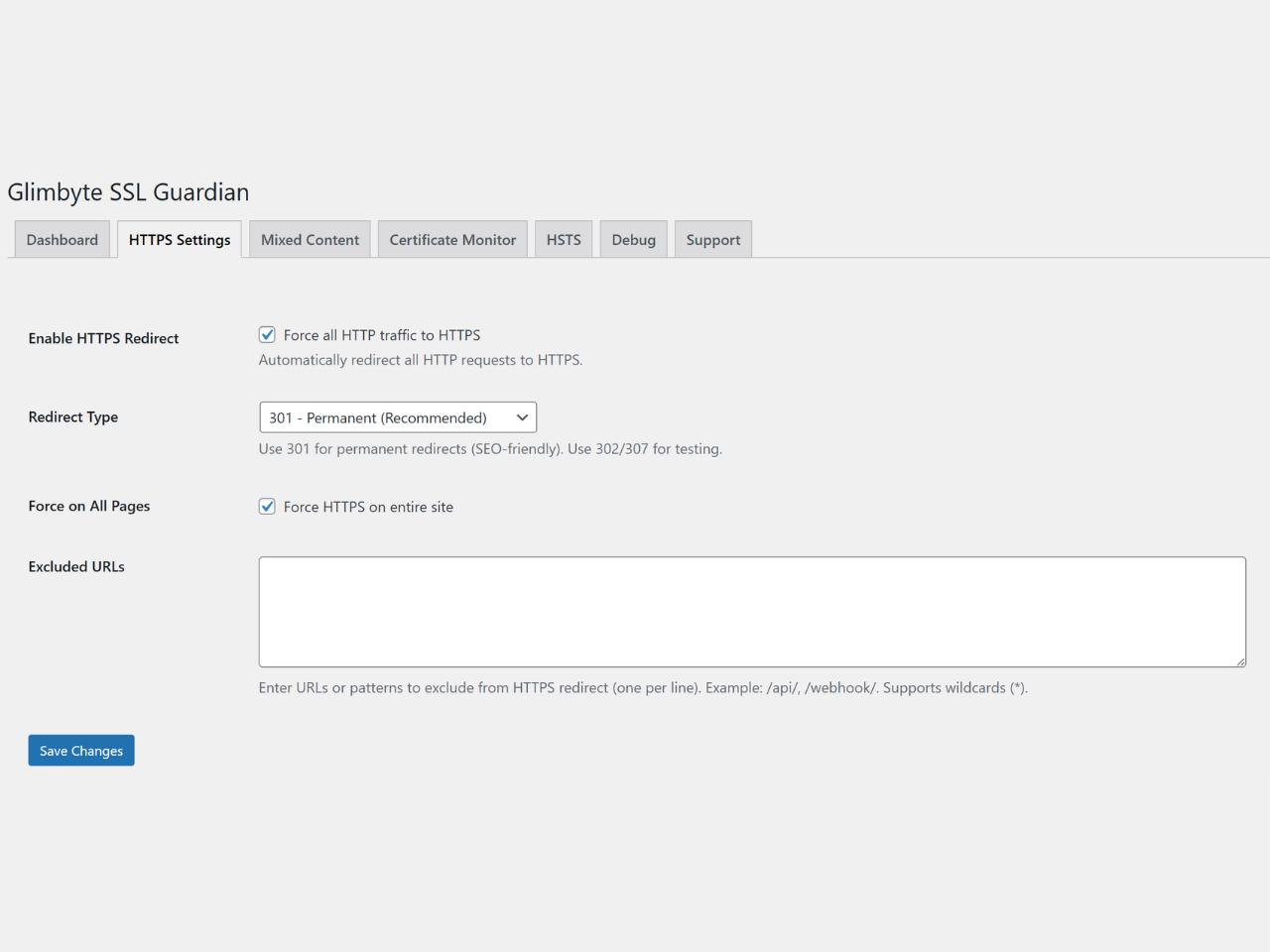
- One-click HTTPS redirect (301/302/307)
- Force HTTPS across entire site
- URL exclusion patterns (for specific pages)
- Proxy/CDN compatible (CloudFlare, AWS, etc.)
- Works with subdirectory installations
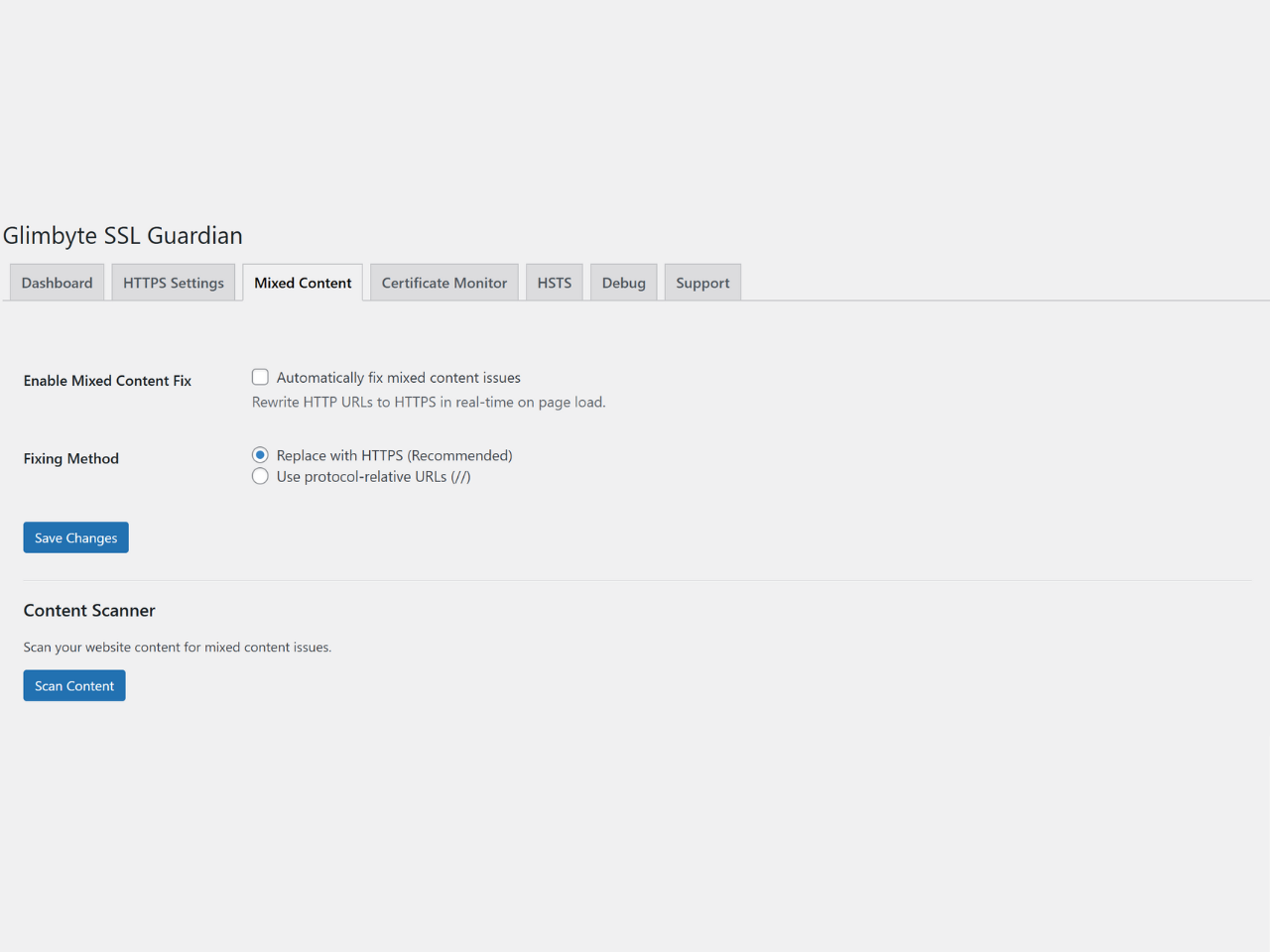
Mixed Content Detection & Fix
- Real-time automatic fixing via output buffer
- Comprehensive database scanner (posts, pages, custom post types)
- Detects: images, scripts, stylesheets, iframes, CSS backgrounds
- One-click “Fix All” for database content
- AJAX-based scanning (no timeouts on large sites)
- Choose HTTPS or protocol-relative URLs (//)
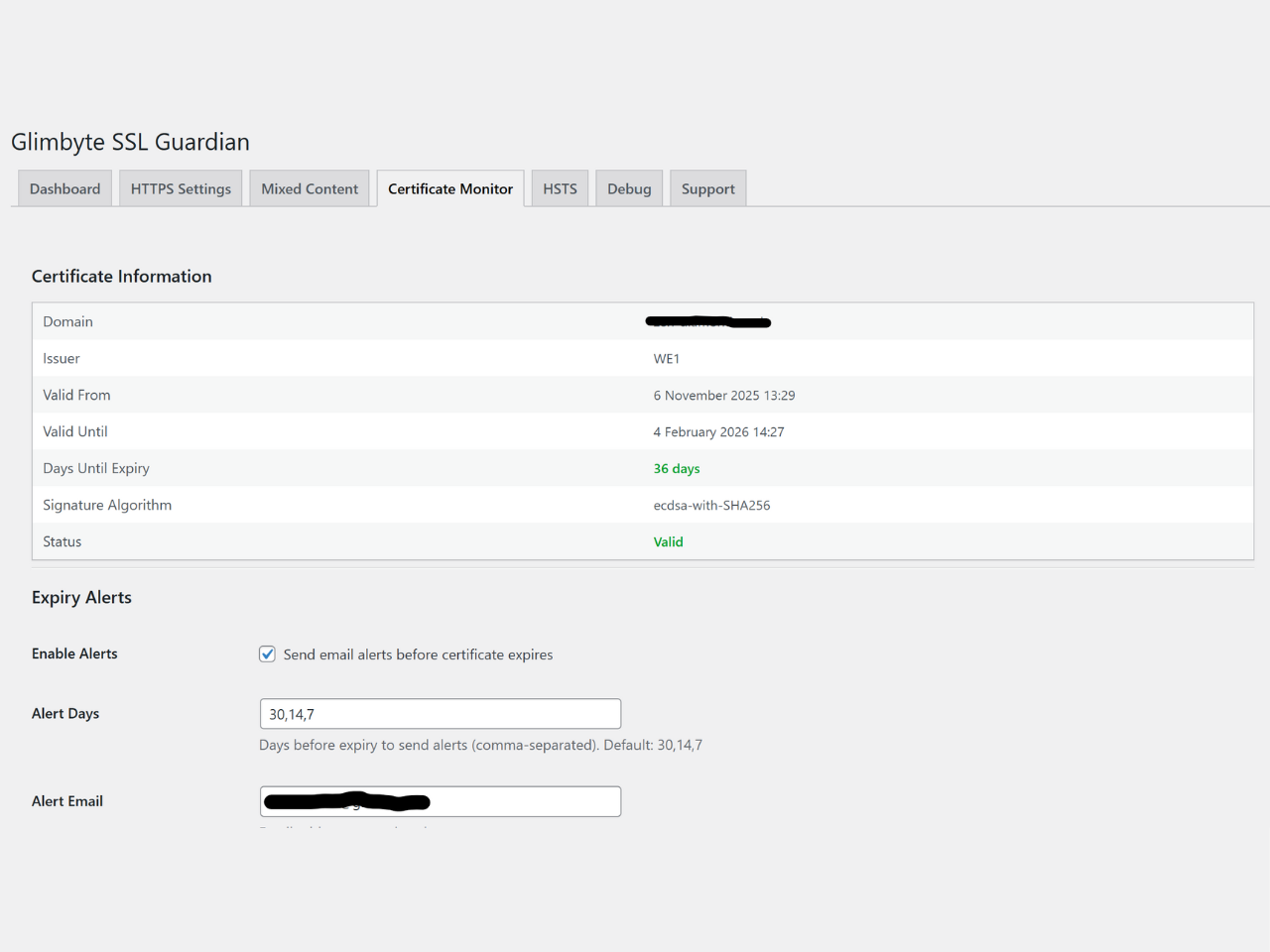
SSL Certificate Monitoring
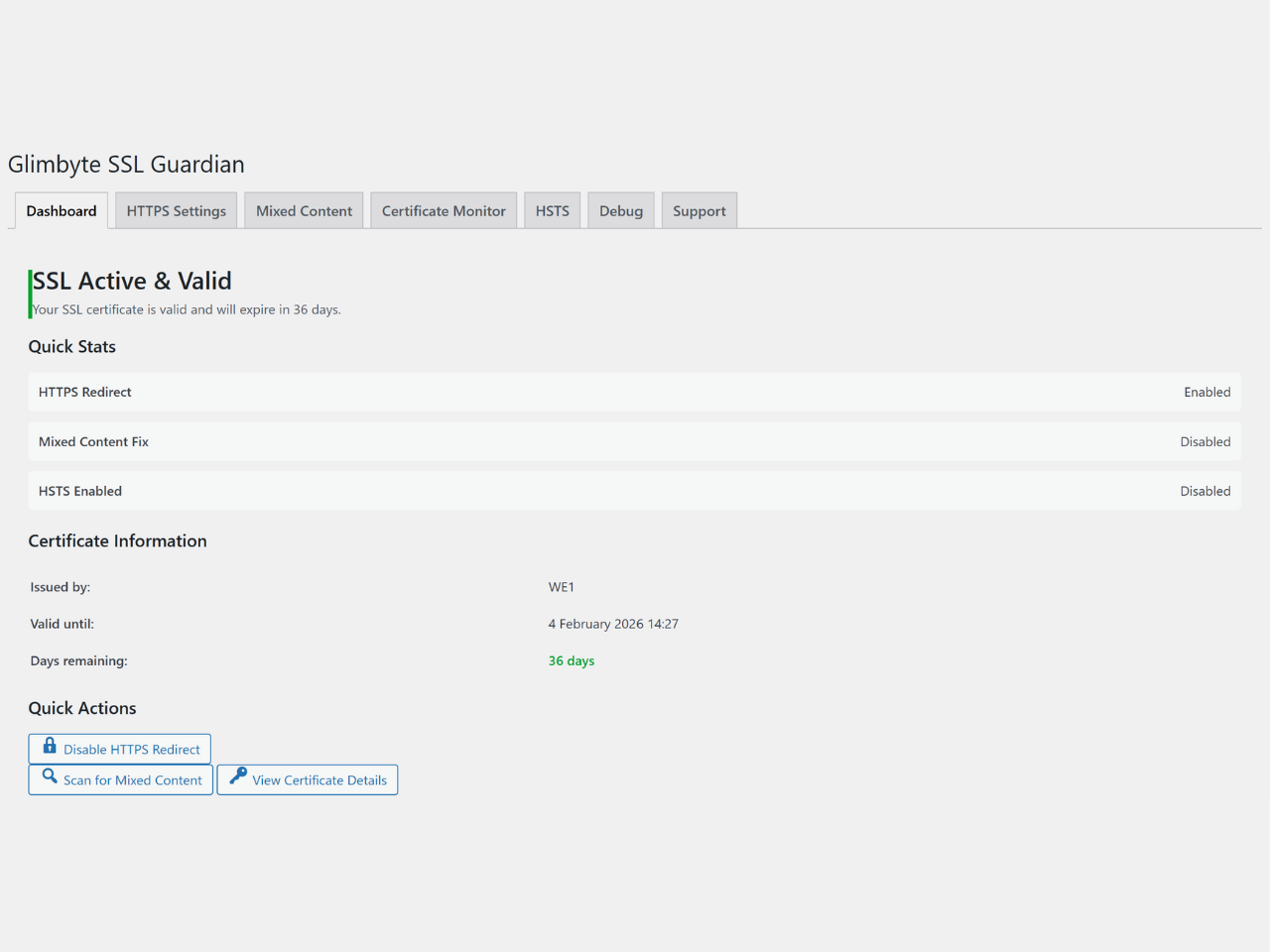
- Displays certificate details (issuer, expiry, validity)
- Visual status indicators (valid/expiring/expired)
- Days remaining countdown
- Automatic 24-hour cache for performance
- Handles connection errors gracefully
Expiry Email Alerts
- Automatic email notifications before expiry
- Configurable thresholds (default: 30, 14, 7 days)
- WP Cron scheduled daily checks
- Test email functionality
- Custom recipient email address
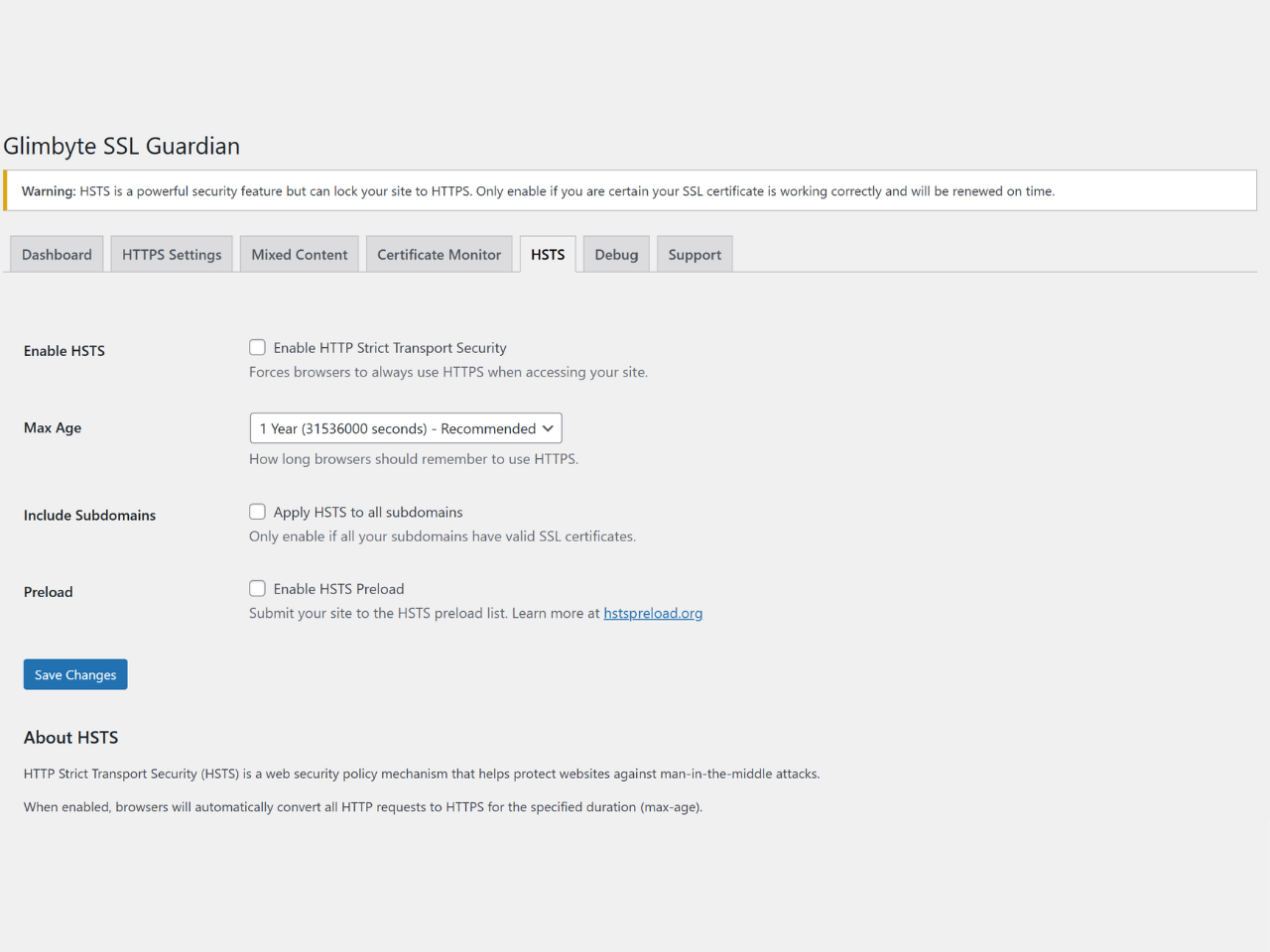
HSTS Security Headers
- Enable/disable HTTP Strict Transport Security
- Configurable max-age (1 month to 2 years)
- includeSubDomains option
- Preload list preparation
- Automatic HTTPS-only delivery
WordPress Multisite Support
- Network admin menu
- Network-wide enforcement option
- Per-site override permissions
- Centralized certificate monitoring
Professional Support System
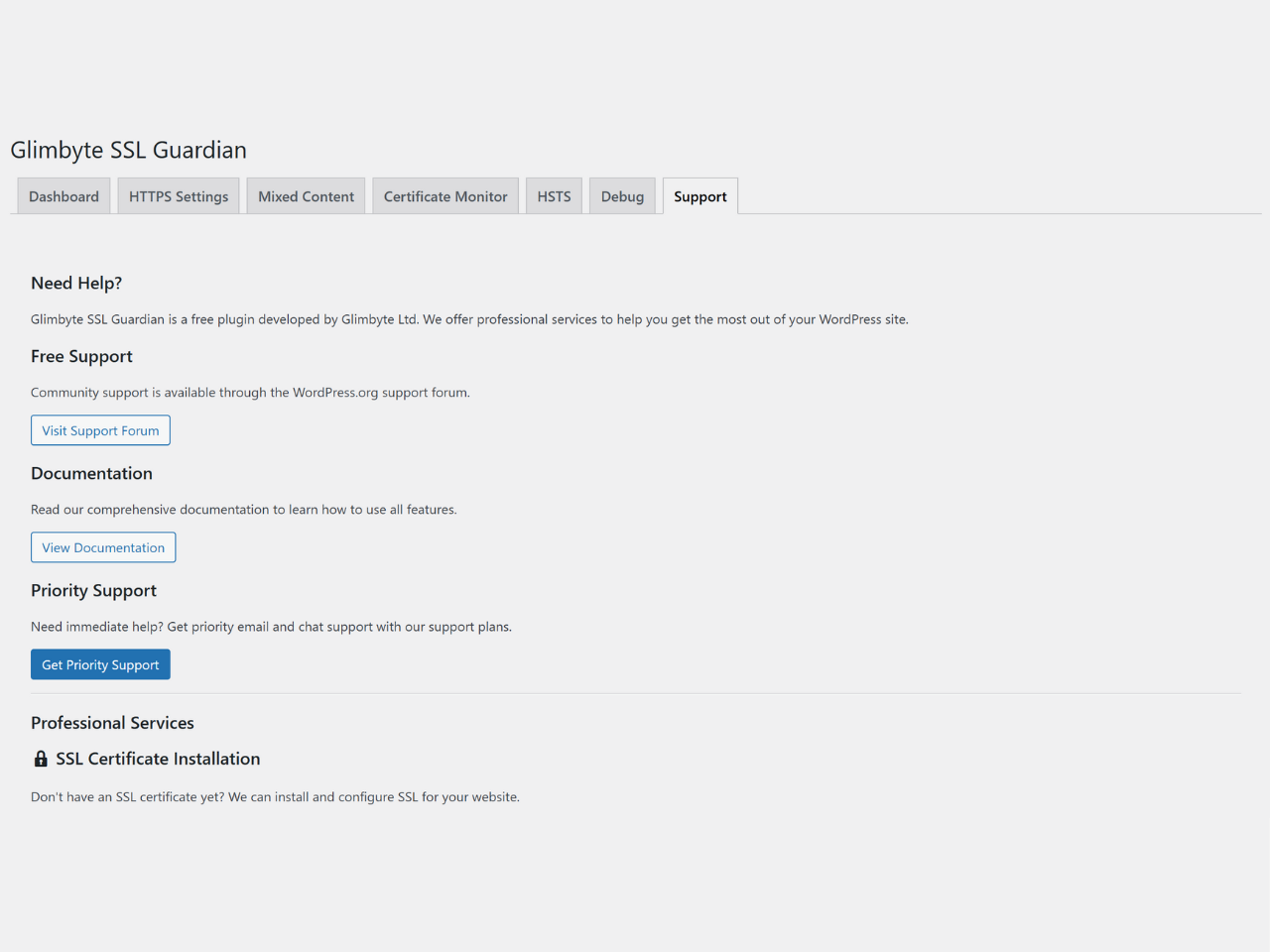
- Built-in support request form
- Automatic system info collection
- Direct email to Glimbyte support team
- GDPR-compliant consent checkbox
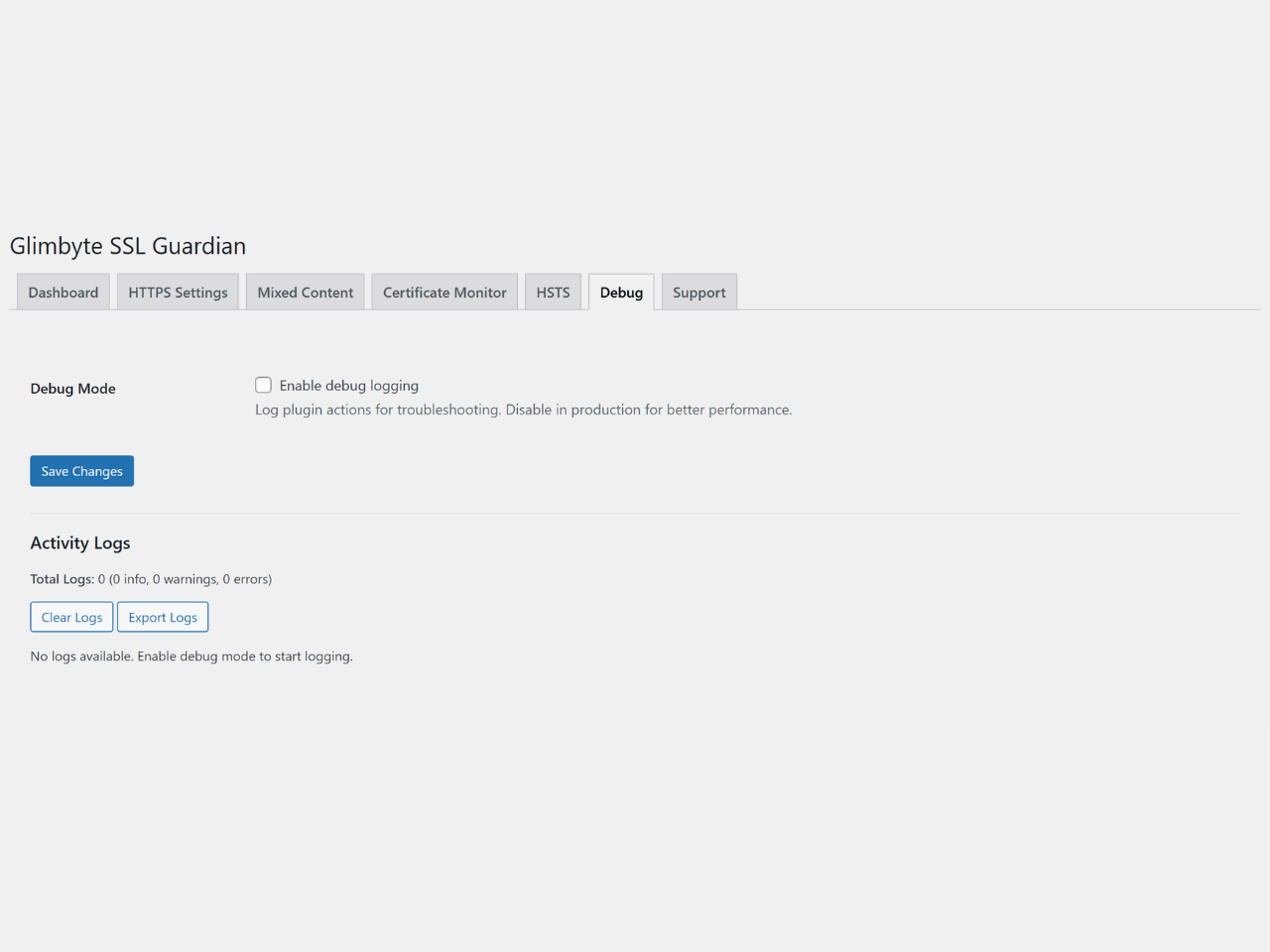
Debug & Logging
- Detailed activity logging
- View recent 100 entries
- Clear all logs
- Export logs as text file
- Disabled by default for performance
Why Choose Glimbyte SSL Guardian?
🎯 Simple Yet Powerful
Unlike complex SSL plugins with hundreds of settings, Glimbyte SSL Guardian gives you exactly what you need with a clean, intuitive interface. Most users complete setup in under 5 minutes.
⚡ Performance Optimized
- Transient caching for certificate checks (24 hours)
- Conditional asset loading (only on admin pages)
- No database queries on frontend
- AJAX for long operations
- Minimal memory footprint
🔐 Security First
- WordPress coding standards compliant
- All functions properly prefixed
- Settings API used throughout
- Nonces on all forms
- Capability checks everywhere
- Input sanitization & output escaping
- No eval() or create_function()
- ABSPATH checks in all files
📱 Works Everywhere
- Compatible with all hosting environments
- Works with CloudFlare, AWS CloudFront, other CDNs
- Supports reverse proxies and load balancers
- Subdirectory installation compatible
- Multisite network ready
🌍 Translation Ready
- Text domain: glimbyte-ssl-guardian
- All strings translatable
- Ready for localization
Perfect For These Use Cases
Migrating to HTTPS
Moving from HTTP to HTTPS? Glimbyte SSL Guardian handles everything:
1. Enable HTTPS redirect
2. Scan and fix mixed content
3. Enable HSTS
4. Done!
E-commerce Sites
WooCommerce, Easy Digital Downloads, and other e-commerce plugins require SSL. Glimbyte SSL Guardian ensures:
- All pages load securely
- No mixed content warnings
- Certificate never expires (with alerts)
- HSTS for extra security
Client Sites & Agencies
Managing SSL for multiple clients? Features you’ll love:
- Quick dashboard overview
- Automatic expiry alerts
- Remote monitoring capability
- Professional support system
- Multisite support
Developers
Clean, well-documented code that’s easy to extend:
- WordPress coding standards
- Action and filter hooks
- Modular class structure
- No deprecated functions
What Users Say
⭐⭐⭐⭐⭐ “Finally, an SSL plugin that just works!”
⭐⭐⭐⭐⭐ “Saved me hours of manual work fixing mixed content”
⭐⭐⭐⭐⭐ “The certificate monitoring gives me peace of mind”
Support & Documentation
Need Help?
- Use built-in support form: SSL Guardian > Dashboard
- Email: support@glimbyte.ie
- Website: https://glimbyte.ie
Developers
- Documentation: https://glimbyte.ie/glimbyte-ssl-guardian-docs
- Hooks & Filters: Full documentation in plugin files
About Glimbyte
Glimbyte SSL Guardian is developed by Glimbyte Ltd, a Dublin-based web development company specializing in WordPress security, e-commerce, and custom development.
Our Services:
- SSL Certificate Installation
- WordPress Security Audits
- Site Migration & HTTPS Setup
- WooCommerce Development
- Custom Plugin Development
- Priority Plugin Support
Visit https://glimbyte.ie for more information.
External Services
This plugin connects to an external API service operated by Glimbyte when you use the built-in support request form.
Service Details:
- Service Provider: Glimbyte (https://glimbyte.ie)
- Service URL: https://glimbyte.ie/wp-json/glimbyte/v1/support-request
- Purpose: To process and deliver support requests from users to the Glimbyte support team
- When Used: Only when you manually submit the support form via the plugin’s Support tab
Data Transmitted:
When you submit a support request, the following data is sent to this API endpoint:
- Your name (as provided in the form)
- Your email address (as provided in the form)
- Your phone number (optional, if provided)
- Your message/support request
- Your website URL
- WordPress version
- PHP version
- SSL certificate status
- Active/inactive SSL features
Important Notes:
- This service is ONLY used when you explicitly click “Submit” on the support form
- No data is sent automatically or during normal plugin operation
- You must explicitly check the consent checkbox before submission
- The data is transmitted over HTTPS for security
Service Terms & Privacy:
- Terms of Service: https://glimbyte.ie/terms
- Privacy Policy: https://glimbyte.ie/privacy
By using the support form, you consent to sending this data to Glimbyte for the purpose of receiving technical support for the plugin.
Privacy Policy
Glimbyte SSL Guardian stores all settings locally in your WordPress database and does not collect or transmit any user data during normal operation.
Support Form Data Transmission:
When you use the built-in support form, the following data is sent to support@glimbyte.ie:
- Your name, email, phone (if provided), and message
- Your website URL
- WordPress version
- PHP version
- SSL certificate status
This data is used solely for providing support and is not shared with third parties.
Credits
Developed with ❤️ by Ardit Caushi and the Glimbyte team in Dublin, Ireland.
Icons by WordPress Dashicons.
1.0.2
- Fixed: Translators comment positioning for better i18n compliance
- Note: “Global variable” warnings are false positives (template variables, not globals)
- Note: Other warnings are acceptable WordPress patterns
1.0.3
- Fixed: Added phpcs:ignore comments for template variables to pass Plugin Check
- Note: Template variables in view files are not actual globals – this is standard WordPress practice
- Improved: Code standards compliance for WordPress.org submission
1.0.4
- Fixed: Corrected phpcs:ignore placement in certificate.php for remaining template variables
- All Plugin Check errors resolved (0 errors)
- Ready for WordPress.org submission
1.0.5
- Fixed: phpcs:disable comment placement in certificate.php (moved to same line as opening PHP tag)
- All Plugin Check errors resolved – 0 errors!
- Final version ready for WordPress.org submission
1.1.2
- Improved: Added phpcs:ignore directive for admin tab navigation (non-data $_GET usage)
- Improved: Added phpcs:ignore directive for multisite uninstall database query
- Code quality: Addressed all Plugin Check warnings with proper documentation
1.1.1
- Fixed: Complete renaming – all SecureWP references replaced with Glimbyte SSL Guardian
- Fixed: Navigation tabs now use correct page slug (glimbyte-ssl-guardian)
- Fixed: AJAX actions renamed from securewp_ssl_* to glimbyte_ssl_*
- Fixed: CSS classes and JavaScript selectors updated for consistency
- Fixed: Multisite network admin menu slug updated
- Fixed: Email subject and X-Mailer header updated to new branding
1.1.0
- MAJOR UPDATE: Plugin renamed from “SecureWP SSL Manager” to “Glimbyte SSL Guardian”
- Changed slug from securewp-ssl-manager to glimbyte-ssl-guardian
- Fixed: All inline scripts/styles now properly enqueued per WordPress.org guidelines
- Fixed: Added explicit buffer closing for ob_start() in mixed content handler
- Fixed: Removed marketing superlatives from description (most comprehensive, perfect, bulletproof)
- Fixed: Updated privacy policy to accurately reflect support form data transmission
- Fixed: Plugin URI now points to valid URL (https://glimbyte.ie)
- Improved: All function/class/constant names updated to new prefix
- Note: Existing settings will be preserved – no reconfiguration needed
Installation
Automatic Installation (Recommended)
- Go to Plugins > Add New in WordPress admin
- Search for “Glimbyte SSL Guardian”
- Click “Install Now”
- Click “Activate”
- Go to SSL Guardian in admin menu
- Enable HTTPS redirect
- Scan for mixed content (if needed)
- Done!
Manual Installation
- Download the plugin ZIP file
- Go to Plugins > Add New > Upload Plugin
- Choose the ZIP file and click “Install Now”
- Click “Activate Plugin”
- Go to SSL Guardian in admin menu
- Configure your SSL settings
Via FTP
- Download and unzip the plugin file
- Upload the
glimbyte-ssl-guardianfolder to/wp-content/plugins/ - Activate the plugin through WordPress admin
- Go to SSL Guardian in admin menu
Getting Started
Step 1: Install SSL Certificate
Before using this plugin, ensure your hosting provider has installed an SSL certificate. Most hosts offer free Let’s Encrypt certificates.
Step 2: Enable HTTPS Redirect
1. Go to SSL Guardian > Dashboard
2. Click “Enable HTTPS Redirect”
3. Your site now forces HTTPS!
Step 3: Fix Mixed Content
1. Go to SSL Guardian > Mixed Content
2. Click “Scan Content”
3. If issues found, click “Fix All Issues in Database”
4. Done!
Step 4: Enable HSTS (Optional)
1. Go to SSL Guardian > HSTS
2. Read the warning (HSTS is permanent!)
3. Enable HSTS
4. Choose max-age (recommend 6 months to start)
5. Save settings
Step 5: Configure Alerts (Optional)
1. Go to SSL Guardian > Certificate Monitor
2. Enable expiry alerts
3. Set alert days (default: 30, 14, 7)
4. Enter your email
5. Click “Send Test Email” to verify
6. Save settings
Frequently asked questions
Do I need an SSL certificate first?
Yes! This plugin manages SSL after your certificate is installed. Contact your hosting provider for free SSL certificate installation (most offer free Let’s Encrypt certificates).
Will this plugin install an SSL certificate?
No. This plugin manages existing SSL certificates. You need to install an SSL certificate through your hosting provider first.
What is mixed content?
Mixed content occurs when an HTTPS page loads resources (images, scripts, etc.) over HTTP. This triggers browser warnings and security issues. Our plugin automatically detects and fixes these issues.
Is HSTS safe to enable?
HSTS (HTTP Strict Transport Security) is very safe BUT permanent for the duration you set. Start with 6 months (recommended). Once enabled and visited, browsers will ONLY load your site over HTTPS for that duration. Make sure your SSL works perfectly before enabling HSTS.
Does this work with CloudFlare?
Yes! The plugin automatically detects CloudFlare and other CDNs/proxies using X-Forwarded-Proto headers.
Does this work with WooCommerce?
Absolutely! Many e-commerce sites use this plugin to ensure all checkout pages are secure and free of mixed content.
Will this slow down my site?
No! The plugin is highly optimized: – Certificate checks cached for 24 hours – No database queries on frontend – Assets only load on admin pages – Minimal memory usage
Does it work with WordPress Multisite?
Yes! Full multisite support with network admin menu, network-wide settings, and per-site overrides.
Can I exclude specific URLs from HTTPS redirect?
Yes! Go to HTTPS Settings and add URL patterns to the exclusion list. Supports wildcards.
What happens if my SSL certificate expires?
If expiry alerts are enabled, you’ll receive emails at your configured thresholds (default: 30, 14, and 7 days before expiry). This gives you plenty of time to renew.
How do I get support?
Use the built-in support form at SSL Guardian > Dashboard > Get Professional Help. You can also email support@glimbyte.ie directly.
Is this compatible with other SSL plugins?
We recommend using only one SSL management plugin at a time to avoid conflicts. Deactivate other SSL plugins before activating Glimbyte SSL Guardian.
Does it support PHP 8?
Yes! Fully compatible with PHP 7.4, 8.0, 8.1, and 8.2.
Can I use this on a localhost/development site?
The HTTPS redirect and mixed content features require a valid SSL certificate. Certificate monitoring won’t work on localhost. For development, you can disable HTTPS enforcement.
How do I uninstall the plugin?
Simply deactivate and delete the plugin through WordPress admin. All plugin settings and data will be removed automatically.
Changelog
Minor security improvements and code quality enhancements. Recommended update for all users.
1.1.2
- Improved: Added phpcs:ignore directive for admin tab navigation (non-data $_GET usage)
- Improved: Added phpcs:ignore directive for multisite uninstall database query
- Code quality: Addressed all Plugin Check warnings with proper documentation
1.1.1
- Fixed: Complete renaming – all SecureWP references replaced with Glimbyte SSL Guardian
- Fixed: Navigation tabs now use correct page slug (glimbyte-ssl-guardian)
- Fixed: AJAX actions renamed from securewp_ssl_* to glimbyte_ssl_*
- Fixed: CSS classes and JavaScript selectors updated for consistency
- Fixed: Multisite network admin menu slug updated
- Fixed: Email subject and X-Mailer header updated to new branding
1.1.0
- MAJOR UPDATE: Plugin renamed from “SecureWP SSL Manager” to “Glimbyte SSL Guardian”
- Changed slug from securewp-ssl-manager to glimbyte-ssl-guardian
- Updated all function prefixes from securewp_ssl_ to glimbyte_ssl_
- Updated all class prefixes from SecureWP_SSL_ to Glimbyte_SSL_
- Updated all constants from SECUREWP_SSL_ to GLIMBYTE_SSL_
- Removed trademark concerns with previous naming
- Added External Services documentation in readme.txt
- Fixed PHP syntax error in debug.php
- Improved ob_start() buffer management with proper tracking
- Fixed inline styles documentation for email templates
- Updated privacy policy documentation
1.0.1
- Fixed: Output escaping for certificate days remaining in multisite view
- Fixed: Output escaping for certificate days remaining in certificate tab
- Improved: Code quality and WordPress.org Plugin Check compliance
1.0.0
- Initial release
- HTTPS redirect with 301/302/307 options
- Mixed content detection and automatic fixing
- SSL certificate monitoring with expiry countdown
- Email alerts for certificate expiration
- HSTS security header management
- WordPress Multisite support
- Built-in professional support system
- Debug logging and activity monitor
- Dashboard widget for quick SSL status
- Translation ready
- WordPress 5.0+ compatible
- PHP 7.4+ compatible
Screenshots
For developers
Is this your plugin? Show off the numbers.
Add a live badge to your site, docs or GitHub README. It updates on its own — no account needed.
Best Glimbyte SSL Guardian alternatives
All certificate plugins →




FAQ
Glimbyte SSL Guardian: quick answers
Straight answers, pulled from live WordPress.org data.
Live data from WordPress.org · checked Sep 29, 2026
Is Glimbyte SSL Guardian free?
Yes. Glimbyte SSL Guardian is free to download and use from the official WordPress.org plugin directory.
Is Glimbyte SSL Guardian safe to use in 2026?
Glimbyte SSL Guardian shows warning signs in 2026 — compare the alternatives below before installing. Was last updated 9 months ago, and scores 36/100 on our health check.
How many websites use Glimbyte SSL Guardian?
Glimbyte SSL Guardian is active on <10 WordPress websites and has been downloaded 322 times since it launched in December 2025. It was downloaded 38 times in the last 30 days.
Does Glimbyte SSL Guardian work with WordPress 7.1?
Glimbyte SSL Guardian is officially tested up to WordPress 6.9.9, while the latest release is 7.1.2. It may still work, but try it on a staging site first.
What PHP version does Glimbyte SSL Guardian need?
Glimbyte SSL Guardian requires PHP 7.4 or higher. Most hosts run PHP 8.x today, so it works on any modern WordPress hosting.
When was Glimbyte SSL Guardian last updated?
The latest version, 1.1.2, was released on December 30, 2025 (9 months ago).
Who makes Glimbyte SSL Guardian?
Glimbyte SSL Guardian is developed and maintained by Glimbyte.
What are the best alternatives to Glimbyte SSL Guardian?
The most popular alternatives to Glimbyte SSL Guardian are Certificate customizer for… (1K+ installs), Certificate Verification (1K+ installs) and ValidateCertify Free (900+ installs).
Powered by PageForge
Want thousands of pages that rank like these? Build them in an afternoon.
This directory runs on the same engine as PageForge. Turn any spreadsheet, CSV or API into thousands of fast, SEO-ready WordPress pages — with schema, internal links and AI-written copy baked in.
- CSV, Google Sheets & API data sources
- AI content, schema & internal links per page
- Works with Elementor, Gutenberg, Yoast & Rank Math
- Free on WordPress.org — no credit card


