



Gift Cards (Gift Vouchers and Packages) (WooCommerce Supported)
Let your customers buy gift cards/certificates for your services & products directly on your website.

Solid choice
Gift Cards (Gift Vouchers and P… is a solid plugin choice in 2026, with a few things worth checking first. It runs on 1K+ sites, is rated 4.7/5 and was last updated 2 days ago, and scores 75/100 on our health check.
- Loved by users — 4.7/5 from 115 reviews
- Actively developed — last update 2 days ago
- Tested with the latest WordPress (7.1)
Daily downloads
Download spikes usually follow a new release — each site that auto-updates counts as a download.
Rankings
Where Gift Cards (Gift Vouchers a… stands todayWordPress.org search rankings
Live position in the plugin search, top 100| Keyword | Position |
|---|---|
| generate gift cards | #4 |
| gift cards | #6 |
| gift certificates | #5 |
| gift voucher | #1 |
| premium vouchers | #1 |
Version adoption
Share of active sites per release.
Rating breakdown
★★★★★★★★★★ 4.7 from 115 reviews
About Gift Cards (Gift Vouchers and Packages)…
From the official readme · v4.8.1Description
Are you looking for creating and selling unlimited gift vouchers on your WordPress/WooCommerce powered website? Then, your search ends here!
We bring you our top-notch product and an excellent customizable WordPress plugin that will cater to all your needs.
The Gift Cards by CodeMenschen is a multi-supported (Woocommerce and WordPress) plugin and a perfect solution for generating and selling gift cards. Be it a product, service or experience, your gift cards/gift packages can include a variety of things.
From rewards & promotions to fitness packages & event tickets, spread happiness across your customers and gift them the love they deserve from their loved ones.
Any merchant whose website is powered by WordPress can use this plugin.
We have made the process of creating basic vouchers for events like birthdays, anniversaries, new years, Valentine’s Day, etc extremely simple. This plugin not only reduces manual efforts but also saves you a lot of time. All you need to do is select a template of your choice from available options, set your logo or event image and you are DONE! Could it be any more simple?
Plugin Gift Cards by CodeMenschen is very easy to set up!
* One-click creation of the Gift Card product.
* Easily customizable to suit your needs.
* checkout the video how it works.
Now, this plugin is also WooCommerce compatible. So customers can redeem the vouchers in your WooCommerce store also.
Highlights
Read out the highlights and features to explore what’s more this plugin has in store for you.
- ONE FOR ALL – Allows customers to buy gift cards/vouchers much like any other product. Several customizable options: choosing card designs, assigning card values, writing personal messages in addition to offering regular product characteristics.
- BOOST YOUR BUSINESS – Connects your online store with your on-the-ground business making life easier for your customers with great customer service.
- WooCommerce COMPATIBLE – This plugin supports the WooCommerce store. Customers can check their voucher balance from ‘My Account’ and redeem the voucher/package from the checkout page. Pro
- GENERATE GIFT VOUCHERS – Admin can create gift vouchers from backend. Pro
- BARCODE ON VOUCHERS – Show Barcode on vouchers and redeem at store easily. Pro
- ADD COMMISSION – Can charge an additional amount on every voucher order of customers. Pro
- EXPIRATION DATES – Automatically set an expiration date according to your choice (fixed date or in days) based on the purchase date.
- BALANCE ADJUSTMENTS – Perform balance adjustments in the admin area. Pro
- CHECK BALANCE PAGE – A shortcode to let customers check their gift card balances. Pro
- SAFER REDEMPTION – Convenient and secured modes for purchasing & payments. Proven valid and authentic gift cards (with coupon codes)that deliver your product or service on a later date at a physical location.
- TRACKING – Powerful reporting and tracking features enable you to track the purchased voucher codes. Once the gift card is purchased, its further use can be tracked by the administrator through the unique gift card codes.
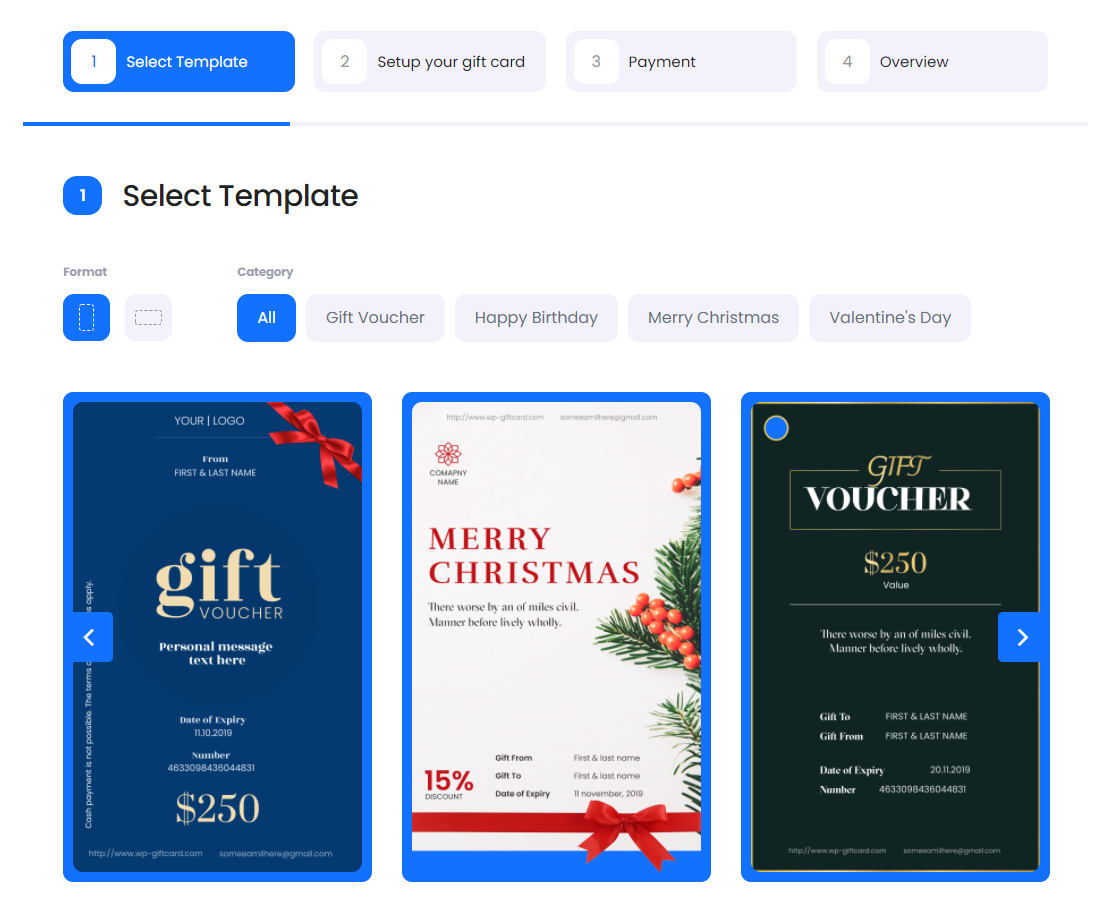
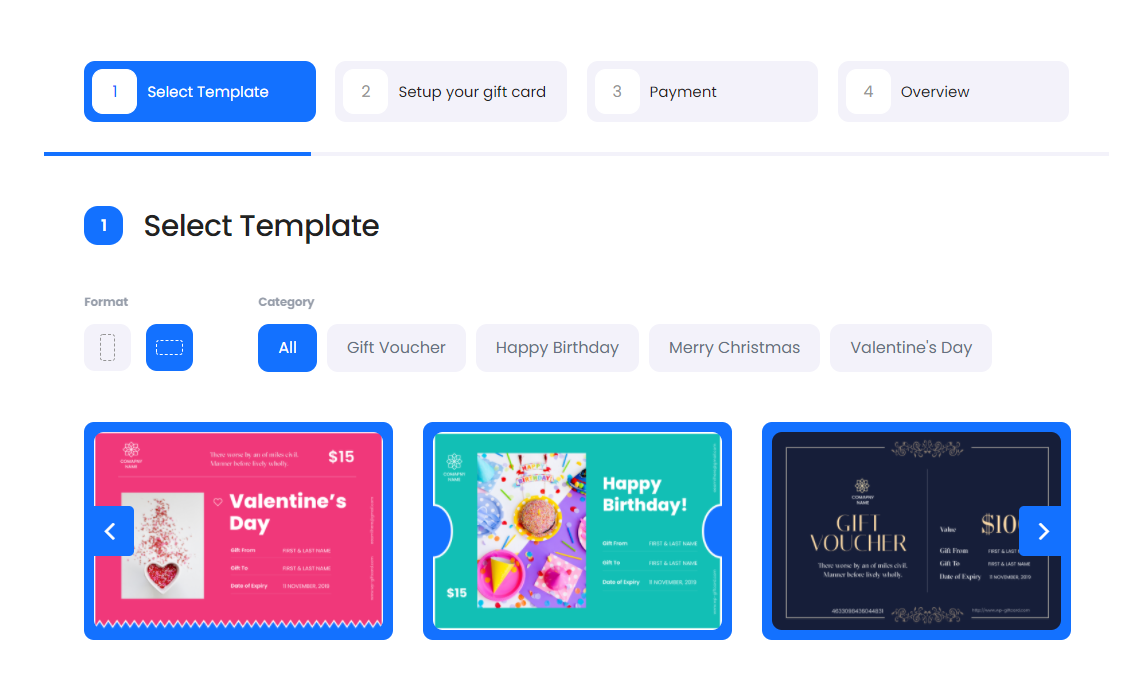
- EASY DESIGNING – Design templates for different themes as ‘Birthday’, ‘New Year’, ‘Valentine’s day’, ‘Independence day’ etc.
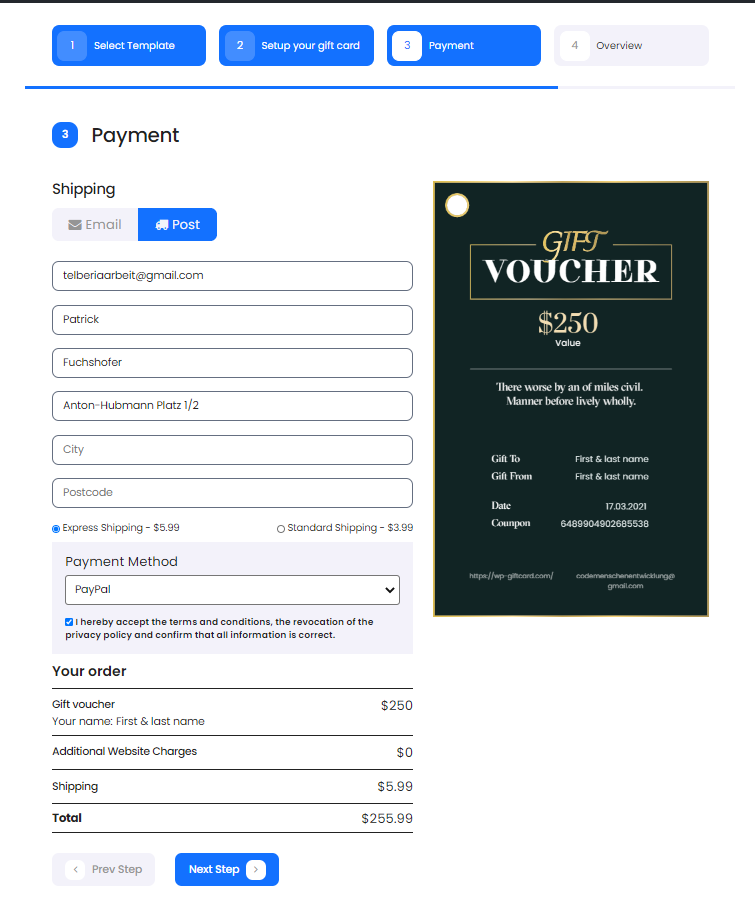
- POSTAL DELIVERY – You can accept postal orders for your gift cards. If you want, you can turn on the ability for your customers to buy your own printed gift cards/certificates. So you can send gift cards via post basis directly to the recipient.
- INSPIRATIONAL QUOTES – Enhance your gift cards with meaningful quotes! The plugin now includes a collection of inspirational quotes that customers can easily add to their personal messages. This feature provides suggested quotes for various occasions, making gift cards more thoughtful and personal.
Voucher Booking Forms
This plugin provides two types of voucher booking forms. They are,
* Fixed Value Vouchers: Administrators can provide their customers with a certain set of fixed priced gift items.
* Custom Priced Vouchers: Price of the vouchers can be defined as per one’s requirement.
checkout the video how it works
Main Plugin Features
Front end:
- Create and design templates with your own logo as per the occasions or fests.
- Customers can pick from a variety of templates uploaded by the admin and can sort by events (Anniversaries, Birthdays, Valentine’s day, Weddings, etc.)
- Redeem gift cards from the WooCommerce Checkout page.
- Customers can view coupon balance.
- Admins can create fixed price gift items for different services and products for their customers.
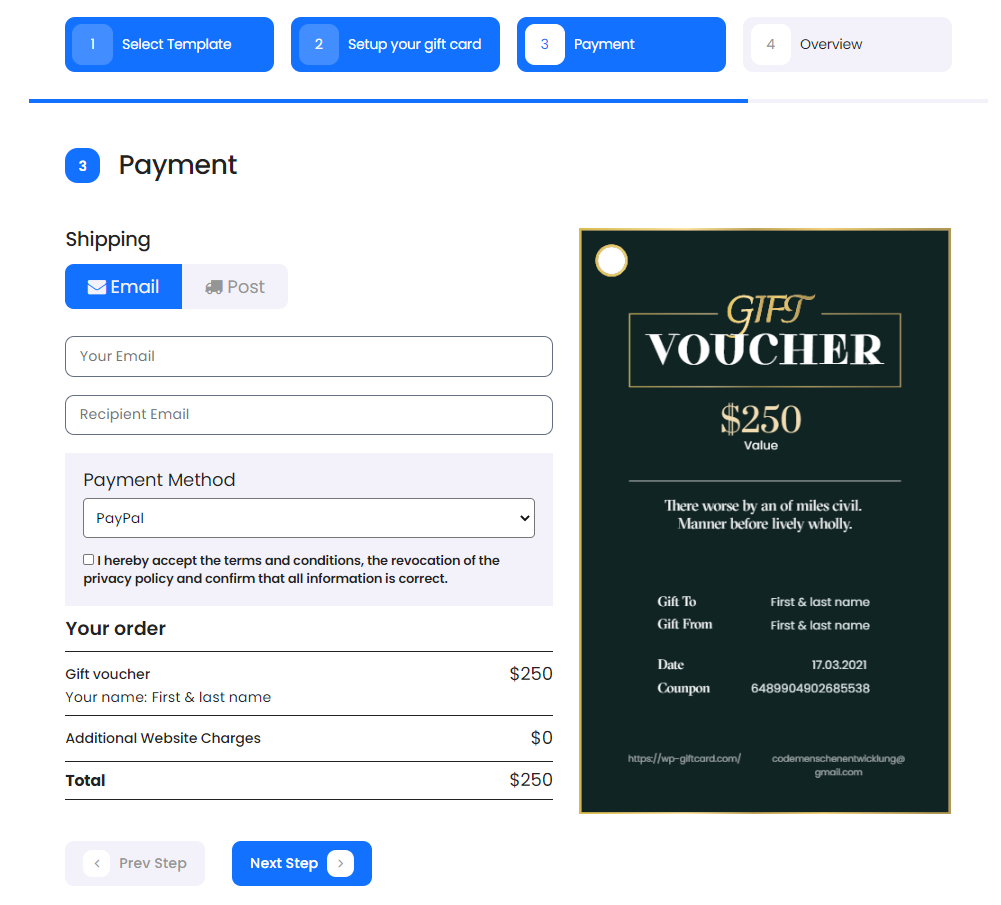
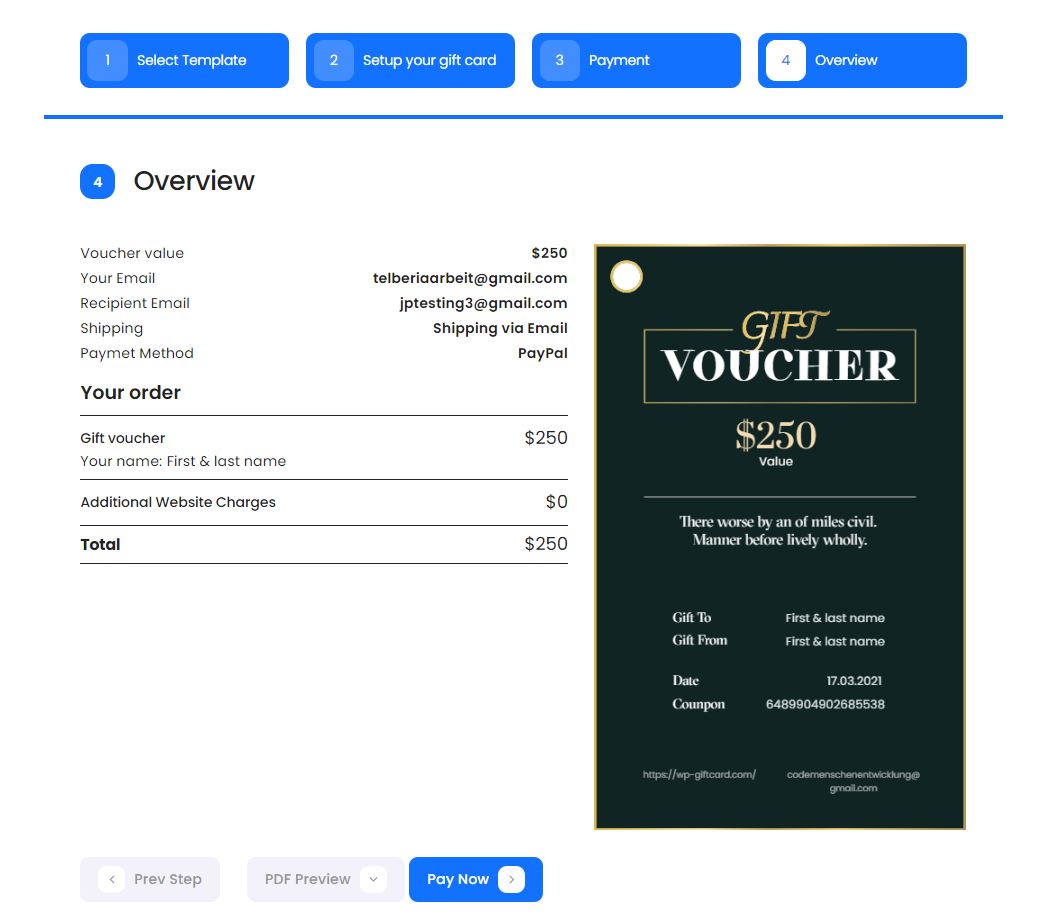
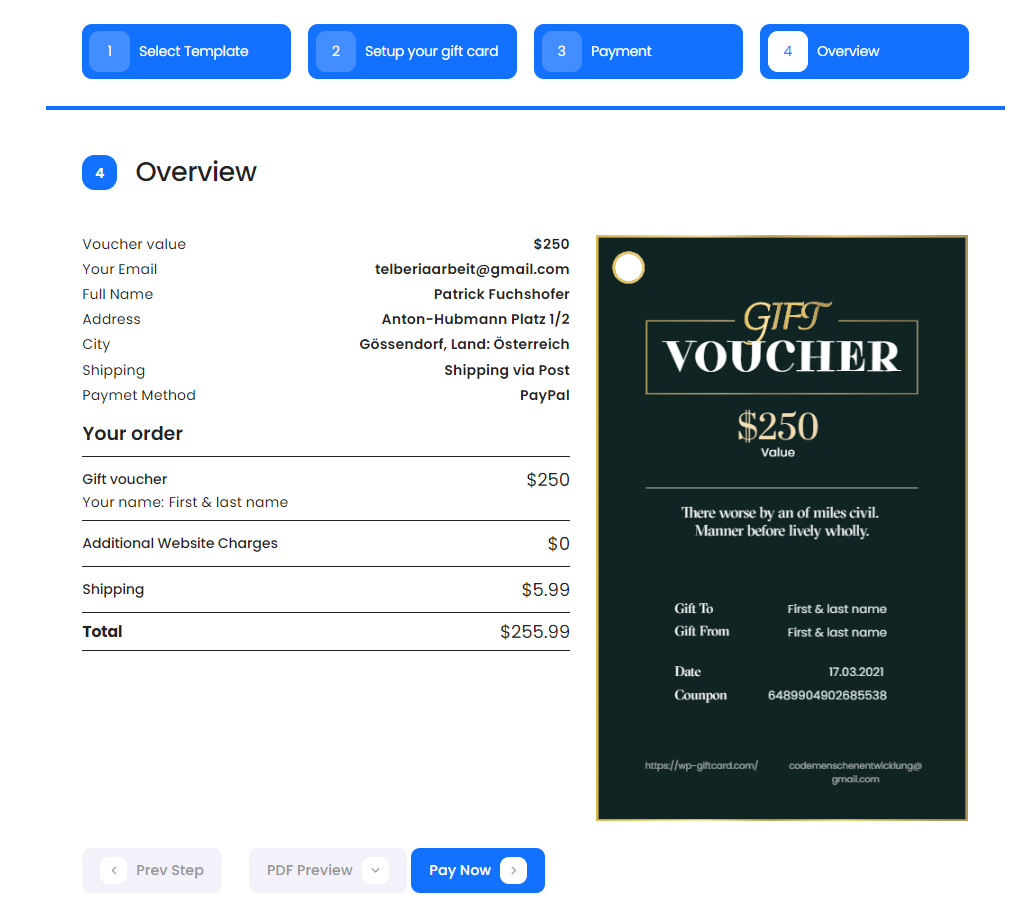
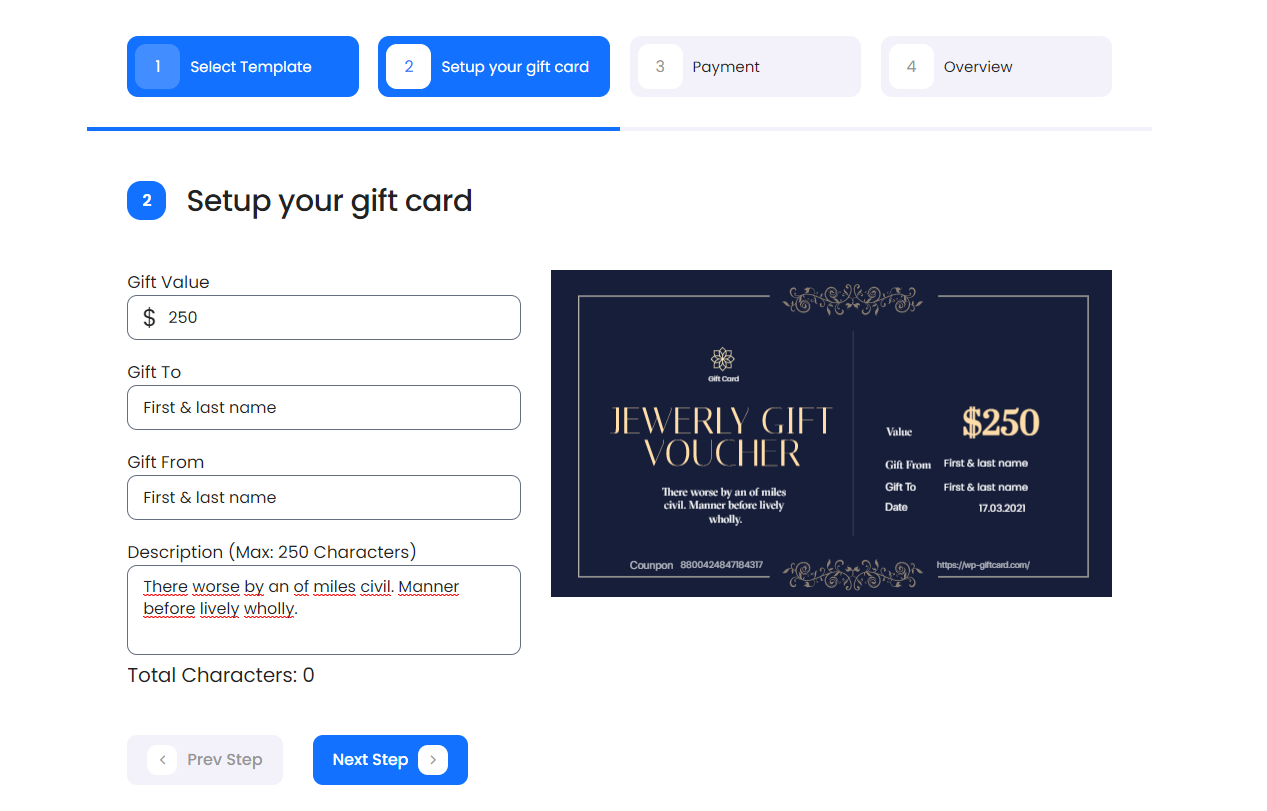
- Customers can preview their Gift Card on their booking page.
- Purchased gift card/voucher is sent to the recipient’s email address.
- Add messages to be printed on the PDF gift card/voucher.
- Access to inspirational quote suggestions to enhance personal messages on gift cards.
- Redeem gift cards/vouchers using unique auto-generated coupon codes.
- Multiple payment gateway integrations available such as Stripe, PayPal, Sofort Pay, and Bank Transfer.
- Invoice based payment solutions i.e. your customers can directly pay to your bank account after purchasing the voucher
- Provides 3 varieties for voucher styles in PDF formats (See Demo)
- Set voucher expiry as fixed dates or number of days
- Remove Expiry date from vouchers
- Hide Price from vouchers
- Send customer receipt after successful order placement.
Backend:
- View all gift orders.
- Track the status of all gift cards/vouchers such as usage or payment status.
- Add edit/delete/view options to your voucher/card templates and gift items.
- View details of each gift card such as full amount, credit left, associated gift-card order, orders on which it has been applied and the total spend it generated.
- Create unlimited gift categories.
- Generate Gift Vouchers from admin.
- Export all orders from order page.
- Export the whole gift card database (gift cards + activity history) to a JSON file, and import it back on another site.
- Admin can set options like sender name, email, company name along with company details on templates from plugin settings.
- Manage and customize inspirational quotes collection for customer use in personal messages.
- Admin can customize email templates both for itself and its customers.
- Admin can also enable the postal delivery options for its customers.
- Customers can view a list of their gift cards used so far, the order in which they have been used and the available credit left.
PREMIUM FEATURES of Gift cards Plugin
- Design and customize modern gift card templates with your own backgrounds, logo, text, colors, and layout.
- Let customers choose a gift card template, preview it before payment, and schedule delivery to the recipient.
- Sell gift vouchers through WooCommerce, including gift voucher products, product-page gift options, Cart and Checkout Blocks, and voucher redemption at checkout.
- Offer secure partial voucher redemption from the frontend, voucher balance history, and balance resync tools for administrators.
- Accept payments with Stripe (redirect, modal, or embedded checkout), PayPal, Klarna, Mollie, MultiSafepay, Sofort, bank transfer, and invoice payment.
- Generate voucher, receipt, and invoice PDFs; regenerate PDFs from the admin area when needed.
- Add barcodes, surcharges, custom voucher values, incremental voucher codes, and detailed order management with import and export.
- Use Polylang-compatible settings, checkout text, emails, and PDF/invoice output for multilingual stores.
- Includes 1 year of updates and support, and a 30-day money-back guarantee.
Premium Live Demos
Want to discover all plugin features? Try it out in just a single click.
For an easy and simple understanding of our plugin, click the links below for quick demos –
Copy this shortcode and paste it where you want the gift voucher form to appear; [wpgv_giftvoucher]
-
Fixed-value gift items/packages:
Copy[wpgv_giftitems]to display all gift items/packages.
Use[wpgv_giftitems item_id=1]to display one gift item/package.
Use[wpgv_giftitems item_cat_id=1]to display gift items/packages from one category. -
Modern gift card templates:
Copy[wpgv_giftcard]to display the modern gift card template picker and purchase form.
By accessing our testing platform, you will be able to discover all plugin features and test them as per your preference in front-end mode.
For more information about the PREMIUM version of Gift Cards (Gift Vouchers and Packages) (WooCommerce Supported), visit the official page on wp-giftcard.com
This plugin is already translated in Czech (Czech Republic), Danish, Deutsch, French, Hindi, Spanish and Swedish Languages
If you help us in translating this plugin in your language, It would be very helpful for us.
You can translate this plugin by clicking on the link here.
Documentation
Please, read the official documentation of Gift Cards (Gift Cards and Packages) to learn more about all plugin features.
Suggestions
If you have suggestions about how to improve Gift Cards plugin, you can write to us.
Installation
- Unzip the downloaded zip file.
- Upload the plugin folder into the wp-content/plugins/ directory of your WordPress site.
- Activate ‘Gift Cards (Gift Vouchers and Packages) (WooCommerce Supported)’ from the Plugins page.
Frequently asked questions
Installation instructions
Unzip the downloaded plugin zip file. Upload the plugin folder into the wp-content/plugins/ directory of your WordPress site. Activate ‘Gift Cards (Gift Vouchers and Packages) (WooCommerce Supported)’ from the plugins page. CONFIGURATION Gift Cards will add a new tab called ‘Settings’ in ‘Gift Vouchers’ menu item. There you will find quick access to the plugin settings page.
Can I share the gift card?
It can be shared with the recipient’s email address in PDF format
Is multiple website licensing available for the premium version?
We provide two kinds of licensing * Single website licensing at $49 * Unlimited website licensing at $79 * Lifetime & Unlimited websites licensing at $99
Which format will be used in coupon codes?
The plugin will auto-generate a 16 digit unique code and it will be sent as a pdf format to the recipient’s billing email address.
Can the voucher be sent as a postal delivery?
Yes, this plugin provides a postal delivery option.
Can I customize the email that is sent?
Yes, admin can customize the email template for customers and himself.
What happens if the customers spend less than the total voucher value?
Customers can view the voucher balance from ‘ My accounts” page and use the remaining amount later on.
How do we receive voucher codes?
The voucher codes are sent on the recipient’s email address.
Does it work with Multisite WordPress Environment?
Yes, This plugin will work.
Will data delete after deactivating the plugin?
No data will delete on plugin deactivation.
Can I install the pro plugin if free plugin already installed?
No, First you have to deactivate the free plugin then install the pro plugin. No data will delete on deactivation of the plugin.
How to translate or change strings of the plugins?
There are two ways to fill up translations: * Using Loco Translate plugin * Using the PoEdit platform
Can customers add inspirational quotes to their gift cards?
Yes, the plugin now includes a collection of inspirational quotes that customers can easily select and add to their personal messages when creating gift cards. This feature helps make gift cards more meaningful and personal for special occasions.
Changelog
Version 4.8.1 – Released: September 26, 2026
- Fix: A new installation now saves the Currency Symbol, Currency Position, the email shown in the PDF footer, the Voucher Expiry Type and the Shipping Methods correctly. Each was being stored as 0, which left prices with no currency symbol, expiry dates measured against a unit that does not exist, and no shipping options for customers to pick from.
- Fix: Sites installed before this version still hold those values, and are not changed for you. The Gift Cards screens now name which settings need filling in and link you to them.
- Update: Purchased Voucher Codes and Purchased Items are now a single Orders list with a Type column and a Type filter – Gift Card, Gift Voucher or Gift Item – so finding an order no longer means remembering which tab it was filed under. Links to the old Purchased Items tab keep working, as a filter.
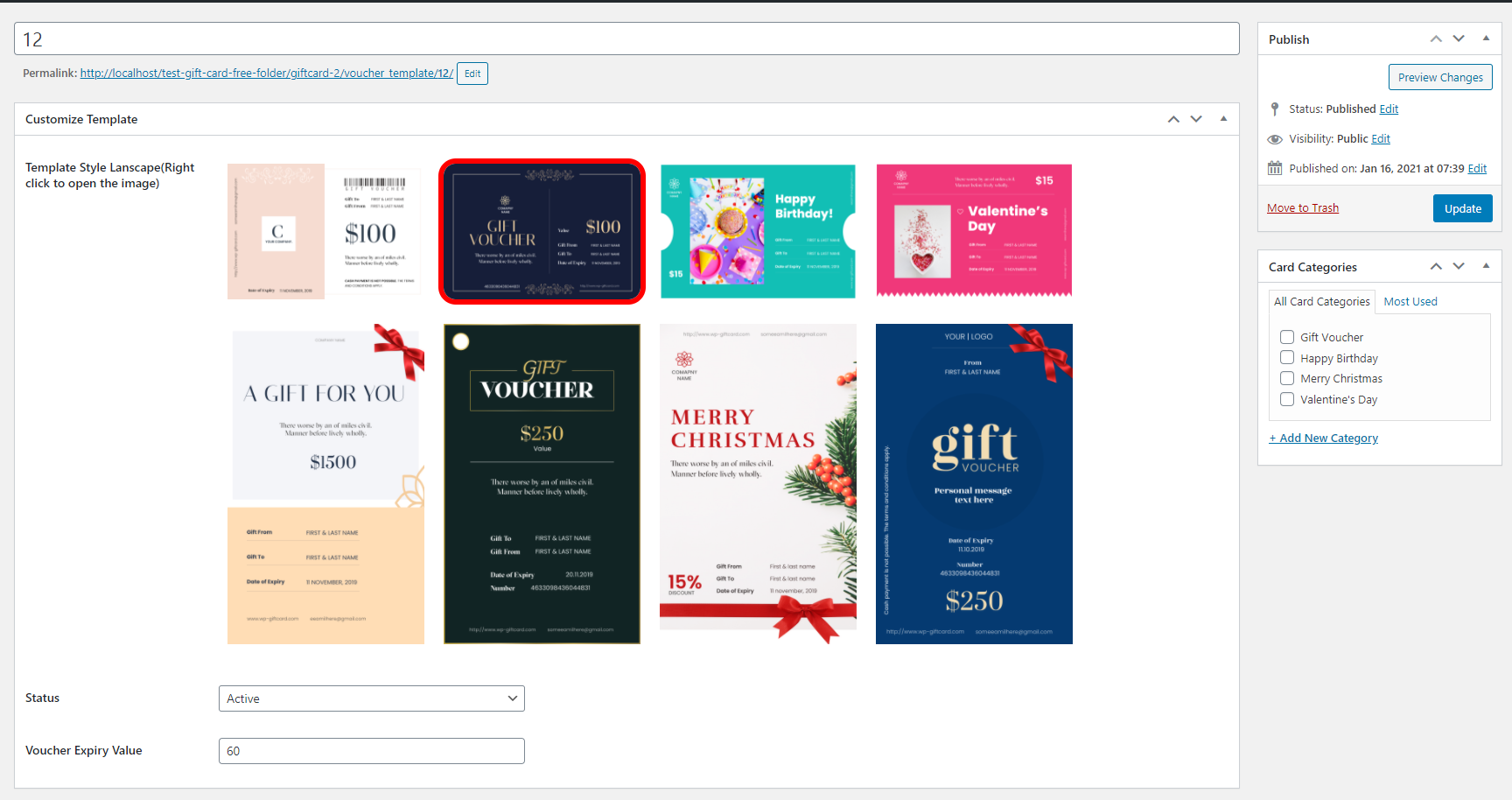
- Improvement: Choosing a gift card design is clearer. The six designs are grouped into Landscape and Portrait, laid out as even tiles, the chosen one is marked with a check, and the chooser can be used with the keyboard.
- Update: The button in Settings now sets up the plugin’s pages and adds sample content with them – a gift card for each of the six templates, a gift item and a gift voucher – so those pages open as a working form rather than an empty one on a new site. Edit or delete the samples once you have your own.
- Feature: A gift item can now be sold at an amount the customer chooses. Leave Item Price empty and the gift items page shows “Enter your amount” for that item; the customer types the amount when buying, within the Min and Max Voucher Value from Settings, and the voucher is issued for exactly that amount. Items with a price work as before.
- Update: Voucher Templates are now called Gift Vouchers in admin, matching the [wpgv_giftvoucher] form they are sold through. Existing records are unchanged.
- Feature: Gift Vouchers now have the same fields as Gift Items – Description, Price, Special Price and three style images with the same upload buttons. Set a Price and the Gift Voucher form fills in the Voucher Value and locks it, charging the Special Price when there is one; leave Price empty and customers enter the value themselves, as before. Each one now shows its description and price when choosing one.
Version 4.8.0 – Released: September 10, 2026
- Update: Gift Items, Gift Cards and Voucher Templates are now created and managed from one list under a single Gift Cards menu. Add New Gift Card opens one screen where you pick the Type, and the fields change to match. Your existing records, their categories and their settings are moved across automatically and keep working; nothing is deleted.
- Update: The menu is down to five entries – All Gift Cards, Add New Gift Card, Categories, Orders and Settings. The separate Voucher Templates screen and the second Categories entry are gone; everything they did now happens in the unified list.
- Update: Gift item and gift card categories are now one shared list of categories. Every category you had, and every record filed under it, is carried over unchanged, and each order form still offers only the categories that apply to it.
- Update: A record’s Type is locked once orders have been placed with it, because those orders’ PDFs are rebuilt from it. To offer the same thing as a different type, create a new record and leave the original in place so your order history stays intact.
- Breaking: Direct links to a gift card template page (addresses beginning /voucher_template/) no longer open. Those pages only ever showed the template’s name and no other content, and they were appearing in your site’s own search results. Gift card templates are still used exactly as before through the [wpgv_giftcard] shortcode.
- Breaking: Editing Gift Items now needs the same permission level as editing Gift Cards. Users with an Author or Contributor role who could previously edit gift items will no longer be able to; Editors and Administrators are unaffected.
- Breaking: Gift Items no longer use a Featured Image. The picture on a gift item’s PDF has always come from its Image – Style 1, 2 and 3 settings, so no PDF changes; the unused Featured Image box has simply been removed.
- Security: A gift item order is now fully checked before anything is saved. Ordering with an invalid item, an invalid category, or a postal shipping method that does not exist is rejected outright instead of creating an order – previously an unrecognised shipping method was charged as free postage.
- Security: Saving the “Customize Template” box on a gift card template now requires permission to edit that template, and the box only ever writes to gift card templates – a valid form token can no longer be reused to write template settings onto an unrelated post.
- Security: Added the standard direct-access guard to the PayPal authentication file, so it can only run inside WordPress.
- Security: Removed an unused 1,025-line WooCommerce product page file that was never loaded and had not been reviewed against the plugin’s current output escaping rules.
- Fix: Cancelling or refunding a WooCommerce order now stops the gift vouchers it issued from being spent. The step that was meant to do this looked for the voucher numbers under the wrong name and so never found any, leaving refunded vouchers fully usable. Deleting an order to the trash is covered too.
- Fix: Completing a WooCommerce order a second time no longer issues a second set of gift vouchers. An order that went from completed to cancelled and back, or was trashed and restored, previously handed out another full set of codes and doubled the value it had given away. Only the codes an order is still short of are issued now.
- Fix: The two functions that take a gift voucher out of use and put it back had their effects the wrong way round, so anything asking to disable a voucher enabled it, and the reverse. They are reachable through the WooCommerce order paths above.
- Fix: Editing a voucher template now takes effect on the order form. Changes made on the old separate screen were saved but never reached the front end, so a renamed template kept showing its previous name to customers.
- Fix: The order confirmation sent to PayPal now carries the gift item’s name; it was previously sent empty for gift item orders.
- Fix: Rebuilding the PDF of an older order now uses the template that order was actually bought with. The template was previously worked out by inspection, which could pick the wrong one on sites where a gift card and a voucher template happened to share the same internal number.
- Fix: Corrected a missing branch break in the template settings box that would have converted future text settings to numbers.
- Improvement: Gift item details are now stored under plugin-specific names, so they can no longer clash with data saved by other plugins. The previous names are kept in step, so any custom code you have that reads them keeps working.
- Improvement: The release package now excludes internal development notes and test tooling, and those folders also deny direct web access on Apache.
Version 4.7.5 – Released: August 21, 2026
- Feature: Export the whole gift card database (gift cards + activity history) to a JSON file from Gift Voucher Orders → Export Database.
- Feature: Import a JSON export back into any site from Gift Voucher Orders → Import Database, with a Merge or Add-only mode.
- Security: The gift voucher success page now sends the order emails only once – reloading it no longer re-sends the buyer, recipient and shop emails with their PDF attachments.
- Security: The public AJAX helpers now only return published gift items, gift voucher categories and existing templates, so titles and details of draft or private content can no longer be read by visitors.
- Security: Editing a gift card’s price, expiry date or note now requires an administrator; those actions are no longer registered for logged-out visitors and a price change can only touch the activity entry that belongs to the gift card being edited.
- Security: Debug logging is now written only while WP_DEBUG is enabled, and it no longer records server paths or gift card PDF file names, so the log can no longer be used to look up gift card codes.
- Fix: Editing the price of a gift card worth 1,000 or more no longer stores a truncated amount in the activity history.
- Improvement: Import skips gift cards whose code is already used by a different gift card, so existing data is never overwritten by a code clash.
- Improvement: Import can reconnect imported gift cards to local templates and items that carry the same name, and reports the references it could not match.
- Improvement: Re-importing the same file is idempotent – gift cards are updated in place and activity entries are de-duplicated instead of piling up.
- Improvement: The shop is now notified about a new order even when the buyer’s confirmation email cannot be delivered, and the success page no longer asks the customer to reload the page to retry.
- Improvement: Removed a leftover diagnostic that ran a full backtrace on every WooCommerce order status change of a Stripe order.
Version 4.7.4 – Released: August 03, 2026
- Fix: Prevented output buffer cleanup from interfering with page caching plugins.
- Security: Upgrade Dompdf from v2.0.4 to v3.1.6.
- Security: Add safe Stripe webhook endpoint with signature verification and idempotent voucher fulfillment while preserving the existing success-page fallback.
Version 4.7.3 – Released: July 14, 2026
- Fix: Prevent existing Gift Voucher denominations from being added again when updating a WooCommerce product; clear the amount field after successful AJAX addition and show inline admin errors.
- Feature: Add WooCommerce Cart and Checkout Blocks voucher redemption with server-side Store API apply/remove handling.
- Feature: Add voucher redemption placement below the native Add coupons section in Cart and Checkout Blocks.
- Improvement: Add accessible status/error messaging and responsive styling for the Blocks voucher redemption form.
Version 4.7.2 – Released: June 19, 2026
- Security: Re-enable Stripe TLS certificate verification in the Stripe success flow (removed
\Stripe\Stripe::setVerifySslCerts(false)ininclude/voucher-shortcodes.php). - Security: Add hourly cleanup for stale unpaid vouchers and transient per-IP rate-limiting on public PDF creation endpoints to remove orphaned PDFs and mitigate automated abuse (see
include/pdf-wrapper.php,include/wpgv_voucher_pdf.php,include/wpgv_item_pdf.php,include/wpgv_giftcard_pdf.php). - Security: Harden the admin voucher redeem AJAX action with capability checks, nonce verification, amount validation, and balance limits to prevent unauthorized balance changes.
- Fix: Replace deprecated WooCommerce coupon property access in
wpgv_handle_gift_voucher_application()by usingget_code()for voucher application compatibility with newer WooCommerce versions.
Screenshots

For developers
Is this your plugin? Show off the numbers.
Add a live badge to your site, docs or GitHub README. It updates on its own — no account needed.
FAQ
Gift Cards (Gift Vouchers and Packa…: quick answers
Straight answers, pulled from live WordPress.org data.
Live data from WordPress.org · checked Sep 27, 2026
Is Gift Cards (Gift Vouchers and P… free?
Yes. Gift Cards (Gift Vouchers and P… is free to download and use from the official WordPress.org plugin directory.
Is Gift Cards (Gift Vouchers and P… safe to use in 2026?
Gift Cards (Gift Vouchers and P… is a solid plugin choice in 2026, with a few things worth checking first. It runs on 1K+ sites, is rated 4.7/5 and was last updated 2 days ago, and scores 75/100 on our health check.
How many websites use Gift Cards (Gift Vouchers and P…?
Gift Cards (Gift Vouchers and P… is active on 1K+ WordPress websites and has been downloaded 144,858 times since it launched in March 2018. It was downloaded 2,368 times in the last 30 days.
Does Gift Cards (Gift Vouchers and P… work with WordPress 7.1?
Yes. The developer has tested Gift Cards (Gift Vouchers and P… up to WordPress 7.1.2, the latest release. It requires WordPress 4.0 or newer.
What PHP version does Gift Cards (Gift Vouchers and P… need?
Gift Cards (Gift Vouchers and P… requires PHP 5.6 or higher. Most hosts run PHP 8.x today, so it works on any modern WordPress hosting.
When was Gift Cards (Gift Vouchers and P… last updated?
The latest version, 4.8.1, was released on September 26, 2026 (2 days ago).
Who makes Gift Cards (Gift Vouchers and P…?
Gift Cards (Gift Vouchers and P… is developed and maintained by Codemenschen.
Powered by PageForge
Want thousands of pages that rank like these? Build them in an afternoon.
This directory runs on the same engine as PageForge. Turn any spreadsheet, CSV or API into thousands of fast, SEO-ready WordPress pages — with schema, internal links and AI-written copy baked in.
- CSV, Google Sheets & API data sources
- AI content, schema & internal links per page
- Works with Elementor, Gutenberg, Yoast & Rank Math
- Free on WordPress.org — no credit card


