


GetPaid Stripe Payments
Stripe Payments for WordPress made easy. Accept credit cards on your WordPress site using the Stripe payments add-on for GetPaid.

Solid choice
GetPaid Stripe Payments is a solid plugin choice in 2026, with a few things worth checking first. It runs on 2K+ sites, is rated 5/5 and was last updated 3 days ago, and scores 78/100 on our health check.
- Actively developed — last update 3 days ago
- Tested with the latest WordPress (7.1)
- Momentum — downloads up 585.3% vs the previous 30 days
- Very few reviews so far
How does it stack up?
Side-by-side on installs, updates, ratings & support



Daily downloads
Download spikes usually follow a new release — each site that auto-updates counts as a download.
Rankings
Where GetPaid Stripe Payments stands todayWordPress.org search rankings
Live position in the plugin search, top 100| Keyword | Position |
|---|---|
| payment | #84 |
| payments | #18 |
| stripe | #12 |
| stripe gateway | #8 |
| stripe payments | #8 |
Version adoption
Share of active sites per release.
Rating breakdown
★★★★★★★★★★ 5 from 3 reviews
About GetPaid Stripe Payments
From the official readme · v2.3.28Description
Stripe Payments for WordPress made easy. Accept credit cards on your WordPress site using the Stripe payments add-on for GetPaid.
Description of the Stripe Payments plugin for GetPaid
Accepting Credit Cards on your website is easier than ever with the GetPaid plugin and its Stripe Payment Gateway. You can trust us, we are Stripe Verified Partner!
Why Stripe
Stripe provides the easiest way to accept credit card payment directly on your website. The Stripe Payment form is frictionless, thus it tends to convert a lot better than the competition. Stripe is currently one of the most widely used and trusted payment gateway.
With the Stripe Payment Gateway for GetPaid, you will be able to immediately accept payments made with the following credit cards:
- Visa
- Mastercard
- American Express
- Discover
- JCB
- Diners Club
Stripe doesn’t charge setup or monthly fees. You only pay a small commission when you Get Paid. No hidden costs!
Stripe is available in 42 countries including the United States, United Kingdom, all EU countries, Brazil, India, Honk Kong and many more. See this page for the complete list.
Stripe Verified Partner
The GetPaid plugin is a Stripe verified partner. Being a Verified Partner, our obligations are to provide all the latest checkout enhancements and security features. Most importantly, the payments API updates are regular, meaning that users benefit from all the latest security enhancements.
Features of Stripe Payments for GetPaid
- Accept single payments
- Accept recurring payments
- Allow customers to Manage subscription on your website
- Provide free trials
- Allow customers to name their price
- Automatically handles EU VAT and Taxes.
Connect with Stripe
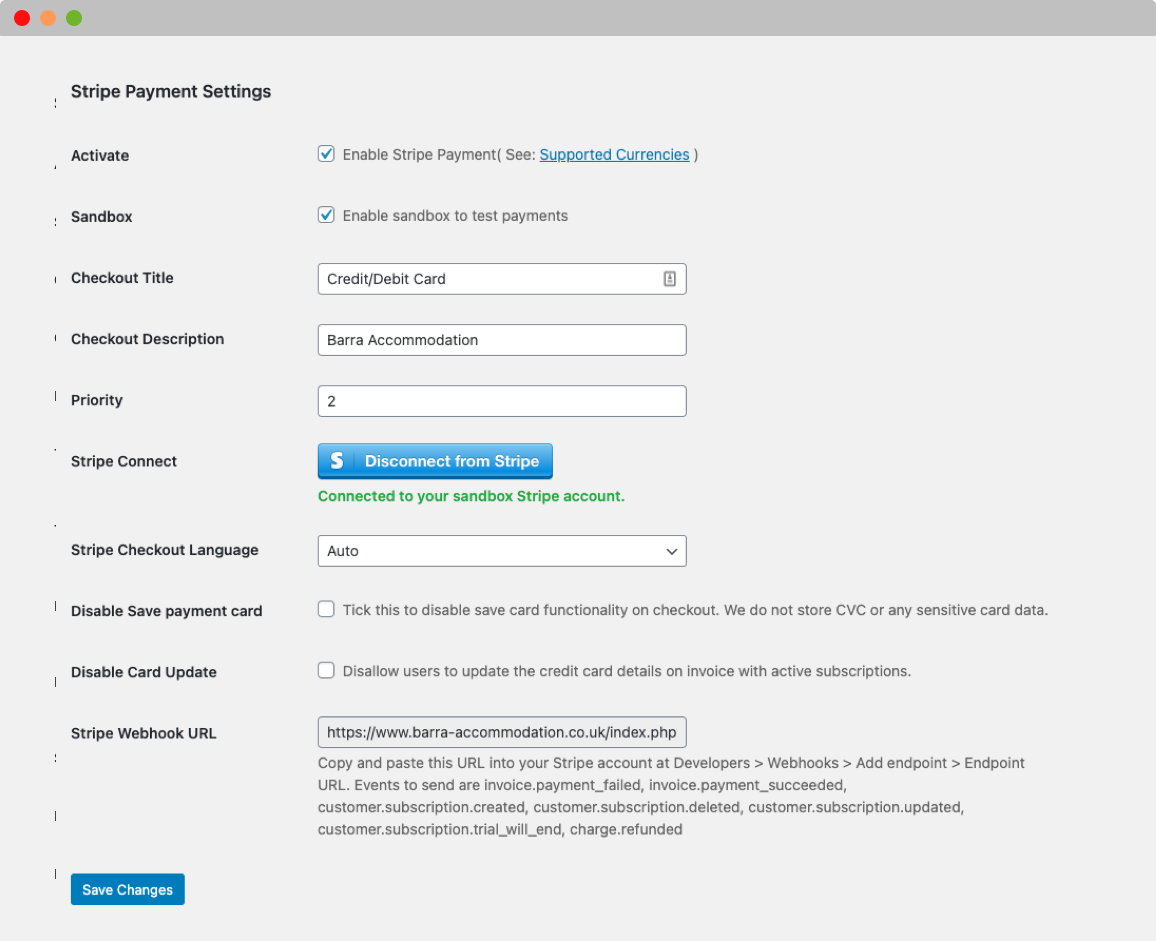
With the Stripe Payment for GetPaid plugin you don’t need to gather API and Secret keys on the payment gateway website, but you can simply connect your Stripe account from the plugin settings and automatically fetch the required information.
Security
To report a security vulnerability, please review our vulnerability disclosure policy.
Installation
- Upload ‘wpinv-stripe-payment’ directory to the ‘/wp-content/plugins/’ directory
- Activate the plugin through the ‘Plugins’ menu in WordPress
- Go to WordPress Admin -> Invoicing -> Settings -> Gateways -> Stripe and customize behaviour as needed
Frequently asked questions
Ask a question…
and you shall get an answer
Changelog
2.3.28 – 2026-09-23
- Fixed minor rounding differences between Stripe charges and invoice amounts – FIXED
2.3.27 – 2026-09-16
- Enhance logging for Stripe failed payments and refund webhook events – CHANGED
- Add extra sanitization filters to webhook request validation – FIXED/SECURITY
2.3.26 – 2026-09-09
- Apple Pay and Google Pay failed to show their payment sheet at checkout – FIXED
- Link payment option remained visible in checkout when disabled in gateway settings – FIXED
- Payment methods disabled in the settings like Link & Klarna are still showing at checkout – FIXED
2.3.25 – 2026-06-17
- Load Stripe.js on subscription pages so the “Update Payment Card” button works when “Load Stripe.js globally” is disabled – FIXED
2.3.24 – 2026-02-26
- Stripe form is not loading on embed checkout when load Stripe.js on all pages is disabled – FIXED
2.3.23 – 2026-02-19
- Display success message after updating card details – FIXED
- Added jQuery hooks for customizing Stripe Elements options – ADDED
- Allow option to set custom locale for checkout – ADDED
Screenshots

For developers
Is this your plugin? Show off the numbers.
Add a live badge to your site, docs or GitHub README. It updates on its own — no account needed.
Best GetPaid Stripe Payments alternatives
All payment plugins →





FAQ
GetPaid Stripe Payments: quick answers
Straight answers, pulled from live WordPress.org data.
Live data from WordPress.org · checked Sep 26, 2026
Is GetPaid Stripe Payments free?
Yes. GetPaid Stripe Payments is free to download and use from the official WordPress.org plugin directory.
Is GetPaid Stripe Payments safe to use in 2026?
GetPaid Stripe Payments is a solid plugin choice in 2026, with a few things worth checking first. It runs on 2K+ sites, is rated 5/5 and was last updated 3 days ago, and scores 78/100 on our health check.
How many websites use GetPaid Stripe Payments?
GetPaid Stripe Payments is active on 2K+ WordPress websites and has been downloaded 73,821 times since it launched in January 2021. It was downloaded 3,646 times in the last 30 days.
Does GetPaid Stripe Payments work with WordPress 7.1?
Yes. The developer has tested GetPaid Stripe Payments up to WordPress 7.1.2, the latest release. It requires WordPress 6.0 or newer.
When was GetPaid Stripe Payments last updated?
The latest version, 2.3.28, was released on September 23, 2026 (3 days ago).
Who makes GetPaid Stripe Payments?
GetPaid Stripe Payments is developed and maintained by Stiofan.
What are the best alternatives to GetPaid Stripe Payments?
The most popular alternatives to GetPaid Stripe Payments are WooPayments: Integrated Woo… (800K+ installs), WooCommerce Tax (formerly W… (500K+ installs) and Payment Gateway Based Fees… (30K+ installs).
Powered by PageForge
Want thousands of pages that rank like these? Build them in an afternoon.
This directory runs on the same engine as PageForge. Turn any spreadsheet, CSV or API into thousands of fast, SEO-ready WordPress pages — with schema, internal links and AI-written copy baked in.
- CSV, Google Sheets & API data sources
- AI content, schema & internal links per page
- Works with Elementor, Gutenberg, Yoast & Rank Math
- Free on WordPress.org — no credit card


