



Get Custom Field Values
This plugin provides a powerful widget, shortcode (with shortcode builder tool), and template tags for easily retrieving and displaying custom field values for posts or pages.

Consider an alternative
Get Custom Field Values shows warning signs in 2026 — compare the alternatives below before installing. It runs on 1K+ sites, is rated 5/5 and was last updated 3 years ago, and scores 34/100 on our health check.
- Very few reviews so far
- No update in 2 years
- Only tested up to WordPress 6.3 (latest is 7.1)
How does it stack up?
Side-by-side on installs, updates, ratings & support



Daily downloads
Download spikes usually follow a new release — each site that auto-updates counts as a download.
Rankings
Where Get Custom Field Values stands todayWordPress.org search rankings
Live position in the plugin search, top 100| Keyword | Position |
|---|---|
| custom fields | >100 |
| meta | >100 |
| shortcode | >100 |
| widget | >100 |
| widgets | >100 |
Version adoption
Share of active sites per release.
Rating breakdown
★★★★★★★★★★ 5 from 4 reviews
About Get Custom Field Values
From the official readme · v4.1Description
This plugin provides a powerful widget, shortcode (with shortcode builder tool), and template tags for easily retrieving and displaying custom field values for posts or pages.
The power of custom fields gives this plugin the potential to be dozens of plugins all rolled into one.
This plugin allows you to harness the power of custom fields/meta data. Use the “Get Custom Field” widget, the [custom_field] shortcode (which has a post editor sidebar widget to help you build the shortcode), or one of six template tags to retrieve and display custom fields. Find a custom field for the current post, a specified post, a recent post, or randomly. And for the custom field values found by the plugin, you may optionally specify text or HTML to appear before and after the results. If nothing is found, then nothing is display (unless you define text to appear when no results are found). If multiple results are found, only the first will be displayed unless you specify a string to be used to join the results together (such as “,”), in which case all will be returned. Visit the Examples section to see how this plugin can be cast in dozens of different ways.
There are six template tags provided by this plugin. Here they are, with an explanation of when they are appropriate for use:
c2c_get_custom(): Use this inside “the loop” to retrieve a custom field value for a postc2c_get_current_custom(): This is only available on the permalink post template (single.php) and page template (page.php). Can be used inside or outside “the loop”. Useful for using custom field to define text you want to include on a post or page’s header, footer, or sidebar.c2c_get_post_custom(): Useful when you know the ID of the post whose custom field value you want.c2c_get_random_custom(): Retrieve the value of a random instance of the specified custom field key, as long as the field is associated with a published posted, non-passworded post (you can modify a setting in the plugin file to search passworded posts as well).c2c_get_random_post_custom(): Retrieves the value of random custom field(s) from a post when you know the ID of the post you’re interested in.c2c_get_recent_custom(): Retrieves the most recent (according to the associated post’s publish date) value of the specified custom field.
You can filter the custom field values that the plugin would display. Add filters for ‘the_meta‘ to filter custom field data (see the end of the code file for commented out samples you may wish to include). You can also add per-meta filters by hooking ‘the_meta_$sanitized_field‘. $sanitized_field is a clean version of the value of $field where everything but alphanumeric and underscore characters have been removed. So to filter the value of the “Related Posts” custom field, you would need to add a filter for ‘the_meta_RelatedPosts‘.
Links: Plugin Homepage | Plugin Directory Page | GitHub | Author Homepage
Developer Documentation
Developer documentation can be found in DEVELOPER-DOCS.md. That documentation covers the numerous template tags, hooks, and shortcode provided by the plugin.
As an overview, these are the template tags provided the plugin:
c2c_get_custom(): Template tag for use inside “the loop” and applies to the currently listed post.c2c_get_current_custom(): Template tag for use on permalink (aka single) page templates for posts and pages.c2c_get_post_custom(): Template tag for use when you know the ID of the post you’re interested in.c2c_get_random_custom(): Template tag for use to retrieve a random custom field value.c2c_get_random_post_custom(): Template tag for use to retrieve random custom field value(s) from a post when you know the ID of the post you’re interested in.c2c_get_recent_custom(): Template tag for use outside “the loop” and applies for custom fields regardless of post.
These are the hooks provided by the plugin:
c2c_get_custom_field_values_shortcode: Filter to customize the name of the plugin’s shortcode.c2c_get_custom_field_values_post_types: Filter to customize the post types that should support the shortcode builder metabox.get_custom_field_values/can_author_use_shortcodes: Filter to customize if post author can make use of the ‘custom_field’ shortcode.get_custom_field_values/show_metabox: Filter to customize if the shortcode builder metabox is shown.
The shortcode provided is [custom-field], which has a number of attributes to customize its behavior and output.
Installation
- Install via the built-in WordPress plugin installer. Or install the plugin code inside the plugins directory for your site (typically
/wp-content/plugins/). - Optional: Add filters for ‘the_meta’ to filter custom field data (see the end of the plugin file for commented out samples you may wish to include). And/or add per-meta filters by hooking ‘the_meta_$field’
- Activate the plugin through the ‘Plugins’ admin menu in WordPress
- Give post(s) a custom field with a value.
- Optional: Go to the Appearance -> Widgets admin page to create one or more ‘Get Custom Field’ sidebar widgets for your widget-enabled theme.
- Optional: Use one of the six template functions provided by this plugin to retrieve the contents of custom fields. You must ‘echo’ the result if you wish to display the value on your site.
- Optional: Use the provided shortcode within posts or wherever shortcodes are supported.
Frequently asked questions
I added the template tag to my template and the post has the custom field I’m asking for but I don’t see anything about it on the page; what gives?
Did you echo the return value of the function, e.g.
Can I achieve all the functionality allowed by the six template functions using the widget?
Except for c2c_get_custom() (which is only available inside “the loop”), yes, by carefully setting the appropriate settings for the widget.
How do I configure the widget to match up with the template functions?
c2c_get_custom() : not achievable via the widget c2c_get_current_custom() : set the “Post ID” field to 0, leave “Pick random value?” unchecked, and set other values as desired. c2c_get_post_custom() : set the “Post ID” field to the ID of the post you want to reference and set other values as desired. c2c_get_random_custom() : leave “Post ID” blank, check “Pick random value?”, and set other values as desired. c2c_get_random_post_custom() : set the “Post ID” field to the ID of the post you want to reference, check “Pick random value?”, and set other values as desired. c2c_get_recent_custom()…
I don’t plan on using the shortcode builder when writing or editing a post or page, so how do I get rid of it?
If you use the block editor (aka Gutenberg, which is the default editing experience as of WordPress 5.0), then the shortcode builder is not available yet so this situation would be moot for you. For the classic editor, when on the write or edit admin pages for a page or post, find the “Screen Options” link near the upper right-hand corner of the page. Clicking it slides down a panel of options. In the “Show on screen” section, uncheck the checkbox labeled “Get Custom Field Values – Shortcode”. This must be done separately for posts and for pages if you want the shortcode builder disabled for…
I don’t see the shortcode builder; where is it?
If you use the block editor (aka Gutenberg, which is the default editing experience as of WordPress 5.0), then the shortcode builder is not available yet. If you aren’t able to include scripts in your posts (i.e. you don’t have the ‘unfiltered_html’ capability), then the shortcode builder is not available to you. Only those with the editor or administrator role (except on Multisite) or the super administrator role can make use of this plugin’s shortcode. For the classic editor, the shortcode builder/wizard is available in the admin when writing or editing a page or post. On the edit/create…
Can I move the shortcode builder box because it is way down at the bottom of the right sidebar when I create/edit posts?
Yes, any of the boxes on the page when creating/editing posts can be rearranged by dragging and dropping the box name. At the very top of the shortcode builder box the cursor will turn into a four-way array indicating you can click to drag that box. You can move it under the post content box, or higher up on the right side.
Why didn’t the shortcode get inserted into the editor after I clicked the “Send shortcode to editor” button?
Sometimes you have to ensure the text editor has focus. Click within the text editor and make sure the cursor is positioned at the location you want the shortcode to be inserted. Then click the button and the shortcode should get inserted there.
Is this plugin compatible with the new block editor (aka Gutenberg)?
Yes, except that the shortcode builder (a custom tool to facilitate making use of the plugin’s shortcode when creating a post) has not been ported over yet. The template tags, widget, and shortcode itself all function properly.
Does this plugin include unit tests?
Yes.
Changelog
Minor update: Prevented use of unsafe markup in widgets, improved documentation, improved unit testing, and noted compatibility through WP 6.3+.
4.1 (2023-10-08)
Highlights:
This minor release prevents use of unsafe markup in widgets, improves documentation, improves unit testing, and notes compatibility through WP 6.3+.
Details:
- Hardening: Restrict markup used in widget to safe HTML. Props Satoo Nakano (Patchstack).
- Change: Ensure
show_metabox()only potentially returns true for post screens - Change: Add inline documentions for shortcode-related hooks
- Change: Tweak some formatting in
DEVELOPER-DOCS.md - Change: Clarify references to shortcode-related hook in
DEVELOPER-DOCS.md - Change: Note compatibility through WP 6.3+
- Change: Update copyright date (2023)
- New: Add
.gitignorefile - Unit tests:
- Fix: Allow tests to run against current versions of WordPress
- New: Add
composer.jsonfor PHPUnit Polyfill dependency - Change: Prevent PHP warnings due to missing core-related generated files
- Change: In bootstrap, add backcompat for PHPUnit pre-v6.0
- Fix: Fix tests associated with
show_metabox()and add two new tests
4.0.1 (2021-11-05)
- Change: Further restrict usage of shortcode to only those with ‘unfiltered_html’ capability. Props Erwan.
- New: Add a few more possible TODO items
4.0 (2021-11-04)
Highlights:
This recommended release prevents users who can’t publish posts from using the shortcode in posts (security hardening), adds some new filters, adds DEVELOPER-DOCS.md, notes compatibility through WP 5.8+, and reorganizes and improves unit tests.
Details:
- Change: Prevent users who can’t publish posts from using the shortcode in posts. Props Francesco Carlucci.
- Hardens security to prevent potentail information disclosure or XSS by authors with limited privileges
- New: Add shortcode class function
can_author_use_shortcodes() - New: Add filter
'get_custom_field_values/can_author_use_shortcodes' - Change: Prevent shortcodes created by users who cannot publish posts from being evaulated
- Change: Prevent display of shortcode builder metabox to users who cannot publish posts
- New: Add filter
'get_custom_field_values/show_metabox'to customize if shortcode builder metabox is shown - New: Add DEVELOPER-DOCS.md and move template tag and shortcode documentation into it
- Change: Note compatibility through WP 5.8+
- Change: Update copyright date (2021)
- Change: Tweak installation instruction
- Unit tests:
- Change: Split shortcode-related tests out into their own file
- Change: Split widget-related tests out into their own file
- New: Add helper functions to facilitate creating users
- New: Add
create_user()for creating a user and optionally making them the current user - New: Add
unset_current_user()for unsetting the current user - New: Add
tearDown()to ensure current user gets unset after each test
- New: Add
- New: Add unit tests for
show_metabox() - Change: Reduce likelihood of particular randomization tests from failing due to reasonable possibility of subsequent randomization choosing the same item
- Change: Add optional arg
$make_global(defaulted to false) tocreate_post_with_meta()to facilitate making the created post global - Change: Restructure unit test file structure
- Change: Move
phpunit/bin/totests/bin/ - Change: Move
phpunit/bootstrap.phpintotests/phpunit/ - Change: Move tests from
phpunit/tests/totests/phpunit/tests/ - Change: In bootstrap, store path to plugin file constant so its value can be used within that file and in test file
- Change: In bootstrap, check for test installation in more places and exit with error message if not found
- Change: Remove ‘test-‘ prefix from unit test files
- Change: Move
- New: Add a few more possible TODO items
Full changelog is available in CHANGELOG.md.
Screenshots

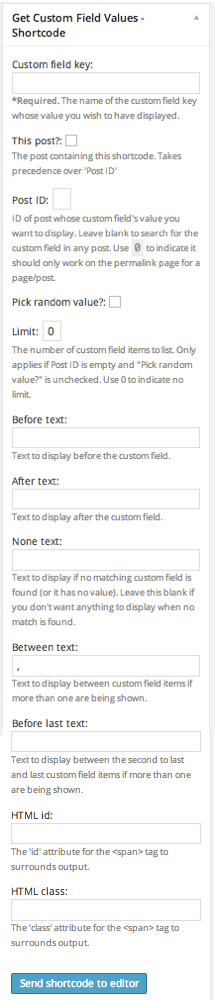
For developers
Is this your plugin? Show off the numbers.
Add a live badge to your site, docs or GitHub README. It updates on its own — no account needed.
Best Get Custom Field Values alternatives
All custom fields plugins →




FAQ
Get Custom Field Values: quick answers
Straight answers, pulled from live WordPress.org data.
Live data from WordPress.org · checked Sep 27, 2026
Is Get Custom Field Values free?
Yes. Get Custom Field Values is free to download and use from the official WordPress.org plugin directory.
Is Get Custom Field Values safe to use in 2026?
Get Custom Field Values shows warning signs in 2026 — compare the alternatives below before installing. It runs on 1K+ sites, is rated 5/5 and was last updated 3 years ago, and scores 34/100 on our health check.
How many websites use Get Custom Field Values?
Get Custom Field Values is active on 1K+ WordPress websites and has been downloaded 133,265 times since it launched in December 2004. It was downloaded 235 times in the last 30 days.
Does Get Custom Field Values work with WordPress 7.1?
Get Custom Field Values is officially tested up to WordPress 6.3.12, while the latest release is 7.1.2. It may still work, but try it on a staging site first.
When was Get Custom Field Values last updated?
The latest version, 4.1, was released on October 10, 2023 (3 years ago).
Who makes Get Custom Field Values?
Get Custom Field Values is developed and maintained by Scott Reilly.
What are the best alternatives to Get Custom Field Values?
The most popular alternatives to Get Custom Field Values are Advanced Custom Fields (ACF… (2M+ installs), Meta Box (500K+ installs) and Checkout Field Editor (Chec… (400K+ installs).
Powered by PageForge
Want thousands of pages that rank like these? Build them in an afternoon.
This directory runs on the same engine as PageForge. Turn any spreadsheet, CSV or API into thousands of fast, SEO-ready WordPress pages — with schema, internal links and AI-written copy baked in.
- CSV, Google Sheets & API data sources
- AI content, schema & internal links per page
- Works with Elementor, Gutenberg, Yoast & Rank Math
- Free on WordPress.org — no credit card


