


Geo-Tier Pricing for WooCommerce
Charge a fair price in every country. Group countries into price tiers, detect the customer's country, and show the adjusted price before checkout.

Use with caution
Geo-Tier Pricing for WooCommerce works, but test it on a staging site before relying on it in 2026. Was last updated 2 months ago, and scores 60/100 on our health check.
- Tested with the latest WordPress (7.1)
- Small user base (<10 active installs)
- Very few reviews so far
How does it stack up?
Side-by-side on installs, updates, ratings & support

Daily downloads
Download spikes usually follow a new release — each site that auto-updates counts as a download.
Rankings
Where Geo-Tier Pricing for WooCom… stands todayWordPress.org search rankings
Live position in the plugin search, top 100| Keyword | Position |
|---|---|
| country pricing | >100 |
| geolocation | >100 |
| pricing | >100 |
| purchasing power | #49 |
| woocommerce | >100 |
About Geo-Tier Pricing for WooCommerce
From the official readme · v0.5.5Description
The same price is not the same price everywhere. 79 EUR is a normal software price in Germany and a week’s wage in parts of the world. Geo-Tier Pricing lets you group countries into price tiers and charge each market a percentage of your regular price — so customers who would never have bought at your list price can buy at a price that is fair for their market.
Every product keeps its own base price. You define the tiers once, map countries to them, and every product in your shop follows automatically. No per-product setup.
How the country is detected
The plugin resolves the customer’s country in a clear order of trust:
- The billing country in the checkout — the customer is confirming it right now, so it wins.
- A country the customer picked manually — via the optional country switcher.
- The saved billing country of a logged-in customer — the real address they ordered with before.
- GeoIP — WooCommerce’s own MaxMind database for anonymous visitors.
- The default tier, when nothing else is known.
The card’s issuing country is deliberately never used: cards are often foreign to the cardholder’s country and would force the wrong price.
No surprises in the checkout
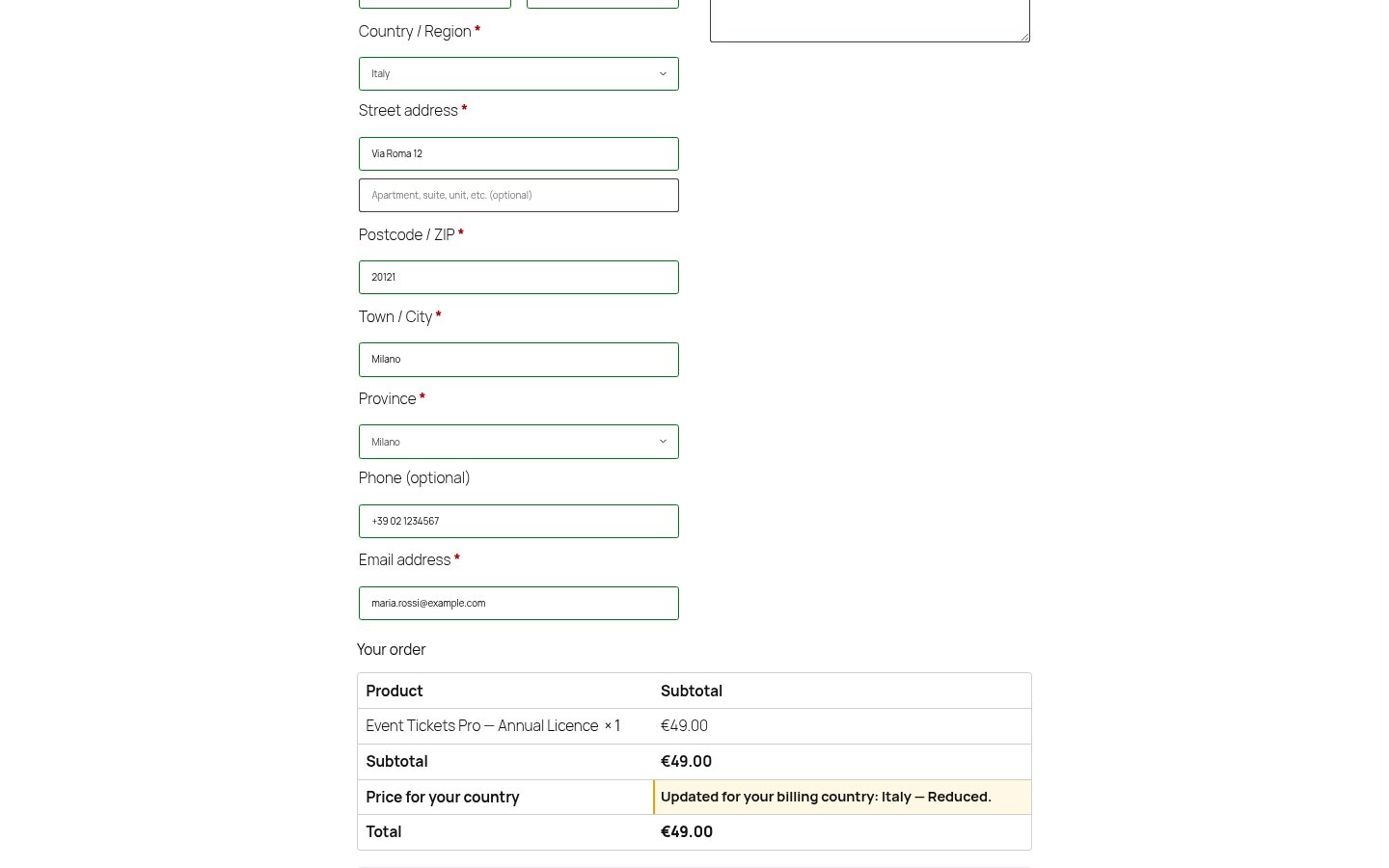
When the billing country changes the price, the cart updates before payment — on both the classic checkout and the Cart & Checkout Blocks. Nobody is charged a price they did not see. On the classic checkout the order review also shows a line explaining why the price changed.
Privacy
Country detection uses WooCommerce’s local MaxMind database. The plugin makes no external requests and sends no data anywhere. The detected country is stored in a cookie so the lookup does not repeat on every page view, and it is saved on the order so you can see which tier was applied.
Works without any geolocation service
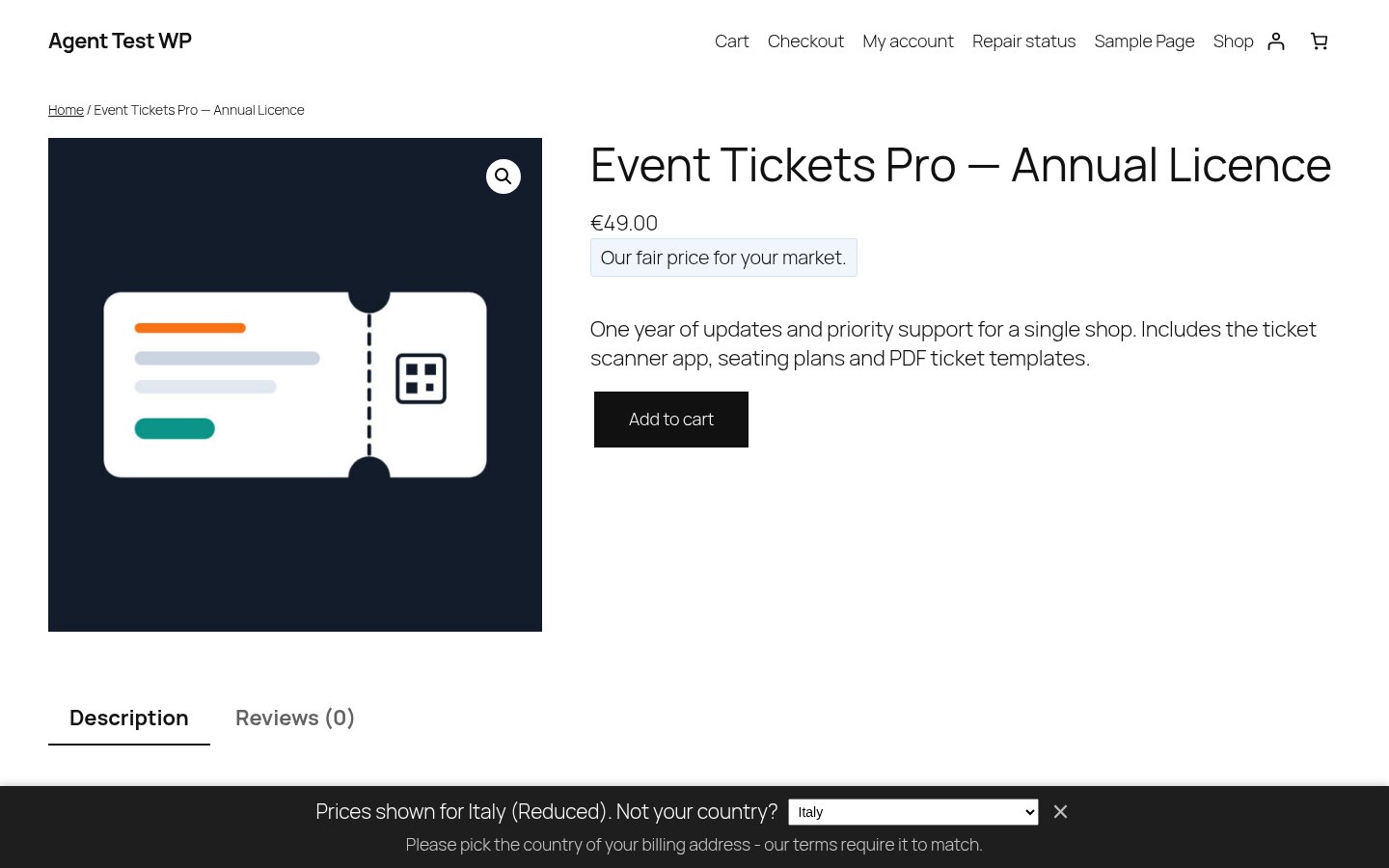
No MaxMind key, no external service, no IP lookup? Then simply ask. If the country cannot be detected, a non-blocking bar invites the customer to pick it — prices stay visible the whole time, nothing is blocked. Shops that do have MaxMind never see the bar, because there is nothing to ask.
Free features
- Unlimited price tiers, freely named, each charging a percentage of the product price
- One-click starting point: three tiers and all 250 countries assigned by purchasing power
- Exclude single products or whole categories — geo pricing never touches them
- Country prompt: ask visitors for their country when it cannot be detected (works with zero setup)
- Country-to-tier mapping for every WooCommerce country, with CSV import and export
- Country detection: GeoIP (anonymous), saved billing country (logged-in), checkout billing field
- Optional country switcher for customers, with your own terms notice
- Optional rounding (whole numbers or charm pricing)
- Price tier and country recorded on every order
- Works with simple and variable products
Subscriptions: an optional add-on covers renewal re-evaluation
WooCommerce Subscriptions is a paid extension, and renewal re-evaluation is shipped as a separate add-on so the Free plugin stays lean. The add-on re-checks the billing country at renewal so a customer who moved keeps paying what is fair for where they now live. Price drops apply automatically; price rises are announced by email first and only applied once the full notice period was actually given.
Installation
- Install and activate the plugin (WooCommerce must be active).
- Go to WooCommerce → Geo-Tier Pricing.
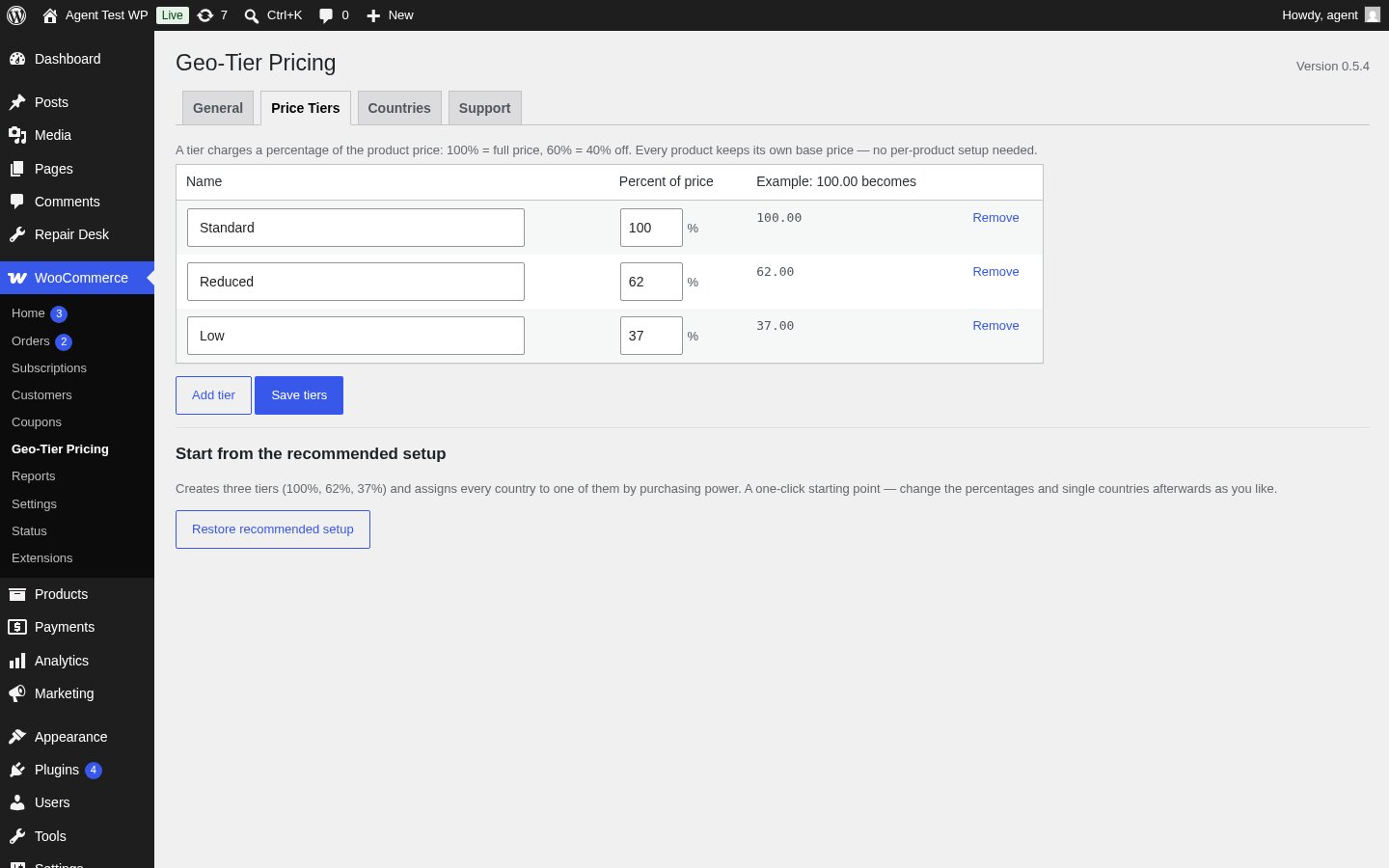
- Under Price Tiers, add your tiers (e.g. “Standard” at 100%, “Reduced” at 60%).
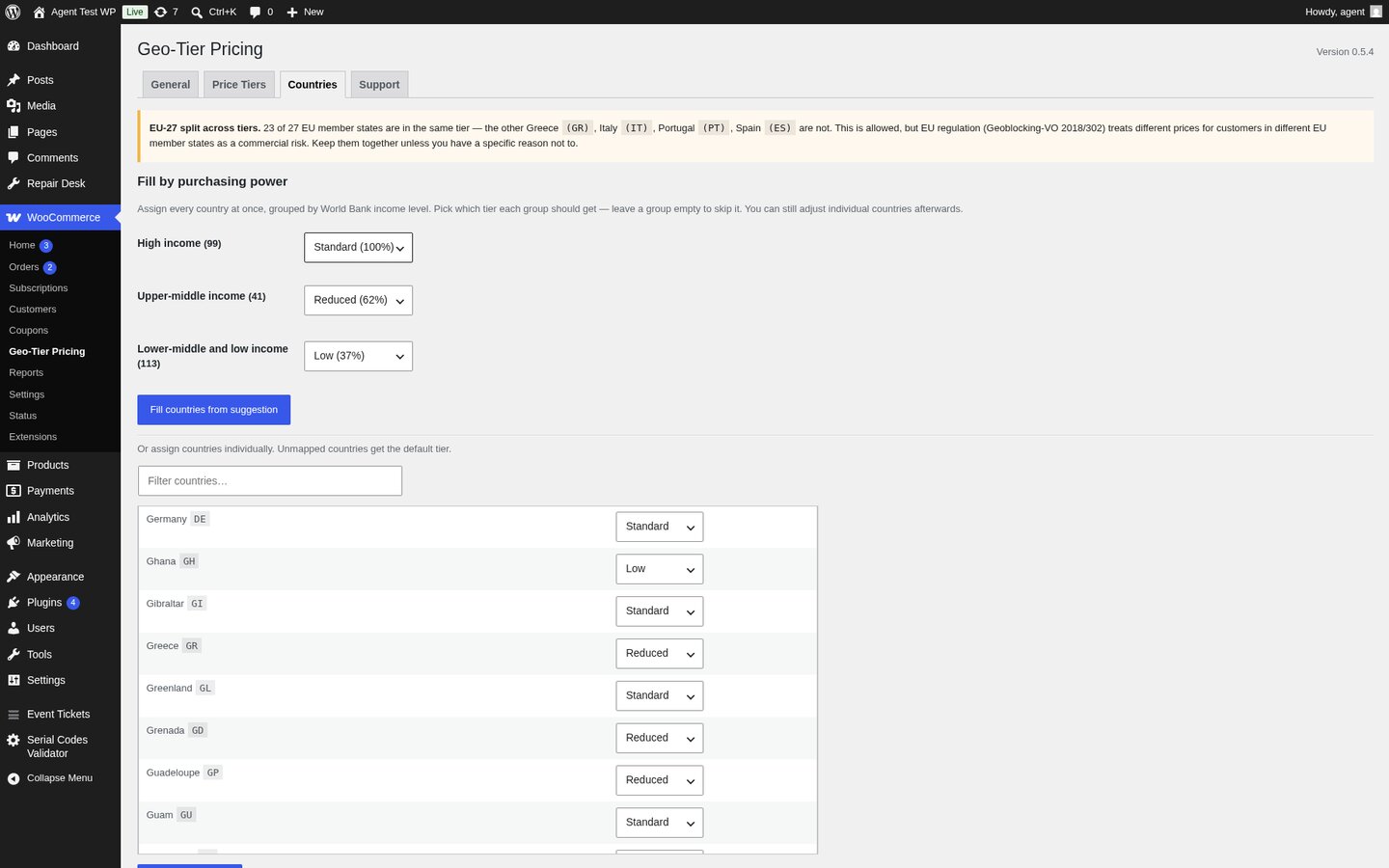
- Under Countries, assign countries to tiers — manually or by CSV import.
- Under General, pick a default tier and enable geo pricing.
GeoIP detection is optional. If you want anonymous visitors geolocated automatically, add a MaxMind license key in WooCommerce → Settings → Integration — WooCommerce uses it to keep its local geolocation database up to date. Without it, the plugin simply asks visitors for their country instead (see “Ask visitors for their country” in the settings).
Frequently asked questions
Do I have to set a price per product per country?
No. Tiers work as a percentage of each product’s own price, so one tier setup covers your whole catalogue.
Can a customer fake their country with a VPN?
Yes, and the plugin does not try to stop them. It is built for fairness, not as a fortress. If your terms require the country to match the billing address, say so in the notice next to the country switcher — the field is there for exactly that.
Does this work with page caching?
Prices are rendered server-side, so a page cache that serves one country’s price to everyone will interfere. Use WooCommerce’s “Geolocate (with page caching support)” setting, or exclude shop pages from the cache.
Does it work with the Cart & Checkout Blocks?
Yes. The billing country from the Blocks checkout feeds the same country detection, the tier price is applied to the totals before payment, and the tier is recorded on the order. The extra line that explains why the price changed is currently only rendered on the classic checkout.
Is any data sent to a third party?
No. Detection runs against WooCommerce’s local MaxMind database only. WooCommerce can optionally fall back to third-party lookup services — this plugin explicitly switches that fallback off, so no visitor IP ever leaves your server. If MaxMind has no answer, the customer is asked for their country (or gets the default tier, if you switched the prompt off).
Where do the country groups come from?
The suggested country-to-tier mapping in the Countries tab uses the World Bank’s income classification (high / upper-middle / lower). The grouping itself is a Vollstart product — the underlying classification is theirs. Source: World Bank (https://datahelpdesk.worldbank.org/), licensed under CC BY 4.0 (https://creativecommons.org/licenses/by/4.0/).
How do I keep all EU member states in the same tier?
The recommended setup already starts all 27 EU member states in the “Standard” tier. If you split them across tiers, a notice in the Countries tab reminds you that EU regulation (Geoblocking-VO 2018/302) treats different prices for customers in different EU member states as a commercial risk. The plugin does not block the split — it is a tool, not a lawyer — but the warning is there so you can make an informed choice.
Changelog
0.5.5 — 2026-09-01
- The settings screen is now extensible: the tab bar and the panel below it can take entries from an add-on, so an add-on adds its own tab here instead of opening a second settings page somewhere else. On its own the free plugin shows exactly the same tabs as before — nothing is gated, nothing moved.
- A tab from an add-on can carry a short badge (e.g. “PRO”), so you can see at a glance which settings come from the free plugin and which one an add-on put there. The free plugin sets no badge on any of its own tabs.
0.5.4 — 2026-08-24
- Fixed: the “EU-27 split across tiers” warning on the Countries tab printed its country codes as raw markup (
Greece <code>(GR)</code>) instead of formatting them. The list was escaped twice. - Housekeeping: the plugin no longer stores a separate “seeded” marker option. Whether the recommended setup has already been created is derived from your actual tier and country-map settings, so there is one less stray row in your options table.
- Changed: all of the plugin’s public identifiers now use the same
vollstart_geo_pricing_prefix. If you placed the country switcher with a shortcode, update it to[vollstart_geo_pricing_switcher]. Cookie names, the URL parameter and the product meta keys changed along with it; order meta is now written as_vollstart_geo_pricing_countryand_vollstart_geo_pricing_tier*. Orders placed before this update keep their existing meta and are not rewritten. - The recommended country-to-tier mapping now starts all 27 EU member states in the same tier. The “Countries” tab shows a soft warning when they are split across tiers, so you can make an informed choice about EU regulation (Geoblocking-VO 2018/302). The plugin never blocks the split — you decide.
- Renewal re-evaluation for WooCommerce Subscriptions (price drops, price-rise notices, preview, WP-CLI migrate) is now shipped as a separate add-on. The Free plugin does not need it; shops that use WooCommerce Subscriptions install the add-on to keep renewals fair.
- World Bank income groups are now attributed in the plugin UI and in this readme (CC BY 4.0). The mapping itself is a Vollstart product; the underlying classification is theirs.
0.5.3 — 2026-07-20
- New “Support” tab in the admin: copy a single block of system info (WP / PHP / WooCommerce / MySQL / active plugins / theme / first-activation timestamp) into a support email. Quick links to the documentation and the release notes. Pattern mirrors the other Vollstart plugins.
0.5.2 — 2026-07-17
- Fixed: price rounding was also applied to tiers that charge the full price (100 %). With charm rounding switched on, a 79.00 product was shown as 78.99 in every country on the standard tier — the shop owner’s own price got rewritten for no reason. Rounding now only runs when a tier actually changes the price. This applies everywhere, so a 100 % country no longer drifts by a cent at subscription renewal either.
0.5.1 — 2026-07-13
-
New: country override via URL parameter. Append
?vollstart_geo_pricing_country=BR(or any ISO code) to test how a different market would see a product or the cart — useful for QA without opening DevTools. The parameter is a one-shot, the cookie still wins if you already chose a country. -
New: exclude products from geo pricing. A checkbox on the product screen (Product data → General) exempts a single product; whole categories can be exempted in the settings. Use it for anything with a real cost per unit — physical goods, hardware, resold items — where a discounted tier would sell at a loss.
- Exclusions hold everywhere: shop, cart, checkout AND subscription renewals. A product exempted in the shop can no longer be quietly re-priced at renewal.
- New: first-boot seed writes the recommended three-tier setup (Standard 100 % / Reduced 62 % / Low 37 %) and maps every WooCommerce country to a tier automatically. The shop owner can edit any of it through the Settings page; the seed only runs when no tiers or country map exist yet.
- Fixed: the subscription price was read through the plugin’s own price filters, so in the admin (preview and Apply run over AJAX, where the filters are active) the tier was applied to an already-discounted price. A 79 subscription would have been written as 11 instead of 29. The base price is now always read unfiltered.
0.4.1 — 2026-07-13
- The plugin version is now shown next to the settings page title.
Screenshots
For developers
Is this your plugin? Show off the numbers.
Add a live badge to your site, docs or GitHub README. It updates on its own — no account needed.
Best Geo-Tier Pricing for WooComme… alternatives
All country pricing plugins →FAQ
Geo-Tier Pricing for WooCommerce: quick answers
Straight answers, pulled from live WordPress.org data.
Live data from WordPress.org · checked Oct 26, 2026
Is Geo-Tier Pricing for WooCommerce free?
Yes. Geo-Tier Pricing for WooCommerce is free to download and use from the official WordPress.org plugin directory.
Is Geo-Tier Pricing for WooCommerce safe to use in 2026?
Geo-Tier Pricing for WooCommerce works, but test it on a staging site before relying on it in 2026. Was last updated 2 months ago, and scores 60/100 on our health check.
How many websites use Geo-Tier Pricing for WooCommerce?
Geo-Tier Pricing for WooCommerce is active on <10 WordPress websites and has been downloaded 237 times since it launched in August 2026. It was downloaded 63 times in the last 30 days.
Does Geo-Tier Pricing for WooCommerce work with WordPress 7.1?
Yes. The developer has tested Geo-Tier Pricing for WooCommerce up to WordPress 7.1.3, the latest release. It requires WordPress 6.2 or newer.
What PHP version does Geo-Tier Pricing for WooCommerce need?
Geo-Tier Pricing for WooCommerce requires PHP 7.4 or higher. Most hosts run PHP 8.x today, so it works on any modern WordPress hosting.
When was Geo-Tier Pricing for WooCommerce last updated?
The latest version, 0.5.5, was released on September 1, 2026 (2 months ago).
Who makes Geo-Tier Pricing for WooCommerce?
Geo-Tier Pricing for WooCommerce is developed and maintained by Vollstart.
What are the best alternatives to Geo-Tier Pricing for WooCommerce?
The most popular alternatives to Geo-Tier Pricing for WooCommerce are FunnelWheel Country Based P… (<10 installs) and MarketTier Pricing for WooC… (<10 installs).
Powered by PageForge
Want thousands of pages that rank like these? Build them in an afternoon.
This directory runs on the same engine as PageForge. Turn any spreadsheet, CSV or API into thousands of fast, SEO-ready WordPress pages — with schema, internal links and AI-written copy baked in.
- CSV, Google Sheets & API data sources
- AI content, schema & internal links per page
- Works with Elementor, Gutenberg, Yoast & Rank Math
- Free on WordPress.org — no credit card


