


Genealogy
"Being revamped" Map out your family relationships using the Genealogy plugin.

Use with caution
Genealogy works, but test it on a staging site before relying on it in 2026. It runs on 50+ sites, is rated 2.3/5 and was last updated 4 months ago, and scores 52/100 on our health check.
- Small user base (50+ active installs)
- Low rating so far — 2.3/5 from only 3 reviews
How does it stack up?
Side-by-side on installs, updates, ratings & support



Daily downloads
Download spikes usually follow a new release — each site that auto-updates counts as a download.
Rankings
Where Genealogy stands todayWordPress.org search rankings
Live position in the plugin search, top 100| Keyword | Position |
|---|---|
| family | #69 |
| family history | #8 |
| family tree | #4 |
| genealogy | #1 |
| pedigree | #5 |
Version adoption
Share of active sites per release.
Rating breakdown
★★★★★★★★★★ 2.3 from 3 reviews
About Genealogy
From the official readme · v1.2.3Description
This plugin has been adapted by SuitePlugins and is currently in BETA as we work to resolve open issues and improve this amazing plugin.
The Genealogy plugin for WordPress allows you to map your entire family’s relationships.
Use the plugin to create a Member for each person in your family. Assign Members parents from the people you have added.
Add information for each Member, including:
- Photographs
- Date and location of birth
- Parents
- Spouses
- Date, location, and reason of death
- Up to 20 wives, husbands, professions, schools, religions & middle names
The plugin has support for:
- Featured images – Upload photos to the family member and set them as Featured Image to have their picture added to the family member information table
- Multiple wives and husbands, including wedding time span
- Multiple professions, schools, religions, locations, and life events
- Calendar-based date picker to make it easy to select a date (as far back as 1411!)
Easy to use!
To add a list of family members to a post or page: add [genealogy] to the content
To add a single family member, add [genealogy id=#] where id is the post ID of the Family Member (such as 231). You can also use [genealogy slug="john-smith"] where the URL of the family member is .../family/john-smith/
Installation
- Upload this plugin to your blog and Activate it
- You will see a Family link in your administration sidebar. Click it.
- Add new family members as you would a Post.
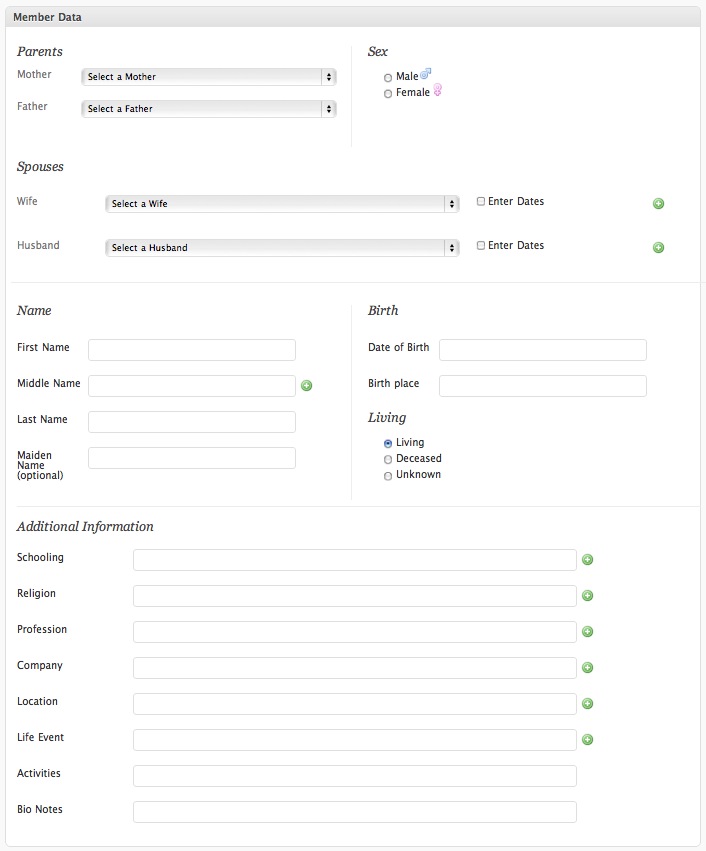
- Under “Member Data” you will enter the information for the person you are adding. As you add additional people, you can select parents and spouses from dropdown menus.
Frequently asked questions
How do I insert family members into a post or page?
To add a list of family members to a post or page: add [genealogy] to the content To add a single family member, add [genealogy id=#] where id is the post ID of the Family Member (such as 231). You can also use [genealogy slug="john-smith"] where the URL of the family member is .../family/john-smith/
What’s the license?
This plugin is released under a GPL license.
Does this plugin support GEDCOM?
The plugin does not currently support importing or exporting GEDCOM. Future versions should feature GEDCOM export.
Where are the options for the plugin?
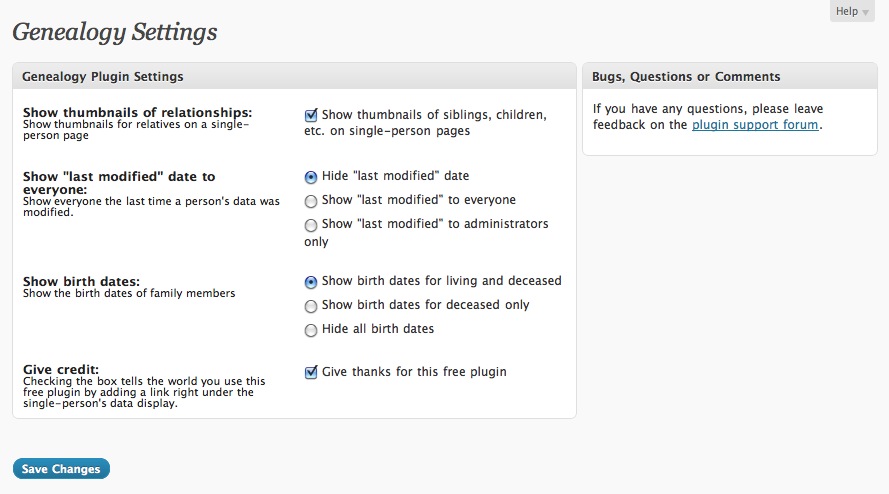
Whether to show thumbnails for family member relationships (siblings, children, etc) Choose to show a record’s “last modified” date to everyone, admins, or no one (default) Birth date options: show the birth date of all family members (default), deceased people only, or no birth dates Give credit to the plugin with a link below a family member’s details
Changelog
Added check for the get_the_post_thumbnail() function support
1.2.3
- Security: Added ABSPATH guard.
- Security: Fixed nonce verification and capability checks on family member save.
- Security: Sanitized settings, admin input, and escaped admin output.
- Tested with WordPress 7.0.
- Requires PHP 7.4.
1.2.2
- Fixed JS error and WP Editor not working / JS Error preventing featured images being set
- Updated readme.txt
- Fixed 404 on single family member details
1.2.1
- Added check for the
get_the_post_thumbnail()function support to fix this reported bug
1.2
- Added
genealogy_thumbnail_sizefilter for image thumbs - Fixed fatal errors on Family Member pages
- Hid empty Father and Mother fields when no family members yet exist
- Fixed issue when clicking the + button to clone fields wasn’t working
- Added contact detail options – Phone, Email, Address
- Improved instructions in ReadMe
1.1
- Added settings page
- Fixes lots of warnings that appear when in WP_DEBUG mode.
- Notice: Undefined index: family_member_data_noncename on line 177
- Notice: Undefined index: screen on line 178
- Notice: Trying to get property of non-object on line 146
- Undefined variable notices
- Not an object notices
1.0
- Launched plugin
Screenshots
For developers
Is this your plugin? Show off the numbers.
Add a live badge to your site, docs or GitHub README. It updates on its own — no account needed.
Best Genealogy alternatives
All family plugins →

FAQ
Genealogy: quick answers
Straight answers, pulled from live WordPress.org data.
Live data from WordPress.org · checked Oct 11, 2026
Is Genealogy free?
Yes. Genealogy is free to download and use from the official WordPress.org plugin directory.
Is Genealogy safe to use in 2026?
Genealogy works, but test it on a staging site before relying on it in 2026. It runs on 50+ sites, is rated 2.3/5 and was last updated 4 months ago, and scores 52/100 on our health check.
How many websites use Genealogy?
Genealogy is active on 50+ WordPress websites and has been downloaded 11,796 times since it launched in March 2011. It was downloaded 104 times in the last 30 days.
Does Genealogy work with WordPress 7.1?
Genealogy is officially tested up to WordPress 7.0.7, while the latest release is 7.1.3. It may still work, but try it on a staging site first.
What PHP version does Genealogy need?
Genealogy requires PHP 7.4 or higher. Most hosts run PHP 8.x today, so it works on any modern WordPress hosting.
When was Genealogy last updated?
The latest version, 1.2.3, was released on June 7, 2026 (4 months ago).
Who makes Genealogy?
Genealogy is developed and maintained by SuitePlugins.
What are the best alternatives to Genealogy?
The most popular alternatives to Genealogy are RootsPersona (400+ installs), GedShow (200+ installs) and WP Term Family (10+ installs).
Powered by PageForge
Want thousands of pages that rank like these? Build them in an afternoon.
This directory runs on the same engine as PageForge. Turn any spreadsheet, CSV or API into thousands of fast, SEO-ready WordPress pages — with schema, internal links and AI-written copy baked in.
- CSV, Google Sheets & API data sources
- AI content, schema & internal links per page
- Works with Elementor, Gutenberg, Yoast & Rank Math
- Free on WordPress.org — no credit card


