



Gellum Delivery Calculator for WooCommerce
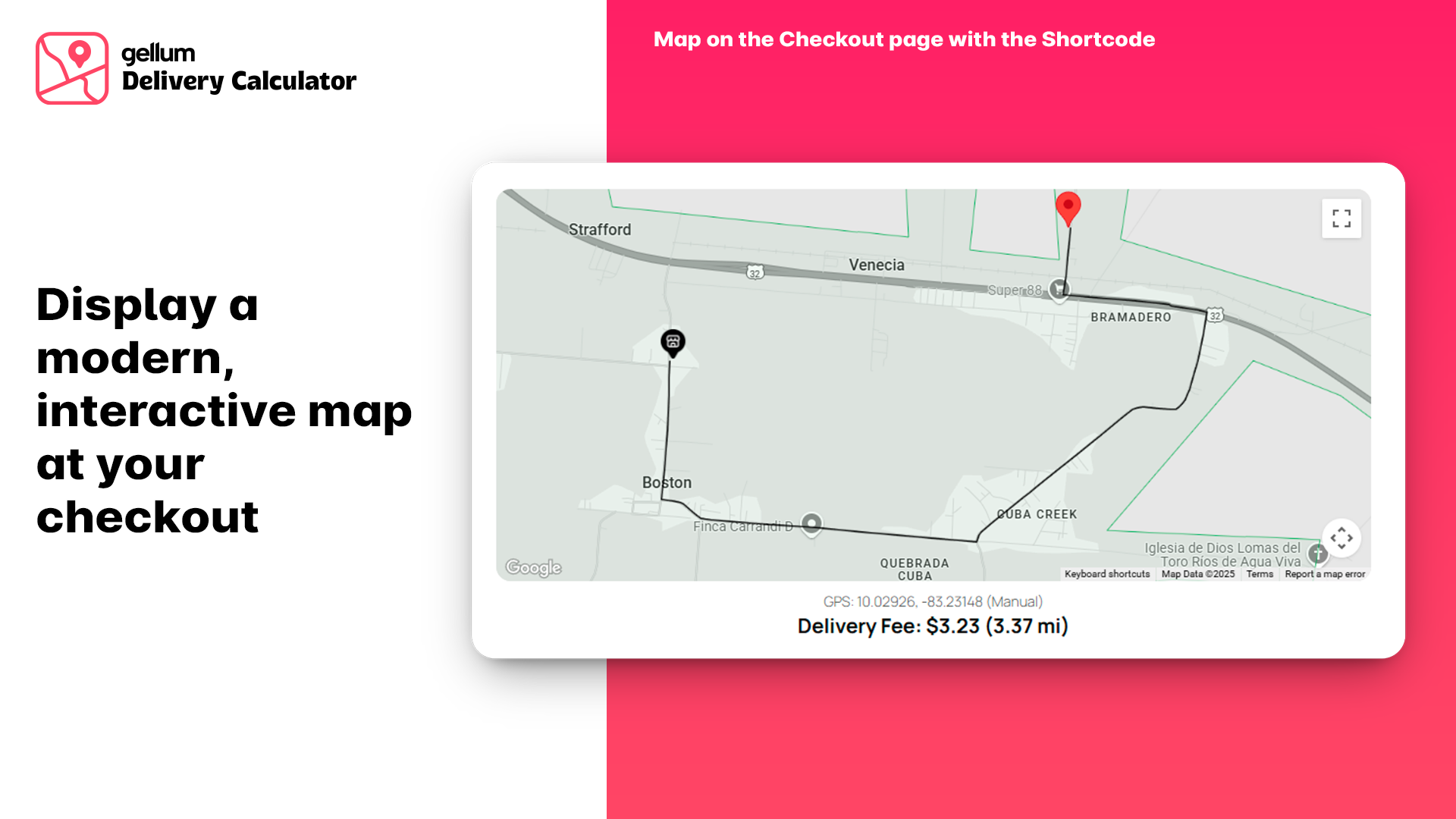
Calculates shipping costs for WooCommerce based on GPS distance with GeoJSON limited areas. Shortcode [gellumdcw_map]

Consider an alternative
Gellum Delivery Calculator for… shows warning signs in 2026 — compare the alternatives below before installing. It runs on 10+ sites and was last updated 8 months ago, and scores 38/100 on our health check.
- Small user base (10+ active installs)
- Very few reviews so far
- Only tested up to WordPress 6.9 (latest is 7.1)
How does it stack up?
Side-by-side on installs, updates, ratings & support



Daily downloads
Download spikes usually follow a new release — each site that auto-updates counts as a download.
Rankings
Where Gellum Delivery Calculator… stands todayWordPress.org search rankings
Live position in the plugin search, top 100| Keyword | Position |
|---|---|
| delivery | >100 |
| Google Maps | >100 |
| gps | #60 |
| shipping calculator | #70 |
| woocommerce | >100 |
Version adoption
Share of active sites per release.
About Gellum Delivery Calculator for WooComme…
From the official readme · v1.1.3Description
Calculate Shipping Costs by GPS Distance in WooCommerce with Interactive Map
Gellum Delivery Calculator transform your WooCommerce store’s local delivery experience. This plugin offers a robust and user-friendly way to calculate shipping costs based on the precise GPS distance from your store to the customer’s location. It goes beyond simple calculations by integrating an interactive Google Map directly into your cart or checkout process. Customers can easily pinpoint their exact delivery location on the map, or allow their browser to attempt automatic GPS detection for an even quicker start. You define your operational reach by drawing or uploading a GeoJSON boundary, ensuring that rates are only offered within your designated service area. The plugin visually displays this area on the map, providing clear feedback to the customer. The standout feature is the integration of Google Maps Reverse Geocoding. When a customer selects or moves their pin on the map:
- The plugin instantly fetches detailed address information via the Google Geocoding API.
- It identifies the Google Plus Code, City, State/Province, Postal Code, and Country.
This streamlines the checkout process, reduces typing errors, and enhances the overall user experience by leveraging WooCommerce’s native checkout update mechanisms. It’s particularly useful for areas where traditional street addresses might be less precise or for customers who prefer the simplicity of dropping a pin.
Key Features:
- Interactive Google Map: Customers visually select their delivery location.
- GPS Distance Calculation: Uses the Haversine formula for accurate distance measurement.
- GeoJSON Delivery Area: Define precise service zones using GeoJSON (Polygon/MultiPolygon support) and visually display them.
- Reverse Geocoding: Fetches Plus Codes, City, State, Postcode, and Country from a map point.
- Automatic Address Field Updates: Populates WooCommerce Billing/Shipping fields (Address 1, City, State, Postcode, Country) in real-time.
- Initial GPS Auto-Detection: Attempts to find the customer’s current location via browser Geolocation API.
- Configurable Rate Structure: Set a base fee, define a maximum distance for that base fee, and add a per-kilometer cost for distances beyond that.
- Free Shipping Threshold: Offer free delivery for orders above a certain subtotal.
- Order Details Storage: Saves the customer’s selected GPS coordinates (Latitude & Longitude) with each order for your records.
- Admin Order View: Displays the customer’s GPS coordinates and a link to Google Maps directly on the order details page in the WordPress admin.
- HPOS Compatible: Works seamlessly with WooCommerce’s High-Performance Order Storage.
- Shortcode Support: Easily place the map anywhere using the
[gellumdcw_map]shortcode. - Server-Side Validation: Includes checks during checkout to ensure the final delivery location is still within the valid GeoJSON area.
- Independent Configuration: Each subsite within your Multisite network can have its own unique Gellum Delivery Calculator settings. This includes distinct Google Maps API Keys, store locations (latitude and longitude), GeoJSON delivery areas, and pricing structures.
- Separate Data Handling: Customer sessions, cart data, and order details (including GPS coordinates saved with each order) are managed independently for each subsite, ensuring no data conflicts across your network.
- Seamless Integration: The plugin integrates smoothly with WooCommerce’s standard shipping methods and checkout processes across individual subsites.
✨ NEW Features
- Configurable Distance Unit: Choose to calculate distances and set rates in either Kilometers (km) or Miles (mi).
- Selectable Calculation Method: Added a new setting in the shipping method configuration allowing administrators to choose between ‘Driving Route (Directions API)’ for high accuracy and ‘Straight Line (Bird’s-eye view)’ for a fast, free approximation.
- Dynamic Map Visualization: The interactive map now dynamically displays the selected calculation method. It will show the precise turn-by-turn driving route or a new, stylized curved line instead of a simple straight line.
- Email Map Snapshot: A static map image is now automatically added to the WooCommerce order confirmation emails sent to the customer. This map clearly shows the store location (A) and the customer’s delivery location (B).
Gellum Delivery Calculator is ideal for restaurants, local shops, and any business offering delivery services within a defined geographic area, providing both operational control and customer convenience.
External Services
This plugin utilizes services from Google Maps Platform to provide accurate delivery cost calculation and location selection.
- Service: Google Maps JavaScript API, Google Geocoding API, Static Maps API, Directions API.
- Purpose: The Maps JavaScript API is used to display an interactive map, allow customers to select their delivery location, and visualize the defined delivery area. The Geocoding API is used to translate the selected map coordinates into human-readable address components (e.g., Plus Code, City, State, Postal Code, Country) and to update WooCommerce checkout fields automatically. Maps Static API is used for display the delivery map on customer email. Directions API is used to retrieve, display, and calculate the distance between the merchant and the customer following the correct route.
- Data Sent:
- Customer’s Location (Latitude and Longitude): Sent from the user’s browser to Google Maps API when the map is initialized (if geolocation is allowed by the user) or when the user clicks/drags the marker on the map. This data is used to geocode the location and calculate the distance from the store.
- Google Maps API Key: Sent with every request to Google Maps Platform services for authentication and billing.
- When Data is Sent:
- Upon loading a page containing the
[gellumdcw_map]shortcode (for map initialization and optional auto-detection). - Whenever a user manually selects or drags the delivery location marker on the map.
- During the checkout process when the Gellum Delivery method is selected and validated.
- Upon loading a page containing the
- Terms of Service: https://policies.google.com/terms
- Privacy Policy: https://policies.google.com/privacy
Installation
- Download: Download the plugin .zip file.
- Upload: Go to your WordPress Dashboard > Plugins > Add New > Upload Plugin. Select the downloaded .zip file and click ‘Install Now’.
- Activate: Once installed, click ‘Activate Plugin’.
- Configure Shipping Zone:
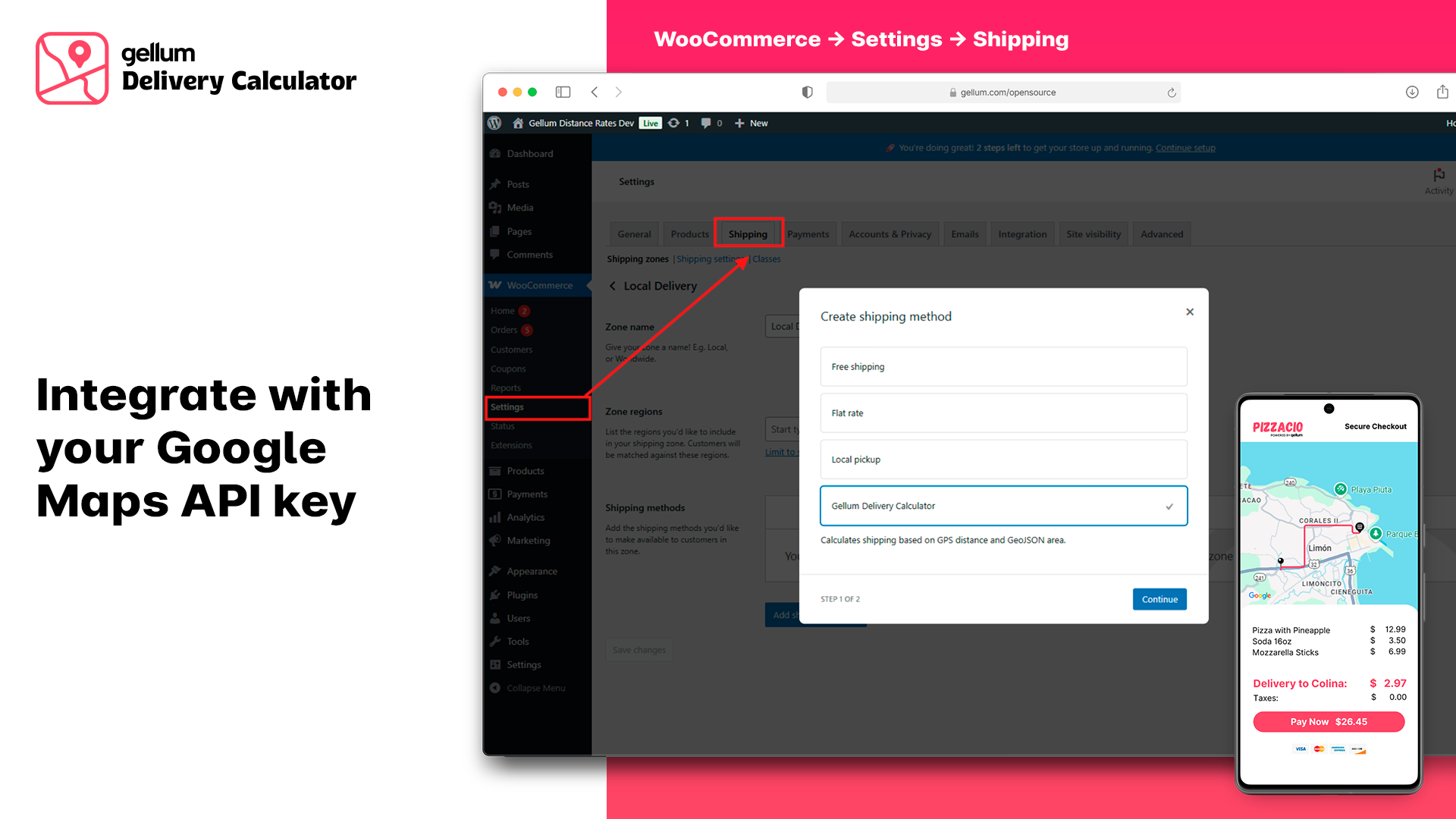
- Go to WooCommerce > Settings > Shipping.
- Click ‘Add shipping zone’. Give it a name (e.g., “Local Delivery Zone”). Assign regions if necessary (though Gellum uses its own GeoJSON).
- Click ‘Add shipping method’. Select ‘Gellum Delivery’ from the dropdown and click ‘Add shipping method’.
- Configure Gellum Delivery:
- Hover over ‘Gellum Delivery’ in your shipping zone and click ‘Edit’.
- Crucially, enter your Google Maps API Key. Ensure you have enabled both the Maps JavaScript API, Geocoding API, Static Maps API, and Directions API in your Google Cloud Console for this key.
- Setup your calculation method: Choose how you want to calculate the distance between the commerce and the customer.
- Select your preferred Distance Unit (Kilometers or Miles). This choice will apply to the distance-based rate fields.
- Enter your Store Latitude and Store Longitude. You can find these using Google Maps.
- Set up your Base Shipping Rate, Max Distance for Base Rate, and Additional Rate per km.
- Define your Delivery Area GeoJSON. You can create this using a tool like geojson.io and paste the code here.
- Set a Minimum Order for Free Shipping if desired (set to 0 to disable).
- Click ‘Save changes’.
- Add the Map:
- Edit your WooCommerce Checkout page (or any other page where you want the map).
- Add the
[gellumdcw_map]shortcode where you want the interactive map to appear.
- Test: Place a test order, select a location on the map, and verify that the shipping costs and address fields update correctly.
Frequently asked questions
How do I get a Google Maps API Key?
You need to create a project in the Google Cloud Console, generate an API key, and enable the “Maps JavaScript API” and “Geocoding API” for that key. Remember to restrict your key for security (e.g., by HTTP referrers).
How do I create the GeoJSON for my delivery area?
Use a free online tool like geojson.io. Use the drawing tools (Polygon) to outline your delivery area on the map. Copy the generated GeoJSON code from the right-hand panel and paste it into the plugin settings. Ensure it’s a valid GeoJSON FeatureCollection or Polygon/MultiPolygon.
Will it work with my theme’s checkout page?
The plugin uses standard WooCommerce hooks and AJAX calls. It’s designed to be compatible with most themes. The [gellumdcw_map] shortcode allows you to place the map flexibly. Some highly customized checkouts might require minor CSS adjustments.
Does it update both billing and shipping addresses?
Currently, the JavaScript focuses on updating the billing address fields. If your checkout uses separate shipping fields, you might need to adjust the gellumdcw-frontend.js or implement a filter if you need both updated automatically.
Can I customize the map’s appearance?
Yes, there are a couple of ways to customize the map’s appearance: CSS Styling: The included gellumdcw-frontend.css provides basic styling for the map container and related elements. You can override these CSS styles in your theme’s style.css file or via the WordPress Customizer’s “Additional CSS” section for a more integrated look with your site. This primarily affects the elements around the map (like the info text, error messages). Google Cloud Map Styling (via Map ID): For advanced customization of the map itself (colors of roads, water, points of interest, density of features, etc.), the…
Multisite Compatibility
Gellum Delivery Calculator is designed to be fully compatible with WordPress Multisite installations. To configure: Simply activate the plugin on each subsite where you intend to offer Gellum Delivery, and then set up its specific settings within the WooCommerce Shipping Zone configuration for that particular subsite.
Changelog
1.1.0 It includes new features and with it new API requirements: Directions and Static Map. 1.0.6 Shortcode Change: If you are a plugin user, you must update the shortcode from [gdc_map] to [gellumdcw_map]. 1.0.1 First release: Plugin that automatically calculates the cost of home delivery between the business and the customer.
1.1.3 (2026-02-17)
- Confirmed compatibility with WordPress 6.9.1.
- Confirmed compatibility with WooCommerce 10.5.2.
- Minor CSS fixes for the latest version.
1.1.2 (2025-06-11)
- Fix: Fixes a synchronization issue that prevented the shipping method from updating correctly at checkout.
- Fix: The Plus Code customer address is now always updated. (In or out of coverage area).
- Improvement: We implemented a new system to generate the static map with API Key restricted by http.
- Improvement: Improved security in Ajax processes.
1.1.1 (2025-06-11)
- Minor bug fixes.
1.1.0 (2025-06-10)
- Improvement: Selectable calculation method for the distance between the business and the customer. The Google Direction API is now used to calculate the correct vehicle route, taking into account streets, roads, and more.
- Update: New dynamic map that matches the calculation method selected by the administrator.
- Improvement: The static map of the delivery location is now automatically displayed in the customer’s email.
- Improvement: Added a setting to allow admin to choose between Kilometers (km) and Miles (mi) for distance calculattion and rate configuration.
- Improvement: The delivery cost summary on the checkout page now optionally displays the calculated distance and the selected unit (e.g., 7.5 mi).
- Update: The backend logic for cost calculation was refactored to support both distance units.
- CSS updates: Minor changes in colors.
- Minor Fixes have been made.
1.0.7 (2025-05-30)
- Bug fix that prevented “View on Google Map” from being displayed within order management.
- Update: Only Address 1 si readonly when Gellum Delivery is selected.
1.0.6 (2025-05-30)
- Updated gdc prefixes to gellumdcw.
- Updated [gdc_map] shortcode to [gellumdcw_map].
- Created gellum-delivery-calculator.pot within language.
Screenshots
For developers
Is this your plugin? Show off the numbers.
Add a live badge to your site, docs or GitHub README. It updates on its own — no account needed.
Best Gellum Delivery Calculator fo… alternatives
All delivery plugins →





FAQ
Gellum Delivery Calculator for WooC…: quick answers
Straight answers, pulled from live WordPress.org data.
Live data from WordPress.org · checked Oct 6, 2026
Is Gellum Delivery Calculator for… free?
Yes. Gellum Delivery Calculator for… is free to download and use from the official WordPress.org plugin directory.
Is Gellum Delivery Calculator for… safe to use in 2026?
Gellum Delivery Calculator for… shows warning signs in 2026 — compare the alternatives below before installing. It runs on 10+ sites and was last updated 8 months ago, and scores 38/100 on our health check.
How many websites use Gellum Delivery Calculator for…?
Gellum Delivery Calculator for… is active on 10+ WordPress websites and has been downloaded 1,220 times since it launched in May 2025. It was downloaded 91 times in the last 30 days.
Does Gellum Delivery Calculator for… work with WordPress 7.1?
Gellum Delivery Calculator for… is officially tested up to WordPress 6.9.9, while the latest release is 7.1.2. It may still work, but try it on a staging site first.
What PHP version does Gellum Delivery Calculator for… need?
Gellum Delivery Calculator for… requires PHP 7.4 or higher. Most hosts run PHP 8.x today, so it works on any modern WordPress hosting.
When was Gellum Delivery Calculator for… last updated?
The latest version, 1.1.3, was released on February 17, 2026 (8 months ago).
Who makes Gellum Delivery Calculator for…?
Gellum Delivery Calculator for… is developed and maintained by Gellum.com.
What are the best alternatives to Gellum Delivery Calculator for…?
The most popular alternatives to Gellum Delivery Calculator for… are SMTP2GO for WordPress (40K+ installs), Claudio Sanches (20K+ installs) and Packlink PRO for WooCommerce (20K+ installs).
Powered by PageForge
Want thousands of pages that rank like these? Build them in an afternoon.
This directory runs on the same engine as PageForge. Turn any spreadsheet, CSV or API into thousands of fast, SEO-ready WordPress pages — with schema, internal links and AI-written copy baked in.
- CSV, Google Sheets & API data sources
- AI content, schema & internal links per page
- Works with Elementor, Gutenberg, Yoast & Rank Math
- Free on WordPress.org — no credit card


