


Photo Gallery by Ays – Responsive Image Gallery
Our WordPress Photo Gallery is a cool responsive image gallery plugin with awesome layout options, stunning gallery and album views, designed with features that allow you not to just show photos in a beautiful way but…

Solid choice
Photo Gallery by Ays is a solid plugin choice in 2026, with a few things worth checking first. It runs on 1K+ sites, is rated 4.8/5 and was last updated 4 days ago, and scores 70/100 on our health check.
- Actively developed — last update 4 days ago
- Tested with the latest WordPress (7.1)
- Momentum — downloads up 34.6% vs the previous 30 days
How does it stack up?
Side-by-side on installs, updates, ratings & support



Daily downloads
Download spikes usually follow a new release — each site that auto-updates counts as a download.
Rankings
Where Photo Gallery by Ays stands todayWordPress.org search rankings
Live position in the plugin search, top 100| Keyword | Position |
|---|---|
| gallery | #49 |
| image gallery | #30 |
| photo gallery | #18 |
| responsive gallery | #21 |
| wordpress gallery plugin | #26 |
Version adoption
Share of active sites per release.
Rating breakdown
★★★★★★★★★★ 4.8 from 19 reviews
About Photo Gallery by Ays
From the official readme · v6.9.3Description
WordPress Photo Gallery plugin
- WordPress Photo Gallery pricing
- Photo Gallery Free Demo
- Photo Gallery Pro Demo
- Photo Gallery Documentation
Our WordPress Photo Gallery is a cool responsive image gallery plugin with awesome layout options, stunning gallery and album views, designed with features that allow you not to just show photos in a beautiful way but to deliver the message hidden in them.
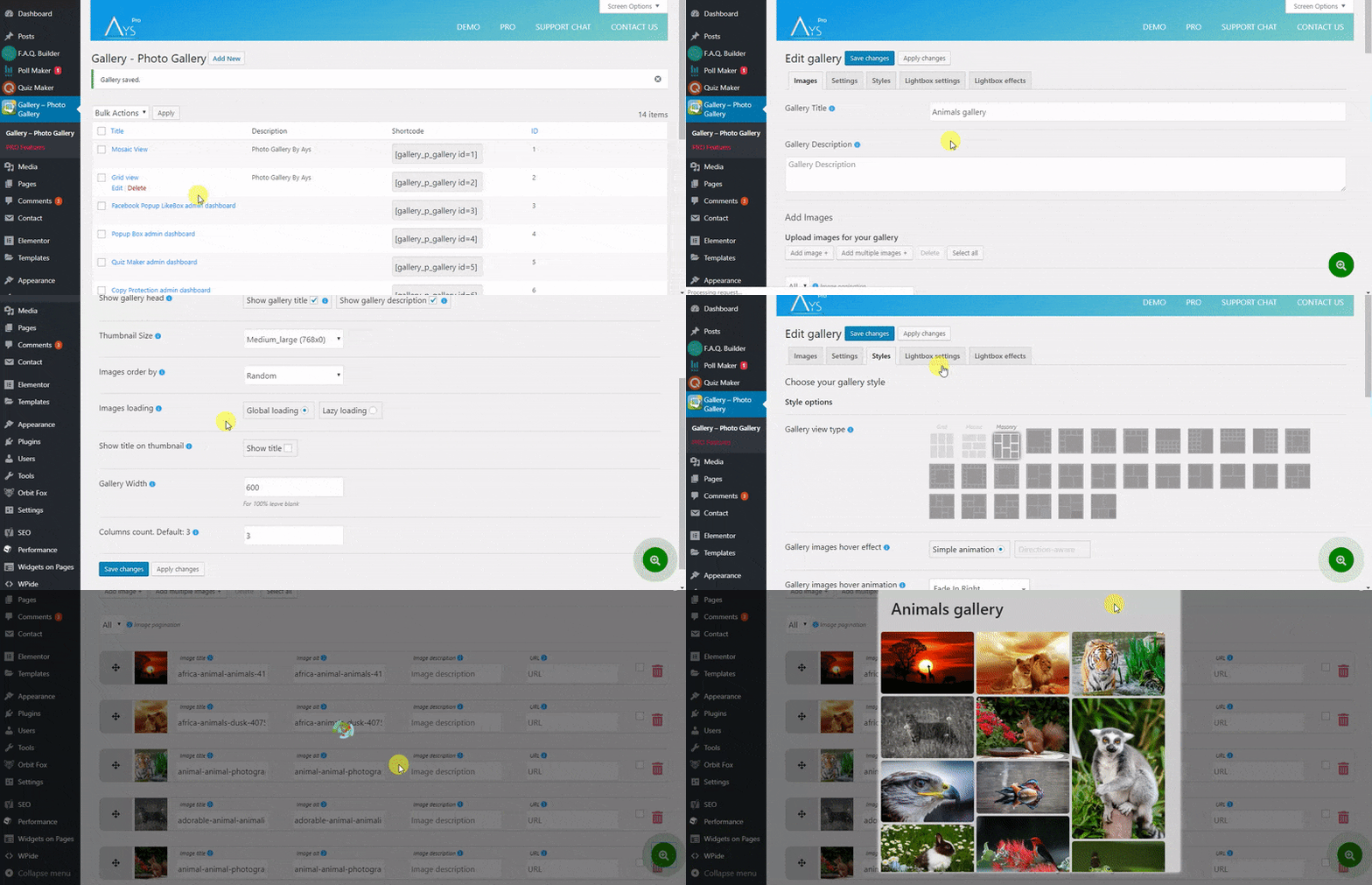
Simple in use, mobile-friendly, and user-friendly – it gives you the opportunity to create unlimited image galleries and easily add unlimited images in each gallery. You can use the galleries in different posts and pages with a very simple shortcode. When creating a new gallery, you can set the name, add a description, specify gallery width in percents and gallery height in pixels. You can even set the hover effect (more than 10 cool hover effects) and pick images from the WordPress media library. Each image can have a title, a description, and even a URL to give the viewer a better understanding of what the photo is all about.
What’s more?
Ah, yes, you can choose between grid, masonry and mosaic views (30+ views in Pro version ). You can use the plugin for all sorts of different intentions, both professional and amateur. The Photo Gallery plugin allows creating awesome portfolios, albums and slideshows about works of photographers, architects, make-up artists, programmers, designers, etc. Find more about this amazing WordPress Photo Gallery plugin features below ( be sure to check also the documentation to find the feature you are looking for or ask to our support team), have a look at the plugin Free and Pro demos and give it a try. We are sure you won’t be disappointed!
Check out awesome Free layouts:
- Nature Gallery – Grid layout
- Photography Gallery – Mosaic layout
- Animals Gallery – Masonry layout
To have fast performance it is possible to choose between lazy loading and global loading, also images have thumbnail size option and are zoomable.
The image gallery plugin also has an responsive lightbox which gives a beautiful effect to the gallery and provides slideshow of your photos.
The features that Photo Gallery plugin provides:
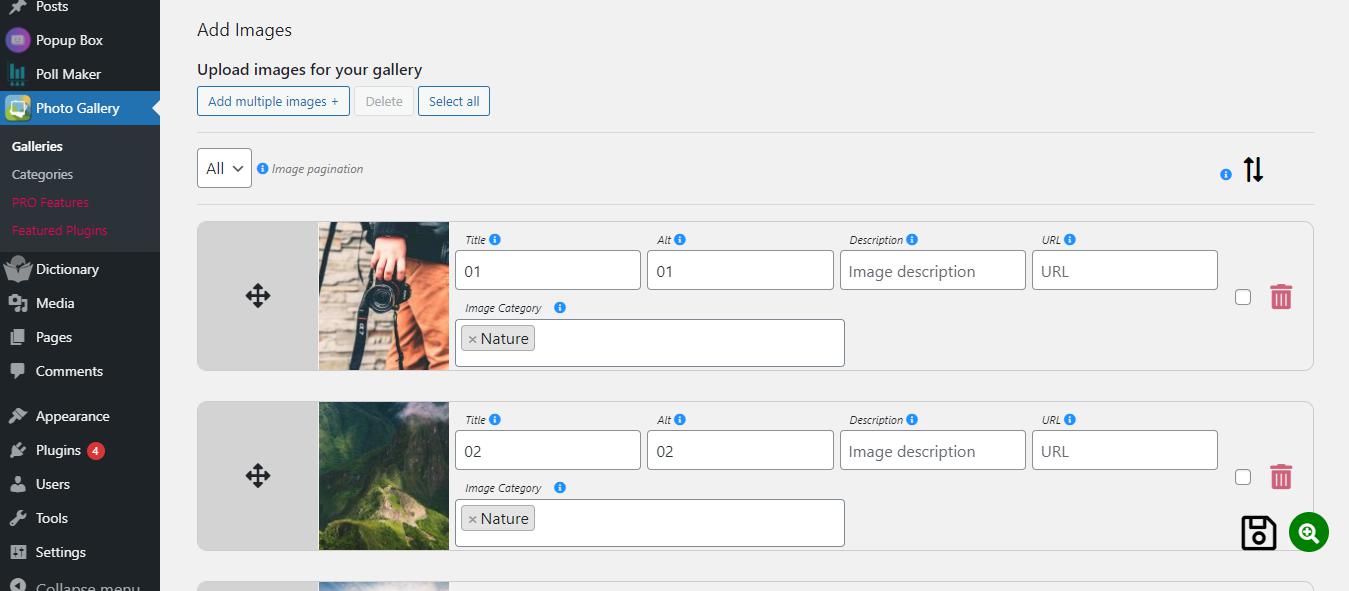
- Multi images upload: There is a multiple images upload button in the admin dashboard which allows you to add as many images as you want at once.
- Lightbox Gallery: Photo Gallery provides a beautiful slideshow to your photo album.
- Image attributes: Every image has attributes: title, alt, description and URL. The simple photo gallery fills the title and alt attributes automatically (by the name that you have given to the pictures in your PC) which makes your work easier. And as for the URL you can add the URL address of whatever you want.
- Image ordering: The arrangement of the pictures is being done by Title, Date and Random.
If random arrangement is selected, every time when you reload the page photo gallery plugin shows you random images from your single gallery.It helps you to create random gallery with random photos, which can grab your users attention. The arrangement of pictures in gallery can be done also by drag and drop. - Thumbnail size: You are given a possibility to choose your preferable thumbnail size.The thumb will load faster when you choose small thumbnail size (from wordpress default image sizes). In our Gallery plugin, you will not meet any inconvenience with the speed. And thanks this the time of the load is shorten.
- Images loading: Global Loading and Lazy Loading. Global loading is the load of the Gallery with images (when the loading finishes the Gallery and images open together) and Lazy loading is when the Gallery opens but the images are being loaded one by one. And this will not slow down your site.
- Gallery width: This parameter is useful because people use gadgets and different devices for the Internet (for 100%, leave blank).This is the fully responsive Picture Gallery.
- Column count: You can choose the number of columns (only in grid view).
- Gallery type: Grid view, Mosaic view and Masonry view. Mosaic and Masonry view will provide a beautiful effect to your Gallery. And the Grid view, of course, which is a default view. (there are 30+ awesome views in Premium version)
- Hover effects: You are free to choose between many parameters for hover – Hover animation, hover opacity and color, hover zoom effect, hover icon and icon size.
- Pagination (available in Pro): Organize your images by dividing them into pages. It helps to navigate through larger galleries effortlessly. Besides a smooth browsing experience, it helps to optimize performance with quicker loading times.
- More features in the Premium version.
Why to have a Image Gallery in your website?
It is not a secret that images are one of the best and most effective ways to attract people. They are catchy, colorful, bright. Even a text on an image appears to be more attention-grabbing than just a text on a website. Images speak to our emotions, imagination and our unconscious part as well. Image presence in a website make it more social as it takes a few seconds for the human brain to process an image, which is considerably faster than processing content or text.
Whether you specialize in photography, creative design, journalism or you are a travel blogger, your photos tell a unique story and deserve to be presented in the best possible way. And our friendly and feature rich Photo Gallery plugin will help you with that! Here, you can create your own single and multiple free galleries from your photo library. We offer a responsive Lightbox Gallery plugin. So you will give thorough information about your portfolio.
Adding an image gallery page to your website helps with:
- Attracting potential customers – As already mentioned images and photos grab attention, add engagement and give a boost in pageviews.
- Generating more sales – Photo Galleries give more information about your work and affect the final purchase decision.
- Increasing SEO rankings – Adding relevant tags, URL and metadata will provide more visibility in search results in Google.
- Better page navigation and control
And… don’t forget! Visual content is a power.
PRO | DEMO | DOCUMENTATION
Why choose our plugin?
The advantages of The Gallery Plugin.
- No restriction neither in the number of galleries nor in the number of images.
- Free version gallery plugin of 3 types of view: Grid view, Mosaic view, Masonry view.
- Free version gallery plugin Image Loading: Global loading and Lazy loading.
- Fully customized. As the plugin has settings and styles options you can customize everything yourself.
- Support: You will get full support and help from us for all your upcoming questions and demands.
Our customers are very valuable for us and our support team works very fast. And this WordPress Photo Gallery plugin is the best easy in use plugin you have ever seen.
Features
- Unlimited Galleries
- Unlimited Images
- Image settings
- Add multiple images at once
- Gallery preview
- Thumbnail Size option
- Images ordering
- Lazy loading
- Global loading
- Columns count
- Gallery views – grid, mosaic, masonry
- Gallery images hover settings
- Style settings
- Responsive design
PRO Features
- Includes ALL Free version Features and
- 30+ awesome views
- 20+ Transition effects
- 20+ Animation easing effects
- Transition speed (in ms)
- Lightbox overlay settings
- Lightbox live preview
- Share buttons
- Full screen button
- Images actual size button
- Download button
- Mouse wheel
- Thumbnails settings
- Key control
- More on the way …
Don’t forget, in case of any problems or upcoming questions feel free to contact us via e-mail info@ays-pro.com or via FREE SUPPORT FORUM.
Other plugins from Ays Pro Team
- Quiz Maker for creating advanced quizzes and exams easily and quickly.
- Survey Maker for collecting data and analyze it.
- Fox LMS to easily build and sell online courses with quizzes, certificates all in one place.
- Poll Maker for creating powerful and interactive polls.
- Popup Box, an easy way to create eye-catching and engaging popups.
- Secure Copy Content Protection to protect web content from being plagiarized.
- Chartify to build both static and dynamic charts, graphs and diagrams.
- Easy Form to create various forms for your website.
- AI ChatBot to generate high-quality content for your blog, and finding the answer to any questions in seconds.
- Personal Dictionary to create and organize their vocabulary lists, study and memorize the words.
- FAQ Builder to display Frequently Asked Questions on your website with a beautiful accordion.
- Image Slider give the aility to grab your audience’s attention with amazing and entertaining slideshows.
- Random Posts and Pages Widget for creating internal links and encouraging visitor engagement on your website.
- Popup Like box to promote your Facebook page and add number of Likes.
- Advanced Related Posts allows you to show a related posts list on your website after a post or via a widget.
- Portfolio Responsive Gallery to showcase beautiful image galleries on your WordPress websites.
Installation
There are two ways to install Photo Gallery: the easy way, when you install Photo Gallery from your WordPress dashboard, and the not so easy way, when you install it from WordPress.org.
- 1.1 The easiest way to enjoy Photo Gallery:
- 1.1.1 Login to your WordPress dashboard
- 1.1.2 Go to Plugins
- 1.1.3 Add New
- 1.1.4 Search for Photo Gallery
- 1.1.5 Click to install
- 1.2 The second way:
- 1.2.1 Download the zip file from https://wordpress.org/plugins/
- 1.2.2 Go to Plugins
- 1.2.3 Add New
- 1.2.4 Upload plugin
- 1.2.5 Choose file ays gallery-photo-gallery.zip
-
1.2.6 Click to install
-
1.3 In order to install the Photo Gallery from WordPress.org you must unzip the archive and copy the gallery-photo-gallery folder into your plugins folder (\wp-content\plugins).
After one ofthis steps you can activate the plugin from the Plugins menu.
Once activated configure any options as desired and you can enjoy our Photo Gallery.
Changelog
6.9.3 ( Nov 13, 2026 )
- Improved: Made some changes to the admin dashboard
6.9.2 ( Nov 03, 2026 )
- Added: Galleries Count column to the Gallery Categories list table
6.9.1 ( Oct 23, 2026 )
- Improved: Made some changes to the admin dashboard
6.9.0 ( Oct 20, 2026 )
- Added: Current Gallery Category Description message variable on the general settings
- Tested: Compatible up to WP 7.1.3
6.8.9 ( Oct 06, 2026 )
- Added: Gallery description shortcode to the General Settings page
6.8.8 ( Sep 29, 2026 )
- Added: Gallery title shortcode to the General Settings page
- Tested: Compatible up to WP 7.1.2
- Fixed: Improved validation of the User IP Address message variable
Screenshots





For developers
Is this your plugin? Show off the numbers.
Add a live badge to your site, docs or GitHub README. It updates on its own — no account needed.
Best Photo Gallery by Ays alternatives
All gallery plugins →


FAQ
Photo Gallery by Ays: quick answers
Straight answers, pulled from live WordPress.org data.
Live data from WordPress.org · checked Nov 17, 2026
Is Photo Gallery by Ays free?
Yes. Photo Gallery by Ays is free to download and use from the official WordPress.org plugin directory. The developer also sells premium add-ons or a Pro version with extra features.
Is Photo Gallery by Ays safe to use in 2026?
Photo Gallery by Ays is a solid plugin choice in 2026, with a few things worth checking first. It runs on 1K+ sites, is rated 4.8/5 and was last updated 4 days ago, and scores 70/100 on our health check.
How many websites use Photo Gallery by Ays?
Photo Gallery by Ays is active on 1K+ WordPress websites and has been downloaded 212,100 times since it launched in July 2016. It was downloaded 5,605 times in the last 30 days.
Does Photo Gallery by Ays work with WordPress 7.1?
Yes. The developer has tested Photo Gallery by Ays up to WordPress 7.1.4, the latest release. It requires WordPress 4.0 or newer.
When was Photo Gallery by Ays last updated?
The latest version, 6.9.3, was released on November 13, 2026 (4 days ago).
Who makes Photo Gallery by Ays?
Photo Gallery by Ays is developed and maintained by Ays Pro.
What are the best alternatives to Photo Gallery by Ays?
The most popular alternatives to Photo Gallery by Ays are Smart Slider 3 (800K+ installs), Slider, Gallery, and Carous… (500K+ installs) and Photo Gallery, Sliders, Pro… (300K+ installs).
Powered by PageForge
Want thousands of pages that rank like these? Build them in an afternoon.
This directory runs on the same engine as PageForge. Turn any spreadsheet, CSV or API into thousands of fast, SEO-ready WordPress pages — with schema, internal links and AI-written copy baked in.
- CSV, Google Sheets & API data sources
- AI content, schema & internal links per page
- Works with Elementor, Gutenberg, Yoast & Rank Math
- Free on WordPress.org — no credit card


