


FV Player 8
WordPress's most reliable, easy to use and feature-rich video player. Supports playlists, ads, stats and user video position saving.

Solid choice
FV Player 8 is a solid plugin choice in 2026, with a few things worth checking first. It runs on 1K+ sites, is rated 4/5 and was last updated 2 days ago, and scores 74/100 on our health check.
- Actively developed — last update 2 days ago
- Tested with the latest WordPress (7.1)
- Very few reviews so far
How does it stack up?
Side-by-side on installs, updates, ratings & support



Daily downloads
Download spikes usually follow a new release — each site that auto-updates counts as a download.
Rankings
Where FV Player 8 stands todayWordPress.org search rankings
Live position in the plugin search, top 100| Keyword | Position |
|---|---|
| html5 player | #12 |
| HTML5 video | #35 |
| mobile video | #78 |
| video player | #22 |
| vimeo | >100 |
Version adoption
Share of active sites per release.
Rating breakdown
★★★★★★★★★★ 4 from 2 reviews
About FV Player 8
From the official readme · v8.1.8Description
FV Player is a free, easy-to-use, and complete solution for embedding MP4 or HLS videos into your posts or pages. With MP4 videos, FV Player offers 98% coverage even on mobile devices.
Features:
- Remembering video position for both guest users and members
- Chromecast and Airplay support
- Video playlists
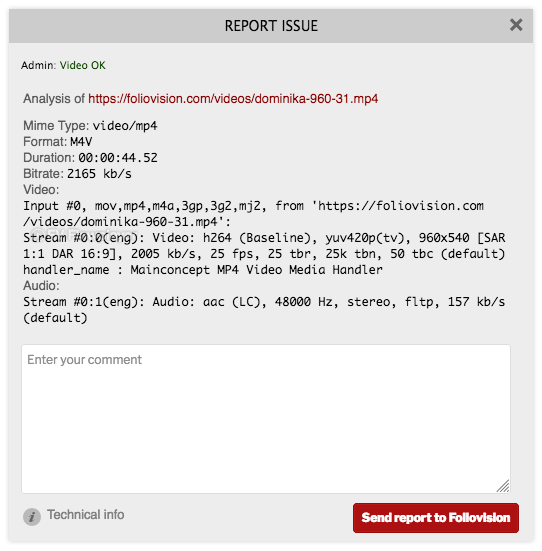
- Automated checking of video encoding for logged in admins
- Totally Brandable. Stop selling YouTube and start selling yourself. Even design your own player
- Full support for Amazon S3
- YouTube support
- Integration with the Bunny Stream video encoding service
- Integration with the Coconut.co video encoding service – using a free addon plugin: https://foliovision.com/downloads/fv-player-coconut
- API for custom video fields
- iframe embed codes
- Ultra-efficient player: just 41.8kB of Javascript. Rest is loaded later when user is going to play the video
Video presentation options:
- Scroll autoplay with the sticky video option
- Sticky video playback
- Video lightbox (works for images and galleries too, using fancyBox 3)
- Video links to point to exact time in the video
Video tracking options:
- Built-in video play stats
- Google Analytics 4
- Matomo
Pro features using the commercial FV Player Pro:
- easy AB looped playback for your visitors (great for teaching sites)
- Encrypted video support
- DRM watermark
- Video Chapters
- Full-featured Vimeo embedding
- Support for URL tokens of different CDNs: Bunny CDN, CloudFront, StackPath and Universal CDN
- Support for other video services: Vimeo, OK.ru, Odysee, PeerTube (incuding support for your own instance)
- Autoplay video only once for each visitor
- Interactive video transcript
- Timeline previews
Other extensions:
- Alternative Sources plugin for backup CDN configuration
- Cloudflare Stream plugin
- JW Player platform plugin
- Pay Per View plugin for Easy Digital Downloads and WooCommerce
- VAST plugin
- Viloud Live Streaming platform support
- Video Bookmarks and User Playlists plugin
Back to school special 25% off pro licenses until end of September.
Additional Documentation at Foliovision.com
Support |
Change Log |
Installation|
User Guide |
Detailed FAQ
External Services
FV Player uses the following external services all of which are optional:
- FV Player Pro license checks via foliovision.com – only used if you click the button to install FV Player Pro extension
- AWS – if you setup Amazon S3 with FV Player
- DigitalOcean Spaces – if you setup DigitalOcean Spaces with FV Player
- Google API via googleapis.com and gdata.youtube.com – if you setup YouTube API key to be able to obtain video splash screens, video titles and duration information when inserting videos from YouTube
- Bunny Stream API via video.bunnycdn.com – only if you setup Bunny Stream
- FV Video Checker on video-checker.foliovision.com – when you install the plugin you are prompted if you allow access to your video files to check for video encoding issues. This can also be disabled using the “Disable Admin Video Checker” setting later.
- Wistia embed codes if you use post Wistia videos
Installation
There aren’t any special requirements for FV Player to work, and you don’t need to install any additional plugins.
Visit our site for a fully featured guide with screenshots and more!
Frequently asked questions
1. I’m thinking about upgrading my FV PLayer 7 to FV Player 8. Is it easy?
Yes, the switch from FV Player 7 to FV Player 8 is easy. All the settings and videos will stay. If you already have the FV Player Pro license with active support and updates, then you will get FV Player Pro 8 automatically.
2. What are the reasons to upgrade to FV Player 8?
The main changes in FV Player 8 are: new mobile controls new editor autoplay works with browser viewport storing user video positions in a separate database table security improvements
3. My video doesn’t play in some browsers.
This should be related to your video format or mime type issues. Each browser supports different video format, MP4 is the recommended format. In general, it’s recommended to use constant frame rate. Detailed instructions about video encoding for HTML 5. Please note that MP4 is just a container, it might contain various streams for audio and video. You should check what audio and video stream are you using. Read next question to find out how.
4. How to check my video properties using the built-in checker and how to report video not playing
The video checker works automatically when you’re logged in as admin. You’ll see a text in upper left corner of any video on your site. All the necessary info can be found in this guide.
5. Player buttons are gone – there are only square symbols.
1) This can happen if your site is at www.domain.com, but the CSS is loaded from your CDN at cdn.domain.com. Based on CSS3 and HTML5 specs not all the resources can be shared between domains. So you need to set the following on your CDN for web fonts (woff, eot, ttf, svg): Access-Control-Allow-Origin: * Or you can allow your domain only (but in that case it might be good to also allow it with https): Access-Control-Allow-Origin: http://www.domain.com Or you can exclude wp-content/plugins/fv-wordpress-flowplayer/css/flowplayer.css from CDN. 2) Second cause might be that your webfonts are…
6. How do I fix the bad metadata (moov) position?
This means that the video information (such as what codecs are used) is not stored at the beginning of the file. Over they years web browsers got better at playing MP4 videos with bad metadata position, but they can still fail on iPhones. In general we recommend you to re-encode your video as per our instructions. If you have Quick Time Pro, just open the video and in the Movie Properties -> Video Track -> Other Settings turn on the “Cache (hint)” – screenshot. There are also server-side tools for fixing of this written in Python and there is even one for PHP, but it fails on videos bigger…
7. I’m getting error about ‘HTTP range requests’.
Please check with your technical support if your web server supports HTTP range requests. Most of the modern web servers support this feature (Apache, Nginx, Lighttpd, Litespeed…). It’s important for fast seeking in HTML5 video playback. Other possible cause is that you are using some membership plugin to protect downloading of your videos (Premise and others). While this might seem like a good solution, we don’t recommend it as it increases the load of your server and it won’t allow seeking in the videos. You can use Amazon S3 with privacy settings, just hit the link to read our illustrated…
8. Are there any known compatibility issues?.
We heard about problems when using some fancy pro templates like OptimizePress (read below for fixing instructions) or Gantry framework. These templates often break the WordPress conventions (probably as they often try to add too many non-template functions, like video support built-in into the template). We can debug the issues for you, just head over to our website and order the pro support. Full list of conflicting plugins is available here: https://foliovision.com/player/compatibility
9. I installed the plugin, inserted the video, but it’s not working – there is no control bar or only a gray box appears.
Go to plugin Settings screen and hit “Check template” button. It will check if both jQuery library and FV Player JavaScript is loading properly. Also, check “I’m using OptimizePress template” question above.
10. Your player works just fine, but there are some weird display issues.
Please check if these issues also appear when using the default WordPress template. There seems to be some sort of conflict between the FV Player CSS and your theme CSS.
11. Fullscreen is not working properly for me.
Are you using some old lightbox plugin like http://www.4mj.it/slimbox-wordpress-plugin/ ? Or are you putting the video into Iframe? Also, the video should not be placed in an HTML element with lowered z-index.
12. How to make this plugin WPMU compatible?.
Just copy the plugin into wp-content/plugins and then activate it on each blog where you want to use it.
13. My videos are taking long time to load.
Check your hosting for download speed. Check your video encoding to find ballance of video quality and bitrare. If you are looking for fast and efficient workflow for getting videos up on your website properly encoded and delivered to your end users, we recommend FV Coconut which integrates DigitalOcean Spaces and Coconut.co video encoding into FV Player. The videos are uploaded right in your admin dashboard when posting your articles.
14. How can I customize the player control bar? I want to add a play/pause button.
Please check our Customizing Controls guide.
15. Minify plugins are interfering with FV Player
Read our guide Using FV Player with Minify Plugins. There you’ll find how to set up plugins such as Autoptimize or WP Rocket so they work properly with the FV Player.
16. What if FV Player doesn’t work for me?
Please contact us via support. We will help you to get FV Player 8 working in your environment. FV Player Pro comes with a money back guarantee so you can even try the commercial no-branding version risk free. Or make it work first with the free versions.
17. I can’t see overlay ads on my videos
The problem is probably in AdBlock. If it’s active, the overlay ads will be blocked. Once AdBlock is deactivated for the particular domain where the video is played, the overlay ads will be displayed (page refresh needed).
Changelog
8.1.8 – 2026-10-05
- CSS: Improve all playlist scrollbars to use main skin color
- Custom video fields: Support saving for multiple posts on a single screen
- Security: Fix issue with FV Player data import
- Security: Fix issue with HTML fields
- Security: Fix issue with the synopsis field
- Security: Fix issue with video duration checking
- Settings: Removed the deprecated “Active Item”, “Background” and “Font Color” settings for playlists
- Vertical videos: Improve playlist appearance for desktop computers
- Video upload: Add plugin hooks
- Video upload: Improved reliability when uploading large videos through an unreliable internet connection
- Bugfix: CSS: Fix FV Player block selection
8.1.7 – 2026-08-20
- WordPress 7.1 support
- Security: Email subscription: Avoid calculations for MS Excel in CSV export
- Vertical videos: Do not lower subtitle size based on player width
- Vertical videos: Limit height for desktop
- Bugfix: CSS: Fix position of tags when used for playlist thumbnails
8.1.6 – 2026-07-28
- Tutor LMS: Use proper FV Player Editor when posting new videos into courses or lessons
- Bugfix: Editor: Sanitize JSON input to fix player saving in rare cases
- Bugfix: Screenshot: Fix CORS with new Freeom Video Player conf property
- Bugfix: YouTube: Fix apperance for non-standard aspect ratio videos
8.1.5 – 2026-06-18
- HLS.js upgrade from 1.6.10 to 1.7.0-beta.1 to fix rare Google Chrome playback issues
- Autoplay: Make it possible for Ajax to add player that autoplays
- Bugfix: Rename unload event internally to avoid issues with certain Google Chrome configurations
- Bugfix: Avoid captions moving up on hover or pause if using fixed controls
- Bugfix: Block: Avoid inserting video URL into video splash screen field
- Security: Avoid unauthenticated stored XSS via comment text if using the “Parse Vimeo and YouTube links” setting
- Security: “Enable profile videos” setting allowed logged in users to change profile videos of other users
- Security: “Enable profile videos” setting allowed logged in users to store videos with ads and popups to attempt stored XSS
8.1.4 – 2026-02-09
- XML sitemap: Loading speed fix
- XML sitemap: Take priority over SEOPress XML sitemaps, these require manual entry for each video
- Bugfix: YouTube: Compatibility fixes with Google Tag Manager -> Manage automatic event detection -> Video engagement
- Bugfix: Validate uploads for FV Player Coconut before uploading full file: Better error messages: Warn about server upload limits
8.1.3 – 2026-01-09
- Bugfix: LearnDash player saving for Topics
- Bugfix: LearnDash video completion saving
Screenshots
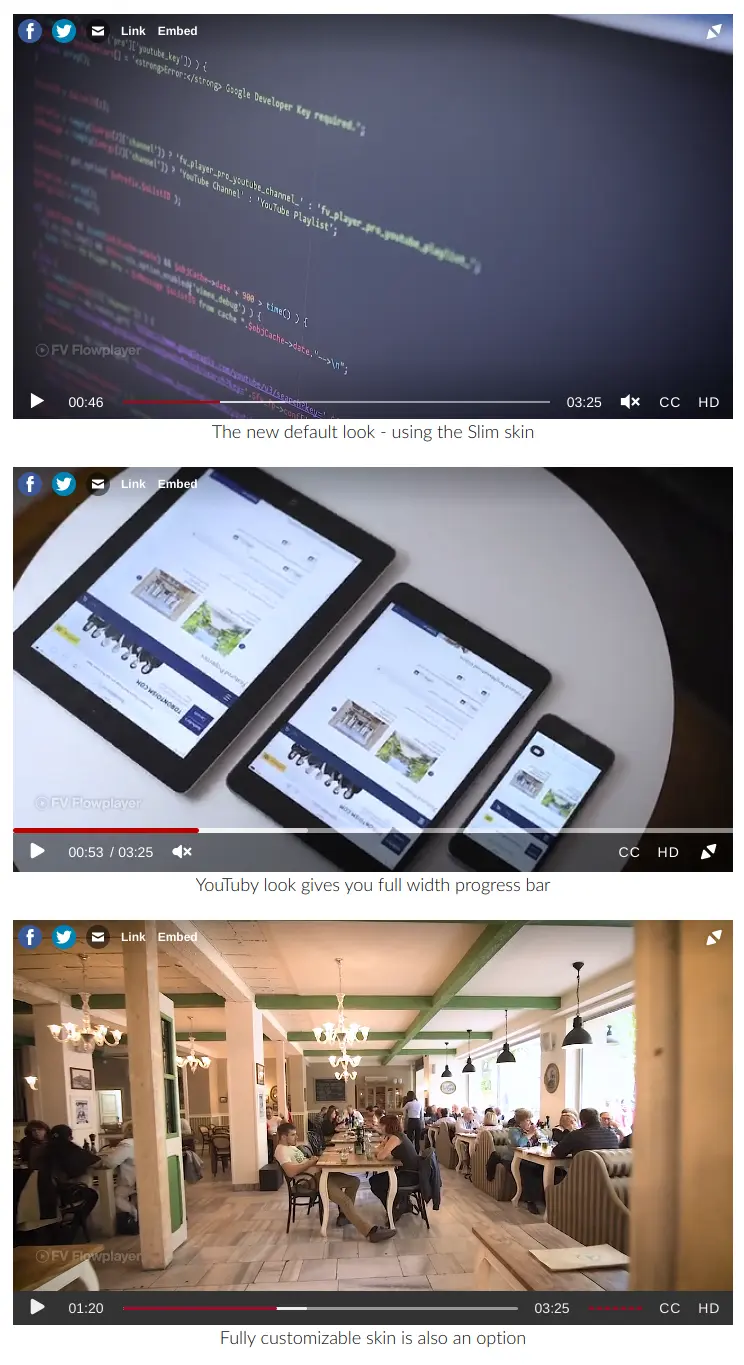
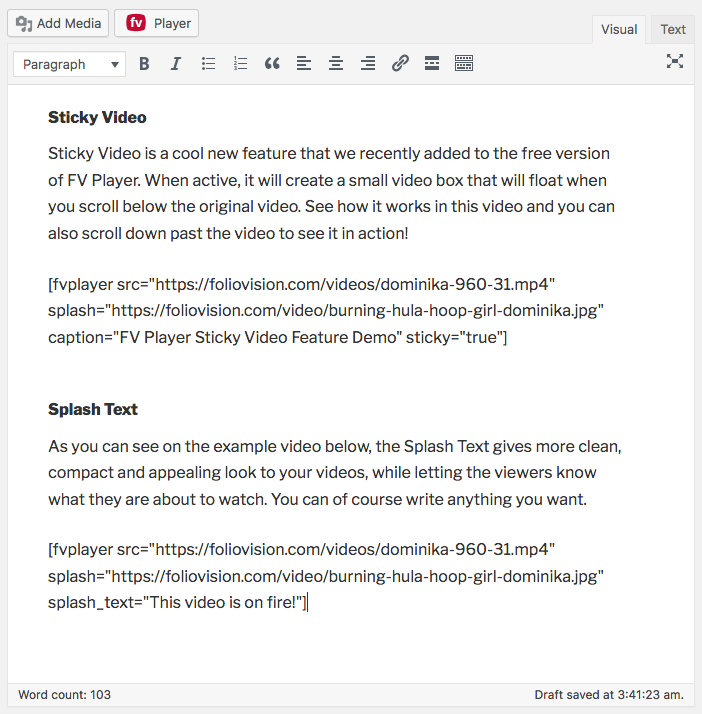
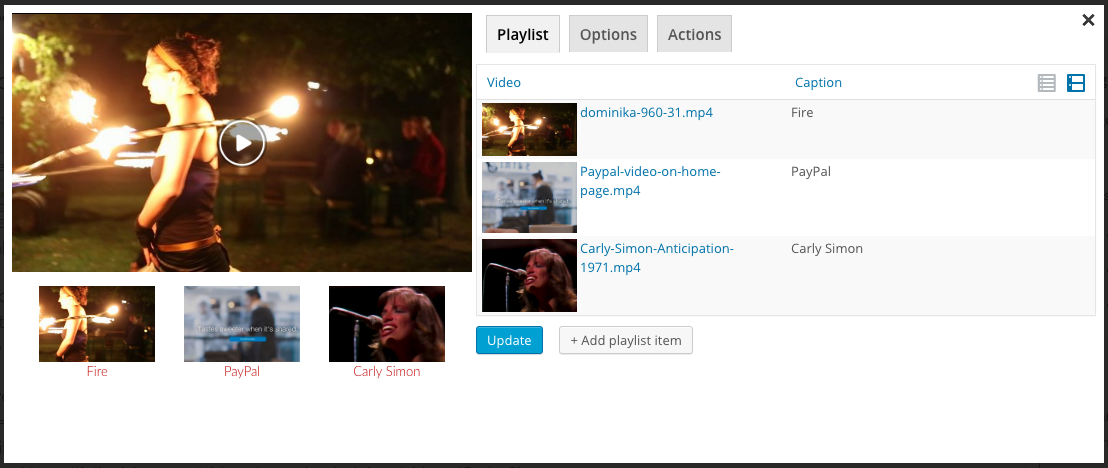
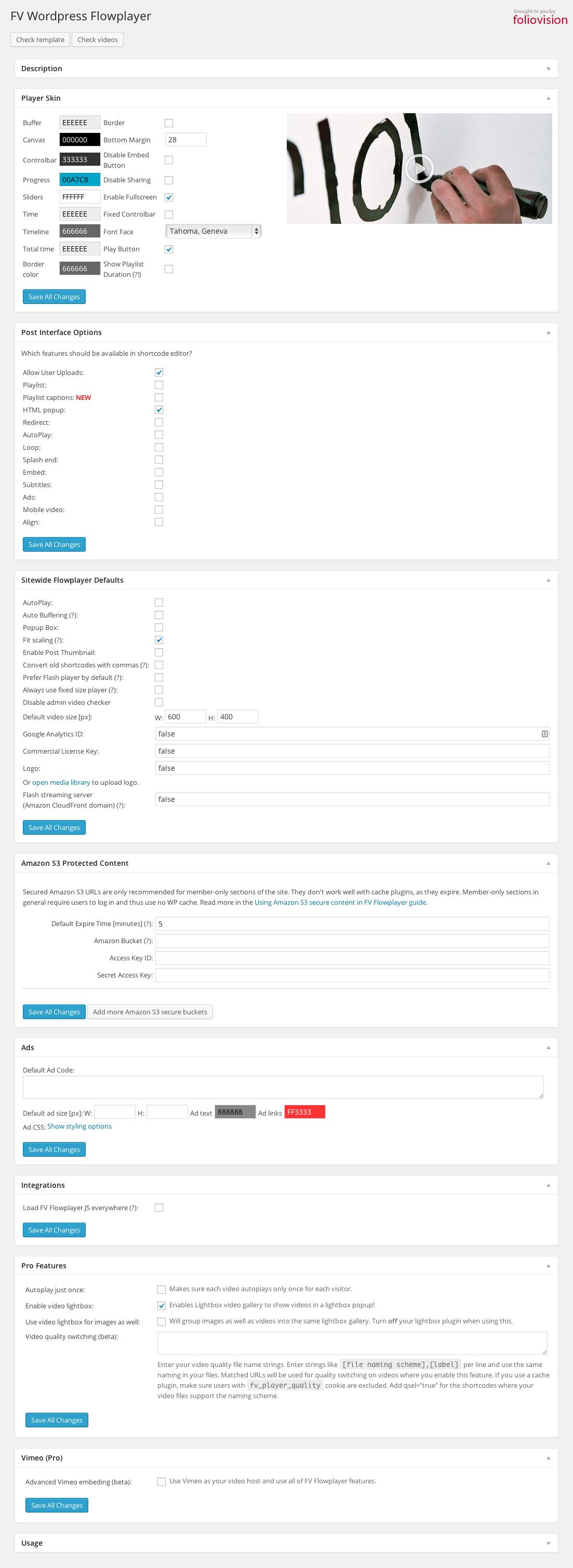
For developers
Is this your plugin? Show off the numbers.
Add a live badge to your site, docs or GitHub README. It updates on its own — no account needed.
Best FV Player 8 alternatives
All html5 player plugins →
FAQ
FV Player 8: quick answers
Straight answers, pulled from live WordPress.org data.
Live data from WordPress.org · checked Oct 7, 2026
Is FV Player 8 free?
Yes. FV Player 8 is free to download and use from the official WordPress.org plugin directory.
Is FV Player 8 safe to use in 2026?
FV Player 8 is a solid plugin choice in 2026, with a few things worth checking first. It runs on 1K+ sites, is rated 4/5 and was last updated 2 days ago, and scores 74/100 on our health check.
How many websites use FV Player 8?
FV Player 8 is active on 1K+ WordPress websites and has been downloaded 21,883 times since it launched in August 2024. It was downloaded 1,374 times in the last 30 days.
Does FV Player 8 work with WordPress 7.1?
Yes. The developer has tested FV Player 8 up to WordPress 7.1.3, the latest release. It requires WordPress 5.7 or newer.
What PHP version does FV Player 8 need?
FV Player 8 requires PHP 5.6 or higher. Most hosts run PHP 8.x today, so it works on any modern WordPress hosting.
When was FV Player 8 last updated?
The latest version, 8.1.8, was released on October 5, 2026 (2 days ago).
Who makes FV Player 8?
FV Player 8 is developed and maintained by FolioVision.
What are the best alternatives to FV Player 8?
The most popular alternatives to FV Player 8 are AudioIgniter Music Player (10K+ installs), PlayerJS (1K+ installs) and dPlayer (40+ installs).
Powered by PageForge
Want thousands of pages that rank like these? Build them in an afternoon.
This directory runs on the same engine as PageForge. Turn any spreadsheet, CSV or API into thousands of fast, SEO-ready WordPress pages — with schema, internal links and AI-written copy baked in.
- CSV, Google Sheets & API data sources
- AI content, schema & internal links per page
- Works with Elementor, Gutenberg, Yoast & Rank Math
- Free on WordPress.org — no credit card


