


Fullmetrix Reporting, Analytics & Marketing for WooCommerce
Turn WooCommerce data into actionable sales, product, customer and marketing insights with reports, segments, cohorts and LTV.

Solid choice
Fullmetrix Reporting, Analytics… is a solid plugin choice in 2026, with a few things worth checking first. Was last updated 6 days ago, and scores 64/100 on our health check.
- Actively developed — last update 6 days ago
- Tested with the latest WordPress (7.1)
- Small user base (<10 active installs)
- Very few reviews so far
How does it stack up?
Side-by-side on installs, updates, ratings & support

Daily downloads
Download spikes usually follow a new release — each site that auto-updates counts as a download.
Rankings
Where Fullmetrix Reporting, Analy… stands todayWordPress.org search rankings
Live position in the plugin search, top 100| Keyword | Position |
|---|---|
| customer segmentation | #68 |
| ecommerce analytics | >100 |
| woocommerce | >100 |
| woocommerce analytics | >100 |
| woocommerce reports | >100 |
About Fullmetrix Reporting, Analytics & Marke…
From the official readme · v1.11.0Description
Fullmetrix is a WooCommerce analytics and reporting platform built to help ecommerce teams understand performance, find growth opportunities and make better marketing decisions.
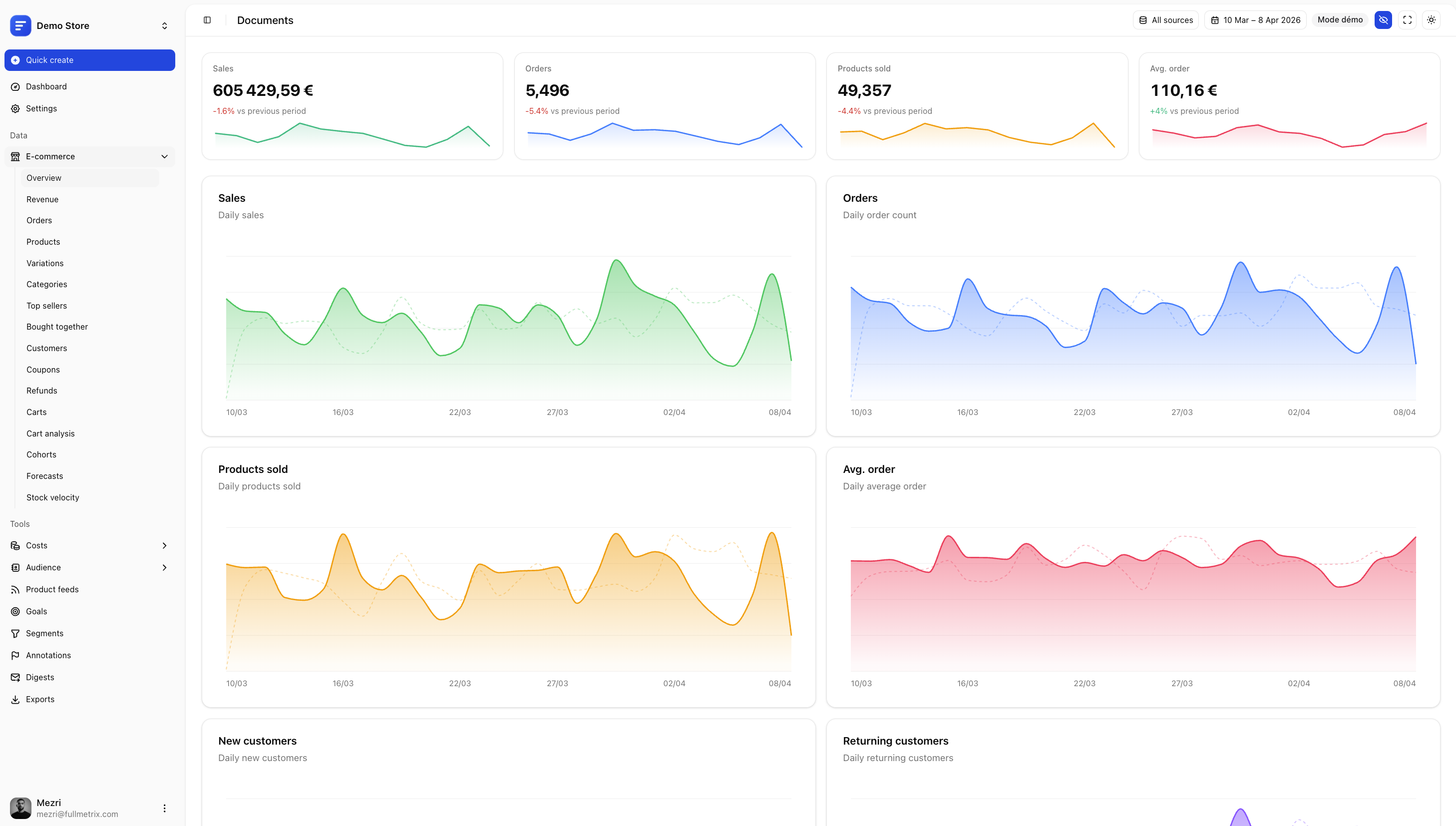
Connect your store and explore WooCommerce sales, orders, customers, products, subscriptions and marketing performance from one clear dashboard.
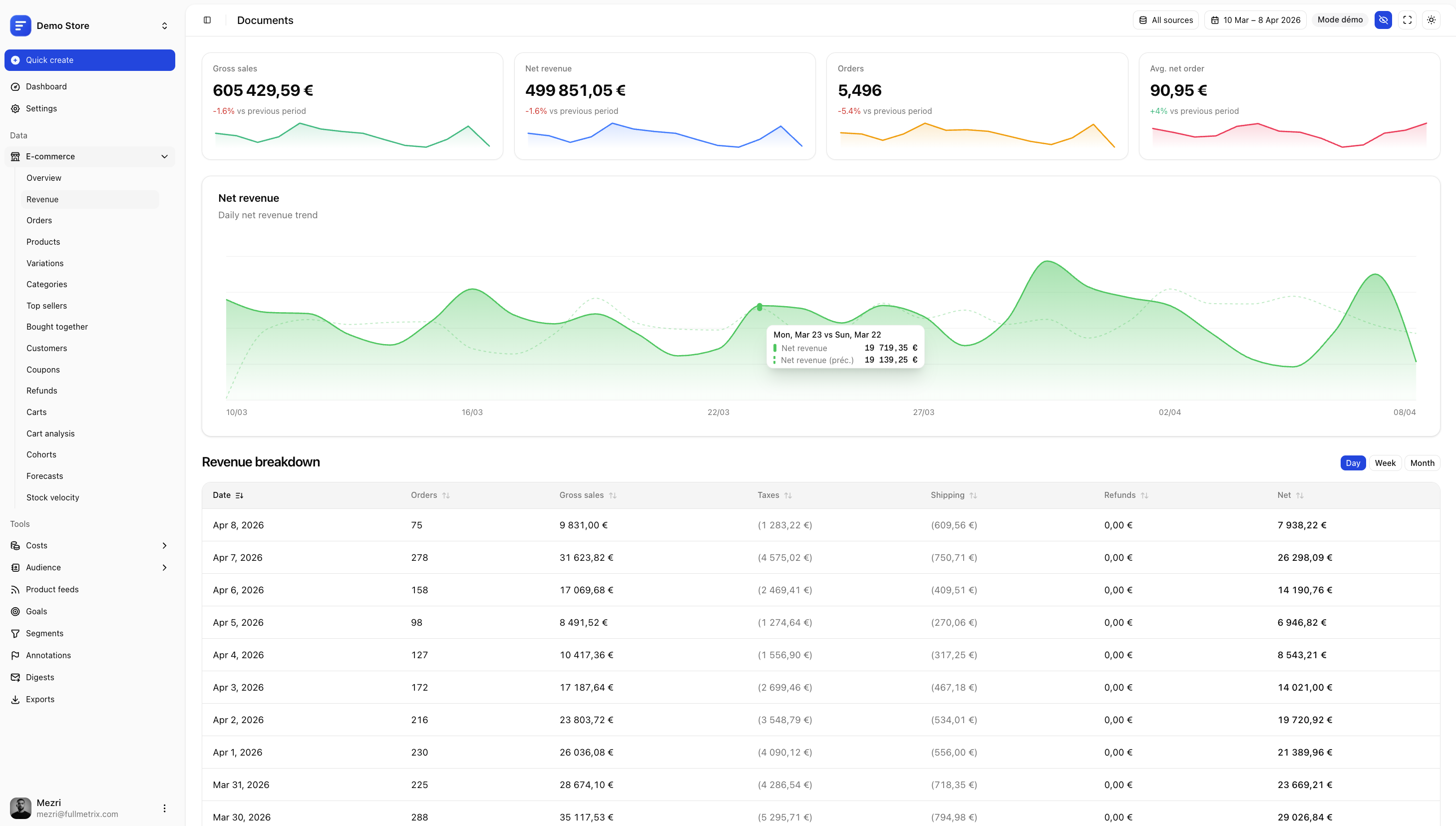
Track the metrics that matter: net revenue, average order value, customer lifetime value, repeat purchases, cohort retention, product performance, refunds, subscriptions and abandoned carts.
Fullmetrix is a hosted analytics service. A Fullmetrix account is required to connect your WooCommerce store.
WooCommerce analytics that lead to action
Go beyond standard WooCommerce reports and generic web analytics. Fullmetrix transforms your store data into ecommerce insights you can use to improve acquisition, retention, merchandising and profitability.
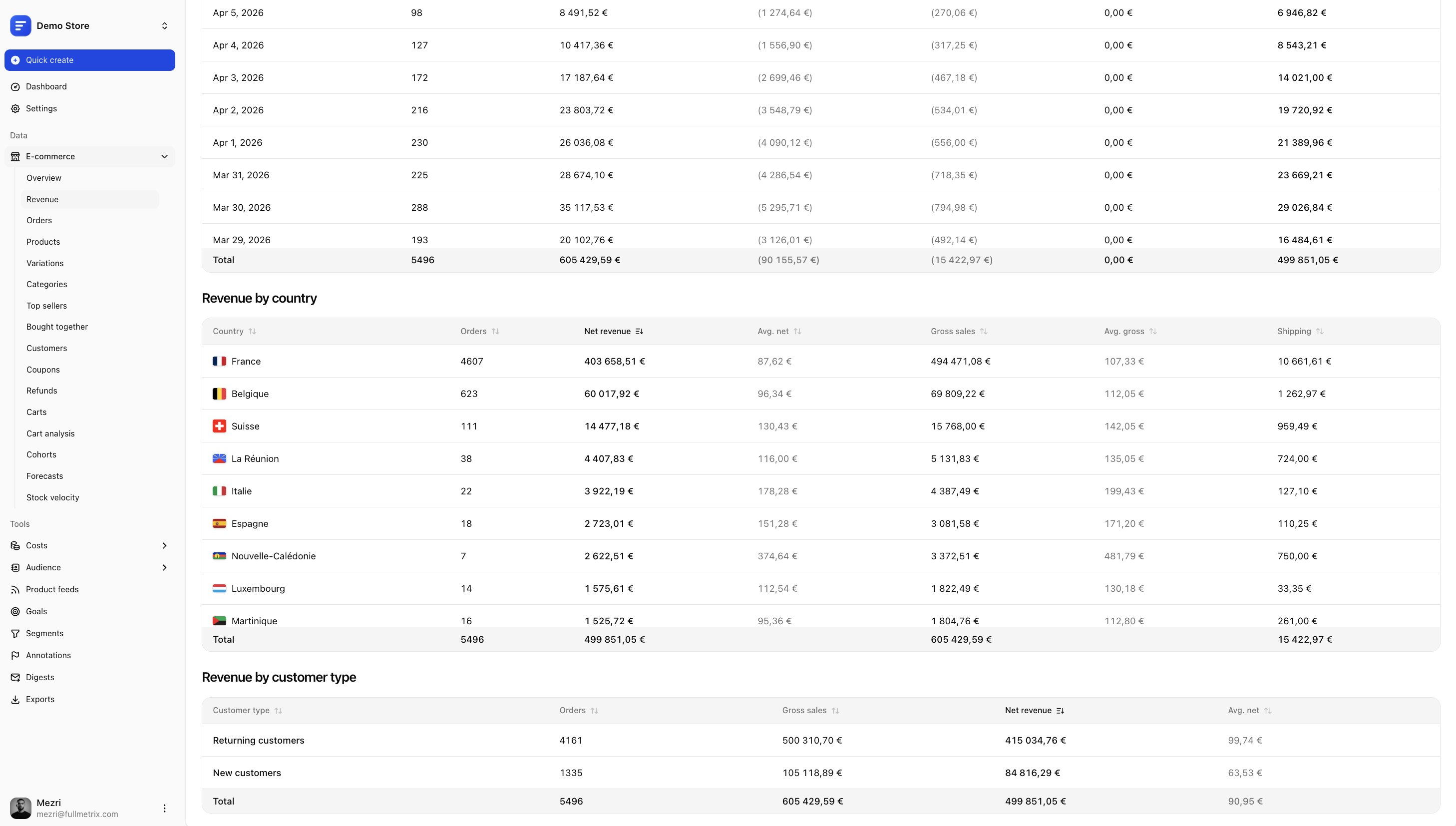
- Monitor gross and net revenue, orders, refunds and average order value
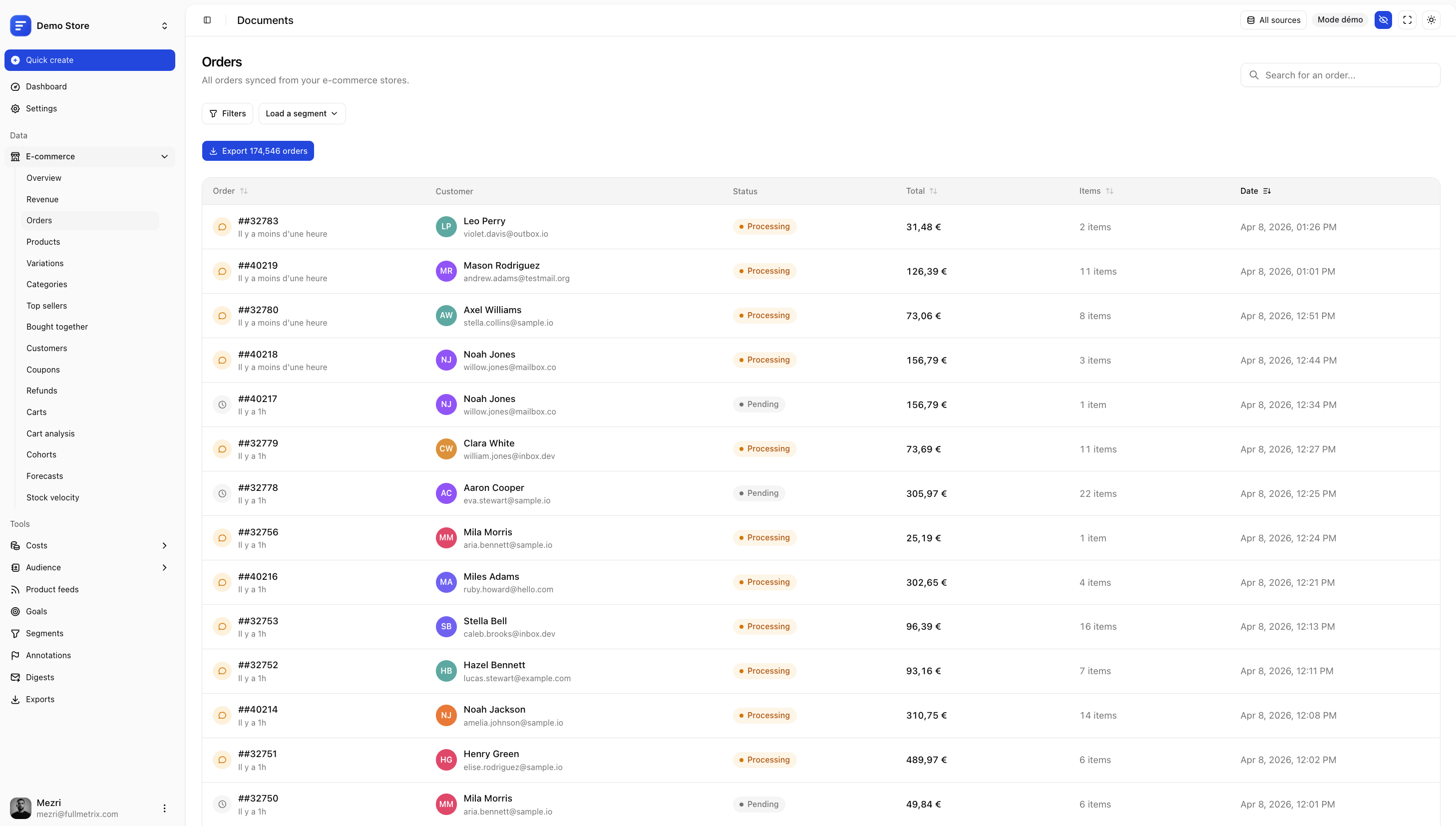
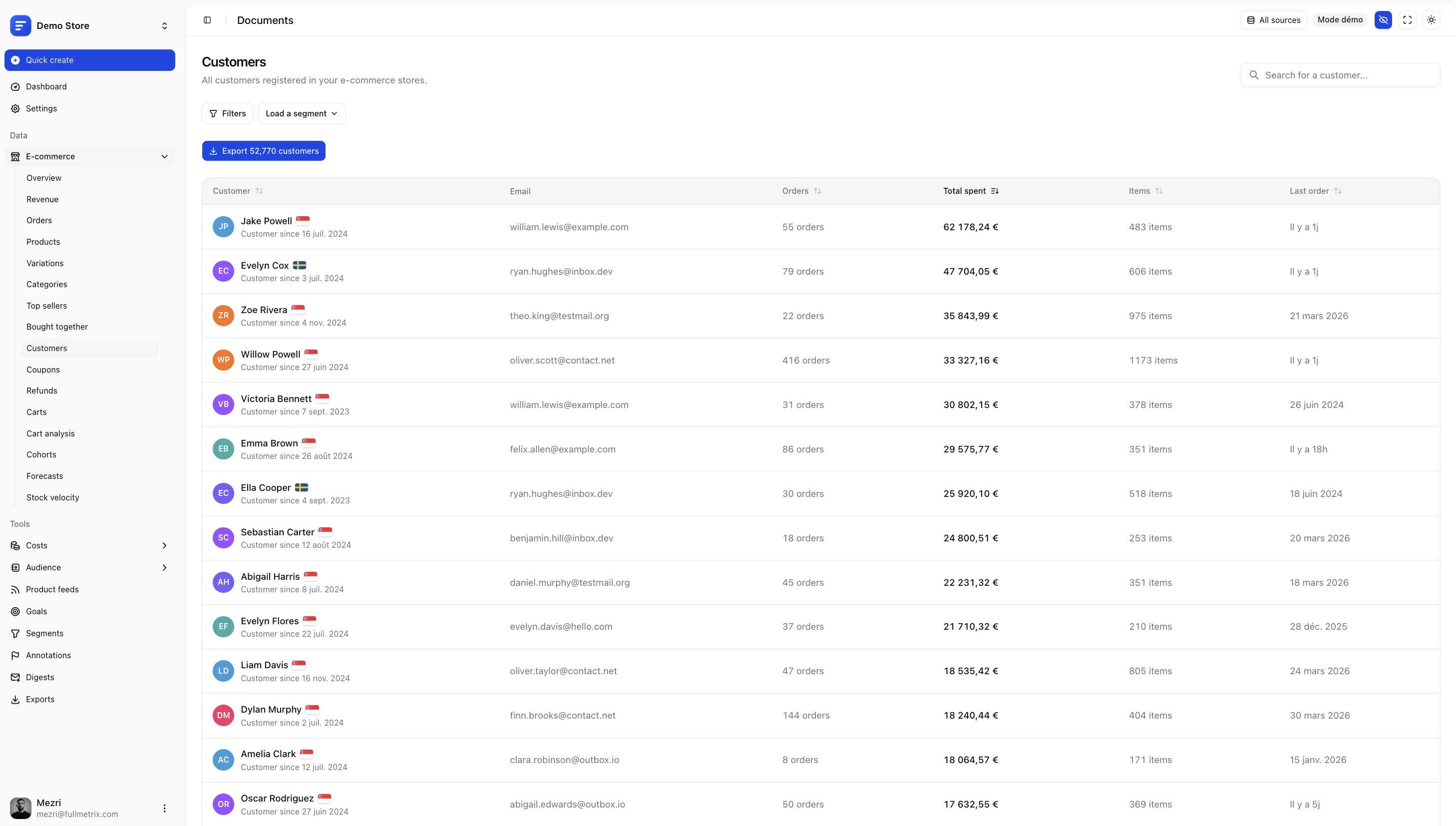
- Analyze customers, products, variations, categories and countries
- Track customer lifetime value, repeat purchase rate and retention
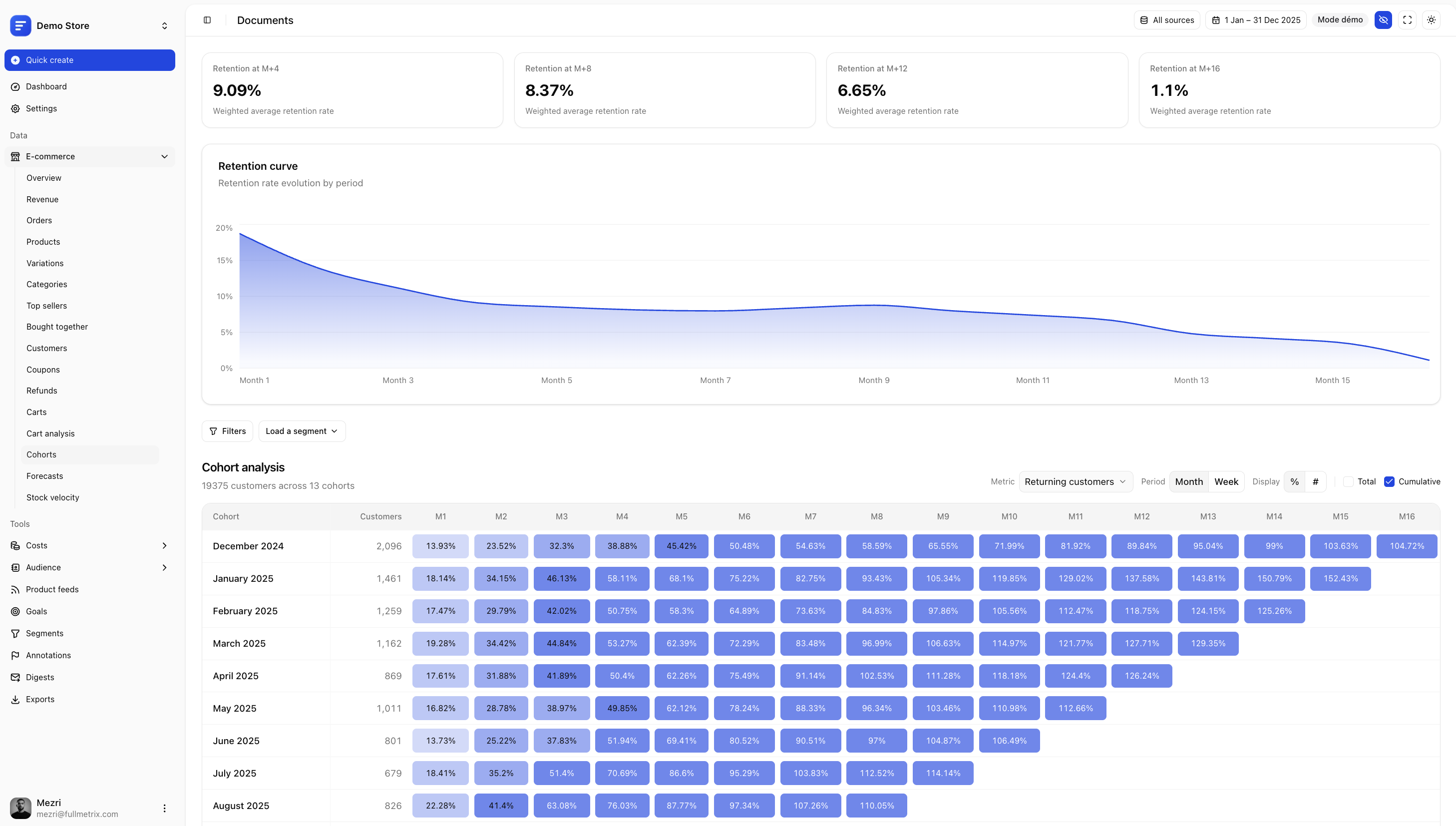
- Compare cohorts to understand how customer behavior changes over time
- Explore subscription revenue, active subscriptions and recurring customers
- Follow abandoned carts and customer activity in real time
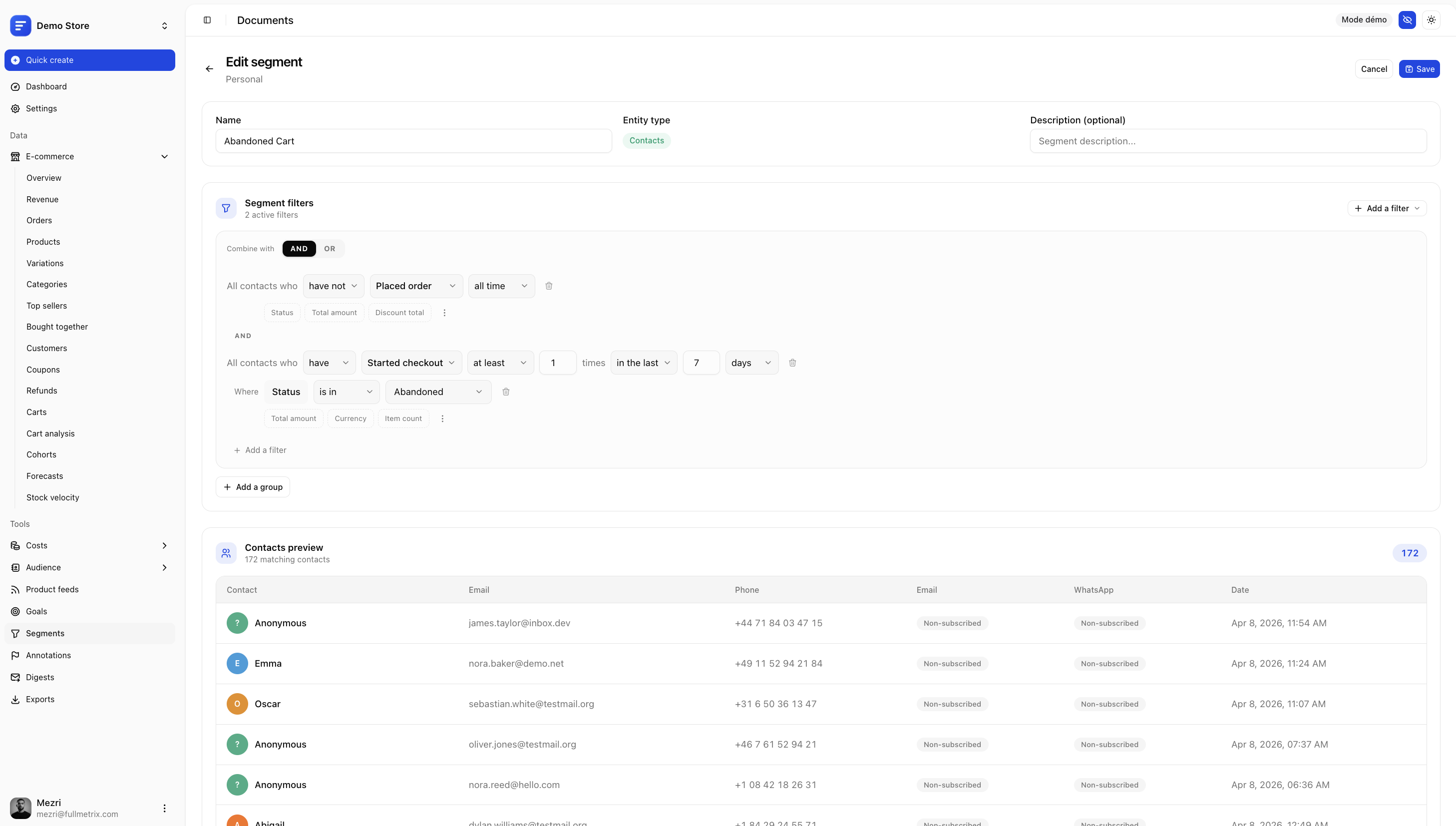
- Create reusable customer, order and product segments
- Consolidate multiple ecommerce stores in one reporting workspace
If you are looking for an alternative to Metorik, Triple Whale, Putler or other ecommerce analytics platforms, Fullmetrix brings reporting, customer intelligence and marketing activation together in one workspace.
Understand your customers
Identify your most valuable customers, first-time buyers, repeat purchasers, inactive customers and customers at risk of churn.
Use ecommerce segmentation to create audiences based on purchasing behavior, order history, products, location, customer value and other WooCommerce data.
Build segments for VIP and high-LTV customers, first-time and repeat buyers, abandoned carts, inactive customers, subscription customers and product-based audiences.
Measure retention with LTV and cohort analysis
Revenue alone does not tell you whether your store is building lasting growth. Fullmetrix helps you measure customer lifetime value, repeat purchases and cohort retention.
Compare customer groups by acquisition period and see when they return, how often they order and how much revenue they generate over time.
Analyze products and merchandising
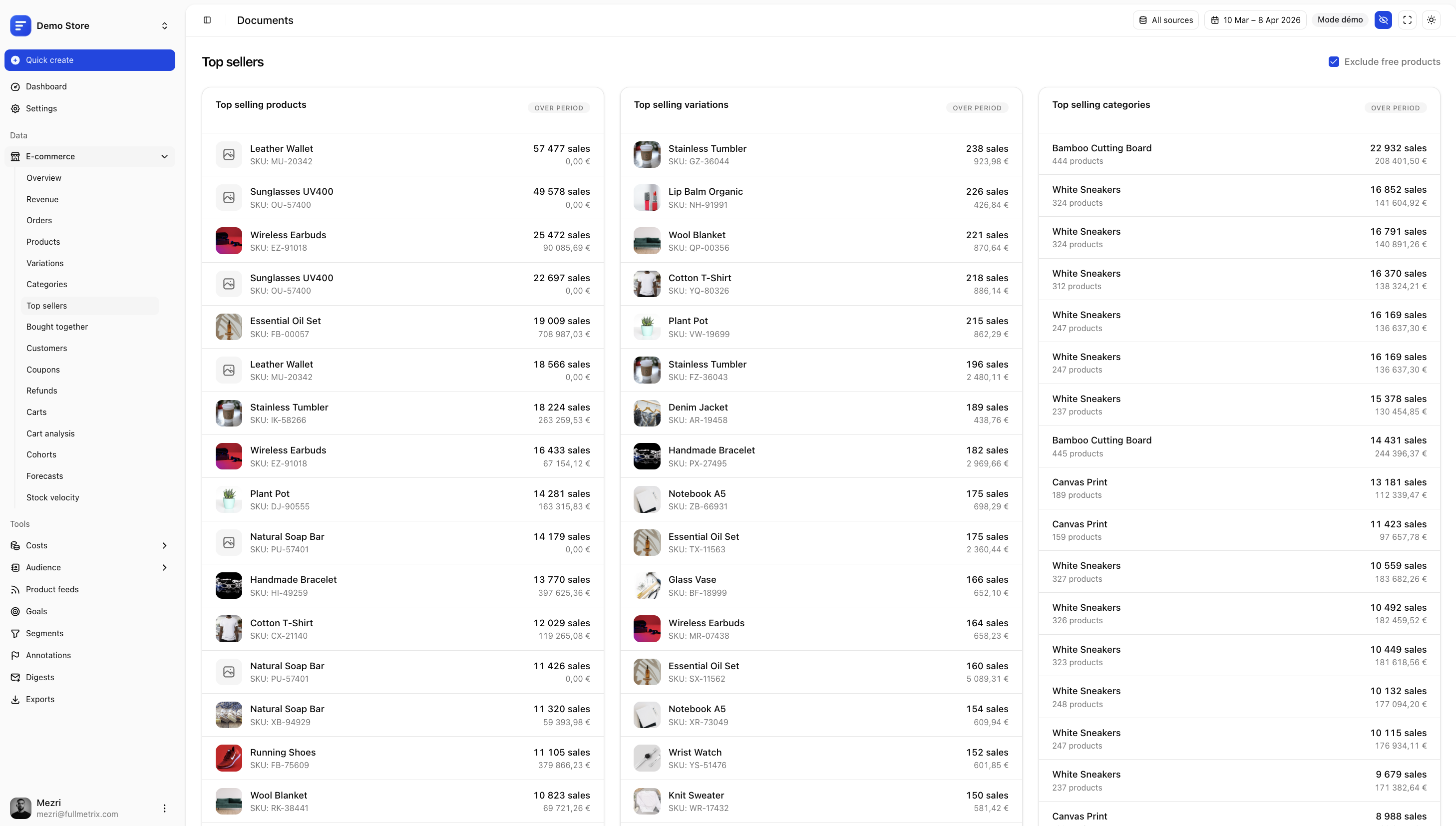
Discover which products, variations and categories generate the most sales. Explore product performance, customer purchase patterns, frequently bought-together products, sales by country and historical pricing data.
Connect analytics with marketing
Turn ecommerce insights into marketing audiences. Create customer segments and use them across acquisition and retention workflows, including audience activation for Meta Ads, Google Ads and TikTok Ads.
Connect complementary data sources such as GA4, Google Search Console and advertising platforms to understand store and campaign performance from the same workspace.
Built for WooCommerce performance
Fullmetrix synchronizes store data in the background and performs reporting outside your WordPress database. The connector supports WooCommerce HPOS and WooCommerce Subscriptions.
Get started in 2 minutes
- Create your Fullmetrix account on fullmetrix.com
- Install this plugin and paste your connection code
- Open your Fullmetrix dashboard and start growing
External services
This plugin connects your WooCommerce store to the Fullmetrix platform (fullmetrix.com). It relies on the following external service:
Fullmetrix API
What it is: Fullmetrix is an e-commerce analytics platform that aggregates and analyzes your store data.
What data is sent and when:
- On connection (one-time): Your store URL, plugin version, WooCommerce version, currency, timezone, and locale are sent to
https://fullmetrix.com/api/plugin/registerwhen you enter your connection code and click “Connect”. - On page load (frontend): The plugin loads a JavaScript tracker (
t.js) fromhttps://fullmetrix.com/t.json all public pages. This script collects anonymous visitor browsing data (page views, cart activity) and sends it tohttps://fullmetrix.com/api/webhooks/events. - On configuration check: The plugin periodically fetches its remote configuration from
https://fullmetrix.com/api/plugin/config(cached for 5 minutes). - On data sync (triggered from Fullmetrix dashboard): Orders, customers, products, categories, coupons, refunds, and subscription data are exported to Fullmetrix when a sync is initiated.
- On real-time changes: When orders, customers, products, or coupons are created or updated in WooCommerce, a webhook notification is sent to
https://fullmetrix.com/api/webhooks/ecommerce.
All communications use HTTPS and are authenticated with HMAC-SHA256 signatures. No data is sent to any third party other than the Fullmetrix service.
Privacy Policy
This plugin connects your WooCommerce store to the Fullmetrix service (fullmetrix.com). See the “External services” section above for full details on data transmission. See the Fullmetrix Privacy Policy for more details.
Installation
- In your WordPress dashboard, go to Plugins > Add New
- Search for “Fullmetrix” and click Install
- Activate the plugin
- Go to WooCommerce > Fullmetrix
- Enter your connection code from fullmetrix.com
- Your store data starts syncing automatically
Frequently asked questions
Is Fullmetrix free?
Yes, you can get started for free at fullmetrix.com. No credit card required to create your account and connect your store.
How long does setup take?
Less than 2 minutes. Install the plugin, paste your connection code, and your store data starts flowing into your dashboard automatically.
Will Fullmetrix slow down my store?
No. All syncing happens silently in the background. Your customers will not notice anything and your site speed stays exactly the same.
What kind of insights will I get?
Revenue trends, conversion data, top-selling products, customer lifetime value, cohort retention, abandoned cart recovery, audience segments, and much more: everything you need to make smarter marketing decisions and grow your store.
Can I use Fullmetrix to run ads?
Yes. Build customer segments inside Fullmetrix and sync them directly to Meta Ads, Google Ads and TikTok Ads to lower your customer acquisition cost and reach the right audience.
Does it work with WooCommerce Subscriptions?
Yes. Subscription revenue and recurring customers are tracked automatically alongside your one-time orders.
What external service does the plugin connect to?
The plugin connects your WooCommerce store to the Fullmetrix service at fullmetrix.com. Store data required for analytics and reporting is transmitted after a store administrator explicitly configures the connection. Review the Fullmetrix privacy policy and terms of service before connecting your store.
Changelog
Calls from Fullmetrix use a stronger signature and the previous one is refused. Update Fullmetrix-connected stores to this version.
1.11.0
- Security: calls from Fullmetrix are signed with the method, the exact query, a timestamp, a single-use nonce for commands and the body hash, and bound to the endpoint they target. The previous signature is refused. It can only be re-enabled from the server for an emergency, with
wp option update fullmetrix_signature_v1 1. - Security: JSON answers to Fullmetrix are signed.
- Fixed: an export query that keeps failing now stops the stream instead of reporting it complete. Related tables are read faster and without losing columns, the updated orders, products and customers listings are paged without duplicates, and coupon creation rejects invalid values.
1.10.1
- Fixed: the customer sync no longer stops on stores where many extensions link their own tables to customers
1.10.0
- Improved: order, product, customer and coupon updates are sent to Fullmetrix in the background through Action Scheduler instead of during the shopper’s request
- Improved: every call to Fullmetrix uses a short timeout and a circuit breaker that pauses calls for 5 minutes after repeated failures, with separate breakers for storefront calls, cart recovery links and background jobs
- Improved: background updates that cannot reach Fullmetrix are retried later instead of being dropped
- Improved: the plugin settings keep their last valid copy during an outage, a failed refresh is retried after 10 minutes and times out after 2 seconds, and the settings are cleared when the store is disconnected
- Improved: server cart events are sent after the page has been delivered to the shopper
- Improved: checkout consent is signed and sent in the background through Action Scheduler, and retried until Fullmetrix confirms it, so a consent given during an outage is no longer lost
- Fixed: a free gift coupon whose gift is out of stock no longer adds a stock error that blocked the checkout
- Fixed: the Blocks checkout no longer saves the order a second time and no longer sends consent on each draft update
- Fixed: displayed product prices sent to Fullmetrix are always computed for the store address, whoever triggers the update
- Fixed: order storage detection no longer counts every order when WooCommerce reports the storage in use
- Added: Fullmetrix can switch off webhooks, server cart events, checkout consent and free gift additions remotely
1.9.1
- Fixed: stores that switched back from HPOS to WordPress posts storage export their new orders again, the exporter now follows the order storage selected in WooCommerce
- Fixed: variable, grouped and external products are exported with their real product type instead of simple
- Fixed: store counts exclude checkout drafts and auto-draft products, matching the exported data
1.9.0
- Fixed: a full import now resumes exactly where it stopped when the store server truncates an oversized response, instead of restarting and hitting the same cut
- Fixed: orders, refunds and subscriptions are exported in ascending id order, aligned with every other entity
- Fixed: a lost database connection no longer loops an export indefinitely
1.6.3
- Added: displayed customer prices, regular prices and sale prices are included for products and variations
- Added: order lines include tax-inclusive pre-coupon prices for reliable historical price reconstruction
Screenshots

For developers
Is this your plugin? Show off the numbers.
Add a live badge to your site, docs or GitHub README. It updates on its own — no account needed.
Best Fullmetrix Reporting, Analyti… alternatives
All customer segmentation plugins →FAQ
Fullmetrix Reporting, Analytics & M…: quick answers
Straight answers, pulled from live WordPress.org data.
Live data from WordPress.org · checked Oct 6, 2026
Is Fullmetrix Reporting, Analytics… free?
Yes. Fullmetrix Reporting, Analytics… is free to download and use from the official WordPress.org plugin directory.
Is Fullmetrix Reporting, Analytics… safe to use in 2026?
Fullmetrix Reporting, Analytics… is a solid plugin choice in 2026, with a few things worth checking first. Was last updated 6 days ago, and scores 64/100 on our health check.
How many websites use Fullmetrix Reporting, Analytics…?
Fullmetrix Reporting, Analytics… is active on <10 WordPress websites and has been downloaded 1,236 times since it launched in April 2026. It was downloaded 322 times in the last 30 days.
Does Fullmetrix Reporting, Analytics… work with WordPress 7.1?
Yes. The developer has tested Fullmetrix Reporting, Analytics… up to WordPress 7.1.3, the latest release. It requires WordPress 6.2 or newer.
What PHP version does Fullmetrix Reporting, Analytics… need?
Fullmetrix Reporting, Analytics… requires PHP 7.4 or higher. Most hosts run PHP 8.x today, so it works on any modern WordPress hosting.
When was Fullmetrix Reporting, Analytics… last updated?
The latest version, 1.11.0, was released on October 1, 2026 (6 days ago).
Who makes Fullmetrix Reporting, Analytics…?
Fullmetrix Reporting, Analytics… is developed and maintained by fullmetrix.
What are the best alternatives to Fullmetrix Reporting, Analytics…?
The most popular alternatives to Fullmetrix Reporting, Analytics… are Clerk (400+ installs) and Yespo CDP for WooCommerce:… (20+ installs).
Powered by PageForge
Want thousands of pages that rank like these? Build them in an afternoon.
This directory runs on the same engine as PageForge. Turn any spreadsheet, CSV or API into thousands of fast, SEO-ready WordPress pages — with schema, internal links and AI-written copy baked in.
- CSV, Google Sheets & API data sources
- AI content, schema & internal links per page
- Works with Elementor, Gutenberg, Yoast & Rank Math
- Free on WordPress.org — no credit card


