


Freshet Unused Media
Find unused media and unused images in the WordPress media library — checks ACF, page builders, options and raw URLs — and safely delete what isn't.

Solid choice
Freshet Unused Media is a solid plugin choice in 2026, with a few things worth checking first. It runs on 10+ sites and was last updated 5 days ago, and scores 66/100 on our health check.
- Actively developed — last update 5 days ago
- Tested with the latest WordPress (7.1)
- Small user base (10+ active installs)
- Very few reviews so far
- Needs PHP 8.1 or newer
How does it stack up?
Side-by-side on installs, updates, ratings & support



Daily downloads
Download spikes usually follow a new release — each site that auto-updates counts as a download.
Rankings
Where Freshet Unused Media stands todayWordPress.org search rankings
Live position in the plugin search, top 100| Keyword | Position |
|---|---|
| attachments | >100 |
| cleanup | >100 |
| media library | >100 |
| unused images | #91 |
| unused media | #51 |
Version adoption
Share of active sites per release.
About Freshet Unused Media
From the official readme · v1.1.0Description
WordPress’ own “Uploaded to” column only tracks where a file was first attached — it says nothing about where a file is actually used. Files referenced from ACF fields, featured images, galleries, widgets, the customizer logo, WooCommerce product galleries or plain URLs in content all look “unattached”, and genuinely unused files look no different from files your site depends on.
Freshet Unused Media scans everywhere a reference can hide and tells you, per attachment, exactly where it is used — or that it provably isn’t.
A media library cleaner that shows its evidence: find unused images, delete or remove unused media, clean up the media library and free up disk space — without deleting a file something still shows.
What it detects
- ACF fields: image, gallery, file — including serialized values and repeater/flexible sub-fields, verified via ACF’s own field-key meta
- ACF blocks: field values stored inside the block markup, where no URL is ever written
- Featured images and WooCommerce product galleries
- Block editor content: image blocks, gallery blocks,
wp-image-Nclasses - Classic content:
[gallery]and[playlist]shortcodes, page-builder shortcodes holding an ID (image="123"), and raw file URLs, including resized variants likephoto-300x200.jpg,-scaledfiles and percent-encoded filenames - Elementor page data
- Options and theme mods: site icon, custom logo, widgets, customizer settings — serialized or JSON
- Term meta and user meta (ACF fields on categories and profiles)
- Term descriptions — an image or an ID in a category, tag or product-category description
- Comments and comment meta (a file linked in a reply, review photos)
- Excerpts, and unsaved edits held in autosaves
How it works
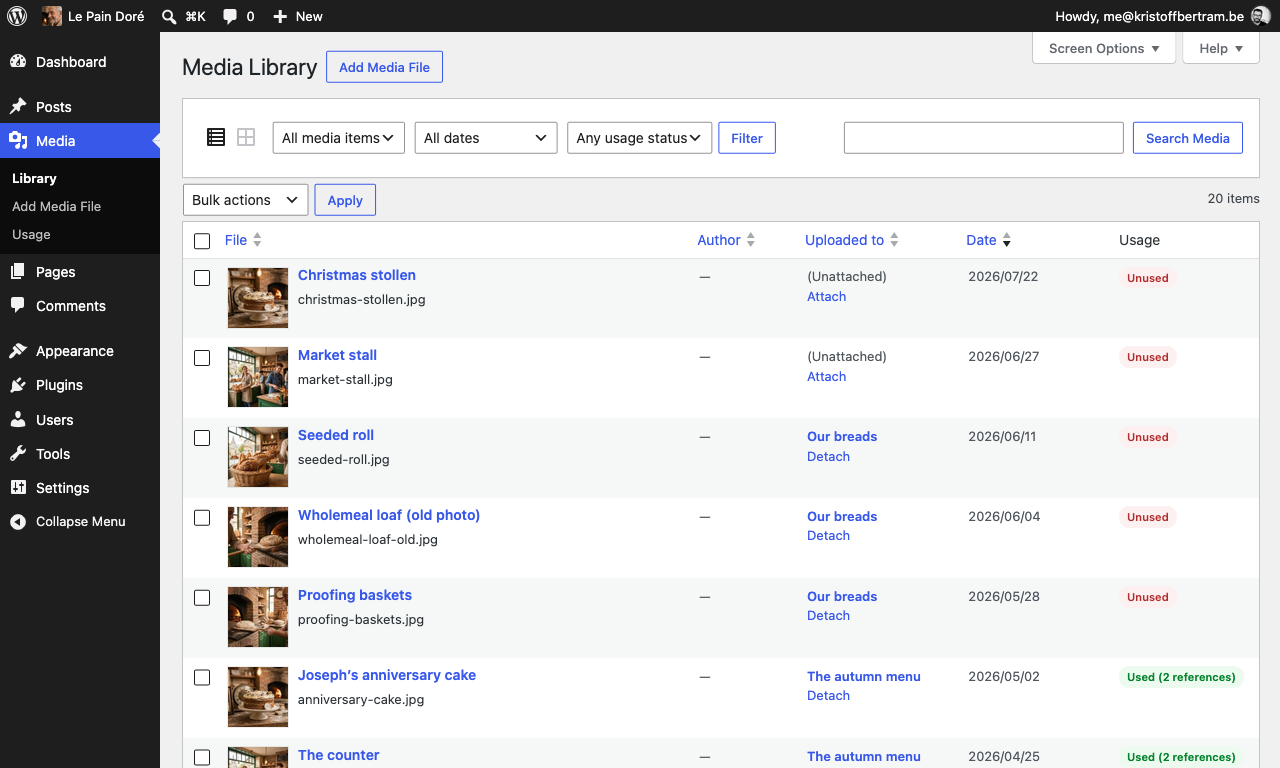
- A Usage column in the Media Library (list mode) with a per-file “Check usage” action
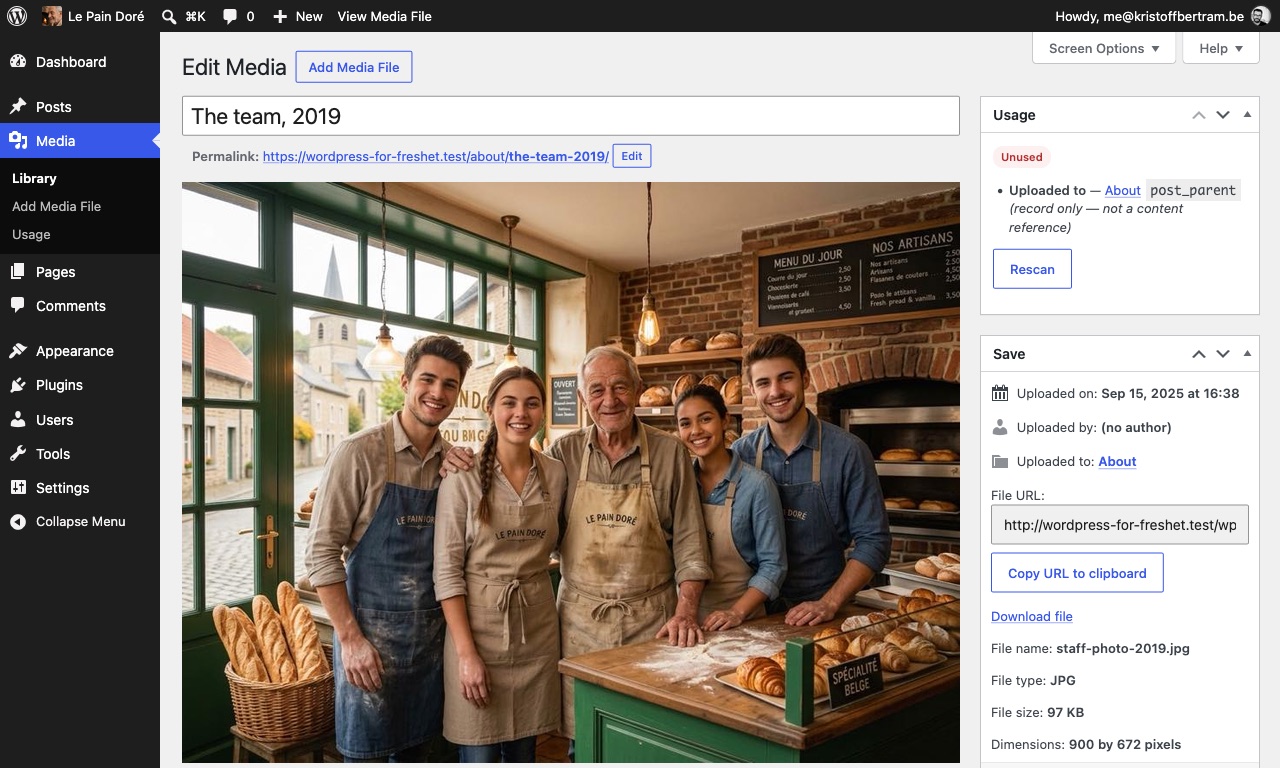
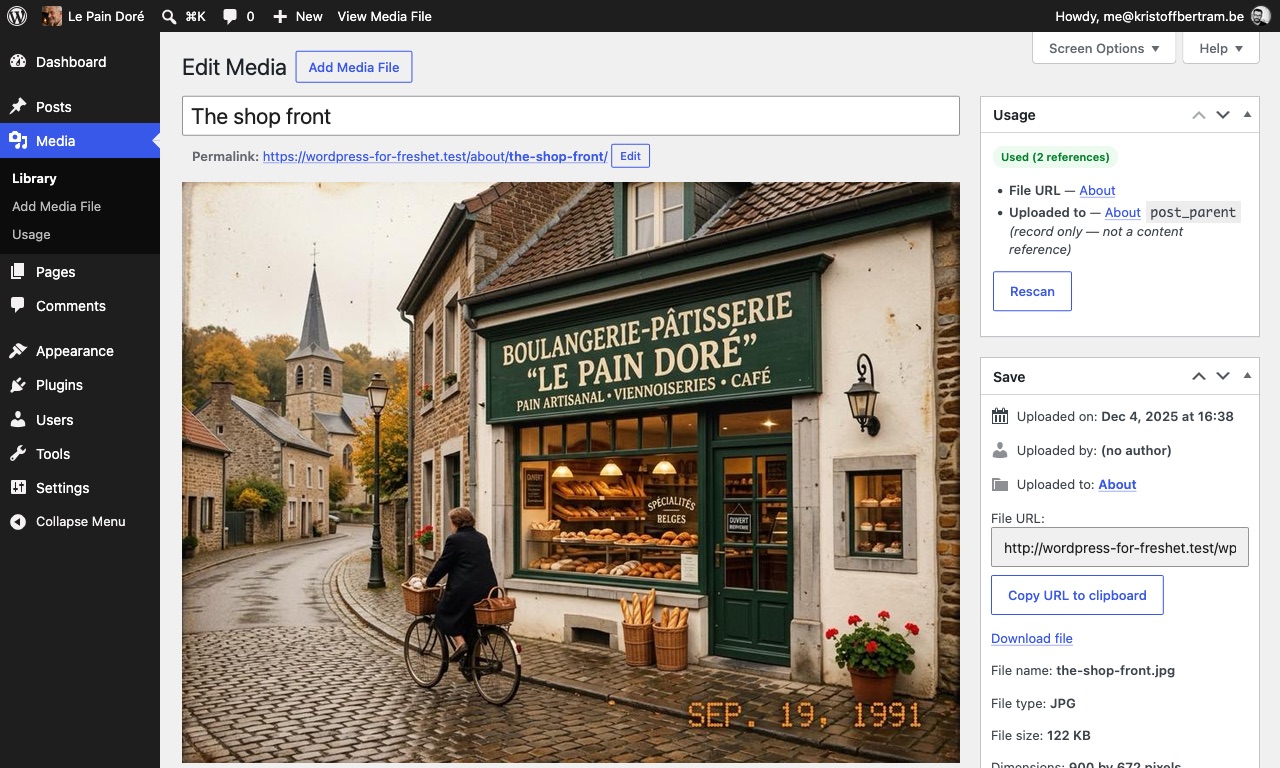
- A Usage meta box on the attachment screen showing the evidence: which post, which field, which option — with edit links
- A full-library scan (Media → Usage) that batches through your library in the browser, resumable at any time
- Safe deletion: delete selected or all unused files, each one re-checked before it goes
Why the answer can be trusted
Deleting media is destructive, so the scan is built to be wrong in one direction only — towards keeping the file.
- Ambiguity counts as used. A bare attachment ID in a meta key the plugin has never seen keeps the file. Matches are boundary-checked, so attachment 123 is never matched by
wp-image-1234. - Every file is re-checked in the instant before it is deleted. Anything that became used between the scan and your click is skipped rather than deleted, and the result tells you how many were skipped.
- A reference in the trash still counts. A trashed post or comment can be restored, so the files it uses are kept.
- Files uploaded in the last 24 hours count as in use — an editor may still be placing them — so a clean-up never removes work in progress.
- The evidence is shown, not summarised. Every reference is listed with the object it lives in, the field or option it was found in, and a link to go and look: you can check the reasoning before you act on it.
- The blind spot is written down. References kept inside a plugin’s own custom database tables cannot be found by any query-based scanner, and the FAQ below names that limit rather than leaving you to discover it.
The “Uploaded to” relation itself is shown as informational evidence but never counts as usage — that unreliable signal is exactly what this plugin replaces.
Thoroughness is the point rather than speed: a first full scan of a large library can take hours rather than minutes. It runs in batches that stop before the PHP time limit and resume where they left off, so a scan always makes progress and never has to be started over.
Extensible
Site-specific detectors can be added via the freshet_unusedmedia_detectors filter; freshet_unusedmedia_is_used gets the final say on any status; freshet_unusedmedia_batch_size and freshet_unusedmedia_batch_seconds tune scan batches; freshet_unusedmedia_upload_grace sets the recent-upload window in seconds (0 disables it).
Part of the Freshet plugin suite. Full documentation: freshet.studio/docs. Questions and problems: freshet.studio/support.
Installation
- Upload the plugin and activate it.
- Go to Media → Usage and run a full scan.
- Review the unused list, then delete selected files or all unused ones.
Tip: add define( 'MEDIA_TRASH', true ); to wp-config.php so deletions go to trash instead of being permanent.
Frequently asked questions
Can it be wrong?
Detection is deliberately conservative: filename and structural matches are boundary-checked (attachment 123 never matches wp-image-1234), ambiguous ID matches count as used, and every file is re-verified right before deletion. What it cannot see is anything outside the tables it reads — posts, postmeta, options, term descriptions, term meta, user meta, comments and comment meta. The blind spot most worth knowing about is inside your database, not outside it: references stored in a plugin’s own custom database tables — form entries, slider or page-builder records, any plugin that keeps…
Does it delete unused images?
Yes, once the scan has shown that nothing on the site uses them. Images, documents, audio and video are all judged the same way: every place a reference can live is read, the evidence is listed per file, and a file with no reference anywhere is offered for deletion. Deleting removes the file and every resized copy WordPress made of it, or moves the entry to the media trash when MEDIA_TRASH is on. Nothing is deleted until you click a delete action, and each file is re-checked in the instant before it goes.
Is it safe to bulk delete unattached media?
No. Deleting on the strength of the Unattached filter deletes files that are in use. Media deletion in WordPress is permanent unless MEDIA_TRASH is enabled, so the references have to be searched for before anything is removed. Run the full scan first and bulk delete from the unused list instead: every file on it has been checked everywhere a reference can hide, and is checked once more before it goes.
How is this different from the “Unattached” filter?
Unattached only means the file was not uploaded from inside a post editor. WordPress records the post you were editing at upload time and nothing else, so a file used in a custom field, a page builder, a widget or a theme setting is shown as unattached while being displayed on the site every day. This plugin reads the places a file is actually referenced from: post content, custom fields (ACF included), featured images, galleries, options and theme mods, widgets, term and user meta, comments and raw URLs. “Uploaded to” is shown as information but never counts as usage.
How long does a full scan take?
Longer than a scanner that only looks at the “Uploaded to” column, because it looks everywhere else as well. On a large library the first full scan is measured in hours, not minutes. It runs in batches from the Media → Usage screen, each batch stops before the PHP time limit and the next one resumes from the last completed file, so the scan always makes progress and can be stopped and picked up later. Nothing runs on a schedule — a scan happens when you start one.
Does a file referenced from the trash get deleted?
No. A trashed post or comment can be restored, so a reference from one keeps the file — it is reported as a possible reference rather than a confirmed one, and possible still counts as used.
What about files that are themselves in the media trash?
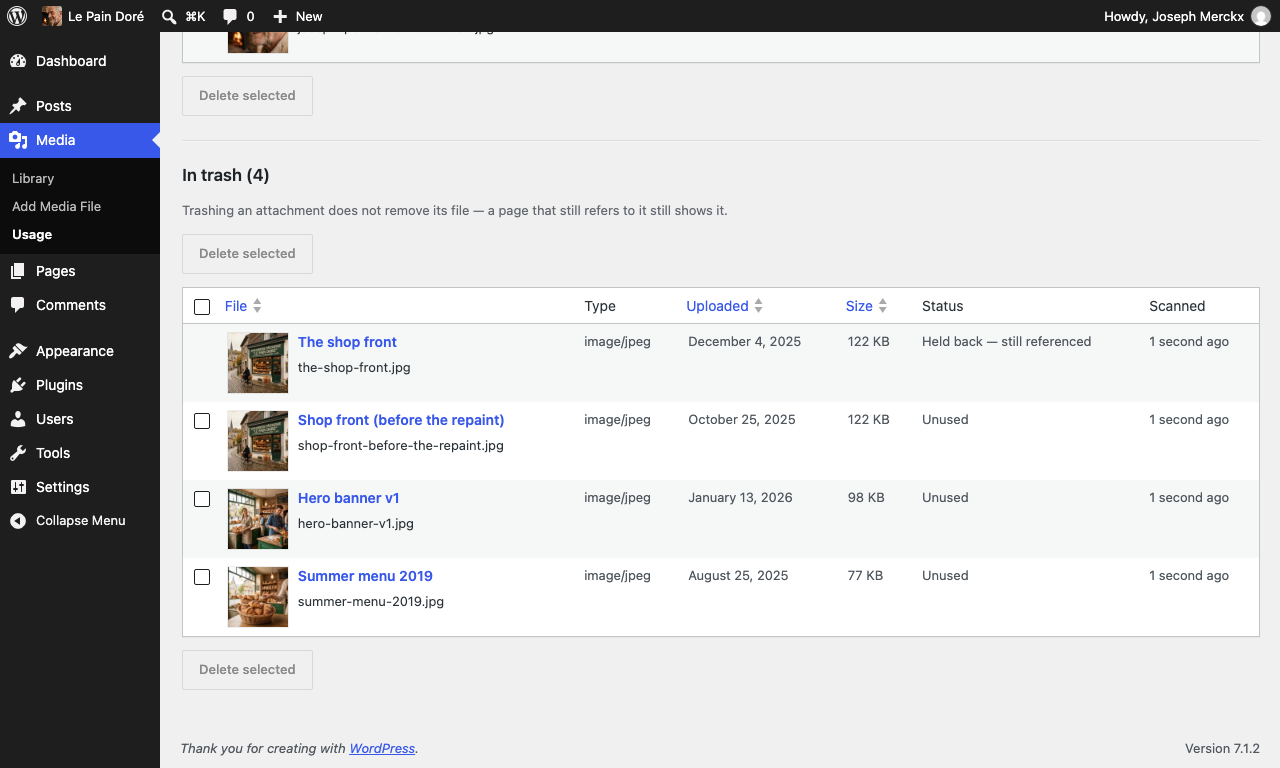
A file whose every library entry is in the trash is listed in its own “In trash” section under the unused list, and can be erased from there once the scan has found every entry unused — it never joins the unused list or its count, and a copy still in use is held back there too.
Does it work with multisite?
Per site, yes. Cross-site references (another site embedding this site’s file URL) are not detected.
Does it delete anything by itself?
Never. Scanning only reads and caches results. Deletion happens exclusively when you click a delete action, after re-verification. Opening the page deletes nothing.
Where do I get help?
Write to the address on freshet.studio/support. Support is email, read by the person who wrote the plugin — say which plugin, which version, and what you saw, and a screenshot covers most of that in one go. Questions here in the WordPress.org support forum are read too.
Changelog
1.1.0
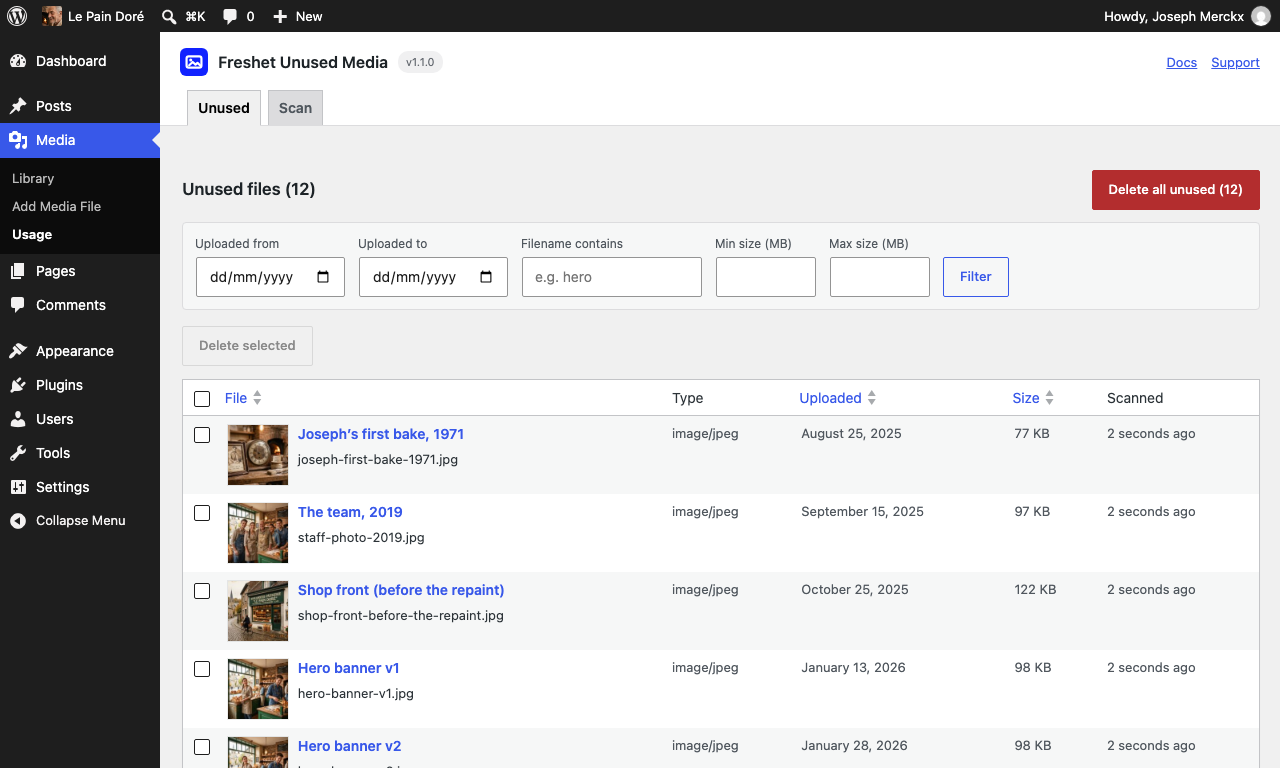
- “Delete selected” is no longer live until you have ticked something. Pressing it with an empty selection used to ask you to confirm a deletion, then report “Deleted 0, skipped 0, failed 0” as a success — two steps that both read as if something had happened. The button now starts disabled and says what to do if you hover it, and lights up the moment a row in that list is ticked.
- The screens explain themselves a great deal less. The Usage box on the Edit Media screen has lost five of its six paragraphs: each of them restated the badge sitting directly above it (“Not scanned yet.” under Not scanned, “No references found anywhere.” under Unused). What is left is the one paragraph that names the other library entry holding a shared file, because it carries the only link to it. The Scan tab has lost everything below the scan button — the list of the places a scan looks, the line about ambiguity counting as used, the two reasons to run it again — and the In trash section is down from a lead and three points to the one sentence you could not have read off the screen. Nothing about what the plugin detects, judges or deletes has changed; the caveat about files uploaded in the last 24 hours now lives only on the Unused tab, which is the screen you are on when you go hunting for one.
- The delete confirmations count in the right unit, and now have a singular. They said “attachments” for a figure that has always counted files, and a list filtered down to one file asked “Delete all 1 unused files matching the current filter?”.
1.0.10
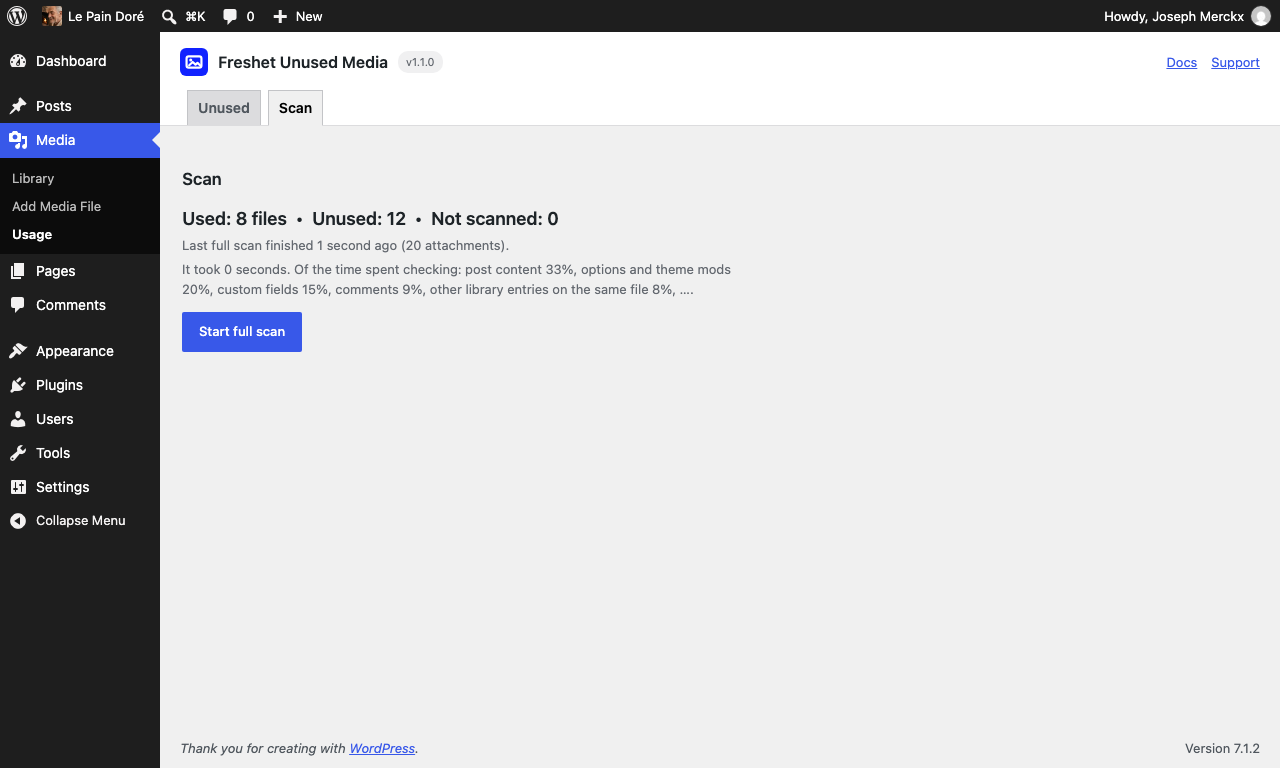
- Media → Usage puts the scan button where the scan is. The Scan tab now reads figures, when the last scan finished, then the button — the three paragraphs explaining what the scan looks at have moved below it, where they are still there to read and no longer sit between you and the thing you came to press.
- A rule now separates the unused files from the ones in the trash, so the In trash section reads as the different set it is rather than as more of the list above it.
1.0.9
- Less explaining, more screen. Media → Usage has lost the paragraphs that described what the lists already show: the intro above Used files, the note list above Unused files, and the two paragraphs around the Space figures. What is left is the heading, the figures and the files.
- The file lists now look like the Media Library. Thumbnail on the left with the title beside it and the filename under the title — the same arrangement WordPress uses on Media → Library, instead of the filename dropping to a line of its own below the thumbnail.
- “Delete all unused” is a filled red button rather than red text, so it can be found on the heading row without reading for it.
1.0.8
- Scans now show how far along they are and how long is left. While a scan runs, the bar under Media → Usage says how many attachments it has done out of how many, how long it has been scanning, roughly how much of it is left, and which check the time is going into — “checking post content”, “checking custom fields”. A scan of a big library no longer looks like a screen that has stopped responding.
- The estimate counts only the time the scan actually spent. Stopping a scan and resuming it tomorrow does not make it claim a week’s work: the hours nobody was scanning are not in the figure.
- A finished scan says what it cost — how long it took, and how the time was split across the checks (“post content 41%, custom fields 33%, …”). It stays on the screen after the scan, which is where the question is actually asked: before starting the next one.
- The plugin’s header strip on Media → Usage now sits flush at the top of the screen and runs its full width, instead of starting a short way in with a gap above it.
1.0.7
- The listing, not the scanner. Nothing about how the plugin scans or deletes has changed since 1.0.6. This release carries the wordpress.org listing: a readme that says what the plugin does in the words people search for — find unused media and unused images, clean up the media library — with three new FAQ entries on deleting unused images, on why bulk-deleting “unattached” files is unsafe, and on how this differs from the Unattached filter; five real screenshots of the Scan tab, the Unused tab, the Usage column and the Usage box; and a Playground blueprint so the plugin can be tried in the browser from the listing.
1.0.6
- Files whose every library entry is in the trash are listed in their own “In trash” section under the unused list, with their own count and their own checkboxes. Trashing an entry removes no file, so a binned file a page still shows is held back there rather than offered, and one the scan has not reached is shown as not scanned; erasing one from this section is the permanent half of the media trash. The unused list, its count and its delete pool are the library’s and do not move.
- The plugin no longer registers its own translation loader — WordPress loads wordpress.org language packs itself.
Screenshots
For developers
Is this your plugin? Show off the numbers.
Add a live badge to your site, docs or GitHub README. It updates on its own — no account needed.
Best Freshet Unused Media alternatives
All attachments plugins →





FAQ
Freshet Unused Media: quick answers
Straight answers, pulled from live WordPress.org data.
Live data from WordPress.org · checked Oct 6, 2026
Is Freshet Unused Media free?
Yes. Freshet Unused Media is free to download and use from the official WordPress.org plugin directory.
Is Freshet Unused Media safe to use in 2026?
Freshet Unused Media is a solid plugin choice in 2026, with a few things worth checking first. It runs on 10+ sites and was last updated 5 days ago, and scores 66/100 on our health check.
How many websites use Freshet Unused Media?
Freshet Unused Media is active on 10+ WordPress websites and has been downloaded 271 times since it launched in September 2026. It was downloaded 277 times in the last 30 days.
Does Freshet Unused Media work with WordPress 7.1?
Yes. The developer has tested Freshet Unused Media up to WordPress 7.1.2, the latest release. It requires WordPress 6.5 or newer.
What PHP version does Freshet Unused Media need?
Freshet Unused Media requires PHP 8.1 or higher. Most hosts run PHP 8.x today, so it works on any modern WordPress hosting.
When was Freshet Unused Media last updated?
The latest version, 1.1.0, was released on October 1, 2026 (5 days ago).
Who makes Freshet Unused Media?
Freshet Unused Media is developed and maintained by Kristoff Bertram.
What are the best alternatives to Freshet Unused Media?
The most popular alternatives to Freshet Unused Media are Export media with selected… (40K+ installs), File Upload Types by WPForms (40K+ installs) and Lightbox with PhotoSwipe (20K+ installs).
Powered by PageForge
Want thousands of pages that rank like these? Build them in an afternoon.
This directory runs on the same engine as PageForge. Turn any spreadsheet, CSV or API into thousands of fast, SEO-ready WordPress pages — with schema, internal links and AI-written copy baked in.
- CSV, Google Sheets & API data sources
- AI content, schema & internal links per page
- Works with Elementor, Gutenberg, Yoast & Rank Math
- Free on WordPress.org — no credit card


