


FormCourier Form Submissions for Telegram
Send submissions from popular WordPress form plugins directly to Telegram. No FormCourier account or intermediary server required.

Solid choice
FormCourier Form Submissions fo… is a solid plugin choice in 2026, with a few things worth checking first. Is rated 5/5 and was last updated 4 days ago, and scores 71/100 on our health check.
- Actively developed — last update 4 days ago
- Tested with the latest WordPress (7.1)
- Small user base (<10 active installs)
- Very few reviews so far
How does it stack up?
Side-by-side on installs, updates, ratings & support


Daily downloads
Download spikes usually follow a new release — each site that auto-updates counts as a download.
Rankings
Where FormCourier Form Submission… stands todayWordPress.org search rankings
Live position in the plugin search, top 100| Keyword | Position |
|---|---|
| contact forms | >100 |
| form notifications | >100 |
| form submissions | >100 |
| telegram | #97 |
| Telegram Bot | #32 |
Rating breakdown
★★★★★★★★★★ 5 from 1 reviews
About FormCourier Form Submissions for Telegr…
From the official readme · v1.0.2Description
FormCourier sends WordPress form submissions directly to Telegram through the Telegram Bot API.
Receive Telegram notifications when visitors submit forms created with Contact Form 7, WPForms, Fluent Forms, Forminator, Ninja Forms, or Gravity Forms.
Form submissions are sent directly from your WordPress website to Telegram. No FormCourier account is required, and submitted form data is not routed through a FormCourier server.
This is an independent third-party integration and is not affiliated with or endorsed by Telegram.
WordPress forms to Telegram
FormCourier adds Telegram form notifications to popular WordPress form plugins:
- Contact Form 7
- WPForms
- Fluent Forms
- Forminator
- Ninja Forms
- Gravity Forms
Enable only the form plugins you use. When a supported form is submitted, FormCourier creates a readable Telegram message from the submitted fields and sends it to your configured Telegram chat.
Features
- Send WordPress form submissions directly to Telegram.
- Support for Contact Form 7, WPForms, Fluent Forms, Forminator, Ninja Forms, and Gravity Forms.
- Telegram notifications for new form submissions.
- One Telegram Bot Token and one destination Chat ID.
- Automatic human-readable output of submitted form fields.
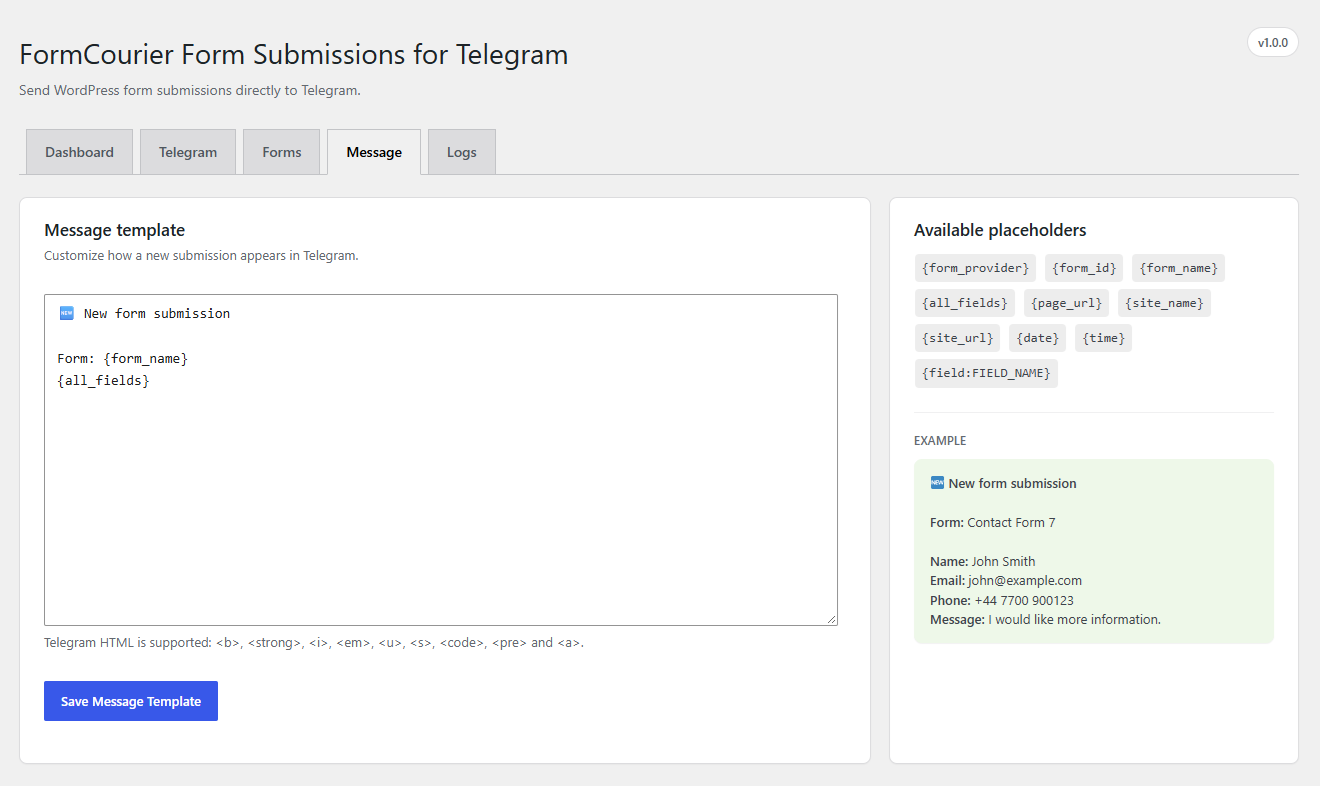
- Custom Telegram message templates.
- Dynamic
{field:FIELD_NAME}placeholders. {form_name},{form_id},{form_provider}, and{all_fields}placeholders.- Telegram HTML formatting in message templates.
- Automatic splitting of long submissions into multiple Telegram messages.
- Test message tool for checking the Telegram connection.
- Recent delivery logs with success and error information.
- Clear Telegram API error messages for common configuration problems.
- Duplicate-delivery protection when the form provider provides a submission ID.
- Bot Token encryption when OpenSSL is available.
- Optional removal of plugin settings and logs during uninstall.
Direct WordPress to Telegram delivery
FormCourier does not require a FormCourier account or an external FormCourier service.
When a supported form is submitted, the message is sent from your WordPress site directly to the Telegram Bot API.
FormCourier servers are not part of the submission delivery process.
Custom Telegram messages
You can customize how form submissions appear in Telegram.
Use general placeholders such as:
{form_name}
{form_id}
{form_provider}
{all_fields}
You can also insert individual form fields with:
{field:FIELD_NAME}
This makes it possible to create Telegram notifications that contain only the information you need.
Delivery logs and troubleshooting
FormCourier includes recent delivery logs to help administrators verify that form submissions are being delivered successfully.
The logs contain delivery information such as the form provider, status, time, and Telegram API result.
Submitted form field values are not stored in the delivery logs.
A built-in test message tool can be used to verify the Bot Token and Chat ID before testing a real form submission.
External services
This plugin connects to the Telegram Bot API to deliver form submissions to the Telegram chat configured by the site administrator.
When an enabled supported form is submitted, the configured Chat ID and the message generated from submitted form fields are sent to Telegram. The Bot Token is used to authenticate the request.
The Telegram Bot API is an external service provided by Telegram.
Telegram Bot API:
https://core.telegram.org/bots/api
Telegram Terms of Service:
https://telegram.org/tos
Telegram Privacy Policy:
https://telegram.org/privacy
This plugin is an independent third-party integration and is not affiliated with or endorsed by Telegram.
Privacy
FormCourier does not send form submissions to the plugin author or to any FormCourier server.
When Telegram delivery is enabled, form data included in the configured message is sent directly from the WordPress website to the Telegram Bot API and the Chat ID configured by the site administrator.
The plugin stores its settings and recent delivery logs in the WordPress database.
Delivery logs do not store submitted form field values.
Site administrators should make sure their website privacy notice accurately describes how submitted form data is processed and which third-party services receive that data.
Installation
- Install and activate FormCourier Form Submissions for Telegram.
- Open FormCourier Form Submissions for Telegram > Telegram in the WordPress admin area.
- Enter the Telegram Bot Token.
- Enter the destination Chat ID.
- Enable the Telegram integration and save the settings.
- Open the Forms tab.
- Enable the WordPress form plugins that should send submissions to Telegram.
- Use Send Test Message to verify the Telegram connection.
- Submit a supported form and check the destination Telegram chat.
Frequently asked questions
Which WordPress form plugins can send submissions to Telegram?
FormCourier supports: Contact Form 7 WPForms Fluent Forms Forminator Ninja Forms Gravity Forms
Can I send Contact Form 7 submissions to Telegram?
Yes. Enable Contact Form 7 in the FormCourier Forms settings and new Contact Form 7 submissions can be delivered to your configured Telegram chat.
Can I send WPForms submissions to Telegram?
Yes. FormCourier can send WPForms submissions directly to Telegram when WPForms integration is enabled.
Can I send Gravity Forms submissions to Telegram?
Yes. Gravity Forms is supported and can send new form submissions to the configured Telegram destination.
Does FormCourier also support Fluent Forms, Forminator, and Ninja Forms?
Yes. Fluent Forms, Forminator, and Ninja Forms are supported together with Contact Form 7, WPForms, and Gravity Forms.
Do I need a FormCourier account?
No. A FormCourier account is not required. Form submissions are sent directly from your WordPress website to the Telegram Bot API.
Do I need a Telegram bot?
Yes. You need a Telegram Bot Token and the Chat ID of the Telegram destination that should receive form submissions.
Does the plugin send form data through a FormCourier server?
No. Form submissions are sent directly from your WordPress site to the Telegram Bot API. The plugin author and FormCourier servers do not receive the submitted form data.
Can I customize the Telegram message?
Yes. The Message tab contains a customizable template. You can use placeholders such as {form_name}, {form_id}, {form_provider}, {all_fields}, and dynamic {field:FIELD_NAME} placeholders.
Can Telegram messages use HTML formatting?
Yes. FormCourier supports Telegram HTML formatting in custom message templates.
What happens when a submission is longer than a Telegram message?
The plugin automatically splits long submissions into multiple sequential Telegram messages so the complete submission can be delivered.
Does the plugin store submitted form values in its logs?
No. Delivery logs store delivery information such as the form/provider, status, time, and delivery result. Submitted form field values are not stored in the delivery logs.
Can I delete the plugin settings when uninstalling it?
Yes. The Telegram settings include an optional setting to remove plugin settings and logs when the plugin is uninstalled. It is disabled by default.
Changelog
1.0.0
- Initial public release.
- Added Telegram delivery for Contact Form 7, WPForms, Fluent Forms, Forminator, Ninja Forms, and Gravity Forms.
- Added automatic human-readable form field output and dynamic field placeholders.
- Added customizable Telegram message templates with HTML formatting.
- Added automatic splitting of long Telegram submissions.
- Added test messages, recent delivery logs, and Telegram API error handling.
- Added duplicate-delivery protection for providers that expose submission IDs.
- Added Bot Token encryption when OpenSSL is available.
-
Added optional plugin-data cleanup on uninstall.= 1.0.2 =
-
Added a clearly labelled link from the Plugins screen to the optional FormCourier Notifications Pro page.
1.0.1
- Improved WordPress.org plugin description and documentation.
- Added plugin screenshots.
- Added WordPress and PHP requirements to the plugin header.
1.0.0
- Initial public release.
- Added Telegram delivery for Contact Form 7, WPForms, Fluent Forms, Forminator, Ninja Forms, and Gravity Forms.
- Added automatic human-readable form field output and dynamic field placeholders.
- Added customizable Telegram message templates with HTML formatting.
- Added automatic splitting of long Telegram submissions.
- Added test messages, recent delivery logs, and Telegram API error handling.
- Added duplicate-delivery protection for providers that expose submission IDs.
- Added Bot Token encryption when OpenSSL is available.
- Added optional plugin-data cleanup on uninstall.
Screenshots




For developers
Is this your plugin? Show off the numbers.
Add a live badge to your site, docs or GitHub README. It updates on its own — no account needed.
Best FormCourier Form Submissions… alternatives
All contact forms plugins →




FAQ
FormCourier Form Submissions for Te…: quick answers
Straight answers, pulled from live WordPress.org data.
Live data from WordPress.org · checked Oct 11, 2026
Is FormCourier Form Submissions fo… free?
Yes. FormCourier Form Submissions fo… is free to download and use from the official WordPress.org plugin directory.
Is FormCourier Form Submissions fo… safe to use in 2026?
FormCourier Form Submissions fo… is a solid plugin choice in 2026, with a few things worth checking first. Is rated 5/5 and was last updated 4 days ago, and scores 71/100 on our health check.
How many websites use FormCourier Form Submissions fo…?
FormCourier Form Submissions fo… is active on <10 WordPress websites and has been downloaded 314 times since it launched in September 2026. It was downloaded 244 times in the last 30 days.
Does FormCourier Form Submissions fo… work with WordPress 7.1?
Yes. The developer has tested FormCourier Form Submissions fo… up to WordPress 7.1.3, the latest release. It requires WordPress 6.0 or newer.
What PHP version does FormCourier Form Submissions fo… need?
FormCourier Form Submissions fo… requires PHP 7.4 or higher. Most hosts run PHP 8.x today, so it works on any modern WordPress hosting.
When was FormCourier Form Submissions fo… last updated?
The latest version, 1.0.2, was released on October 7, 2026 (4 days ago).
Who makes FormCourier Form Submissions fo…?
FormCourier Form Submissions fo… is developed and maintained by Den Slav.
What are the best alternatives to FormCourier Form Submissions fo…?
The most popular alternatives to FormCourier Form Submissions fo… are Spam Protection | Maspik (30K+ installs), Contact Form by Supsystic (6K+ installs) and NEX-Forms (5K+ installs).
Powered by PageForge
Want thousands of pages that rank like these? Build them in an afternoon.
This directory runs on the same engine as PageForge. Turn any spreadsheet, CSV or API into thousands of fast, SEO-ready WordPress pages — with schema, internal links and AI-written copy baked in.
- CSV, Google Sheets & API data sources
- AI content, schema & internal links per page
- Works with Elementor, Gutenberg, Yoast & Rank Math
- Free on WordPress.org — no credit card


