


FormBeacon – Form Health Monitor
WordPress form health monitor for Contact Form 7, WPForms, and Gravity Forms. Get email alerts when forms fail, go inactive, or detect spam.

Consider an alternative
FormBeacon – Form Health Monitor shows warning signs in 2026 — compare the alternatives below before installing. It runs on 10+ sites and was last updated 6 months ago, and scores 38/100 on our health check.
- Small user base (10+ active installs)
- Very few reviews so far
- Only tested up to WordPress 6.9 (latest is 7.1)
- Needs PHP 8.1 or newer
How does it stack up?
Side-by-side on installs, updates, ratings & support



Daily downloads
Download spikes usually follow a new release — each site that auto-updates counts as a download.
Rankings
Where FormBeacon stands todayWordPress.org search rankings
Live position in the plugin search, top 100| Keyword | Position |
|---|---|
| contact form 7 | >100 |
| email alerts | >100 |
| form monitor | >100 |
| gravity forms | >100 |
| WPForms | >100 |
Version adoption
Share of active sites per release.
About FormBeacon – Form Health Monitor
From the official readme · v1.1.2Description
Have your contact forms ever silently stopped working — and you only found out because a client complained?
FormBeacon watches your WordPress forms around the clock and tells you when something looks wrong, before it costs you leads or customers.
It tracks every submission event across Contact Form 7, WPForms, and Gravity Forms, flags unhealthy patterns, and sends you an email alert the moment a form tips into a warning or critical state.
Why FormBeacon?
Most WordPress sites have no visibility into what their forms are actually doing. A mail server hiccup, a spam filter, or a misconfigured field can silently kill form submissions for days. FormBeacon closes that gap with zero configuration required.
What FormBeacon monitors
- Successes — every completed, processed submission
- Failures — mail delivery errors, validation failures, server-side rejections
- Spam blocks — submissions caught by honeypot, Akismet, keyword filters, and country rules
- Inactivity — forms that have gone quiet for longer than your configured threshold
Health statuses
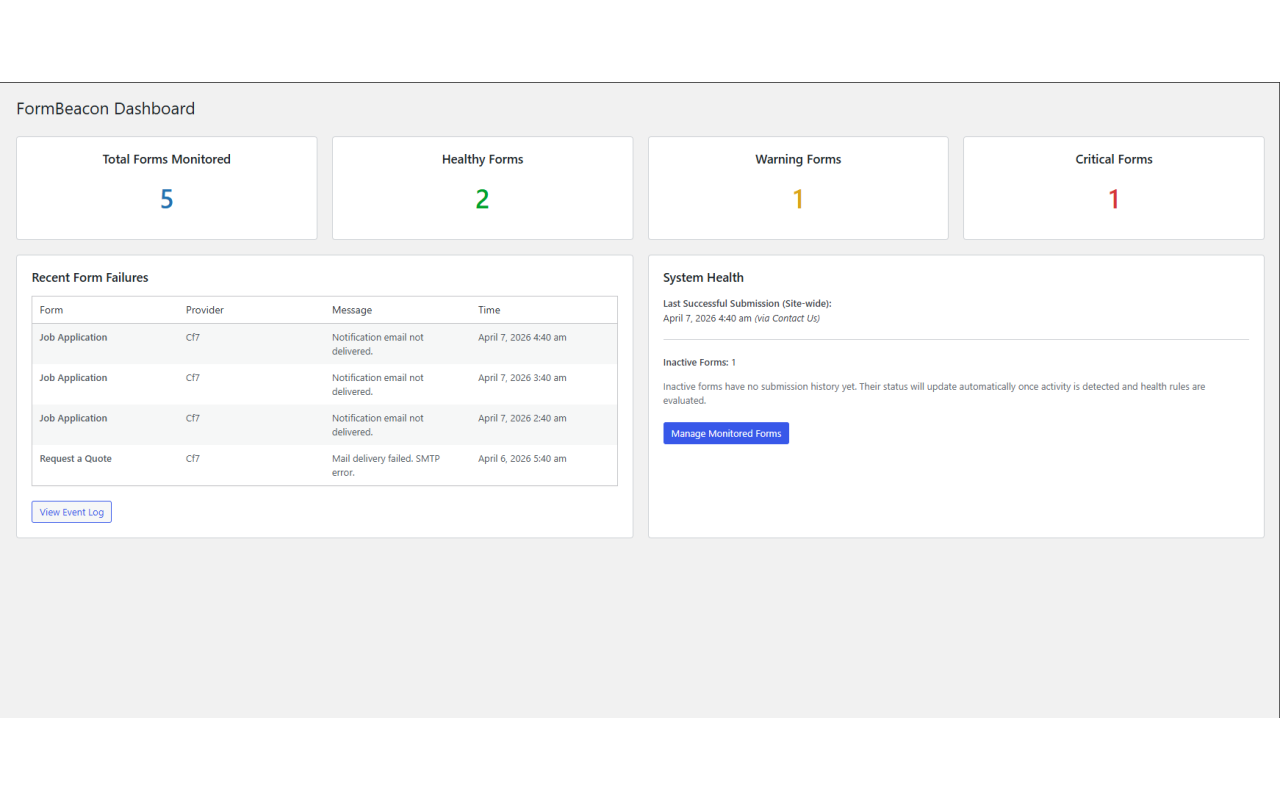
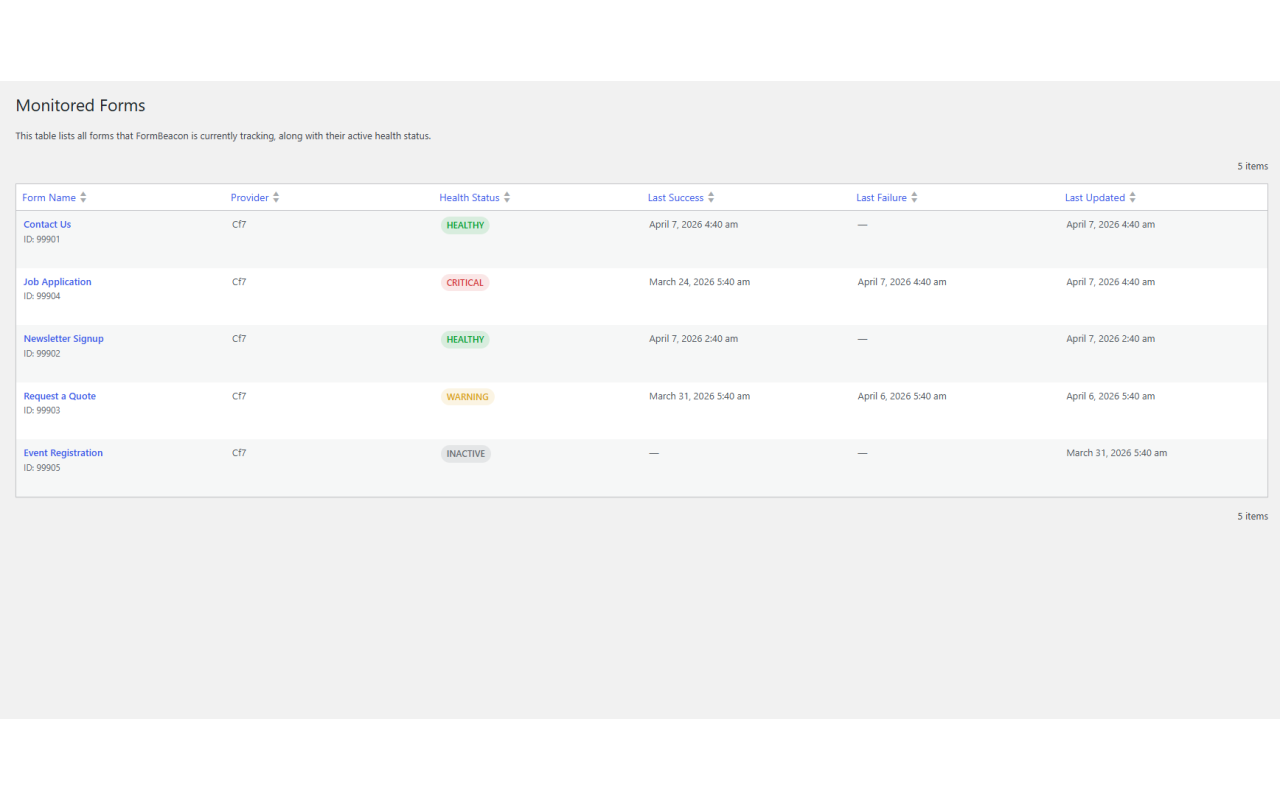
Each form tracked by FormBeacon carries one of four statuses:
- ✅ Healthy — recent successful activity, within your thresholds
- ⚠️ Warning — no successful submission within the inactivity window
- 🔴 Critical — failure spike detected in the last 24 hours, or prolonged inactivity
- 💤 Inactive — form seen but no submission history recorded yet
Supported form plugins
- Contact Form 7 — tracks mail sent (success) and mail failed (failure)
- WPForms — tracks process complete (success), AJAX validation errors (failure), and spam detection blocks (failure)
- Gravity Forms — tracks entry saved (success), validation failures (failure), and spam flagged entries (failure)
Key features
- Email alerts — notified the moment a form transitions to warning or critical
- Dashboard widget — at-a-glance form health overview on the WordPress admin home screen
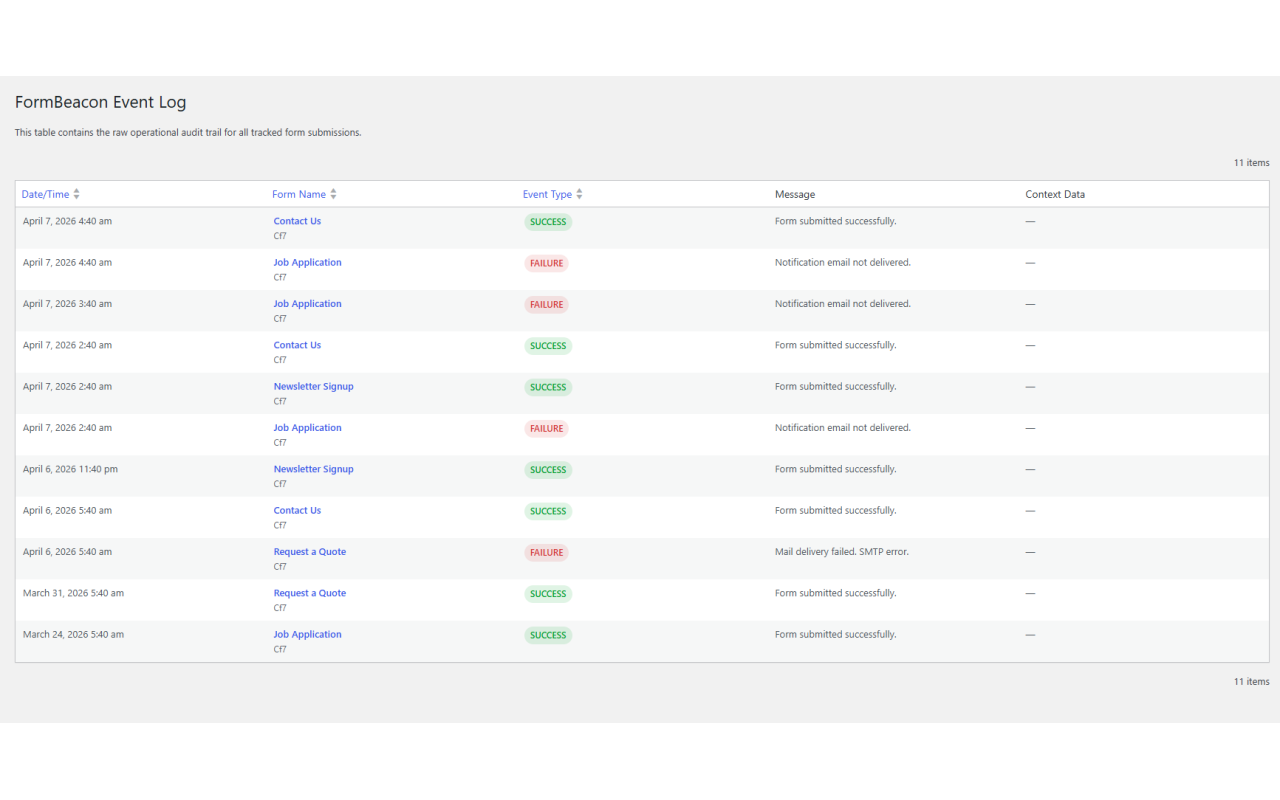
- Event log — full audit trail of every tracked submission event with timestamps and context
- Monitored forms list — sortable table of all active forms and their current health status
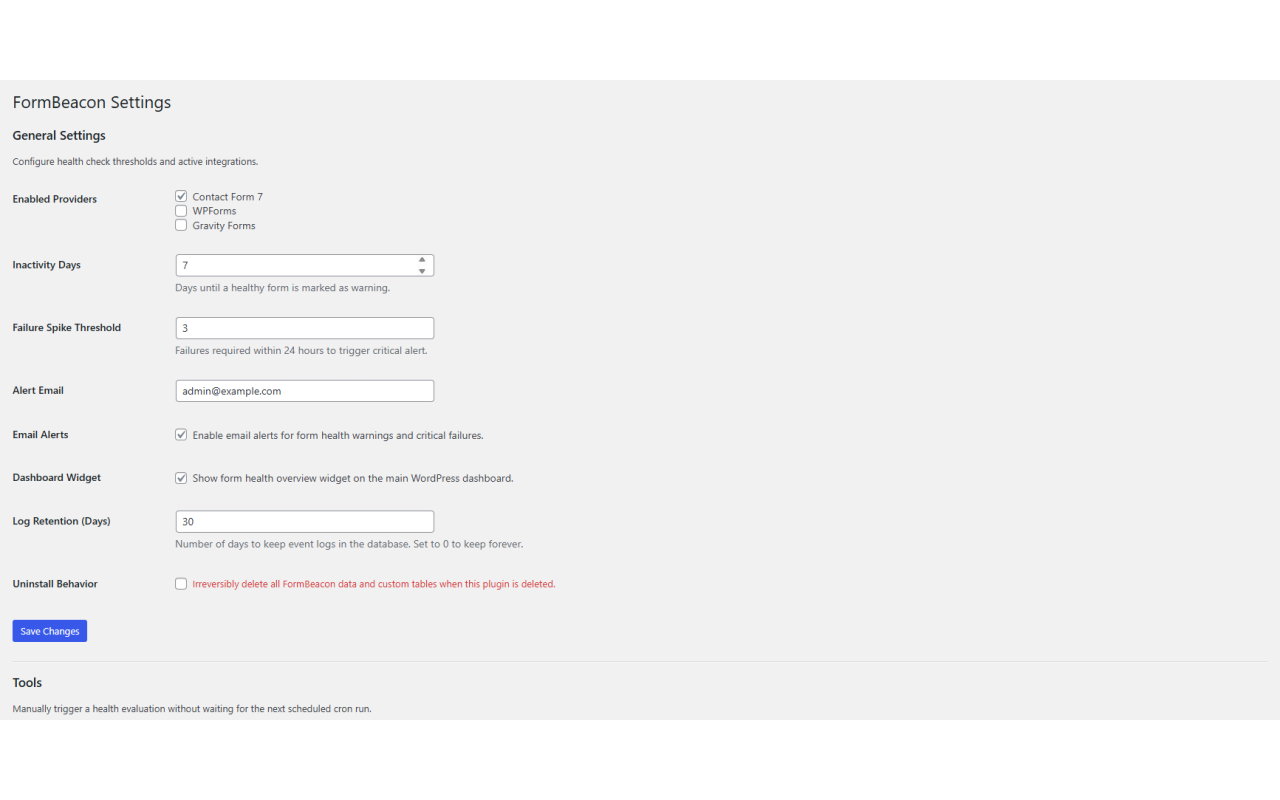
- Configurable thresholds — set your own inactivity window and failure spike limit
- Automatic log pruning — old event records are cleaned up on a schedule you control
- No coding required — activate and go; FormBeacon auto-detects your active form plugins
Privacy-first design
FormBeacon is designed to store operational metadata only. It never records names, email addresses, phone numbers, message bodies, file names, IP addresses, or any personal content from form submissions. All data is stored locally in your WordPress database and pruned automatically based on your retention setting.
Who is FormBeacon for?
- Freelancers and agencies who manage client sites and need early warning when a contact form breaks
- Business owners who rely on forms for leads, bookings, or support requests
- Developers who want observability into form submission health without building a custom solution
Privacy Policy
FormBeacon stores minimal operational telemetry to monitor form health. This includes the form ID, success/failure status, and aggregated event timestamps. It does not store personal identifiers (PII), request bodies, user IP addresses, uploaded file names, or any form field content.
All telemetry data is stored locally within your WordPress database and is automatically pruned after the retention period configured in FormBeacon Settings.
Installation
- Upload the plugin files to the
/wp-content/plugins/formbeacondirectory, or install the plugin through the WordPress Plugins screen directly. - Activate the plugin through the Plugins screen in WordPress.
- Go to FormBeacon in the WordPress admin menu.
- Open Settings to configure your health thresholds, alert email address, and which form plugins to monitor.
- FormBeacon will begin tracking submission events automatically — no additional setup required.
Frequently asked questions
Do I need to configure anything before FormBeacon starts working?
No. FormBeacon auto-detects your active form plugins on activation and begins tracking immediately. The default thresholds (7-day inactivity window, 3-failure spike limit) work for most sites. You can adjust these in the Settings tab at any time.
Which form plugins are supported?
This version supports Contact Form 7, WPForms, and Gravity Forms. You can enable or disable individual providers in FormBeacon Settings.
Does FormBeacon store personal form submission data?
No. FormBeacon stores operational metadata only: form ID, success/failure status, event type, and timestamps. No names, emails, phone numbers, message bodies, uploaded file names, or IP addresses are ever stored.
Does FormBeacon guarantee email inbox delivery?
No. FormBeacon monitors submission health signals exposed by supported form plugins. It does not guarantee SMTP delivery, inbox placement, or third-party CRM delivery. For reliable outgoing email, pair FormBeacon with an SMTP plugin such as WP Mail SMTP.
Does FormBeacon track both successes and failures?
Yes. As of version 1.1.0, FormBeacon tracks both successes and failures for all three supported providers: Contact Form 7 — mail sent (success) and mail failed (failure) WPForms — process complete (success), AJAX validation error response (failure), and spam detection blocks (failure) Gravity Forms — entry saved (success), validation failure via gform_validation (failure), and spam flagged via gform_entry_is_spam (failure)
How do email alerts work?
When a form transitions into a warning or critical state during the daily health evaluation, FormBeacon sends a plain-text alert email to your configured alert address. Each form-status combination is rate-limited to one alert per 24 hours to avoid inbox flooding.
Can I manually trigger a health check?
Yes. Go to FormBeacon → Settings and click the Run Health Check Now button to evaluate all forms immediately without waiting for the next scheduled cron run.
How do I remove a form from monitoring?
Go to FormBeacon → Forms, hover over any form row, and click Remove from monitoring. This removes the form and all its associated event log entries from FormBeacon’s records. The form itself is not affected.
Does FormBeacon slow down my site?
No. FormBeacon hooks into events that already fire during form submission — it adds a lightweight database write per submission. The health evaluation runs on a daily WordPress cron job, not on page load.
What happens to my data if I uninstall the plugin?
By default, FormBeacon leaves your data intact when the plugin is deleted, so you can re-activate without losing history. If you want a clean removal, enable Remove all data on uninstall in FormBeacon Settings before deleting the plugin.
Changelog
Fixes short description display on WordPress.org.
1.1.2
- Fixed: Short description truncated on WordPress.org — trimmed to within the 150 character limit.
1.1.1
- Fixed: DB version stored as 1.0.0 on fresh install, causing a redundant upgrade run on first admin page load.
- Fixed: Removed redundant esc_sql() call in the event log list table before a %i placeholder.
- Fixed: Removed unused nonce field from the monitored forms list view.
1.1.0
- Added failure tracking for WPForms: AJAX validation errors and spam detection blocks.
- Added failure tracking for Gravity Forms: validation failures and spam flagged entries.
- Added detailed error context (failed field labels, error counts) to failure event logs.
1.0.0
- Initial release.
Screenshots
For developers
Is this your plugin? Show off the numbers.
Add a live badge to your site, docs or GitHub README. It updates on its own — no account needed.
Best FormBeacon alternatives
All contact form 7 plugins →





FAQ
FormBeacon – Form Health Monitor: quick answers
Straight answers, pulled from live WordPress.org data.
Live data from WordPress.org · checked Oct 7, 2026
Is FormBeacon – Form Health Monitor free?
Yes. FormBeacon – Form Health Monitor is free to download and use from the official WordPress.org plugin directory.
Is FormBeacon – Form Health Monitor safe to use in 2026?
FormBeacon – Form Health Monitor shows warning signs in 2026 — compare the alternatives below before installing. It runs on 10+ sites and was last updated 6 months ago, and scores 38/100 on our health check.
How many websites use FormBeacon – Form Health Monitor?
FormBeacon – Form Health Monitor is active on 10+ WordPress websites and has been downloaded 390 times since it launched in April 2026. It was downloaded 70 times in the last 30 days.
Does FormBeacon – Form Health Monitor work with WordPress 7.1?
FormBeacon – Form Health Monitor is officially tested up to WordPress 6.9.10, while the latest release is 7.1.3. It may still work, but try it on a staging site first.
What PHP version does FormBeacon – Form Health Monitor need?
FormBeacon – Form Health Monitor requires PHP 8.1 or higher. Most hosts run PHP 8.x today, so it works on any modern WordPress hosting.
When was FormBeacon – Form Health Monitor last updated?
The latest version, 1.1.2, was released on April 7, 2026 (6 months ago).
Who makes FormBeacon – Form Health Monitor?
FormBeacon – Form Health Monitor is developed and maintained by Nikhil Umaretiya.
What are the best alternatives to FormBeacon – Form Health Monitor?
The most popular alternatives to FormBeacon – Form Health Monitor are Database Addon for Contact… (600K+ installs), Redirection for Contact For… (200K+ installs) and ReCaptcha v2 for Contact Fo… (200K+ installs).
Powered by PageForge
Want thousands of pages that rank like these? Build them in an afternoon.
This directory runs on the same engine as PageForge. Turn any spreadsheet, CSV or API into thousands of fast, SEO-ready WordPress pages — with schema, internal links and AI-written copy baked in.
- CSV, Google Sheets & API data sources
- AI content, schema & internal links per page
- Works with Elementor, Gutenberg, Yoast & Rank Math
- Free on WordPress.org — no credit card


