


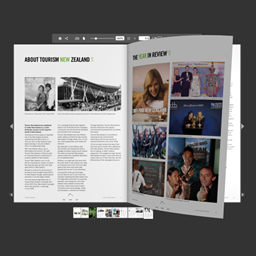
flowpaper
Embed your PDFs with ease. All you need : [flipbook pdf="https://flowpaper.com/example.pdf"]

Solid choice
flowpaper is a solid plugin choice in 2026, with a few things worth checking first. It runs on 10K+ sites, is rated 3.4/5 and was last updated 3 months ago, and scores 73/100 on our health check.
- Proven at scale on 10K+ active sites
- Mixed reviews — 3.4/5 from 37 ratings
How does it stack up?
Side-by-side on installs, updates, ratings & support


Daily downloads
Download spikes usually follow a new release — each site that auto-updates counts as a download.
Rankings
Where flowpaper stands todayWordPress.org search rankings
Live position in the plugin search, top 100| Keyword | Position |
|---|---|
| flip book | #7 |
| flipbook | #10 |
| pdf viewer | #19 |
| viewer | #42 |
| web pdf viewer | #6 |
Version adoption
Share of active sites per release.
Rating breakdown
★★★★★★★★★★ 3.4 from 37 reviews
About flowpaper
From the official readme · v2.0.8Description
This is a PDF viewer plugin that allows you to embed your PDF catalogs, magazines and brochures as flipbooks on your web site in HTML5 format for free.
FlowPaper Home Page | Flipbook Maker | Examples
The plugin supports the majority of browsers and devices. It is currently limited to PDF documents that are 15 megabytes or smaller for PDFs that are not uploaded to FlowPaper cloud.
To publish larger PDF documents, customize the look and to show the viewer without FlowPaper branding, please visit our homepage. It supports both light and dark themes.
How to embed a PDF using a URL:
- Add a the plug in shortcode to a post like this:
[flipbook pdf="http://full-url/document.pdf"] - Change the PDF Url (“http://full-url/document.pdf”) to a PDF file you want to display. Voila!
How to embed a new PDF uploaded to WordPress:
- Click on the “Media” link in the left panel
- Upload your PDF document
- Click on the uploaded PDF document and copy the URL to the PDF file
- Create a new post and add the shortcode
[flipbook pdf="http://full-url/document.pdf"]to your post. Update the url in the shortcode to the URL you copied from your media library
How to embed a publication uploaded to FlowPaper Cloud:
- Make sure the publication is uploaded to FlowPaper cloud using the desktop publisher
- Copy the link that the desktop publisher created for you
- Create a new post and add the shortcode
[flipbook pdf="http://online.flowpaper.com/publication"]to your post. Update the url in the shortcode to the URL you copied from the desktop publisher
Customizing Theme
Style of the viewer theme (default: “dark”) by adding the “theme” parameter and setting it to either “light” or “dark” like this: [flipbook pdf="http://full-url/document.pdf" theme="light"]
Opening in a Lightbox overlay
You can display a cover of your publication and open it in a lightbox overlay by supplying the “lightbox” and “cover” parameters like this: [flipbook pdf="http://full-url/document.pdf" lightbox="true" cover="https://flowpaper.com/images/demo/zine-magazine@2x.jpg"]
Setting Header
You can modify the header that is displayed (default: “Loading viewer …”) by adding the “header” to the embed code like this: [flipbook pdf="http://full-url/document.pdf" header="Opening catalog..."]
Setting Publication Title
You can modify the publication title that is displayed (default: PDF title) by adding the “title” to the embed code like this: [flipbook pdf="http://full-url/document.pdf" title="Fashion catalog 2016"]
About FlowPaper
FlowPaper is a publishing platform that uses a number of technologies to bring your PDF documents to the web in the most beautiful friendliest ways possible.
For a full set of features and an unbranded viewer, please use the flipbook maker available at the FlowPaper home page. This plug in is built so that people can experience one of our pdf viewers as easy as possible.
Customizing
Parameters:
- pdf – source of the PDF you want to embed:
[flipbook pdf="http://flowpaper.com/example.pdf"]; - width – width in pixels or in percents:
[flipbook width="100%"]or[flipbook width="600"]; by default width=”100%”; - height – height in pixels:
[flipbook height="500"]; by default height=”500″; - theme – sets the theme for the viewer:
[flipbook theme="light"]; “dark” by default; - singlepage – lets you to force the viewer to only show one page at the time:
[flipbook singlepage="true"]; “auto” by default which selects single page if the publication uses landscape pages; - lightbox – opens the viewer in a lightbox overlay when clicked:
[flipbook lightbox="true"]; “false” by default; - cover – sets a image cover to be used for the viewer. Useful in combination with the lightbox setting:
[flipbook cover="http://domain.com/myimage.png"]; - header – sets the header for the viewer:
[flipbook header="Custom Header"]; “Loading viewer …” by default; - title – sets the title for the viewer:
[flipbook title="Custom Title"]; taken from the PDF by default; - id – allows to add the id of the flowpaper frame:
[flipbook id="custom_id"]; removed by default; - same_height_as – allows to set the height of flowpaper same as target element:
[flipbook same_height_as="div.sidebar"],[flipbook same_height_as="div#content"],[flipbook same_height_as="body"],[flipbook same_height_as="html"]; removed by default;
Installation
- install and activate the plugin on the Plugins page
- add shortcode
[flipbook pdf="https://flowpaper.com/Paper.pdf"]to page or post content (change the URL to a PDF file you want to show)
Frequently asked questions
What is the limitation of this version?
It has a limitation of 15 megabytes for publications that are not hosted on FlowPaper cloud. Self hosted publications reaches the majority of devices and browsers. For full browser coverage and for more options on styling the viewer, please visit the FlowPaper home page.
Changelog
Fix for set_magic_quotes_runtime which was being set (depricated in PHP 5.3 and higher)
1.0
- Initial release
1.1
- Slight change in URL for the iframe that gets embedded
1.2
- Use HTTPS/SSL if the page is using SSL
1.3
- Implemented method for loading the PDF directly from WordPress if hosted as wp-content
1.4
- Improved http headers
- Improved support for browsers not supporting iframes
1.5
- Tighter access control checks
Screenshots

For developers
Is this your plugin? Show off the numbers.
Add a live badge to your site, docs or GitHub README. It updates on its own — no account needed.
Best flowpaper alternatives
All flip book plugins →


FAQ
flowpaper: quick answers
Straight answers, pulled from live WordPress.org data.
Live data from WordPress.org · checked Sep 26, 2026
Is flowpaper free?
Yes. flowpaper is free to download and use from the official WordPress.org plugin directory.
Is flowpaper safe to use in 2026?
flowpaper is a solid plugin choice in 2026, with a few things worth checking first. It runs on 10K+ sites, is rated 3.4/5 and was last updated 3 months ago, and scores 73/100 on our health check.
How many websites use flowpaper?
flowpaper is active on 10K+ WordPress websites and has been downloaded 411,638 times since it launched in August 2016. It was downloaded 1,895 times in the last 30 days.
Does flowpaper work with WordPress 7.1?
flowpaper is officially tested up to WordPress 7.0.6, while the latest release is 7.1.2. It may still work, but try it on a staging site first.
When was flowpaper last updated?
The latest version, 2.0.8, was released on July 2, 2026 (3 months ago).
Who makes flowpaper?
flowpaper is developed and maintained by getflowpaper.
What are the best alternatives to flowpaper?
The most popular alternatives to flowpaper are DearFlip (200K+ installs), 3D FlipBook (70K+ installs) and Real3D Flipbook (10K+ installs).
Powered by PageForge
Want thousands of pages that rank like these? Build them in an afternoon.
This directory runs on the same engine as PageForge. Turn any spreadsheet, CSV or API into thousands of fast, SEO-ready WordPress pages — with schema, internal links and AI-written copy baked in.
- CSV, Google Sheets & API data sources
- AI content, schema & internal links per page
- Works with Elementor, Gutenberg, Yoast & Rank Math
- Free on WordPress.org — no credit card


