


Floating Button/CTA – Easy to use
Easily add a floating button on your site with multiple sub-buttons in a half circle layout. Perfect for quick actions, call-to-action, or shortcuts.

Use with caution
Floating Button/CTA works, but test it on a staging site before relying on it in 2026. It runs on 20+ sites, is rated 5/5 and was last updated 8 months ago, and scores 46/100 on our health check.
- Small user base (20+ active installs)
- Very few reviews so far
- Only tested up to WordPress 6.9 (latest is 7.1)
How does it stack up?
Side-by-side on installs, updates, ratings & support



Daily downloads
Download spikes usually follow a new release — each site that auto-updates counts as a download.
Rankings
Where Floating Button/CTA stands todayWordPress.org search rankings
Live position in the plugin search, top 100| Keyword | Position |
|---|---|
| call to action | >100 |
| floating button | #57 |
| sticky button | #80 |
| sub buttons | #36 |
| ui | >100 |
Version adoption
Share of active sites per release.
Rating breakdown
★★★★★★★★★★ 5 from 3 reviews
About Floating Button/CTA – Easy to use
From the official readme · v1.0.1Description
Floating Button / CTA allows you to add a floating button that appears on all pages of your website. When
clicked, the main button reveals multiple sub-buttons with icons, links, and tooltips.
Features:
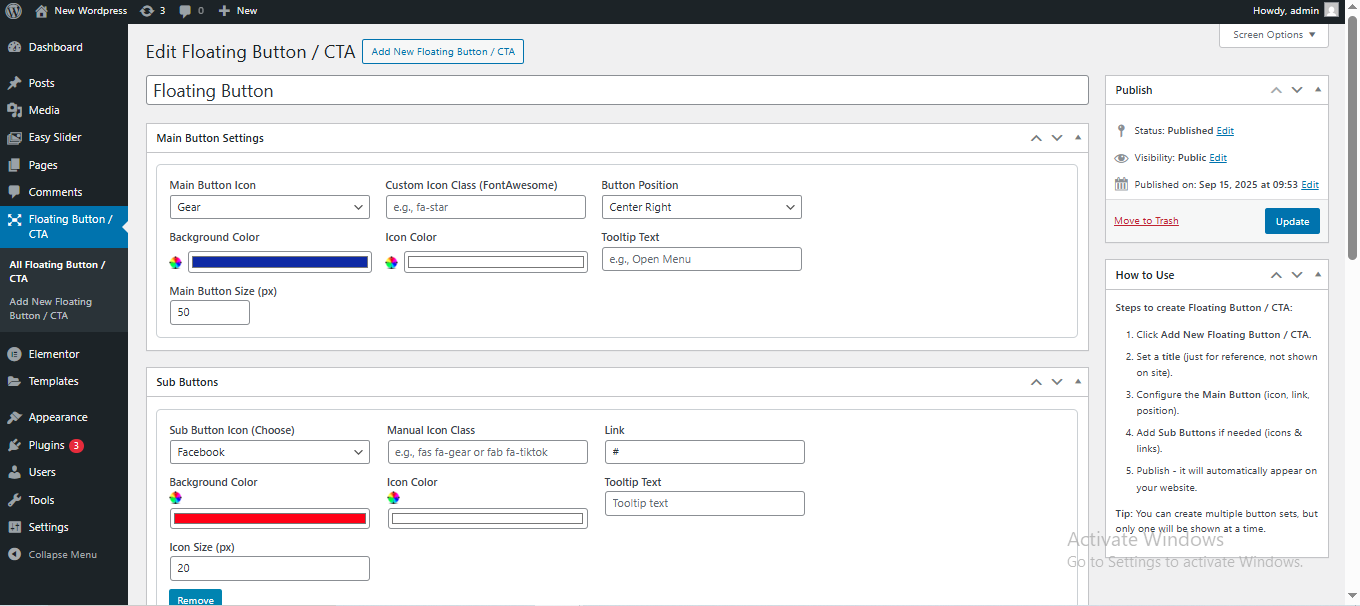
- Fully customizable main button (icon, color, size, tooltip)
- Add multiple sub-buttons (each with its own icon, color, link, tooltip)
- Position the button anywhere on the screen (bottom-right, bottom-left, etc.)
- Multiple button sets – now you can choose which button set is active (previously, only the last published was active by default)
- If you add only one sub-button, it can now show directly on the frontend without requiring a parent button
- Lightweight and responsive design
Usage
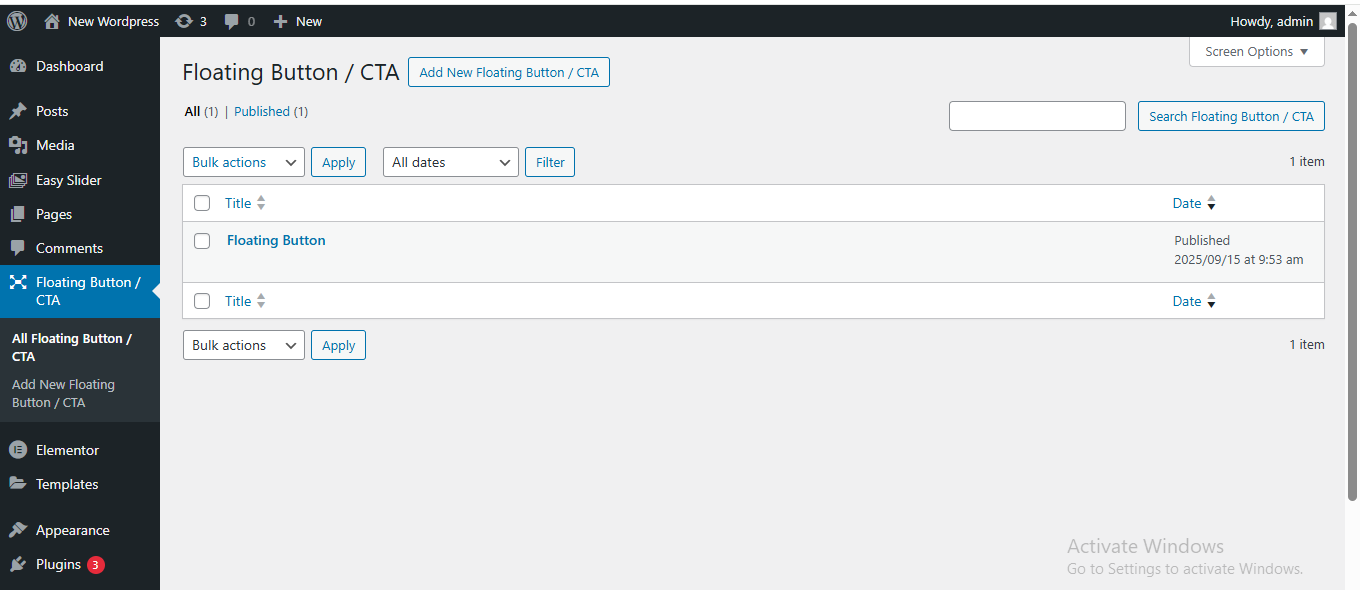
- Click Add New Floating Button / CTA in the admin.
- Set a title (for reference, not displayed on the site).
- Configure the Main Button:
- Choose an icon or upload a custom one
- Set button position
- Pick background and icon color
- Add tooltip text
- Add Sub Buttons if needed:
- Set icon or upload a custom icon
- Set Link URL
- Pick colors and tooltip text
- Publish your floating button.
- Visit any page on our site. Click the main button to reveal the sub-buttons.
Please view the FAQ Page for information on how to use Floating Button / CTA.
License
This plugin is licensed under the GPL v2 or later.
Support
For support or feature requests related to the “Floating Button/CTA – Easy to use” plugin, please contact hello@tridenttechnolabs.com.
If you need assistance with creating a custom plugin for your website or company, our team at Trident Technolabs offers professional plugin development services. Feel free to reach out to us at hello@tridenttechnolabs.com to discuss your requirements and get a quote.
We hope you find this plugin useful! Thank you for using Floating Button/CTA – Easy to use.
Trident Technolabs
Installation
- Upload the
floating-button-ctafolder to the/wp-content/plugins/directory. - Activate the plugin through the ‘Plugins’ menu in WordPress.
- Go to Floating Button / CTA → Add New to create your first floating button.
- Configure your main button and optional sub-buttons.
- Publish your button -it will automatically appear on all pages.
Frequently asked questions
Can I have multiple floating buttons?
Yes, you can create multiple buttons. You can now select which button set is active at a time. Only the active set will display on the frontend.
Can I change the position of the button?
Yes, you can select left or right position from the main button settings.
Are the buttons responsive on mobile?
Yes, the floating button and sub-buttons work on desktop, tablet and mobile devices.
What happens if I add only one sub-button?
In version 1.0.1 and later, if there is only one sub-button, it will show directly on the frontend without requiring a main parent button.
Changelog
1.0.1
- Added the ability to toggle and select which button set is active (previously, only the last published button was active by default).
- Fixed issue where a single sub-button required a parent main button – now a single sub-button can display directly on the frontend.
1.0.0
- Initial release with customizable floating button and sub-buttons.
Screenshots

For developers
Is this your plugin? Show off the numbers.
Add a live badge to your site, docs or GitHub README. It updates on its own — no account needed.
Best Floating Button/CTA alternatives
All call to action plugins →




FAQ
Floating Button/CTA – Easy to use: quick answers
Straight answers, pulled from live WordPress.org data.
Live data from WordPress.org · checked Oct 12, 2026
Is Floating Button/CTA free?
Yes. Floating Button/CTA is free to download and use from the official WordPress.org plugin directory.
Is Floating Button/CTA safe to use in 2026?
Floating Button/CTA works, but test it on a staging site before relying on it in 2026. It runs on 20+ sites, is rated 5/5 and was last updated 8 months ago, and scores 46/100 on our health check.
How many websites use Floating Button/CTA?
Floating Button/CTA is active on 20+ WordPress websites and has been downloaded 821 times since it launched in September 2025. It was downloaded 77 times in the last 30 days.
Does Floating Button/CTA work with WordPress 7.1?
Floating Button/CTA is officially tested up to WordPress 6.9.10, while the latest release is 7.1.3. It may still work, but try it on a staging site first.
What PHP version does Floating Button/CTA need?
Floating Button/CTA requires PHP 7.2 or higher. Most hosts run PHP 8.x today, so it works on any modern WordPress hosting.
When was Floating Button/CTA last updated?
The latest version, 1.0.1, was released on January 31, 2026 (8 months ago).
Who makes Floating Button/CTA?
Floating Button/CTA is developed and maintained by Trident Technolabs.
What are the best alternatives to Floating Button/CTA?
The most popular alternatives to Floating Button/CTA are Boxzilla (20K+ installs), Simple Side Tab (10K+ installs) and Mobile Contact Bar (9K+ installs).
Powered by PageForge
Want thousands of pages that rank like these? Build them in an afternoon.
This directory runs on the same engine as PageForge. Turn any spreadsheet, CSV or API into thousands of fast, SEO-ready WordPress pages — with schema, internal links and AI-written copy baked in.
- CSV, Google Sheets & API data sources
- AI content, schema & internal links per page
- Works with Elementor, Gutenberg, Yoast & Rank Math
- Free on WordPress.org — no credit card


