



FlexiPick – Simple Extra Product Options for WooCommerce
Add extra options, toppings, and customizations to your WooCommerce products with a seamless, user-friendly interface.

Solid choice
FlexiPick is a solid plugin choice in 2026, with a few things worth checking first. Was last updated 1 week ago, and scores 64/100 on our health check.
- Actively developed — last update 1 week ago
- Tested with the latest WordPress (7.1)
- Small user base (<10 active installs)
- Very few reviews so far
How does it stack up?
Side-by-side on installs, updates, ratings & support



Daily downloads
Download spikes usually follow a new release — each site that auto-updates counts as a download.
Rankings
Where FlexiPick stands todayWordPress.org search rankings
Live position in the plugin search, top 100| Keyword | Position |
|---|---|
| custom product fields | >100 |
| extra options | >100 |
| Product Addons | >100 |
| product variations | >100 |
| woocommerce | >100 |
About FlexiPick
From the official readme · v1.0.3Description
FlexiPick is a powerful yet simple extension for WooCommerce that allows you to add custom extra options and add-ons to your products. Perfect for restaurants, custom product builders, or any store that needs to offer personalized item variations.
Whether you need to let customers choose toppings for a pizza, pick a size for their drink, or add premium gift wrapping, FlexiPick makes it incredibly easy. It integrates natively into your WooCommerce Product Data tabs, providing an intuitive builder to set up your product extras.
Demo: https://demo.add-ons.org/extra-product-options/
Documentation: https://add-ons.org/documentation-simple-extra-product-options-for-woocommerce/;
Pro Version: https://add-ons.org/plugin/simple-extra-product-options-for-woocommerce/;
Key Features
- Unlimited Add-on Groups: Create as many option groups as you need per product (e.g., “Choose Toppings”, “Select Size”).
- Multiple Input Types: Support for Radio buttons (choose one) and Checkboxes (choose multiple).
- Flexible Pricing: Add a custom flat price to any individual option.
- Size Variations: Add sub-sizes with specific pricing to any option (e.g., Option: Coke -> Sizes: Small +$1, Large +$2).
- Required Options: Force customers to select an option before they can add the product to their cart.
- Native WooCommerce Integration: Add-on prices are automatically calculated into the cart total. Selected options are neatly displayed in the cart, checkout page, and backend order details.
- Beautiful Frontend UI: Clean, modern, and responsive design that looks great on any theme.
How it Works
- Go to your WordPress Admin -> Products and edit a product.
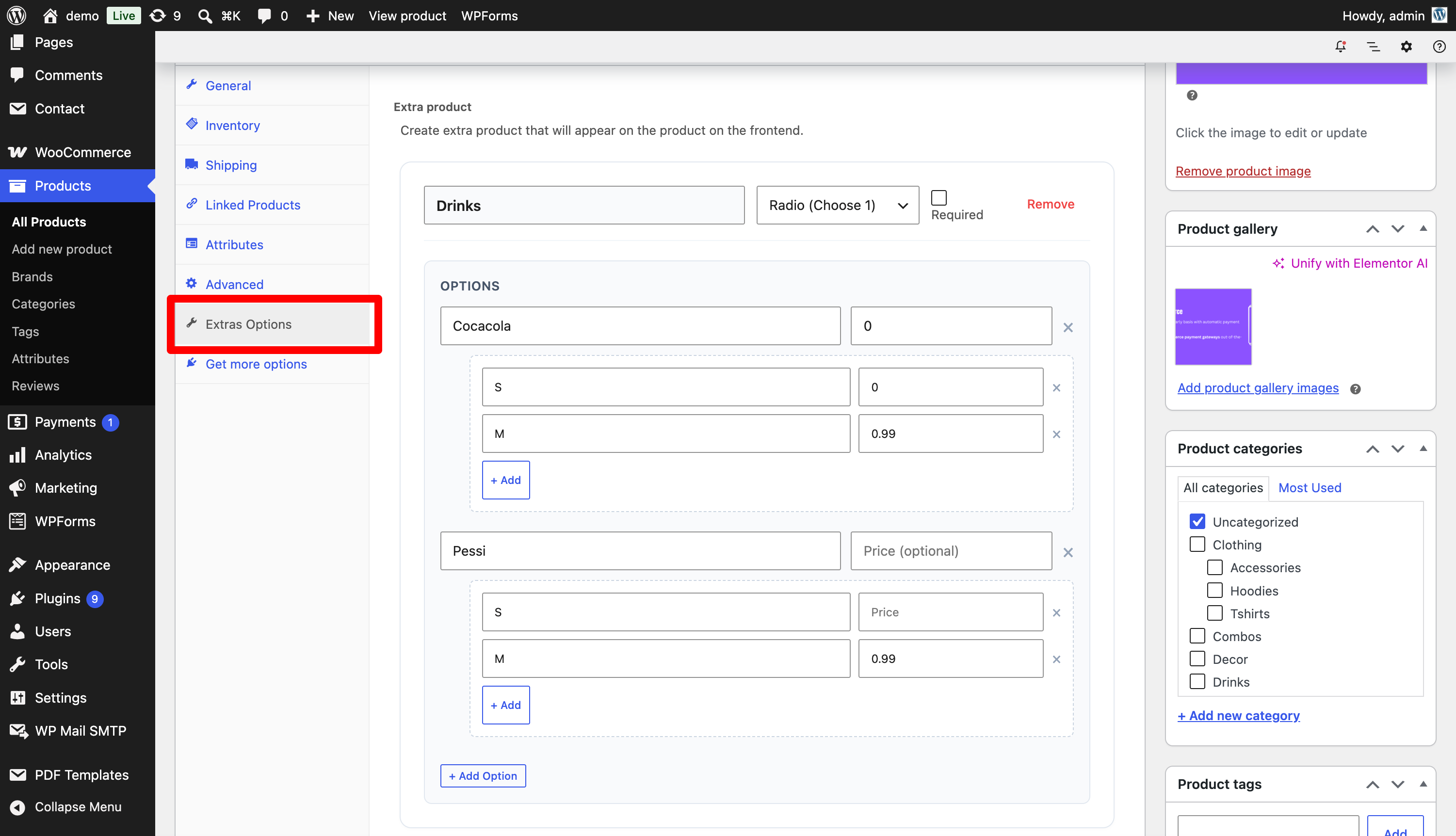
- Scroll down to the Product Data section and click on the new Extras Options tab.
- Click “+ Add extra product” to create a new group.
- Define your options, set prices, and save the product.
- The options will now beautifully display on your frontend product page!
Installation
- Upload the
flexipickfolder to your/wp-content/plugins/directory. - Activate the plugin through the ‘Plugins’ menu in WordPress.
- Edit any WooCommerce product and navigate to the Extras Options tab in the Product Data meta box.
- Start adding your custom options!
Frequently asked questions
Does this plugin work with any theme?
Yes! The frontend design is built to be clean, flexible, and compatible with the vast majority of WooCommerce themes out of the box.
Are the extra prices added to the final total?
Yes, all selected option prices are automatically added to the base price of the product and reflected in the WooCommerce cart and checkout.
Where do I see the customer’s selected add-ons?
Selected add-ons are displayed in the cart, on the checkout page, in order confirmation emails, and in the WooCommerce order details screen in your WordPress backend.
Changelog
1.0.0
- Initial release of FlexiPick.
- Added support for Checkbox and Radio input types.
- Added support for option pricing and sub-size pricing.
- Integrated with WooCommerce Cart, Checkout, and Order Items.
Screenshots
For developers
Is this your plugin? Show off the numbers.
Add a live badge to your site, docs or GitHub README. It updates on its own — no account needed.
Best FlexiPick alternatives
All custom product fields plugins →FAQ
FlexiPick: quick answers
Straight answers, pulled from live WordPress.org data.
Live data from WordPress.org · checked Oct 5, 2026
Is FlexiPick free?
Yes. FlexiPick is free to download and use from the official WordPress.org plugin directory.
Is FlexiPick safe to use in 2026?
FlexiPick is a solid plugin choice in 2026, with a few things worth checking first. Was last updated 1 week ago, and scores 64/100 on our health check.
How many websites use FlexiPick?
FlexiPick is active on <10 WordPress websites and has been downloaded 245 times since it launched in July 2026. It was downloaded 107 times in the last 30 days.
Does FlexiPick work with WordPress 7.1?
Yes. The developer has tested FlexiPick up to WordPress 7.1.2, the latest release. It requires WordPress 6.0 or newer.
When was FlexiPick last updated?
The latest version, 1.0.3, was released on September 28, 2026 (1 week ago).
Who makes FlexiPick?
FlexiPick is developed and maintained by add-ons.org.
What are the best alternatives to FlexiPick?
The most popular alternatives to FlexiPick are WC Fields Factory (7K+ installs), Extend Product Options for… (10+ installs) and Luma Product Fields (10+ installs).
Powered by PageForge
Want thousands of pages that rank like these? Build them in an afternoon.
This directory runs on the same engine as PageForge. Turn any spreadsheet, CSV or API into thousands of fast, SEO-ready WordPress pages — with schema, internal links and AI-written copy baked in.
- CSV, Google Sheets & API data sources
- AI content, schema & internal links per page
- Works with Elementor, Gutenberg, Yoast & Rank Math
- Free on WordPress.org — no credit card


