


Flexible Refund for WooCommerce – EU One Click Return
WooCommerce refund and returns process made simple. Let your customers request a refund and return products directly from the My Account page.

Solid choice
Flexible Refund for WooCommerce is a solid plugin choice in 2026, with a few things worth checking first. It runs on 2K+ sites, is rated 3.7/5 and was last updated 3 days ago, and scores 78/100 on our health check.
- Actively developed — last update 3 days ago
- Tested with the latest WordPress (7.1)
- Very few reviews so far
Daily downloads
Download spikes usually follow a new release — each site that auto-updates counts as a download.
Rankings
Where Flexible Refund for WooComm… stands todayWordPress.org search rankings
Live position in the plugin search, top 100| Keyword | Position |
|---|---|
| eu return directive | #1 |
| one click return | #3 |
| woocommerce cancel order | #8 |
| woocommerce refund | #6 |
| woocommerce returns | #10 |
Version adoption
Share of active sites per release.
Rating breakdown
★★★★★★★★★★ 3.7 from 3 reviews
About Flexible Refund for WooCommerce
From the official readme · v2.0.3Description
Flexible Refund for WooCommerce – EU One Click Return is a plugin that lets you manage refund and return requests. Your customers will be able to send a refund request directly from the My Account page. The plugin will handle return and refund requests and communication with your customers directly in WooCommerce! You may also inform customers about the privacy and refund policy to help you with returns and warranty requests.
The plugin helps you align with the EU ‘One Click Return’ directive by letting customers submit and Withdrawal refund requests in one click from their WooCommerce account while store admins keep a full status history — including every Withdrawal event — and automated notifications.
Flexible Refund for WooCommerce – EU One Click Return – Plugin Features
See the main features of the free version:
- Enable the refund and return system for WooCommerce
- Cash / On bank account refund type
- Allow shipping costs refund too
- Handle full refunds for WooCommerce orders
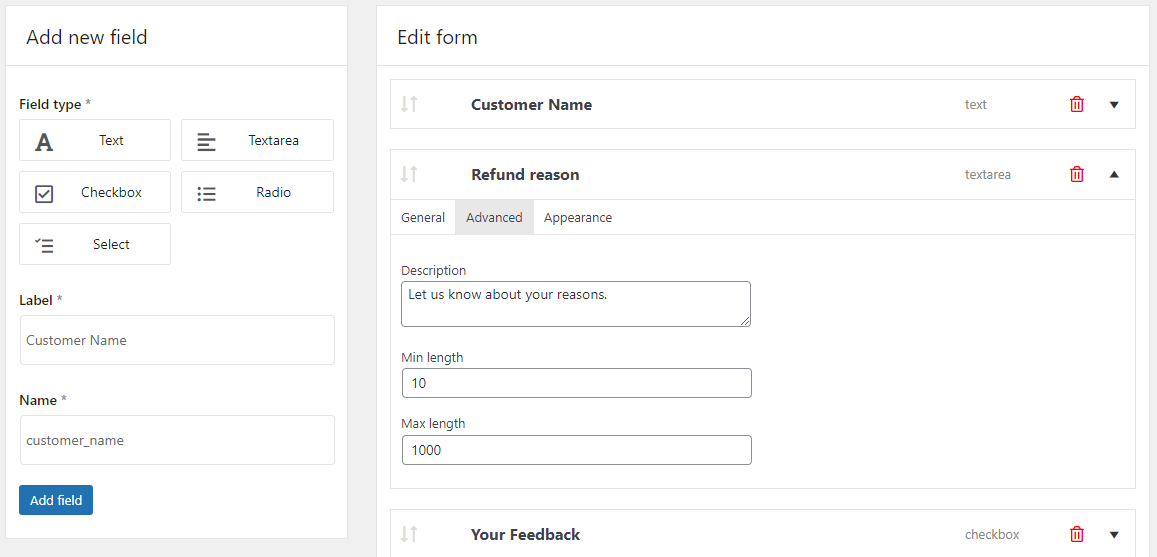
- Refund form builder
- Text, textarea, checkbox, radio, select with description, CSS class, and additional form fields’ settings
- Describe your refund and return policy, terms and conditions, or conditions for returns and warranty requests for WooCommerce orders with the form as well
- Add privacy and refund policy checkbox
- Include the terms and conditions text and conditions to accept
- Describe the return policy and refund requirements of your WooCommerce store
- Refund button for an order on the customer My Account page -> Orders
- Refund form for an order
- Withdrawal the refund request with the cancel button
- Refund Request management page
- Decide about the refund status for a WooCommerce order directly from the Order Edit Screen
- Add notes to the customer about the refund request status change
- Automatic emails to the customer after the WooCommerce refund request status changes
- Edit and customize the content of these notifications
- Handle the refund communication and the process faster
- Send an email to the store administrator about the WooCommerce refund request
- Adjust the order returns with the plugin
- Compatible with WooCommerce Subscriptions and Flexible Subscriptions.
Visit Flexible Refund Docs to see all features of the plugin & how to set up a refund and return system for your WooCommerce orders.
Flexible Refund for WooCommerce – EU One Click Return – PRO Features
Do you need more automation for WooCommerce refunds? You may manage the refund system automatically with Flexible Refund for WooCommerce – EU One Click Return PRO.
See some of its features:
* [PRO] Enable the conditions for the refund button visibility
* [PRO] [NEW] Enable refund for shop customers who do not have an account (guests)
* [PRO] Refund button for specific user roles, order statuses, product categories, products, and payment methods
* [PRO] Partial refunds
* [PRO] Change the refund type to an automatic WooCommerce coupon
* [PRO] Auto refund option to accept order refund requests automatically
* [PRO] Hide the refund button after a specified time (days, weeks, months, years)
* [PRO] Additional form fields (Multiselect, Upload, HTML)
* [PRO] Add the privacy and refund policy checkbox and link to the terms and conditions page you set in WooCommerce
* [PRO] Use as a WooCommerce warranty plugin
* [PRO] Let customers upload files for warranty requests
* [PRO] Benefit from your return and warranty management system for WooCommerce (with automatic refunds)
* [PRO] Use the Multiselect form field to collect data about refunds and returns
* [PRO] Priority email support.
Try refunds and returns for WooCommerce – Live Demo
Test Flexible Refund for WooCommerce – EU One Click Return (free and PRO) in your free demo. The demo also lets you preview the full Withdrawal flow from the customer’s side.
The Flexible Refund for WooCommerce – EU One Click Return Plugin Checklist
The benefits and scenarios for the plugin to help you manage your advanced refund system in WooCommerce.
- Enable the advanced refund system for WooCommerce with a free plugin 🔄
- Let customers ask for a refund, return and exchange products, or warranty requests in WooCommerce 🔁
- Choose to refund cash or send automatic WooCommerce discount coupons 💲
- Allow customers a Withdrawal of a refund request for a WooCommerce order ↩️
- Use and customize the refund form builder with multiple fields and options 🎛️
- Accept, deny, and manage all WooCommerce refunds and returns in one place ⚙️
- Adjust the email templates to personalize the communication for refunds, returns, and warranty requests in WooCommerce 📨
- Enable partial refunds and automatic returns in WooCommerce (PRO) 💞
- Get professional assistance for the plugin on the plugin forum or through priority email support (PRO) 🚀
Languages
The Flexible Refund for WooCommerce – EU One Click Return plugin is available in:
- English
- Polish
You may help us translate the plugin.
Docs
View Flexible Refund for WooCommerce – EU One Click Return Documentation
Support Policy
We provide support for the free version in the plugin Support Forum. You may purchase the PRO to receive priority email support and all PRO features. Upgrade Now →
Flexible Refund for WooCommerce – EU One Click Return in a nutshell
Flexible Refund for WooCommerce – EU One Click Return is a plugin you need when you want to handle return and refund requests directly in your store.
The plugin helps you to add a refund form and allows your customers to request an order refund or return directly from the My Account page. Also, communicate about the WooCommerce refund with a customer by using refund request order statuses, notes, and emails. Add a privacy and refund policy (or terms and conditions) checkbox for users to accept to proceed with the refund for WooCommerce orders. Define conditions for returns and warranty requests in WooCommerce with the form fields and description.
The PRO version will help you handle the refund process automatically by setting conditions for refund button visibility, managing partial refunds, enabling auto refunds, hiding the refund button after some time, and choosing a new refund type (on WooCommerce coupon). You may also let customers upload a file for returns and warranty requests. Moreover, add a link to the privacy and refund policy page and your WooCommerce terms and conditions.
Data use policy
Learn about Use of Data Policy by WP Desk Plugins
Installation
You can install the plugin like any other WordPress plugin.
1. Download and unzip the latest release of the plugin.
2. Upload the entire plugin directory to your /wp-content/plugins/ directory.
3. Activate the plugin through the Plugins menu in the WordPress Administration.
You can also use WordPress uploader to upload the plugin zip file in WordPress menu Plugins -> Add New -> Upload Plugin. You can find and install the plugin through your Plugins menu with a search bar too.
Frequently asked questions
How can I use this plugin to manage a WooCommerce refund?
After installing the plugin, enable the refund button in the plugin settings. You may also add a refund form with fields for your customers like text, textarea, checkbox, radio, and select with description, CSS class, and additional field settings. You can describe your refund and return policy and show your customers additional information for the refund form. Refund buttons will become visible for your customers on the My Account page of their accounts for their orders. You will find refund requests in your WooCommerce -> Refund Request menu. You’ll be able to send the message and decide…
What are the differences between the Flexible Refund and the built-in WooCommerce refund options?
By default, WooCommerce lets you process the refund manually. After you receive the call or an email from a customer, go to the WooCommerce → Orders → Edit the order → and use the Refund button below the product list. If you want to speed up the refund and returns process and do not miss any calls or emails from your customers, use Flexible Refund for WooCommerce – EU One Click Return. The plugin makes refund requests easier for your customers and yourself! You will manage all order refunds under the WooCommerce → Orders menu. The plugin lets you add and customize the refund form, communicate…
Can I allow customers to ask for a shipping costs refund?
Yes. You can enable that option in the plugin settings. The plugin will allow your clients to ask for a refund for the whole order. Customers can select specific items for a partial refund in the PRO version of the plugin. Upgrade to PRO →
When to use the plugin?
The plugin works for WooCommerce orders. It will help you manage refund and return requests in WooCommerce better. You can also add a refund form to ask for more information about the refund or reasons for a product return. The automatic email notifications will shorten communication and support. You may also choose the conditions for refunds, enable auto refund, hide the refund button after some time, handle partial refunds, and choose an automatic WooCommerce coupon refund type in the PRO version of the plugin. Upgrade to PRO →
What are the benefits of Flexible Refund for WooCommerce – EU One Click Return?
The plugin is easy to configure and start using! You will no longer have to handle the refund and return requests by phone or email. Your customers will be able to ask for a refund from their accounts. The whole communication will take place directly in WooCommerce (with automatic and adjustable emails too). You can adjust the refund form by asking to accept the checkbox of your WooCommerce terms and conditions, or privacy and refund policy. And there is even more automation, new settings, new form field types, partial refunds, and priority support in PRO if you need additional speed. Upgrade…
Can I allow users to request and withdraw their refund requests from one place?
Yes. The refund button will appear on the My Account -> Orders page for those orders that are appropriate for the refund. Your customer will be able to request a refund and fill out the form directly there. So, no need to call or mail you outside WooCommerce. If customers change their minds, they cancel the refund request for the WooCommerce order in the same place!
Can I condition the refunds, returns, and warranty requests?
Yes. You may add a checkbox to accept the privacy and refund policy. You can do similarly with your WooCommerce terms and conditions. Also, by setting the conditions for the refund button in the PRO version of the plugin, you may show it only for some orders. You may autohide the refund button after a specified time too. Upgrade to PRO → The plugin will help you manage refunds for WooCommerce orders based on your refund requirements.
Can I add privacy, refund policy, and terms and conditions with the plugin?
You may add a checkbox in the refund form. Also, inform about the privacy and refund policy in your WooCommerce store with a field description. In the PRO version of the plugin, you can use the HTML form field to add links. For example, to terms and conditions or your WooCommerce refund policy page. The plugin options and form fields will provide you with the WooCommerce management system for returns, refunds, and warranty requests under the refund requirements you want.
Is the plugin translation ready?
Yes. You may translate it and also add your translation for other users of the plugin. Read more about translating WordPress plugins.
Where can I read more about the plugin, WooCommerce refunds, and refund policy?
Visit our blog to find interesting knowledge about WooCommerce. Read how to set your WooCommerce refund and return system with this free plugin. Also, about adding the return policy and managing order refunds in WooCommerce stores. Last but not least, how to build trust and handle returns and warranty requests in your WooCommerce store.
How to process a full or partial refund in WooCommerce?
Read about the default WooCommerce refund process. You can then compare it with the possibilities of Flexible Refund for WooCommerce – EU One Click Return. The plugin lets you manage and process the refunds in WooCommerce much faster!
How to manage the pending payment orders and cancellations in WooCommerce?
You may read how to cancel an order in WooCommerce, set the WooCommerce pending payment time limit, and clear the WooCommerce cart after a chosen time.
Is the plugin similar to YITH Advanced Refund System for WooCommerce?
Yes. The Flexible Refund helps you manage the WooCommerce refund process like the YITH Advanced Refund System for WooCommerce plugin. Flexible Refund lets you build trust, speed up refunds, and also build a reliable return and warranty management system for WooCommerce!
Can I use the plugin to cancel WooCommerce orders?
The plugin lets your customers send you WooCommerce order refund requests much faster. They may also cancel such requests before your reply on the My Account page if they change their mind, or want to correct the refund request. With the Flexible Refund for WooCommerce – EU One Click Return plugin, buyers may also cancel WooCommerce orders using the refund request button for an order before payment. You can add the information about the refund process on the separate page (Refund Policy or Terms & Conditions), and in the refund form as well. In that case, of course, you will not have to give…
Can I use the WooCommerce Refund plugin for product returns?
Yes. Flexible Refund can handle a lot of scenarios for order refunds, product returns, and warranty requests in your WooCommerce store! If you have more questions or suggestions about the plugin, contact us!
Can users who do not have accounts use the refund form?
It’s possible in the PRO version of the plugin. You may add a shortcode to the site that will let customers send the refund request without logging in.
Could you give me an example of how the WooCommerce refund plugin works?
Of course. After the plugin installation, first, go to the settings. Next, enable the refund order button in WooCommerce. Also, decide if the shipping cost will be refundable. Finally, add a refund form and customize it to your needs. And that’s it 😊! Customers will be able to send refund requests for their WooCommerce orders from the My Account → Orders. It will also be possible for them to cancel the refund request with a button. What’s more, the plugin lets them check the refund status changes on their My Account pages, and thanks to the refund emails (you may customize them as well). The…
Do you have more free plugins for WooCommerce?
Yes. Check out our free WooCommerce plugins → You can also choose one from the list below based on your needs. Flexible Invoices – issue free PDF invoices in WordPress and WooCommerce. Custom Price – let customers name the WooCommerce product price. Use this plugin to receive donations or sell products with custom prices in WooCommerce. Flexible Checkout Fields – add, remove, and manage custom fields on the WooCommerce checkout page. Customize checkout fields in WooCommerce easily. Flexible PDF Coupons – sell pdf gift cards, vouchers, and tickets in WooCommerce (unlimited gift card…
Where do I report security bugs found in this plugin?
Please report security bugs found in the source code of the Flexible Refund for WooCommerce – EU One Click Return plugin through the Patchstack Vulnerability Disclosure Program. The Patchstack team will assist you with verification, CVE assignment, and notify the developers of this plugin.
Roadmap
Let us know about more functionalities you’d like to see in the plugin 🙂 We may also focus on better compatibility with invoicing plugins.
Changelog
If you activate the PRO version, it will take over the functionality of the free version. So you won't need the free version to be installed.
2.0.3 – 2026-09-23
- Removed refund type in email headers
2.0.2 – 2026-09-10
- Fixed the plugin settings page link
2.0.1 – 2026-08-25
- Added option to automatically refund shipping costs when all remaining products are returned
- Fixed refund request date formatting in email notifications
2.0.0 – 2026-08-19
- Support for refund, complaint, and repair requests, each with its own customizable form
- Multiple requests for the same order can now be viewed and managed independently
- Request type and status are now visible in the WooCommerce order list and email notifications
1.2.5 – 2026-08-19
- Added support for WordPress 7.1
- Added support for WooCommerce 11.1
1.2.4 – 2026-07-29
- Fixed auto-hide refund button checks no longer change the order creation date
Screenshots




For developers
Is this your plugin? Show off the numbers.
Add a live badge to your site, docs or GitHub README. It updates on its own — no account needed.
FAQ
Flexible Refund for WooCommerce: quick answers
Straight answers, pulled from live WordPress.org data.
Live data from WordPress.org · checked Sep 26, 2026
Is Flexible Refund for WooCommerce free?
Yes. Flexible Refund for WooCommerce is free to download and use from the official WordPress.org plugin directory. The developer also sells premium add-ons or a Pro version with extra features.
Is Flexible Refund for WooCommerce safe to use in 2026?
Flexible Refund for WooCommerce is a solid plugin choice in 2026, with a few things worth checking first. It runs on 2K+ sites, is rated 3.7/5 and was last updated 3 days ago, and scores 78/100 on our health check.
How many websites use Flexible Refund for WooCommerce?
Flexible Refund for WooCommerce is active on 2K+ WordPress websites and has been downloaded 67,533 times since it launched in August 2022. It was downloaded 3,724 times in the last 30 days.
Does Flexible Refund for WooCommerce work with WordPress 7.1?
Yes. The developer has tested Flexible Refund for WooCommerce up to WordPress 7.1.2, the latest release. It requires WordPress 6.4 or newer.
What PHP version does Flexible Refund for WooCommerce need?
Flexible Refund for WooCommerce requires PHP 7.4 or higher. Most hosts run PHP 8.x today, so it works on any modern WordPress hosting.
When was Flexible Refund for WooCommerce last updated?
The latest version, 2.0.3, was released on September 23, 2026 (3 days ago).
Who makes Flexible Refund for WooCommerce?
Flexible Refund for WooCommerce is developed and maintained by wpdesk.
Powered by PageForge
Want thousands of pages that rank like these? Build them in an afternoon.
This directory runs on the same engine as PageForge. Turn any spreadsheet, CSV or API into thousands of fast, SEO-ready WordPress pages — with schema, internal links and AI-written copy baked in.
- CSV, Google Sheets & API data sources
- AI content, schema & internal links per page
- Works with Elementor, Gutenberg, Yoast & Rank Math
- Free on WordPress.org — no credit card


