


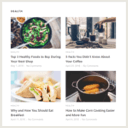
Flex Posts – Responsive Posts Block
Show your posts with thumbnails in flexible, responsive layouts. Works as a sidebar widget or a block in the editor.

Safe pick
Yes — Flex Posts is a safe, well-maintained plugin to use in 2026. It runs on 2K+ sites, is rated 5/5 and was last updated 1 month ago, and scores 84/100 on our health check.
- Loved by users — 5/5 from 24 reviews
- Tested with the latest WordPress (7.1)
How does it stack up?
Side-by-side on installs, updates, ratings & support


Daily downloads
Download spikes usually follow a new release — each site that auto-updates counts as a download.
Rankings
Where Flex Posts stands todayWordPress.org search rankings
Live position in the plugin search, top 100| Keyword | Position |
|---|---|
| magazine | #29 |
| news | >100 |
| posts list | #17 |
| posts-widget | #21 |
| responsive | #48 |
Version adoption
Share of active sites per release.
Rating breakdown
★★★★★★★★★★ 5 from 24 reviews
About Flex Posts – Responsive Posts Block
From the official readme · v2.1.0Description
Flex Posts is a widget to display posts in various different layouts. It is useful for a news site where you need to display a lot of posts in a page.
The widget is responsive so you can place it in any widget area. The widget content will adapt based on the width of its container. In a narrow area like standard sidebar, posts will be displayed vertically, but in a wider area, posts will be displayed in 2 or 3 columns depends on the container’s width.
Widget Settings
- Layout: Select a widget layout, from layout 1 to 6.
- Title: Set the widget title. Leave it empty to hide the title section.
- Title URL: Set the title link url. Leave it empty to disable link in the title.
- Use category title: Enable category name as the title.
- Use category URL: Enable category URL as the title URL.
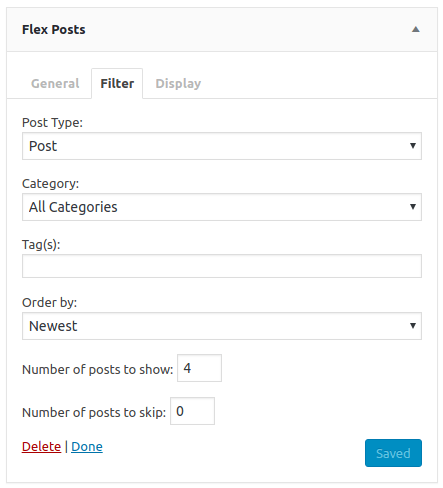
- Post type: Select the post type. Options include: Post, Page, custom post types if available, and any.
- Category: Select a category for the posts, or choose All Categories to disable this filter.
- Tag(s): Set a post tag (using the tag slug). You can also use comma separated value for multiple tags. Prepending a tag with a hyphen will exclude posts matching that tag. Eg,
featured, -videowill show posts tagged withfeaturedbut notvideo. - Order by: Set the order in which the posts will be displayed. Options include: Newest, Oldest, Most Commented, Alphabetical, Random, Modified Date, Page order.
- Number of posts to show: Set the number of posts displayed.
- Number of posts to skip: Set the number of posts to displace or pass over.
- Exclude current post: Choose to show or hide current post.
- Show image on: Select in which posts the image will be displayed. Options include: All posts, First post only, or none.
- Image size: Select image size from registered image sizes.
- Show post title: Choose to show or hide the post title.
- Show categories: Choose to show or hide the categories.
- Show author: Choose to show or hide the author.
- Show author image: Choose to show or hide the author image.
- Show date: Choose to show or hide the date.
- Show comments number: Choose to show or hide the comments number.
- Show excerpt: Choose to show or hide the excerpt
- Excerpt length: Set the number of words for the excerpt.
- Show read more link: Choose to show or hide the Read More link.
- Read more text: Set the text for the read more link. You can leave it empty to use the default text
Read More. - Show pagination: Choose to show or hide the pagination links.
- Block title HTML element: Choose the HTML element for the block title. Options include: h1, h2, h3, h4, h5, h6, div, p, span.
- Post title HTML element: Choose the HTML element for the post title. Options include: h1, h2, h3, h4, h5, h6, div, p, span.
- Additional class(es): Set a custom class for the widget container. You can use spaces to separate multiple classes.
Gutenberg Block
Since version 1.1.0, Flex Posts also includes a gutenberg block. You can add the widget directly into the post/page content with the WP 5.0 block editor.
Demo
Please visit the live demo here: Flex Posts Demo
Requirements
This plugin has been tested and works with at least PHP 5.3 installed in your environment. But we strongly recommend you to use the latest PHP version, as using older versions may expose you to security vulnerabilities.
Installation
- Upload the
flex-postsdirectory to the/wp-content/plugins/directory. - In your WordPress dashboard, go to Plugins, search for Flex Posts and click Activate.
- Go to Appearance » Widgets to add Flex Posts widget into your widget area.
- You can also insert the widget from post/page edit screen. Click Add block button, go to Widgets section, and click Flex Posts to add the widget into your content area.
Changelog
2.1.0
- Updated compatibility to WordPress 7.1
- Added a new layout
2.0.0
- Updated compatibility to WordPress 7.0
- Updated minimum version to WordPress 6.3
- Updated block to api version 3
- Updated layout selector
- Added a new layout
- Added block title filters (before & after title)
- Added block wrapper attributes filter
- Added category title & url option for heading
- Added category color
- Fixed disable links in editor
- Fixed horizontal scrollbar in full width block
- Fixed missing dependencies
- Fixed accessibility issues in meta & thumbnail
- Fixed HTML entity in category dropdown
- Fixed block rendering issue in editor (Invalid parameter(s): attributes)
1.12.0
- Updated compatibility to WordPress 6.9
- Fixed author image hover style
- Fixed block settings label translations
- Fixed block style in Appearance » Widgets page
1.11.0
- Fixed a php error in widget title
- Added show author image option
1.10.0
- Added options page
- Added disable css option
- Added disable image size option
1.9.0
- Fixed style not loaded on widget
- Fixed layout 3 style in full width page
- Added post title element option
- Added block title element option
- Added exclude current post option
- Added custom order option
Screenshots



For developers
Is this your plugin? Show off the numbers.
Add a live badge to your site, docs or GitHub README. It updates on its own — no account needed.
Best Flex Posts alternatives
All magazine plugins →





FAQ
Flex Posts – Responsive Posts Block: quick answers
Straight answers, pulled from live WordPress.org data.
Live data from WordPress.org · checked Sep 26, 2026
Is Flex Posts free?
Yes. Flex Posts is free to download and use from the official WordPress.org plugin directory.
Is Flex Posts safe to use in 2026?
Yes — Flex Posts is a safe, well-maintained plugin to use in 2026. It runs on 2K+ sites, is rated 5/5 and was last updated 1 month ago, and scores 84/100 on our health check.
How many websites use Flex Posts?
Flex Posts is active on 2K+ WordPress websites and has been downloaded 63,150 times since it launched in May 2018. It was downloaded 936 times in the last 30 days.
Does Flex Posts work with WordPress 7.1?
Yes. The developer has tested Flex Posts up to WordPress 7.1.2, the latest release. It requires WordPress 6.3 or newer.
When was Flex Posts last updated?
The latest version, 2.1.0, was released on August 20, 2026 (1 month ago).
Who makes Flex Posts?
Flex Posts is developed and maintained by Tajam.
What are the best alternatives to Flex Posts?
The most popular alternatives to Flex Posts are AF Companion (10K+ installs), WP Magazine Modules Lite (5K+ installs) and ThemeZee Magazine Blocks (4K+ installs).
Powered by PageForge
Want thousands of pages that rank like these? Build them in an afternoon.
This directory runs on the same engine as PageForge. Turn any spreadsheet, CSV or API into thousands of fast, SEO-ready WordPress pages — with schema, internal links and AI-written copy baked in.
- CSV, Google Sheets & API data sources
- AI content, schema & internal links per page
- Works with Elementor, Gutenberg, Yoast & Rank Math
- Free on WordPress.org — no credit card


