



Flash Sale Stock Guard for WooCommerce
Prevent overselling in WooCommerce — hold stock on add-to-cart, flash sale or any day, with a live countdown for shoppers.

Solid choice
Flash Sale Stock Guard for WooC… is a solid plugin choice in 2026, with a few things worth checking first. Was last updated 4 weeks ago, and scores 64/100 on our health check.
- Actively developed — last update 4 weeks ago
- Tested with the latest WordPress (7.1)
- Small user base (<10 active installs)
- Very few reviews so far
How does it stack up?
Side-by-side on installs, updates, ratings & support


Daily downloads
Download spikes usually follow a new release — each site that auto-updates counts as a download.
Rankings
Where Flash Sale Stock Guard for… stands todayWordPress.org search rankings
Live position in the plugin search, top 100| Keyword | Position |
|---|---|
| flash sale | #68 |
| prevent overselling | #21 |
| stock management | >100 |
| stock reservation | #20 |
| woocommerce | >100 |
About Flash Sale Stock Guard for WooCommerce
From the official readme · v1.0.0Description
Overselling isn’t just a flash-sale problem. Any product with more people watching it than units left — a restock, a handmade batch, a limited print run, a popular size running low — can sell the same last unit to two customers within seconds of each other. Flash Sale Stock Guard for WooCommerce closes that window for good: the instant a guarded product is added to cart, its stock is held against that shopper, so nobody else can check out with units that are already spoken for. If they don’t complete checkout in time, the hold expires automatically and the stock goes back into circulation — no manual cleanup, no oversold orders to refund and apologize for.
It’s named for the moment it matters most, but it runs every day, on every guarded product — quietly protecting stock whether or not a sale is even happening.
Stock holds like this are usually locked behind premium inventory or checkout add-ons. Here, that protection is built in and free from the moment you activate the plugin — no upsell, no “Pro” version required for concurrency-safe locking, per-variation targeting, order-status-aware release, or the developer filters below.
How it works
- Hold on add-to-cart. Adding a guarded item reserves that quantity immediately, before checkout even starts.
- Race-condition safe. When two shoppers fight over the last unit at the same instant, a database-level lock scoped to that exact product decides it — not a stock check that was already stale by the time it ran.
- Automatic expiry. Holds release themselves after a duration you set (1 minute to 24 hours) — long enough to check out, short enough that an abandoned cart doesn’t sit on your inventory.
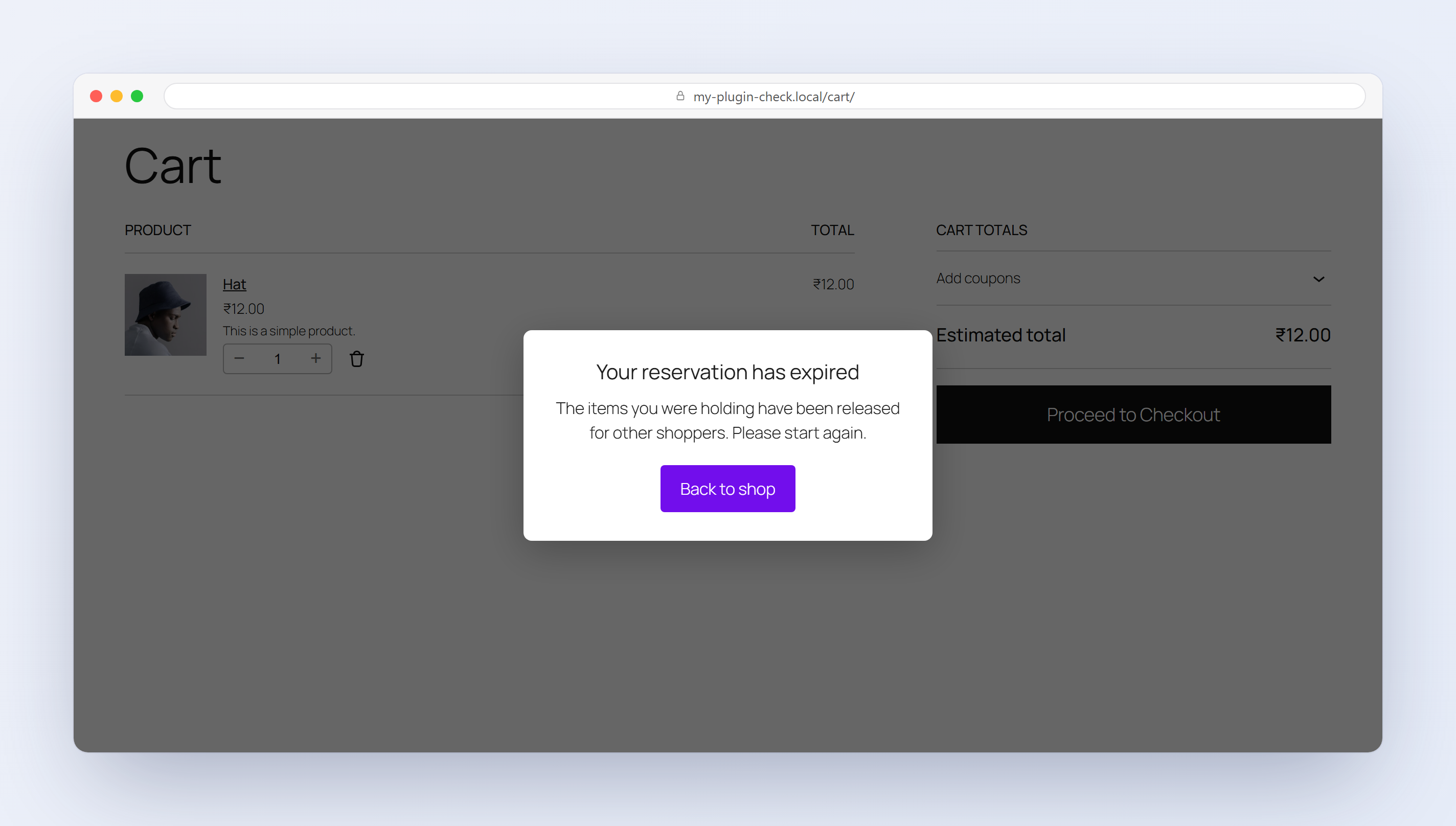
- A clear hand-off when a hold expires. When the countdown reaches zero the released item is removed from the shopper’s cart and a short pop-up explains that the reservation lapsed, with a button back to the shop — the pattern ticketing and limited-drop sites use, instead of leaving a stale cart behind.
- Order-aware. A completed order converts the hold so it stops expiring; a cancelled, failed, or refunded order releases it back to stock.
Choose what gets guarded
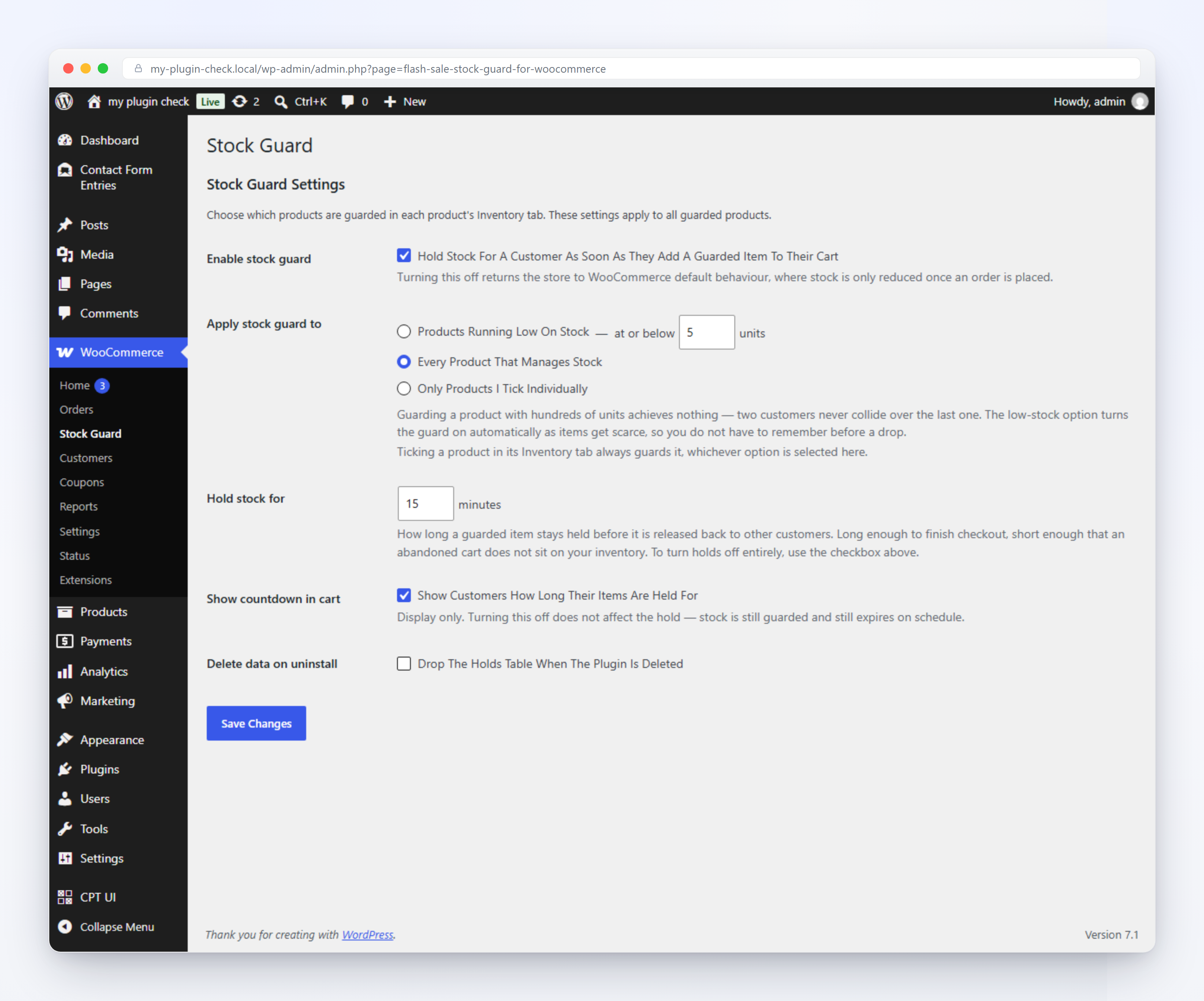
- Every stock-managed product — a store-wide safety net.
- Only products at or below a low-stock threshold you set (the default) — guard scarce items automatically without a manual checklist before every drop.
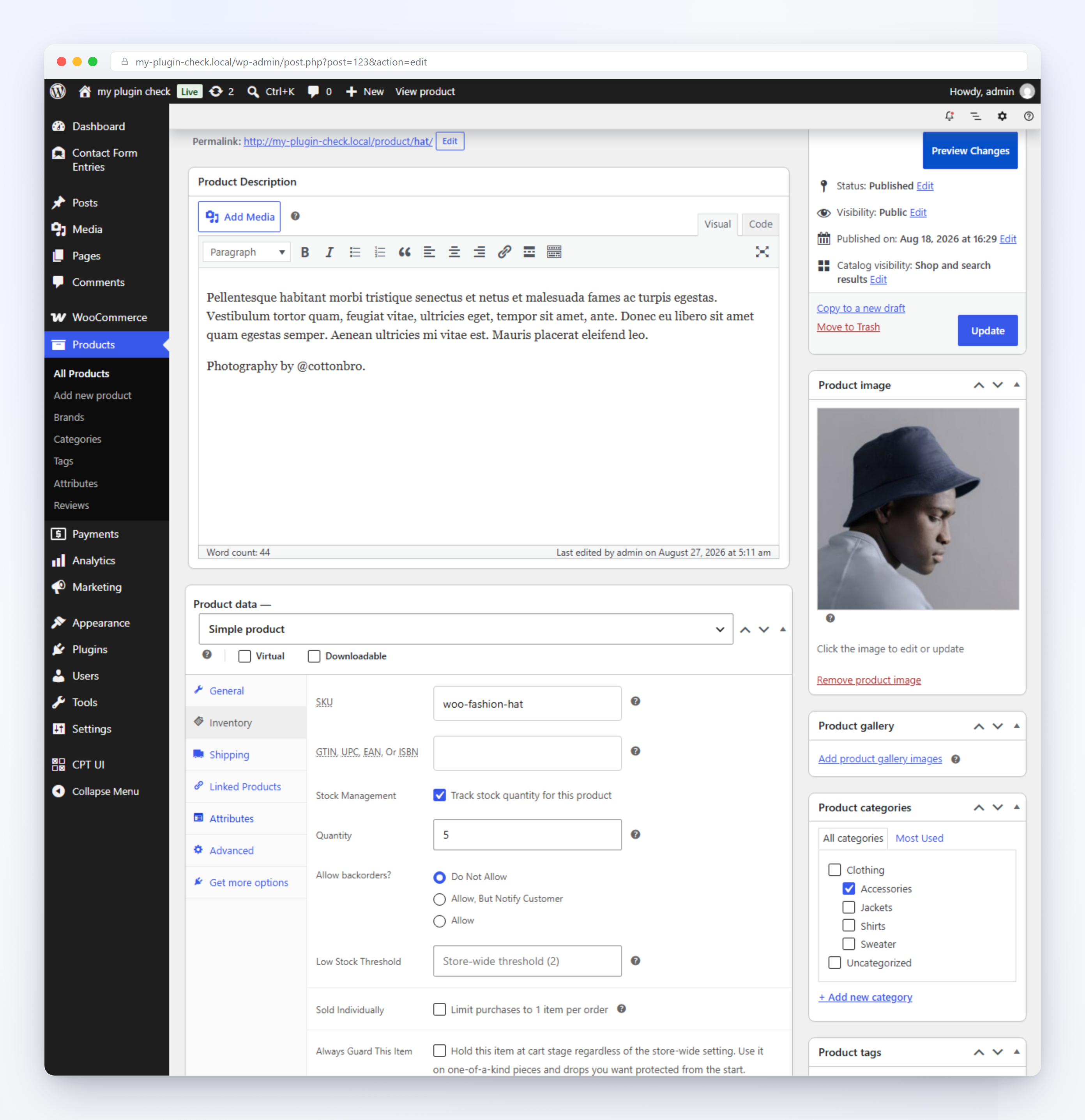
- Only products you mark individually — a checkbox right on the product’s Inventory tab, with its own checkbox per variation, so one variation of a size or color can be protected without guarding the whole product.
- Per-item checkboxes always guard that item, no matter what the store-wide mode says — a manual override on top of the automatic rule, not instead of it.
Built for how customers actually shop
- Works on both the classic shortcode-based Cart/Checkout and the block-based Cart/Checkout — no separate setup for either.
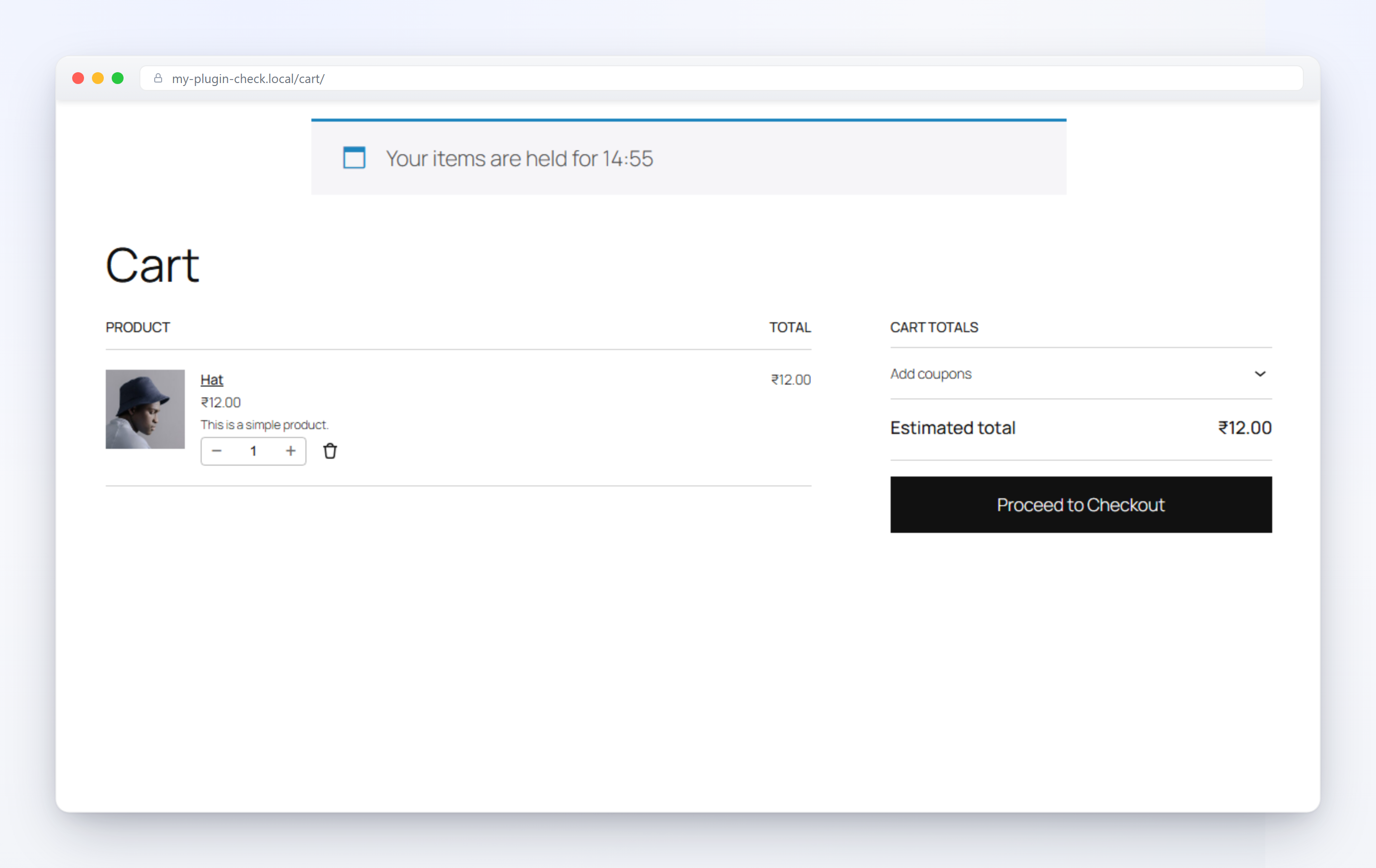
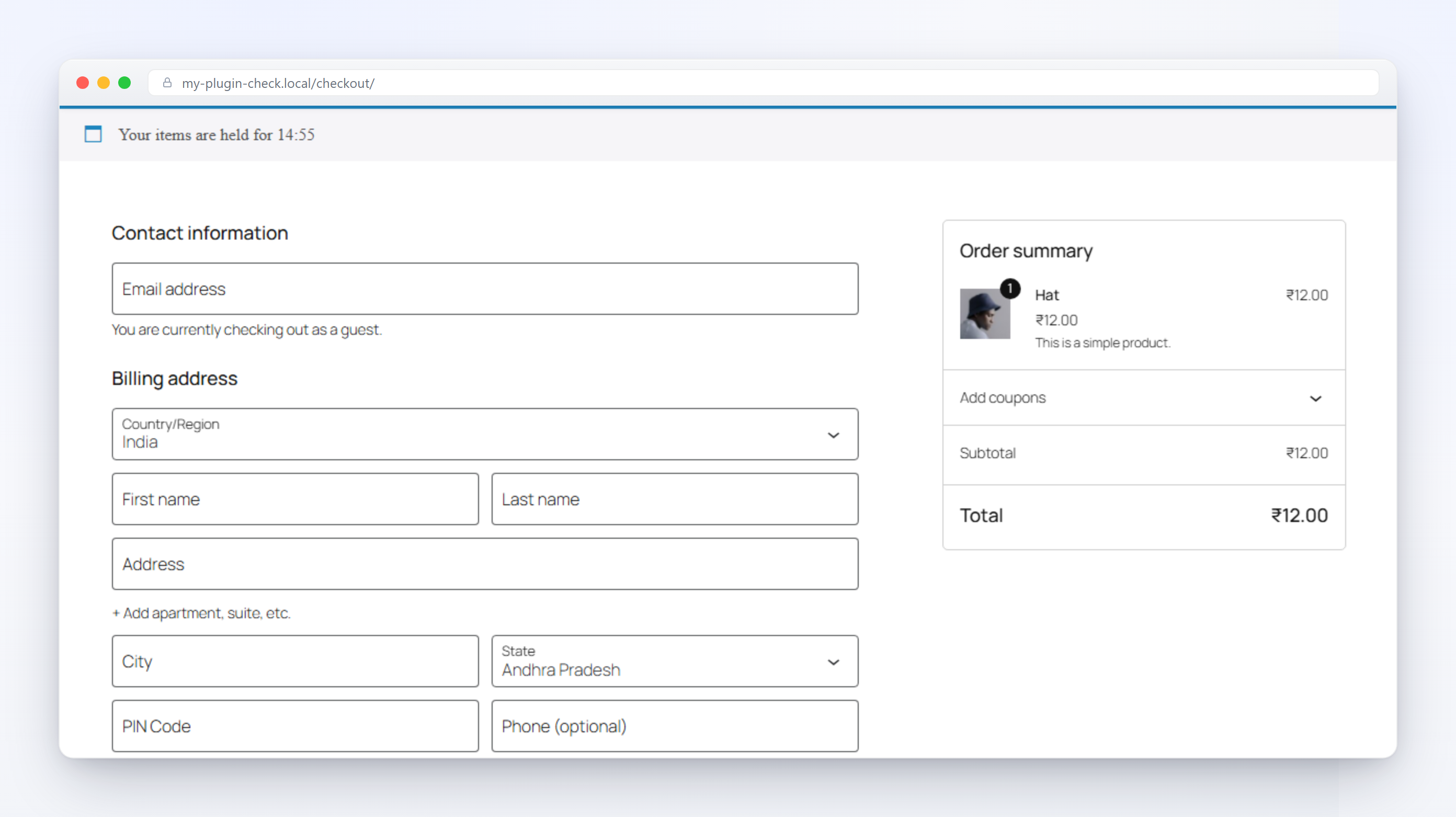
- An optional live countdown on the cart and checkout pages tells shoppers exactly how long their hold is good for. When it reaches zero it becomes a pop-up — background, text, and button colours and text size all set from the settings screen — that sends them back to the shop to start again.
- Turn the countdown off entirely and the stock protection still runs invisibly in the background.
For developers
fssgw_hold_ttlfilter — vary hold duration per product or globally.fssgw_is_product_guardedfilter — decide guarding programmatically, by category, campaign, or anything the settings screen doesn’t cover.fssgw_release_statusesfilter — control which order statuses release a converted hold.fssgw_providersfilter — register additional service providers without touching plugin files.fssgw_holds_expiredaction — fires after each cron expiry sweep, for logging or metrics.- WP-CLI:
wp fssgw status.
See the plugin’s GitHub README for parameters and code examples for each hook.
Installation
- Make sure WooCommerce is installed and active — this plugin requires it.
- Upload the plugin files to
/wp-content/plugins/flash-sale-stock-guard-for-woocommerce, or install it through the WordPress plugins screen directly. - Activate the plugin through the ‘Plugins’ screen in WordPress.
- Go to WooCommerce → Stock Guard to choose which products are guarded, set the hold duration, turn the countdown on or off, and style the expiry pop-up.
Frequently asked questions
How do I stop overselling on WooCommerce?
Overselling happens because WooCommerce only checks stock at checkout — two shoppers can add the last unit to their carts at the same time, and both are allowed to try to pay. Turn on Flash Sale Stock Guard for a product (or let the low-stock default catch it automatically), and stock is held the moment it’s added to cart instead — so only one of those two shoppers can ever complete the order.
Is this only useful during flash sales?
No — that’s just the scenario overselling happens fastest in. The same hold-on-add-to-cart protection runs every day for any product you guard, sale or no sale: low-stock items, one-off restocks, made-to-order or limited-run products, anything where two people could otherwise grab the same last unit.
Does this require WooCommerce?
Yes. It has no purpose without it, and won’t do anything if WooCommerce isn’t active.
What happens when a customer’s hold expires?
The held quantity is released back to available stock automatically, and the item is removed from that shopper’s cart. On the cart or checkout page the countdown turns into a pop-up telling them the reservation lapsed, with a button back to the shop. If the item is still in stock, adding it again starts a fresh hold.
Does this work with variable products?
Yes — holds are tracked per variation, not just per product.
Will this slow down my store?
No. Stock checks use a lightweight database lock scoped to the specific product being held, so shoppers buying different items never wait on each other.
Does the countdown work with the block-based Cart and Checkout?
Yes, alongside the classic shortcode-based versions.
Can I turn off the countdown but keep the stock protection?
Yes — the countdown display and the hold logic are controlled by separate settings.
Can I change how the expiry pop-up looks?
Yes. WooCommerce → Stock Guard → Expiry popup sets its background colour, text colour, button colours, and text size. The wording and the “back to shop” destination are fixed.
Will uninstalling the plugin delete my data?
Not by default. Your guard settings and per-product overrides stay in the database in case you reinstall. Data is only wiped if you tick “Delete data on uninstall” in the settings screen first.
Screenshots
For developers
Is this your plugin? Show off the numbers.
Add a live badge to your site, docs or GitHub README. It updates on its own — no account needed.
Best Flash Sale Stock Guard for Wo… alternatives
All flash sale plugins →





FAQ
Flash Sale Stock Guard for WooComme…: quick answers
Straight answers, pulled from live WordPress.org data.
Live data from WordPress.org · checked Sep 28, 2026
Is Flash Sale Stock Guard for WooC… free?
Yes. Flash Sale Stock Guard for WooC… is free to download and use from the official WordPress.org plugin directory.
Is Flash Sale Stock Guard for WooC… safe to use in 2026?
Flash Sale Stock Guard for WooC… is a solid plugin choice in 2026, with a few things worth checking first. Was last updated 4 weeks ago, and scores 64/100 on our health check.
How many websites use Flash Sale Stock Guard for WooC…?
Flash Sale Stock Guard for WooC… is active on <10 WordPress websites and has been downloaded 117 times since it launched in September 2026. It was downloaded 127 times in the last 30 days.
Does Flash Sale Stock Guard for WooC… work with WordPress 7.1?
Yes. The developer has tested Flash Sale Stock Guard for WooC… up to WordPress 7.1.2, the latest release. It requires WordPress 6.4 or newer.
What PHP version does Flash Sale Stock Guard for WooC… need?
Flash Sale Stock Guard for WooC… requires PHP 7.4 or higher. Most hosts run PHP 8.x today, so it works on any modern WordPress hosting.
When was Flash Sale Stock Guard for WooC… last updated?
The latest version, 1.0.0, was released on September 3, 2026 (4 weeks ago).
Who makes Flash Sale Stock Guard for WooC…?
Flash Sale Stock Guard for WooC… is developed and maintained by Akshat Saxena.
What are the best alternatives to Flash Sale Stock Guard for WooC…?
The most popular alternatives to Flash Sale Stock Guard for WooC… are PW WooCommerce On Sale! (300+ installs), Black Friday and Cyber Mond… (100+ installs) and Flash Sale Product for WooC… (100+ installs).
Powered by PageForge
Want thousands of pages that rank like these? Build them in an afternoon.
This directory runs on the same engine as PageForge. Turn any spreadsheet, CSV or API into thousands of fast, SEO-ready WordPress pages — with schema, internal links and AI-written copy baked in.
- CSV, Google Sheets & API data sources
- AI content, schema & internal links per page
- Works with Elementor, Gutenberg, Yoast & Rank Math
- Free on WordPress.org — no credit card


