



FirstPromoter
Integrate FirstPromoter's affiliate tracking with WooCommerce, OptimizePress, Contact Form 7, MemberPress, and any custom form or thank you page.

Use with caution
FirstPromoter works, but test it on a staging site before relying on it in 2026. It runs on 60+ sites and was last updated 2 months ago, and scores 59/100 on our health check.
- Small user base (60+ active installs)
- Very few reviews so far
How does it stack up?
Side-by-side on installs, updates, ratings & support



Daily downloads
Download spikes usually follow a new release — each site that auto-updates counts as a download.
Rankings
Where FirstPromoter stands todayWordPress.org search rankings
Live position in the plugin search, top 100| Keyword | Position |
|---|---|
| affiliate | >100 |
| marketing | >100 |
| memberpress | >100 |
| referral tracking | #64 |
| woocommerce | >100 |
Version adoption
Share of active sites per release.
About FirstPromoter
From the official readme · v0.3.7Description
FirstPromoter for WordPress allows you to easily integrate FirstPromoter’s affiliate tracking scripts with your WordPress website.
With this plugin, you can track referrals, registrations, and sales across your website, with special integrations for popular platforms.
Features
- Add FirstPromoter tracking to your WordPress site
- WooCommerce integration – track new account registrations and checkouts
- OptimizePress integration – track form submissions
- Contact Form 7 integration – track form submissions with email capture
- MemberPress integration – track member signups, transactions, and recurring payments
- Custom Form Tracking – track email submissions from any form using CSS selectors
- URL Email Capture – capture referrals from thank you pages where the email is in the URL
- Payment Links – automatically append the FirstPromoter tracking ID to payment links on your pages
- Cross-domain tracking support
- Automatically send sales data to FirstPromoter (WooCommerce, MemberPress)
- Automatic refund and cancellation tracking (WooCommerce)
- Track recurring subscription payments (MemberPress)
- Force tracking bypass for privacy browsers and ad-blockers
WooCommerce Integration
When enabled, the WooCommerce integration allows you to:
- Capture emails when users create new accounts
- Capture emails at checkout
- Automatically send sale information to FirstPromoter
- Track refunds and generate negative commissions
- Track order cancellations and update customer status
OptimizePress Integration
The OptimizePress integration tracks form submissions and captures emails for referral tracking.
Contact Form 7 Integration
When enabled, the Contact Form 7 integration allows you to:
- Track form submissions automatically (all forms tracked)
- Capture email addresses from any field containing “email” in its name
- Attribute form leads to the correct referral source
- Requires API key – uses server-side tracking
MemberPress Integration
When enabled, the MemberPress integration allows you to:
- Track new member signups and registrations (always enabled)
- Automatically send transaction data to FirstPromoter (requires API key)
- Track recurring subscription payments (requires API key)
- Associate members with their referral source
- API sale tracking uses prefixed user IDs (“mepr-“) to prevent conflicts
Important: If you’re using FirstPromoter’s Stripe integration, only enable signup tracking. Leave sale tracking OFF to avoid duplicate sales.
Custom Form Tracking
When enabled, the Custom Form Tracking integration allows you to:
- Track email submissions from any form on your site — no plugin dependency required
- Works with any form builder, custom HTML forms, or dynamically loaded popups
- Configure CSS selector pairs: one for the email input, one for the submit button or form element
- Supports multiple forms with separate selector pairs
- Uses MutationObserver to handle dynamically loaded forms (popups, AJAX-injected content)
- AJAX fallback for ad-blocker bypass when force tracking is enabled
URL Email Capture
When enabled, the URL Email Capture integration allows you to:
- Track referrals from thank you pages where the email is passed as a URL query parameter
- Useful when your checkout, funnel, or external platform redirects to a confirmation page with the customer’s email in the URL (e.g.
/thank-you?email=user@example.com) - Configure the URL parameter key for the email (e.g.
email) - Optionally configure a second parameter key for the user ID (e.g.
uid) - No plugin dependency required — works on any WordPress page
Payment Links
When enabled, the Payment Links integration allows you to:
- Automatically append the FirstPromoter tracking ID to payment links on your pages as the
client_reference_idparameter - Works with Stripe
buy.stripe.comlinks, custom Stripe checkout domains, or any direct payment URL - Configure the URL prefix to match — defaults to
https://buy.stripe.com/, supports comma-separated multiple prefixes - Uses MutationObserver to handle dynamically added links (popups, AJAX-injected content)
- No plugin dependency required — works on any WordPress page
Configuration
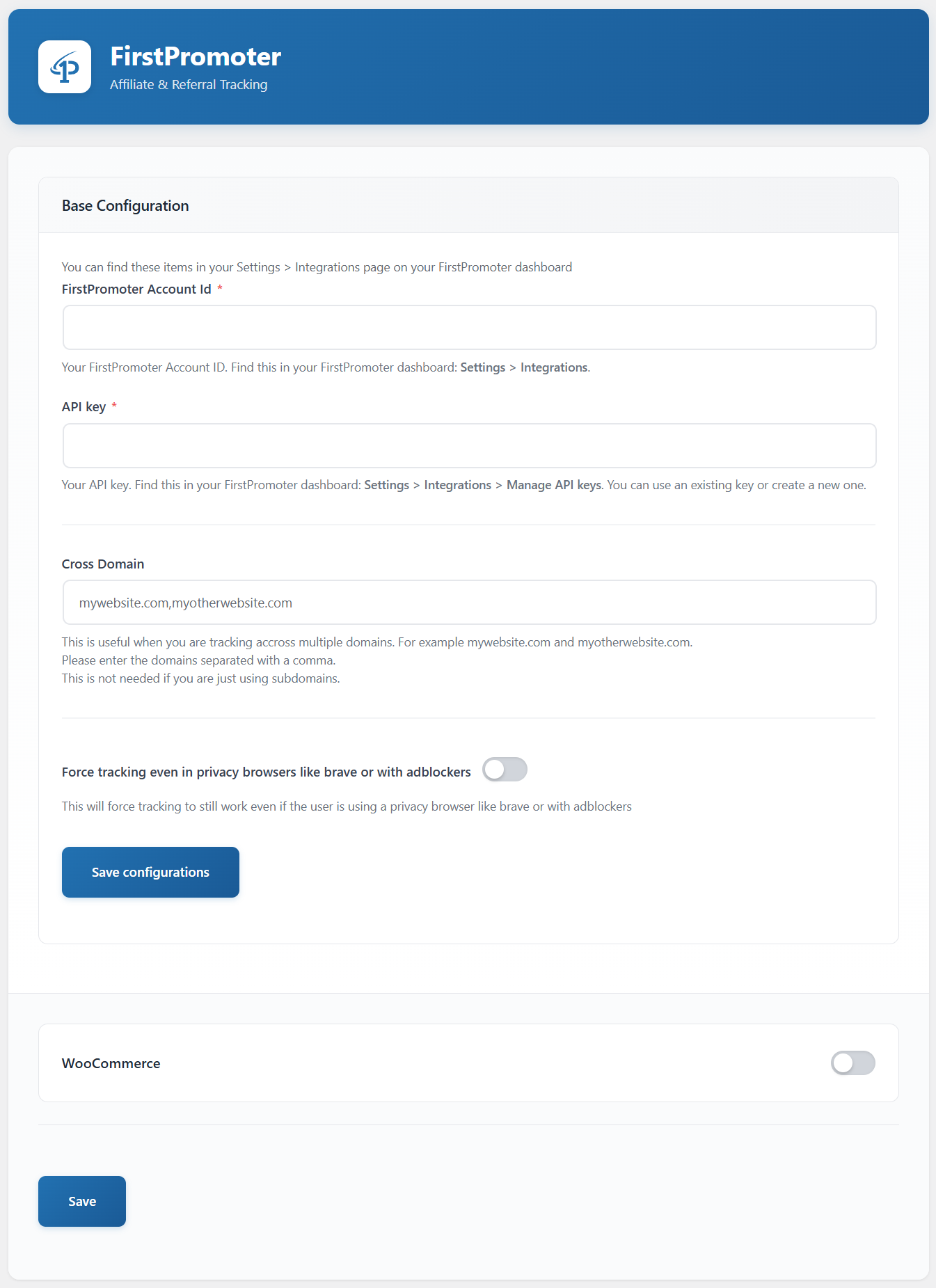
After activation, you’ll find a new menu item in your WordPress admin dashboard labeled “FirstPromoter”.
Base Configuration
- Navigate to the FirstPromoter settings page in your WordPress admin
- Enter your FirstPromoter Account ID (required)
- Enter your API key (required for most integrations – see below)
- If you want to track across multiple domains, enter them in the Cross Domain field, separated by commas
- Click “Save” to store your settings
API Key Requirements
The FirstPromoter API key is required for the following features:
- Contact Form 7 integration (all tracking)
- WooCommerce sale tracking
- MemberPress sale tracking
- MemberPress recurring payment tracking
The following features work without an API key:
- WooCommerce signup tracking
- WooCommerce checkout email capture
- OptimizePress integration
- MemberPress signup tracking (without sales)
You can find your API key in your FirstPromoter dashboard: Settings > Integrations > Manage API keys
Integration Settings
The plugin supports multiple types of integrations:
- WooCommerce Integration: Track new account registrations and checkouts
- OptimizePress Integration: Track form submissions
- Contact Form 7 Integration: Track contact form submissions with email capture
- MemberPress Integration: Track member signups, transactions, and recurring payments
- Custom Form Tracking: Track email submissions from any form using CSS selectors
- URL Email Capture: Capture referrals from thank you pages where the email is in the URL
- Payment Links: Automatically append the tracking ID to payment links on your pages
Enable the integrations that apply to your website and configure their specific settings.
External Services
This plugin connects to FirstPromoter’s external services to provide affiliate and referral tracking functionality. It’s essential for the plugin’s operation to track referrals, registrations, and sales.
FirstPromoter Tracking Service
What it is: FirstPromoter’s affiliate tracking platform that monitors referral activity and conversions.
What data is sent:
– Email addresses (for referral tracking)
– User IDs (when available)
– Order information including amount, order ID, and coupon codes (when WooCommerce sales tracking is enabled)
– Page visit information for referral attribution
When data is sent:
– Every time a page loads (for referral attribution via JavaScript tracking)
– When users register or create accounts (if integration is enabled)
– When purchases are completed (if WooCommerce integration is enabled)
– When custom tracking events are triggered
Service provider: FirstPromoter (https://firstpromoter.com)
– Terms of Service: https://firstpromoter.com/terms
– Privacy Policy: https://firstpromoter.com/privacy
– API Documentation: https://docs.firstpromoter.com/api-reference-v2/
FirstPromoter CDN Service
What it is: Content delivery network that serves the FirstPromoter tracking JavaScript library.
What data is sent: Standard web request data (IP address, user agent, referrer)
When data is sent: On every page load where tracking is active
Service details:
– CDN URL: https://cdn.firstpromoter.com/fpr.js
– v2 API Endpoints: https://api.firstpromoter.com/api/v2/track/*
– This is required for the tracking functionality to work
Technical Details
This plugin works by adding the FirstPromoter tracking script to your website and handling various trigger points for tracking registrations, checkouts, and custom events. The plugin:
- Adds the base FirstPromoter tracking script to all pages
- Captures and tracks user emails at registration and checkout (when enabled)
- Supports cross-domain tracking
- Can send WooCommerce sales data directly to FirstPromoter’s API
Installation
- Upload the plugin files to the
/wp-content/plugins/firstpromoterdirectory, or install the plugin through the WordPress plugins screen - Activate the plugin through the ‘Plugins’ screen in WordPress
- Use the FirstPromoter menu item in your admin sidebar to configure the plugin
Frequently asked questions
Where do I find my FirstPromoter Account ID?
You can find your Account ID in your FirstPromoter dashboard under Settings > Integrations.
Where do I find my FirstPromoter API key?
You can find your API key in your FirstPromoter dashboard under Settings > Integrations > Manage API keys. You can use an existing key or create a new one for this WordPress integration.
Which features require an API key?
API key is required for: Contact Form 7 (all tracking), WooCommerce sale tracking, MemberPress sales and recurring payments. Basic signup/email tracking for WooCommerce, OptimizePress, and MemberPress works without an API key.
Does this work with other plugins?
The plugin has specific integrations for WooCommerce, OptimizePress, Contact Form 7, and MemberPress. The Custom Form Tracking and URL Email Capture integrations work with any platform — no additional plugin required.
How do I use Payment Links?
Enable the “Payment Links” integration. By default it targets all https://buy.stripe.com/ links on your pages. If you use a custom Stripe domain or a different payment provider, enter your URL prefix in the Payment Link URL Prefix field. You can enter multiple prefixes separated by commas. The plugin will automatically append ?client_reference_id={tid} to every matching link as soon as the link appears in the DOM and the FirstPromoter tracking ID is available.
How do I use URL Email Capture?
Enable the “URL Email Capture” integration and enter the URL parameter name that contains the email on your thank you page. For example, if your thank you page URL looks like /thank-you?email=user@example.com, enter email in the Email URL Parameter Key field. Optionally enter a second parameter name for the user ID.
What information is sent to FirstPromoter?
When tracking is enabled, the plugin sends: – Email addresses (for referral tracking) – User IDs (when available) – Order information (when WooCommerce sales tracking is enabled)
Is cross-domain tracking supported?
Yes, you can enable cross-domain tracking in the Base Configuration settings.
Changelog
Important fix for stores using the WooCommerce block Checkout: referral tracking (both the order data and the client-side script that registers the referral with FirstPromoter) was silently not working there. Update recommended for all WooCommerce users, especially anyone using the block Checkout.
0.3.7
- Fixed: WooCommerce sale/referral tracking not firing on the block-based Checkout (Cart & Checkout blocks). The order confirmation step there only fires
woocommerce_before_thankyou, notwoocommerce_thankyou; checkout tracking is now hooked towoocommerce_before_thankyouso it fires correctly on both the block checkout and the classic shortcode checkout. - Fixed: WooCommerce checkout referral tracking (the client-side
fpr("referral", ...)call) was silently never reaching the browser on block-based Checkout/Order Confirmation pages. It was registered viawp_enqueue_script()/wp_add_inline_script()onwp_footer/wp_enqueue_scripts, but on this page type that registration does not survive to the final rendered output. The script is now echoed directly and immediately from thewoocommerce_before_thankyouhook instead, which is reliably captured into the page content. Order meta (ref_id/tid) tracking was unaffected by this bug. - Fixed: the main FirstPromoter tracking script (
fpr.jsplus itswindow.fprinit) was loaded in the footer, which is after the WooCommerce order-confirmation content that now echoesfpr("referral", ...)directly. Since that content renders before the footer, the referral call was throwingfpr is not defined. The tracking script now loads in the page<head>instead, so it’s always defined before any integration callsfpr(...). - Fixed: revisiting the order-received page without the referral cookies present (e.g. a bot/crawler, or the customer reloading after the cookie expired) used to wipe the order’s already-captured
ref_id/tidmeta back to empty. Order meta is now only overwritten when a new value is actually present in cookies. - Added: verbose debug logging throughout the WooCommerce referral/checkout tracking path (
track_checkout,track_referral, script emission) to make future issues easier to diagnose viaWP_DEBUG_LOG.
0.3.6
- Fixed: OptimizePress integration now always appears in settings regardless of plugin detection — resolves issue where OptimizePress 3.x users could not see the option
0.3.5
- Improved: Custom Form Tracking admin UI now shows labels (“Email Input” / “Submit Button”) on selector fields for clarity
- Fixed: Removed spurious console.warn when no custom forms are configured (script is never loaded in that case anyway)
0.3.4
- New: Payment Links integration — automatically append FirstPromoter tracking ID to payment links as
client_reference_id - Supports Stripe buy.stripe.com links, custom checkout domains, or any direct payment URL prefix
- Configurable URL prefix field with comma-separated support for multiple prefixes
- Uses MutationObserver to handle dynamically added links (popups, AJAX content) with no fixed timeouts
0.3.3
- Fixed: URL capture now uses filter_input( INPUT_SERVER ) instead of direct $_SERVER access, resolving WordPress coding standards warnings without suppression comments
- Fixed: Inline script for URL param capture refactored to use wp_json_encode() and pure JS conditionals, eliminating unescaped output warnings
0.3.2
- Improved: URL capture JS now uses decodeURI + new URL() for robust param parsing, window.fpr guard, and setInterval readyState check to ensure the FP library is loaded before calling fpr(“referral”, …)
Screenshots
For developers
Is this your plugin? Show off the numbers.
Add a live badge to your site, docs or GitHub README. It updates on its own — no account needed.
Best FirstPromoter alternatives
All affiliate plugins →





FAQ
FirstPromoter: quick answers
Straight answers, pulled from live WordPress.org data.
Live data from WordPress.org · checked Oct 10, 2026
Is FirstPromoter free?
Yes. FirstPromoter is free to download and use from the official WordPress.org plugin directory.
Is FirstPromoter safe to use in 2026?
FirstPromoter works, but test it on a staging site before relying on it in 2026. It runs on 60+ sites and was last updated 2 months ago, and scores 59/100 on our health check.
How many websites use FirstPromoter?
FirstPromoter is active on 60+ WordPress websites and has been downloaded 1,389 times since it launched in November 2025. It was downloaded 158 times in the last 30 days.
Does FirstPromoter work with WordPress 7.1?
FirstPromoter is officially tested up to WordPress 7.0.7, while the latest release is 7.1.3. It may still work, but try it on a staging site first.
What PHP version does FirstPromoter need?
FirstPromoter requires PHP 5.6 or higher. Most hosts run PHP 8.x today, so it works on any modern WordPress hosting.
When was FirstPromoter last updated?
The latest version, 0.3.7, was released on July 29, 2026 (2 months ago).
Who makes FirstPromoter?
FirstPromoter is developed and maintained by FirstPromoter.
What are the best alternatives to FirstPromoter?
The most popular alternatives to FirstPromoter are Advanced Ads (100K+ installs), Pochipp (30K+ installs) and Meks Easy Ads Widget (10K+ installs).
Powered by PageForge
Want thousands of pages that rank like these? Build them in an afternoon.
This directory runs on the same engine as PageForge. Turn any spreadsheet, CSV or API into thousands of fast, SEO-ready WordPress pages — with schema, internal links and AI-written copy baked in.
- CSV, Google Sheets & API data sources
- AI content, schema & internal links per page
- Works with Elementor, Gutenberg, Yoast & Rank Math
- Free on WordPress.org — no credit card


