


FilterWell – Query Loop Filters
Native filters for the Query Loop block: search, sorting, category and tag pills, author and date filters, without page reloads.

Solid choice
FilterWell – Query Loop Filters is a solid plugin choice in 2026, with a few things worth checking first. It runs on 40+ sites and was last updated 4 weeks ago, and scores 67/100 on our health check.
- Actively developed — last update 4 weeks ago
- Tested with the latest WordPress (7.1)
- Small user base (40+ active installs)
- Very few reviews so far
How does it stack up?
Side-by-side on installs, updates, ratings & support



Daily downloads
Download spikes usually follow a new release — each site that auto-updates counts as a download.
Rankings
Where FilterWell stands todayWordPress.org search rankings
Live position in the plugin search, top 100| Keyword | Position |
|---|---|
| block | >100 |
| filter | >100 |
| query loop | #41 |
| search | >100 |
| taxonomy | >100 |
Version adoption
Share of active sites per release.
About FilterWell – Query Loop Filters
From the official readme · v1.0.1Description
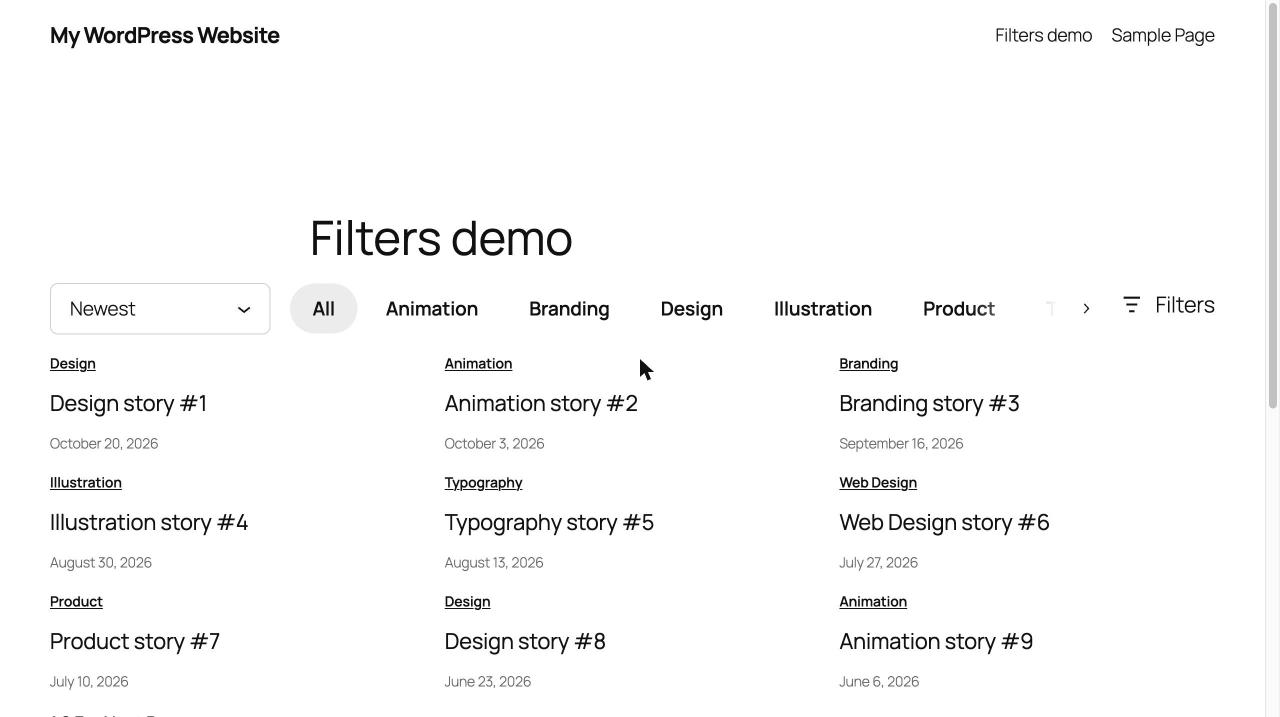
FilterWell adds filtering blocks that connect to the core Query Loop block. Visitors can search, sort and filter posts, pages or custom post types, and the results update without reloading the page, using the WordPress Interactivity API.
Everything is built with native blocks and takes its look from your theme: fonts, colors, buttons and form fields follow the Styles you already defined.
Blocks
- Query Loop Filters – the container. It connects to a Query Loop and decides whether filters apply instantly or with a “Filter” button. On mobile, it can show the filters in a slide-in panel.
- Taxonomy Filter – categories, tags or any taxonomy, shown as checkboxes, single choice, a dropdown or a row of pills. Includes result counts that take the other active filters into account and can hide options without results. For hierarchical taxonomies it can show only the main terms, or only the subterms of the selected term.
- Author Filter – the same styles, listing the authors that have published content.
- Date Filter – a publish date range (from / to).
- Query Loop Search – a text search field that uses your theme’s Search block style.
- Query Loop Sort – a dropdown to sort by newest, oldest, title, recently updated or most commented. You choose the options and their labels.
Need only a search field or a sort dropdown next to your loop? Insert Query Loop Search or Query Loop Sort anywhere on the page: they come already wrapped in their own Query Loop Filters block.
* Filter Buttons – “Filter” and “Clear” buttons.
* Active Filters – the applied filters as removable chips.
Highlights
- Pills row: a single scrollable row with arrows and fading edges, which can also be swiped on mobile.
- Category and subcategory rows: a first row with the main categories and a second row, shown only when needed, with the subcategories of the selected one.
- Archive pages: on a category, tag, taxonomy or author archive, the current term is marked as selected and choosing another one goes to its archive URL. On date archives (
/2025/09/), the Date Filter shows that period. - Shareable URLs: filters are stored in the URL, so filtered results can be shared and the browser back and forward buttons work.
- Several loops per page: name your loops and choose which one each set of filters controls. You can also add filters directly from the Query Loop sidebar.
- Accessible: real form controls, keyboard support, a focus-trapped mobile panel and screen reader announcements when results change.
- No settings page and no database tables.
Installation
- Install the plugin from the Plugins screen, or upload the
filterwellfolder to/wp-content/plugins/. - Activate the plugin.
- In the block editor or the Site Editor, add a Query Loop block.
- Select the Query Loop and, in its Query Loop Filters panel, click Add filters above the loop. You can also insert the Query Loop Filters block anywhere and choose the loop in its Connection panel.
- Add the filter blocks you need inside the container.
Changelog
Adds standalone sort and search blocks for any Query Loop.
1.0.1
- New: “Query Loop Sort” and “Query Loop Search” can be inserted anywhere on the page, on their own. They connect to the loop like the full filters block.
- New: the default Query Loop Filters block now includes the sort dropdown.
- Fix: sorting by title ignores leading punctuation, so “¿Cómo…?” is listed with the C titles. This also applies to loops sorted by title by default.
- New: all FilterWell blocks are grouped in their own “FilterWell” section of the block inserter.
1.0.0
- First public release.
Screenshots


For developers
Is this your plugin? Show off the numbers.
Add a live badge to your site, docs or GitHub README. It updates on its own — no account needed.
Best FilterWell alternatives
All block plugins →





FAQ
FilterWell – Query Loop Filters: quick answers
Straight answers, pulled from live WordPress.org data.
Source: WordPress.org
Is FilterWell – Query Loop Filters free?
Yes. FilterWell – Query Loop Filters is free to download and use from the official WordPress.org plugin directory.
Is FilterWell – Query Loop Filters safe to use in 2026?
FilterWell – Query Loop Filters is a solid plugin choice in 2026, with a few things worth checking first. It runs on 40+ sites and was last updated 4 weeks ago, and scores 67/100 on our health check.
How many websites use FilterWell – Query Loop Filters?
FilterWell – Query Loop Filters is active on 40+ WordPress websites and has been downloaded 580 times since it launched in November 2026. It was downloaded 580 times in the last 30 days.
Does FilterWell – Query Loop Filters work with WordPress 7.1?
Yes. The developer has tested FilterWell – Query Loop Filters up to WordPress 7.1.5, the latest release. It requires WordPress 6.8 or newer.
What PHP version does FilterWell – Query Loop Filters need?
FilterWell – Query Loop Filters requires PHP 7.4 or higher. Most hosts run PHP 8.x today, so it works on any modern WordPress hosting.
When was FilterWell – Query Loop Filters last updated?
The latest version, 1.0.1, was released on November 3, 2026 (4 weeks ago).
Who makes FilterWell – Query Loop Filters?
FilterWell – Query Loop Filters is developed and maintained by Raúl Cerda.
What are the best alternatives to FilterWell – Query Loop Filters?
The most popular alternatives to FilterWell – Query Loop Filters are Spectra Legacy (1M+ installs), Breadcrumb NavXT (700K+ installs) and PDF Embedder (300K+ installs).
Powered by PageForge
One template and a spreadsheet. A real page for every search.
PageForge turns each row of a CSV into a WordPress page with its own title, URL, SEO fields and schema, built on the layout you already designed. Free on WordPress.org.
- CSV and XLSX, plus Google Sheets on Professional and Enterprise
- Its own title, URL, SEO fields and schema for every page
- Works with the block editor, Elementor, Divi and Avada
- Free on WordPress.org, no credit card