



Advanced File Manager – Ultimate File Manager for WordPress And Document Library Solution
Manage WordPress files and folders with ease all from your dashboard!

Safe pick
Yes — Advanced File Manager is a safe, well-maintained plugin to use in 2026. It runs on 100K+ sites, is rated 4.8/5 and was last updated 1 month ago, and scores 91/100 on our health check.
- Proven at scale on 100K+ active sites
- Loved by users — 4.8/5 from 443 reviews
- Tested with the latest WordPress (7.1)
- Responsive support — 100% of recent threads resolved
Daily downloads
Download spikes usually follow a new release — each site that auto-updates counts as a download.
Rankings
Where Advanced File Manager stands todayWordPress.org search rankings
Live position in the plugin search, top 100| Keyword | Position |
|---|---|
| advance-file-manager | #1 |
| document management | #3 |
| file manager | #2 |
| ftp | #6 |
| wp file manager | #2 |
Version adoption
Share of active sites per release.
Rating breakdown
★★★★★★★★★★ 4.8 from 443 reviews
About Advanced File Manager
From the official readme · v6.0.0Description
Buy Pro | Live Demo | Documentation | Support
Manage WordPress files and folders with ease all from your dashboard!
Are you tired of managing your WordPress site files via FTP clients or hosting control panels like cPanel, hPanel, Plesk, DirectAdmin, or other hosting panels? 😖
If that is the case, then ✨ Download Advanced File Manager Now! ✨
With this WordPress file manager plugin, you can perform multiple file operations, such as Copy, Paste, Rename, Edit, Delete, Upload, Download, Create an archive (Zip archive), etc., directly from the WordPress dashboard—no need for any cPanel, FTP or other hosting panels.
The best part is that this WordPress file manager plugin also allows you to access files outside of the WordPress root directory, which means you can create a fully functional document library with download controls as well. 😃
Whether you are a developer or a beginner, this file management plugin has something for everyone.
⚡ Key Features That Make This WordPress File Manager a Complete File Management Solution!
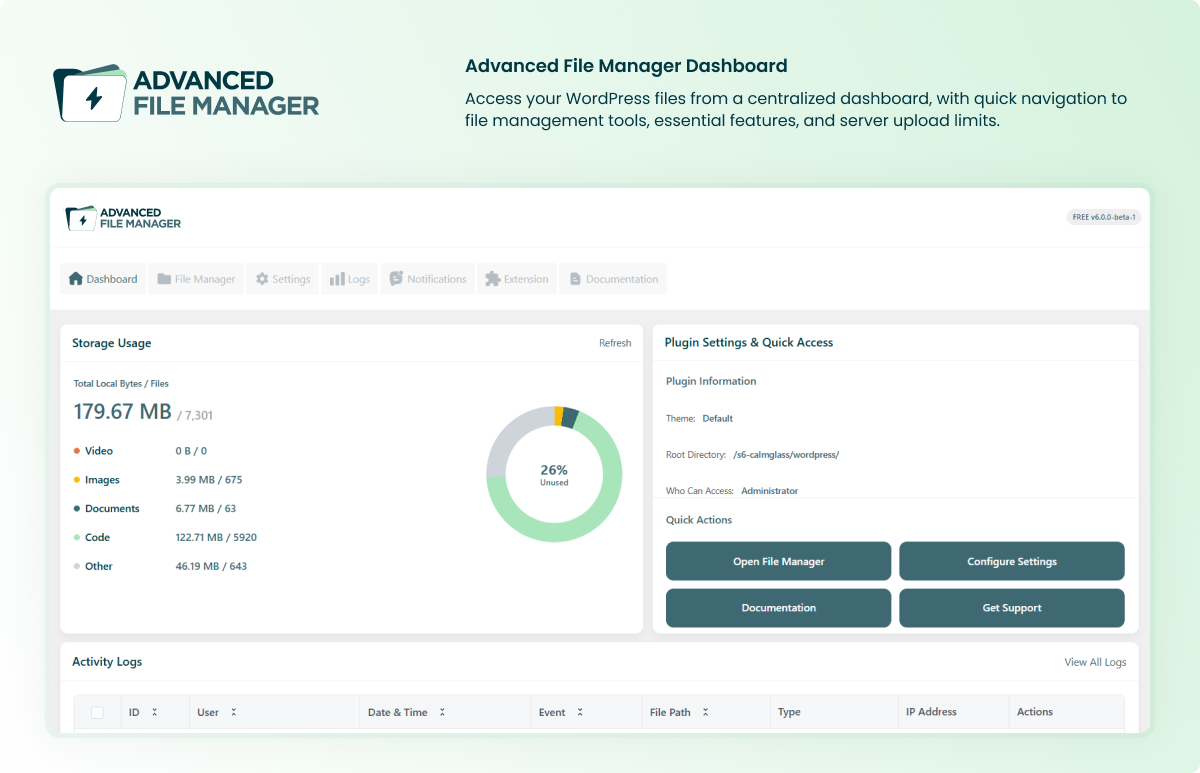
✅ Storage Limit Dashboard: Monitor storage usage and access file manager settings directly from the dashboard for convenient file management.
✅ Flexible Root Directory Access: You can easily set and modify the root directory path, which allows you to access specific files according to your development requirements.
✅ Access to Internal and External Directories: Gain complete control over files located both within and outside your WordPress root directory, making file management more flexible.
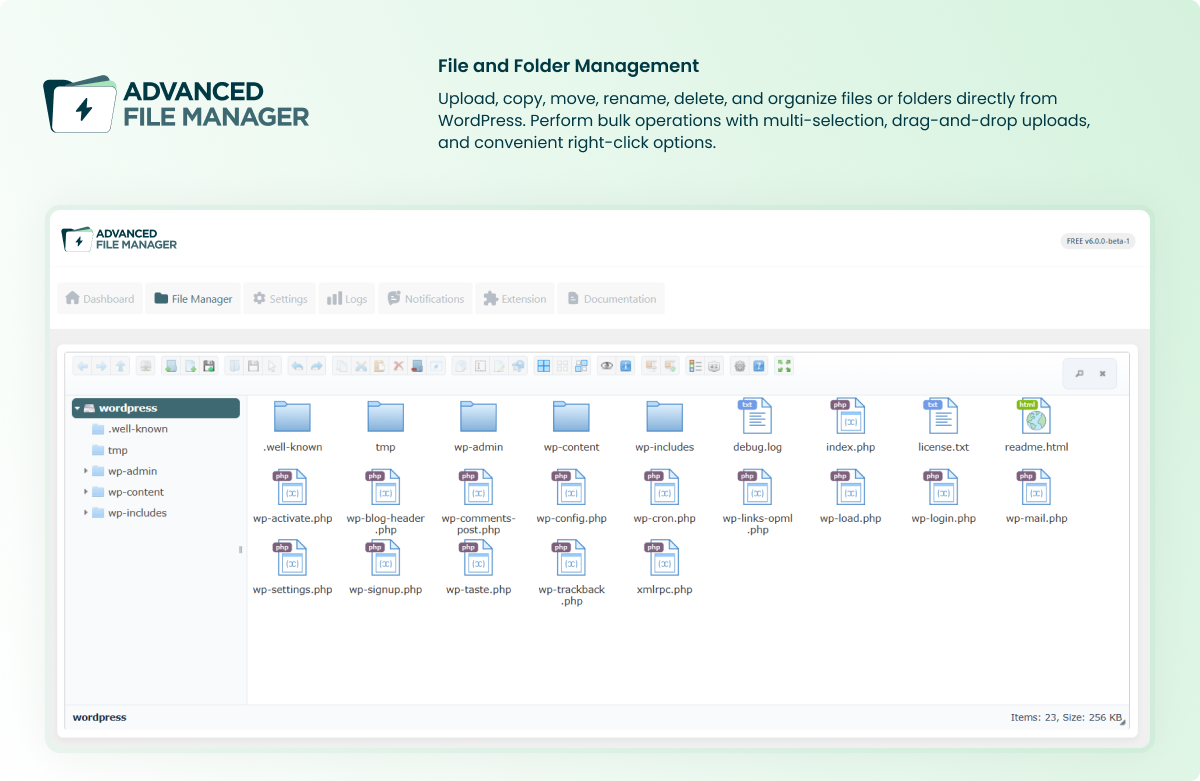
✅ Complete File Operations: Perform all essential file operations such as copy, paste, rename, edit, delete, upload, download, and even create an archive (Zip archive) directly from your WordPress dashboard.
✅ Quick PDF Previews: Save time by easily previewing PDF documents directly in the plugin without needing to download them first.
✅ FTP-Free File Management: This WordPress file manager acts as a secure alternative to traditional FTP clients that allows you to manage files securely from within WordPress.
✅ Path Privacy Protection: Hide the actual file paths from users to enhance security and protect sensitive information on your site.
✅ Drag-and-Drop File Interface: Use drag and drop file upload to easily upload and move files within the interface.
✅ Icon and List View Options: Use this file organizer for WordPress to switch between icon and list views for easier navigation.
✅ Directory Size Calculation: Instantly calculate directory sizes using this practical file organizer for WordPress.
✅ Archive Management: Easily zip and extract archives in multiple formats (ZIP, RAR, 7Z, TAR, GZIP, and BZIP2) directly from WordPress.
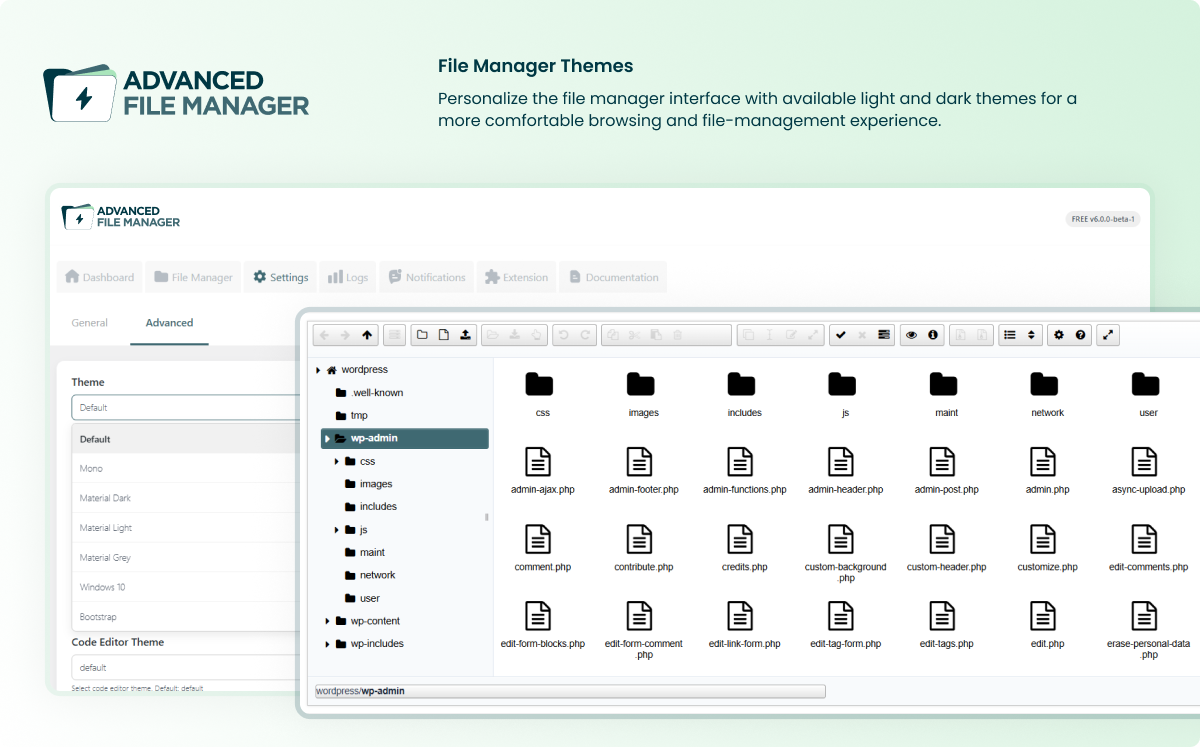
✅ Themes for File Manager: Choose between light and elegant themes to create a visually appealing and comfortable file management user interface.
✅ Keyboard Shortcuts: Speed up your file management tasks by using a range of keyboard shortcuts for common operations.
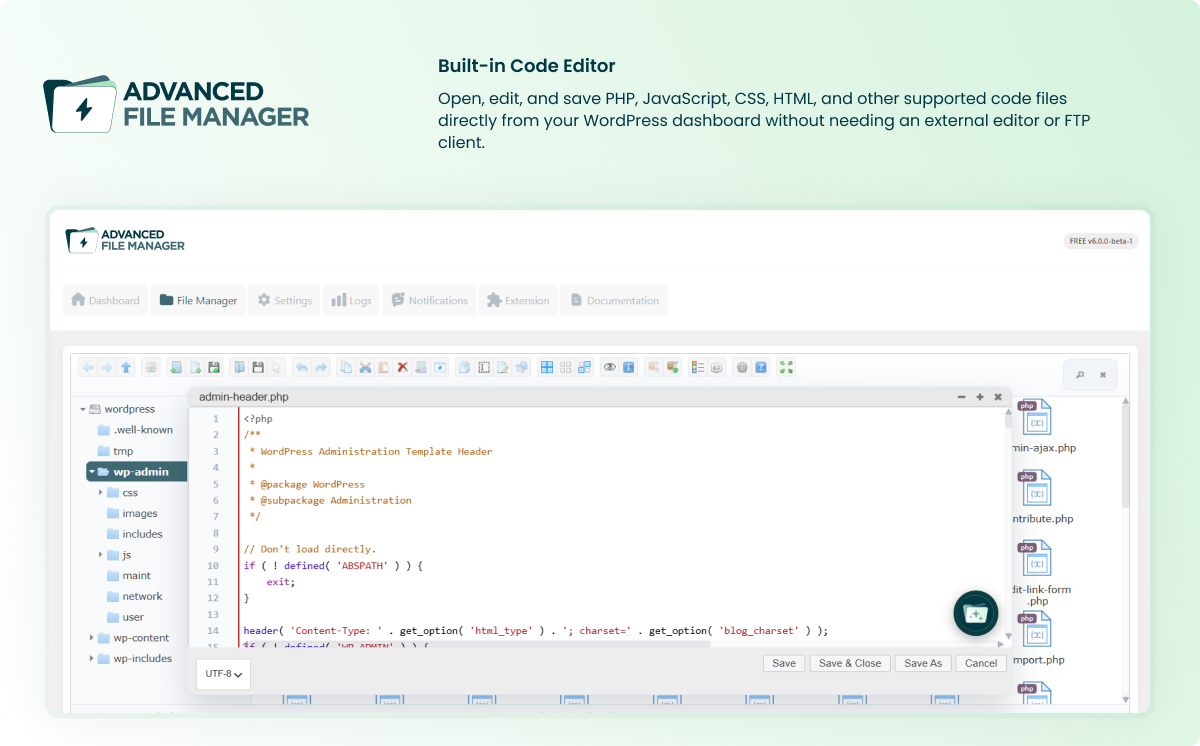
✅ Code Editor: Edit and customize files directly within the File Manager using the built-in code editor.
✅ Media Previews: Simplify media file management by previewing video and audio files instantly.
✅ Large Files & Folder Upload Support: The file manager allows you to upload large files and folders quickly by uploading them in chunks, ensuring a smoother file transfer process.
✅ Maximum Upload File Size Limit: Set the maximum upload file size through Advanced File Manager settings to control file uploads according to your requirements. The effective limit is also subject to your WordPress and hosting server configurations.
✅ Advanced File Search and Sorting: Quickly find and organize your files with a smart file organizer for WordPress.
✅ Thumbnails for Images: Improve media file management with built-in image thumbnails, which helps in quickly identifying visual content.
✅ Rich Context Menu and Toolbar: Access frequently used file operations through a rich context menu and toolbar, making navigation faster and more intuitive.
✅ Multi-Selection: Select multiple files or folders at once to perform bulk operations and improve folder structure.
✅ Seamless UI/UX: Enjoy a streamlined interface with intuitive navigation and convenient access to file management tools, making everyday file operations easier from your WordPress dashboard.
✅ Image and File Editing: Edit images and files directly within the plugin, making quick changes without needing additional tools.
✅ File Sanitization and UTF-8 Normalization: Ensure proper file naming and avoid errors with built-in sanitization and UTF-8 normalization of file names and paths.
✅ High-Performance Backend: This file management plugin offers a high-performance server backend for smooth and fast file operations.
✅ Recent Directory Access: Quickly return to previously opened folders. It saves you time by easily jumping to your most recent navigation paths from the folder structure.
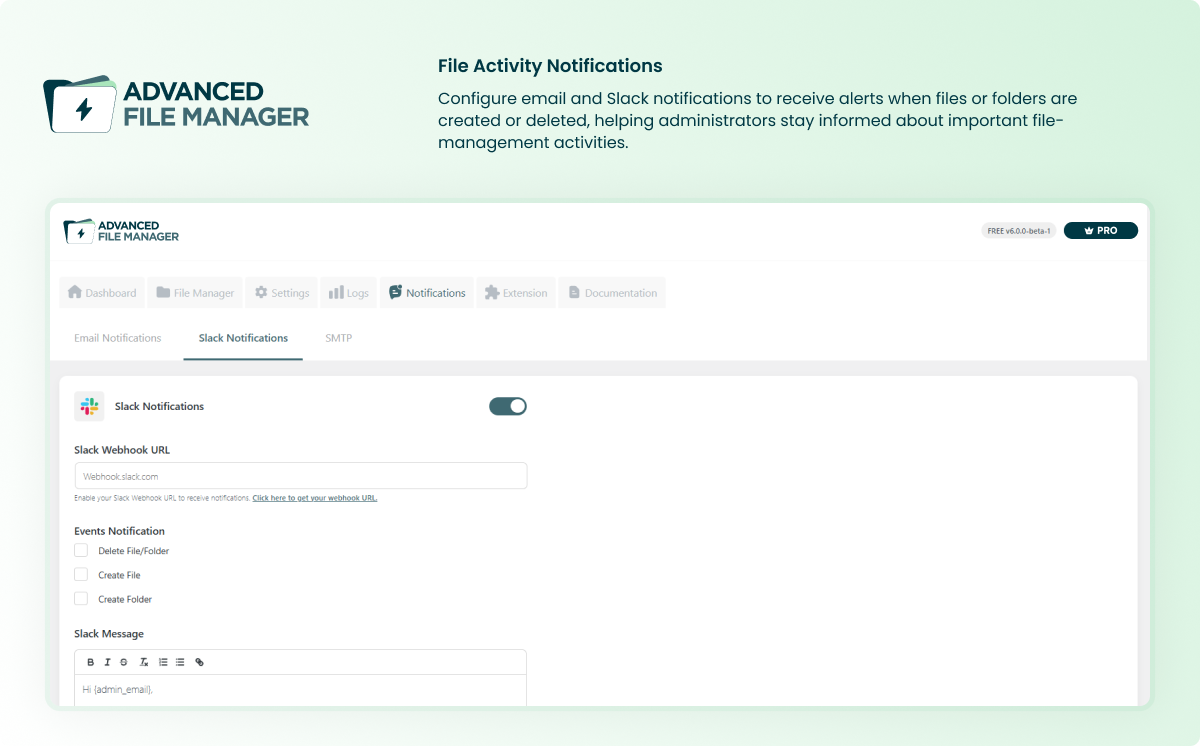
✅ Email Notifications: Get notified by email whenever a file or folder is created or deleted. Admins receive alerts for this activity, and users are informed when their files are removed, keeping everyone updated without needing to check manually.
✅ Flexible View Options (Grid/List): Switch between grid and list views for better navigation of file manager and document libraries/download manager that adapts to various user preferences.
✅ PHP Debug in Code Editor:Enables developers to run and debug PHP code directly inside the file manager’s editor for quick troubleshooting.
⚡ Manage and Display Document Libraries and File Manager on the Frontend [Pro] — Key Features
The premium version of Advanced File Manager unlocks even more possibilities by providing a range of customizable features for managing WordPress files, creating document libraries, and offering cloud integration with the WordPress file manager.
Below are the key premium features:
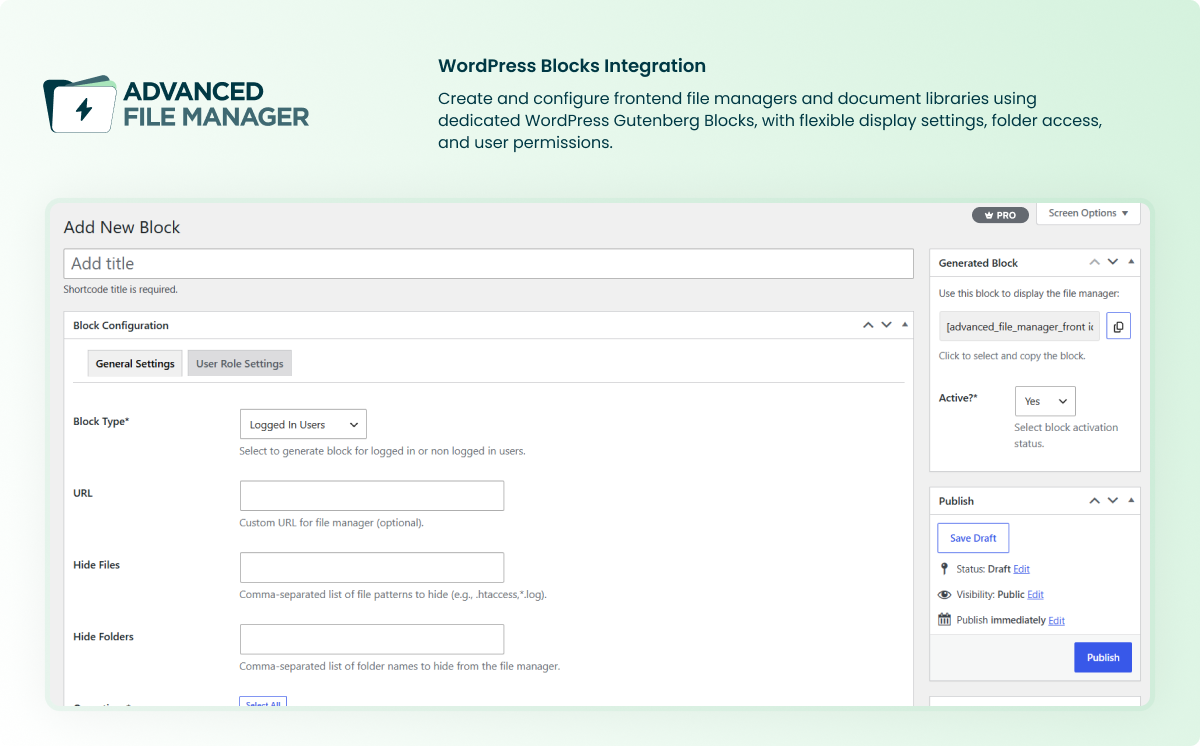
✔️ Frontend File Management: Allow users to manage files from your website’s frontend using the dedicated Advanced File Manager block or shortcode.
✔️ Role-Based Access Control: Control file management access based on WordPress user roles and permissions.
✔️ Slack Notifications: Receive Slack notifications when files or folders are added or deleted to keep your team informed of file management activity.
✔️ Frontend Access for Logged-In Users: Enable a secure frontend file manager for logged-in users.
✔️ Elementor, Divi, and WordPress Block Support: Display your Document library or file manager on the front end of your favorite page builder via Advanced File Manager Block or shortcode.
✔️ WordPress Database Access (Adminer Data Manager):With WP Adminer integration, you can securely access and manage the WordPress database.
✔️ File Logs: Get detailed logs of complete file operations, including Log ID, User, Date & Time, Event Type, File Path, File Type, and IP Address. Helps you track changes, errors, and activity for better transparency and auditing.
✔️ Public File Access for Visitors: Enable visitors (non-logged-in users) to access resources through a structured document library.
✔️ Role-Based File Access Control: Implement role-based access control to restrict file access by user roles, allowing you to define who can view, edit, or delete files on your website.
✔️ Individual User Access Control: Control file access on a user-by-user basis, blocking or restricting specific users from accessing particular files or folders.
✔️ Private Folder Access: Create secure folders within your document library for specific users or groups, ensuring only authorized individuals can access sensitive files.
✔️ Hide Sensitive Files and Folders: Protect sensitive files by hiding them from specific users or from the public view and ensure privacy.
✔️ Personalized User Folders: Assign users personal folders using this flexible file organizer for WordPress, helping them organize and manage their files in a secure, individualized space.
✔️ Theme Selection: Choose from a variety of themes to match the front-end file manager and document library/download manager with your site’s design and branding.
✔️ Multilingual Support for Global Access: Enable language customization to present the file manager interface in your visitors’ preferred language, ideal for global users.
✔️ Operations Control for Users: Manage file access permissions to control which actions users can perform, such as uploading, downloading, or deleting files, via shortcode for precise file management.
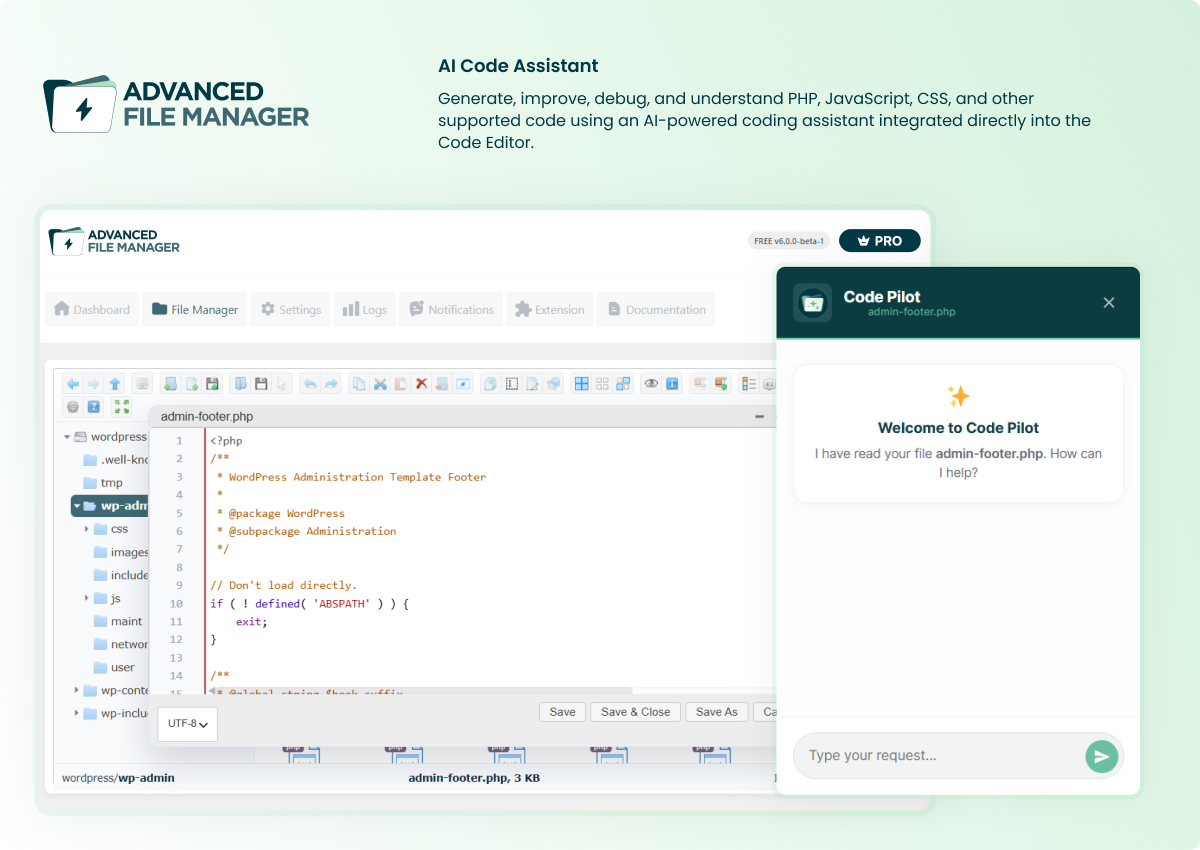
✔️ AI Integration: Use the built-in AI assistant in the Code Editor to generate, edit, and customize code without leaving the File Manager.
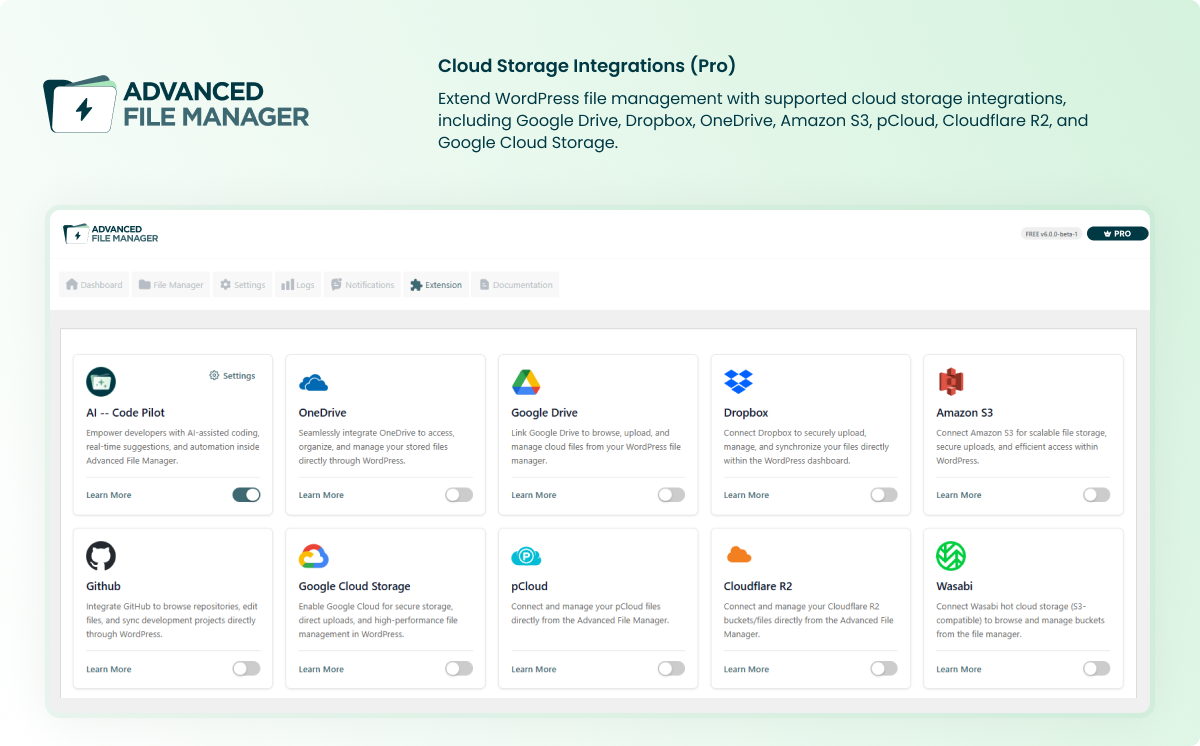
✔️ Dropbox: Connect Dropbox to WordPress to manage and sync files directly from your dashboard.
✔️ Google Drive: Connect Google Drive to WordPress to access and manage cloud files from the File Manager.
✔️ OneDrive: Integrate Microsoft OneDrive to manage cloud-stored files directly from WordPress.
✔️ Amazon S3: Connect Amazon S3 to WordPress to manage files stored in your cloud storage buckets.
✔️ pCloud: Connect pCloud to upload, organize, and manage cloud files directly from the File Manager.
✔️ Cloudflare R2: Connect Cloudflare R2 to manage files in your cloud storage buckets from WordPress.
✔️ Wasabi Hot Cloud Storage: Connect Wasabi to manage files stored in your cloud storage buckets directly from WordPress.
✔️ Google Cloud Storage: Integrate Google Cloud Storage to access and manage files stored in your cloud buckets.
✔️ DigitalOcean Spaces (Coming Soon): Connect DigitalOcean Spaces to manage files stored in your cloud storage buckets from WordPress.
✔️ Azure Blob Storage (Coming Soon): Connect Azure Blob Storage to manage files stored in your Azure storage containers.
Get ✨Advanced File Manager Pro✨ Now!
Benefits of Using a WordPress File Manager Plugin Instead of an FTP
Using a WordPress file manager like Advanced File Manager offers numerous advantages over traditional FTP tools.
Ease of Use: No need for technical expertise or additional software; everything is accessible from your WordPress dashboard.
-
No FTP Configuration: Avoid the hassle of configuring FTP settings or dealing with firewalls and port issues.
-
Quick Access: Access files directly from the WordPress admin area without switching to another application.
-
Enhanced Security: With built-in role-based access control, you can better control who can access files.
-
Convenient File Operations: Perform all file operations with just a few clicks, eliminating the need for command-line instructions.
Why Should You Install Advanced File Manager Plugin?
🤗 Advanced File Manager comes with robust security — which means you can manage WordPress files confidently, knowing your site remains secure!
Here are some of the compelling reasons to install the Advanced File Manager plugin:
🌟 Effortless File Management
-
Access file management tools and settings from the dedicated dashboard.
-
Perform file operations with a few clicks.
-
View files in both icon and list views.
-
Move, archive, and extract files easily.
🌟 Powerful Security Features
-
Configure file access permissions by user roles and permissions.
-
Hide file paths for added security.
-
Control user actions (upload, download, delete).
-
Protect sensitive data from unauthorized access.
🌟 No Need for FTP
-
Manage files without FTP or cPanel.
-
Access all files from the WordPress admin.
-
Streamline your workflow with simple clicks.
-
A secure alternative to FTP management.
🌟 Customizable File Manager
-
Select from various themes to match your site.
-
Choose between grid and list views.
-
Enable multilingual support for global audiences.
-
Limit user actions with advanced settings inside Blocks.
🌟 Advanced Features for Developers
-
Access files inside and outside the root directory.
-
Use file search and sorting for quick organization.
-
Create and extract archives in multiple formats.
-
Upload large files and folders with ease.
-
Set the maximum upload file size through the File Manager settings.
🌟 High-Performance & User-Friendly Interface
-
Fast and smooth file management on large sites.
-
Clean, responsive design for all devices.
-
Drag-and-drop file upload functionality.
-
Make quick modifications using the integrated file editor (code editor).
AI-Powered Coding Assistant (NEW)
For developers, we added an AI-powered coding assistant directly in the code editor. You can now write functions, generate CSS or PHP, debug safely, and get instant explanations. It’s like having a coding partner, right inside your WordPress dashboard.
☁️ Cloud Apps Integration with WordPress
You can integrate your favorite cloud apps with WordPress to manage files and document libraries. The list of cloud storage apps is as follows:
-
Wasabi Hot Cloud Storage (Newly Added)
🤝 Compatibility
Advanced File Manager plugin works perfectly with all popular WordPress themes, plugins, and website builders.
📜 Requirements to Install Advanced File Manager
To install and use the Advanced File Manager plugin, make sure that your WordPress site meets the following minimum requirements:
-
WordPress Version: 4.0 or higher
-
PHP Version: 7.0 or higher
-
MySQL Version: 5.0 or higher
🔑 How to Use/Install the Advanced File Manager Plugin
Using the Advanced File Manager plugin is straightforward. Here’s a step-by-step guide to install the WordPress file manager plugin:
Step #1: Install the Plugin:
-
Go to your WordPress admin panel.
-
Navigate to the Plugins section and click on “Add New Plugin.”
-
Search for “Advanced File Manager” and click “Install Now.”
-
Activate the plugin after installation.
Step #2: Access the File Manager:
-
Once activated, a new menu labeled “File Manager” will appear in your WordPress admin panel.
-
Click on it to access the file manager interface.
Step#3: Perform File Operations:
- Use the toolbar or right-click to open the context menu to perform uploading tasks faster with advanced drag and drop file upload features.
Step #4: Set User Restrictions (Pro Version):
-
Navigate to the Blocks settings if you have the Pro version.
-
Configure role-based access control, operation permissions for private folders.
Step #5: Customize the Interface:
-
Choose your preferred theme and view mode (grid or list).
-
Enable or disable features based on your workflow requirements.
By following these simple steps, you can fully leverage the Advanced File Manager plugin to manage your WordPress site’s files efficiently.
Technical Documentation
For more details, 👉 click here to check out our detailed step-by-step technical documentation to manage your WordPress files and create document libraries easily.
🚨 Need Help? Get Expert Assistance
Having trouble with file management or configuring Advanced File Manager? Our expert support team is ready to assist you! 🤝
Whether you face issues with uploading files, customizing settings, or need guidance on using the plugin’s features, we’ll help you every step of the way.
Click here to contact us for fast and reliable assistance. We’ve got your back! 📞
Minimum requirements for File Manager Advanced
- WordPress 4.0+
- PHP > 7.0
- MySQL > 5.0
Changelog
6.0.0 – Oct 14, 2026
- New – Introduced a redesigned dashboard featuring hosting storage statistics, an overview of file management, and a quick setup guide.
- New – Introduced an updated admin UI for settings, integrations, logs, and notifications.
- Update – Updated the Freemius SDK to the latest version.
- Security – Improved access control to strengthen plugin security and protect against unauthorized access.
5.4.13 – August 12, 2026
* Security Fix – Fixed a missing authorization vulnerability in file manager AJAX actions.
* Security Fix – Fixed a Reflected Cross-Site Scripting (XSS) vulnerability through the postMessage soundFile parameter.
* Fix – Resolved an issue preventing files from being deleted when the folder name contains an apostrophe.
* Fix – Fixed an error that occurred when copying and pasting folders.
5.4.12 – June 09, 2026
* Fix – Resolved compatibility issues with WordPress 7.0.
* Fix – Fixed an issue preventing direct PDF downloads for non-logged-in users.
* Fix – Resolved the Cannot redeclare fpassthru() fatal error.
* Fix – Corrected strings using an incorrect text domain and updated hard-coded strings for proper localization.
* Fix – Resolved an issue where the File Manager plugin could modify PHP source code when files were opened and saved through the plugin editor.
* Fix – Updated the elFinder library to address a security vulnerability.
5.4.11 – March 18, 2026
- Fix – Security enhancement.
5.4.10 – March 09, 2026
- Improvement – Added Content search feature in the File manager search bar.
5.4.9 – February 09, 2026
- Tweak – Updated the Integrations menu by adding new tabs for pCloud, Cloudflare R2, and DigitalOcean Spaces.
5.4.8 – February 03, 2026
- Fix – Resolved a script dependency conflict.
- Improvement – File Manager themes.
- Improvement – Added a complete data deletion option in settings to remove all plugin data upon uninstallation.
5.4.7 – December 04, 2025
- Tweak – Increased elfinder search timeout to 120.
- Fix – Fixed Uploading files issue by other user roles.
Screenshots
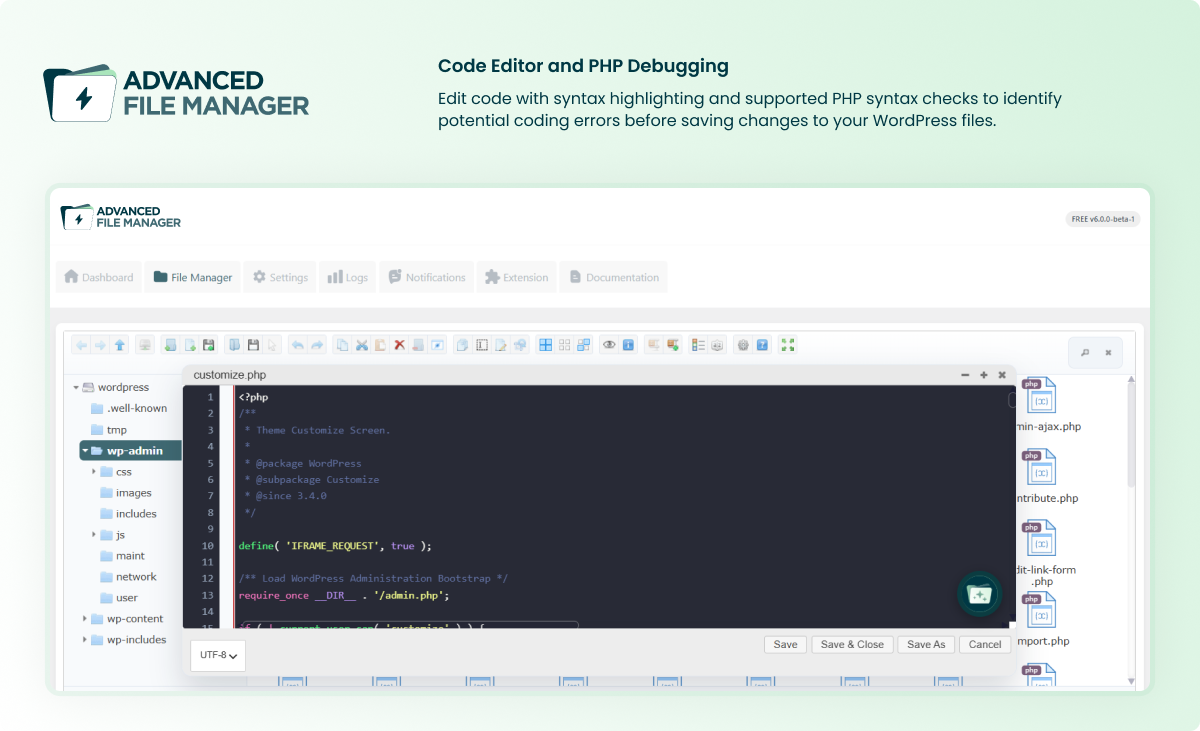
For developers
Is this your plugin? Show off the numbers.
Add a live badge to your site, docs or GitHub README. It updates on its own — no account needed.
FAQ
Advanced File Manager: quick answers
Straight answers, pulled from live WordPress.org data.
Live data from WordPress.org · checked Nov 18, 2026
Is Advanced File Manager free?
Yes. Advanced File Manager is free to download and use from the official WordPress.org plugin directory. The developer also sells premium add-ons or a Pro version with extra features.
Is Advanced File Manager safe to use in 2026?
Yes — Advanced File Manager is a safe, well-maintained plugin to use in 2026. It runs on 100K+ sites, is rated 4.8/5 and was last updated 1 month ago, and scores 91/100 on our health check.
How many websites use Advanced File Manager?
Advanced File Manager is active on 100K+ WordPress websites and has been downloaded 6,477,353 times since it launched in November 2017. It was downloaded 82,448 times in the last 30 days.
Does Advanced File Manager work with WordPress 7.1?
Yes. The developer has tested Advanced File Manager up to WordPress 7.1.4, the latest release. It requires WordPress 4.0 or newer.
What PHP version does Advanced File Manager need?
Advanced File Manager requires PHP 7.0 or higher. Most hosts run PHP 8.x today, so it works on any modern WordPress hosting.
When was Advanced File Manager last updated?
The latest version, 6.0.0, was released on October 14, 2026 (1 month ago).
Who makes Advanced File Manager?
Advanced File Manager is developed and maintained by Saad Iqbal.
Powered by PageForge
Want thousands of pages that rank like these? Build them in an afternoon.
This directory runs on the same engine as PageForge. Turn any spreadsheet, CSV or API into thousands of fast, SEO-ready WordPress pages — with schema, internal links and AI-written copy baked in.
- CSV, Google Sheets & API data sources
- AI content, schema & internal links per page
- Works with Elementor, Gutenberg, Yoast & Rank Math
- Free on WordPress.org — no credit card


