



FacturAgil
FacturAgil conecta tu tienda WooCommerce con AFIP/ARCA (el organismo fiscal de Argentina). Cuando se paga un pedido, la factura electrónica se emite sola, con un CAE real (código de autorización de AFIP/ARCA), y el…

Use with caution
FacturAgil works, but test it on a staging site before relying on it in 2026. Was last updated 3 weeks ago, and scores 59/100 on our health check.
- Actively developed — last update 3 weeks ago
- Small user base (<10 active installs)
- Very few reviews so far
How does it stack up?
Side-by-side on installs, updates, ratings & supportDaily downloads
Download spikes usually follow a new release — each site that auto-updates counts as a download.
Rankings
Where FacturAgil stands todayWordPress.org search rankings
Live position in the plugin search, top 100| Keyword | Position |
|---|---|
| afip | #5 |
| arca | #7 |
| Argentina | #35 |
| Facturacion | #22 |
| woocommerce | >100 |
About FacturAgil
From the official readme · v0.1.11Description
Español:
FacturAgil conecta tu tienda WooCommerce con AFIP/ARCA (el organismo fiscal de Argentina). Cuando se paga un pedido, la factura electrónica se emite sola, con un CAE real (código de autorización de AFIP/ARCA), y el comprador la recibe por email y puede descargarla desde “Mi cuenta > Pedidos”.
Qué hace:
- Emite automáticamente Factura A/B/C cuando un pedido pasa a “Procesando” (pago confirmado) o “Completado”, vos elegís cuál.
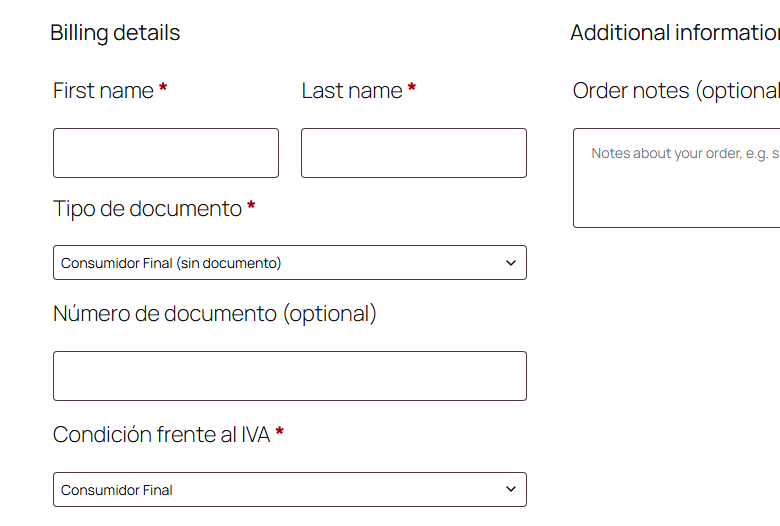
- Agrega los campos de checkout necesarios para facturar (tipo y número de documento, condición de IVA) — WooCommerce no los trae por defecto. Si tu tienda ya tenía sus propios campos (de otro plugin o de tu tema), FacturAgil puede reusarlos en vez de duplicarlos (ver FAQ).
- Nota de Crédito automática si se reembolsa un pedido ya facturado (total o parcial).
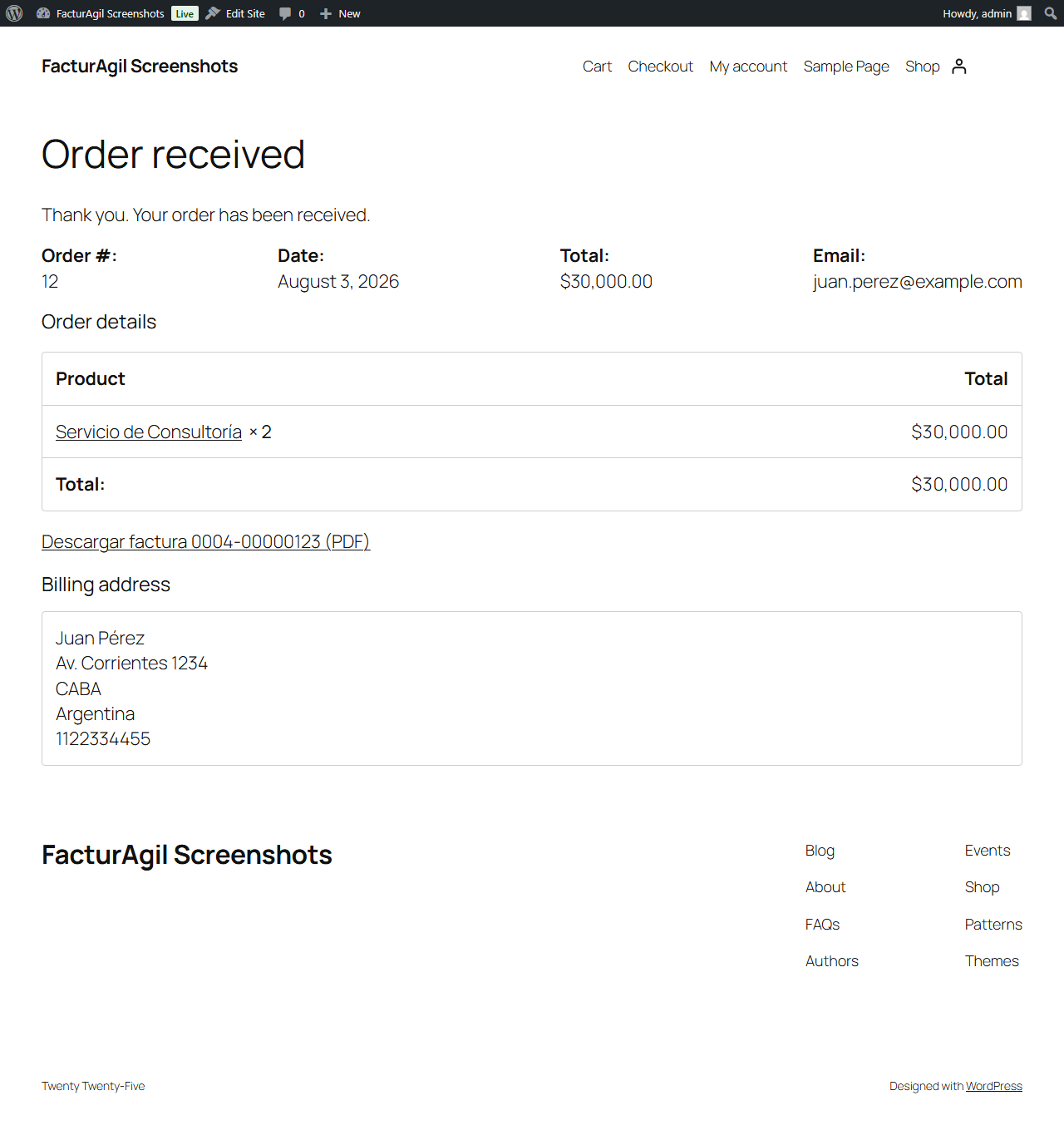
- El comprador descarga el PDF de su factura desde “Mi cuenta > Pedidos”, sin salir de tu tienda.
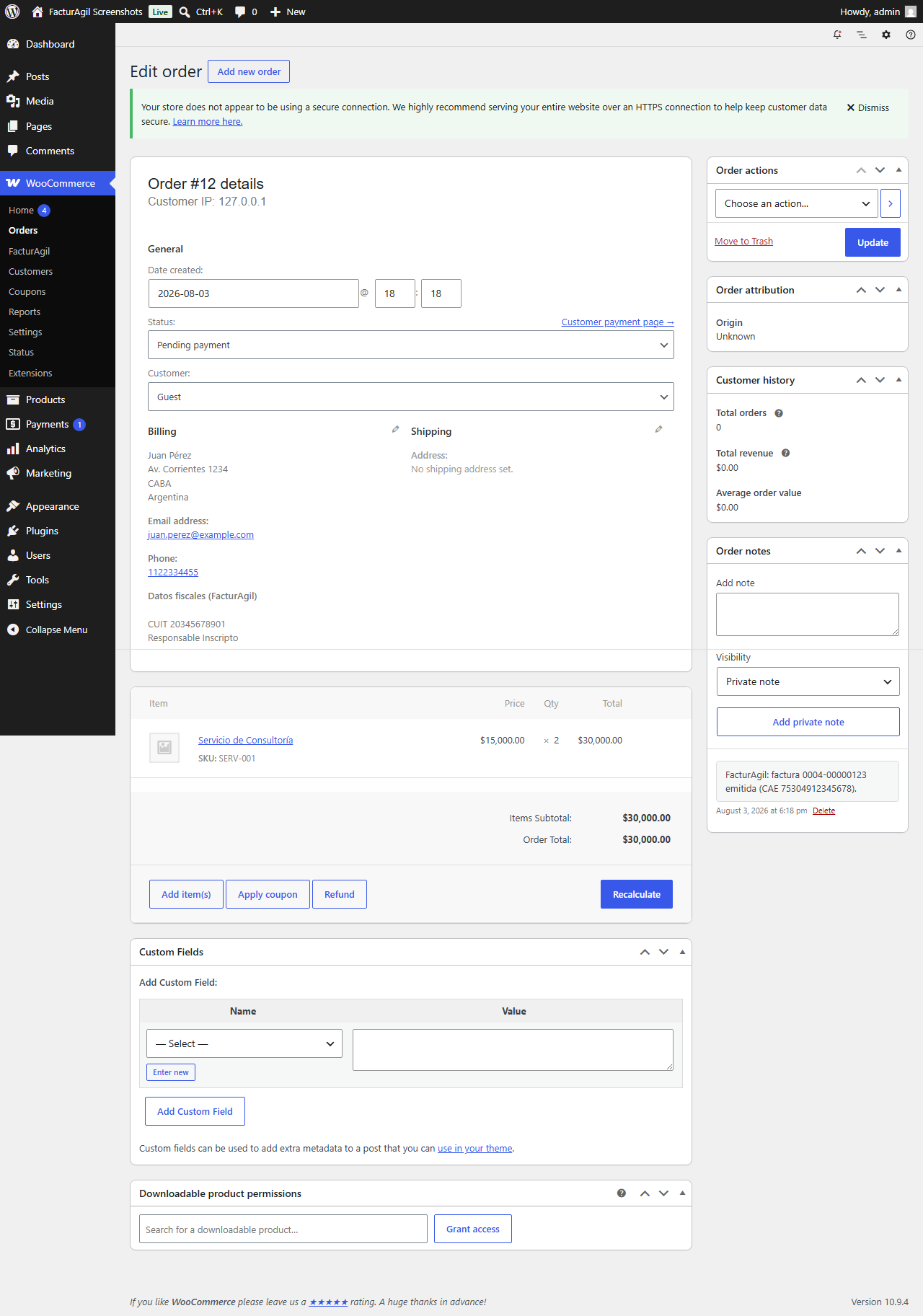
- Nunca bloquea un pedido si falla la facturación — el error queda registrado como nota del pedido y se puede reintentar con un clic.
Qué necesitás antes de instalarlo:
Una cuenta de FacturAgil (gratis para probar). Si todavía no tenés una, el plugin te guía para crearla en 2 minutos desde la misma pantalla de configuración.
English:
FacturAgil connects your WooCommerce store to AFIP/ARCA (Argentina’s tax authority). When an order is paid, the electronic invoice is issued automatically, with a real CAE (AFIP/ARCA authorization code), and the buyer receives it by email and can download it from “My account > Orders”.
What it does:
- Automatically issues Invoice A/B/C when an order moves to “Processing” (payment confirmed) or “Completed”, your choice.
- Adds the checkout fields required to invoice (document type and number, VAT status) — WooCommerce doesn’t include these by default. If your store already had its own fields (from another plugin or your theme), FacturAgil can reuse them instead of duplicating them (see FAQ).
- Automatic Credit Note if an already-invoiced order is refunded (full or partial).
- The buyer downloads their invoice PDF from “My account > Orders”, without leaving your store.
- Never blocks an order if invoicing fails — the error is logged as an order note and can be retried with one click.
What you need before installing it:
A FacturAgil account (free to try). If you don’t have one yet, the plugin walks you through creating one in 2 minutes from the same settings screen.
External services
Español:
Este plugin se conecta a la API de FacturAgil (facturagil.com.ar) para emitir comprobantes electrónicos de AFIP/ARCA (el organismo fiscal de Argentina) de tus pedidos de WooCommerce. FacturAgil es el servicio para el que está construido este plugin — tu tienda necesita una cuenta de FacturAgil para usarlo (ver Instalación).
Le manda datos a esta API en estas situaciones:
- Al facturar un pedido (automáticamente cuando pasa a “Procesando”/”Completado”, o reintentado a mano desde wp-admin): se envían el tipo y número de documento del comprador, nombre, condición de IVA, email, y los ítems del pedido (descripción, cantidad, precio unitario, alícuota de IVA) para generar el comprobante de AFIP/ARCA.
- Al emitir una Nota de Crédito (por un reembolso de WooCommerce, o manualmente desde wp-admin): se envían los mismos datos de arriba, para los ítems que se acreditan.
- Al descargar una factura o Nota de Crédito en PDF (desde “Mi cuenta > Pedidos”, o desde wp-admin): solo se envía el ID interno del comprobante, para obtener el PDF.
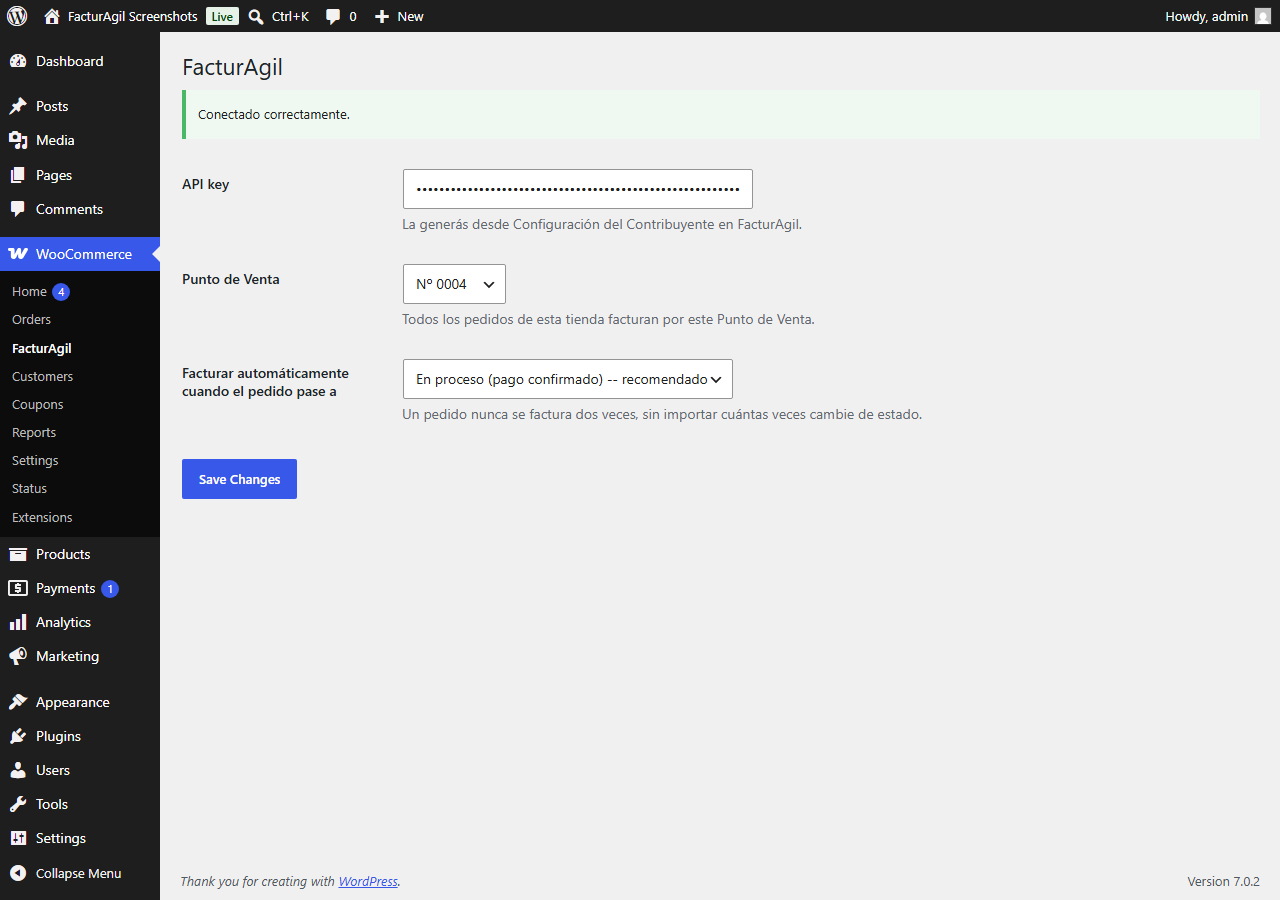
- Al probar la conexión o listar tus Puntos de Venta en la pantalla de configuración (WooCommerce > FacturAgil): solo se envía la API key de tu tienda, para autenticar el pedido.
Cada request de los de arriba se autentica con la API key que generás desde tu propia cuenta de FacturAgil (configuración de WooCommerce > FacturAgil).
Este servicio lo provee PampaLógica. Términos del Servicio: https://facturagil.com.ar/terminos — Política de Privacidad: https://facturagil.com.ar/privacidad
English:
This plugin connects to the FacturAgil API (facturagil.com.ar) to issue AFIP/ARCA (Argentina’s tax authority) electronic invoices for your WooCommerce orders. FacturAgil is the service this plugin is built for — your store needs a FacturAgil account to use it (see Installation).
It sends data to this API in these situations:
- When an order is invoiced (automatically when it moves to “Processing”/”Completed”, or manually retried from wp-admin): the buyer’s document type and number, name, VAT status, email, and the order’s line items (description, quantity, unit price, VAT rate) are sent to generate the AFIP/ARCA invoice.
- When a Credit Note is issued (on a WooCommerce refund, or manually from wp-admin): the same order/item data above is sent for the items being credited.
- When downloading an invoice or Credit Note as a PDF (from “My account > Orders”, or from wp-admin): only the invoice’s internal ID is sent, to retrieve the PDF.
- When testing the connection or listing your Points of Sale on the settings screen (WooCommerce > FacturAgil): only your store’s API key is sent, to authenticate the request.
Every request above is authenticated with the API key you generate from your own FacturAgil account (WooCommerce > FacturAgil settings).
This service is provided by PampaLógica. Terms of Service: https://facturagil.com.ar/terminos — Privacy Policy: https://facturagil.com.ar/privacidad
Installation
Español:
- Subí este plugin (Plugins > Agregar nuevo > Subir plugin) y activalo.
- Andá a WooCommerce > FacturAgil.
- Si todavía no tenés cuenta, creála desde el link que aparece ahí — es gratis para probar.
- Pegá tu API key (la generás desde FacturAgil, en la configuración de tu Contribuyente) y elegí tu Punto de Venta.
- Listo — de ahora en más, los pedidos pagos se facturan solos.
English:
- Upload this plugin (Plugins > Add New > Upload Plugin) and activate it.
- Go to WooCommerce > FacturAgil.
- If you don’t have an account yet, create one from the link shown there — it’s free to try.
- Paste your API key (you generate it from FacturAgil, in your Taxpayer settings) and pick your Point of Sale.
- Done — from now on, paid orders invoice themselves.
Frequently asked questions
¿Qué pasa si falla la facturación de un pedido? / What happens if invoicing an order fails?
Español: El pedido sigue su curso normal — WooCommerce nunca se entera de que algo falló del lado impositivo. El error queda registrado como nota del pedido, y hay un botón para reintentarlo a mano desde el mismo pedido. English: The order keeps going normally — WooCommerce never knows anything went wrong on the tax side. The error is logged as an order note, and there’s a button to retry manually from the same order.
¿El comprador necesita crear una cuenta de FacturAgil? / Does the buyer need to create a FacturAgil account?
Español: No. El comprador solo ve el link de descarga de la factura dentro de “Mi cuenta > Pedidos” de tu tienda — todo el lado de AFIP/ARCA lo maneja vos, el dueño de la tienda, desde tu propia cuenta de FacturAgil. English: No. The buyer only sees the invoice download link inside their store’s “My account > Orders” — the whole AFIP/ARCA side is handled by you, the store owner, from your own FacturAgil account.
¿Soporta el Block Checkout de WooCommerce? / Does it support WooCommerce’s Block Checkout?
Español: Todavía no — la v0.1 agrega los campos de documento/condición de IVA al checkout clásico. Si tu tienda usa Block Checkout, contactanos. English: Not yet — v0.1 adds the document/VAT status fields to the classic checkout. If your store uses Block Checkout, contact us.
Mi checkout ya tiene campos de documento/condición de IVA (de otro plugin o de mi tema) — ¿cómo evito que FacturAgil agregue los suyos y se dupliquen? / My checkout already has document/VAT status fields (from another plugin or my theme) — how do I stop FacturAgil from adding its own and duplicating everything?
Español: En WooCommerce > FacturAgil, sección “Campos de checkout”: Marcá “Ya tengo campos de documento/condición de IVA en mi checkout — no mostrar los de FacturAgil”. En “Nombre del campo de documento”, ingresá el name del input HTML de tu checkout que guarda el DNI/CUIT (lo podés encontrar con “Inspeccionar elemento” en la página de checkout — por ejemplo billing_dni). En “Nombre del campo de condición de IVA”, hacé lo mismo con el name de tu campo de condición de IVA. En “Valores para ese campo”, completá qué valor manda tu campo para cada condición (Consumidor Final / Responsable…
Changelog
0.1.11
- Fix: saving any other setting on the FacturAgil settings screen (sales point, checkout fields, etc.) while already connected via “Connect with FacturAgil” silently disconnected the account, requiring you to reconnect from scratch. The API key now survives saving any other setting.
0.1.10
- Description, Installation, FAQ and External services sections now in both Spanish and English — the plugin’s audience is exclusively Argentina, but the English version stays alongside it (required by WordPress.org’s review in 0.1.7) rather than being replaced.
0.1.9
- New “Connect with FacturAgil” button replaces the manual API key field — no more copy/pasting a key by hand.
0.1.8
- Ownership transfer: Author is now PampaLógica (www.pampalogica.com). No functional changes.
0.1.7
- Fix: translated the plugin header’s Description field to English (the readme was already in English since 0.1.6).
- Added an “External services” section documenting the FacturAgil API calls this plugin makes.
0.1.6
- Fix: this readme is now written in English, as required by WordPress.org’s directory guidelines (the plugin’s own UI stays in Spanish, its primary audience — this only affects the directory listing text).
- Fix: added the missing “translators:” comments for five strings with placeholders, flagged by Plugin Check.
Screenshots
For developers
Is this your plugin? Show off the numbers.
Add a live badge to your site, docs or GitHub README. It updates on its own — no account needed.
Best FacturAgil alternatives
All afip plugins →| Rank | Plugin | Active installs |
|---|---|---|
| 1 |
 Wanderlust
Este plugin permite a tus clientes autocompletar el 90% los datos del checkout obteniendo…
Wanderlust
Este plugin permite a tus clientes autocompletar el 90% los datos del checkout obteniendo…
|
100+ |
FAQ
FacturAgil: quick answers
Straight answers, pulled from live WordPress.org data.
Live data from WordPress.org · checked Oct 1, 2026
Is FacturAgil free?
Yes. FacturAgil is free to download and use from the official WordPress.org plugin directory.
Is FacturAgil safe to use in 2026?
FacturAgil works, but test it on a staging site before relying on it in 2026. Was last updated 3 weeks ago, and scores 59/100 on our health check.
How many websites use FacturAgil?
FacturAgil is active on <10 WordPress websites and has been downloaded 291 times since it launched in August 2026. It was downloaded 127 times in the last 30 days.
Does FacturAgil work with WordPress 7.1?
FacturAgil is officially tested up to WordPress 7.0.6, while the latest release is 7.1.2. It may still work, but try it on a staging site first.
What PHP version does FacturAgil need?
FacturAgil requires PHP 7.4 or higher. Most hosts run PHP 8.x today, so it works on any modern WordPress hosting.
When was FacturAgil last updated?
The latest version, 0.1.11, was released on September 9, 2026 (3 weeks ago).
Who makes FacturAgil?
FacturAgil is developed and maintained by pampalogica.
What are the best alternatives to FacturAgil?
The most popular alternatives to FacturAgil are Wanderlust (100+ installs).
Powered by PageForge
Want thousands of pages that rank like these? Build them in an afternoon.
This directory runs on the same engine as PageForge. Turn any spreadsheet, CSV or API into thousands of fast, SEO-ready WordPress pages — with schema, internal links and AI-written copy baked in.
- CSV, Google Sheets & API data sources
- AI content, schema & internal links per page
- Works with Elementor, Gutenberg, Yoast & Rank Math
- Free on WordPress.org — no credit card


