


Extnify Fee Rules for WooCommerce
Add conditional fees or discounts to the WooCommerce cart and checkout — flat or percentage, gated by zone, payment or shipping method.

Solid choice
Extnify Fee Rules for WooCommer… is a solid plugin choice in 2026, with a few things worth checking first. Was last updated 38 minutes ago, and scores 64/100 on our health check.
- Actively developed — last update 38 minutes ago
- Tested with the latest WordPress (7.1)
- Small user base (<10 active installs)
- Very few reviews so far
How does it stack up?
Side-by-side on installs, updates, ratings & support



Daily downloads
Download spikes usually follow a new release — each site that auto-updates counts as a download.
Rankings
Where Extnify Fee Rules for WooCo… stands todayWordPress.org search rankings
Live position in the plugin search, top 100| Keyword | Position |
|---|---|
| checkout | >100 |
| discount | >100 |
| fees | >100 |
| surcharge | #74 |
| woocommerce | >100 |
About Extnify Fee Rules for WooCommerce
From the official readme · v1.1.0Description
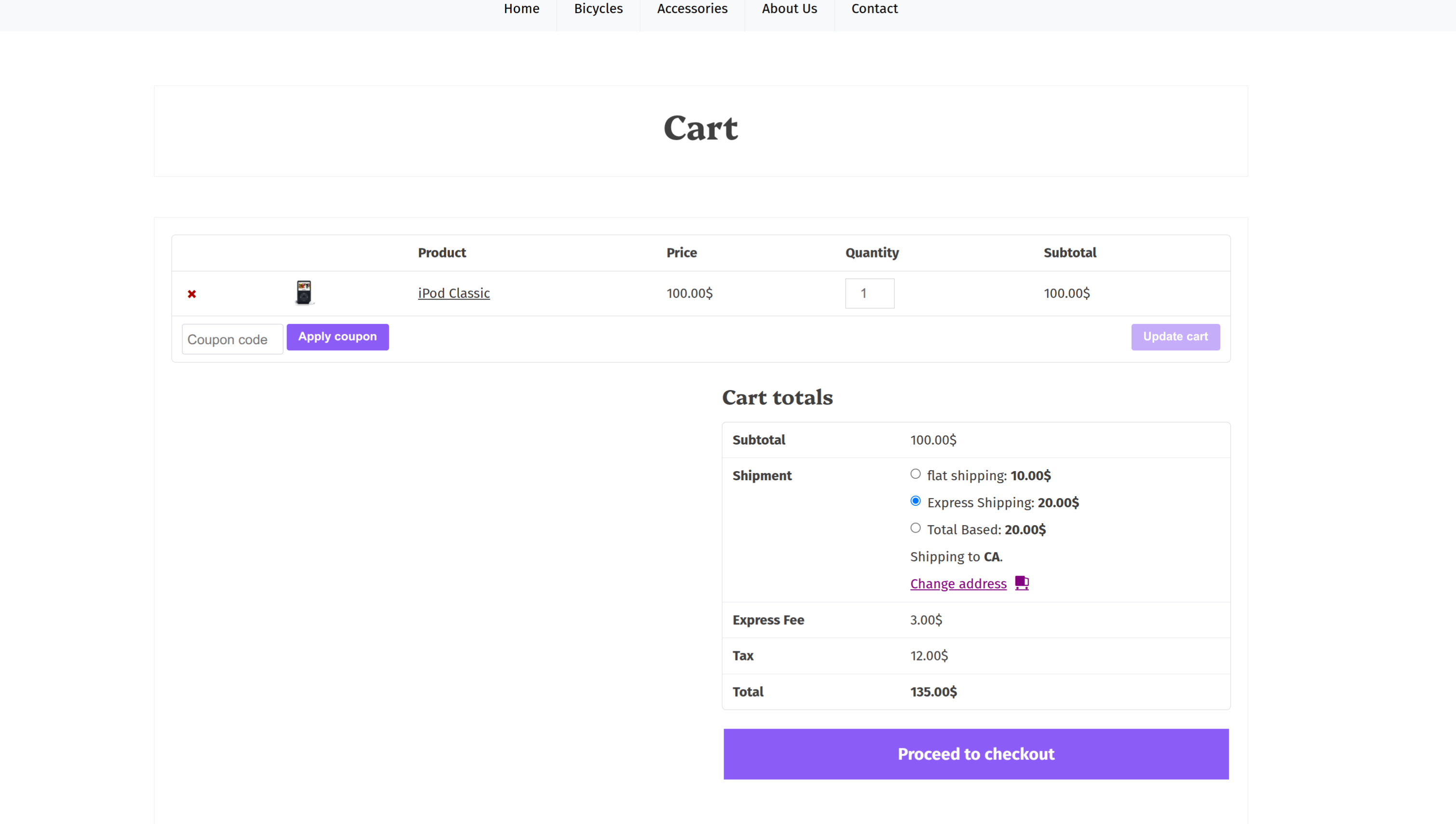
Extnify Fee Rules lets you add your own fees — or discounts — to the WooCommerce cart and checkout, and applies them automatically when the cart matches. There’s no code for the customer to type: a matching fee simply appears on the totals.
Create as many fees as you need, set each one as a flat amount or a percentage of the subtotal, and limit when it applies by shipping zone, payment method and shipping method. A positive amount adds a fee; a negative amount shows as a discount. Everything is managed from one simple screen, and a built-in live log shows you exactly why a fee did or didn’t apply.
Read the documentation » | Try backend » | Try frontend »
See it in action:
What you can do with Extnify Fee Rules
- Charge a processing, handling or service fee on every order.
- Add a surcharge only for Cash on Delivery (or any chosen payment method).
- Apply a fee only in a certain shipping zone — or only with a certain shipping method.
- Give an automatic discount by entering a negative amount — no coupon code needed.
- Charge a flat amount ($5) or a percentage of the subtotal (10%).
- Run several fees at once — each one checks its own rules independently.
Add fees or discounts
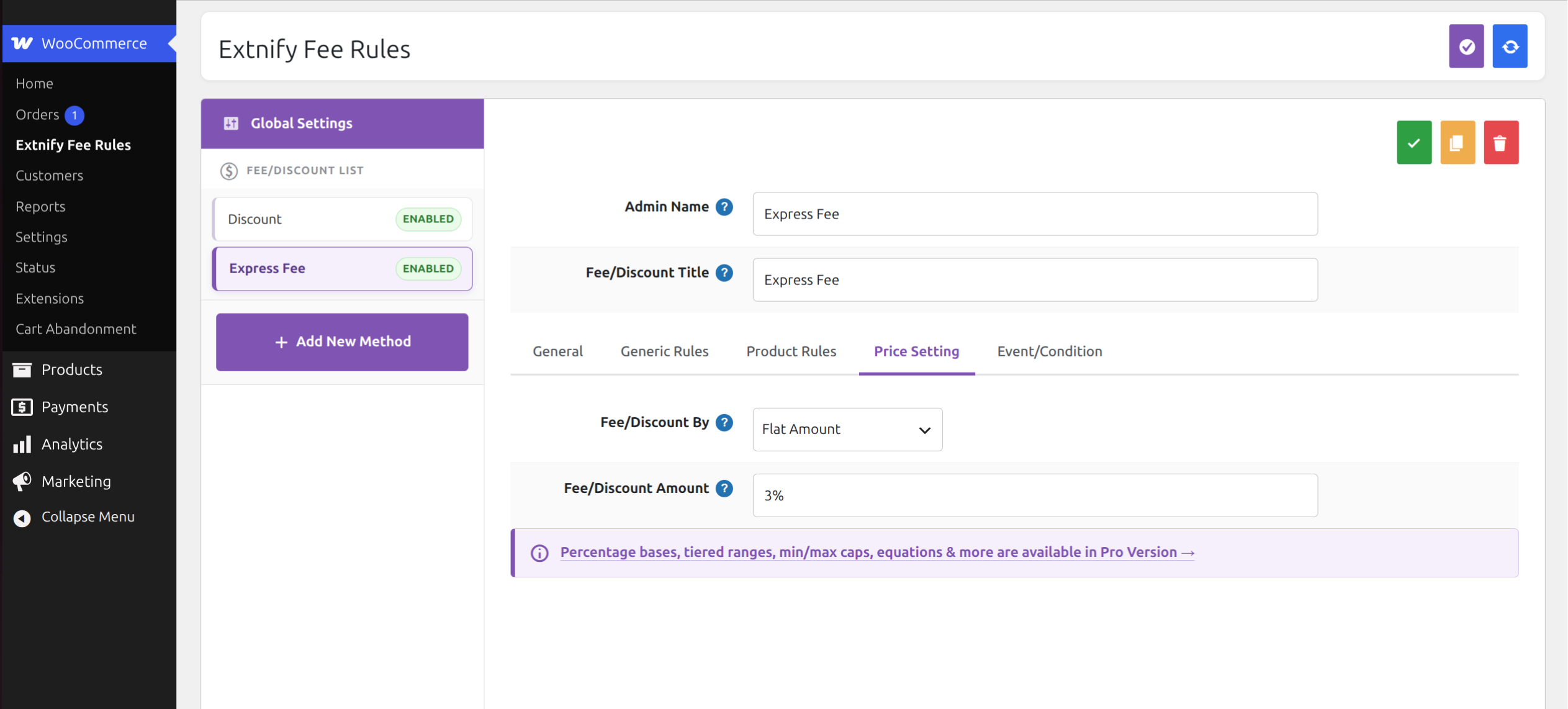
One form creates both. Enter 5 for a $5 fee, or -5 for a $5 discount. Enter 10% for ten percent of the subtotal, or -10% to take ten percent off. A positive amount is added to the totals as a fee; a negative amount shows as a reduction. Every matching fee applies on its own — the customer doesn’t choose anything.
Conditional rules
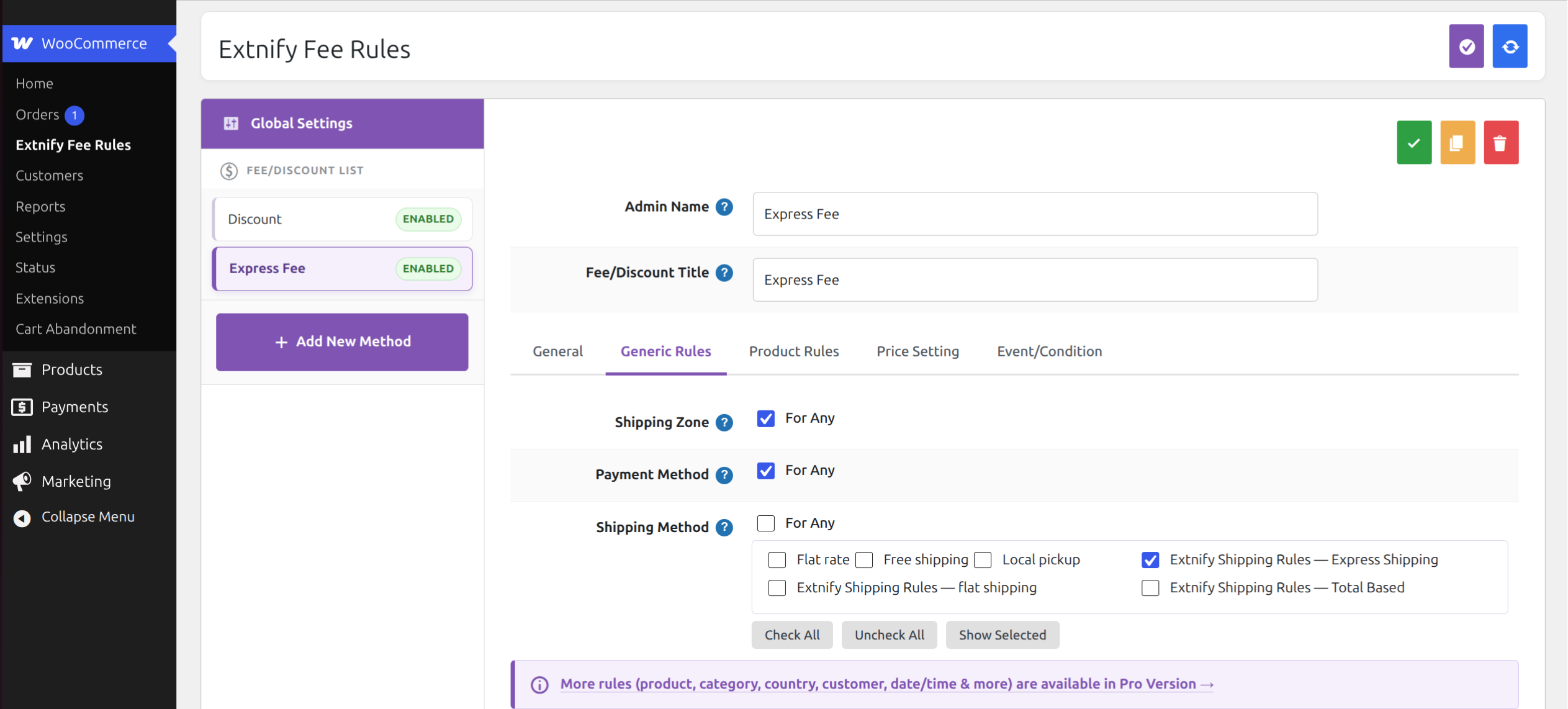
Each fee only applies when the cart matches the rules you set, combined with AND. Leave any rule at “For any” to ignore it. The free version gates fees by:
- Shipping zone — the WooCommerce zone the destination falls in.
- Payment method — the gateway the customer chose at checkout.
- Shipping method — the shipping option chosen (if you also run Extnify Shipping Rules, its methods are listed here individually).
Flat or percentage amounts
Set a fixed value, or add a trailing % to make it a percentage of the cart subtotal. No currency sign needed — just the number. Tiered (range-based) amounts and extra percentage bases are available in Pro.
Tax handling
Pick a tax class per fee, or set it to None for a non-taxable fee. Fee tax follows your WooCommerce tax settings.
Easy management
Create, enable, disable, copy, delete and bulk-save all your fees from one screen, and set the order they’re applied in. New fees appear in the sidebar instantly and are written to the database when you save.
Live debugging
When a fee doesn’t show up and you’re not sure why, turn on the built-in debug log. For each fee it reports whether its rules passed or failed, the resolved amount, and whether it was applied or skipped — so you can see exactly which rule filtered it out. The log is stored in your own database (never a file, never sent anywhere) and can be cleared with one click.
Works everywhere WooCommerce does
Fees are applied server-side through WooCommerce’s standard fee system, so the totals are correct on both the classic and the block cart and checkout.
Built for speed and privacy
- No external requests and no tracking — every rule and calculation runs on your own store.
- Lightweight — no bloat, no third-party libraries pulled in on your storefront.
- Translation-ready — ships with a
.potfile and a cleanextnify-feetext domain. - Clean uninstall — deleting the plugin removes its table, option and log; nothing is left behind.
Need more? Extnify Fee Rules Pro
Extnify Fee Rules Pro adds:
- Product, category and brand targeting, plus date/time, location, coupon and customer conditions.
- Tiered (range-based) amounts with min/max caps.
- More percentage bases (grand total, weight, quantity and more).
- Fee grouping and tax-inclusive fees.
- CSV import/export.
Your free fees carry over automatically — Pro shares the same data.
More plugins by Extnify
- Extnify Discount Rules — rule-based product discounts shown as a sale across your store. Free · Pro
- Extnify Offer Rules — selectable discounts and optional add-ons for the cart and checkout. Free · Pro
- Extnify Shipping Rules — build your own conditional WooCommerce shipping methods and rates. Free · Pro
Extnify Fee Rules is built by Extnify, the team behind the X-FeePro extension for OpenCart.
Installation
- Make sure WooCommerce is installed and active.
- Upload the plugin to
/wp-content/plugins/, or install it from Plugins → Add New → Upload Plugin. - Activate the plugin through the Plugins menu in WordPress.
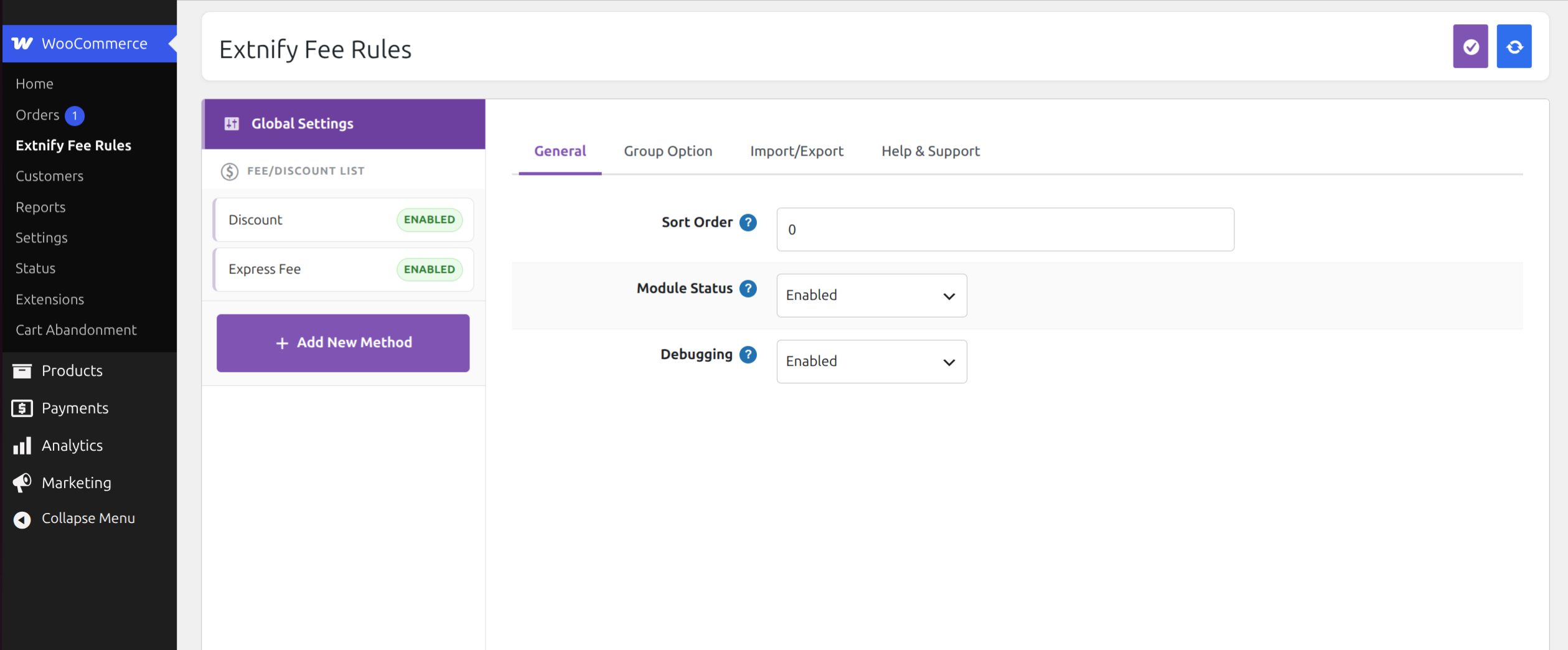
- Go to WooCommerce → Extnify Fee Rules and set Module Status = Enabled in Global Settings.
- Click Add New Method, enter a fee amount, and (optionally) restrict it by shipping zone, payment method or shipping method. Save, and it appears on the cart and checkout totals automatically.
Changelog
Your fees and settings are moved to the new storage automatically. As always, back up your site before updating.
1.1.0
- Rebuilt on the shared Extnify core, consistent with the other Extnify plugins.
- Your existing fees and settings are moved to the new storage automatically on update — nothing to re-enter.
- The database table now updates itself automatically after plugin updates.
- New fees get a numbered default title (Fee Title 2, Fee Title 3, …).
- Readme: new backend and frontend demo links.
1.0.1
- Expanded the plugin listing (features, demo, FAQ).
- Corrected the in-admin Documentation link.
1.0.0
- Initial release.
Screenshots
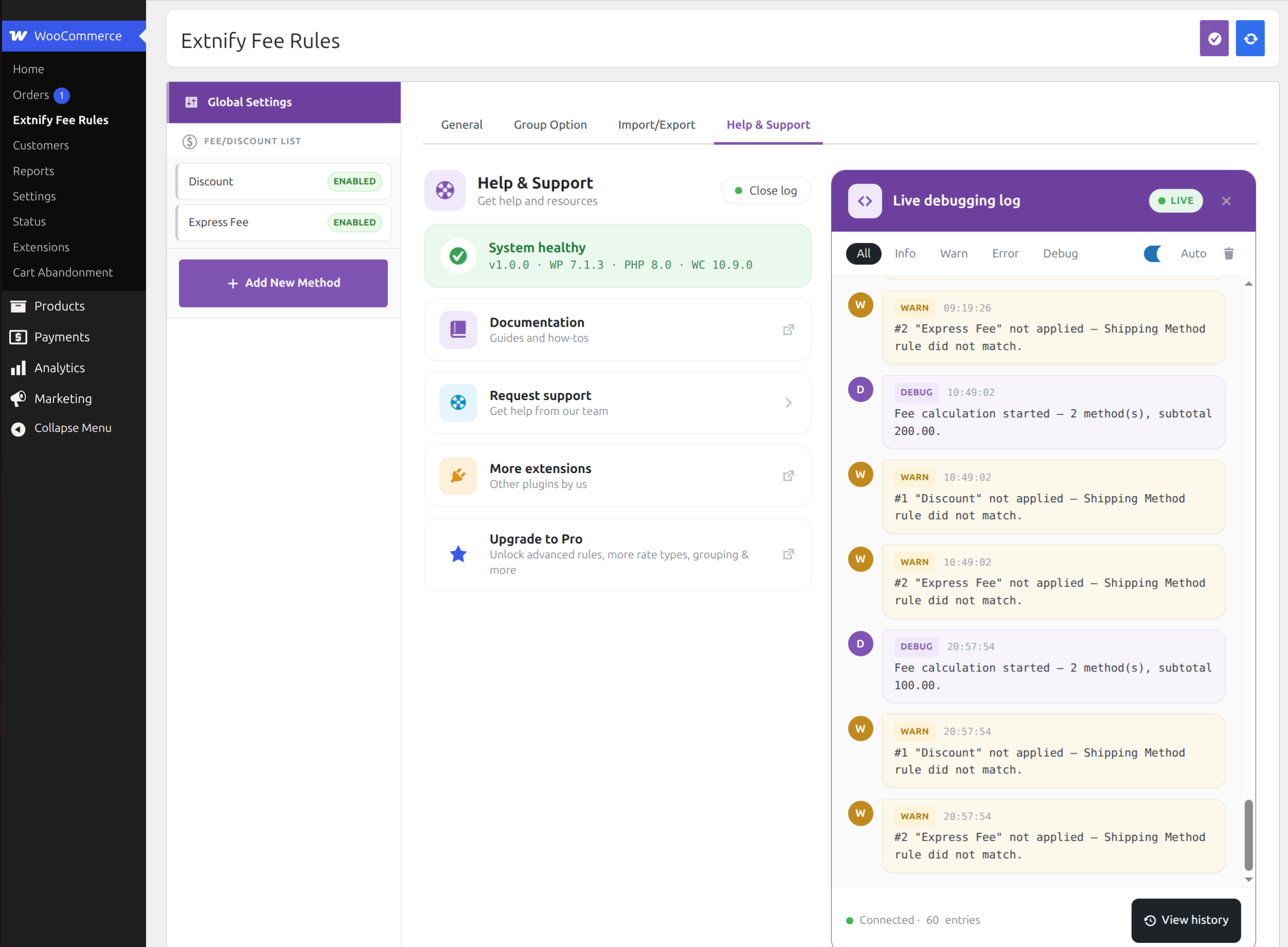
For developers
Is this your plugin? Show off the numbers.
Add a live badge to your site, docs or GitHub README. It updates on its own — no account needed.
Best Extnify Fee Rules for WooComm… alternatives
All checkout plugins →





FAQ
Extnify Fee Rules for WooCommerce: quick answers
Straight answers, pulled from live WordPress.org data.
Source: WordPress.org
Is Extnify Fee Rules for WooCommer… free?
Yes. Extnify Fee Rules for WooCommer… is free to download and use from the official WordPress.org plugin directory.
Is Extnify Fee Rules for WooCommer… safe to use in 2026?
Extnify Fee Rules for WooCommer… is a solid plugin choice in 2026, with a few things worth checking first. Was last updated 38 minutes ago, and scores 64/100 on our health check.
How many websites use Extnify Fee Rules for WooCommer…?
Extnify Fee Rules for WooCommer… is active on <10 WordPress websites and has been downloaded 256 times since it launched in October 2026. It was downloaded 122 times in the last 30 days.
Does Extnify Fee Rules for WooCommer… work with WordPress 7.1?
Yes. The developer has tested Extnify Fee Rules for WooCommer… up to WordPress 7.1.5, the latest release. It requires WordPress 6.0 or newer.
What PHP version does Extnify Fee Rules for WooCommer… need?
Extnify Fee Rules for WooCommer… requires PHP 7.4 or higher. Most hosts run PHP 8.x today, so it works on any modern WordPress hosting.
When was Extnify Fee Rules for WooCommer… last updated?
The latest version, 1.1.0, was released on November 29, 2026 (38 minutes ago).
Who makes Extnify Fee Rules for WooCommer…?
Extnify Fee Rules for WooCommer… is developed and maintained by extnify.
What are the best alternatives to Extnify Fee Rules for WooCommer…?
The most popular alternatives to Extnify Fee Rules for WooCommer… are Brazilian Market on WooComm… (60K+ installs), reCAPTCHA for WooCommerce (40K+ installs) and FunnelKit (30K+ installs).
Powered by PageForge
One template and a spreadsheet. A real page for every search.
PageForge turns each row of a CSV into a WordPress page with its own title, URL, SEO fields and schema, built on the layout you already designed. Free on WordPress.org.
- CSV and XLSX, plus Google Sheets on Professional and Enterprise
- Its own title, URL, SEO fields and schema for every page
- Works with the block editor, Elementor, Divi and Avada
- Free on WordPress.org, no credit card