


Extended Post Status
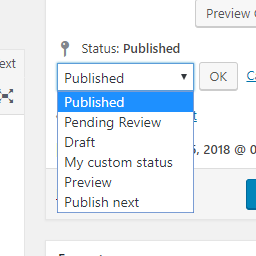
Add new statuses to all post types (posts, pages, products, ...).

Solid choice
Extended Post Status is a solid plugin choice in 2026, with a few things worth checking first. It runs on 1K+ sites, is rated 4.5/5 and was last updated 1 month ago, and scores 76/100 on our health check.
- Tested with the latest WordPress (7.1)
How does it stack up?
Side-by-side on installs, updates, ratings & support


Daily downloads
Download spikes usually follow a new release — each site that auto-updates counts as a download.
Rankings
Where Extended Post Status stands todayWordPress.org search rankings
Live position in the plugin search, top 100| Keyword | Position |
|---|---|
| extended | #7 |
| post | >100 |
| post type | #66 |
| publishing | #57 |
| status | #6 |
Version adoption
Share of active sites per release.
Rating breakdown
★★★★★★★★★★ 4.5 from 11 reviews
About Extended Post Status
From the official readme · v1.1.1Description
This plugin provides the option to add new statuses to the backend and define the system relevant status settings. You can add/edit statuses just as categories or tags. All statuses are available for all your post types.
You will find a new menu item located in the settings admin menu.
For the sake of understanding, this plugin minimally changes messages, translations and workflow in Gutenberg Editor!
Installation
- Upload to the
/wp-content/plugins/directory - Activate the plugin through the ‘Plugins’ menu in WordPress
- Use the new menu item
Statusesin posts menu
Frequently asked questions
How does this plugin work?
As there is no core hook to add new items to the status dropdown in posts and in the quick edit view, js is required to achieve this. It is definently the most dirty way, but WP Core does not provide other ways to do it. There is an open trac ticket fo this circumstance: https://core.trac.wordpress.org/ticket/12706
What happens when I delete the plugin?
Since all custom statuses would no longer be available, deleting the plugin will reset all posts, pages etc. with an custom status to the draft status. This step cannot be undone by reinstalling the plugin! However, the plugin can be deactivated without any problems (see “What happens when I delete a status or deactivate the plugin?”).
What happens when I delete a status or deactivate the plugin?
Be careful, posts without a valid status will be hidden! Just change the status of your post with a custom status to a system status (e.g. publish or draft) before you delete a custom status or deactivate the plugin. Your posts will never be deleted, but you need to know your old status slugs once you have deleted a status or deactivated the plugin to get your posts back.
Why is a hidden status still visible in dropdowns?
The “Hide in admin drop downs” option only hides the status if the current post doesn’t have the status. As long as your post has the hidden status, the drop down will still show it.
Why is my button no longer called publish in Gutenberg?
To avoid misunderstandings in handling with own custom statuses, the button has been named more generally and is now just called Save. Likewise, the message that a post has been published has been renamed. This now only indicates that a post has been saved. The indicator whether a post is published or not should always be the status and not a message or button label. Furthermore, the publishing sidebar of Gutenberg has been removed.
Changelog
Maintenance release. Identical to 1.1.0 in functionality, published to correct the 1.1.0 release package.
1.1.1
- [Changed] Maintenance release without functional changes, published to correct the 1.1.0 release package
1.1.0
- [Added] Support for WordPress 7.0, still compatible with WordPress 5.0 and above
- [Added] Custom statuses are shown with their name in the block editor sidebar again (WordPress 7.0 builds its own status control from a fixed list)
- [Fixed] Custom statuses were missing in quick edit and bulk edit, because the mutation events used to detect the inline editor were removed from current browsers
- [Fixed] Fatal error on PHP 8 when the settings of a status were missing
- [Fixed] Posts with a non public custom status showed up in front end archives, feeds and search results for every logged in editor, and could be exposed to visitors by a page cache
- [Fixed] Deleting the plugin did not reset posts whose status name differed from its slug
- [Fixed] Translations are no longer loaded before the init action
- [Fixed] Settings of a deleted status are removed instead of being kept forever
- [Security] Escape status names and slugs in all admin output
- [Security] Only store known status settings and verify capabilities when saving them
- [Security] Validate the submitted status and check the capability of the post type before applying it, including REST API requests
- [Changed] Performance: the translation filter no longer runs on the front end, the status list is cached per request, and the post overview no longer scans the whole posts table
1.0.21
- [Fixed] PHP incorrect calling of _load_textdomain_just_in_time
1.0.20
- [Security] Check user capabilities in publishing process. (Thanks to TaeEun Lee)
See: https://www.wordfence.com/threat-intel/vulnerabilities/wordpress-plugins/extended-post-status/extended-post-status-1019-missing-authorization-via-wp-insert-post-data
1.0.19
- [Fixed] Update handling of the javascript for disabling the publishing sidebar in Gutenberg
1.0.18
- [Added] The publish button in Gutenberg and Classic Editor no longer contains publish but only save to prevent confusion
- [Added] Remove the “two click” publishing sidebar in Gutenberg
- [Added] Override post published message and replace it with general post saved message in Gutenberg
Screenshots


For developers
Is this your plugin? Show off the numbers.
Add a live badge to your site, docs or GitHub README. It updates on its own — no account needed.
Best Extended Post Status alternatives
All extended plugins →FAQ
Extended Post Status: quick answers
Straight answers, pulled from live WordPress.org data.
Live data from WordPress.org · checked Oct 3, 2026
Is Extended Post Status free?
Yes. Extended Post Status is free to download and use from the official WordPress.org plugin directory.
Is Extended Post Status safe to use in 2026?
Extended Post Status is a solid plugin choice in 2026, with a few things worth checking first. It runs on 1K+ sites, is rated 4.5/5 and was last updated 1 month ago, and scores 76/100 on our health check.
How many websites use Extended Post Status?
Extended Post Status is active on 1K+ WordPress websites and has been downloaded 29,068 times since it launched in November 2018. It was downloaded 883 times in the last 30 days.
Does Extended Post Status work with WordPress 7.1?
Yes. The developer has tested Extended Post Status up to WordPress 7.1.2, the latest release. It requires WordPress 5.0 or newer.
What PHP version does Extended Post Status need?
Extended Post Status requires PHP 7.2 or higher. Most hosts run PHP 8.x today, so it works on any modern WordPress hosting.
When was Extended Post Status last updated?
The latest version, 1.1.1, was released on September 1, 2026 (1 month ago).
Who makes Extended Post Status?
Extended Post Status is developed and maintained by Felix W..
What are the best alternatives to Extended Post Status?
The most popular alternatives to Extended Post Status are Extended Recent Comments (20+ installs), Feedback Extended (10+ installs) and Extended Image Box Widget f… (<10 installs).
Powered by PageForge
Want thousands of pages that rank like these? Build them in an afternoon.
This directory runs on the same engine as PageForge. Turn any spreadsheet, CSV or API into thousands of fast, SEO-ready WordPress pages — with schema, internal links and AI-written copy baked in.
- CSV, Google Sheets & API data sources
- AI content, schema & internal links per page
- Works with Elementor, Gutenberg, Yoast & Rank Math
- Free on WordPress.org — no credit card


