



ExpressTechSoftwares Addon for MemberPress and Discord
Engage your audience with voice, video, and chat features in a controlled environment.

Use with caution
ExpressTechSoftwares Addon for… works, but test it on a staging site before relying on it in 2026. It runs on 200+ sites, is rated 4.5/5 and was last updated 5 months ago, and scores 51/100 on our health check.
- Small user base (200+ active installs)
- Only tested up to WordPress 6.7 (latest is 7.1)
Daily downloads
Download spikes usually follow a new release — each site that auto-updates counts as a download.
Rankings
Where ExpressTechSoftwares Addon… stands todayWordPress.org search rankings
Live position in the plugin search, top 100| Keyword | Position |
|---|---|
| communities | >100 |
| discord role management | #1 |
| memberpress | #9 |
| memberships | >100 |
| sell private access | #25 |
Version adoption
Share of active sites per release.
Rating breakdown
★★★★★★★★★★ 4.5 from 8 reviews
About ExpressTechSoftwares Addon for MemberPr…
From the official readme · v1.1.5Description
Transform your WordPress membership site into a thriving Discord community with our powerful plugin. Seamlessly sell private access to exclusive Discord channels, unlocking new revenue streams for creators. Automate member management, syncing roles between your membership site and Discord server effortlessly.
Engage your audience with voice, video, and chat features in a controlled environment.
With over 19+ features, including automated role assignment, expiration handling, and direct messaging, you’ll save time while boosting member engagement. Perfect for content creators, coaches, moderators, and community leaders looking to monetize their expertise. Elevate your membership offering and create a vibrant, interactive space for your most dedicated followers.
Manual | Support | Demo | Premium Features
-
Unlock Exclusive Discord Realms: Elevate your members’ experience with access to private Discord servers tailored to their membership tier. Create an air of exclusivity that keeps subscribers coming back for more.
-
Focused Discussion Hubs: Craft specialized Discord channels for each of your courses and hot topics. Watch as members dive into rich, targeted conversations and make valuable connections with like-minded peers.
-
Direct Line to Experts: Host electrifying Q&A sessions and support discussions on Discord. Give your members the thrill of real-time interaction with instructors, fostering a dynamic and supportive learning ecosystem.
-
Instant Buzz Generator: Keep your community on the pulse with lightning-fast Discord notifications. From fresh content drops to can’t-miss webinars, ensure your members are always in the know.
-
Make Unbreakable Community Bonds: Harness Discord’s interactive magic – voice chats, video calls, and more. Watch your community transform into a vibrant, engaged family of members eager to share and grow.
POWER-PACKED FEATURES OF OUR MEMBERPRESS DISCORD COMMUNITY ADDON:
Seamless Member Management:
1. Effortless Discord-Membership account linking
2. Auto-role updates on membership expiration
3. Instant role adjustments upon membership cancellation
4. One-click role changes via WP User Management
5. Smart handling of the “Cancel on Next Payment Date” option
Advanced Role & Access Control:
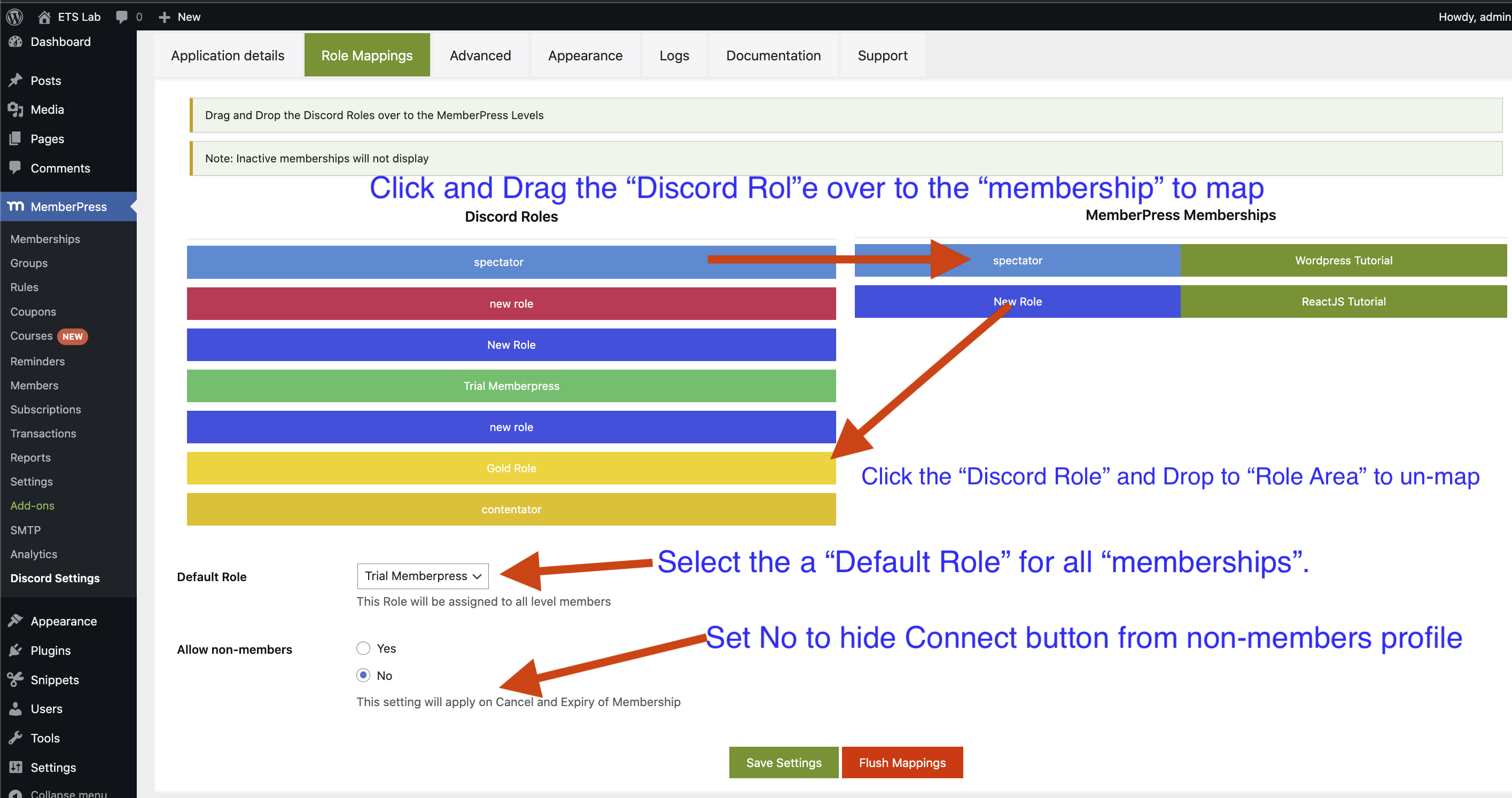
6. Dynamic role assignment based on membership tiers
7. Admin superpowers for role management
8. Customizable default roles for new Discord connections
9. Flexible server access settings post-membership
10. Tailored roles for expired or canceled memberships
11. Pre-checkout Discord authentication option
12. Downgrade will remove old discord roles.
13. Search members by their Discord Username or Discord ID in the member list.
14. Admin can decide if membership should stay in their discord server when membership expires or is canceled.
Engagement Boosters:
15. Automated expiration notifications via Discord DM
16. Personalized cancellation messages straight to Discord
17. Proactive membership renewal reminders
Customization & Seamless Integration:
18. Versatile [mepr_discord_button] shortcode for easy implementation
19. One-click Discord server joining with the optional default role
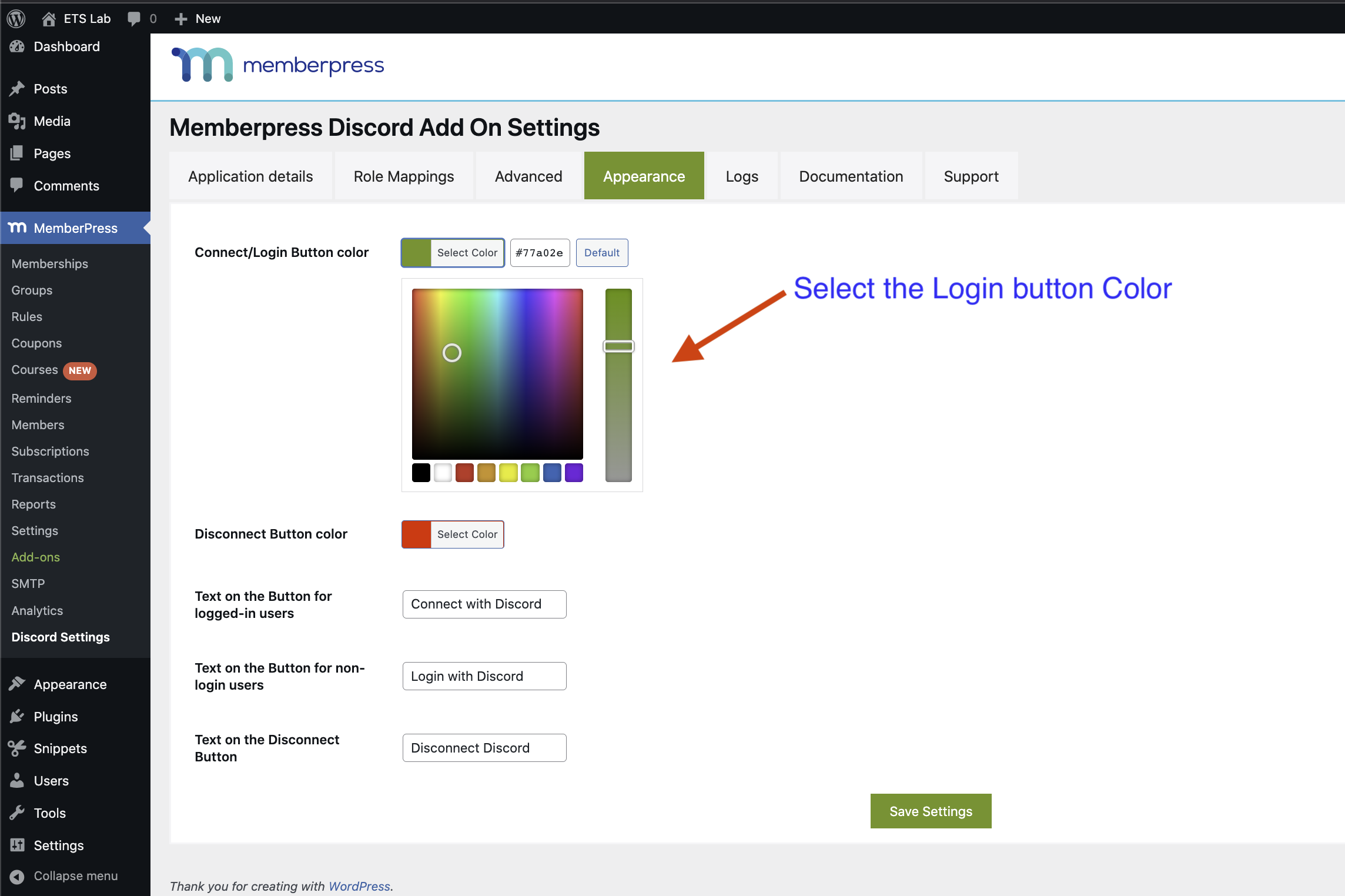
20. Sleek button styling options in plugin settings
21. Developer-friendly button hiding feature
Transform your membership site into a thriving Discord community with these powerful tools designed for creators who mean business!
DOCUMENTATION, SUPPORT.
Pro Version Addon Features for MemberPress-Discord
-
A. Enhanced Role Management
The Pro version supercharges your Discord integration with cloud-powered API calls. This advanced feature takes role management to new heights, ensuring lightning-fast synchronization between your membership site and Discord server. Experience seamless, efficient role updates that keep your community perfectly organized with minimal effort. -
B. Premium Support Services
Email Support: Subscribers of the Pro version gain access to dedicated email support. This service ensures that any technical issues or questions related to the MemberPress-Discord integration are promptly addressed by a team of experts. This level of support is crucial for maintaining a seamless and uninterrupted community experience, particularly for large communities where quick resolution of issues is paramount. - C. Custom Integration Services
Free Consultation for Custom Discord API Integrations: A standout feature of the Pro version is the offer of a free consultation for developing custom Discord API integrations. This service is invaluable for community managers looking to customize their Discord experience to fit unique community needs. Whether it’s developing specialized bots, automating specific community functions, or integrating with other software, the Pro version opens up a world of possibilities for bespoke community solutions. This feature not only adds tremendous value to the addon but also demonstrates. -
D. PRO Feature Release Roadmap:
Access release roadmap for memberpress discord pro. -
E. Cloud Version Support
Our cloud version unleashes the full potential of Discord integration, offering advanced features and automations. Design custom workflows powered by AI for seamless execution. Gain deep insights with comprehensive marketing and community analytics, empowering moderators to make data-driven decisions based on channel chat intents. Boost your community’s value with intelligent cross-selling and upselling opportunities. Streamline operations with custom onboarding process management and effective spam policy enforcement. Measure the impact of your strategies in real time. From commerce promotion to community health, our cloud solution provides the tools you need to cultivate a thriving, engaged Discord community that drives your membership site’s success.
Step-by-Step Guide for setting PRO version.
Instruction Installation
Download, Install and Activate!
-
Go to Plugins > Add New to find and install MemberPress discord Addon.
-
Or, download the latest version of the plugin, then go to Plugins > Add New and click the “Upload Plugin” button to upload your .zip file.
-
Activate the plugin.
Complete the Initial Plugin Setup
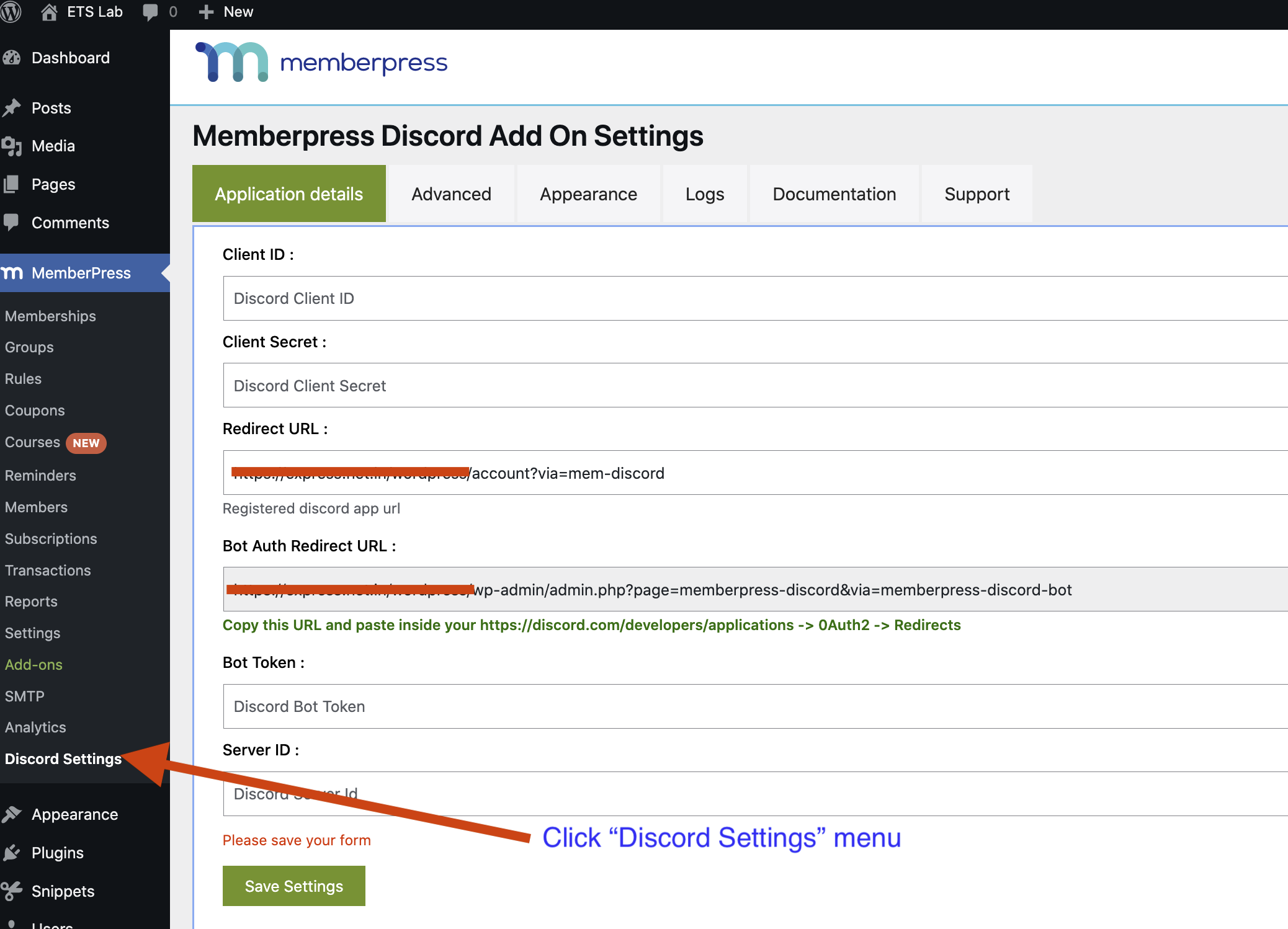
Go to MemberPress > Discord Settings in the WordPress admin to begin setup. Our Initial Setup Tutorial Video will show you how to configure
More Installation and Setup Documentation
Checkout Our Other Plugins
- Connect Learnpress and Discord
- Connect PaidmembershipPro and Discord
- Connect LearnDash and Discord
- Connect GamiPress and Discord
- Connect LifterLMS and Discord
- Webhook For WCFM Vendors
- Inspect HTTP Requests
- Product Questions & Answers for WooCommerce
- Connect Ultimate Member and Discord
- Connect Tutor LMS to Discord
- Connect Restrict Content Pro to Discord AddOn
- Connect BadgeOS to Discord
- Connect Eduma Theme to Discord
- Connect ProfilePress and Discord
Frequently asked questions
The main difference between Free and Plugin.
Free should suffice for discord servers having 100-200 members, while pro connects with the cloud tech for heavier server API loads.
I need help installing, configuring, or customizing the plugin.
Please visit [our support site at https://www.expresstechsoftwares.com/step-by-step-documentation-guide-on-how-to-connect-memberpress-and-discord-server-using-discord-addon) for more documentation and our support forums.
I’m getting an error in error Log ‘Missing Access’
Please make sure your bot role has the high priority among all other roles your bot has to manager in your discord server roles settings. please watch video on youtube how to do it. Installation Video
Role Settings is not appearing.
Clear browser cache, to uninstall and install again. Try the disabling cache Try Disabling other plugins, there may be any conflict with another plugin.
Members are not being added spontaneously.
Due to the nature of Discord API, we have to use schedules to precisely control API calls, This is the reason actions are delayed.
Member roles are not being assigned spontaneously.
Due to the nature of Discord API, we have to use schedules to precisely control API calls, This is the reason actions are delayed.
Some members are not getting their role and there is no error in the log.
Sometimes discord API behaves weirdly, It is suggested to TRY again OR use another discord account.
Screenshots



For developers
Is this your plugin? Show off the numbers.
Add a live badge to your site, docs or GitHub README. It updates on its own — no account needed.
FAQ
ExpressTechSoftwares Addon for Memb…: quick answers
Straight answers, pulled from live WordPress.org data.
Live data from WordPress.org · checked Oct 5, 2026
Is ExpressTechSoftwares Addon for… free?
Yes. ExpressTechSoftwares Addon for… is free to download and use from the official WordPress.org plugin directory. The developer also sells premium add-ons or a Pro version with extra features.
Is ExpressTechSoftwares Addon for… safe to use in 2026?
ExpressTechSoftwares Addon for… works, but test it on a staging site before relying on it in 2026. It runs on 200+ sites, is rated 4.5/5 and was last updated 5 months ago, and scores 51/100 on our health check.
How many websites use ExpressTechSoftwares Addon for…?
ExpressTechSoftwares Addon for… is active on 200+ WordPress websites and has been downloaded 13,795 times since it launched in April 2022. It was downloaded 395 times in the last 30 days.
Does ExpressTechSoftwares Addon for… work with WordPress 7.1?
ExpressTechSoftwares Addon for… is officially tested up to WordPress 6.7.9, while the latest release is 7.1.2. It may still work, but try it on a staging site first.
What PHP version does ExpressTechSoftwares Addon for… need?
ExpressTechSoftwares Addon for… requires PHP 7.0 or higher. Most hosts run PHP 8.x today, so it works on any modern WordPress hosting.
When was ExpressTechSoftwares Addon for… last updated?
The latest version, 1.1.5, was released on May 9, 2026 (5 months ago).
Who makes ExpressTechSoftwares Addon for…?
ExpressTechSoftwares Addon for… is developed and maintained by expresstechsoftware.
Powered by PageForge
Want thousands of pages that rank like these? Build them in an afternoon.
This directory runs on the same engine as PageForge. Turn any spreadsheet, CSV or API into thousands of fast, SEO-ready WordPress pages — with schema, internal links and AI-written copy baked in.
- CSV, Google Sheets & API data sources
- AI content, schema & internal links per page
- Works with Elementor, Gutenberg, Yoast & Rank Math
- Free on WordPress.org — no credit card


