



Executive VIP Transfer Service
Professional VIP transfer and chauffeur booking system with Google Maps routing, vehicle selection, distance-based pricing, and WooCommerce payments.

Use with caution
Executive VIP Transfer Service works, but test it on a staging site before relying on it in 2026. It runs on 10+ sites and was last updated 3 days ago, and scores 43/100 on our health check.
- Actively developed — last update 3 days ago
- Small user base (10+ active installs)
- Very few reviews so far
- Only tested up to WordPress 6.9 (latest is 7.1)
How does it stack up?
Side-by-side on installs, updates, ratings & support


Daily downloads
Download spikes usually follow a new release — each site that auto-updates counts as a download.
Rankings
Where Executive VIP Transfer Serv… stands todayWordPress.org search rankings
Live position in the plugin search, top 100| Keyword | Position |
|---|---|
| airport transfer | #4 |
| booking | >100 |
| chauffeur | #9 |
| executive transfer | #1 |
| vip transfer | #1 |
Version adoption
Share of active sites per release.
About Executive VIP Transfer Service
From the official readme · v1.3.9Description
Executive VIP Transfer Service is a complete booking solution for chauffeur companies, airport transfer businesses, limousine services, private drivers, and executive transportation providers.
It provides a modern three-step booking experience where customers can:
- Select pickup and drop-off locations
- Review available vehicles and route-based prices
- Enter passenger details and complete payment
The plugin integrates with Google Maps services for address autocomplete, distance calculation, route information, and travel duration. Bookings are processed through WooCommerce, giving site owners access to established payment gateways, order management, and customer notifications.
WooCommerce is required.
View the live booking experience
Key Features
- Modern three-step transfer booking form
- Google Places address autocomplete
- Pickup and drop-off route calculation
- Distance and estimated travel duration
- Distance-based pricing
- Minimum service price and maximum distance controls
- Passenger and luggage capacity validation
- One-way and return journey support
- Pickup date and time scheduling
- Minimum advance booking time rules
- Responsive vehicle selection cards
- Live booking summary and price updates
- Card and manual/cash payment options
- WooCommerce order and payment integration
- Booking confirmation and tracking workflow
- Responsive layout for desktop, tablet, and mobile
- Theme-independent front-end styling
- Modern plugin settings, reservations, and vehicle management screens
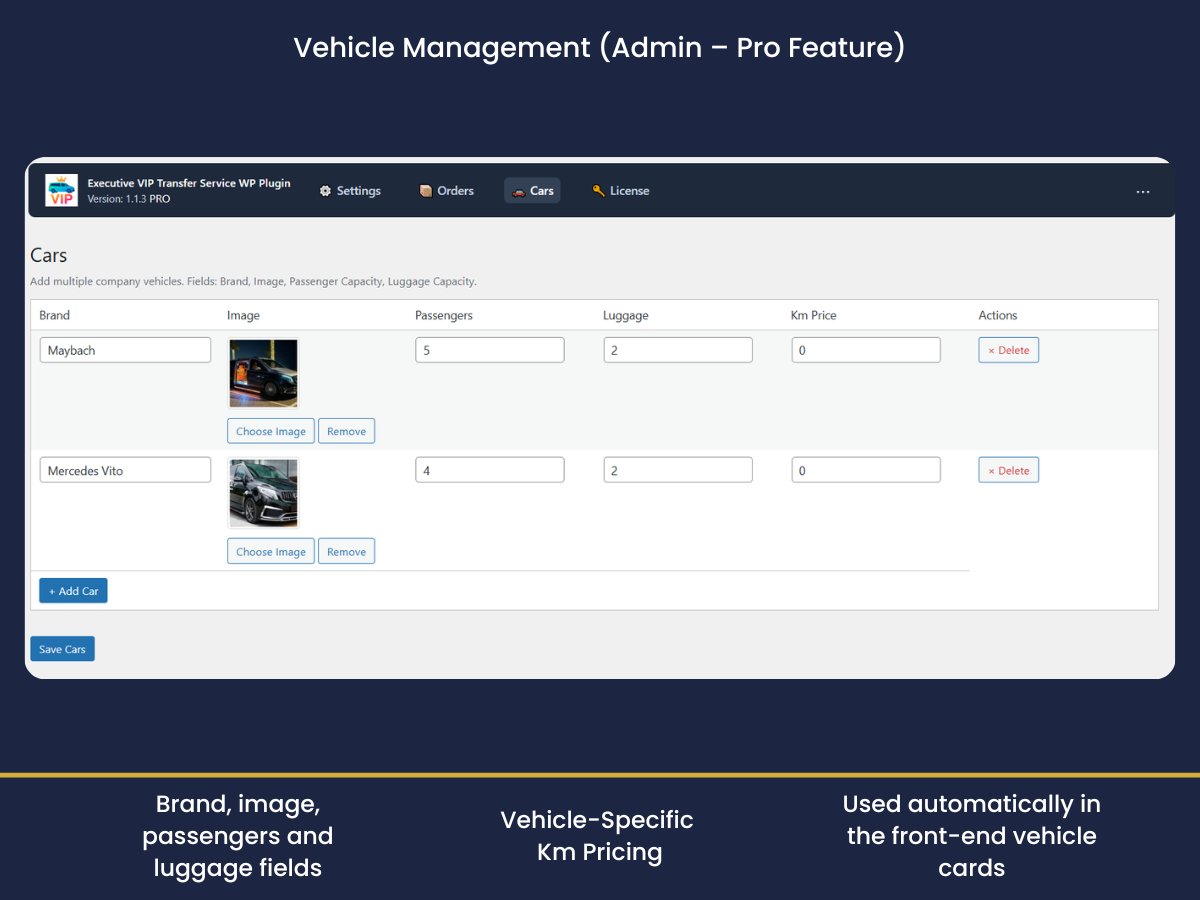
Vehicle Management
Create and manage a professional fleet directly from WordPress:
- Vehicle name, image, and description
- Passenger and luggage capacity
- Distance-based vehicle pricing
- Vehicle features and service badges
- Active and inactive vehicle status
- Automatic availability filtering by passenger and luggage requirements
- Route-based price preview before vehicle selection
Booking Experience
The booking form is designed to keep the reservation process clear and focused:
- Step 1 — Route: Pickup, drop-off, date, time, passengers, luggage, return journey, map, distance, and duration
- Step 2 — Vehicle: Vehicle images, capacity, features, route-based pricing, and selection
- Step 3 — Details & Payment: Passenger contact details, flight information, special requests, payment method, and final booking summary
The optional booking header can be enabled globally from the plugin settings or for an individual shortcode.
Admin Dashboard
The plugin includes dedicated admin screens for:
- General booking configuration
- Google Maps API settings
- Currency and pricing rules
- Booking form options
- Payment methods
- Email notifications
- Vehicle management
- Reservation management
- Reservation status and payment review
Free and Pro
The free version provides the core transfer booking workflow, Google-powered address selection, global distance-based pricing, WooCommerce integration, and booking management.
The Pro version adds advanced business features such as:
- Vehicle management
- Vehicle-specific route pricing
- Live route map and directions
- Advanced pickup scheduling
- Capacity-based vehicle filtering
- Enhanced booking summaries
- Priority support
Compare features and view the Pro version
Live Demo
See the complete booking flow in action:
Requirements
- WordPress 5.6 or later
- PHP 7.2 or later
- WooCommerce installed and active
- A valid Google Maps Browser API key with billing enabled
- The following Google Cloud APIs enabled for current installations:
- Maps JavaScript API
- Places API (New)
- Routes API
- Strongly recommended for production: a separate Server API key for server-side route verification
For better security, restrict the Browser key by website HTTP referrers. For production sites—especially sites taking online payments—configure a separate Server API key and restrict it by server IP. This lets the plugin verify route distance and pricing on the server instead of relying only on browser-submitted values. Legacy Places, Distance Matrix and Directions services are used only as compatibility fallbacks on older installations when available.
Shortcodes
Display the booking form:
[execvitr_form]
Display the booking form with the optional booking header:
[execvitr_form show_hero="yes"]
Force the booking header to remain hidden:
[execvitr_form show_hero="no"]
The plugin automatically creates the required booking and tracking pages during activation. Customers are redirected to a secure booking or payment flow after submitting the reservation form.
How It Works
For Customers
- Select pickup and drop-off addresses from Google suggestions.
- Choose the pickup date, time, passenger count, and luggage count.
- Review the calculated distance, duration, and starting price.
- Select an available vehicle.
- Enter passenger and optional flight information.
- Select a payment method and confirm the booking.
- Complete payment through WooCommerce when online payment is selected.
For Administrators
- Configure the Google API key, country restriction, currency, and pricing rules.
- Add vehicles with images, capacities, features, and distance rates.
- Configure available payment methods and notification settings.
- Review, edit, filter, and manage reservations from the plugin dashboard.
- Track payments and booking status through WooCommerce.
Privacy
The plugin sends location-related requests to Google Maps services to provide address suggestions, route distance, and estimated travel duration.
Reservation and customer information is stored and processed through WordPress and WooCommerce according to the configuration and privacy policy of the website owner.
The plugin does not include its own advertising analytics or independent visitor-tracking system.
External services:
Installation
- Install and activate WooCommerce.
- Upload the plugin files to
/wp-content/plugins/executive-vip-transfer-service/, or install the plugin through the WordPress Plugins screen. - Activate Executive VIP Transfer Service.
- Go to VIP Transfer Service → Settings.
- Enter your Google Maps API key and configure pricing, currency, payment, and booking options.
- Add vehicles from VIP Transfer Service → Cars when vehicle management is available.
- Add
[execvitr_form]to any page, or use the booking page created automatically by the plugin.
Frequently asked questions
Is WooCommerce required?
Yes. WooCommerce is used for order creation, payment processing, order status management, and supported payment gateways.
Where can I see a working example?
Open the live demo to review the complete route, vehicle, passenger, and payment flow.
Why does the displayed price differ from a Google route estimate?
Google provides route distance and duration. The final price is calculated using the pricing rules configured in the plugin, including distance rates, vehicle rates, minimum price, return journey, and configured fees.
Why is address autocomplete not working?
Confirm that billing is active, the Browser API key is valid, Maps JavaScript API and Places API (New) are enabled, and the key’s HTTP-referrer restrictions include the exact website domain. Route pricing also requires Routes API. The plugin now surfaces Google authorization/loading errors directly in the form instead of polling indefinitely.
Can customers see a price before selecting a vehicle?
Yes. After the route is calculated, the booking summary can display the lowest available vehicle price as a starting price. The exact total is updated when a vehicle is selected.
Can I hide the large booking header?
Yes. It is disabled by default from version 1.3.8 onward. You can control it from the plugin settings or use the show_hero shortcode attribute.
Can I accept cash payments?
Yes. Manual or cash payment can be enabled from the payment settings. Card payments can also be processed through available WooCommerce payment gateways.
Can I use miles instead of kilometers?
Yes. The plugin supports kilometer and mile-based distance display and pricing configuration.
Another plugin also loads Google Maps. Can this cause a conflict?
The plugin includes safeguards against duplicate initialization. If another theme or plugin injects Google Maps more than once on the same page, review the script-loading settings and remove the duplicate Google Maps loader.
Can I use a different currency for each country?
The current version uses one global currency configuration for the booking system.
Changelog
Improved compatibility with WordPress themes by disabling the optional booking header by default, while preserving full shortcode and admin control.
1.3.9
- Fixed: Booking submission no longer depends on jQuery
serializeArray()or$.ajax, preventing failures with jQuery slim/optimized builds. - Added: Modern Places Autocomplete Data API support with session tokens and a legacy autocomplete fallback.
- Added: Modern Route Matrix / Routes API distance calculation with legacy Distance Matrix compatibility fallback.
- Added: Optional Server API key setting for server-side route recovery.
- Fixed: Google Maps loader now reports missing key, authorization, script, Places library and timeout errors instead of polling forever.
- Improved: Route preview uses the current Route class first and legacy Directions only as a compatibility fallback.
- Fixed: Server-side distance recalculation can recover a booking when browser route calculation fails.
- Security: Server-side route verification overrides browser-submitted distance when a valid server key is configured, reducing price-tampering risk.
- Fixed: Ticket/email data now carries the correct mile conversion plus phone, duration, passenger, luggage and payment details more consistently.
- Fixed: Paid online transfer orders are completed after WooCommerce confirms payment instead of remaining in Processing.
- Fixed: Existing internal booking products are normalized as hidden virtual products during upgrade.
- Fixed: Cash-to-driver reservations no longer redirect customers to the WooCommerce payment screen.
- Fixed: Reservation emails are triggered directly when the plugin creates an order, and failed recipients remain retryable.
- Improved: Email sender uses the WooCommerce configured sender identity and retries without the PDF attachment if attachment delivery fails.
- Improved: Billing address data and booking metadata are saved more consistently for payment gateways and emails.
- Fixed: PHP 7.2 compatibility by removing PHP 7.4 arrow-function syntax from plugin PHP files.
1.3.8
- Changed: The optional booking header is now disabled by default.
- Added: Automatic migration for previously saved header visibility settings.
- Added: Per-shortcode header visibility control with
show_hero="yes"andshow_hero="no".
1.3.7
- Added: Configurable booking header settings.
- Added: Editable booking header badge, title, description, and benefit text.
- Improved: Compatibility with websites that provide their own page header or hero section.
1.3.6
- Fixed: Pickup and drop-off icons no longer overlap placeholder or address text.
- Improved: Input spacing and right-to-left layout compatibility.
1.3.5
- Redesigned: Step 2 vehicle selection cards with improved image, capacity, feature, price, and selection layout.
- Redesigned: Admin settings page with modern navigation and section cards.
- Improved: Responsive vehicle selection for desktop, tablet, and mobile.
1.3.4
- Fixed: Reservation action buttons remain fully visible in the admin orders table.
- Improved: Actions column width and responsive table behavior.
Screenshots


For developers
Is this your plugin? Show off the numbers.
Add a live badge to your site, docs or GitHub README. It updates on its own — no account needed.
Best Executive VIP Transfer Service alternatives
All airport transfer plugins →FAQ
Executive VIP Transfer Service: quick answers
Straight answers, pulled from live WordPress.org data.
Live data from WordPress.org · checked Oct 5, 2026
Is Executive VIP Transfer Service free?
Yes. Executive VIP Transfer Service is free to download and use from the official WordPress.org plugin directory.
Is Executive VIP Transfer Service safe to use in 2026?
Executive VIP Transfer Service works, but test it on a staging site before relying on it in 2026. It runs on 10+ sites and was last updated 3 days ago, and scores 43/100 on our health check.
How many websites use Executive VIP Transfer Service?
Executive VIP Transfer Service is active on 10+ WordPress websites and has been downloaded 1,927 times since it launched in August 2025. It was downloaded 214 times in the last 30 days.
Does Executive VIP Transfer Service work with WordPress 7.1?
Executive VIP Transfer Service is officially tested up to WordPress 6.9.9, while the latest release is 7.1.2. It may still work, but try it on a staging site first.
What PHP version does Executive VIP Transfer Service need?
Executive VIP Transfer Service requires PHP 7.2 or higher. Most hosts run PHP 8.x today, so it works on any modern WordPress hosting.
When was Executive VIP Transfer Service last updated?
The latest version, 1.3.9, was released on October 2, 2026 (3 days ago).
Who makes Executive VIP Transfer Service?
Executive VIP Transfer Service is developed and maintained by Gksoft Dev Team.
What are the best alternatives to Executive VIP Transfer Service?
The most popular alternatives to Executive VIP Transfer Service are E-cab Taxi Booking Manager… (2K+ installs), Cab Grid (100+ installs) and MYF Fleet Booking Widget (<10 installs).
Powered by PageForge
Want thousands of pages that rank like these? Build them in an afternoon.
This directory runs on the same engine as PageForge. Turn any spreadsheet, CSV or API into thousands of fast, SEO-ready WordPress pages — with schema, internal links and AI-written copy baked in.
- CSV, Google Sheets & API data sources
- AI content, schema & internal links per page
- Works with Elementor, Gutenberg, Yoast & Rank Math
- Free on WordPress.org — no credit card


