



Estasoft Name Catalog
A fast, searchable names directory for WordPress: bulk import, search, browse A-Z, and a name of the day.

Solid choice
Estasoft Name Catalog is a solid plugin choice in 2026, with a few things worth checking first. Was last updated 1 day ago, and scores 64/100 on our health check.
- Actively developed — last update 1 day ago
- Tested with the latest WordPress (7.1)
- Small user base (<10 active installs)
- Very few reviews so far
How does it stack up?
Side-by-side on installs, updates, ratings & supportDaily downloads
Not enough data yet.
Download spikes usually follow a new release — each site that auto-updates counts as a download.
Rankings
Where Estasoft Name Catalog stands todayWordPress.org search rankings
Live position in the plugin search, top 100| Keyword | Position |
|---|---|
| baby names | #11 |
| directory | >100 |
| import | >100 |
| names | >100 |
| search | >100 |
About Estasoft Name Catalog
From the official readme · v2.1.0Description
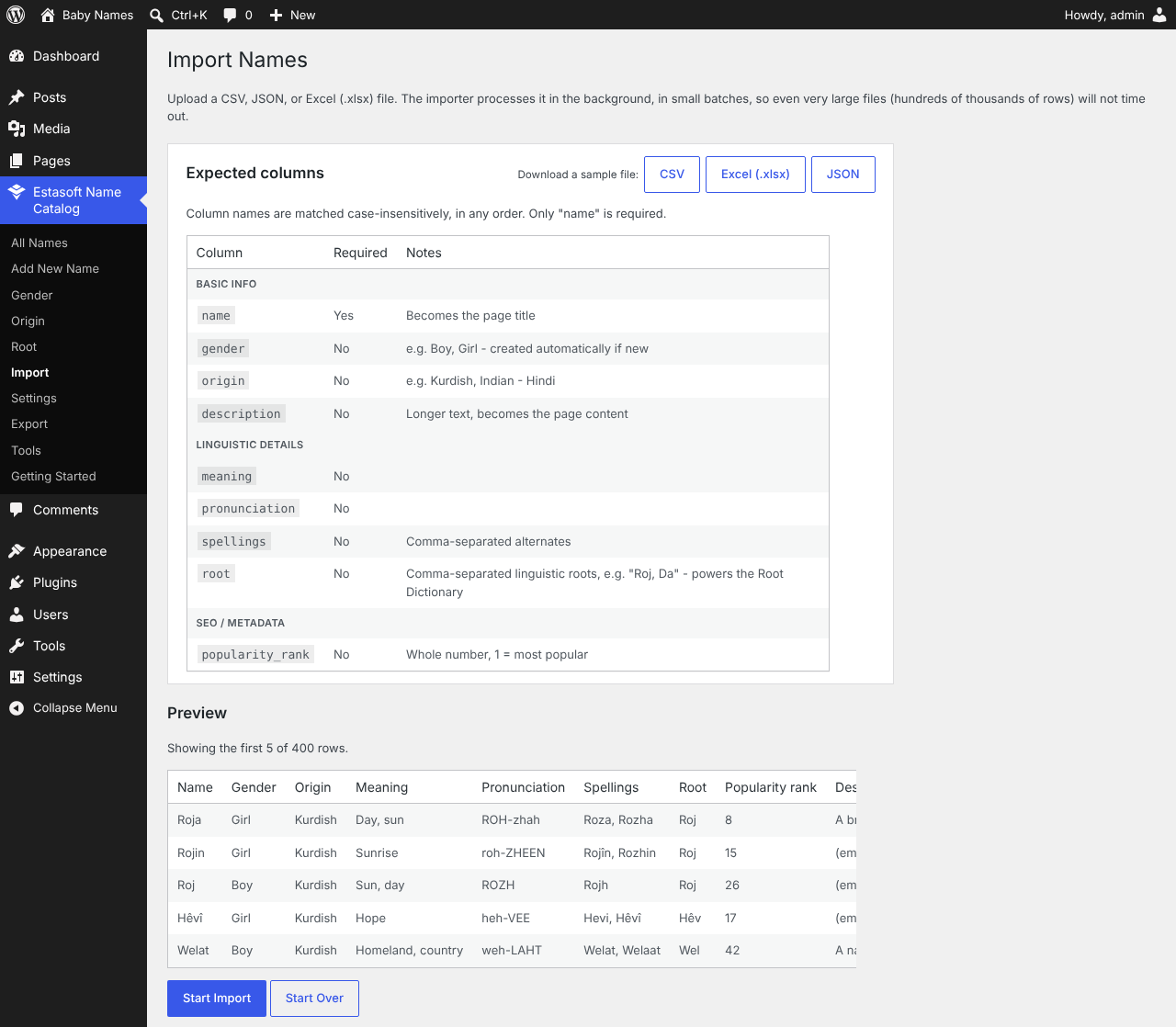
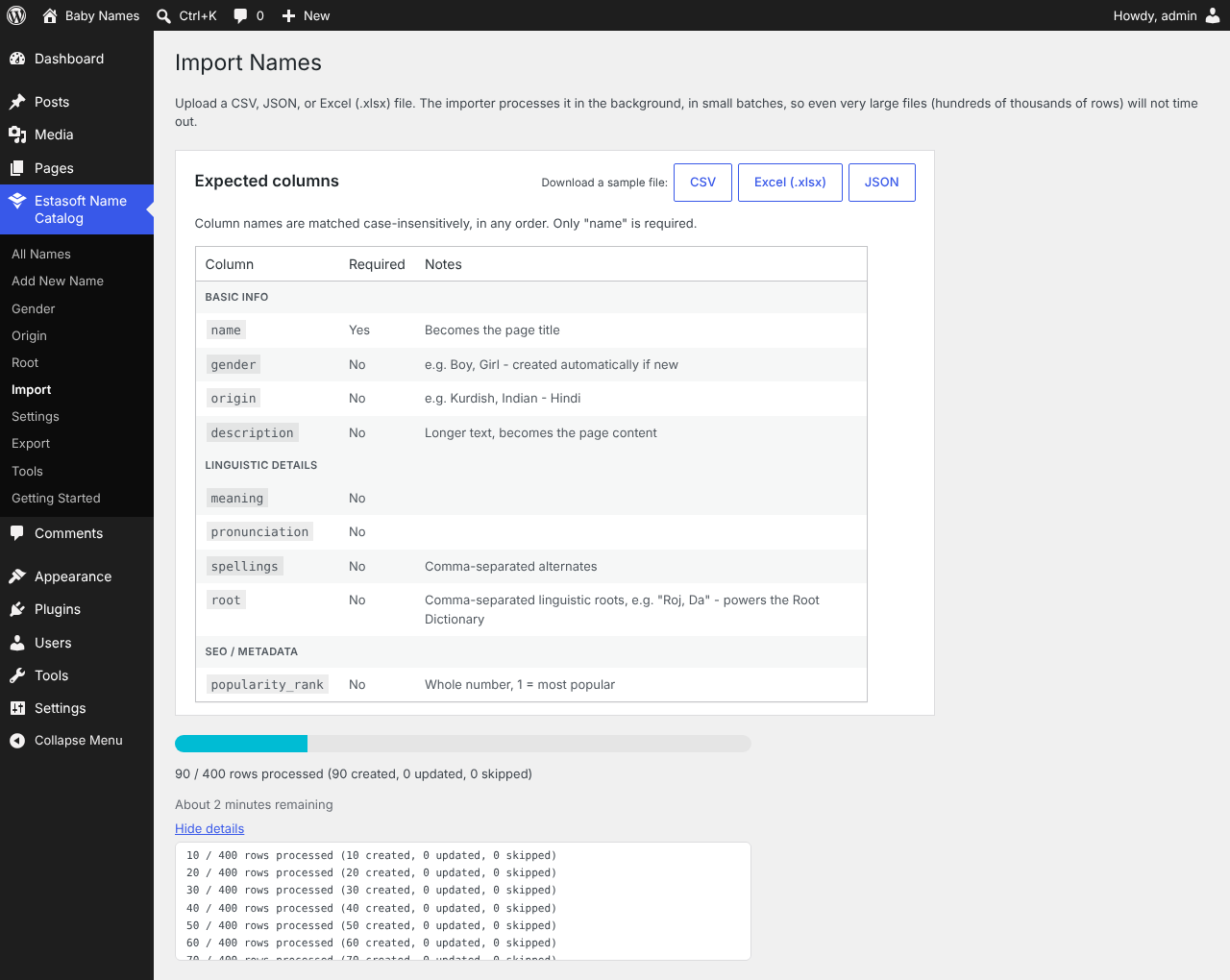
Estasoft Name Catalog turns WordPress into a searchable names database – useful for baby names, place names, or any structured name collection. Add entries one at a time through a simple admin screen, or bulk-import thousands (or hundreds of thousands) at once from a CSV, JSON, or Excel file, with a guided wizard: drag a file in, map its columns, preview the first rows, then watch live progress with an estimated time remaining.
Search and browse, with AJAX filtering by gender and origin, A-Z navigation, and search that matches a name’s meaning as well as its spelling. Kurdish Latin and Sorani (right-to-left) alphabets are supported natively.
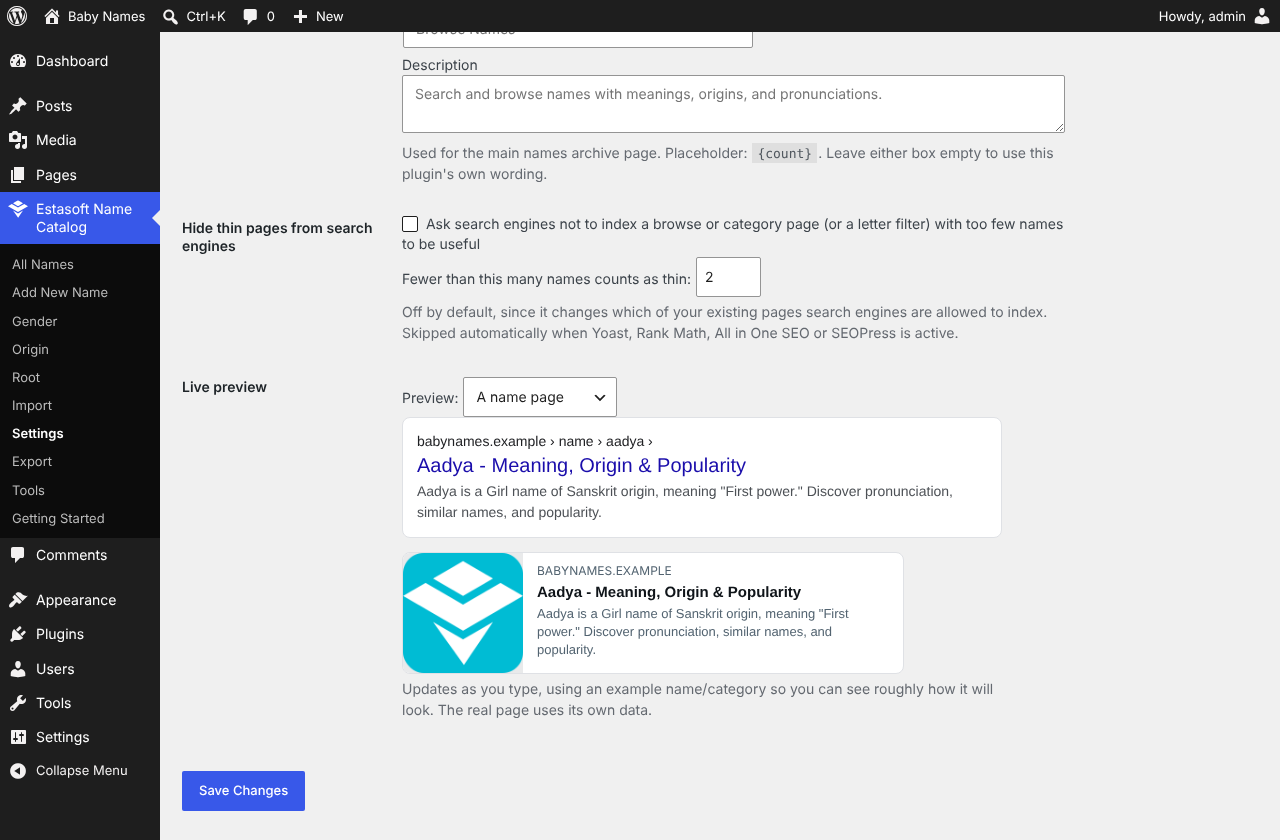
SEO built in. Meta titles and descriptions (with a live Google-result preview), FAQPage and DefinedTerm structured data, Open Graph and Twitter cards, breadcrumbs, and automatic 301 redirects when a name or category is merged or removed – all independently toggleable, and all stepping aside automatically if Yoast, Rank Math, All in One SEO, or SEOPress is active.
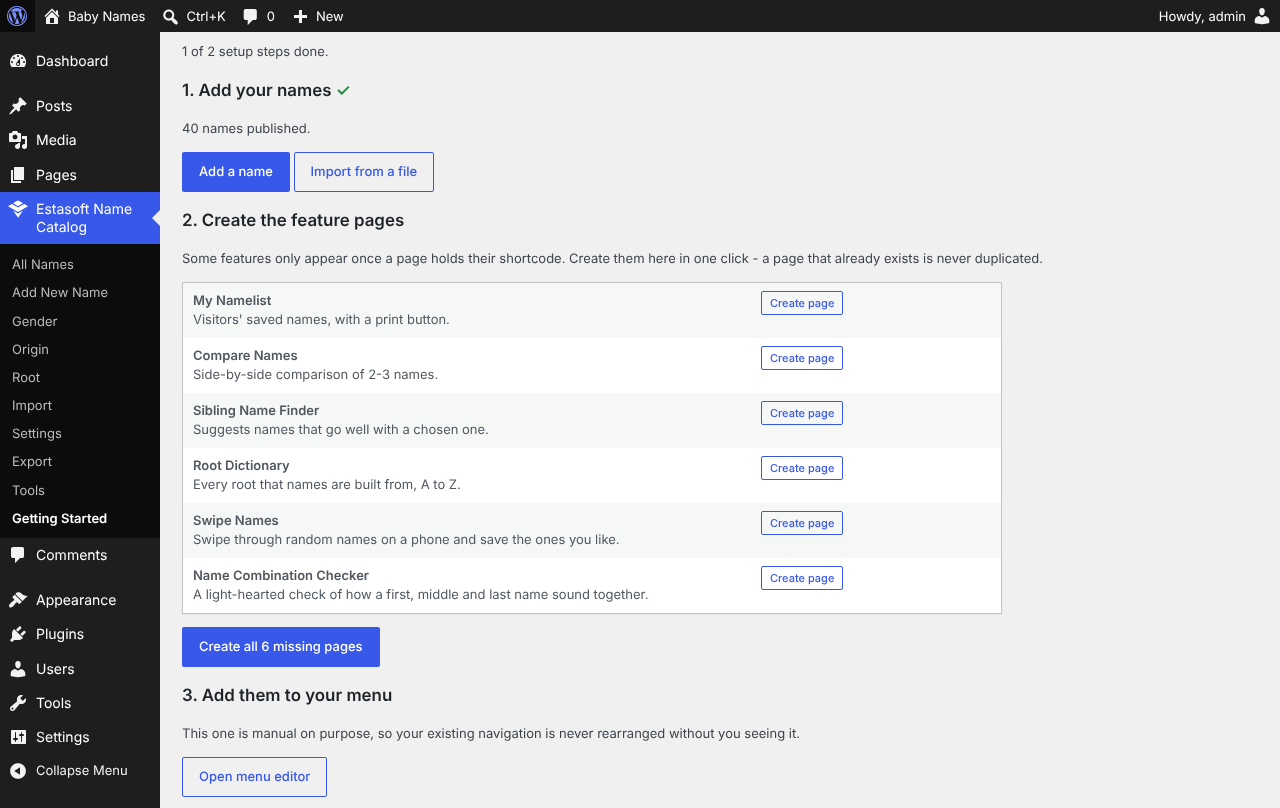
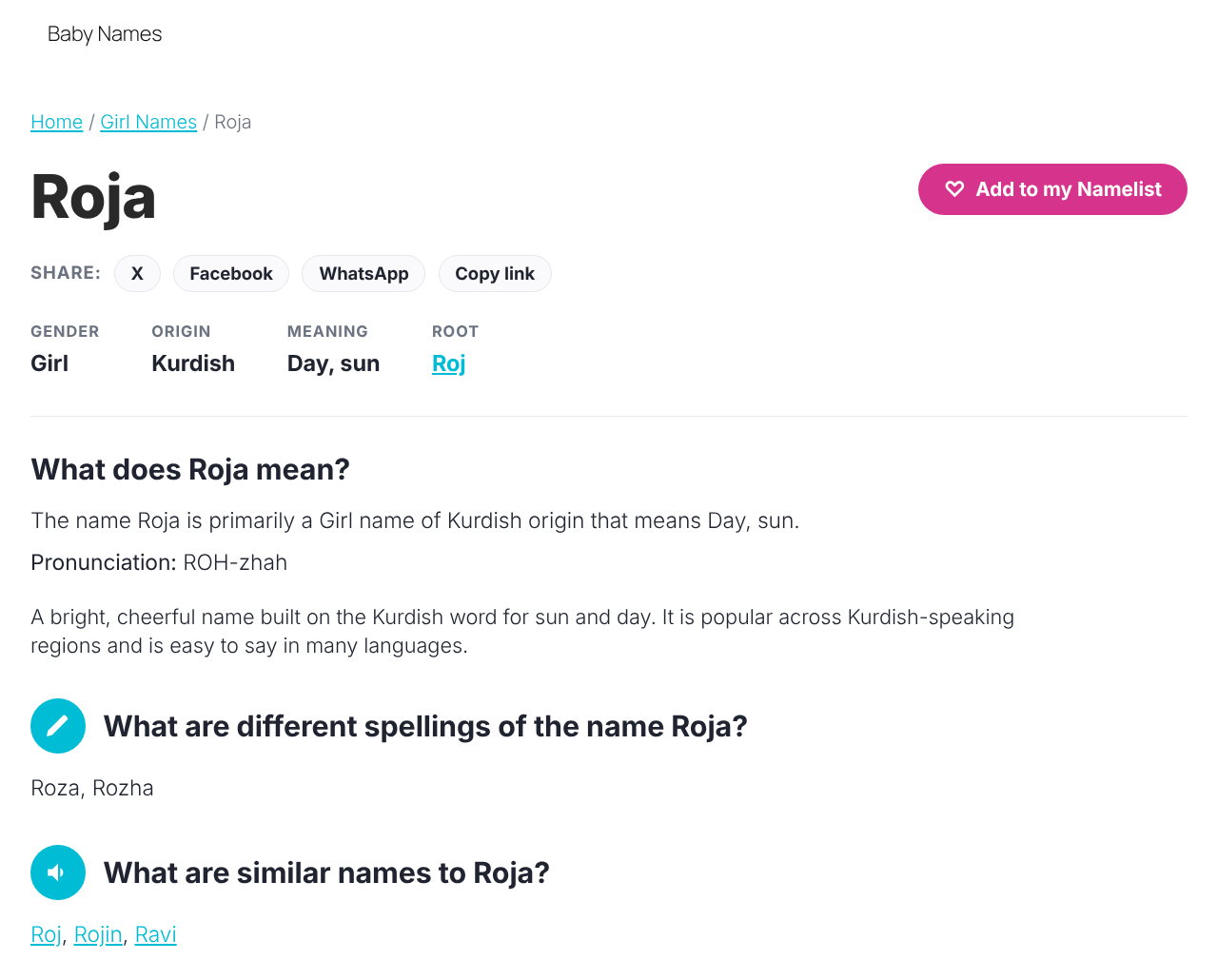
Visitor tools, each its own shortcode and editor block: a personal “Namelist” visitors can save to and share, a name combination checker, a side-by-side comparison tool, a sibling-name generator, swipe-to-save discovery mode, a “name of the day,” and a Root Dictionary linking names that share a linguistic root.
Data quality tools for admins: find duplicates, spot names missing key fields, and merge categories that drifted apart (like “Boy” and “Male”) without creating duplicate taxonomy terms.
Built for scale. Imports and exports process in the background in batches, so even very large files never time out. An optional FULLTEXT search index and WP-CLI import support suit directories in the tens or hundreds of thousands of names. Every database query is prepared or goes through WP_Query, every admin action is nonce-verified and capability-checked, and all output is escaped at the point of use.
See the FAQ below for the full shortcode list with every available attribute, and for more on the SEO, security, and performance details.
External services
This plugin does not contact any external service by itself. It makes no outbound requests from your server, and nothing is sent anywhere when a page loads.
The only links to outside services are the optional social share buttons on each name page. You choose which ones appear (or turn them all off) under Settings > Sharing. Each is an ordinary link that does nothing until a visitor clicks it. When clicked, it opens that service in the visitor’s own browser and hands it two things so the service can pre-fill a post: the name page’s web address, and the short text “Check out the name” followed by the name. No other data from your site or from the visitor is sent by this plugin. What the service then does with that information is governed by its own terms and privacy policy:
- X (formerly Twitter),
twitter.com/intent/tweet– receives the page address and share text. Terms of Service – Privacy Policy - Facebook,
facebook.com/sharer/sharer.php– receives the page address. Terms – Privacy Policy - WhatsApp,
api.whatsapp.com/send– receives the share text and page address. Terms of Service – Privacy Policy - Pinterest,
pinterest.com/pin/create/button/– receives the page address and share text. Terms of Service – Privacy Policy - Telegram,
t.me/share/url– receives the page address and share text. Terms of Service – Privacy Policy
The “Copy Link” button does not use any external service; it copies the page address to the visitor’s own clipboard.
Installation
- Upload the plugin files to
/wp-content/plugins/estasoft-name-catalog, or install directly through the WordPress Plugins screen. - Activate the plugin through the “Plugins” screen.
- Go to the new “Estasoft Name Catalog” menu in wp-admin and add your first name, or go to Estasoft Name Catalog > Import to bulk-upload a file.
- Place any of the shortcodes above on a page or post.
Frequently asked questions
What shortcodes are available, and what attributes does each take?
[wpned_search] – live search box with gender and origin filters (AJAX, no page reload). Matches a name’s meaning as well as its title (searching “sun” finds a name meaning “sun, day” even if it isn’t spelled that way). Attributes: target (CSS selector of a results container to update instead of its own – used to combine with an existing listing so there is only ever one results area on the page), fixed_gender / fixed_origin (lock the query to one taxonomy term and hide that dropdown – handy on a page that’s already about one gender/origin), columns (1-6, default 3). [wpned_az] – A-Z browsing…
What does this plugin do for security and performance?
Every database query goes through WP_Query or a fully prepared statement – no raw, unescaped SQL. All admin form submissions and AJAX requests are nonce-verified and capability-checked. All output is escaped at the point of output; JSON-LD output is additionally hardened against a literal in any field breaking out of the schema block. The Compare Names and Sibling Generator tools build their UI from raw JSON field values entirely through safe DOM methods (never innerHTML of untrusted text), so a name or meaning containing markup can never execute as code. Uploaded import files are stored…
Does this support multiple genders?
The Gender taxonomy ships with “Boy” and “Girl” by default. You can rename or add terms under Estasoft Name Catalog > Gender at any time, since it’s a standard WordPress taxonomy – and any new gender value in an imported file is created automatically.
Can I change how a single name page, archive, or gender/origin page looks?
Yes. Add a single-wpned_name.php, archive-wpned_name.php, or taxonomy-wpned_gender.php / taxonomy-wpned_origin.php file to your active theme and it will automatically override the plugin’s default template.
How do I add a “My Namelist” (favorites) link to my site’s header menu?
Create a new Page (e.g. titled “My Namelist”), add the [wpned_favorites] shortcode to it, publish it, then go to Appearance > Menus in wp-admin and add that Page to your navigation menu like any other page. No extra plugin configuration is needed – favorites are stored in each visitor’s own browser, so the page just displays whatever they’ve saved.
Does this conflict with Yoast/Rank Math/AIOSEO/SEOPress?
No. This plugin detects whether one of those is active and lets it fully own the meta title and meta description (so you keep using that plugin’s own editor UI for those). The structured data (JSON-LD) this plugin adds is separate and additive – it will not remove or duplicate anything those plugins generate on their own.
I merged two categories / trashed a name – will old links to it break?
Not if redirects are on (Settings > SEO, on by default). Merging two categories in Merge Terms 301-redirects the old category’s page to the surviving one. For an individual name, open it, fill in “Redirect this name to” with the address of the page you want visitors sent to instead, then move the name to the Trash – the redirect activates as soon as it’s trashed. Neither happens unless you set it up; nothing is redirected automatically just because a name is deleted.
Should I turn on “hide thin pages from search engines”?
It’s off by default because it can remove a page search engines had already indexed. If your site has many categories or letters with only one or two names each, turning it on (Settings > SEO) can help by keeping those near-empty pages out of results until they have more content – search engines generally rank a site better when it isn’t full of thin pages. If most of your categories are well populated, you likely don’t need it.
The content isn’t lined up with my header/footer.
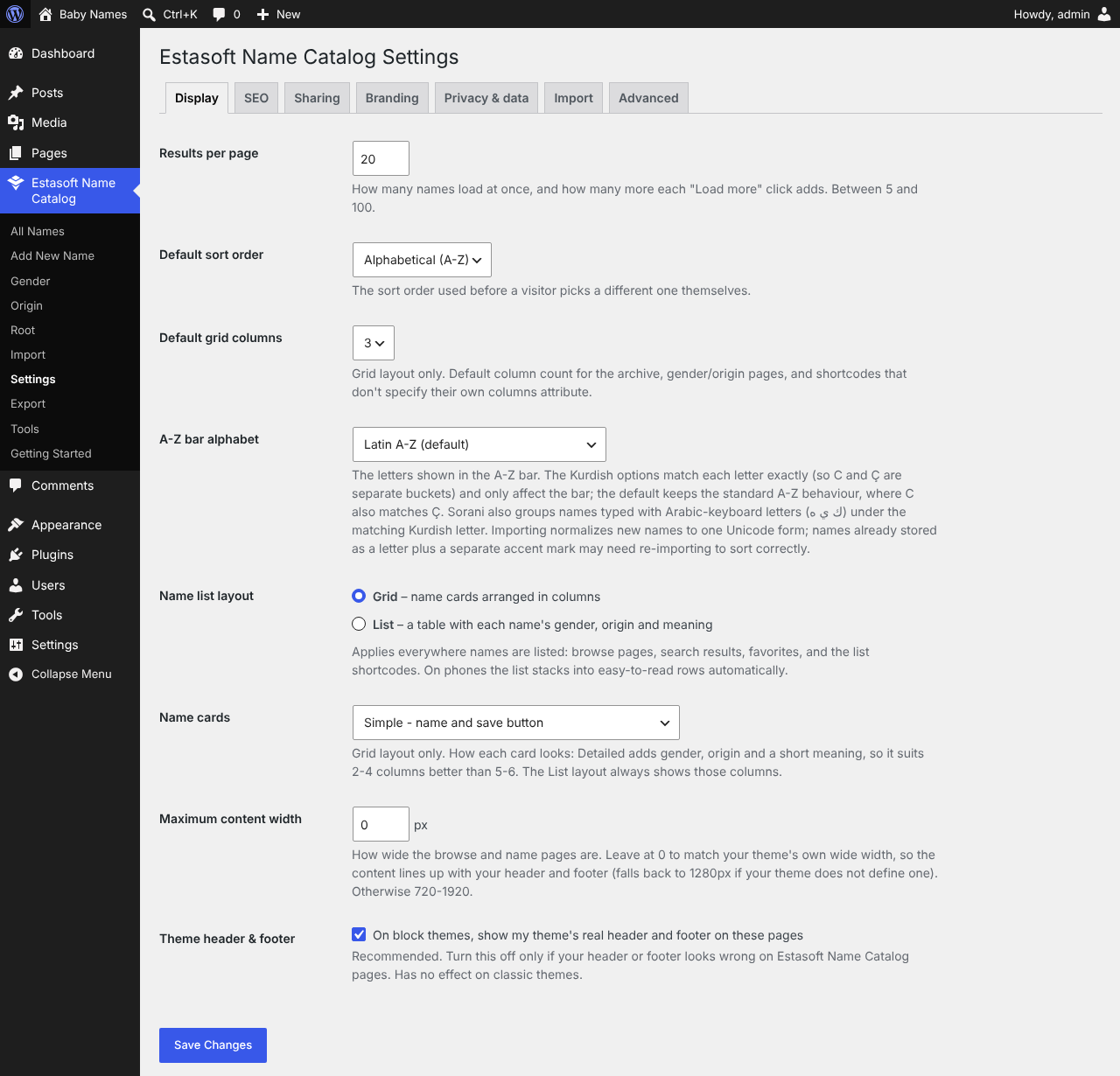
The pages follow your theme’s “wide” width by default. If your header uses a different width, set Estasoft Name Catalog > Settings > Maximum content width to match it. If the header or footer itself looks wrong on these pages, untick “Theme header & footer” in the same screen. Note that pages you build yourself with shortcodes take their width from your theme’s normal page layout, not from this plugin.
How do I translate the plugin into Kurdish (or anything else)?
Install Loco Translate or Poedit and start from languages/wpned.pot. Sorani is locale ckb and Kurmanji is kmr; the files must be named wpned-ckb.mo / wpned-kmr.mo (Loco does this for you). Then set your site language under Settings > General, or use a multilingual plugin such as Polylang, WPML or TranslatePress. First drafts of a few dozen short labels for both dialects are included as wpned-ckb.po and wpned-kmr.po. They are deliberately marked “fuzzy” – a draft by a non-native speaker – so WordPress ignores them until a native speaker reviews each one and clears the flag. Entries marked “LOW…
How does sharing my list work, and is it private?
The link contains only the IDs of the public names on your list, compressed into the address, so there is nothing to look up and nothing stored on the server. Anyone who has the link can see those names, and nothing else about you. Up to your 500 most recent names go into a link.
The A-Z bar doesn’t have Ç, Ş, Î… or my Sorani letters.
Settings > Display > A-Z bar alphabet. Choose Kurdish Latin or Sorani. Names already stored as a plain letter followed by a separate accent mark may need re-importing (with “update existing names” ticked) so they sort under the right letter.
My file says “Male” but my site uses “Boy”. How do I avoid two categories?
Add Male = Boy under Settings > Import. It applies to imports from then on. If both categories already exist, use Estasoft Name Catalog > Tools > Merge Terms to combine them.
How do I show names as a table instead of cards?
Estasoft Name Catalog > Settings > Display > Name list layout > List. It applies to every place names are listed. Switch back to Grid at any time; nothing about your names changes.
Where do I create the Compare / My Namelist pages?
Estasoft Name Catalog > Getting Started creates them for you in one click. It only creates pages that don’t exist yet.
How do I show the meaning on each name card?
Estasoft Name Catalog > Settings > Display > Name cards > Detailed. It shows gender, origin and a short meaning under each name. Detailed cards suit 2-4 columns better than 5-6.
Do saved names really sync between my devices?
For visitors who are logged in, yes: their list is stored on their account and merged whenever they load a page. Each device remembers what it last synced, so additions and removals both carry over. Visitors who are not logged in keep a browser-only list, and when they later log in, what they saved is added to their account rather than lost.
Will choosing “Update existing” or “Skip existing” make an import slower?
Somewhat: each row needs one lookup to see whether that name already exists. “Create new” (the default) skips that lookup entirely. Matching is by exact name, and whether “Welat” and “welat” count as the same follows your database’s collation (the WordPress default treats them as the same).
My file’s columns aren’t named exactly “name”, “gender”, etc. – do I need to rename them?
No. After choosing a file, a mapping step lets you match each of your file’s columns to the right field (so a column called “Full Name” can be mapped to “name”, for instance). Your file itself is never changed. Only “name” needs to be mapped before you can continue; anything left unmapped is simply not imported.
Where do I find out which rows failed during an import?
Once the import finishes, if anything was skipped, a “Download error log” link appears with the result. It lists the specific row number and reason for every skipped row (a missing name, or “already exists” when Skip existing is chosen, for example) – not just a count.
Changelog
2.1.0
- Changed: the plugin is now “Estasoft Name Catalog” (slug
estasoft-name-catalog), following WordPress.org plugin-review feedback that the previous name was too close to an existing trademark and plugin. The admin menu and every in-app label use the new name. - Changed: import file uploads now go through WordPress’s own upload handler,
wp_handle_upload(), instead of PHP’smove_uploaded_file()directly. - Security: the JSON-LD structured data printed in page HTML is now encoded with the full set of HTML-safe JSON flags. The previous safeguard neutralized only a literal closing script tag, not other markup that could appear in a name or meaning. JSON exports use standard JSON escaping and are sent with a
nosniffheader. - Added: an “External services” section documenting the optional share buttons, with each service’s terms and privacy links. The plugin itself makes no outbound requests.
- Removed: bundled translation drafts – WordPress.org supplies translations through translate.wordpress.org. The
.pottemplate stays. - Fixed: the readme’s Contributors entry now matches the WordPress.org account that owns the plugin.
- Fixed: CSV and JSON import files that begin with a UTF-8 byte-order mark – which Excel’s “CSV UTF-8” option adds, and which the plugin’s own downloadable sample file carries – are now read correctly. Previously the first column name did not match “name”, so such a file could not be imported without manual remapping.
- Security: the CSV export now guards against spreadsheet formula injection. A name or meaning beginning with =, +, – or @ is exported with a leading apostrophe so Excel and Sheets treat it as text instead of running it, and the importer removes the apostrophe again so an export re-imports exactly as exported.
- Security: output is now escaped at the moment it is printed, everywhere. The name grids, cards, table and breadcrumbs pass through a strict
wp_kses()allow-list of exactly the tags the plugin emits; the structured data uses WordPress’s ownwp_print_inline_script_tag(); the accent and heading colors must be real hex colors before they reach the stylesheet; and file downloads (CSV, JSON, Excel) are streamed instead of echoed. No visible change to any page. - Changed: file removal now uses WordPress’s
wp_delete_file(), and the sample JSON download uses standard JSON escaping (non-Latin text appears as \uXXXX codes that every JSON reader, including this plugin’s importer, decodes to the same letters). - Fixed: a debug-mode notice on the hidden Duplicates, Data Quality and Merge Terms admin pages (a missing page title).
2.0.0
- Changed: the plugin’s formal name is now “Name Engine Directory” and its slug/text domain is now
name-engine-directory– WordPress.org does not permit a plugin name or slug to begin with “WP”. The WPNED brand, logo, and every in-app label (the admin menu, page titles, etc.) are unchanged; only the formal listing identity and the folder/file name moved. - Fixed: the plugin’s own bootstrap class and boot function had kept their very first internal name since well before the WPNED rename and were never actually updated – fixed, with no effect on how the plugin runs.
- Fixed: a handful of internal helper names that should have been plugin-prefixed (or made non-global) were not; corrected, each verified to have no effect on behavior.
- Changed:
mt_rand()replaced withwp_rand()in the swipe-mode name picker, per WordPress’s own guidance. - Removed: the manual
load_plugin_textdomain()call – redundant since WordPress.org has loaded this plugin’s translations automatically since WP 4.6. - Changed: the readme’s Description section is now a concise overview (WordPress.org truncates anything past 2,500 characters); the full shortcode reference and the security/performance details that used to live there are now their own FAQ entries, so no information was lost.
- Passed a full review against the WordPress Plugin Check tool’s Plugin Repo category: every flagged line was individually checked against the actual code, confirmed safe, and annotated with the reasoning (not silently suppressed).
1.16.1
- Fixed: removed the Plugin URI header, which was identical to the Author URI – the WordPress.org plugin directory requires these two to be different (or only one provided).
1.16.0
- Changed: the default accent color is now this plugin’s own teal (#00bcd4) instead of the previous purple.
- New: a separate heading color (Settings > Branding), defaulting to #292929, for name and category page titles – independent of the accent color used for buttons and links. In dark mode, a very dark heading color automatically falls back to a readable light tone rather than disappearing against a dark background; a lighter custom choice is always respected as-is.
1.15.0
- Changed: the admin menu is more focused – Duplicates, Data Quality, and Merge Terms are now reached through a single “Tools” area (which also shows what was “Diagnostics”) instead of four separate sidebar entries. Each one still works exactly as before, including for anyone with a bookmarked link; a shared strip of tabs ties them together, and only shows tabs the current user actually has permission to open.
- Security: completed a full review against every major category (SQL injection, output escaping, CSRF/nonce coverage, capability checks, path traversal, and more) – no issues found; see the plugin’s documentation for the specifics checked.
- Housekeeping: readme brought in line with the WordPress.org plugin directory format – added the missing Screenshots section, shortened the description to fit the required length, and updated the tested-up-to version.
1.14.0
- Plugin renamed to WPNED – Name Engine Directory (folder, text domain, every internal identifier, and the admin UI all updated together).
- New: a proper brand icon – the WordPress admin menu now shows the plugin’s own icon instead of a generic dashicon, and the Getting Started page shows the full logo.
Screenshots
For developers
Is this your plugin? Show off the numbers.
Add a live badge to your site, docs or GitHub README. It updates on its own — no account needed.
Best Estasoft Name Catalog alternatives
All baby names plugins →| Rank | Plugin | Active installs |
|---|---|---|
| 1 |
 Slodds Baby Name Generator
Baby name generator and popularity trends chart with 1,000 names, meanings, origins, and 11…
Slodds Baby Name Generator
Baby name generator and popularity trends chart with 1,000 names, meanings, origins, and 11…
|
<10 |
FAQ
Estasoft Name Catalog: quick answers
Straight answers, pulled from live WordPress.org data.
Live data from WordPress.org · checked Oct 13, 2026
Is Estasoft Name Catalog free?
Yes. Estasoft Name Catalog is free to download and use from the official WordPress.org plugin directory.
Is Estasoft Name Catalog safe to use in 2026?
Estasoft Name Catalog is a solid plugin choice in 2026, with a few things worth checking first. Was last updated 1 day ago, and scores 64/100 on our health check.
How many websites use Estasoft Name Catalog?
Estasoft Name Catalog is active on <10 WordPress websites and has been downloaded 51 times since it launched in October 2026. It was downloaded 37 times in the last 30 days.
Does Estasoft Name Catalog work with WordPress 7.1?
Yes. The developer has tested Estasoft Name Catalog up to WordPress 7.1.3, the latest release. It requires WordPress 5.8 or newer.
What PHP version does Estasoft Name Catalog need?
Estasoft Name Catalog requires PHP 7.4 or higher. Most hosts run PHP 8.x today, so it works on any modern WordPress hosting.
When was Estasoft Name Catalog last updated?
The latest version, 2.1.0, was released on October 12, 2026 (1 day ago).
Who makes Estasoft Name Catalog?
Estasoft Name Catalog is developed and maintained by ESTASOFT TECHNOLOGIES.
What are the best alternatives to Estasoft Name Catalog?
The most popular alternatives to Estasoft Name Catalog are Slodds Baby Name Generator (<10 installs).
Powered by PageForge
Want thousands of pages that rank like these? Build them in an afternoon.
This directory runs on the same engine as PageForge. Turn any spreadsheet, CSV or API into thousands of fast, SEO-ready WordPress pages — with schema, internal links and AI-written copy baked in.
- CSV, Google Sheets & API data sources
- AI content, schema & internal links per page
- Works with Elementor, Gutenberg, Yoast & Rank Math
- Free on WordPress.org — no credit card


