



eCheckpoint
Compliance screening for firearms, ammunition, magazine and knife stores on WooCommerce, based on federal, state and local sales laws.

Solid choice
eCheckpoint is a solid plugin choice in 2026, with a few things worth checking first. Was last updated 1 week ago, and scores 64/100 on our health check.
- Actively developed — last update 1 week ago
- Tested with the latest WordPress (7.1)
- Small user base (<10 active installs)
- Very few reviews so far
- Needs PHP 8.1 or newer
How does it stack up?
Side-by-side on installs, updates, ratings & support



Daily downloads
Download spikes usually follow a new release — each site that auto-updates counts as a download.
Rankings
Where eCheckpoint stands todayWordPress.org search rankings
Live position in the plugin search, top 100| Keyword | Position |
|---|---|
| age verification | >100 |
| compliance | >100 |
| FFL | #14 |
| firearms | #18 |
| woocommerce | >100 |
About eCheckpoint
From the official readme · v3.2.1Description
eCheckpoint screens every order against federal, state and local sales laws for firearms, ammunition, magazines, knives and related products. It checks the cart at checkout, checks the order again after it is placed, and records the result on the order.
An active eCheckpoint subscription and API key are required. To get started, visit echeckpoint.com or contact support@echeckpoint.com.
What it does
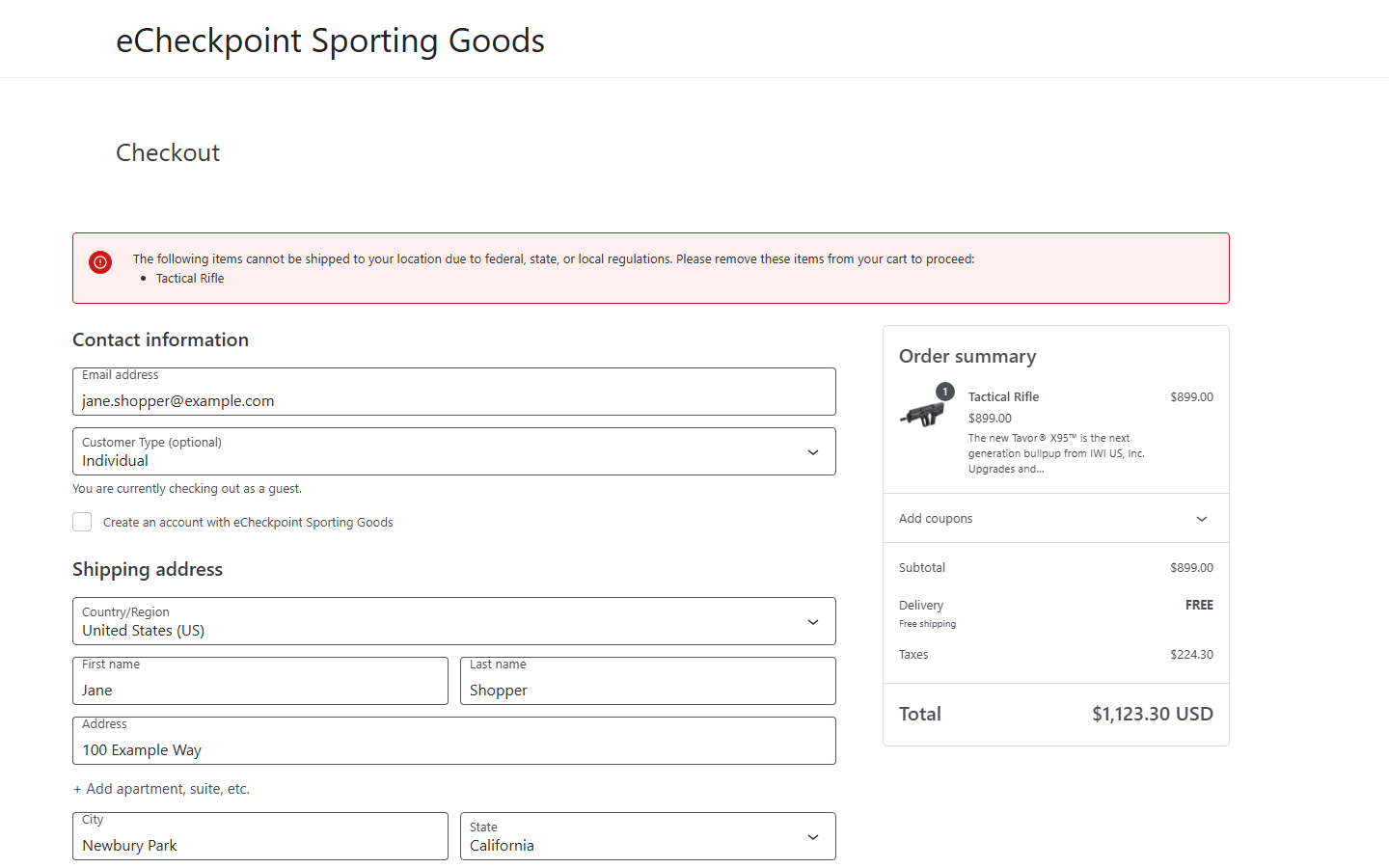
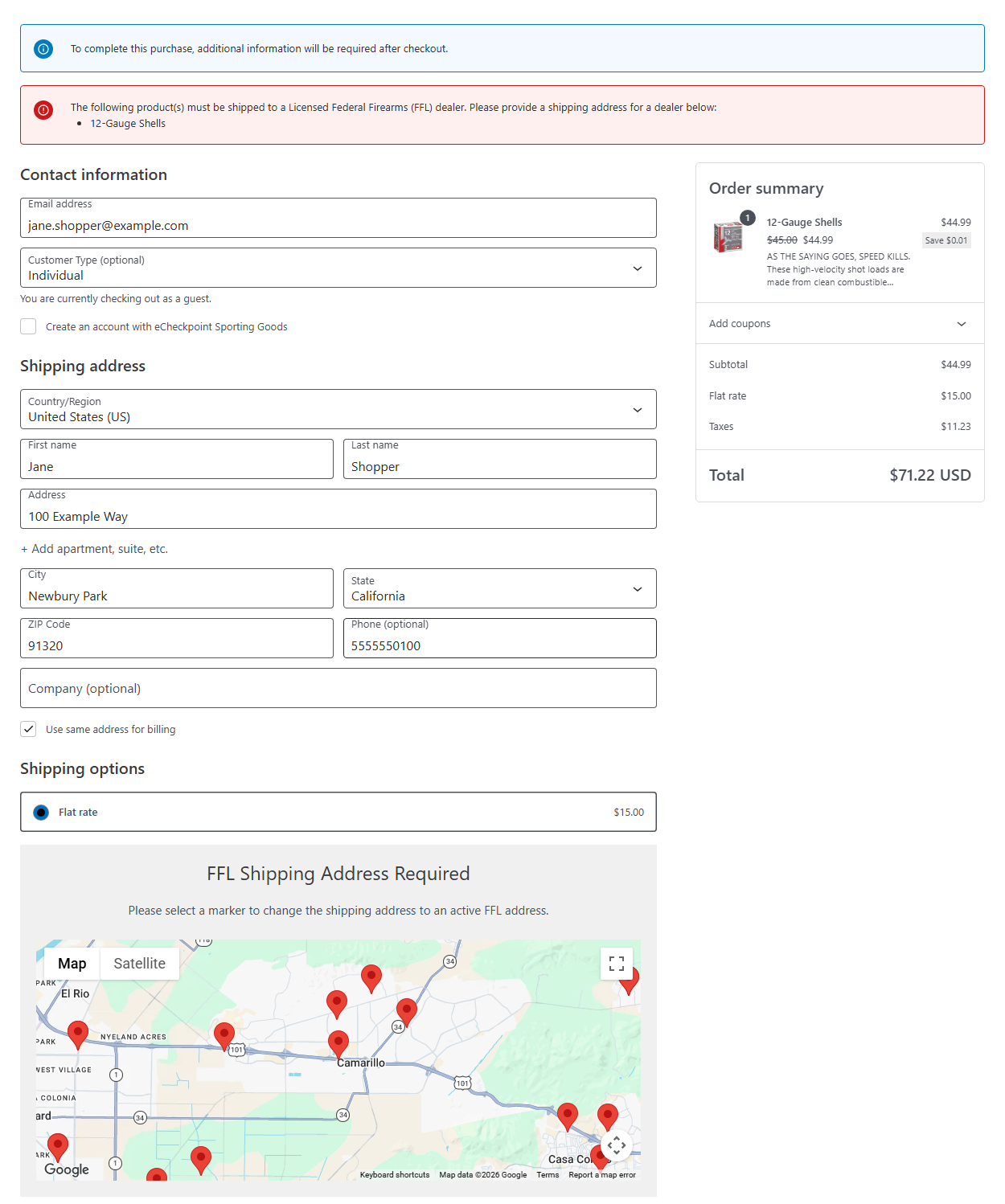
- Pre-Order Checkpoint – Screens the cart at checkout and tells the shopper which products cannot ship to their address, need a licensed dealer, or need additional information after checkout.
- Post-Order Checkpoint – Screens each order after it is placed, adds the result to the order notes, shows it on the order screen and in the orders list, can place orders that need review on hold in the status you choose, and can re-check held orders automatically.
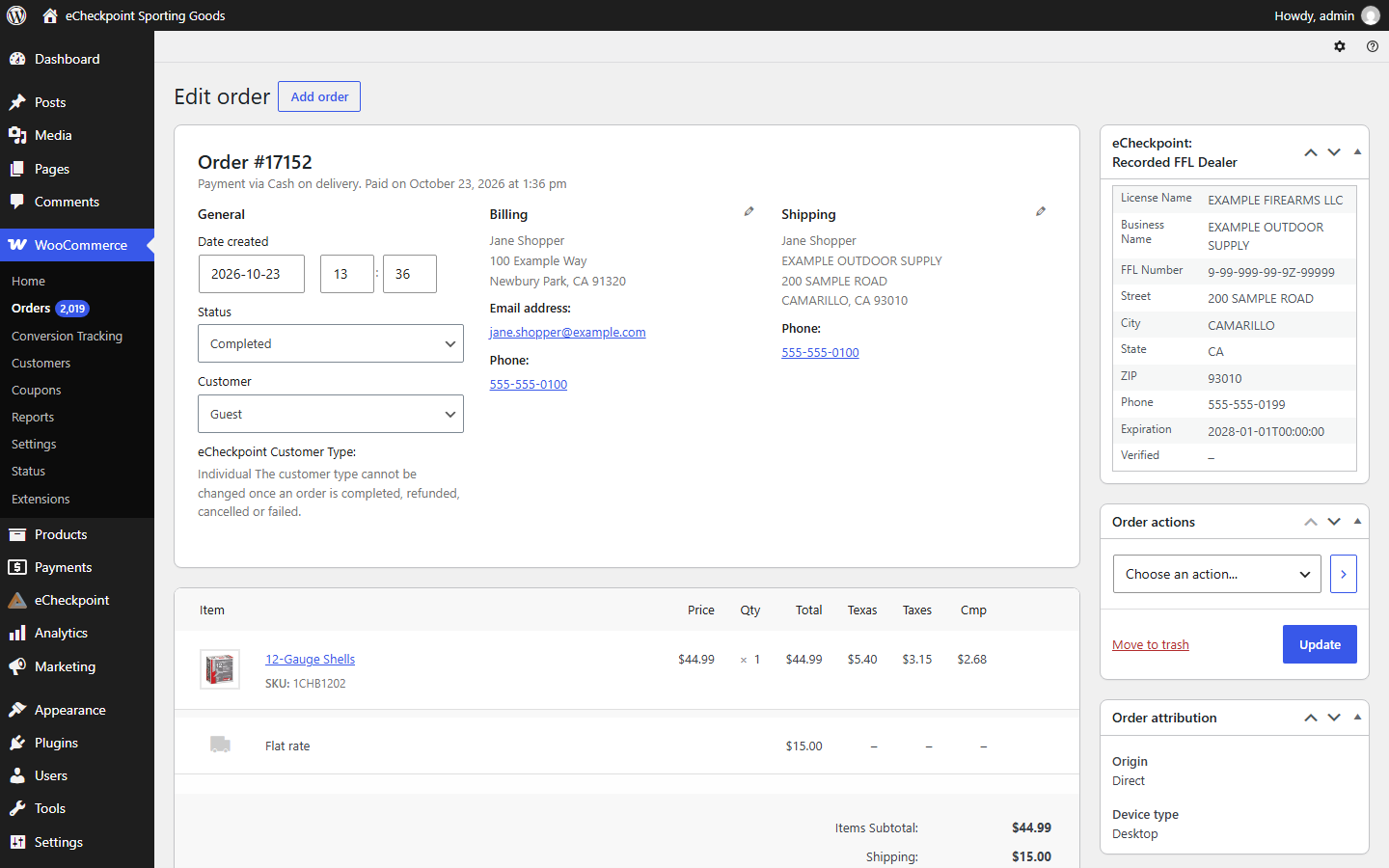
- FFL Dealer Selection – Shoppers choose a licensed dealer from a map at checkout. The dealer becomes the shipping address, and the order screen shows the dealer’s license name, FFL number, premise address, phone and license expiration.
- Customer Type – Shoppers identify as an individual, an authorized retailer, or government, law enforcement or military, and the matching rules apply.
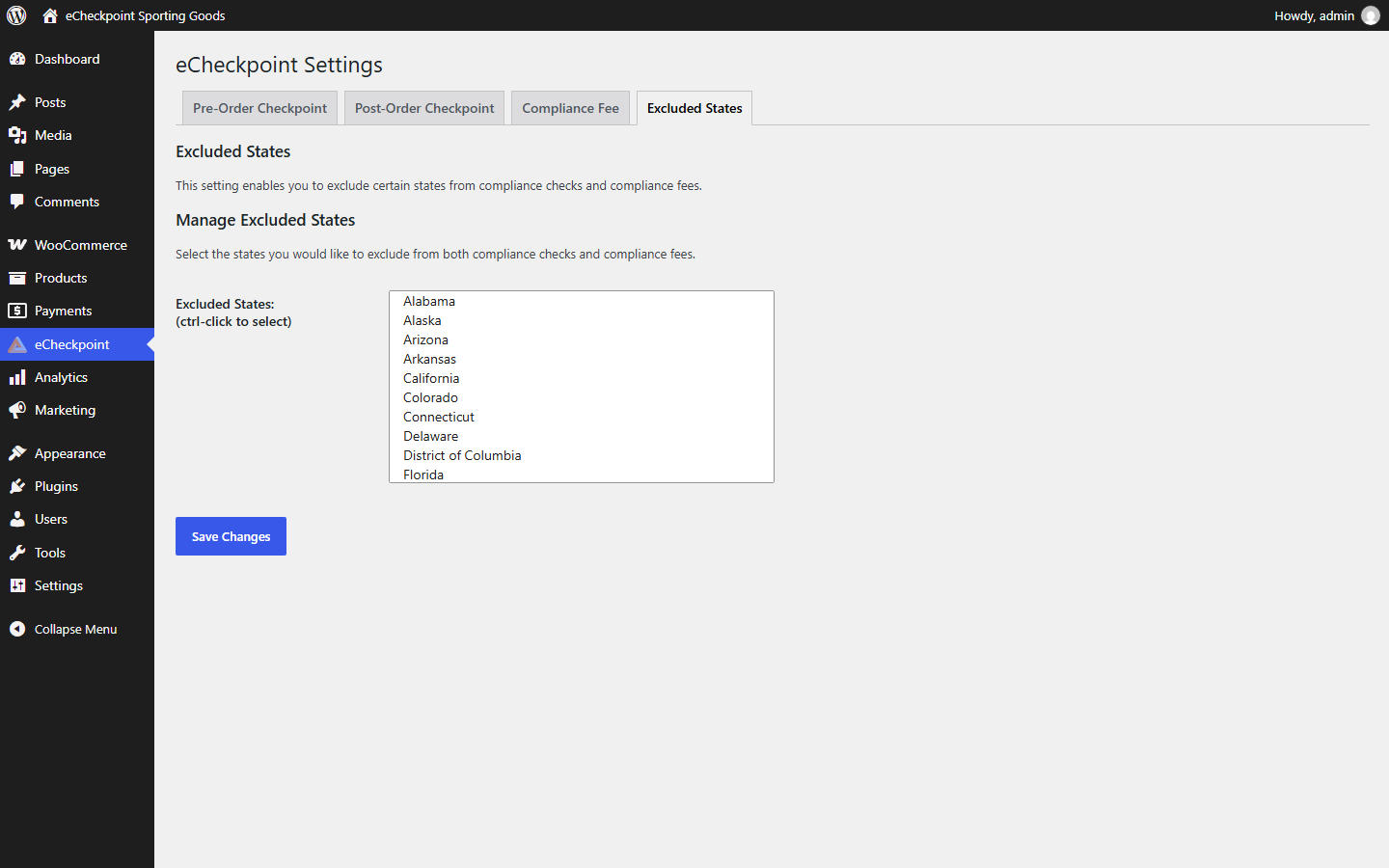
- Excluded States – Choose states your store does not screen.
- Order Acceptance – Optionally let orders through checkout when a product is not registered with eCheckpoint or an address cannot be verified.
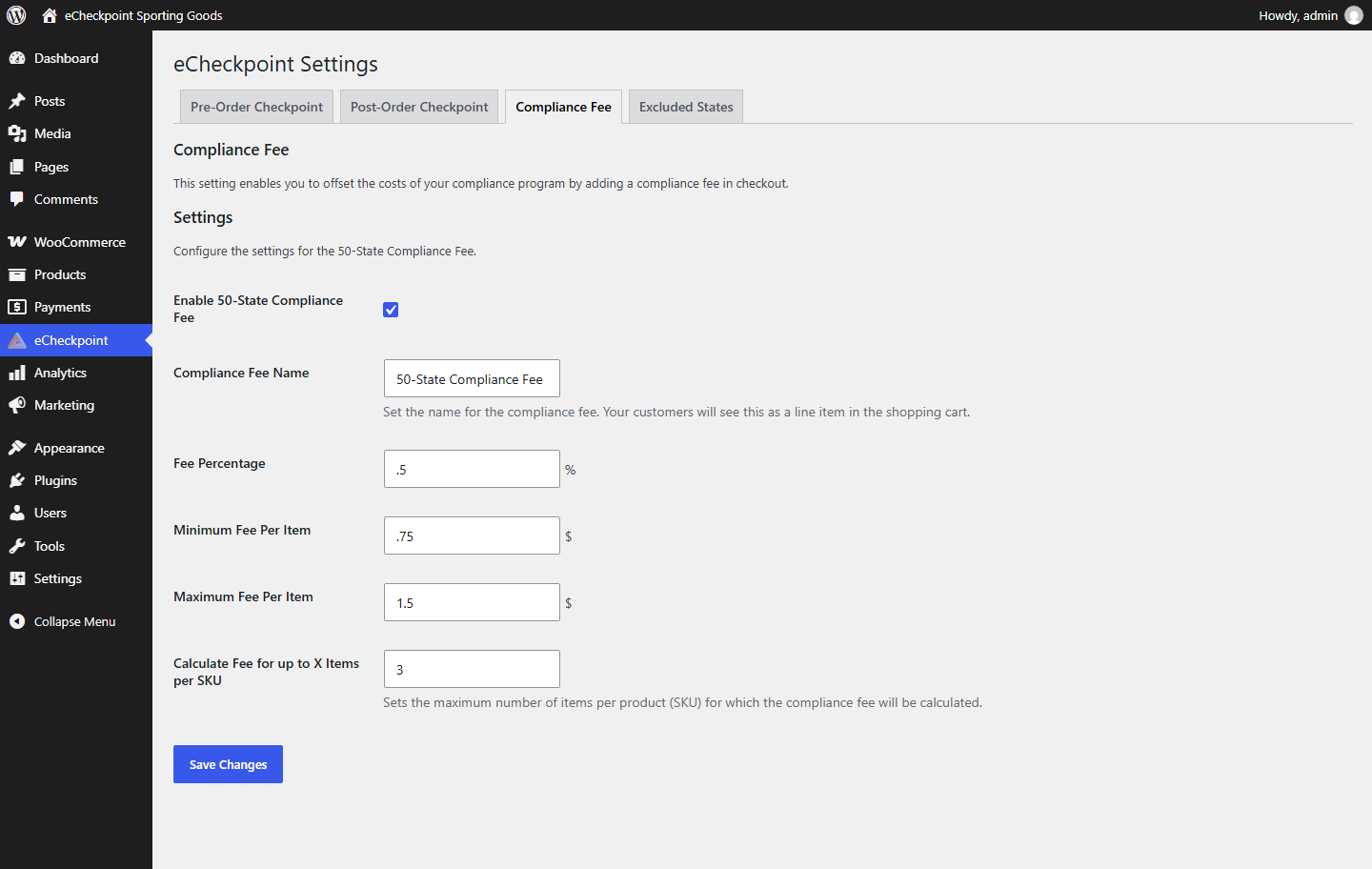
- 50-State Compliance Fee – Optionally add a compliance fee to United States orders, as a percentage with a per-item minimum and maximum.
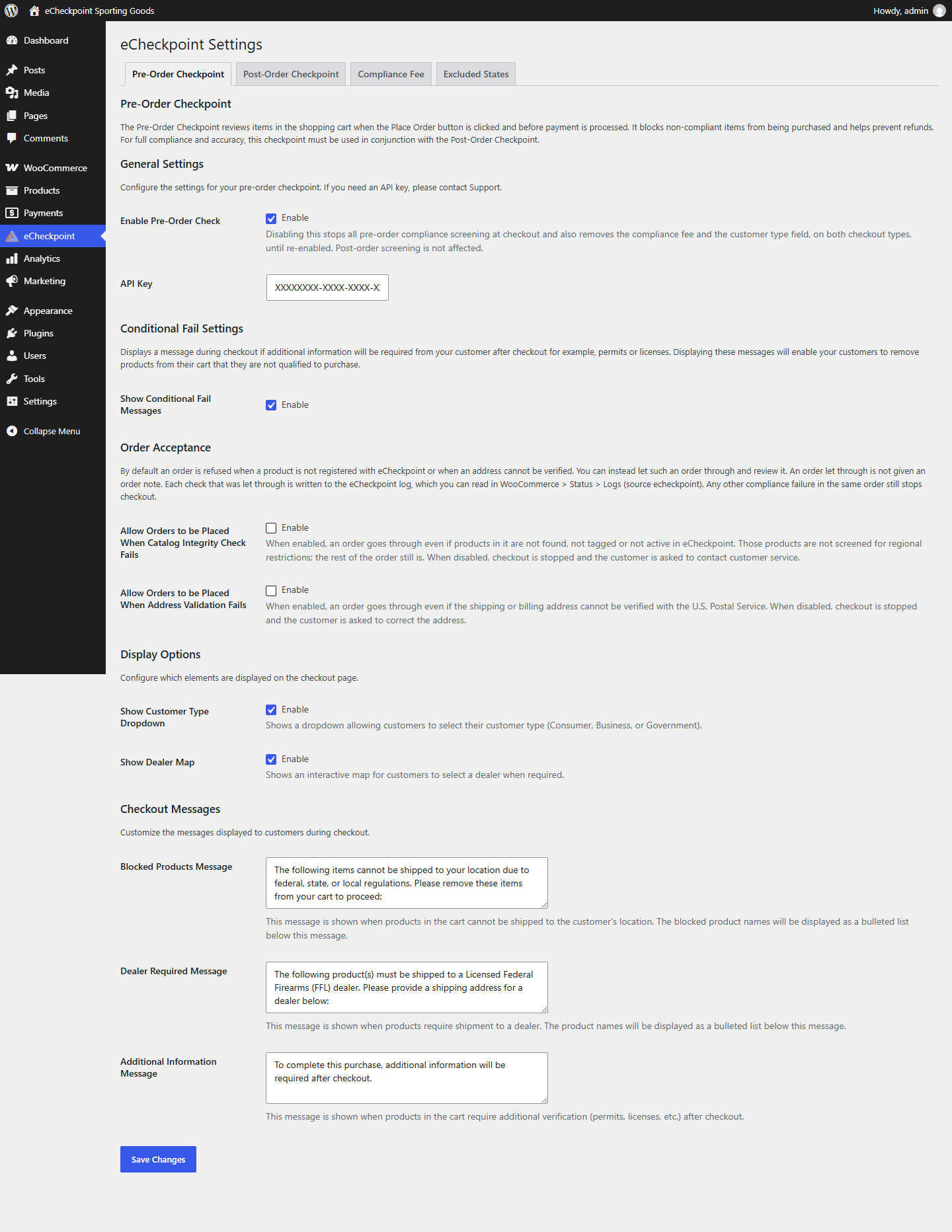
- Custom Messages – Set the wording shoppers see for blocked products, dealer requirements and additional information.
- Classic and Block Checkout – Works with both the classic (shortcode) checkout and the block-based checkout.
- High-Performance Order Storage – Works with WooCommerce’s High-Performance Order Storage and with posts storage.
Order history, product setup, credential review and reporting are in the eCheckpoint Portal.
Installation
- In your WordPress admin, go to Plugins > Add New Plugin, search for “eCheckpoint”, then install and activate it.
- Open the eCheckpoint menu in your WordPress admin.
- On the Pre-Order Checkpoint tab, turn on Enable Pre-Order Check and enter your eCheckpoint API key. On the Post-Order Checkpoint tab, enter your API key. If you need an API key, contact support@echeckpoint.com.
- Set your Excluded States and Compliance Fee options if you use them.
- Place a test order the way a shopper would.
Changelog
Review the new Automatic Compliance Remediation settings on the Post-Order Checkpoint tab. Held orders are re-checked automatically only once a Lookback Cutoff Date is set.
3.2.1
- Added compliance screening for orders staff create in the WordPress admin, under the customer type chosen on the order, while Enable Pre-Order Check is on. An order that cannot be screened is placed On Hold until a compliance check gets an answer.
- Updated checkout to let customers complete their order when the compliance check cannot get an answer. The order is noted as not screened at checkout and, while Enable Post-Order Check is on, is screened after purchase and held until a compliance check gets an answer.
- Added Automatic Compliance Remediation settings to the Post-Order Checkpoint tab, to re-check held orders on a schedule and release each one when its verification is completed. Off by default.
- Added a Lookback Cutoff Date setting. Held orders are re-checked automatically only once it is set.
- Updated the Check Compliance Status button on the order screen to show while Enable Automatic Remediation is on, and also on an order held because it could not be screened.
- Updated a held order that staff move to a final status, such as Completed or Cancelled, to show as Cleared, or as Closed without screening if it was never screened.
- General improvements and bug fixes to checkout, dealer selection and after-purchase screening.
3.2.0
- Added the eCheckpoint: Compliance card to the order screen, with a Check Compliance Status button for orders held for compliance.
- Added an eCheckpoint Status column and filter to the orders list.
- Added settings for the order status applied after purchase when an order passes screening or is held for review, while Place Orders On Hold is on.
- Added an Enable Post-Order Check setting, on by default.
- Added Order Acceptance settings to let orders through checkout when a product is not registered or an address cannot be verified. Off by default.
- Added an optional verification prompt on the order confirmation page. Off by default.
- Added a customer type field to the admin order screen, so staff can record the customer type on orders they enter.
- Added support for WooCommerce High-Performance Order Storage.
- Improved dealer selection on the block-based checkout with a Change button for the chosen dealer.
- Improved checkout messages so they come into view, with the affected products listed.
- Tested with WordPress 7.1 and WooCommerce 11.2.
- General improvements and bug fixes to checkout, dealer selection, customer type handling, product matching and after-purchase screening.
3.1.5
- Updated the Enable Pre-Order Check setting to control pre-order screening, the customer type field and the compliance fee together, with a reminder while it is off. Please confirm this setting after updating.
- Tested with WordPress 7.1 and WooCommerce 11.1.
- General improvements and bug fixes to checkout, dealer selection and after-order screening.
3.1.4
- Added the licensed dealer a shopper selects at checkout to the order, shown on the order screen.
- Added confirmation of the selected dealer by license number.
- Improved dealer selection: choosing a dealer sets the shipping address and company to the dealer’s premise.
- Improved the dealer map to list all nearby dealers for the shopper’s ZIP code, so a different dealer can be chosen at any time.
3.1.2
- Improved after-order screening for off-site payment gateways.
3.1.1
- Improved after-order handling of excluded states.
Screenshots

For developers
Is this your plugin? Show off the numbers.
Add a live badge to your site, docs or GitHub README. It updates on its own — no account needed.
Best eCheckpoint alternatives
All age verification plugins →




FAQ
eCheckpoint: quick answers
Straight answers, pulled from live WordPress.org data.
Live data from WordPress.org · checked Nov 16, 2026
Is eCheckpoint free?
Yes. eCheckpoint is free to download and use from the official WordPress.org plugin directory.
Is eCheckpoint safe to use in 2026?
eCheckpoint is a solid plugin choice in 2026, with a few things worth checking first. Was last updated 1 week ago, and scores 64/100 on our health check.
How many websites use eCheckpoint?
eCheckpoint is active on <10 WordPress websites and has been downloaded 2,221 times since it launched in October 2024. It was downloaded 306 times in the last 30 days.
Does eCheckpoint work with WordPress 7.1?
Yes. The developer has tested eCheckpoint up to WordPress 7.1.4, the latest release. It requires WordPress 6.6 or newer.
What PHP version does eCheckpoint need?
eCheckpoint requires PHP 8.1 or higher. Most hosts run PHP 8.x today, so it works on any modern WordPress hosting.
When was eCheckpoint last updated?
The latest version, 3.2.1, was released on November 6, 2026 (1 week ago).
Who makes eCheckpoint?
eCheckpoint is developed and maintained by eCheckpoint.
What are the best alternatives to eCheckpoint?
The most popular alternatives to eCheckpoint are Age Gate (40K+ installs), WP Terms Popup (3K+ installs) and Age Gate Lite (2K+ installs).
Powered by PageForge
Want thousands of pages that rank like these? Build them in an afternoon.
This directory runs on the same engine as PageForge. Turn any spreadsheet, CSV or API into thousands of fast, SEO-ready WordPress pages — with schema, internal links and AI-written copy baked in.
- CSV, Google Sheets & API data sources
- AI content, schema & internal links per page
- Works with Elementor, Gutenberg, Yoast & Rank Math
- Free on WordPress.org — no credit card


