



eaSYNC Booking – Hotels, Restaurants & Car Rentals
Simplify a Customer’s Booking Experience with eaSYNC Booking — a WordPress Booking Plugin for Hotels, Restaurants, and Car Rentals!

Solid choice
eaSYNC Booking is a solid plugin choice in 2026, with a few things worth checking first. It runs on 100+ sites, is rated 4.1/5 and was last updated 3 days ago, and scores 76/100 on our health check.
- Actively developed — last update 3 days ago
- Tested with the latest WordPress (7.1)
- Momentum — downloads up 64.2% vs the previous 30 days
- Small user base (100+ active installs)
How does it stack up?
Side-by-side on installs, updates, ratings & support


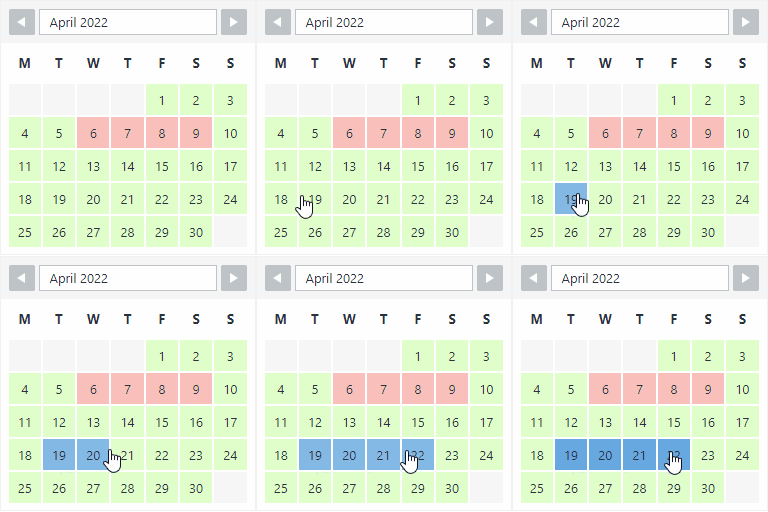
Daily downloads
Download spikes usually follow a new release — each site that auto-updates counts as a download.
Rankings
Where eaSYNC Booking stands todayWordPress.org search rankings
Live position in the plugin search, top 100| Keyword | Position |
|---|---|
| booking calendar | #72 |
| booking system | #60 |
| car booking | #7 |
| Hotel Booking | #21 |
| restaurant reservation | #15 |
Version adoption
Share of active sites per release.
Rating breakdown
★★★★★★★★★★ 4.1 from 17 reviews
About eaSYNC Booking
From the official readme · v1.3.30Description
Simplify a Customer’s Booking Experience with eaSYNC Booking — a WordPress Booking Plugin for Hotels, Restaurants, and Car Rentals!
NOTE: This WordPress plugin requires a Paypal Merchant Account in order to get the Client ID
Homepage | Pricing for Car Booking | Pricing for Hotel Booking | Pricing for Restaurant Booking | Demo | Help Center
Key Benefits of eaSYNC Booking Plugin:
- Car Rentals: The car rental module simplifies management with a visual representation of available and rented vehicles, aiding in efficient fleet allocation and reducing the chances of overbooking or conflicts in reservations.
- Hotels: For hotels, the key benefit is the automation of check-in and check-out processes, allowing guests to easily find and book available rooms, which enhances the overall customer experience and operational efficiency.
- Restaurants: The restaurant module’s interactive calendar and time slot system streamline the booking process, ensuring diners can reserve a table at their convenience, thereby improving table turnover and customer satisfaction.
We have a list of eaSYNC Booking’s capabilities, starting with features that are common across all modules and then the module-specific ones:Simplify a Customer’s Booking Experience with eaSYNC Booking — a WordPress Booking Plugin for Hotels, Restaurants, and Car Rentals!
NOTE: This WordPress plugin requires a Paypal Merchant Account in order to get the Client ID
Homepage | Pricing for Car Booking | Pricing for Hotel Booking | Pricing for Restaurant Booking | Demo | Help Center
Key Benefits of eaSYNC Booking Plugin:
- Car Rentals: The car rental module simplifies management with a visual representation of available and rented vehicles, aiding in efficient fleet allocation and reducing the chances of overbooking or conflicts in reservations.
- Hotels: For hotels, the key benefit is the automation of check-in and check-out processes, allowing guests to easily find and book available rooms, which enhances the overall customer experience and operational efficiency.
- Restaurants: The restaurant module’s interactive calendar and time slot system streamline the booking process, ensuring diners can reserve a table at their convenience, thereby improving table turnover and customer satisfaction.
We have a list of eaSYNC Booking’s capabilities, starting with features that are common across all modules and then the module-specific ones:
Common Features Across All Modules
- Easy to install and use (Installation Service Available)
- Fully responsive booking forms
- Sleek UI
- Booking entries are categorized into Active, Inactive, Pending, and Trash
- Guests will receive emails once their reservation is confirmed
- Automatic sorting of pending entries
- Easy integration into posts/pages
- Payment Gateway Integration
- Option to turn specific modules on or off
- Can set currency codes for products or services
- Can customize email header and footer text
- Auto currency and price change are based on geolocation; the use of third-party service comes from Free Currency Converter (https://free.currencyconverterapi.com/)
- Free Currency Converter Terms of Service: https://free.currencyconverterapi.com/terms-of-service
Car Booking Plugin
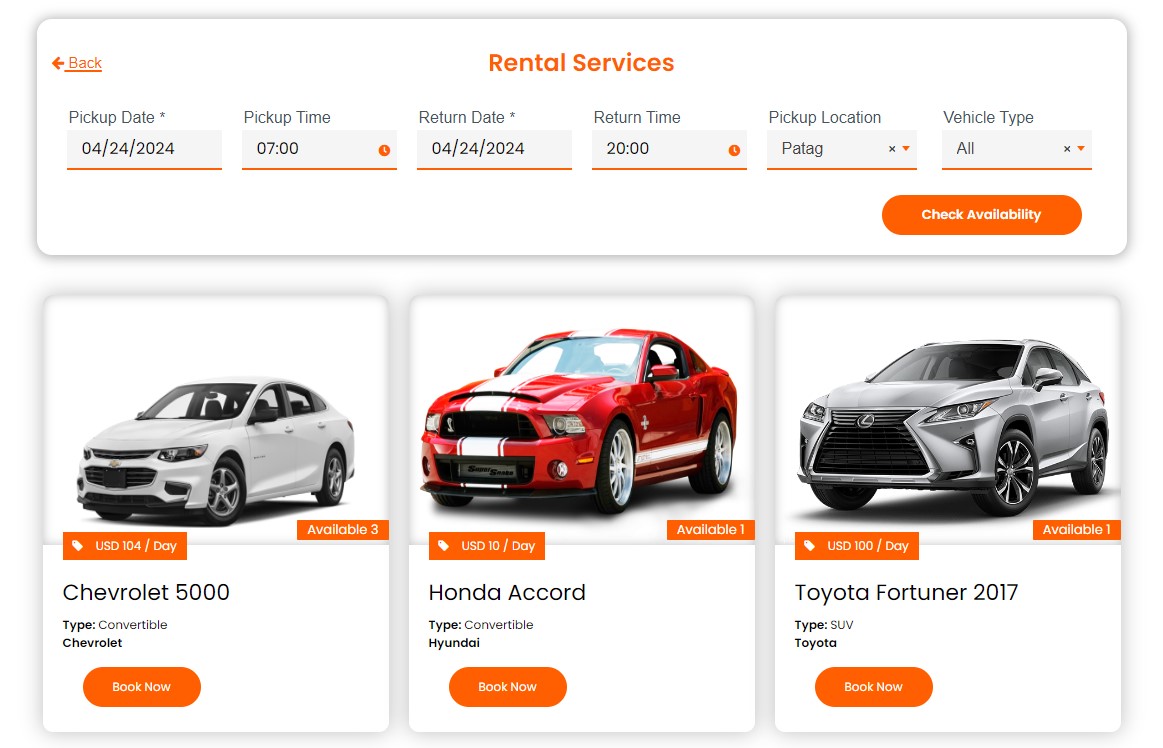
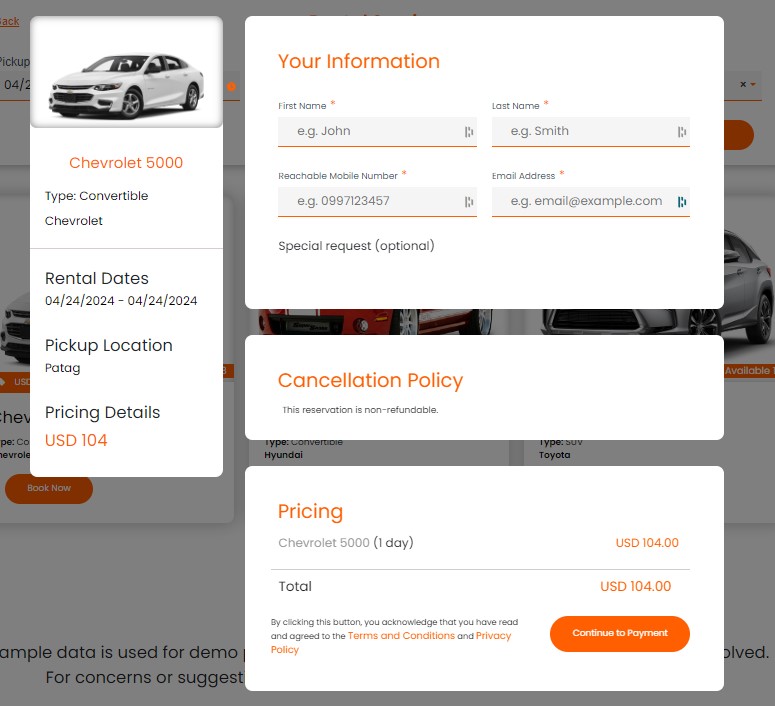
The eaSYNC Booking’s Car Rental Module features a minimalistic yet bright design and an easy-to-follow rental process. It’s also simple for those who are starting out on WordPress.
Here are the features of the Car Rental module:
Front-end:
- Calendar View of Reservation Slots
- Confirmation Pages and Policies
- Custom Search Form Title
- Specify Car Model, Type, and Pickup Locations
- Pre-set Default Time in Rental Forms
- Input and Manage Driver Information
Back-end:
- Calendar View of Customer Bookings
- Can Manage and Cancel Bookings
- Can Set and Customize Confirmation Pages and Policies
- Can Integrate PayPal Payment Gateway
- Can Customize and Schedule Email Notifications
- Can Personalize Search Form Title
- Can Define Default Time Parameters
- Can Allow Users to Input Driver Information
Hotel Booking Plugin
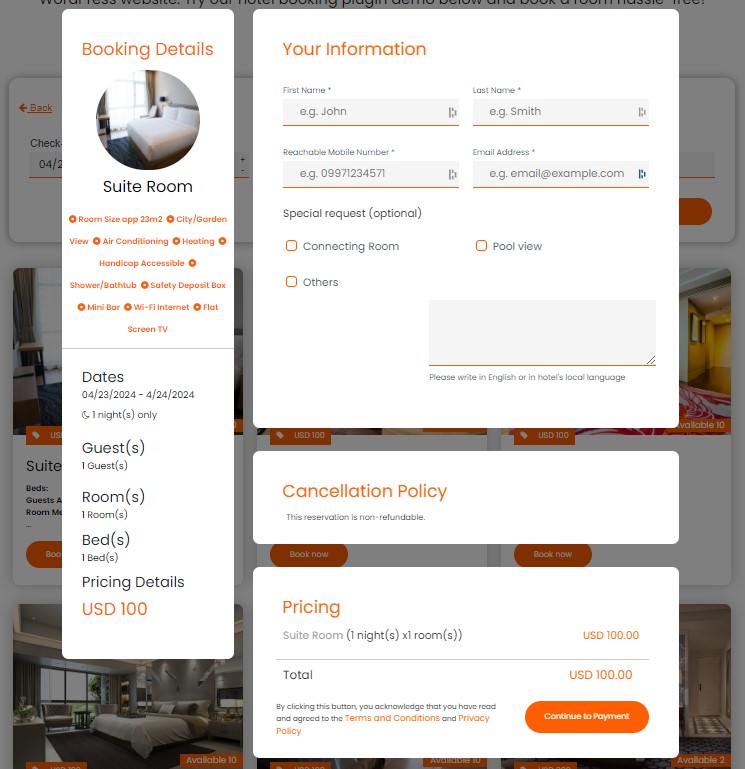
The eaSYNC’s Hotel Booking Module prominently features an automated check-out date counter. It’s a display of the plugin’s automation capabilities, serving as a sneak peek of its overall convenience.
Here’s a full list of the Hotel Booking module’s features:
Front-end:
- Calendar View of Reservation Slots
- Confirmation Pages and Policies
- Custom Search Form Title
- Can Select and Customize Hotel Room Preferences (Number of Guests, Rooms, Beds, and Special Requests)
Back-end:
- Calendar View of Customer Bookings
- Can Manage and Cancel Bookings
- Can Set and Customize Confirmation Pages and Policies
- Can Integrate PayPal Payment Gateway
- Can Customize and Schedule Email Notifications
- Can Personalize Search Form Title
- Can Configure Hotel Room Settings
Restaurant Booking Plugin
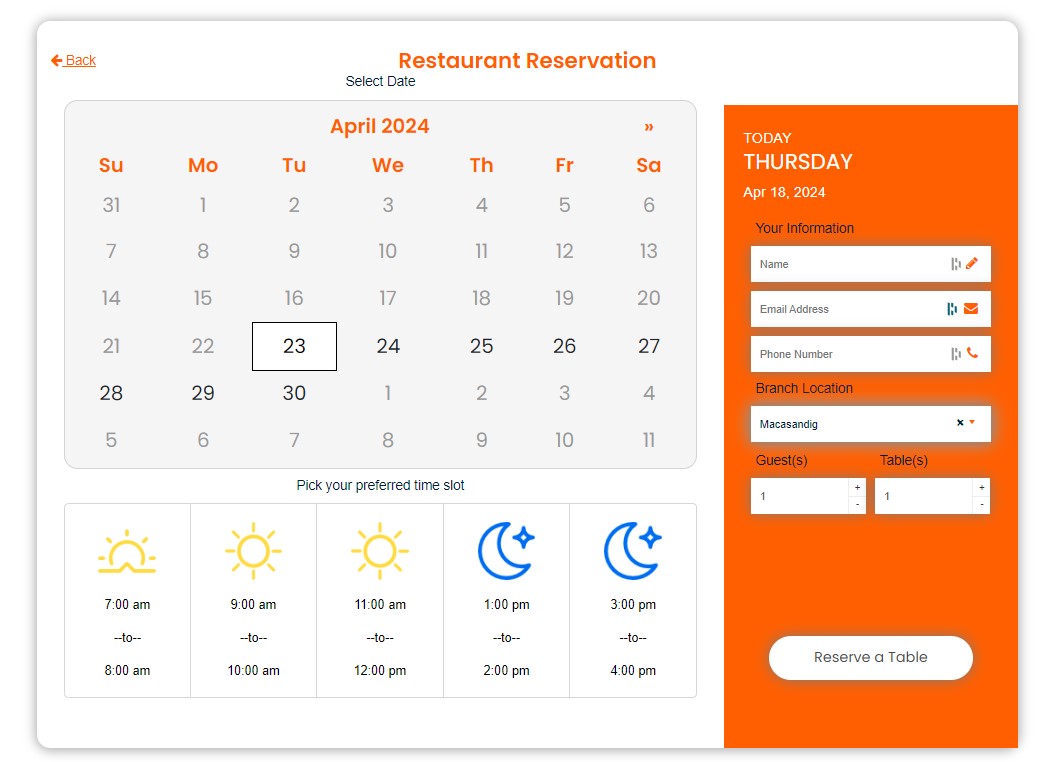
The Restaurant Reservation Module features a stunning and interactive visual representation of the date and time slots. It draws customers in, inviting them to reserve a table. We acknowledge that time is a valuable resource, so the booking forms are kept simple and require only the necessary information from diners!
Here’s the list of eaSYNC Booking features for the restaurant reservation module:
Front-end:
- Calendar View of Reservation Slots
- Confirmation Pages and Policies
- Custom Search Form Title
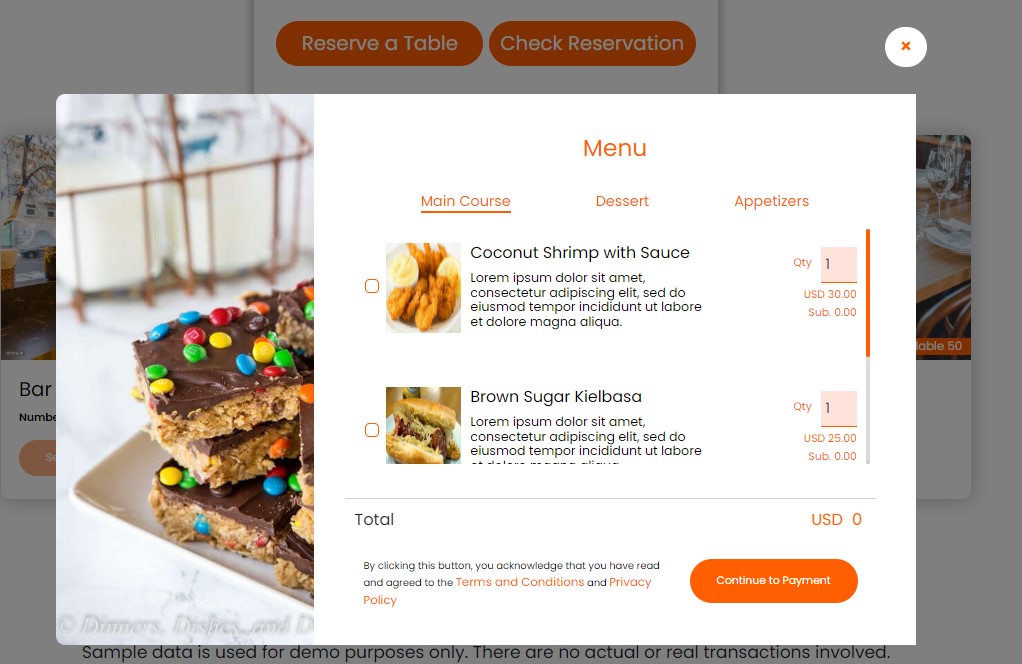
- Choose Dishes from the Custom Menu and Select Preferred Tables
- Locate and Choose Specific Restaurant Branch Locations
- Choose Available Time Slots for Bookings
Back-end:
- Calendar View of Customer Bookings
- Can Manage and Cancel Bookings
- Can Set and Customize Confirmation Pages and Policies
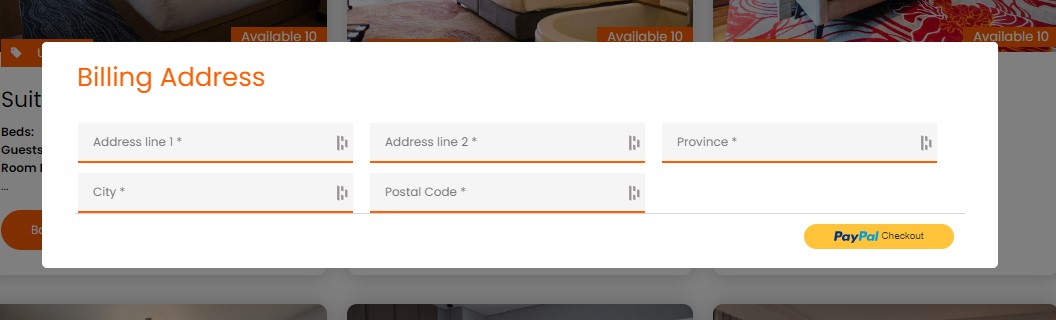
- Can Integrate PayPal Payment Gateway
- Can Customize and Schedule Email Notifications
- Can Personalize Search Form Title
- Can Manage Menu and Table Configuration
- Can Configure and Manage Branch Locations
- Can Configure and Manage Restaurant’s Available Time Slots
The Best Part? It’s Absolutely Free!
Translations
- English – default, always included
3rd Party Service
- We used Free Currency Converter (https://free.currencyconverterapi.com/) for automatic price conversion based on user location.
- No personal user information is involved in this service, just the price conversion.
- Third-party terms of service:
https://free.currencyconverterapi.com/terms-of-service.
- We used geoPlugin (https://www.geoplugin.com/) to geolocate visitors. It allows you to provide customers with Geolocalised content that’s more relevant to their geographical location.
- No personal user information is involved in this service, only the location.
- Third-party Privacy Policy: https://www.geoplugin.com/privacy.
tml
Simplify a Customer’s Booking Experience with eaSYNC Booking — a WordPress Booking Plugin for Hotels, Restaurants, and Car Rentals!
Common Features Across All Modules
- Easy to install and use (Installation Service Available)
- Fully responsive booking forms
- Sleek UI
- Booking entries are categorized into Active, Inactive, Pending, and Trash
- Guests will receive emails once their reservation is confirmed
- Automatic sorting of pending entries
- Easy integration into posts/pages
- Payment Gateway Integration
- Option to turn specific modules on or off
- Can set currency codes for products or services
- Can customize email header and footer text
- Auto currency and price change are based on geolocation; the use of third-party service comes from Free Currency Converter (https://free.currencyconverterapi.com/)
- Free Currency Converter Terms of Service: https://free.currencyconverterapi.com/terms-of-service
Car Booking Plugin
The eaSYNC Booking’s Car Rental Module features a minimalistic yet bright design and an easy-to-follow rental process. It’s also simple for those who are starting out on WordPress.
Here are the features of the Car Rental module:
Front-end:
- Calendar View of Reservation Slots
- Confirmation Pages and Policies
- Custom Search Form Title
- Specify Car Model, Type, and Pickup Locations
- Pre-set Default Time in Rental Forms
- Input and Manage Driver Information
Back-end:
- Calendar View of Customer Bookings
- Can Manage and Cancel Bookings
- Can Set and Customize Confirmation Pages and Policies
- Can Integrate PayPal Payment Gateway
- Can Customize and Schedule Email Notifications
- Can Personalize Search Form Title
- Can Define Default Time Parameters
- Can Allow Users to Input Driver Information
Hotel Booking Plugin
The eaSYNC’s Hotel Booking Module prominently features an automated check-out date counter. It’s a display of the plugin’s automation capabilities, serving as a sneak peek of its overall convenience.
Here’s a full list of the Hotel Booking module’s features:
Front-end:
- Calendar View of Reservation Slots
- Confirmation Pages and Policies
- Custom Search Form Title
- Can Select and Customize Hotel Room Preferences (Number of Guests, Rooms, Beds, and Special Requests)
Back-end:
- Calendar View of Customer Bookings
- Can Manage and Cancel Bookings
- Can Set and Customize Confirmation Pages and Policies
- Can Integrate PayPal Payment Gateway
- Can Customize and Schedule Email Notifications
- Can Personalize Search Form Title
- Can Configure Hotel Room Settings
Restaurant Booking Plugin
The Restaurant Reservation Module features a stunning and interactive visual representation of the date and time slots. It draws customers in, inviting them to reserve a table. We acknowledge that time is a valuable resource, so the booking forms are kept simple and require only the necessary information from diners!
Here’s the list of eaSYNC Booking features for the restaurant reservation module:
Front-end:
- Calendar View of Reservation Slots
- Confirmation Pages and Policies
- Custom Search Form Title
- Choose Dishes from the Custom Menu and Select Preferred Tables
- Locate and Choose Specific Restaurant Branch Locations
- Choose Available Time Slots for Bookings
Back-end:
- Calendar View of Customer Bookings
- Can Manage and Cancel Bookings
- Can Set and Customize Confirmation Pages and Policies
- Can Integrate PayPal Payment Gateway
- Can Customize and Schedule Email Notifications
- Can Personalize Search Form Title
- Can Manage Menu and Table Configuration
- Can Configure and Manage Branch Locations
- Can Configure and Manage Restaurant’s Available Time Slots
The Best Part? It’s Absolutely Free!
Translations
- English – default, always included
3rd Party Service
- We used Free Currency Converter (https://free.currencyconverterapi.com/) for automatic price conversion based on user location.
- No personal user information is involved in this service, just the price conversion.
- Third-party terms of service:
https://free.currencyconverterapi.com/terms-of-service.
- We used geoPlugin (https://www.geoplugin.com/) to geolocate visitors. It allows you to provide customers with Geolocalised content that’s more relevant to their geographical location.
- No personal user information is involved in this service, only the location.
- Third-party Privacy Policy: https://www.geoplugin.com/privacy.
Installation
This section describes how to install the plugin and get it working.
Automatic Installation
- Login to WordPress admin panel
- Click on Plugins > Add New
- Find the plugin by typing ‘eaSYNC Booking’ on the search bar
- Click the ‘Install Now’ button
- After the successful installation, click on the Activate button to start using the plugin
Uploading the WordPress Plugin
- Login to WordPress admin panel
- Click on Plugins > Add New
- Click on the ‘Upload Plugin’ button
- Once redirected to the plugin upload page, click the Choose File button and select the eaSYNC Booking plugin file
- Click on the ‘Install Now’ button
- After the successful installation, click on the Activate Plugin link to start using the plugin
How to use this plugin
Adding Shortcode
- Create a full width page (optional)
- Copy and paste the shortcodes below
For Hotel Room
Shortcode: [easync_hotel_code]
To add hotel room type, go to auto generated eaSYNC Hotel in your sidebar
For Car Rental
Shortcode: [easync_car_code]
To add car rental, go to auto generated eaSYNC Car Rental in your sidebar
For Restaurant Reservation
Shortcode: [easync_restau_code]
To add menu type, go to auto generated eaSYNC Restao in your sidebarThis section describes how to install the plugin and get it working.
Automatic Installation
- Login to WordPress admin panel
- Click on Plugins > Add New
- Find the plugin by typing ‘eaSYNC Booking’ on the search bar
- Click the ‘Install Now’ button
- After the successful installation, click on the Activate button to start using the plugin
Uploading the WordPress Plugin
- Login to WordPress admin panel
- Click on Plugins > Add New
- Click on the ‘Upload Plugin’ button
- Once redirected to the plugin upload page, click the Choose File button and select the eaSYNC Booking plugin file
- Click on the ‘Install Now’ button
- After the successful installation, click on the Activate Plugin link to start using the plugin
How to use this plugin
Adding Shortcode
- Create a full width page (optional)
- Copy and paste the shortcodes below
For Hotel Room
Shortcode: [easync_hotel_code]
To add hotel room type, go to auto generated eaSYNC Hotel in your sidebar
For Car Rental
Shortcode: [easync_car_code]
To add car rental, go to auto generated eaSYNC Car Rental in your sidebar
For Restaurant Reservation
Shortcode: [easync_restau_code]
To add menu type, go to auto generated eaSYNC Restao in your sidebar
Frequently asked questions
How can I embed eaSYNC Booking modules on a page or post?
To embed a specific eaSYNC module, such as Car Rental, go to Page or Post in the admin panel and use this shortcode: “[easync_car_code]” (minus the double quotes). Here are the other modules’ shortcodes: [easync_hotel_code] = Hotel Booking [easync_restau_code] = Restaurant Reservation
Will this WordPress booking system work for me?
We’re very sure it will! We made the eaSYNC Booking plugin as flexible as possible. You can use it to book hotel rooms, restaurant tables, and rental cars or vehicles. If you have multiple businesses, especially in line with hotels, restaurants, and car rentals, eaSYNC Booking is well-suited for your needs.
What payment methods does the plugin support?
The eaSYNC Booking plugin supports PayPal.
How will I know that a rental car has been returned?
Our plugin has a monitoring feature for overseeing expected car returns.
Why is the eaSYNC Booking plugin not working?
Your WordPress version may be one reason why our booking plugin isn’t working on your site. Our plugin runs on version 6.0 or higher, so upgrading your WordPress version might fix the issue. There may also be conflicts with eaSYNC Booking and your existing plugins. If you’re still experiencing errors, you can post a ticket on our support (https://wordpress.org/support/plugin/easync-booking) so we can address your concern accordingly.
Can you provide plugin installation services on my website?
Yes! You can email us at (inquiries@syntacticsinc.com) for a quotation on our installation services.
Will you add additional features to the plugin?
Yes, we will! Recently, we released version 2 of the free eaSYNC Booking plugin. In addition, we’ve also released a premium version! Stay tuned for more updates to our WordPress plugin.
Do you offer support?
Yes, we do! You can post a ticket via our support page (https://wordpress.org/support/plugin/easync-booking), and we’ll work to address your concern in a timely manner.
Are the forms GDPR compliant?
We comply with the Data Privacy Act and ensure that we keep our customers’ personal information confidential. Our Privacy Policy can be found here.
Changelog
1.3.30
Release Date – 5 October, 2026
- Improved security by limiting admin functions to admin users only. Removed the AJAX hooks that allowed non-admin users to trigger them.
- Improved security by adding nonce checks to public functions that write data to the database.
- Credits: Thanks to Enrico Marcolini, Claudio Marchesini and Dottor Marc for responsibly reporting these issues.
1.3.29
Release Date – 8 January, 2026
- Updated plugin name, it contains unallowed trademarked term “WordPress”
1.3.28
Release Date – 8 January, 2026
- Removed files that are not compatible with GPL License
1.3.27
Release Date – 5 January, 2026
- Updated plugin name
1.3.26
Release Date – 29 December, 2025
- Updated code to comply with wordpress guidelines
1.3.25
Release Date – 18 December, 2025
- code optimization
Screenshots

For developers
Is this your plugin? Show off the numbers.
Add a live badge to your site, docs or GitHub README. It updates on its own — no account needed.
Best eaSYNC Booking alternatives
All booking calendar plugins →




FAQ
eaSYNC Booking: quick answers
Straight answers, pulled from live WordPress.org data.
Live data from WordPress.org · checked Oct 7, 2026
Is eaSYNC Booking free?
Yes. eaSYNC Booking is free to download and use from the official WordPress.org plugin directory.
Is eaSYNC Booking safe to use in 2026?
eaSYNC Booking is a solid plugin choice in 2026, with a few things worth checking first. It runs on 100+ sites, is rated 4.1/5 and was last updated 3 days ago, and scores 76/100 on our health check.
How many websites use eaSYNC Booking?
eaSYNC Booking is active on 100+ WordPress websites and has been downloaded 53,311 times since it launched in February 2019. It was downloaded 632 times in the last 30 days.
Does eaSYNC Booking work with WordPress 7.1?
Yes. The developer has tested eaSYNC Booking up to WordPress 7.1.3, the latest release. It requires WordPress 6.0 or newer.
What PHP version does eaSYNC Booking need?
eaSYNC Booking requires PHP 7.2 or higher. Most hosts run PHP 8.x today, so it works on any modern WordPress hosting.
When was eaSYNC Booking last updated?
The latest version, 1.3.30, was released on October 5, 2026 (3 days ago).
Who makes eaSYNC Booking?
eaSYNC Booking is developed and maintained by Syntactics, Inc..
What are the best alternatives to eaSYNC Booking?
The most popular alternatives to eaSYNC Booking are Online Scheduling and Appoi… (60K+ installs), Booking Calendar (40K+ installs) and WP Simple Booking Calendar (20K+ installs).
Powered by PageForge
Want thousands of pages that rank like these? Build them in an afternoon.
This directory runs on the same engine as PageForge. Turn any spreadsheet, CSV or API into thousands of fast, SEO-ready WordPress pages — with schema, internal links and AI-written copy baked in.
- CSV, Google Sheets & API data sources
- AI content, schema & internal links per page
- Works with Elementor, Gutenberg, Yoast & Rank Math
- Free on WordPress.org — no credit card


