


Discount Rules and Dynamic Pricing for WooCommerce
WooCommerce discount plugin & dynamic pricing: bulk discount, BOGO, quantity discount, category discount & auto-apply coupons — no coding needed.

Safe pick
Yes — Discount Rules and Dynamic Pric… is a safe, well-maintained plugin to use in 2026. It runs on 9K+ sites, is rated 4.7/5 and was last updated 3 weeks ago, and scores 92/100 on our health check.
- Loved by users — 4.7/5 from 248 reviews
- Actively developed — last update 3 weeks ago
- Tested with the latest WordPress (7.1)
How does it stack up?
Side-by-side on installs, updates, ratings & support



Daily downloads
Download spikes usually follow a new release — each site that auto-updates counts as a download.
Rankings
Where Discount Rules and Dynamic… stands todayWordPress.org search rankings
Live position in the plugin search, top 100| Keyword | Position |
|---|---|
| bogo | #11 |
| bulk discount | #5 |
| discounts | #1 |
| dynamic pricing | #4 |
| woocommerce | >100 |
Version adoption
Share of active sites per release.
Rating breakdown
★★★★★★★★★★ 4.7 from 248 reviews
About Discount Rules and Dynamic Pricing for…
From the official readme · v9.4.0Description
Discount Rules and Dynamic Pricing for WooCommerce (formerly Easy WooCommerce Discounts) is the most complete free WooCommerce discount plugin and dynamic pricing tool. Create bulk discounts, quantity discounts, BOGO deals (buy one get one free), category discounts, storewide percentage discounts, cart-total offers, and auto-apply coupons — all without writing a single line of code. It’s a proven sales strategy for increasing average order value, reducing cart abandonment, and driving ecommerce conversions without manually re-pricing a single product.
Whether you need a buy 2 get 1 free or buy 3 get 1 free deal, a WooCommerce dynamic pricing rule, a scheduled flash sale, a cart total discount, a category-wide sale, or a WooCommerce coupon that applies automatically — the free version handles every core scenario from a single admin panel, for simple and variable products.
Need advanced features like wholesale pricing, user role-based pricing, conditional pricing, tiered pricing, live price display, purchase history rules, checkout fees, or product bundle discounts? Those are available in the PRO version.
LIVE DEMO (Front-End) | LIVE DEMO (Back-End) | Ask a Question | Documentation | Video Playlist | GET PRO — UP TO 75% OFF
✅ Free Version Features
Product Discounts
- Bulk / Quantity Discount — volume discounts by quantity tier
- Category Coupon and Category Discount — % or fixed off entire categories
- Percentage Discounts — storewide or per-product
- Storewide and scheduled discounts
- BOGO — Buy One Get One Free — Buy 1/2/3 Get 1, Buy X Get Y, and more
- Exclude products from any rule
Cart & Order Discounts
- Cart Discount Rules — e.g. 20% off sitewide on Black Friday
- Cart/order total discounts — e.g. spend $100, get 15% off
- Auto-apply and manual coupons — no code entry needed, or activate with a specific code
Display & Notifications
- Quantity / bulk pricing table — shown automatically on the product page, or anywhere via
[wccs_bulk_table] - Product page messages — inform customers of active rules before they add to cart
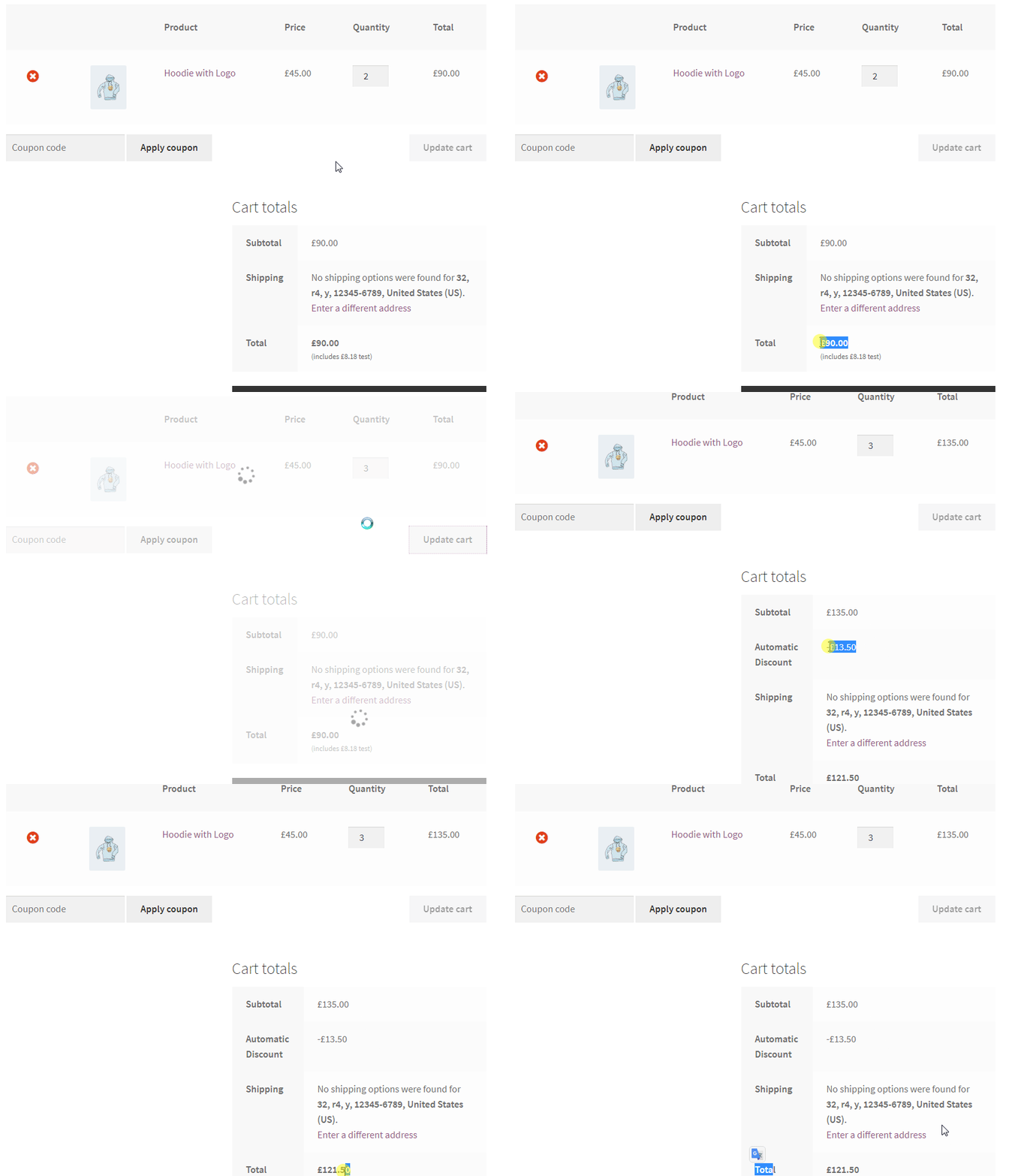
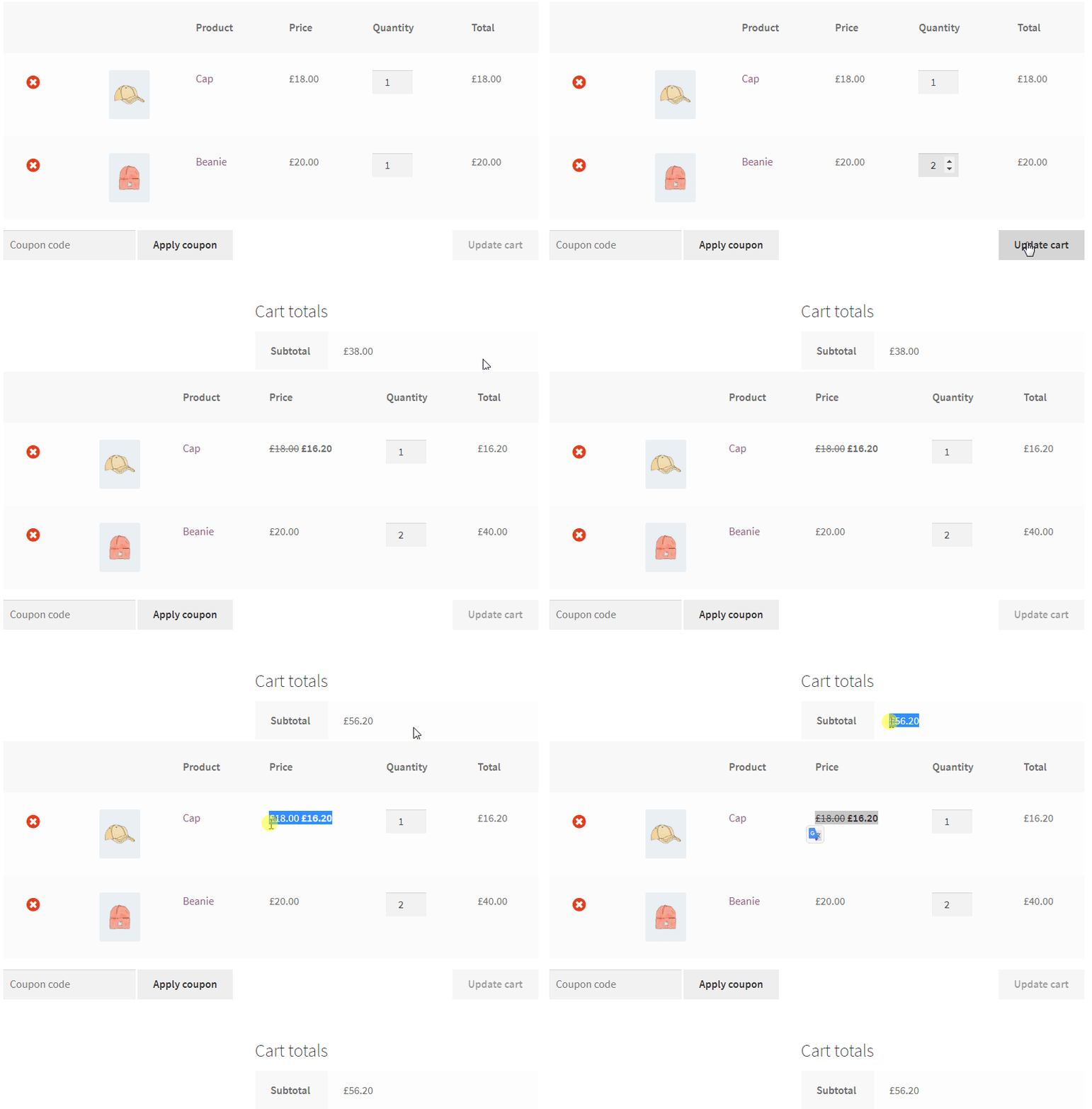
- “You Saved” display — total savings shown in cart and at checkout
- Rules analytics — track rule impressions and performance in the dashboard
- Discount templates — pre-built rule templates to launch your first discount in minutes
Shipping
- Free shipping by cart total, weight-based and scheduled methods
- Shipping method rules — show/hide by cart total, weight, item count, or date
📦 WooCommerce Bulk Discount & Quantity Discount
A WooCommerce bulk discount (or quantity discount) automatically lowers the per-unit price as customers buy more — a proven way to increase average order value and clear inventory faster. Also called tiered pricing. Basic bulk pricing tiers are free and unlimited; advanced per-tier percentages and role-based tiers are in PRO.
- Buy 1–5 units → 0% off (regular price)
- Buy 6–10 units → 10% off
- Buy 11–20 units → 20% off
- Buy 21+ units → 30% off
Volume kick discounts: reward the entire order once a quantity threshold is hit — e.g. buy 10+, and all 10 units get 20% off retroactively, not just the units past the 10th. A distinct alternative to standard tiered pricing when you want an all-or-nothing volume incentive.
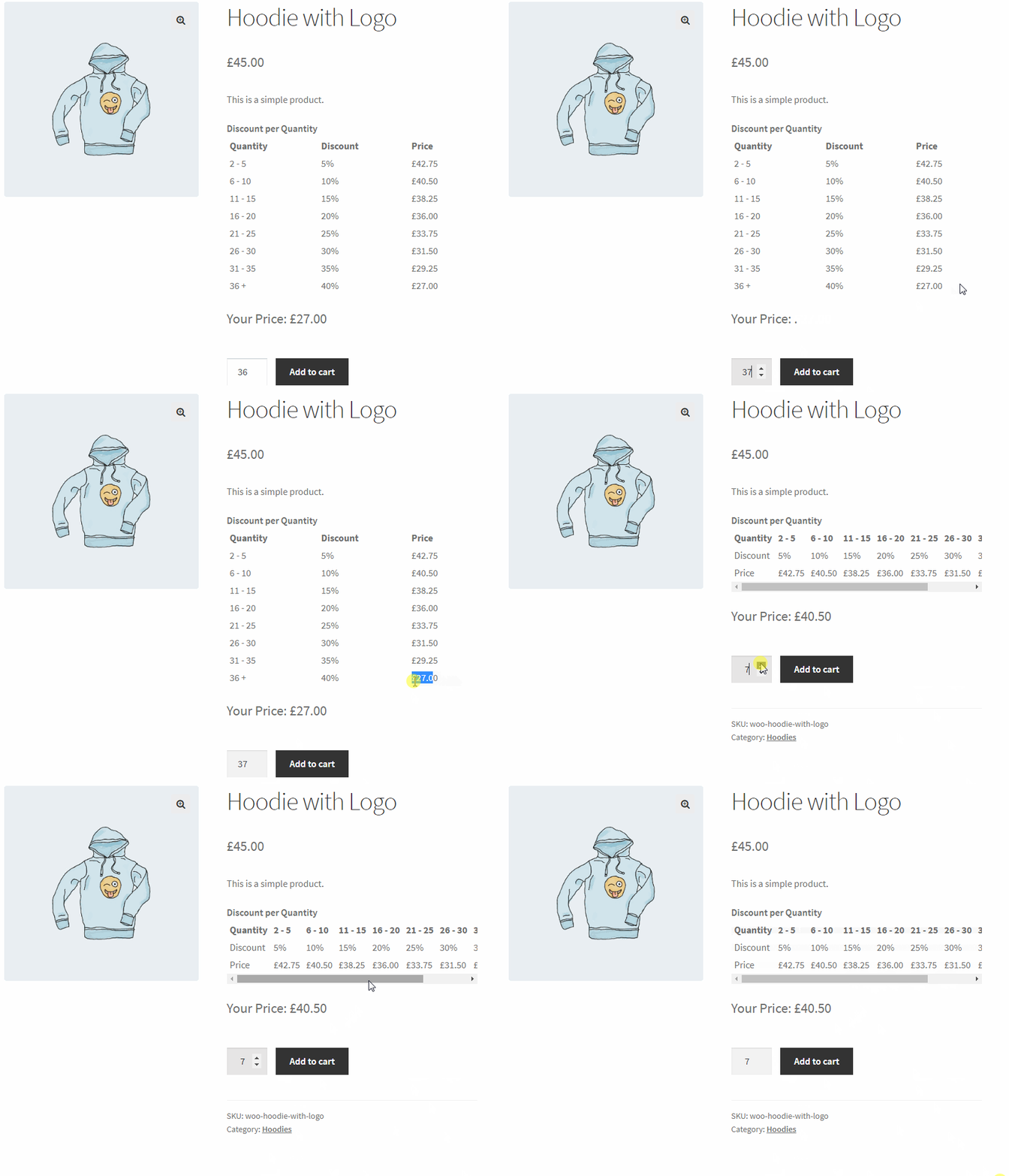
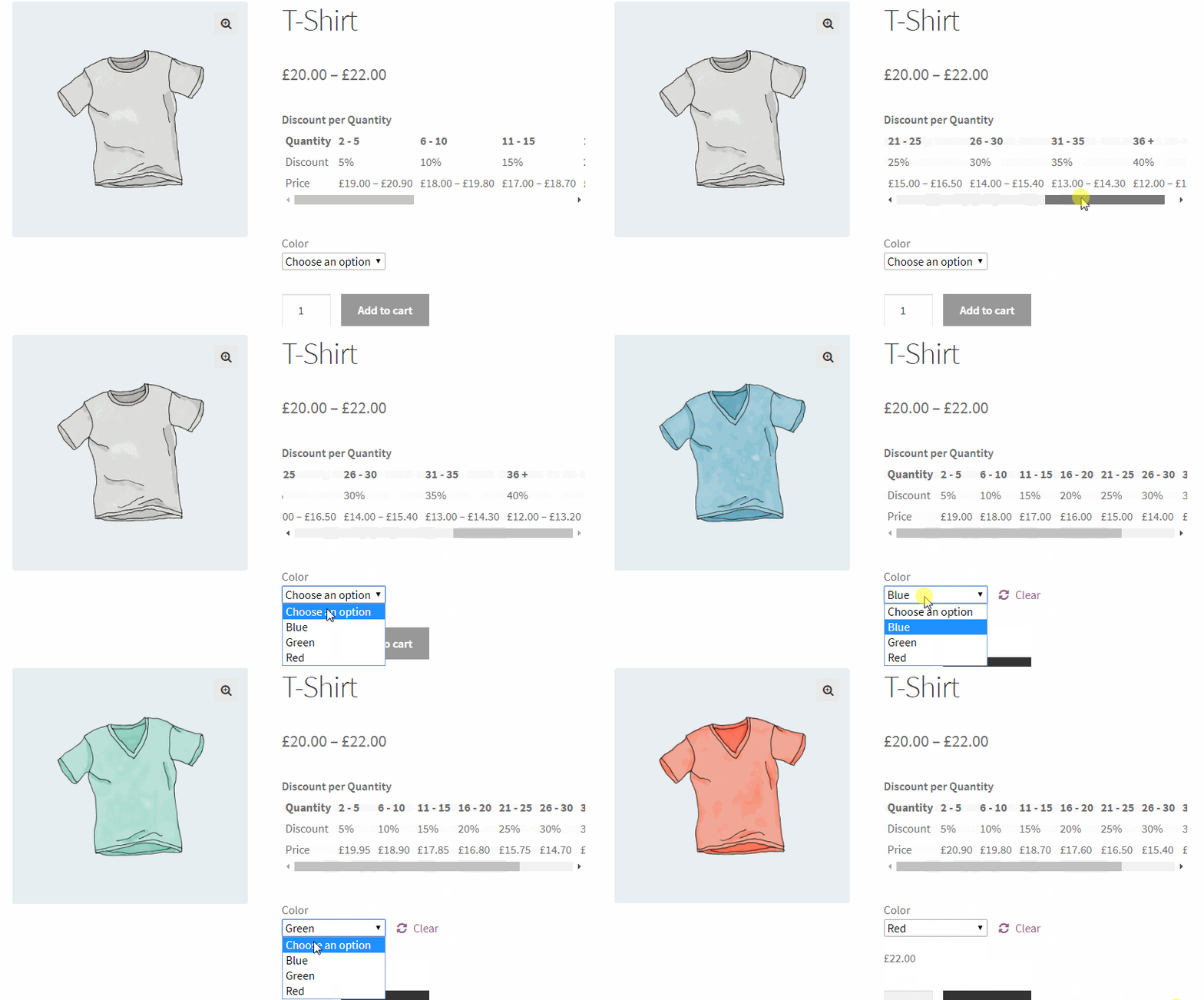
The redesigned quantity pricing table — with pre-built themes and a live settings preview — displays automatically on the product page, or anywhere via [wccs_bulk_table].
🏷️ WooCommerce Category Discount
A WooCommerce category discount applies a percentage or fixed discount to an entire product category in one step — no editing individual products. Combine with date ranges or a minimum cart total, apply to multiple categories at once, and exclude specific products. Ideal for seasonal sales and clearance events.
- Set a percentage discount on any category (e.g. 20% off all “Winter Jackets”)
- Set a fixed amount discount on any category (e.g. $10 off all “Accessories”)
🛒 WooCommerce BOGO Deals — Buy One Get One Free
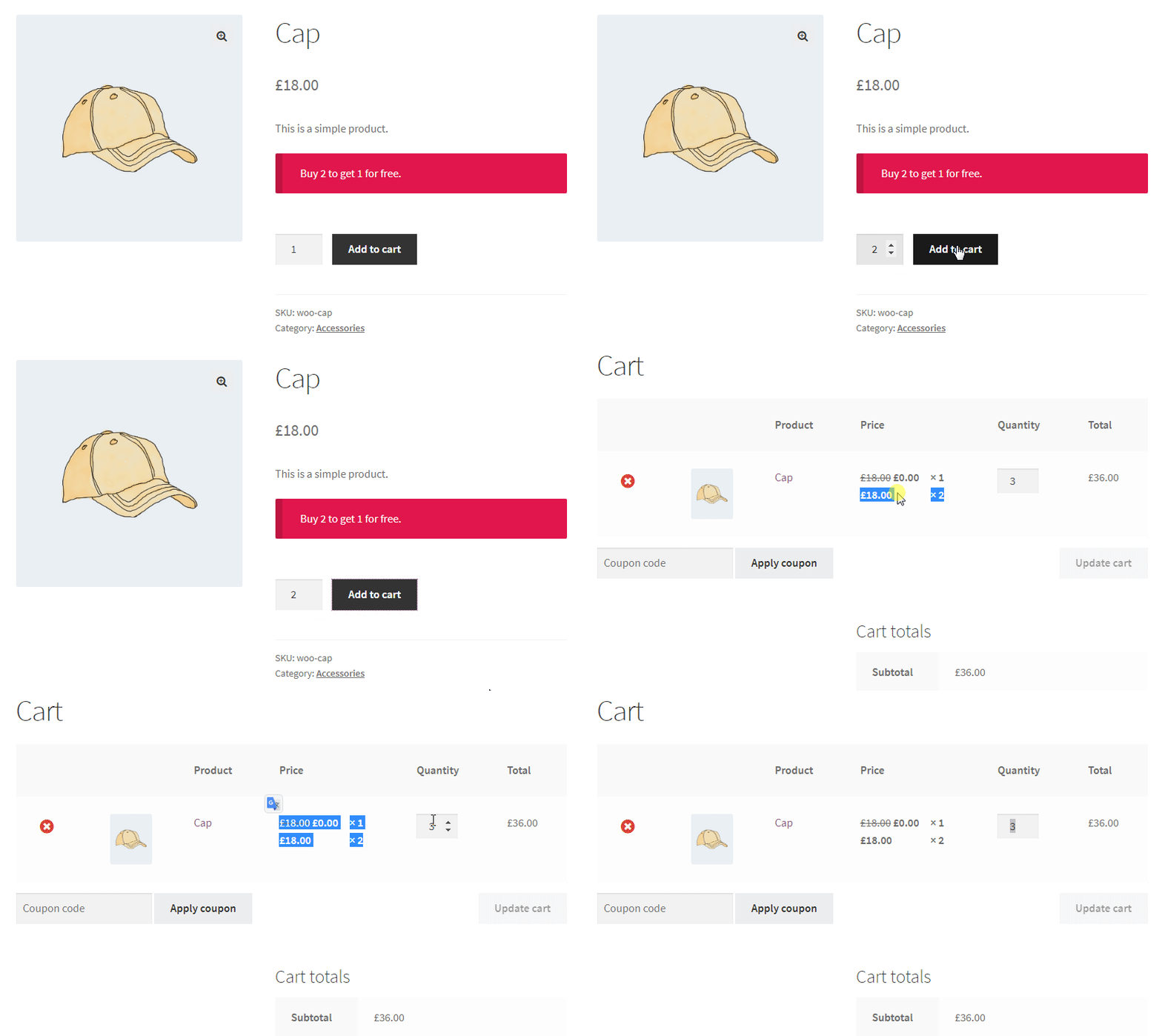
BOGO deals are one of the highest-converting promotions in e-commerce, and every common variation is free for simple and variable products. The free item adds to cart automatically, no manual step needed. Category-based and variation-based BOGO rules are in PRO.
- Buy 1 Get 1 Free — Classic buy one get one free
- Buy 2 Get 1 Free — Buy two, get the third at no cost
- Buy 3 Get 1 Free — Perfect for multi-pack promotions
- Buy X Get Y — Buy product A and receive product B free or at a discount
- Buy One Get One 50% Off — Buy one item, get the second at half price
- Buy 2X Get 1Y Free — cross-product reward, e.g. buy 2 shampoos, get 1 conditioner free
- Buy 3, Cheapest Free — automatically discounts the lowest-priced item in the cart
BOGO use cases:
- Cosmetics and personal care — buy one shampoo, get conditioner free
- Food and grocery — buy 3, pay for 2 multi-pack deals
- Apparel — buy two shirts, get one free to clear end-of-season stock
- SaaS or digital products — buy one license, get a second at no charge
💲 WooCommerce Dynamic Pricing
WooCommerce dynamic pricing changes prices and discounts automatically based on conditions you set — no manual editing, no coupon codes. Free: quantity-based, cart-total, date-based, and category-based dynamic pricing. PRO adds live price display, role-based (wholesale/VIP) conditional pricing, purchase-history pricing, and advanced tiered pricing rules.
- Quantity-based dynamic pricing (more items = lower price per unit)
- Cart-total dynamic pricing (spend $X, get Y% off)
- Date-based dynamic pricing (flash sales and scheduled promotions)
- Category-based dynamic pricing (automatic discounts on entire product categories)
📊 WooCommerce Tiered Pricing (PRO)
Tiered pricing — also called volume pricing or volume discounts — gives progressively larger discounts as customers buy more. Basic quantity tiers are free; advanced per-tier percentages, role-based tiers, and attribute conditions are in PRO: e.g. 5% off at 5 units, 12% off at 10, 20%+5% wholesale off at 20+.
PRO tiered pricing example:
- Quantity 1–4: regular price
- Quantity 5–9: 5% off
- Quantity 10–19: 12% off
- Quantity 20+: 20% off — plus an additional 5% off for wholesale user role
📖 Tutorial
🔖 WooCommerce Scheduled Discounts & Flash Sales
Free version: schedule any rule with a start/end date, run it on specific days, or repeat it weekly — perfect for flash sales, Black Friday, and holiday promotions. PRO adds a countdown timer on product pages to drive urgency.
📖 Tutorial
🎫 WooCommerce Coupon & Auto-Apply Coupon
Turn discount rules into auto-applied WooCommerce coupons — no code entry, less cart abandonment.
- Auto-apply coupons — applied automatically at checkout when conditions are met
- Manual coupons — activate a rule only when a specific code is entered
- Cart/order total coupons — e.g. apply a coupon when a customer spends over $100
- Scheduled coupons — activate and deactivate automatically on set dates
- PRO: smart coupons, shareable URL coupons (auto-apply + optionally add products to cart), and user role coupon templates
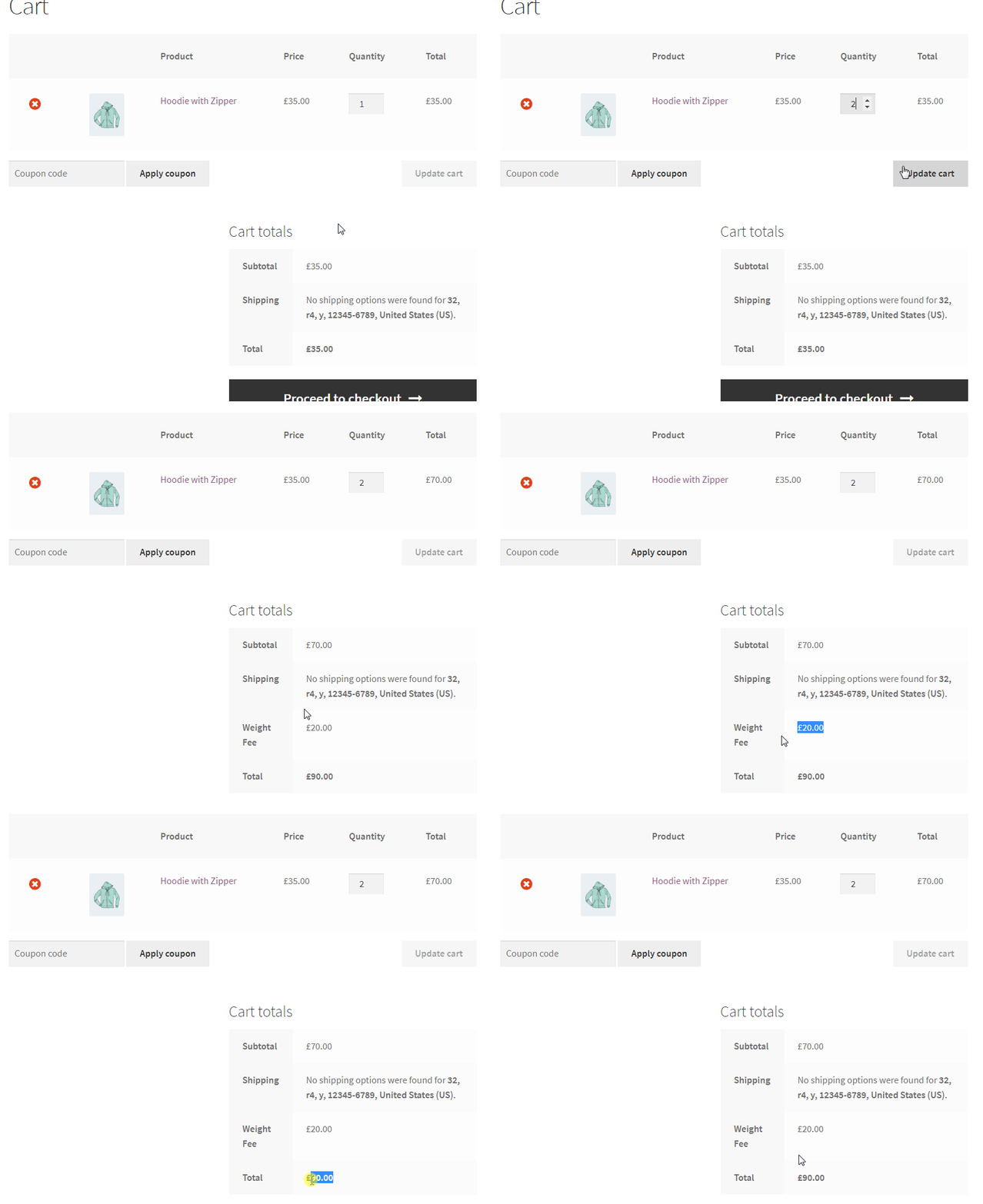
💳 WooCommerce Checkout Fee (PRO)
Add conditional surcharges at checkout — a PRO feature. Base fees on payment method, shipping postcode, cart weight, or specific products. Use a negative value to give a checkout discount instead.
📖 Tutorial
🚚 WooCommerce Shipping Rules
Free: free shipping by cart total, weight-based methods, scheduled shipping, and rules to show/hide shipping methods. PRO unlocks the full condition library (shipping zone, customer role, purchase history, and more) plus the Shipping Discount addon for percentage/fixed discounts on any shipping method.
⭐ PRO Version Features
PRO unlocks every advanced conditional pricing scenario:
- Live price display — real-time updates as quantity changes
- Advanced tiered & role-based pricing — wholesale, VIP, purchase-history conditions
- Advanced BOGO — Buy X Get X, category & variation-based, 🎁 gift emoji on free items
- Auto Add Products to Cart addon — free gift at a spending threshold
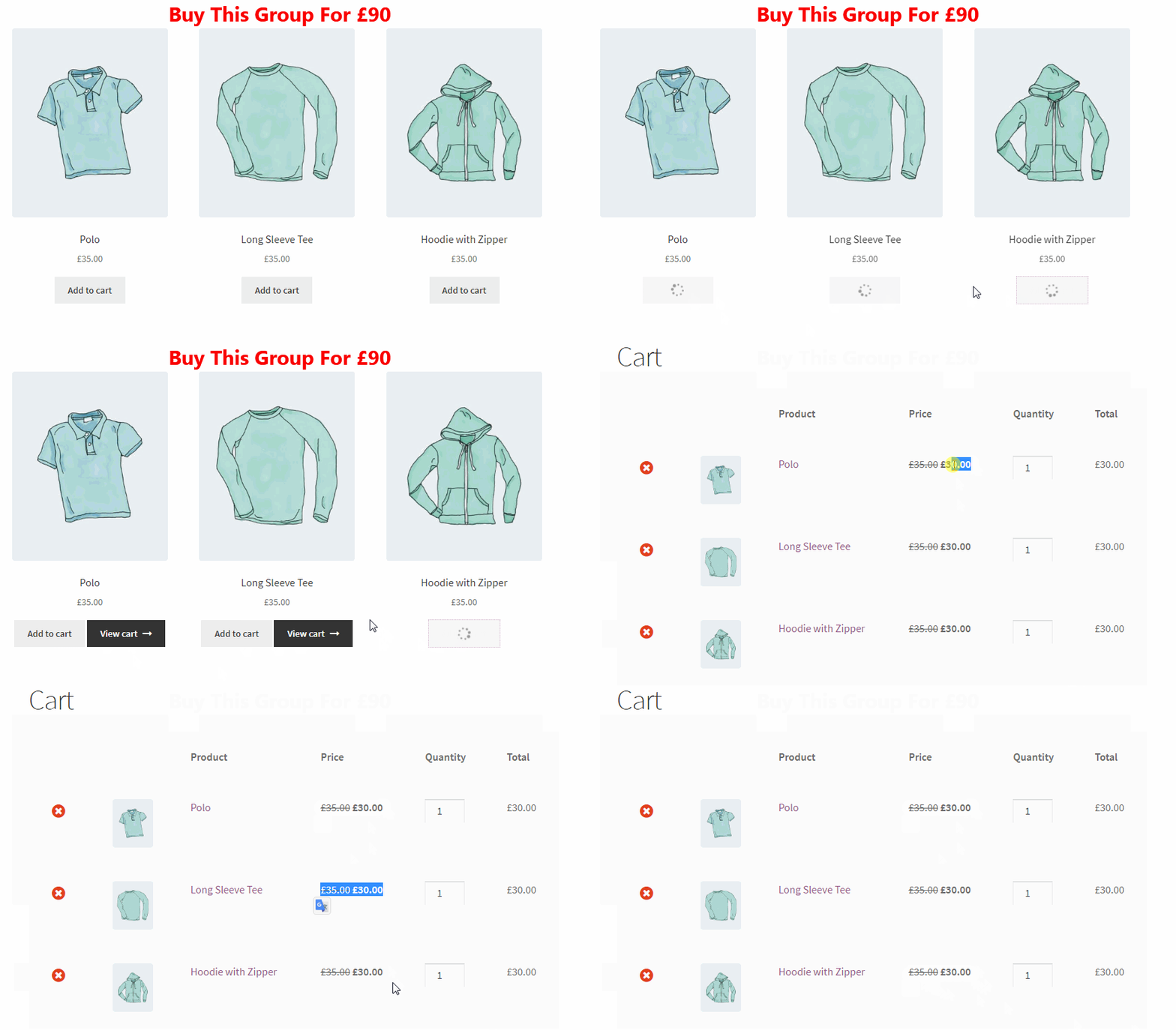
- Bundle & Mix and Match discounts — fixed bundle pricing, or “Any 3 for $60” style mix-and-match deals from a product pool
- Variation & attribute discounts
- First order & sign-up discounts — reward new customers automatically
- Recurring discounts for WooCommerce Subscriptions
- Checkout fees & payment method discounts
- Smart coupons & URL coupons — share a link that auto-applies a coupon
- WooCommerce Countdown Timer on product pages
- Usage restrictions — limit how often a rule can fire, per store or per user
- Shipping Discount addon — % or fixed discounts on any shipping method
Every PRO rule can combine any condition from our full library: customer role & purchase history, cart contents & totals, shipping zone, payment method, product categories/attributes/tags, and more. See the full condition list →
📚 Tutorials & Video Tutorials
Every feature above links directly to its own step-by-step guide and video. For the complete library, visit All Tutorials or our YouTube Playlist.
🎉 Our Other Plugins
Installation
- In your WordPress admin, go to Plugins → Add New.
- Search for “Discount Rules and Dynamic Pricing for WooCommerce”.
- Click Install Now, then Activate.
- Go to Woo Pricing & Discounts menu to create your first discount rule.
Or upload manually:
- Upload the
easy-woocommerce-discountsfolder to/wp-content/plugins/. - Activate through Plugins in the WordPress admin.
- Visit the Documentation for detailed setup instructions.
Minimum Requirements
- WordPress 4.4.1 or greater
- WooCommerce 3.0.0 or greater
- PHP 5.6.0 or greater
- MySQL 5.0 or greater
Frequently asked questions
How do I create a bulk discount in WooCommerce?
Install the plugin, go to Woo Pricing & Discounts → Pricing tab → Add from Template, and select the Bulk Savings: Buy More, Save % template. Set your quantity ranges and discount amounts (percentage or fixed). The bulk pricing table will appear automatically on the product page. You can also use the [wccs_bulk_table] shortcode to display it anywhere. Available in the free version. Full tutorial: WooCommerce Bulk Discounts.
How do I create a BOGO (buy one get one free) deal in WooCommerce?
Go to Woo Pricing & Discounts → Pricing tab → Add from Template and select one of the “BOGO: Buy 1 Get 1 Free” or “Free Gift: Buy X, Get Y for Free” templates. Select your buy and get products. The free product is added to the cart automatically. Buy 1 Get 1, Buy 2 Get 1, Buy 3 Get 1, and Buy X Get Y are all available in the free version. Full tutorial: BOGO Deals in WooCommerce.
How do I create a buy 2 get 1 free deal in WooCommerce?
Go to Woo Pricing & Discounts → Pricing tab → Add from Template and select the “Buy 2 Get 1 Free (Same Item)” or “Combo Pack: Buy 2 of X, Get 1 Y Free” template. Select your buy and get products. The free item is added to the cart automatically. Available in the free version. Full tutorial: Buy 2 Get 1 Free in WooCommerce.
How do I create a category discount in WooCommerce?
Go to Woo Pricing & Discounts → Pricing tab → Add from Template and select the “Category Discovery” template. Choose Percentage or Price for the Adjustment Type, then under Discounted Products select Categories. The discount applies to all products in those categories automatically. Available in the free version. Full tutorial: WooCommerce Category Discounts.
How do I create a tiered pricing rule in WooCommerce?
Basic quantity-based tiered discounts (buy more, save more) are available in the free version — go to Woo Pricing & Discounts → Pricing tab → Add from Template and select the Bulk Savings: Buy More, Save % template. Add multiple quantity ranges with different discount percentages. Advanced tiered pricing with role-based conditions, attribute targeting, and live price display is available in the PRO version. Full tutorial: Tiered Discounts in WooCommerce.
What is the difference between bulk discount and tiered pricing?
They refer to the same concept. “Bulk discount” and “quantity discount” mean giving a lower price when customers buy more items. “Tiered pricing” and “volume pricing” describe the same strategy with multiple price levels at different quantity thresholds. Basic bulk/quantity discounts are available in the free version. Advanced tiered pricing rules with additional conditions are available in PRO.
What is a volume kick discount?
Unlike standard tiered pricing, where only the units past a threshold get the lower price, a volume kick discount applies the discount retroactively to every unit once the threshold is met — e.g. buy 10+, and all 10 units get 20% off, not just units 10 and up. Available in the free version.
How do I set up a WooCommerce coupon that applies automatically?
Create a Cart Discount rule and set your conditions (date, cart total, products, etc.). When a customer meets those conditions, the WooCommerce coupon discount is applied at checkout automatically — no code needed. You can also create manual coupons that require a specific code. Both modes are available in the free version.
How do I create a discount or auto-apply coupon based on cart total?
Go to Woo Pricing & Discounts → Discounts tab → Add from Template and select the Minimum Spend template. Set the cart total threshold and discount amount — for example, spend over $100, get 15% off. Available in the free version.
How do I create a WooCommerce checkout fee?
WooCommerce checkout fees are available in the PRO version. Go to Woo Pricing & Discounts → Fees tab to create a checkout fee rule. You can base fees on payment method, cart weight, shipping postcode, or specific products in the cart. Full tutorial: Create Payment Gateway Fees in WooCommerce.
Can I add a surcharge for a specific payment method in WooCommerce?
Yes, this is a PRO version feature. Create a Checkout Fee rule and add a Payment Method condition — for example, add a 2% surcharge for credit card payments. Full tutorial: Payment Method Fee in WooCommerce.
Can I offer wholesale pricing or different prices per user role?
This is a PRO version feature. With PRO, create a pricing rule and add a User Role condition. For example, wholesale customers get 25% off all products automatically when they log in. Full tutorial: User Role Based Pricing for WooCommerce.
Can I create a flash sale or scheduled discount?
Yes, available in the free version. Every rule has a Date Range option (From Date / To Date). Set the start and end date and the rule activates and deactivates automatically. You can also target specific days of the week. The PRO version adds a Countdown Timer on product pages. Full tutorial: WooCommerce Flash Sale.
Does this plugin show a quantity pricing table on the product page?
Yes, available in the free version. When you create a bulk pricing rule, a quantity table appears on the product page automatically. Customize its position and style in the plugin settings. Use [wccs_bulk_table] shortcode to place it anywhere.
Can I offer a discount based on purchase history?
This is a PRO version feature. Add a Purchase History condition to any rule — for example, customers who spent $200+ in previous orders get 10% off their next order.
Does this plugin support variable products and product variations?
The free version supports discount rules on variable products as a whole. Targeting individual product variations specifically (e.g. only Size: XL of a shirt) is a PRO version feature.
Can I give a discount on a customer’s first order?
This is a PRO version feature. Go to Woo Pricing & Discounts → Discounts tab → Add from Template and select the “New Customer Welcome” or “Welcome Gift” template. Full tutorial: First Order Discount in WooCommerce.
How do I create a storewide discount in WooCommerce?
Go to Woo Pricing & Discounts → Pricing tab → Add from Template, select the Storewide template, and set your discount type and amount. Available in the free version. Add date conditions to make it a scheduled storewide sale. Full tutorial: WooCommerce Apply Discount to All Products.
Is it possible to exclude products from a discount rule?
Yes, available in the free version. Every rule has an Excluded Products section where you can select individual products or categories to exclude — for example, exclude already on-sale products from a storewide discount.
Can I create “Mix and Match” or “Any 3 for $X” style deals?
Yes, this is a PRO version feature. Define a pool of eligible products and a bundle price or discount — for example, “Any 3 items from this category for $60.” Customers can mix any combination from the pool and the price adjusts automatically in the cart. tutorial: Create Mix & Match Product Discounts
Changelog
9.4.0
- New: Added more templates for tiered pricing rules.
- New: Enhanced discount page alert message design.
- New: Added direct links to Documentation and Video Tutorials.
- Update: Tested and verified compatibility with WordPress 7.1.
- Update: Tested and verified compatibility with WooCommerce 11.1.0
Note: We kindly request your support in spreading the word by leaving a 5-star review. ❤️😍 Feel free to include your ideas in the review, as we always value and consider your feedback. 🌹
9.3.1
- Improvement: Added version parameters to plugin stylesheets to force cache refresh and ensure the latest styles are always loaded.
- Update: Verified compatibility with WooCommerce 11.0.1
9.3.0
- New: Completely redesigned the quantity table with a modern, user-friendly interface.
- New: Introduced a selection of pre-built themes for the quantity table, accessible via plugin settings.
- New: Added a live preview feature to the settings panel, allowing you to see table changes in real time.
- New: Added Chamevo product customizer plugin compatibility for quantity table.
- New: Added capability to set an active tier for the quantity table when using server-side pricing.
- Fix: Resolved volume kick pricing template apply mode set to Individually.
- Fix: Horizontally centered table content for improved UI consistency.
- Update: Changed the default quantity table layout from Horizontal to Vertical.
9.2.0
- New: Added “You Saved” block to the cart and checkout blocks.
- Update: Verified compatibility with WooCommerce 10.9.4
9.1.1
- Fix: When a product updates, the background price updater now updates only that product.
- Update: Verified compatibility with WooCommerce 10.8.1
9.1.0
- New: Added order total coupon rules.
- New: Added products subtotal coupon rules.
- New: Added minimum spend templates.
- New: Added cart total coupons templates.
- New: Added generate coupon code button to generate coupon codes easily.
- New: Added user role based coupon code templates to create coupons fast & easy.
- Fix: Fixed quantity based on field in bulk pricing for variations templates.
- Update: Verified compatibility with WooCommerce 10.8.1
- Update: Verified compatibility with WordPress 7.0
Screenshots
For developers
Is this your plugin? Show off the numbers.
Add a live badge to your site, docs or GitHub README. It updates on its own — no account needed.
Best Discount Rules and Dynamic Pr… alternatives
All bogo plugins →




FAQ
Discount Rules and Dynamic Pricing…: quick answers
Straight answers, pulled from live WordPress.org data.
Live data from WordPress.org · checked Sep 26, 2026
Is Discount Rules and Dynamic Pric… free?
Yes. Discount Rules and Dynamic Pric… is free to download and use from the official WordPress.org plugin directory.
Is Discount Rules and Dynamic Pric… safe to use in 2026?
Yes — Discount Rules and Dynamic Pric… is a safe, well-maintained plugin to use in 2026. It runs on 9K+ sites, is rated 4.7/5 and was last updated 3 weeks ago, and scores 92/100 on our health check.
How many websites use Discount Rules and Dynamic Pric…?
Discount Rules and Dynamic Pric… is active on 9K+ WordPress websites and has been downloaded 419,265 times since it launched in April 2019. It was downloaded 7,332 times in the last 30 days.
Does Discount Rules and Dynamic Pric… work with WordPress 7.1?
Yes. The developer has tested Discount Rules and Dynamic Pric… up to WordPress 7.1.2, the latest release. It requires WordPress 4.4.2 or newer.
What PHP version does Discount Rules and Dynamic Pric… need?
Discount Rules and Dynamic Pric… requires PHP 5.6.0 or higher. Most hosts run PHP 8.x today, so it works on any modern WordPress hosting.
When was Discount Rules and Dynamic Pric… last updated?
The latest version, 9.4.0, was released on September 8, 2026 (3 weeks ago).
Who makes Discount Rules and Dynamic Pric…?
Discount Rules and Dynamic Pric… is developed and maintained by AsanaPlugins.
What are the best alternatives to Discount Rules and Dynamic Pric…?
The most popular alternatives to Discount Rules and Dynamic Pric… are Smart Coupons For WooCommer… (30K+ installs), Advanced Coupons for WooCom… (20K+ installs) and Discount Rules for WooComme… (5K+ installs).
Powered by PageForge
Want thousands of pages that rank like these? Build them in an afternoon.
This directory runs on the same engine as PageForge. Turn any spreadsheet, CSV or API into thousands of fast, SEO-ready WordPress pages — with schema, internal links and AI-written copy baked in.
- CSV, Google Sheets & API data sources
- AI content, schema & internal links per page
- Works with Elementor, Gutenberg, Yoast & Rank Math
- Free on WordPress.org — no credit card


