


Easy Waveform Player
Add Waveform players easy and fast to your WordPress.

Use with caution
Easy Waveform Player works, but test it on a staging site before relying on it in 2026. It runs on 100+ sites and was last updated 2 months ago, and scores 59/100 on our health check.
- Small user base (100+ active installs)
- Very few reviews so far
How does it stack up?
Side-by-side on installs, updates, ratings & support



Daily downloads
Download spikes usually follow a new release — each site that auto-updates counts as a download.
Rankings
Where Easy Waveform Player stands todayWordPress.org search rankings
Live position in the plugin search, top 100| Keyword | Position |
|---|---|
| audio | >100 |
| elementor | >100 |
| player | #75 |
| waveform | #2 |
| WPBakery | >100 |
Version adoption
Share of active sites per release.
About Easy Waveform Player
From the official readme · v1.2.3Description
SSL certificate is REQUIRED for the plugin to work!
Easy Waveform Player allows you to add visual waveform, generated on the fly, for an audio file.
Loads audio on request only. If multiple players are showed they will not over load all the audio at once.
Autostop other Easy Waveform Players if they are playing.
How to use:
1) Use the block from the editor you have installed(intergrated in: Gutenberb, Elementor, WPBakery Visual Builder, DIVI)
2) Run code programatically. Code example:
 global $easywaveformplayer;
echo $easywaveformplayer->easywaveformplayer(
    array(
        'audio' => 'https://link.to/audio.mp3',
    )
);
3) Write manual shortcode using examples below
Examples:
- Load audio by libray id:
[easywaveformplayer audio="6"] - Load audio by URL:
[easywaveformplayer audio="https://file-examples-com.github.io/uploads/2017/11/file_example_MP3_700KB.mp3"] - Autoplay(this requires that user allow permission to autoplay for your page):
[easywaveformplayer audio="6" autoplay="1"] - Add title:
[easywaveformplayer audio="https://file-examples-com.github.io/uploads/2017/11/file_example_MP3_700KB.mp3" title="This is a title"] - Animated appearence of timeline:
[easywaveformplayer audio="https://file-examples-com.github.io/uploads/2017/11/file_example_MP3_700KB.mp3" animated="true"] - Wave design changes:
[easywaveformplayer audio="https://file-examples-com.github.io/uploads/2017/11/file_example_MP3_700KB.mp3" timeline_wave_color="#FF0000" timeline_progress_color="#000000"] - Colored timelime background(including gradient):
[easywaveformplayer audio="https://file-examples-com.github.io/uploads/2017/11/file_example_MP3_700KB.mp3" timeline_background_color="linear-gradient(90deg, rgba(2,0,36,1) 0%, rgba(9,9,121,1) 35%, rgba(0,212,255,1) 100%)"] - Minimum size and adding different size then default:
[easywaveformplayer audio="https://file-examples-com.github.io/uploads/2017/11/file_example_MP3_700KB.mp3" min="true" mini_size="100"] - Minimum size with progress indicator:
[easywaveformplayer audio="https://file-examples-com.github.io/uploads/2017/11/file_example_MP3_700KB.mp3" min="true" show_progress="true"]
Parameters and default values:
- id -> ” can be any value containing letters, numbers, _ OR – Value Added will be concatenated with: “ewfplayer_”. Eg: ewfplayer_mainplayer
- always_play -> 0 (0 – it will stop when other player start playing, 1 – it will continue playing when other start playing)
- autoplay -> 0 (accepted 0 or 1 values)
- animated -> false (accepted true or false values)
- min -> false (accepted true or false values)
- show_progress -> false (accepted true or false values)
- player_width -> 100% (any css width values)
- player_position -> left (left, center, right)
- player_background_color -> transparent (or other CSS color)
- mini_size -> 60 (in px)
- mini_border_size -> 2 (in px)
- mini_border_color -> #000000 (transparent or other CSS color)
- progress_circle_thickness -> 4 (in px)
- progress_circle_color -> #FF0000 (transparent or other CSS color)
- controller_size -> 40 (in px)
- controller_color -> #000000 (transparent or other CSS color)
- timeline_background_color -> transparent (in px)
- timeline_wave_color -> #999999 (transparent or other CSS color)
- timeline_progress_color -> #555555 (transparent or other CSS color)
- timeline_cursor_width -> 1 (in px)
- timeline_cursor_color -> #333333 (transparent or other CSS color)
- timeline_height -> 128 (in px)
- timeline_bar_gap -> 0 (any number, starting from 0)
- timeline_bar_width -> 0 (any number, starting from 0)
- timeline_bar_radius -> 0 (any number, starting from 0)
Built using library: https://wavesurfer-js.org/
SSL certificate is REQUIRED for the plugin to work!
Installation
Minimum Requirements
- PHP version 5.6 or greater (PHP 7.1 or greater is recommended)
Automatic installation
Automatic installation is the easiest option as WordPress handles the file transfers itself and you don’t need to leave your web browser. To do an automatic install of Face Recognition, log in to your WordPress dashboard, navigate to the Plugins menu and click Add New.
In the search field type “Waveform Player” and click Search Plugins. Once you’ve found the plugin you can view details about it such as the point release, rating and description. Most importantly of course, you can install it by simply clicking “Install Now”.
Manual installation
The manual installation method involves downloading our plugin and uploading it to your webserver via your favourite FTP application OR from Admin Area -> Plugins -> Add New and choose ‘Upload Plugin’. The WordPress codex contains instructions on how to do this here.
Frequently asked questions
Why SSL is required?
Plugin uses parts of browser that needs SSL to run
Cache plugins
The plugin should work with any cache plugin
Integrations
The plugin is integrated with main builders by adding custom block.
Changelog
Fixed a hack exploit(CVE-2025-7963) Tested with Wordpress 6.7 Diverse code changes
1.2.3
Security fix: escaped and sanitized every player attribute used in the rendered HTML, inline CSS and inline JS. Reported as a stored XSS through the [easywaveformplayer] shortcode.
1.2.1
Fixed a hack exploit(CVE-2024-11881)
Tested with WordPress 6.7
Diverse code changes
1.2.0
Removed Gutenberg support
Tested with WordPress 6.4.3
1.1.0
Added Integrations with: Gutenberg, Elementor, WPBakery Visual Builder and DIVI builder. More to come!
Added possibility to run the plugin programatically, from main class(see readme)
Bug fixes and improvements to plugin
Typos fix
1.0.0
On date 2019-10-14:
* First version pushed to WordPress
Screenshots
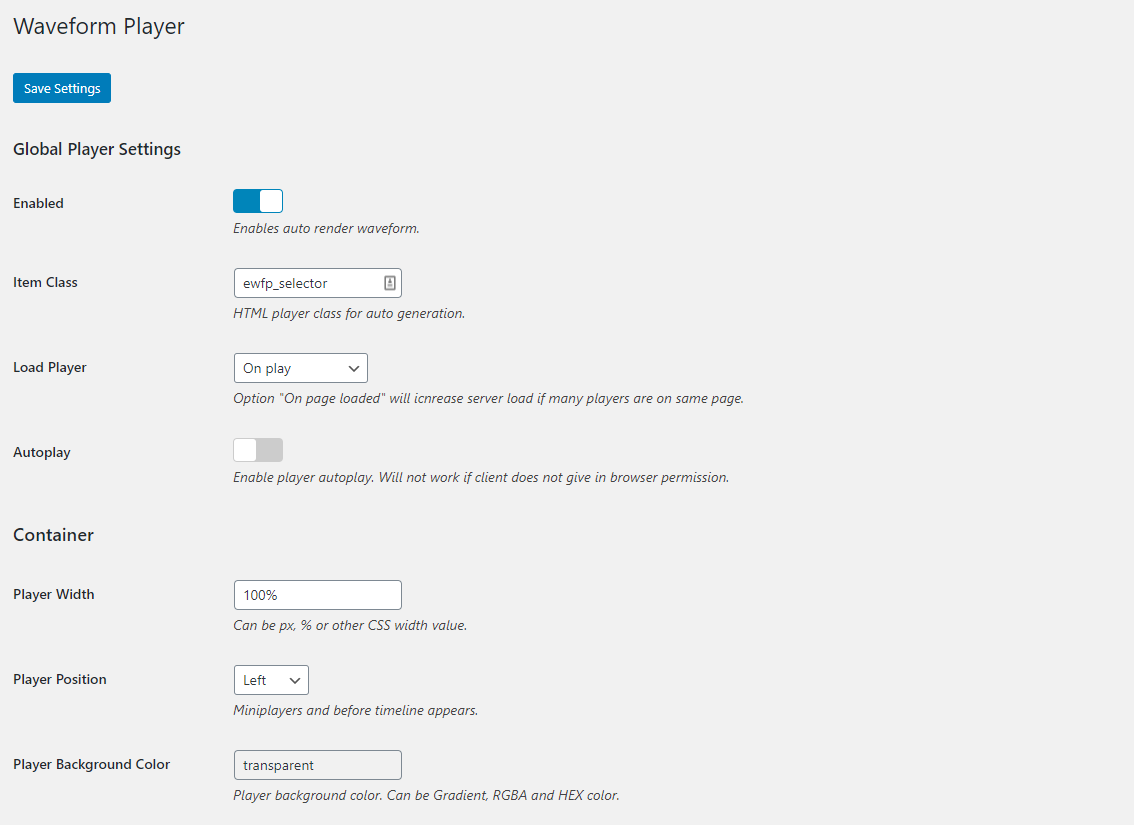


For developers
Is this your plugin? Show off the numbers.
Add a live badge to your site, docs or GitHub README. It updates on its own — no account needed.
Best Easy Waveform Player alternatives
All audio plugins →





FAQ
Easy Waveform Player: quick answers
Straight answers, pulled from live WordPress.org data.
Live data from WordPress.org · checked Oct 16, 2026
Is Easy Waveform Player free?
Yes. Easy Waveform Player is free to download and use from the official WordPress.org plugin directory.
Is Easy Waveform Player safe to use in 2026?
Easy Waveform Player works, but test it on a staging site before relying on it in 2026. It runs on 100+ sites and was last updated 2 months ago, and scores 59/100 on our health check.
How many websites use Easy Waveform Player?
Easy Waveform Player is active on 100+ WordPress websites and has been downloaded 6,831 times since it launched in October 2020. It was downloaded 207 times in the last 30 days.
Does Easy Waveform Player work with WordPress 7.1?
Easy Waveform Player is officially tested up to WordPress 7.0.7, while the latest release is 7.1.3. It may still work, but try it on a staging site first.
What PHP version does Easy Waveform Player need?
Easy Waveform Player requires PHP 7.0 or higher. Most hosts run PHP 8.x today, so it works on any modern WordPress hosting.
When was Easy Waveform Player last updated?
The latest version, 1.2.3, was released on August 31, 2026 (2 months ago).
Who makes Easy Waveform Player?
Easy Waveform Player is developed and maintained by tymotey.
What are the best alternatives to Easy Waveform Player?
The most popular alternatives to Easy Waveform Player are Presto Player (100K+ installs), Seriously Simple Podcasting (30K+ installs) and Compact WP Audio Player (20K+ installs).
Powered by PageForge
Want thousands of pages that rank like these? Build them in an afternoon.
This directory runs on the same engine as PageForge. Turn any spreadsheet, CSV or API into thousands of fast, SEO-ready WordPress pages — with schema, internal links and AI-written copy baked in.
- CSV, Google Sheets & API data sources
- AI content, schema & internal links per page
- Works with Elementor, Gutenberg, Yoast & Rank Math
- Free on WordPress.org — no credit card


