


Easeora Easy Events
Responsive multi-day event listings with filters, logistics documents, images, and custom detail-page links.

Use with caution
Easeora Easy Events works, but test it on a staging site before relying on it in 2026. Was last updated 1 month ago, and scores 55/100 on our health check.
- Small user base (<10 active installs)
- Very few reviews so far
How does it stack up?
Side-by-side on installs, updates, ratings & support



Daily downloads
Download spikes usually follow a new release — each site that auto-updates counts as a download.
Rankings
Where Easeora Easy Events stands todayWordPress.org search rankings
Live position in the plugin search, top 100| Keyword | Position |
|---|---|
| elementor | >100 |
| event filters | >100 |
| event listing | >100 |
| events | >100 |
| logistics | >100 |
About Easeora Easy Events
From the official readme · v1.3.1Description
Easeora Easy Events is a lightweight event-listing plugin for websites that design event detail pages separately with Elementor or another page builder.
The plugin stores events in a private dashboard-only custom post type. It does not generate public single-event URLs or load Elementor code.
Each event supports:
- Event name
- Event image
- Event location
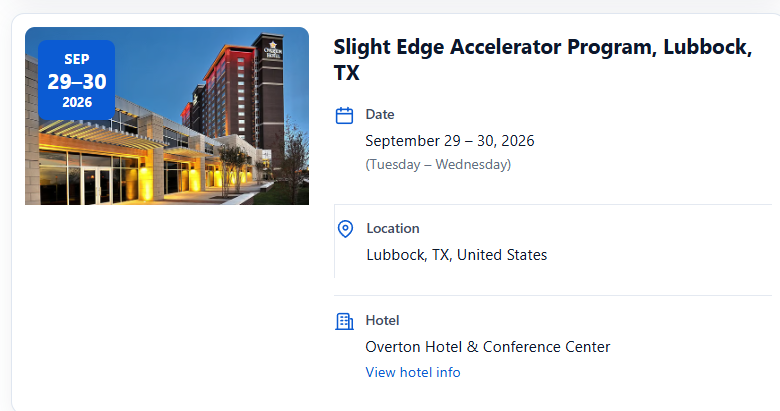
- One or more event dates, with an optional time for each date
- Hotel information and an optional hotel-information link
- Logistics file selected through the WordPress Media Library
- Optional external logistics URL
- Custom event details-page URL
- Draft and published statuses
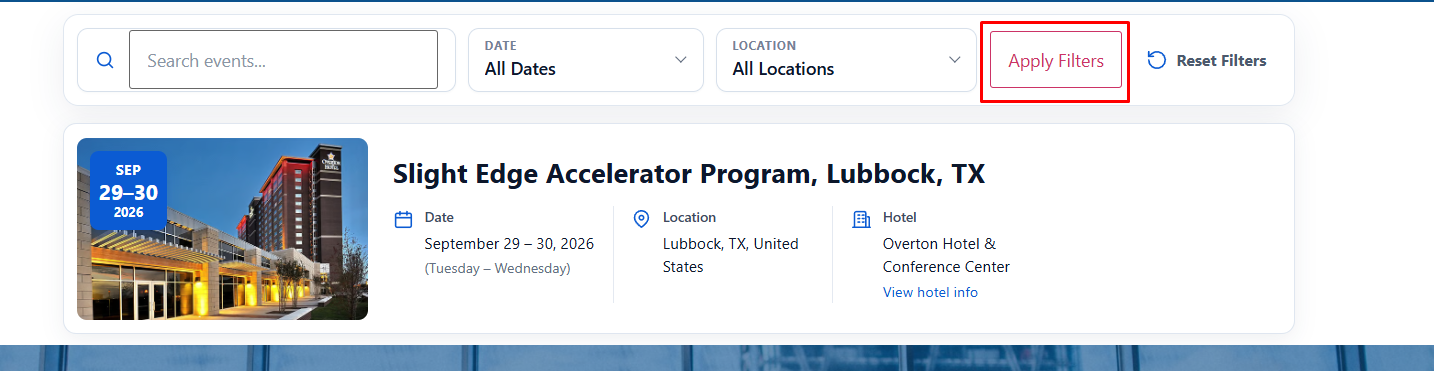
The frontend listing is inserted with the [easeoraee_events] shortcode. It includes a responsive search and filter panel, event images, multi-day date badges, event details, configurable button colours, logistics links, and standard WordPress pagination.
On desktop and tablet, the complete filter bar is always visible. On mobile, the filter area is collapsed into a native click-to-open control. The page layout contains only the filters and event cards, so the surrounding header, hero, and footer remain under the control of the active theme or Elementor page.
Usage
Creating an event
- Open Easy Events > Add New Event.
- Enter the event name in the title field.
- Add the event location, date schedule, and any optional links.
- Add one date, then use Add Another Date for two-day, three-day, or non-consecutive events.
- Select an event image from the WordPress Media Library.
- Add hotel information and an optional hotel-information URL.
- Select a PDF, DOCX, or ZIP logistics file, or enter an external logistics URL.
- Paste the URL of the independently designed event details page.
- Publish the event.
Elementor workflow
- Create a normal WordPress page for the event.
- Design and publish it with Elementor or Elementor Theme Builder.
- Copy the page URL.
- Paste that URL into the event’s Custom Details Page URL field.
Easeora Easy Events does not modify Elementor or control the design of that page.
Shortcode
[easeoraee_events]
The shortcode displays the filter panel and event cards only. It does not add a site header, hero heading, newsletter form, or footer.
The listing filters support:
- Search by event name
- All dates, upcoming events, this month, next 30 days, and past events
- Location
Upcoming and ongoing events appear first. Past-event visibility, events per page, and button colours can be changed under Easy Events > Settings.
Privacy and External Services
Easeora Easy Events does not collect analytics, track visitors, set tracking cookies, or send event data to an external service. All events, settings, files, and links remain within the WordPress site unless an administrator deliberately enters an external URL.
The plugin does not require an account, API key, paid service, or remote connection.
Installation
- Upload the
easeora-easy-eventsfolder to/wp-content/plugins/, or install the ZIP through Plugins > Add New > Upload Plugin. - Activate Easeora Easy Events.
- Go to Easy Events > Add New Event and add your event information.
- Create or edit a normal WordPress page, such as
/events/. - Add
[easeoraee_events]to the page, or place it in Elementor’s Shortcode widget. - Publish the page.
Frequently asked questions
Does the plugin require Elementor?
No. Elementor is optional. The plugin only outputs a shortcode that can be used in WordPress, Elementor, or another page builder.
Can an event have multiple dates?
Yes. Add as many date rows as needed. The plugin sorts them automatically and presents consecutive dates as a clean date range.
Is the filter mobile friendly?
Yes. On small screens the filter panel is collapsed and opens when the visitor taps Filter Events.
Does it load jQuery or a CSS framework?
No. The plugin uses one frontend stylesheet and one tiny dependency-free JavaScript file for automatic desktop/tablet filter submission. The mobile open/close control uses the native HTML details element.
Which logistics file types are supported?
PDF, DOCX, and ZIP files selected through the WordPress Media Library.
What happens if an event has no logistics or details URL?
The corresponding button is not rendered.
Does uninstalling delete event data?
Not by default. Data is only removed when “Delete all event data on uninstall” is enabled before deleting the plugin.
Changelog
1.3.1
- Escaped all inline SVG icon output at render time using a strict
wp_kses()SVG allowlist. - Renamed the localized admin JavaScript object to
easeoraeeEventAdminso it follows the plugin’s common unique prefix. - Removed the output-escaping PHPCS ignores associated with inline icons.
1.3.0
- Replaced the original three-character global prefix with the unique
easeoraeeprefix across functions, classes, constants, options, metadata, shortcodes, script handles, and frontend selectors. - Added a one-time migration that preserves existing events, settings, metadata, and shortcode placements from versions before 1.3.0.
- Updated the public listing shortcode to
[easeoraee_events]. Existing shortcode placements are migrated automatically during the upgrade. - Reduced Elementor editor and Theme Builder overhead by skipping large Elementor document scans during editor, preview, and Elementor AJAX requests.
- Limited Elementor shortcode detection to pages confirmed as Elementor-built on normal frontend requests.
- Forced the Apply Filters button to remain hidden on desktop and tablet while keeping it available on mobile.
- Removed theme-generated borders and focus shadows from the event search input.
- Corrected tablet and mobile event-detail divider behaviour.
1.2.7
- Prepared the production package for WordPress.org submission.
- Updated the contributor metadata, licence file, translation template, and directory documentation.
- Confirmed the current responsive event listing, filter, colour, security, and uninstall features.
1.2.6
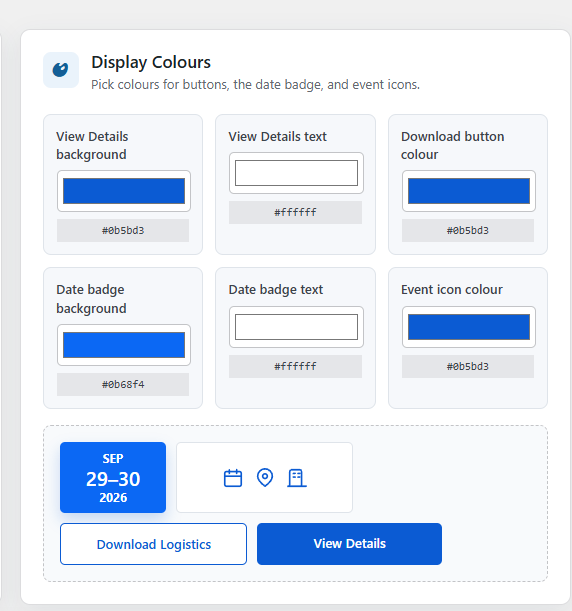
- Added editable hex fields beside all colour pickers.
- Added two-way picker and hex-field synchronisation with inline validation.
- Improved the colour settings layout for easier editing.
1.2.5
- Added visible colour pickers for the event-image date badge background and text.
- Added a global frontend icon colour picker with a live preview.
- Added uninstall cleanup for all colour options.
1.2.4
- Fixed the Apply Filters button flash when resetting filters.
- Simplified the filter interface and removed non-interactive date/location icons.
- Made each native date and location select field fully clickable with clearer labels and modern styling.
Screenshots
For developers
Is this your plugin? Show off the numbers.
Add a live badge to your site, docs or GitHub README. It updates on its own — no account needed.
Best Easeora Easy Events alternatives
All elementor plugins →





FAQ
Easeora Easy Events: quick answers
Straight answers, pulled from live WordPress.org data.
Live data from WordPress.org · checked Oct 1, 2026
Is Easeora Easy Events free?
Yes. Easeora Easy Events is free to download and use from the official WordPress.org plugin directory.
Is Easeora Easy Events safe to use in 2026?
Easeora Easy Events works, but test it on a staging site before relying on it in 2026. Was last updated 1 month ago, and scores 55/100 on our health check.
How many websites use Easeora Easy Events?
Easeora Easy Events is active on <10 WordPress websites and has been downloaded 149 times since it launched in August 2026. It was downloaded 69 times in the last 30 days.
Does Easeora Easy Events work with WordPress 7.1?
Easeora Easy Events is officially tested up to WordPress 7.0.6, while the latest release is 7.1.2. It may still work, but try it on a staging site first.
What PHP version does Easeora Easy Events need?
Easeora Easy Events requires PHP 7.4 or higher. Most hosts run PHP 8.x today, so it works on any modern WordPress hosting.
When was Easeora Easy Events last updated?
The latest version, 1.3.1, was released on August 20, 2026 (1 month ago).
Who makes Easeora Easy Events?
Easeora Easy Events is developed and maintained by rifathasanbd.
What are the best alternatives to Easeora Easy Events?
The most popular alternatives to Easeora Easy Events are Ultimate Addons for Element… (2M+ installs), Essential Addons for Elemen… (1M+ installs) and Royal Addons for Elementor (600K+ installs).
Powered by PageForge
Want thousands of pages that rank like these? Build them in an afternoon.
This directory runs on the same engine as PageForge. Turn any spreadsheet, CSV or API into thousands of fast, SEO-ready WordPress pages — with schema, internal links and AI-written copy baked in.
- CSV, Google Sheets & API data sources
- AI content, schema & internal links per page
- Works with Elementor, Gutenberg, Yoast & Rank Math
- Free on WordPress.org — no credit card


