


{eac}SoftwareRegistry Software Taxonomy
Software Product Taxonomy - Customize {eac}SoftwareRegistry with options, licensing, client messaging, and Github hosting for each software product.

Solid choice
{eac}SoftwareRegistry Software… is a solid plugin choice in 2026, with a few things worth checking first. Was last updated 1 month ago, and scores 64/100 on our health check.
- Actively developed — last update 1 month ago
- Tested with the latest WordPress (7.1)
- Small user base (<10 active installs)
- Very few reviews so far
- Needs PHP 8.1 or newer
Daily downloads
Download spikes usually follow a new release — each site that auto-updates counts as a download.
Rankings
Where {eac}SoftwareRegistry Softw… stands todayWordPress.org search rankings
Live position in the plugin search, top 100| Keyword | Position |
|---|---|
| github hosting | >100 |
| software license | >100 |
| software product | >100 |
| software registration | #86 |
| software registry | #7 |
About {eac}SoftwareRegistry Software Taxonomy
From the official readme · v2.1.3Description
{eac}SoftwareRegistry Software Taxonomy is an extension plugin to {eac}SoftwareRegistry Software Registration Server.
Now with plugin hosting on Github to provide complete, automated plugin information and updates in WordPress.
{eac}SoftwareRegistry Software Taxonomy is a simple plugin extension that allows you to set and override {eac}SoftwareRegistry options for specific software products. It both defines the software product as well as the server parameters used when that product is registered via the software registration application program interface.
When an API request is received by the registry server, the registry_product is matched to the software taxonomy slug. When a match is found, the parameters entered in the software taxonomy meta data are used to override the registry server default parameters.
Options set on a per-product basis by this extension
-
Software Product
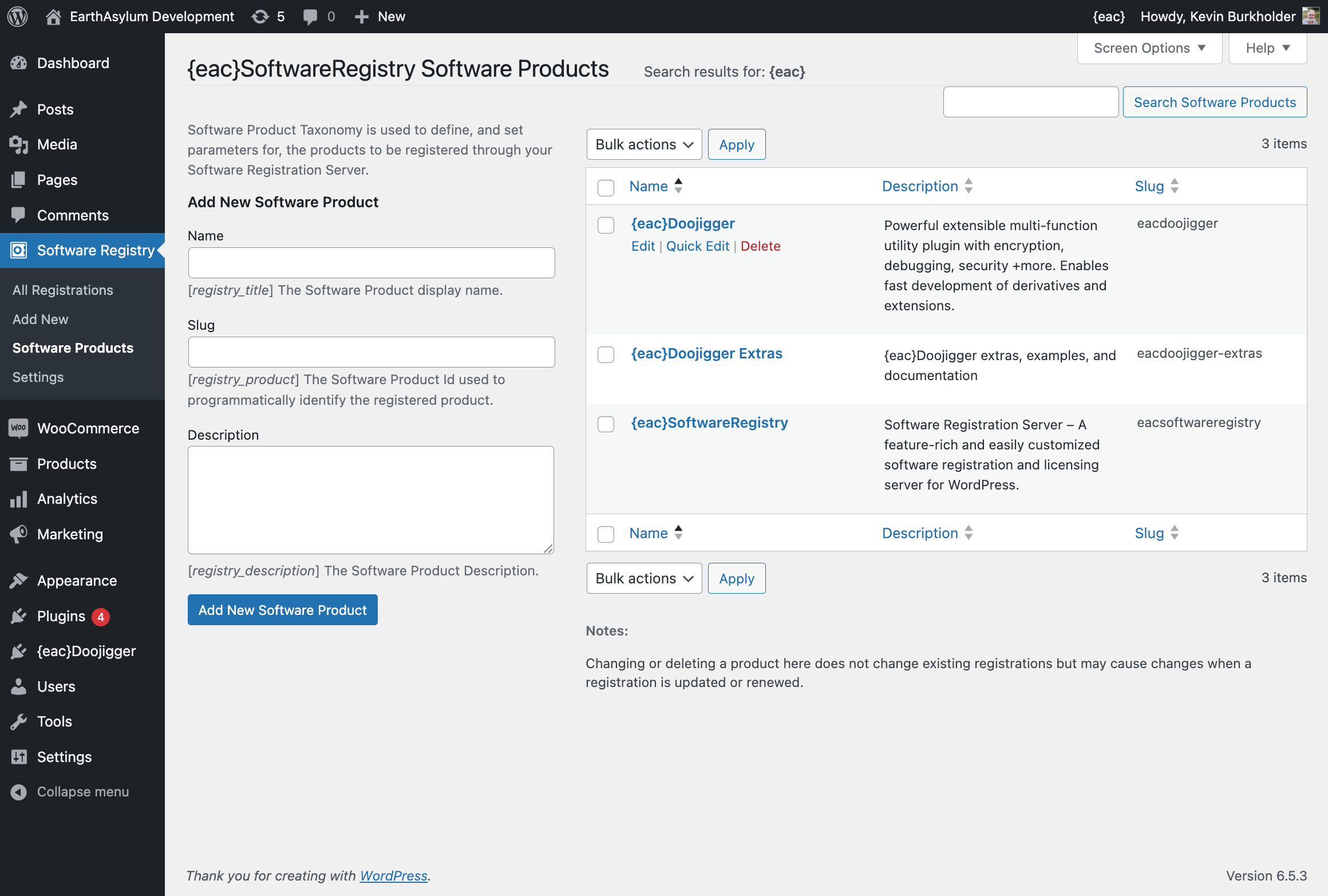
- Registry Title – The Software Product display name
- Registry Description – The Software Product Description
-
Registrar Contact (override existing global options in {eac}SoftwareRegistry)
- Registrar Name – Sending client email from this name
- Registrar Telephone – Include telephone in client notifications
- Registrar Support Email – Include support email address in client notifications
- Registrar Web Address – Include web address in client notifications
-
Registration Defaults (override existing global options in {eac}SoftwareRegistry)
- Default Status – The default status to assign to newly created registrations
- Default Initial Term – The initial term when creating a new registration (pending or trial)
- Default Full Term – The full term when activating a registration
- Default License – The default license level (L1-L5, LD) to assign to newly created registrations
-
Client Notification (Customize the email message and API response notifications sent to the client)
- Client Email Message – Message sent to client on creation, activation or update of registration.
- Client API Message – Short message included with all API responses.
- Client Success Notice – Success notification sent via API response.
- Client Error Notice – Error notification sent via API response.
-
License Limitations
- see below
-
GitHub Hosting
- WordPress Plugin Slug – The {directory}/{plugin.php} slug of the WordPress plugin.
- GitHub Repository – The {owner}/{repository} id of the github repository.
- Repository Source – Select which source to use from the repository (branch, release).
- Tag Name – (Optional) Specific release or branch tag name (or id).
- Path to readme.txt – Pathname within the repository to the readme.txt file.
- GitHub Access Token – Your GitHub personal access token, Increases the github rate limit and is required for private repositories.
- Plugin URLs – Displays the URL(s) you will need for your plugin file and readme.txt file.
License Limitations
Based on the license level assigned to a registration, we can limit the optional values in the registration API (count, variations, options, domains & sites). This allows APIs (possibly from multiple sources) to register any/all values for these options while filtering on the registration server, providing an effective (albeit rudimentary) licensing validation.
For each license level ( L1=Lite, L2=Basic, L3=Standard, L4=Professional, L5=Enterprise, LD=Developer ) you may set a limit for count, variations, options, domains, and sites.
- count – Number of licenses (users/seats/devices)
- variations – List of custom name/value pairs
- options – List of custom registry options
- domains – List of valid/registered domains
- sites – List of valid/registered sites/uris
For count, the value passed through the API is limited to a maximum value.
For variations, options, domains, and sites, the arrays passed through the API are sliced to a maximum number of elements.
GitHub Hosting
* GitHub hosting requires installation of the {eac}Readme plugin in order to process readme.txt files.
Wether you’re using software registration or not, you can use Github Hosting to manage your software releases and provide automated updates for your WordPress plugins.
New in version 2.0, these options allow for the “self-hosting” of WordPress plugins on GitHub in a way similar to and meeting the requirements of the WordPress plugin repository.
More details may be found in the included readme_github.md file.
See Also
Copyright
Copyright © 2019-2026, EarthAsylum Consulting, distributed under the terms of the GNU GPL.
This program is free software: you can redistribute it and/or modify it under the terms of the GNU General Public License as published by the Free Software Foundation, either version 3 of the License, or (at your option) any later version.
This program is distributed in the hope that it will be useful, but WITHOUT ANY WARRANTY; without even the implied warranty of MERCHANTABILITY or FITNESS FOR A PARTICULAR PURPOSE. See the GNU General Public License for more details.
You should receive a copy of the GNU General Public License along with this program. If not, see https://www.gnu.org/licenses/.
Installation
{eac}SoftwareRegistry Software Taxonomy is an extension plugin to and requires installation and registration of {eac}SoftwareRegistry.
Automatic Plugin Installation
This plugin is available from the WordPress Plugin Repository and can be installed from the WordPress Dashboard » Plugins » Add New page. Search for ‘EarthAsylum’, click the plugin’s [Install] button and, once installed, click [Activate].
See Managing Plugins -> Automatic Plugin Installation
Upload via WordPress Dashboard
Installation of this plugin can be managed from the WordPress Dashboard » Plugins » Add New page. Click the [Upload Plugin] button, then select the eacsoftwareregistry-software-taxonomy.zip file from your computer.
See Managing Plugins -> Upload via WordPress Admin
Manual Plugin Installation
You can install the plugin manually by extracting the eacsoftwareregistry-software-taxonomy.zip file and uploading the ‘eacsoftwareregistry-software-taxonomy’ folder to the ‘wp-content/plugins’ folder on your WordPress server.
See Managing Plugins -> Manual Plugin Installation
Settings
Taxonomy settings available from this extension will be seen in the Software Registry → Software Products menu.
Changelog
Version 2.1.3 – September 8, 2026
- Fix/enhance proper selection of branch/prerelease/release when selected by environment.
- Local, Development = default branch.
- Staging = pre-release or default branch.
- Production = release, pre-release or default branch.
Version 2.1.2 – September 3, 2026
- Support most recent pre-release in addition to release and branch.
- Default readme to
/readme.txt, required. - Source ‘select’ based on
?environment=parameter.- ‘production’ = use latest release only.
- Previously recognized source – any, either – set to select.
Version 2.1.1 – August 30, 2026
- Compatible with WordPress 7.1.
- Admin notification on missing required plugin.
- Aesthetic/Nonstructural changes…
- WP plugins page links.
- Plugin DocBlocks, readme headers, etc.
Version 2.1.0 – August 21, 2026
- Changed default zip file name to match WP naming convention.
plugin-name.tag.zip, no longerplugin-name-tag.zip(though still supported).
- Fixed/improved processing of
.distignoreto ignore files in final zip archive. - Use
.distignorefrom branch or release when not found in downloaded zipball.- May be excluded from zipball by
.gitattributes.
- May be excluded from zipball by
- Suppress erroneous
Authorizationheader on local files when GitHub token is set. - Wrapper to set context and suppress errors from
file_get_contents().
Version 2.0.13 – July 20, 2026
- Compatible with WordPress 7.0.
Version 2.0.12 – July 21, 2025
- Added additional registrar option filters.
- ‘registrar_status’, ‘registrar_term’, ‘registrar_fullterm’, ‘registrar_license’
Screenshots


For developers
Is this your plugin? Show off the numbers.
Add a live badge to your site, docs or GitHub README. It updates on its own — no account needed.
FAQ
{eac}SoftwareRegistry Software Taxo…: quick answers
Straight answers, pulled from live WordPress.org data.
Live data from WordPress.org · checked Oct 10, 2026
Is {eac}SoftwareRegistry Software… free?
Yes. {eac}SoftwareRegistry Software… is free to download and use from the official WordPress.org plugin directory.
Is {eac}SoftwareRegistry Software… safe to use in 2026?
{eac}SoftwareRegistry Software… is a solid plugin choice in 2026, with a few things worth checking first. Was last updated 1 month ago, and scores 64/100 on our health check.
How many websites use {eac}SoftwareRegistry Software…?
{eac}SoftwareRegistry Software… is active on <10 WordPress websites and has been downloaded 2,776 times since it launched in May 2023. It was downloaded 89 times in the last 30 days.
Does {eac}SoftwareRegistry Software… work with WordPress 7.1?
Yes. The developer has tested {eac}SoftwareRegistry Software… up to WordPress 7.1.3, the latest release. It requires WordPress 5.8 or newer.
What PHP version does {eac}SoftwareRegistry Software… need?
{eac}SoftwareRegistry Software… requires PHP 8.1 or higher. Most hosts run PHP 8.x today, so it works on any modern WordPress hosting.
When was {eac}SoftwareRegistry Software… last updated?
The latest version, 2.1.3, was released on September 9, 2026 (1 month ago).
Who makes {eac}SoftwareRegistry Software…?
{eac}SoftwareRegistry Software… is developed and maintained by Kevin Burkholder.
Powered by PageForge
Want thousands of pages that rank like these? Build them in an afternoon.
This directory runs on the same engine as PageForge. Turn any spreadsheet, CSV or API into thousands of fast, SEO-ready WordPress pages — with schema, internal links and AI-written copy baked in.
- CSV, Google Sheets & API data sources
- AI content, schema & internal links per page
- Works with Elementor, Gutenberg, Yoast & Rank Math
- Free on WordPress.org — no credit card


