



PlugUpp Dynamic OG Image Generator: Automatic Screenshot OG Images
Every page and post gets an OG image automatically, no template to design: a real screenshot of the page becomes its Open Graph image.

Solid choice
PlugUpp Dynamic OG Image Genera… is a solid plugin choice in 2026, with a few things worth checking first. Was last updated 14 hours ago, and scores 64/100 on our health check.
- Actively developed — last update 14 hours ago
- Tested with the latest WordPress (7.1)
- Small user base (<10 active installs)
- Very few reviews so far
How does it stack up?
Side-by-side on installs, updates, ratings & supportDaily downloads
Download spikes usually follow a new release — each site that auto-updates counts as a download.
Rankings
Where PlugUpp Dynamic OG Image Ge… stands todayWordPress.org search rankings
Live position in the plugin search, top 100| Keyword | Position |
|---|---|
| og image generator | #12 |
| og-image | #30 |
| open graph image | >100 |
| screenshot | >100 |
| social share image | >100 |
About PlugUpp Dynamic OG Image Generator: Aut…
From the official readme · v2.10.1Description
Every page and post gets a share image without anyone designing one. PlugUpp Dynamic OG Image Generator takes a real browser screenshot of each page and uses it as the og:image, so when someone shares your link, social platforms show exactly what the page looks like. Most SEO plugins can only set a static image; this fills in every page nobody got round to.
Captures run in the background via WP-Cron. The plugin submits each job to the PlugUpp screenshot service, which renders at the 1200×630 Open Graph size and delivers the result back to your site. The cached image is injected as og:image, overriding your SEO plugin’s output wherever a screenshot is available.
You can also pick Featured image, Featured image with a screenshot fallback, or a Custom image from your Media Library, per content type and per individual post. Auto-screenshot is the standard choice; pick something else when you would rather use an image you already have.
And it is not just posts and pages: the Site-wide Pages section covers the pages that have no post at all – your homepage, archive pages, category and tag pages, and author pages. These pages have no featured image by definition, so a screenshot is often the only real image they can carry. Homepage coverage is free; archive, taxonomy and author pages come with Premium.
Upgrade to Premium for custom post type and WooCommerce coverage, per-page capture overrides, country routing, retina captures, Media Library integration, and higher monthly screenshot quotas. One licence covers a single site up to unlimited sites. See plans and pricing
What you get on the free plan
- Real-screenshot og:image – actual browser captures at the standard 1200×630 Open Graph size, not templates and not featured-image fallbacks
- Per-post Image Source picker – choose Auto-screenshot, Featured image, Featured or screenshot, Custom image, or Off, from the block editor sidebar on each post
- Per-content-type Source defaults – set the default behaviour for Posts and Pages independently from the Settings page
- Homepage og:image – your front page gets a real screenshot og:image too, something most SEO plugins have struggled with for years
- SEO plugin aware – works alongside Yoast SEO, Rank Math, and All in One SEO. The plugin replaces only the og:image and twitter:image tags; titles, descriptions, structured data, and sitemaps stay with your SEO plugin
- Page-builder content detection – edits made in Elementor, Beaver Builder, Divi, BeTheme, Oxygen, Themify, and Breakdance trigger the same auto-regen as a Block Editor save
- Bulk actions – set the Image Source for any selection of posts from the standard Posts and Pages list screens, including alongside any list filter (category, tag, Page Generator Pro, and similar)
- Automatic refresh schedule – cached screenshots refresh on a configurable interval (30 days by default), with a background sweep that cleans up cached images you no longer need after a 14-day grace
- Cache management – view cache size, clear all screenshots, or queue a full regeneration from the Dashboard
- Quota awareness – clear in-admin counters and status messages when your monthly allowance is approaching or has reached its cap
What Premium adds
- Site-wide coverage – screenshot og:images for archive pages, category and tag pages, and author pages, with a live page count shown before you enable each group and a per-group custom image option
- Custom post types and WooCommerce products – extend Image Source defaults and auto-screenshot capture to any public CPT, including WooCommerce products
- Per-page capture overrides – viewport width, capture delay, hide selectors, scroll-into-view, click-before-capture, dark mode, and country routing on individual posts from the block editor sidebar
- Custom capture URL – point a post’s screenshot at a different https URL, even on another domain. Ideal for portfolio or case-study posts where the page worth showing is the client site itself
- Country routing – capture each page as it renders from a chosen region for IP-localised content
- Retina captures – 2x or 3x device scale factor for sharper share previews
- Media Library integration – save each capture as a Media Library attachment, optionally set it as the post’s Featured Image, and delete the previous capture on regenerate
- Higher monthly screenshot allowance – for larger or busier sites
- Multi-site licensing – one licence covers 1, 3, 5, or unlimited sites (Personal, Pro, Business, Agency)
- Email support
See the full plan comparison and pricing.
External services
This plugin connects to three external services. Two are operated by PlugUpp.
PlugUpp Screenshot Service
The plugin sends screenshot job requests to the PlugUpp Screenshot Service at https://screenshots.plugupp.com, which captures browser screenshots of your pages and returns them for use as Open Graph images.
- When data is sent: when a page or post is first published, when an enabled page is updated and the “Regenerate on post update” setting is on, when you click “Regenerate Now” in the block editor, on the configurable refresh schedule (default 30 days), and when the Dashboard is loaded (to populate the server status line and the screenshot usage figures).
- What data is sent: the public URL of the page to be captured, your PlugUpp licence key, your site’s Freemius site identifier, the URL the service should send the result to (a REST endpoint on your site), and the capture configuration (viewport width, image quality, country routing, etc.).
- What is received back: the captured screenshot image, which is downloaded by your site and stored locally as a WebP file in your uploads directory.
- Terms of service: https://plugupp.com/terms-of-service/
- Privacy policy: https://plugupp.com/privacy-policy/
- Legal notice: https://plugupp.com/legal-notice/
PlugUpp settings usage (optional)
If you allow it, the plugin sends PlugUpp a summary of which settings you change and which plugin screens you open, with no content, addresses or names, to https://usage.plugupp.com. It helps us simplify the plugin. It is part of the PlugUpp opt-in you can decline, and you can turn it off at any time on the plugin’s Logs tab.
- When data is sent: only if you opted in to the plugin’s Freemius connection, where “Settings usage” is listed, and “Share settings usage” on the plugin’s Logs tab is on (it is on after you opt in, and you can turn it off there at any time). Once a week, and once within a day of saving the plugin’s settings. Never when a visitor views your site. Turning it off, or opting out of the connection, stops sending and sends one request to delete what was stored for this install.
- What data is sent: the plugin’s name, version and plan (free or premium), the WordPress and PHP versions, a random install ID made on your site, which settings differ from their defaults (for a setting with a fixed set of options, the option chosen; for text and lists, only that it changed and how many items it holds), how often each settings group and tab was opened, and when the setup steps were completed, counted from when the plugin first ran.
- What is never sent: your site address, email addresses, names, page or post content, passwords or keys, or any Freemius identifier. The service does not store your IP address.
- Terms of service: https://plugupp.com/terms-of-service/
- Privacy policy: https://plugupp.com/privacy-policy/
- Legal notice: https://plugupp.com/legal-notice/
Freemius
The plugin uses the Freemius platform for licence activation, plan changes, plugin updates (for paid plans), and as the Merchant of Record for purchases.
- When data is sent: on first plugin activation as part of the user-consented opt-in flow, on licence activation or deactivation, on plugin update checks (paid plans), and on uninstall (for optional feedback). Sending the initial opt-in data is the user’s choice – declining the opt-in still lets the plugin work, but skips telemetry.
- What data is sent: standard Freemius opt-in data including site URL, administrator email address, WordPress version, PHP version, plugin version, and active theme name.
- Terms of service: https://freemius.com/terms/
- Privacy policy: https://freemius.com/privacy/
Installation
- Install from the WordPress.org plugin directory (Plugins > Add New), or upload the plugin ZIP (Plugins > Add New > Upload).
- Activate the plugin.
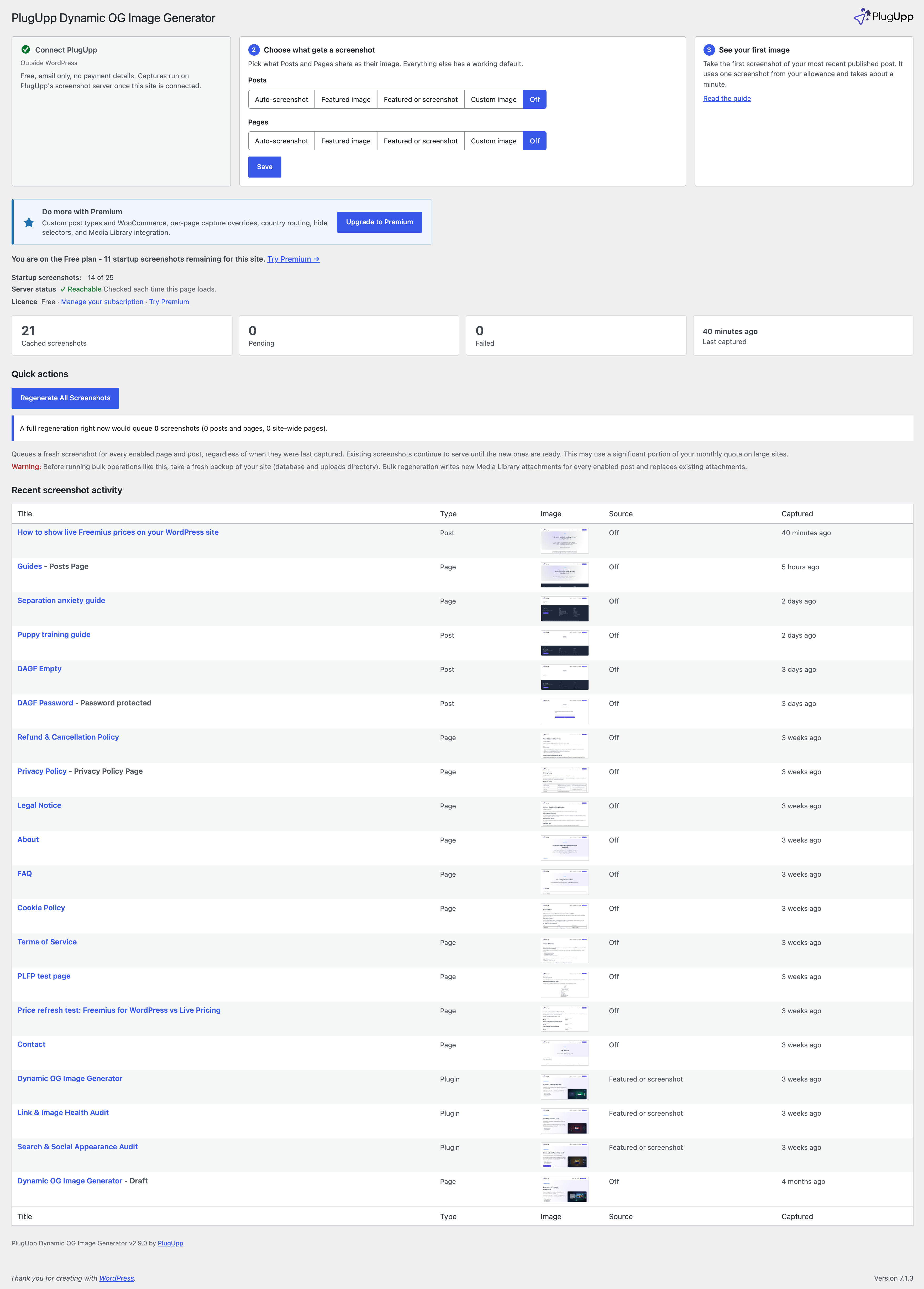
- Open OG Images. The setup row at the top of the Dashboard connects the plugin to PlugUpp and asks what Posts and Pages share as their image. Auto-screenshot is the standard choice. Pick a different mode when you have featured images you would rather use as the og:image.
- Screenshots begin generating in the background as WP-Cron fires.
No API key or additional account is required. The plugin authenticates with the PlugUpp screenshot service automatically using your licence.
Frequently asked questions
Do I need to set up anything beyond a PlugUpp licence?
No. The plugin connects to the PlugUpp screenshot service using your licence. No separate API key or additional signup is needed.
How long does it take for a screenshot to appear?
Screenshots are generated asynchronously. The plugin submits a job and the result is delivered back to your site – typically within a few seconds to a couple of minutes depending on server load. On a site with active traffic and WP-Cron firing regularly, screenshots usually appear shortly after publishing. You can also trigger an immediate regeneration from the block editor sidebar using the Regenerate Now button.
What happens while a screenshot is being generated?
Depending on your Image Source setting, either your SEO plugin’s default og:image is shown, your Featured image, a Custom image you chose, or no og:image until the screenshot is ready.
Can I use a different image on specific pages?
Yes. Open any page or post in the block editor and find the OG Image panel in the sidebar. Pick Auto-screenshot, Featured image, Featured or screenshot, Custom image, or Off for that specific post – this overrides the content-type default.
Does it work with page builders like Elementor, Divi, or BeTheme?
Yes. The plugin detects content changes from the Block Editor and Classic Editor (always), and from the following page builders that store their content separately from the main post body: Elementor, Beaver Builder, Divi (Elegant Themes), BeTheme (Muffin Builder), Oxygen, Themify Builder, Breakdance. If you use a builder not listed here, you can still trigger captures manually with the Regenerate Now button in the block editor sidebar – or let us know which builder you would like added.
What happens if my screenshot quota is exhausted?
Posts that would have been screenshotted are marked with a “quota reached” status. No screenshot is attempted until the next billing period when quota resets. You can upgrade your plan at any time to increase your quota – see https://plugupp.com/plugins/dynamic-og-image-generator/#pricing.
What do I get with Premium?
Premium raises your monthly screenshot quota and unlocks per-page capture overrides (viewport width, capture delay, hide selectors, scroll-into-view, click-before-capture, dark mode, country routing, and retina), Media Library integration, and Image Source coverage for custom post types including WooCommerce products. The full plan comparison and current pricing are at https://plugupp.com/plugins/dynamic-og-image-generator/#pricing.
Does it work with WooCommerce product pages?
Yes, on Premium. Custom post type coverage extends the Image Source defaults and auto-screenshot pipeline to WooCommerce products and any other public CPT. The free plan covers Posts and Pages.
Does this replace my SEO plugin?
No. It only handles og:image. Your SEO plugin continues to manage all other meta tags. When a screenshot is ready (or your Featured image or Custom image is the chosen source), the plugin overrides only the og:image and twitter:image tags.
Changelog
2.10.1
- Improved: re-sync of the shared agent-access component to 0.1.10.
2.10.0
- New: an agent interface. An AI agent working on your site, such as Claude, can read your image settings and what each page shares, save them as one file and apply a file back, through WP-CLI and, on WordPress 6.9 or later, the Abilities API. Applying a file never takes a screenshot, an agent takes one only when asked, and it never sees your licence key.
2.9.1
- Fixed: deactivating the plugin now also clears its weekly settings usage task. Nothing it scheduled is left behind.
- Improved: before your first screenshot, the Dashboard now shows your plan and the startup screenshots you have left. It is the same line you see afterwards.
2.9.0
- New: a setup row at the top of the Dashboard. It takes you through connecting to PlugUpp, choosing what Posts and Pages share as their image, and seeing your first image. It goes away once everything works.
- New: choose the Image source for Posts and Pages on the Dashboard, without opening Settings.
- New: optional settings usage. If this site is opted in to PlugUpp, the plugin sends a weekly summary of which settings you changed, never your content or site address. Turn it off on the Logs tab.
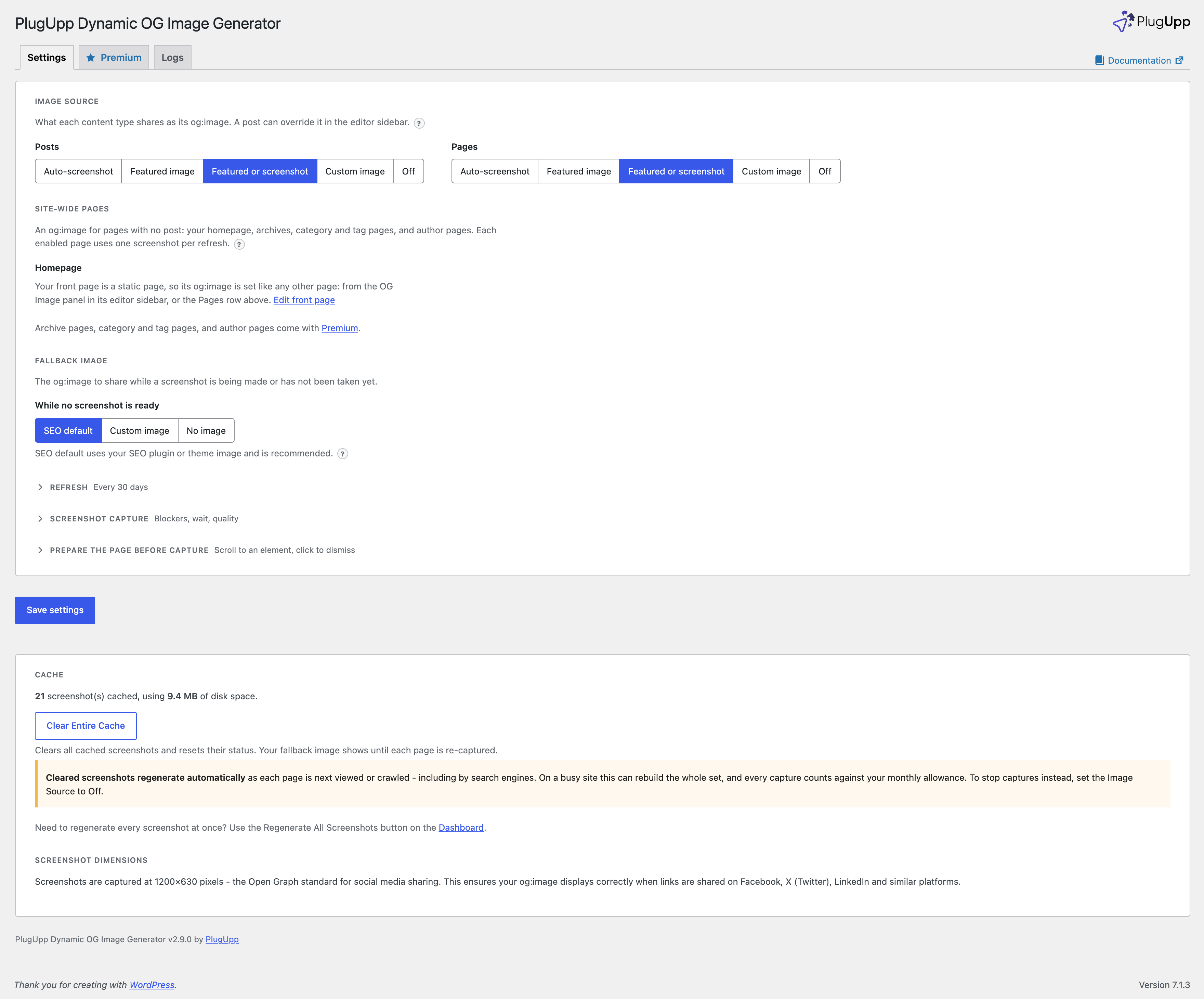
- Improved: the Settings page opens on the Image source choice. Refresh, Screenshot capture, Prepare the page before capture and Output are folded under their headings. A folded group that holds a changed setting opens by itself and says how many settings are changed.
- Improved: Scroll into view and Click before capture are now one group, Prepare the page before capture.
- Improved: the server status and licence lines moved from Settings to the Dashboard.
- Improved: “Featured or screenshot” is now the name of that image source everywhere, including the block editor sidebar and the bulk actions.
- Fixed: the Premium tab said the free plugin has no limits. It now says each site gets 25 startup screenshots.
2.8.1
- Security: updated the Freemius SDK to 2.13.5, which includes security fixes.
- Fixed: a text box on the Settings page now always fits inside its setting, at every window width.
2.8.0
- Improved: a clearer Settings page. On and off settings are now switches. A choice of two to five options is a row of buttons, so you can see every option without opening a list.
- Improved: each Settings tab sits on one card, with short headings in the order you set things up. Every setting has one line of help, and more behind a ? button.
- Improved: the Image source, Site-wide pages, Wait until, Device scale factor and fallback image choices use short button names. “Featured image (with screenshot when missing)” is now “Featured or screenshot” on the Settings page.
- Improved: settings that only apply to another choice now show only while they apply. The refresh interval shows while Scheduled refresh is on, and the fallback image picker while Custom image is chosen.
- Improved: in the block editor sidebar, the Dark mode and Media Library overrides are now rows of Default, On and Off buttons.
- Improved: the log level on the Logs tab is now a row of buttons.
- Fixed: saving Settings with Scheduled refresh off reset the refresh interval to 30 days. Your interval is now kept.
- Fixed: saving Settings while a Premium licence was inactive removed your custom post type choices. They now stay until you renew.
- Fixed: Settings now confirms “Settings saved.” after you save.
- Fixed: when another plugin added its own Categories, two Site-wide pages rows could both read “Categories pages”. Each row now says which content it belongs to, for example “Categories pages (Posts)”.
- Fixed: choosing Custom image on a Site-wide pages row no longer moves the rows after it.
- Fixed: each Site-wide pages row now sits on its own line, so the rows line up at every window width.
Screenshots


For developers
Is this your plugin? Show off the numbers.
Add a live badge to your site, docs or GitHub README. It updates on its own — no account needed.
Best PlugUpp Dynamic OG Image Gene… alternatives
All og image generator plugins →| Rank | Plugin | Active installs |
|---|---|---|
| 1 |
 ogdynamic
Automatically generate beautiful Open Graph images for your WordPress posts, pages…
ogdynamic
Automatically generate beautiful Open Graph images for your WordPress posts, pages…
|
<10 |
FAQ
PlugUpp Dynamic OG Image Generator:…: quick answers
Straight answers, pulled from live WordPress.org data.
Live data from WordPress.org · checked Oct 17, 2026
Is PlugUpp Dynamic OG Image Genera… free?
Yes. PlugUpp Dynamic OG Image Genera… is free to download and use from the official WordPress.org plugin directory.
Is PlugUpp Dynamic OG Image Genera… safe to use in 2026?
PlugUpp Dynamic OG Image Genera… is a solid plugin choice in 2026, with a few things worth checking first. Was last updated 14 hours ago, and scores 64/100 on our health check.
How many websites use PlugUpp Dynamic OG Image Genera…?
PlugUpp Dynamic OG Image Genera… is active on <10 WordPress websites and has been downloaded 1,316 times since it launched in June 2026. It was downloaded 354 times in the last 30 days.
Does PlugUpp Dynamic OG Image Genera… work with WordPress 7.1?
Yes. The developer has tested PlugUpp Dynamic OG Image Genera… up to WordPress 7.1.3, the latest release. It requires WordPress 6.0 or newer.
What PHP version does PlugUpp Dynamic OG Image Genera… need?
PlugUpp Dynamic OG Image Genera… requires PHP 7.4 or higher. Most hosts run PHP 8.x today, so it works on any modern WordPress hosting.
When was PlugUpp Dynamic OG Image Genera… last updated?
The latest version, 2.10.1, was released on October 17, 2026 (14 hours ago).
Who makes PlugUpp Dynamic OG Image Genera…?
PlugUpp Dynamic OG Image Genera… is developed and maintained by PlugUpp.
What are the best alternatives to PlugUpp Dynamic OG Image Genera…?
The most popular alternatives to PlugUpp Dynamic OG Image Genera… are ogdynamic (<10 installs).
Powered by PageForge
Want thousands of pages that rank like these? Build them in an afternoon.
This directory runs on the same engine as PageForge. Turn any spreadsheet, CSV or API into thousands of fast, SEO-ready WordPress pages — with schema, internal links and AI-written copy baked in.
- CSV, Google Sheets & API data sources
- AI content, schema & internal links per page
- Works with Elementor, Gutenberg, Yoast & Rank Math
- Free on WordPress.org — no credit card


