


Dynamic Month & Year into Posts
Automate SEO and content with dynamic shortcodes for dates, years, months, age calculations, seasons and countdowns in content, titles and meta.

Safe pick
Yes — Dynamic Month & Year into Posts is a safe, well-maintained plugin to use in 2026. It runs on 8K+ sites, is rated 5/5 and was last updated 1 month ago, and scores 88/100 on our health check.
- Actively developed — last update 1 month ago
- Tested with the latest WordPress (7.1)
- Momentum — downloads up 80.5% vs the previous 30 days
How does it stack up?
Side-by-side on installs, updates, ratings & support



Daily downloads
Download spikes usually follow a new release — each site that auto-updates counts as a download.
Rankings
Where Dynamic Month & Year into P… stands todayWordPress.org search rankings
Live position in the plugin search, top 100| Keyword | Position |
|---|---|
| dates | #24 |
| dynamic content | #3 |
| seo | >100 |
| shortcode | >100 |
| year | #2 |
Version adoption
Share of active sites per release.
Rating breakdown
★★★★★★★★★★ 5 from 18 reviews
About Dynamic Month & Year into Posts
From the official readme · v1.8.1Description
Automate your SEO
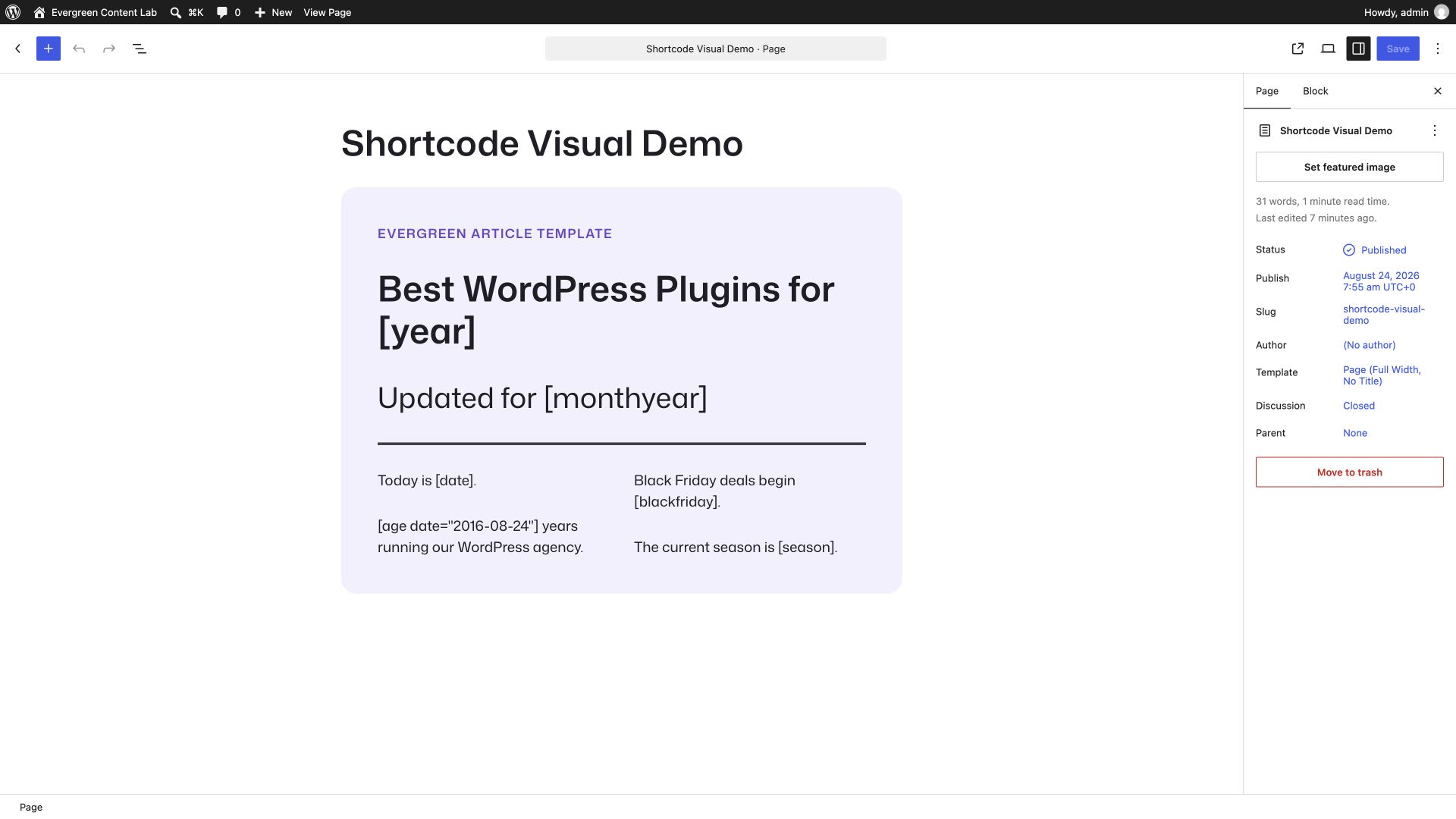
Insert dynamic dates anywhere in your WordPress content using simple shortcodes:
- Years:
[year](current),[nyear](next),[pyear](previous) - Months:
[month](January),[mon](Jan),[nmonth]/[pmonth](next/previous) - Dates:
[date](full date),[dt](day number),[weekday](day name) - Age:
[age date="1990-05-15"]calculates years from any date - Season:
[season]displays current season (supports hemispheres) - Countdowns:
[daysuntil date="2025-12-25"]and[dayssince date="2020-01-01"] - Post Dates:
[datemodified]and[datepublished]shortcodes. - Event Dates:
[blackfriday]and[cybermonday]shortcodes. - Block Editor support: Toolbar to quickly insert the shortcodes, customizable date and countdown blocks.
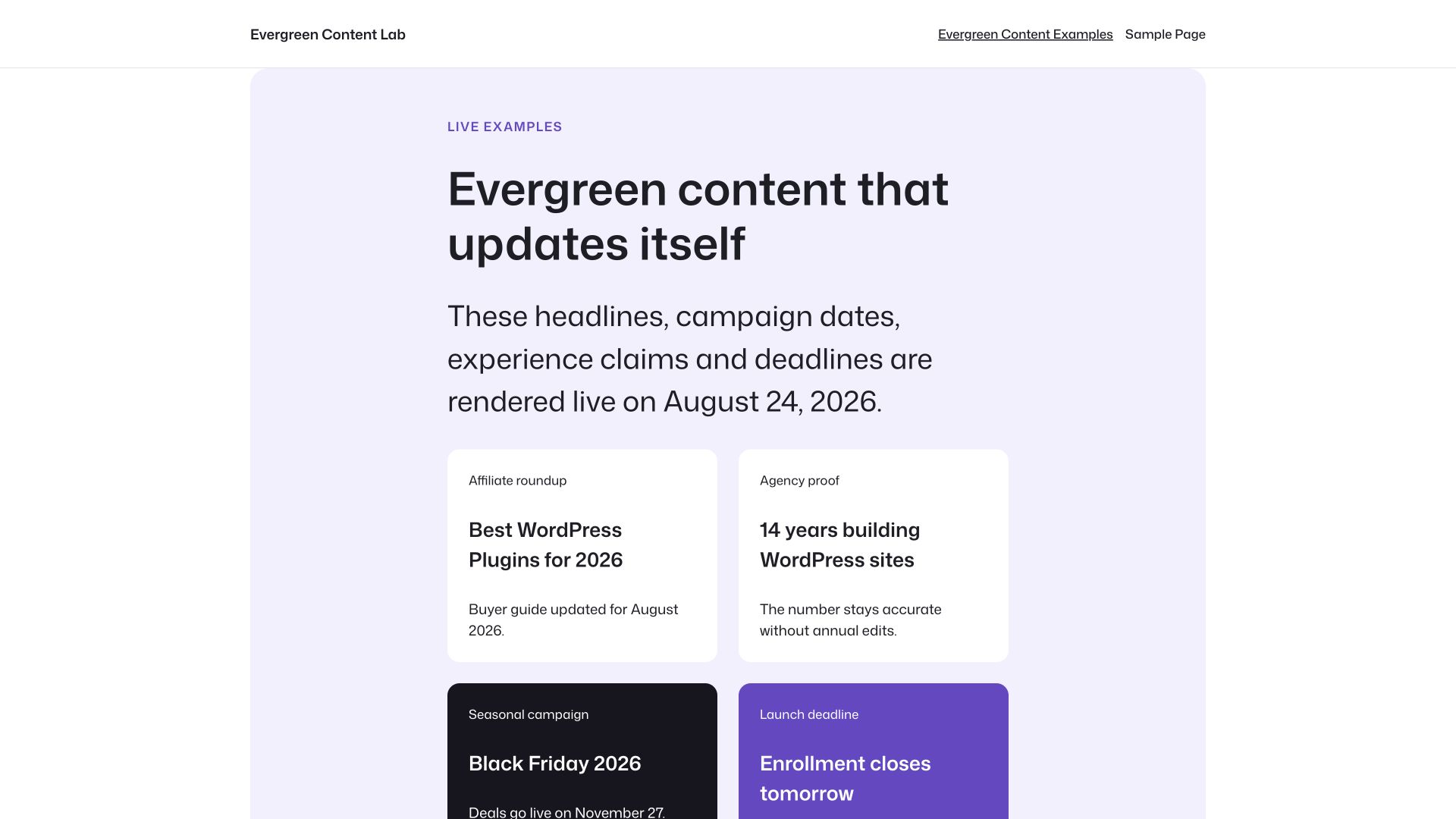
Works in posts, pages, titles, widgets, and SEO meta. Renders in your WordPress language. Perfect for affiliate marketers, bloggers, and anyone who wants evergreen content that updates automatically.
But that’s not it.
- New: Display current season with
[season]shortcode. Supports hemisphere:[season region="south"]for Southern hemisphere. - New: Calculate age with
[age date="1990-05-15"]shortcode. Add ordinal suffix withordinal="true"(e.g., “35th”). - New: Post dates with
[datemodified]and[datepublished]shortcodes. - New: Event dates with
[blackfriday]and[cybermonday]shortcodes.
Gutenberg Blocks
Four dedicated blocks for the Block Editor:
Dynamic Date Block – Insert any dynamic date with live preview:
- Select date type from dropdown (year, month, date, age, season, etc.)
- Configure age format (years only, years & months, full breakdown)
- Set ordinal suffix for age display
- Typography and color controls
- Spacing options (margin, padding)
Live Countdown Block – Real-time countdown powered by WordPress Interactivity API:
- Count days until or since any date
- Auto-updates without page reload, even when the page HTML is cached
- Repeat the countdown annually
- Customizable label text
- Correct singular and plural day labels
- Typography and color styling
- Perfect for event promotions and milestones
Published Date Block – Display the post’s publication date:
- Uses WordPress date format from Settings
- Custom format support
- Typography and color controls
Modified Date Block – Display the post’s last modified date:
- Uses WordPress date format from Settings
- Custom format support
- Typography and color controls
All blocks are found under “Widgets” category in the Block Inserter. Plus, a toolbar button in the formatting toolbar lets you quickly insert any shortcode into text blocks.
Works with popular SEO Plugins
- Supports RankMath, Yoast and SEOPress plugins and can be used to replace all their date based variables.
[year]works as a replacement to%currentyear%,[month]as a replacement to%currentmonth%already.- Use various combinations to make your articles even more dynamic and make your content always SEO ready — no matter the date or year.
- Extremely useful for Affiliate Marketers, Amazon Affiliates and Copywriters.
Tested Support With
- Rank Math
- Rank Math Pro
- SEOPress
- SEOPress Premium
- Yoast SEO
- Yoast SEO Premium
- SureRank
- Gutenberg and Block Editor Content, Headings and Buttons
- All popular Block Editor Addons, including Greenshift, GenerateBlocks, Ultimate Blocks, Kadence Blocks, Spectra, Otter Blocks.
- Elementor Page Builder
- WP Bakery Page Builder
- Visual Composer
- Beaver Builder
- Brizy Builder
- Oxygen Builder
- Bricks Builder
- Jetpack Related Posts
- Intelly Related Posts a.k.a. Inline Related Posts (IRP)
- Advanced Custom Fields (Manual: please see the FAQs)
- Lightweight Accordion (including Schema)
- All major themes including Twenty Twenty-Five, Twenty Twenty-Four, Twenty Twenty-Three, Twenty Twenty-Two, Twenty Twenty-One, Twenty Twenty, Astra, Neve, Hello (Elementor), Kadence, GeneratePress, Blocksy, and OceanWP.
Tested to be totally working with Yoast SEO, SEOPress and Rank Math’s breadcrumbs, custom meta titles, excerpt etc.
Note: Since August 2021, Google has started showing h1 titles in search results, this plugin becomes even more useful as no other SEO plugins adds Current Month, Current Year or Today’s Date in h1 titles except this; keeping the same in SEO meta as well.
More features
- Full Rank Math OpenGraph Support.
- Full Schema and OpenGraph support in YoastSEO.
- Multiple Langauge (WPML) Support: Shortcode renders your site’s defined language.
- Contextual Related Posts Support.
- Jetpack Related Posts Support.
- Totally native. Doesn’t write anything to the database.
- No configuration required.
- The Live Countdown corrects cached day counts in the browser.
Easy to use
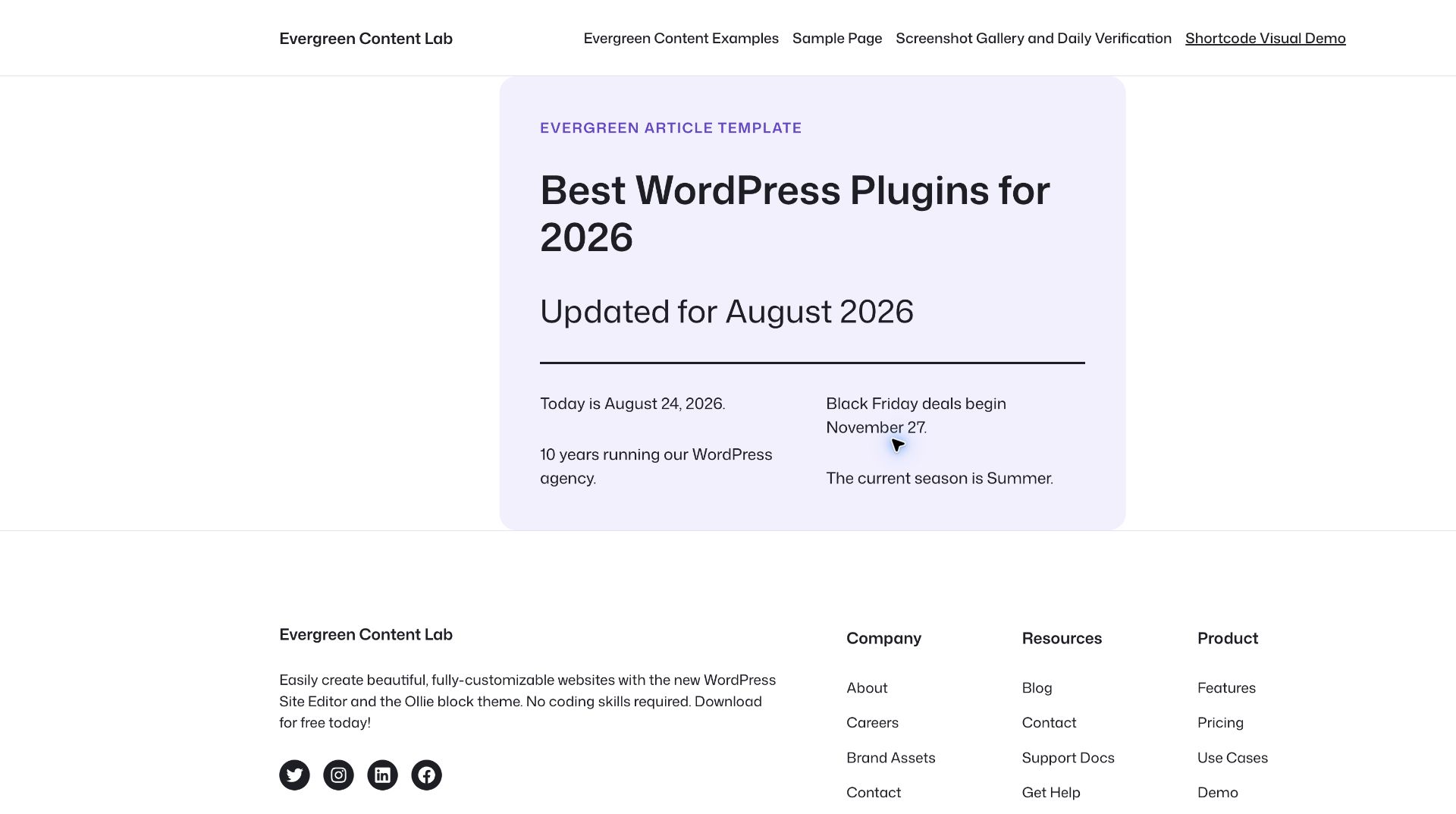
Just install the plugin (see Installation tab) and activate it. Add [year] to render current year, [nyear] to render next year, [pyear] to render previous year, [month] to render current month (full name) and [mon] to render first three letters of months automatically. See Full List of Shortcodes (You can also see this link in Plugins page in your WordPress dashboard).
As the months & years change, these shortcodes get updated into the content and title automatically on the shortcode locations.
Zero bloat. Editor assets load only in the editor, and frontend JavaScript loads only for the Live Countdown block. Shortcode rendering makes no plugin database queries. Ordinary shortcodes are server-rendered, so configure your page cache to expire or purge when a cached year, month, date or age should change.
Also, Dynamic Month & Year into Posts is a totally free plugin. There are no upsells and will never be.
Privacy
Dynamic Month & Year into Posts by Gaurav Tiwari is a completely native shortcode plugin. It has no settings page and does not use any analytics tool to gather or use your data. It’s bloat and ad-free. No notifications. No upgrade notices. Nothing.
Fast Support and Feature Implementation
I will provide instant support for all your queries or feature requests. Use support forum to ask your questions, request new features or report something broken. I will also update the plugin for every major and minor WordPress version.
Compatibility
I use the plugin myself on my primary website and other client sites that I run. I try my best to ensure that this plugin is compatible with every functionality plugin you use. Please let me know if this plugin isn’t compatible with your stack, create a support request and allow me some time.
Please note that some plugins strip shortcodes or disable rendering of shortcodes. In such cases, it’s impossible to implement dynamic dates without rewriting the whole plugin code and breaking a couple of things. But still, I’ll give a try.
Help me with a positive review to keep the development going.
Installation
- Upload the plugin folder to the
/wp-content/plugins/directory, or install the plugin through the WordPress plugins screen directly. - Activate the plugin through the ‘Plugins’ screen in WordPress
- There is no additional configuration required. There will not be any menus or settings for this plugin.
Frequently asked questions
Why would I need this?
If you are an affiliate marketer or blogger who uses months, years and dates in your posts. If you use this plugin to render dynamic month, year, date, next year, and previous year shortcodes, you won’t have to update those posts again and again as time passes.
How can I access settings?
You cannot. There is no options panel because there is no need to have one. Why bloat the WordPress dashboard with more options?
Can I use it in Block Editor or Classic Editor?
Like running text, you can use the shortcodes in both Block Editor and Classic Editor. You can also use the shortcodes in widget areas, including the footer (use-case: Autoupdating Copyright Year) and headers (use-case: Today’s Date).
Will this plugin work in my language?
Yes. The shortcode outputs are WPML ready and render as per the language set in your WordPress dashboard. Since there is no settings page, you don’t have to translate this plugin.
How can I use these shortcodes in my theme/PHP code?
You can use , etc. in themes or in functionality plugins to use these shortcodes.
How can I render shortcodes in ACF fields?
This plugin doesn’t render shortcodes in ACF fields by default (due to various reasons, security being the first). But if you really need to render [year] etc., shortcodes, you can enable selective rendering. Just add this code in your theme’s functions.php file or in the Code Snippets plugin: ACF field type => text add_filter('acf/format_value/type=text', 'do_shortcode'); ACF field name => headline add_filter('acf/format_value/name=headline', 'do_shortcode');
How can I disable shortcode processing in titles or excerpts?
Since 1.7.1, you can use the dmyip_core_filters filter to selectively disable shortcode processing. Add this to your theme’s functions.php or a code snippets plugin: Disable all core filters: add_filter( 'dmyip_core_filters', '__return_empty_array' ); Disable only title processing: add_filter( 'dmyip_core_filters', function ( $filters ) { $filters['the_title'] = false; return $filters; } ); Available keys: the_title, single_post_title, wp_title, the_excerpt, get_the_excerpt, get_the_archive_title. All default to true.
Changelog
1.8.1
- Fixed: Recurring February 29 countdowns now produce the same valid leap-day result in PHP and the browser.
- Fixed: Invalid countdown dates no longer display as zero days, and the default day label is plural-aware.
- Fixed: WP-CLI accepts both complete plugin shortcodes and date types with named options.
- Improved: Added WordPress 7.1 compatibility, content-role block metadata, current dependency security fixes and wider runtime checks.
- Improved: Corrected countdown, editor, cache, pattern and WP-CLI documentation.
1.8.0
- Added: Recurring, cache-aware Live Countdown block with leap-day handling and Block Bindings presets.
- Improved: All date calculations now use the WordPress site timezone and calendar-day arithmetic across daylight-saving changes.
- Improved: Searchable shortcode picker, block previews, toolbar accessibility, responsive editor controls and theme-neutral patterns.
- Improved: Shortcode processing in titles, excerpts and supported integrations is limited to this plugin’s tags.
- Fixed: Countdown Interactivity API code now ships as a JavaScript module.
- Changed: Minimum supported WordPress version is 6.5.
- Changed: Removed duplicate legacy runtime files and consolidated rendering around one date engine.
1.7.4
- Changed: Tested up to WordPress 7.0.
1.7.3
- Fix:
[season]shortcode not working in legacy (non-Composer) installations. - Fix:
[age]shortcode missingordinal/rankattributes in legacy installations. - Fix: Duplicate Open Graph filter registrations in legacy Rank Math integration.
- Fix: Duplicate Elementor and CRP filter registrations in legacy SEOPress file.
1.7.2
- New: Bricks Builder integration — shortcodes now render inside Bricks dynamic data elements.
- New: Published Date and Modified Date Gutenberg blocks.
- New:
dmyip_core_filtersfilter to selectively disable shortcode processing on WordPress core filters (titles, excerpts, archive titles). Props @meteorlxy. - Improved: Release workflow auto-generates changelogs and attaches them to GitHub releases.
- Fix:
[year]shortcode with large negative offsets (e.g.,[year n=-2003]) now returns correct results instead of wrong/empty values. - Fix:
[year]shortcode no longer zero-pads results (e.g.,[year n=-1100]returns926instead of0926).
1.7.0
- New:
[season]shortcode to display current season (Spring, Summer, Fall, Winter)[season]– Northern hemisphere (default)[season region="south"]– Southern hemisphere (reversed seasons)
- New: Ordinal suffix support for
[age]shortcode[age date="1990-05-15" ordinal="true"]– Returns “35th”[age date="1990-05-15" rank="true"]– Alias for ordinal
- Improved: Proper handling of special ordinals (11th, 12th, 13th)
Screenshots
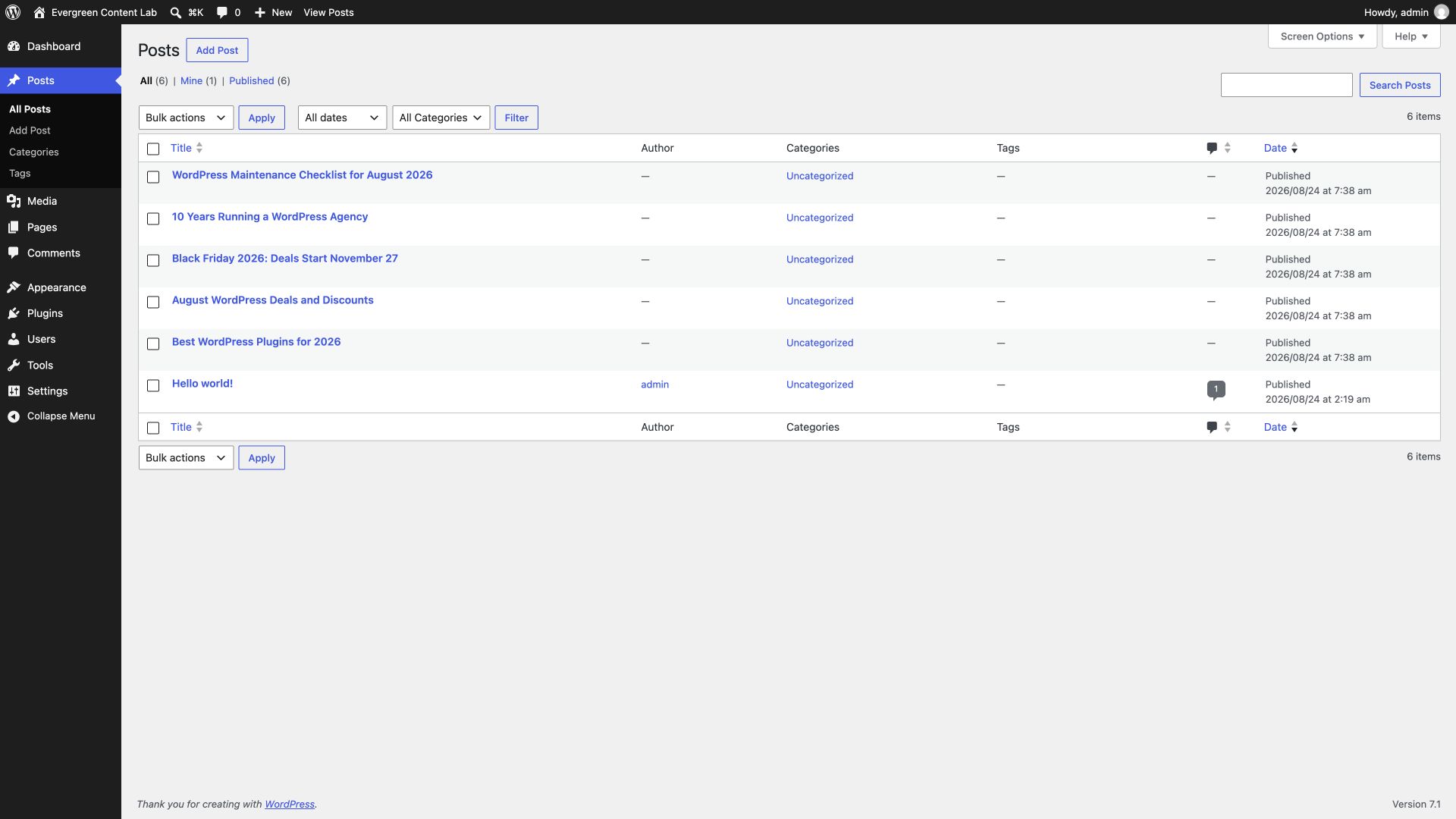
For developers
Is this your plugin? Show off the numbers.
Add a live badge to your site, docs or GitHub README. It updates on its own — no account needed.
Best Dynamic Month & Year into Pos… alternatives
All dates plugins →




FAQ
Dynamic Month & Year into Posts: quick answers
Straight answers, pulled from live WordPress.org data.
Live data from WordPress.org · checked Sep 26, 2026
Is Dynamic Month & Year into Posts free?
Yes. Dynamic Month & Year into Posts is free to download and use from the official WordPress.org plugin directory.
Is Dynamic Month & Year into Posts safe to use in 2026?
Yes — Dynamic Month & Year into Posts is a safe, well-maintained plugin to use in 2026. It runs on 8K+ sites, is rated 5/5 and was last updated 1 month ago, and scores 88/100 on our health check.
How many websites use Dynamic Month & Year into Posts?
Dynamic Month & Year into Posts is active on 8K+ WordPress websites and has been downloaded 118,809 times since it launched in February 2020. It was downloaded 5,656 times in the last 30 days.
Does Dynamic Month & Year into Posts work with WordPress 7.1?
Yes. The developer has tested Dynamic Month & Year into Posts up to WordPress 7.1.2, the latest release. It requires WordPress 6.5 or newer.
What PHP version does Dynamic Month & Year into Posts need?
Dynamic Month & Year into Posts requires PHP 7.4 or higher. Most hosts run PHP 8.x today, so it works on any modern WordPress hosting.
When was Dynamic Month & Year into Posts last updated?
The latest version, 1.8.1, was released on August 27, 2026 (1 month ago).
Who makes Dynamic Month & Year into Posts?
Dynamic Month & Year into Posts is developed and maintained by Gaurav Tiwari.
What are the best alternatives to Dynamic Month & Year into Posts?
The most popular alternatives to Dynamic Month & Year into Posts are Calendar (4K+ installs), Hide My Dates (400+ installs) and Product Delivery Date (200+ installs).
Powered by PageForge
Want thousands of pages that rank like these? Build them in an afternoon.
This directory runs on the same engine as PageForge. Turn any spreadsheet, CSV or API into thousands of fast, SEO-ready WordPress pages — with schema, internal links and AI-written copy baked in.
- CSV, Google Sheets & API data sources
- AI content, schema & internal links per page
- Works with Elementor, Gutenberg, Yoast & Rank Math
- Free on WordPress.org — no credit card


