


Drag and Drop File Upload for Elementor Forms
Allows you to add powerful Drag & Drop or choose Multiple Files Uploading area to your Elementor Forms.

Solid choice
Drag and Drop File Upload for E… is a solid plugin choice in 2026, with a few things worth checking first. It runs on 1K+ sites, is rated 5/5 and was last updated 3 weeks ago, and scores 77/100 on our health check.
- Actively developed — last update 3 weeks ago
- Tested with the latest WordPress (7.1)
- Very few reviews so far
How does it stack up?
Side-by-side on installs, updates, ratings & support



Daily downloads
Download spikes usually follow a new release — each site that auto-updates counts as a download.
Rankings
Where Drag and Drop File Upload f… stands todayWordPress.org search rankings
Live position in the plugin search, top 100| Keyword | Position |
|---|---|
| elementor forms | #33 |
| Elementor Forms upload | #13 |
| File field | #24 |
| uploads | #27 |
| uploads field | #23 |
Version adoption
Share of active sites per release.
Rating breakdown
★★★★★★★★★★ 5 from 4 reviews
About Drag and Drop File Upload for Elementor…
From the official readme · v1.6.2Description
DEMO: https://demo.add-ons.org/demo-drag-and-drop-fields/
Download Pro Version: https://add-ons.org/plugin/drag-and-drop-file-upload-for-elementor-forms-pro/
Document: https://add-ons.org/document-elementor-drag-and-drop-multiple-file-upload/
Drag and Drop File Upload for Elementor Forms is a powerful, lightweight, and user-friendly add-on designed to enhance the default Elementor form capabilities. If you are looking for an intuitive way to collect files, documents, or images from your users, this plugin provides a robust multiple file upload area completely integrated with the native Elementor Forms builder.
Enhance your user experience by allowing visitors to effortlessly drag and drop files or use the traditional browse button. With full control over file size limits, allowed file types, and upload quantity, you can securely and effectively collect the exact assets you need without cluttering your inbox.
Whether you are collecting resumes, user-generated content, portfolio submissions, or support documents, this plugin offers premium functionality including direct integration with Dropbox and the WordPress Media Library.
Features
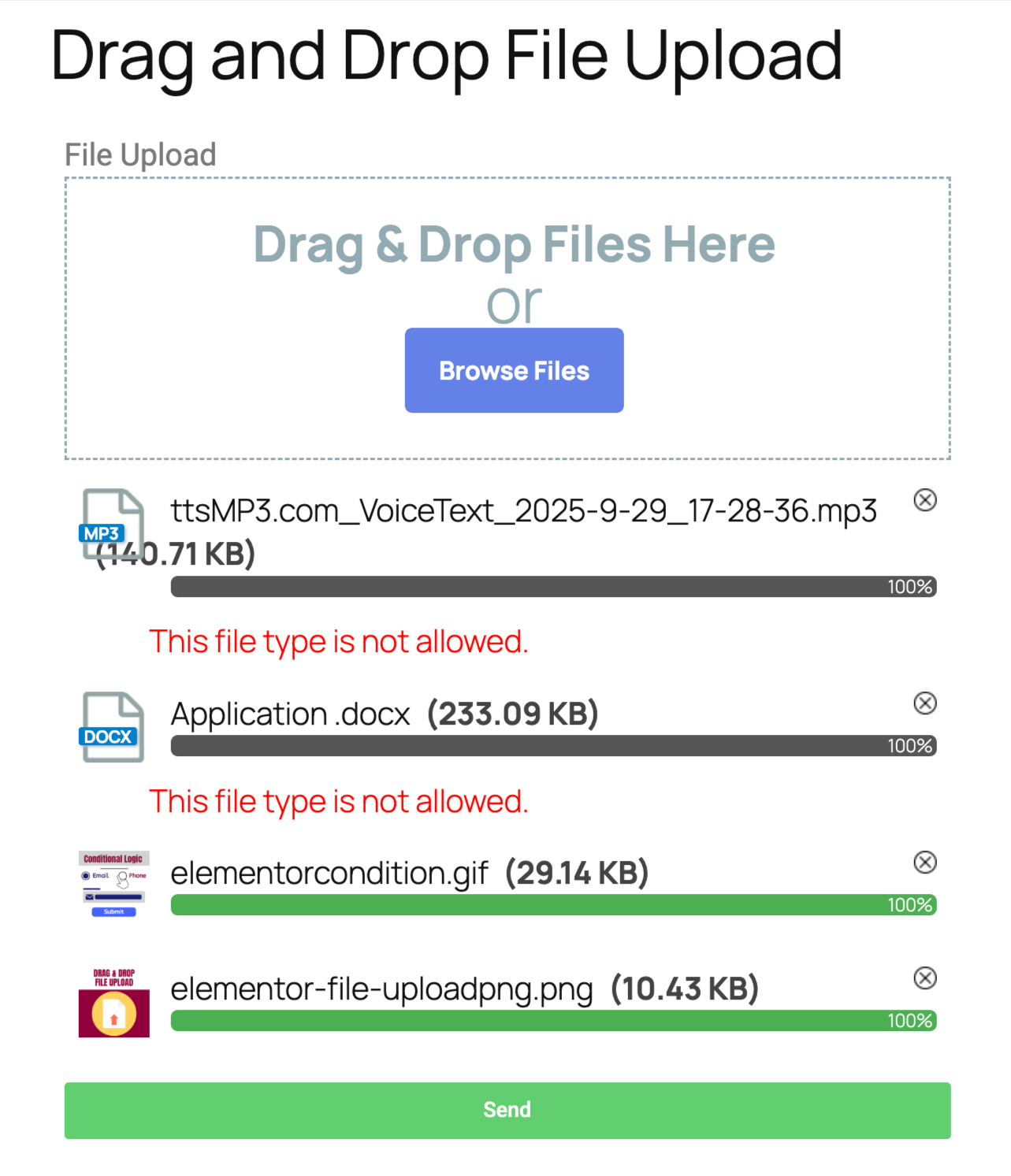
- Seamless Drag & Drop Interface: Provide a modern, interactive upload area that users love.
- Multiple Files Upload: Allow users to upload one or several files at once.
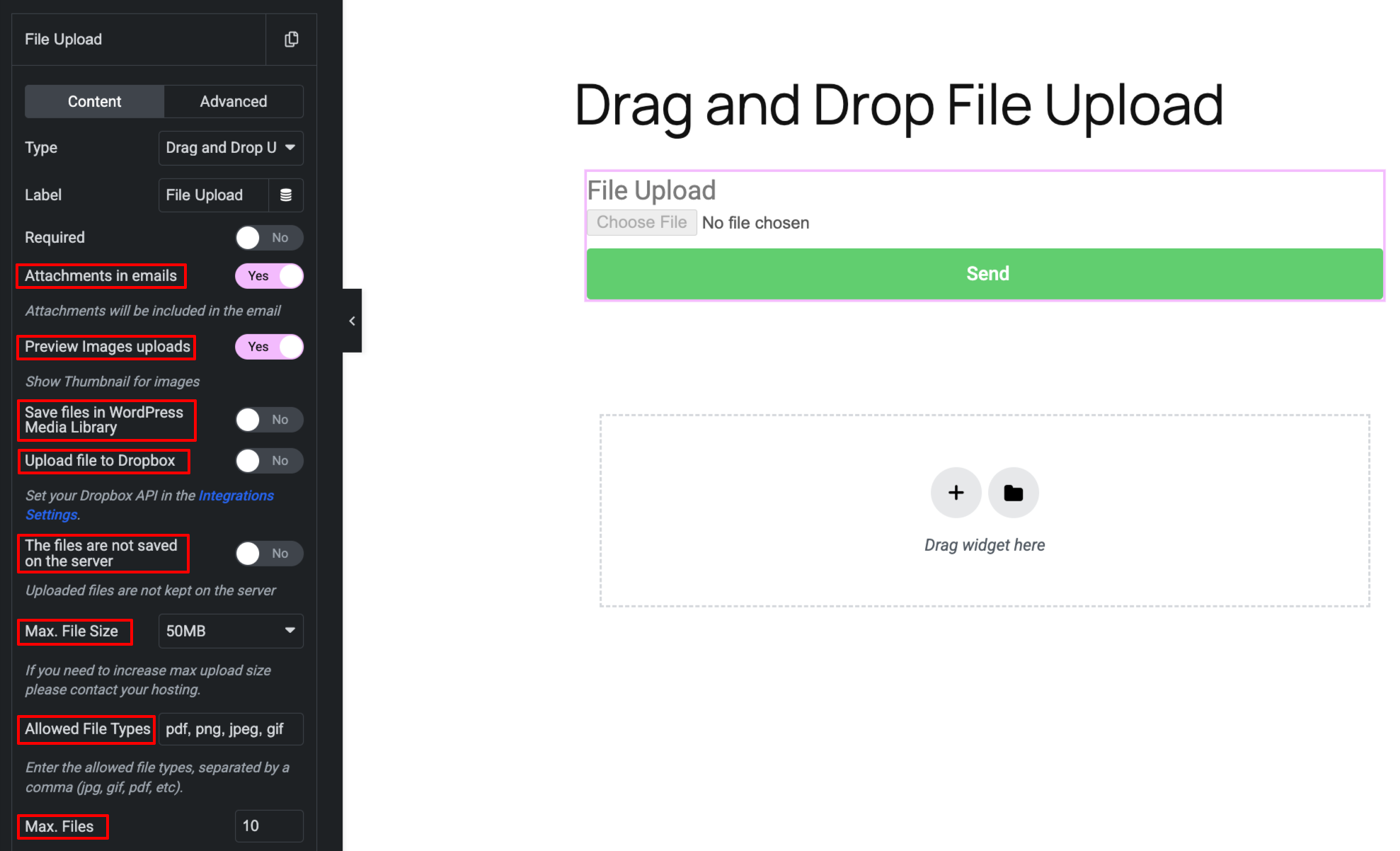
- Limit Upload Quantity: Prevent spam by restricting the maximum number of files per submission.
- Secure File Type Validation: Specify exact file extensions (e.g., pdf, docx, jpg, zip) to restrict unwanted uploads.
- File Size Validation: Set maximum file size limits to save server storage and improve performance.
- Image Thumbnails Preview: Instantly display attractive thumbnail previews for uploaded images.
- Email Attachments: Automatically attach uploaded files directly to your Elementor Form notification emails, or send them as clean HTML links.
- Save to WordPress Media Library: Store submitted files directly within your native WP Media dashboard.
- Save to Dropbox: Offload file storage by automatically syncing user uploads directly to your Dropbox account.
- Fully Customizable UI: Tweak button styles, padding, colors, and borders right from the Elementor editor.
- Translation Ready: Easily translate “Drag & Drop Files Here” or “Browse Files” buttons to any language.
- Mobile Responsive: Flawlessly works on all mobile devices and touch screens.
Pro Versions
- Save files to Dropbox
- Show Thumbnail for images
- Flash Message Support
Installation
Normal installation
- Download the drag-and-drop-file-upload-for-elementor-forms.zip file to your computer.
- Unzip the file.
- Upload the
drag-and-drop-file-upload-for-elementor-formsdirectory to your/wp-content/plugins/directory. - Activate the plugin through the ‘Plugins’ menu in WordPress.
- Document: https://add-ons.org/document-elementor-drag-and-drop-multiple-file-upload/
Changelog
1.6.0
- Fixed: Create a temporary upload directory and automatically delete its contents daily to prevent unnecessary files from accumulating on the server.
1.5.7
- Fixed: After success submission, the file upload field is not reset
1.5.6
- Changed: move_uploaded_file to wp_handle_upload
1.5.1
- Changed: Hide style on mobile
1.5.0
- Fixed: Security hole
1.4.3
- Fixed: Remove files
Screenshots
For developers
Is this your plugin? Show off the numbers.
Add a live badge to your site, docs or GitHub README. It updates on its own — no account needed.
Best Drag and Drop File Upload for… alternatives
All elementor forms plugins →





FAQ
Drag and Drop File Upload for Eleme…: quick answers
Straight answers, pulled from live WordPress.org data.
Live data from WordPress.org · checked Oct 14, 2026
Is Drag and Drop File Upload for E… free?
Yes. Drag and Drop File Upload for E… is free to download and use from the official WordPress.org plugin directory.
Is Drag and Drop File Upload for E… safe to use in 2026?
Drag and Drop File Upload for E… is a solid plugin choice in 2026, with a few things worth checking first. It runs on 1K+ sites, is rated 5/5 and was last updated 3 weeks ago, and scores 77/100 on our health check.
How many websites use Drag and Drop File Upload for E…?
Drag and Drop File Upload for E… is active on 1K+ WordPress websites and has been downloaded 14,104 times since it launched in July 2024. It was downloaded 1,280 times in the last 30 days.
Does Drag and Drop File Upload for E… work with WordPress 7.1?
Yes. The developer has tested Drag and Drop File Upload for E… up to WordPress 7.1.3, the latest release. It requires WordPress a recent version or newer.
What PHP version does Drag and Drop File Upload for E… need?
Drag and Drop File Upload for E… requires PHP 5.2 or higher. Most hosts run PHP 8.x today, so it works on any modern WordPress hosting.
When was Drag and Drop File Upload for E… last updated?
The latest version, 1.6.2, was released on September 24, 2026 (3 weeks ago).
Who makes Drag and Drop File Upload for E…?
Drag and Drop File Upload for E… is developed and maintained by add-ons.org.
What are the best alternatives to Drag and Drop File Upload for E…?
The most popular alternatives to Drag and Drop File Upload for E… are FormsDB (20K+ installs), GSheetConnector (9K+ installs) and Telephone field for Element… (4K+ installs).
Powered by PageForge
Want thousands of pages that rank like these? Build them in an afternoon.
This directory runs on the same engine as PageForge. Turn any spreadsheet, CSV or API into thousands of fast, SEO-ready WordPress pages — with schema, internal links and AI-written copy baked in.
- CSV, Google Sheets & API data sources
- AI content, schema & internal links per page
- Works with Elementor, Gutenberg, Yoast & Rank Math
- Free on WordPress.org — no credit card


