



Download Media File
Adds a "Download" button to the WordPress media modal for quick downloads.

Use with caution
Download Media File works, but test it on a staging site before relying on it in 2026. It runs on 400+ sites, is rated 5/5 and was last updated 5 months ago, and scores 55/100 on our health check.
- Small user base (400+ active installs)
- Very few reviews so far
- Only tested up to WordPress 6.9 (latest is 7.1)
Daily downloads
Download spikes usually follow a new release — each site that auto-updates counts as a download.
Rankings
Where Download Media File stands todayWordPress.org search rankings
Live position in the plugin search, top 100| Keyword | Position |
|---|---|
| download-media-file | #5 |
Version adoption
Share of active sites per release.
Rating breakdown
★★★★★★★★★★ 5 from 2 reviews
About Download Media File
From the official readme · v1.0.2Description
Download Media File is a lightweight plugin that adds a Download button to the media modal. It lets you download files from the dashboard without opening them in a new tab.
No settings needed. Activate the plugin, and the button will appear automatically in the media modal.
Installation
Automatic installation
Automatic installation is the easiest option as WordPress handles the file transfers itself and you don’t even need to leave your web browser. To do an automatic install, log in to your WordPress admin panel, navigate to the Plugins menu and click Add New.
In the search field type Download Media File and click Search Plugins. Once you’ve found the plugin you can view details about it such as the point release, rating, and description. Most importantly, of course, you can install it by clicking Install Now.
Manual installation
The manual installation method involves downloading the plugin and uploading it to your web server via your favorite FTP application.
- Download the plugin file to your computer and unzip it
- Using an FTP program, or your hosting control panel, upload the unzipped plugin folder to your WordPress installation’s
wp-content/plugins/directory. - Activate the plugin from the Plugins menu within the WordPress admin
Frequently asked questions
Can I show the download button on the front end?
No. The plugin doesn’t offer this feature.
Changelog
1.0.2
- Update author name, URL, and contributors.
- Update descriptions and “Tested up to” version compatibility.
- Align stable tag with repository structure.
- Improve download handling for large files and different file types.
- Fallback to attachment URL when the local file is not available (offloaded media).
- Add safer download headers and better permission checks.
1.0.1
- Refactor the plugin
1.0.0
- Initial release.
Screenshots
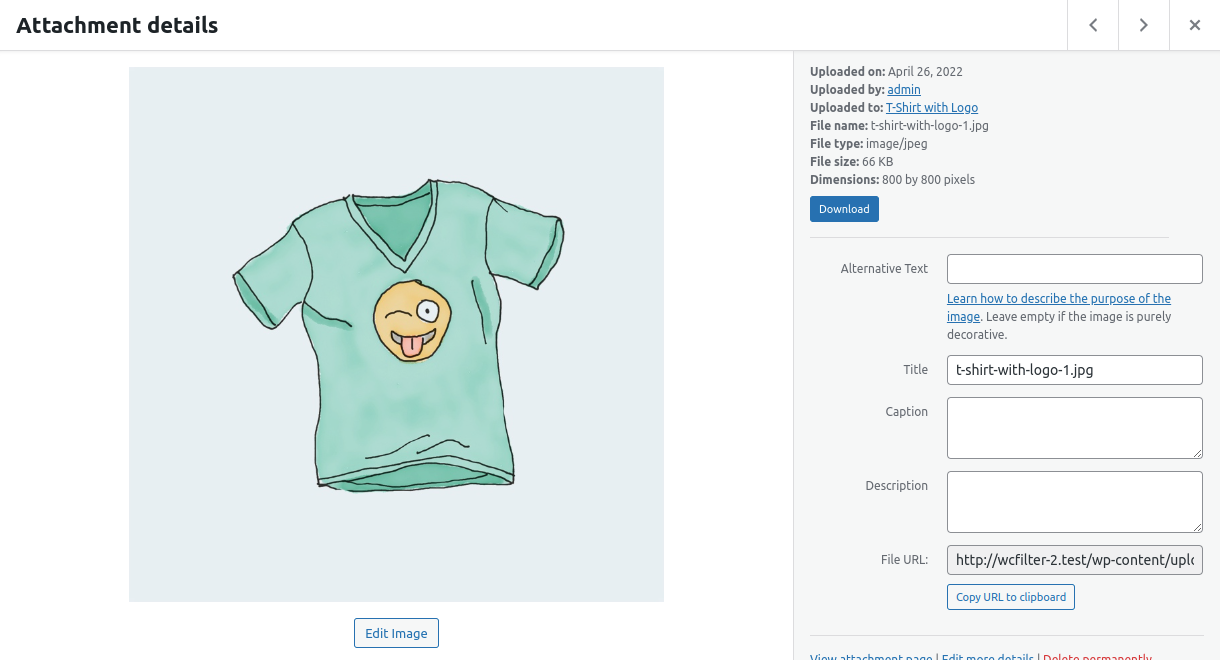
For developers
Is this your plugin? Show off the numbers.
Add a live badge to your site, docs or GitHub README. It updates on its own — no account needed.
FAQ
Download Media File: quick answers
Straight answers, pulled from live WordPress.org data.
Live data from WordPress.org · checked Oct 8, 2026
Is Download Media File free?
Yes. Download Media File is free to download and use from the official WordPress.org plugin directory.
Is Download Media File safe to use in 2026?
Download Media File works, but test it on a staging site before relying on it in 2026. It runs on 400+ sites, is rated 5/5 and was last updated 5 months ago, and scores 55/100 on our health check.
How many websites use Download Media File?
Download Media File is active on 400+ WordPress websites and has been downloaded 6,384 times since it launched in October 2018. It was downloaded 233 times in the last 30 days.
Does Download Media File work with WordPress 7.1?
Download Media File is officially tested up to WordPress 6.9.10, while the latest release is 7.1.3. It may still work, but try it on a staging site first.
What PHP version does Download Media File need?
Download Media File requires PHP 7.4 or higher. Most hosts run PHP 8.x today, so it works on any modern WordPress hosting.
When was Download Media File last updated?
The latest version, 1.0.2, was released on May 20, 2026 (5 months ago).
Who makes Download Media File?
Download Media File is developed and maintained by Mainul Hassan.
Powered by PageForge
Want thousands of pages that rank like these? Build them in an afternoon.
This directory runs on the same engine as PageForge. Turn any spreadsheet, CSV or API into thousands of fast, SEO-ready WordPress pages — with schema, internal links and AI-written copy baked in.
- CSV, Google Sheets & API data sources
- AI content, schema & internal links per page
- Works with Elementor, Gutenberg, Yoast & Rank Math
- Free on WordPress.org — no credit card


