



Domain Mapping System | Create Microsites with Multiple Alias Domains (multisite optional)
Domain Mapping System is the most powerful way to manage alias domains and map them to any published resource - creating Microsites with ease!

Use with caution
Domain Mapping System works, but test it on a staging site before relying on it in 2026. It runs on 2K+ sites, is rated 4.5/5 and was last updated 4 months ago, and scores 60/100 on our health check.
- Loved by users — 4.5/5 from 56 reviews
How does it stack up?
Side-by-side on installs, updates, ratings & support



Daily downloads
Download spikes usually follow a new release — each site that auto-updates counts as a download.
Rankings
Where Domain Mapping System stands todayWordPress.org search rankings
Live position in the plugin search, top 100| Keyword | Position |
|---|---|
| alias | #2 |
| multidomain | #2 |
| multiple domains | #1 |
| multisite | #29 |
| subdomain | #10 |
Version adoption
Share of active sites per release.
Rating breakdown
★★★★★★★★★★ 4.5 from 56 reviews
About Domain Mapping System
From the official readme · v2.2.7Description
Domain Mapping System is the best way to manage multiple domains on your WordPress site and point them to any published resource, including Posts, Pages, Products, Categories, or other Custom Post Types and Taxonomies.
Whether you’re just looking for the simplicity of multiple domain mapping in a single WordPress site, or you’re creating a more complex multi-pronged WordPress project, Domain Mapping System can save a great deal of time and hassle over using multisite or creating standalone WordPress installs.
EXAMPLE USE-CASES
- Targeting specific audiences with branded domains, such as by country or language.
- Organizations that want a different section of their website for each of their physical locations.
- Expanding site reach to new audiences/locations without changing your primary domain.
- Saving time over Multisite, or supplementing a Multisite with Microsite capabilities
🔢 MULTIPLE DOMAINS IN A SINGLE WORDPRESS SITE
Assign content to each domain from a single WordPress Admin Dashboard.
🚀 MAP UNLIMITED ALIAS DOMAINS COMPLETELY FREE
Manage and map as many alias domains as you want for complete control.
🗺️ MAP CONTENT TO ANY DOMAIN
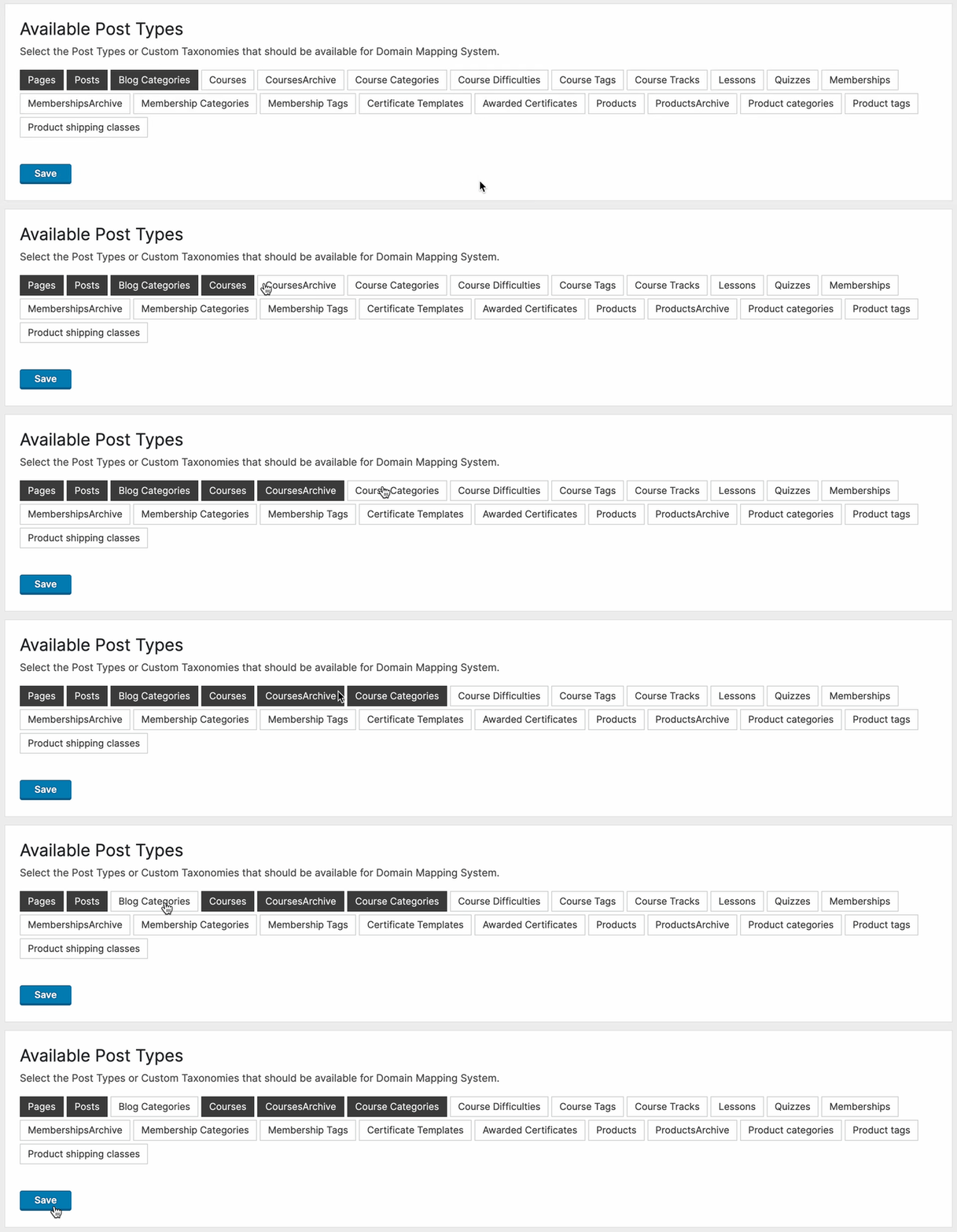
Map alias domains to any Post, Page, Product, or Custom Post Type, including Blog Categories, Products Archive, custom taxonomies, and more.
🔍 OPTIMIZE YOUR SEO & MARKETING STRATEGY
Optimize your site for search engines with full Yoast SEO integration, including the option to add custom Titles, Descriptions, and Keywords, as well as Sitemap for each mapped domain.
🔀 SUBDOMAIN MAPPING
Map subdomains to your primary WordPress site, so you don’t have to create a second WordPress install or buy a second domain.
🌐 MULTISITE SUPPORTED
Activate Domain Mapping System on your WordPress MU multisite network for each of your network sites. Now, multisite is even more powerful with multiple domain management for every site on your network, so you can enable BYOD (Bring Your Own Domain) for your users.
🇺🇳 LANGUAGE PER DOMAIN
Activate the TranslatePress multilingual plugin and attach each language to a specific domain. Even the language switchers work perfectly out of the box. [PRO]
🧩 CREATE “MICROSITES” – GROUP CONTENT BY DOMAIN
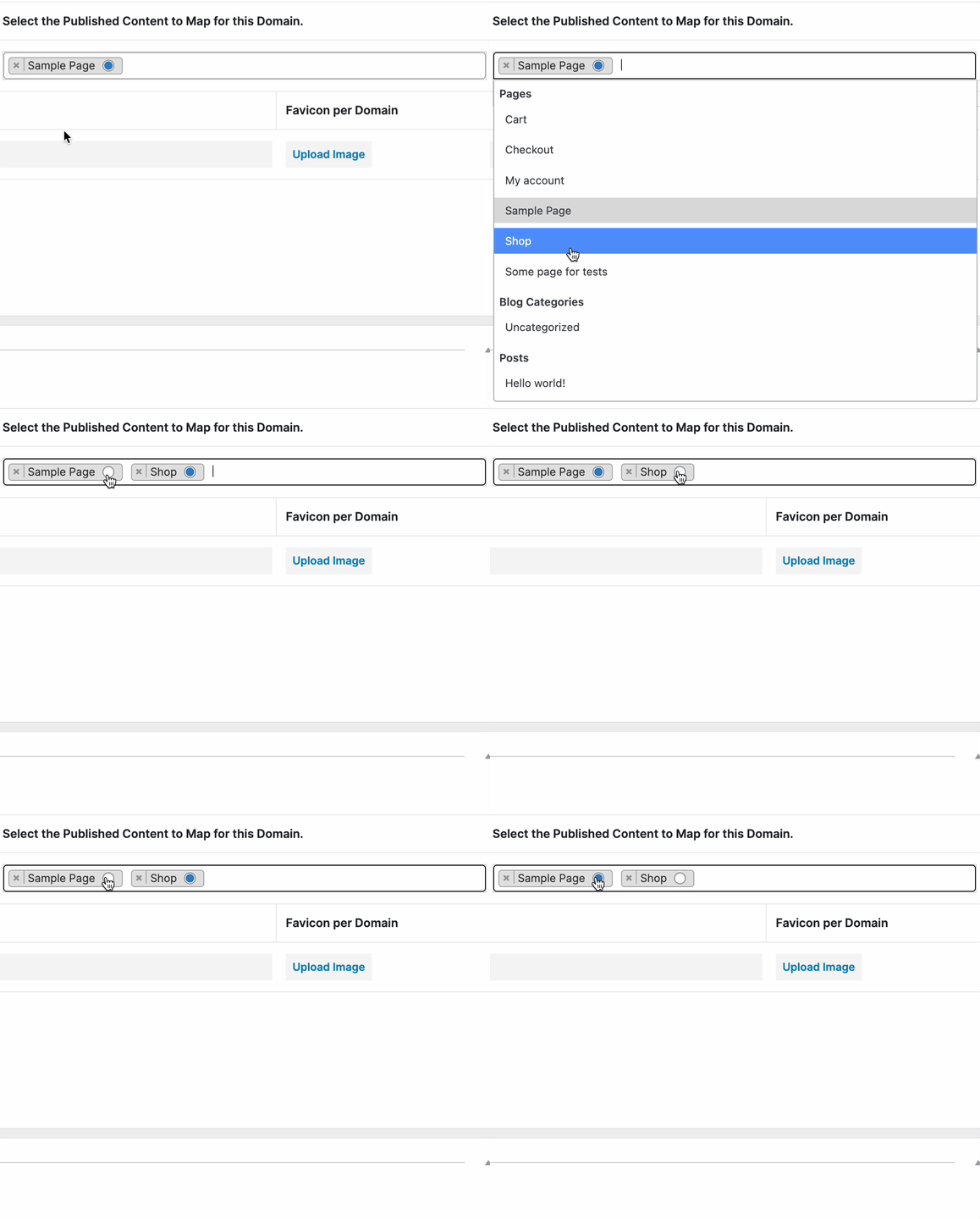
Create microsites by grouping your published resources (pages, posts, products, custom post types) around a specific domain – a much less complex multisite alternative. [PRO]
🌍 GLOBAL DOMAIN MAPPING
Easily map every unmapped page on your site in one click – so visitors only see mapped domains for all content on your site. [PRO]
🗂 SUBDIRECTORY MAPPING
Map subdirectory URLs of your main site. E.g. – your-site.com/landing-page/ can be set to display the content from the post your-site.com/example-page/landing-page/. [PRO]
📚 ARCHIVE, CATEGORY, AND CUSTOM TAXONOMY MAPPING
Want to map a specific Blog category and all its posts to a different domain automatically? Now you can! Map a domain to any archive, category, or custom taxonomy created by a plugin or theme. [PRO]
↪️ FORCE REDIRECT TO MAPPED PAGES
Want to hide the “unmapped” version of your page? There’s a checkbox that allows you to “Force redirect all visitors to the mapped version of a page.” [PRO]
🛒 WOOCOMMERCE INTEGRATION
Map your Shop page and all Products. You can also map a specific product Category and all the products in the category automatically. [PRO]
🛒 ALIAS & SUBDOMAIN AUTHENTICATION
Allow users to login to Alias Domains or Subdomains of your site, effectively acting as a standalone site for any protected login area, such as WooCommerce Account pages. [PRO]
⏩ WELL-DOCUMENTED SETUP PROCESS
Domain Mapping System requires a bit of knowledge about DNS and server side configuration, so we’ve helped out by documenting the simple steps you’ll need to take. Contact support with any questions.
🎨 BRANDING PER DOMAIN (FAVICON)
Customize the favicon that appears in your website visitors’ browser for each domain mapped to your site.
🔒 SECURE ALL YOUR DOMAINS
Use SSL across all your domains with one WordPress install (some server configuration required).
⚒️ DEVELOPER FRIENDLY
Take advantage of the REST API to add/delete domains automatically.
DETAILED USE-CASE
Let’s say you own 2 domains:
Primary domain (WordPress site): my-awesome-site.com
Secondary domain: my-cool-site.com
With Domain Mapping System, you can map the secondary domain to any Post, Page, Product, or Custom Post Type on your primary site:
my-cool-site.com will display content from
my-awesome-site.com/any-post-you-want/
The plugin does not redirect visitors – the browser URL bar displays the secondary domain my-cool-site.com. This happens using some awesome code, so feel free to explore 😊
IMPORTANT CONFIGURATION INSTRUCTIONS
In order for the plugin to work:
-
You must set DNS records (both domain A Records should point to the same server)
-
You must add your mapped domains as an Alias in cPanel or in your server configuration (the root folder for both domains should be your WP install)
For detailed instructions, please see our Documentation.
FREE FEATURES
- Map unlimited domains
- Map domains to any post, page, product, or custom post type generated by other plugins
- Map subdomains
- Multisite supported (requires custom sunrise.php, please see our documentation.
- Query string parameters (used for UTMs or search results) are supported out of the box.
PRO FEATURES
- Create “Microsites” – set a different homepage and inner pages for each domain
- Global Domain Mapping – automatically map all published content on your site
- Subdirectory mapping
- Force redirect visitors mapped domains
- Favicon per domain
- WooCommerce Integration for Shop, Checkout, Cart pages
- Custom code per domain
- Global Parent Page Mapping
- Global Archive Mapping
- Global/Selective URL Rewriting
- Yoast SEO Integration
- 1on1 support
WHAT CAN I DO WITH EACH FEATURE?
Unlimited Domain Mapping: Expand your online presence without limitations, enabling you to manage multiple domains effortlessly from a single WordPress Dashboard.
Flexible Mapping Options: Seamlessly map domains to various types of content, including posts, pages, products, custom post types, and more, enhancing your site’s organizational structure and user experience.
Subdomain Mapping: Easily extend your site’s reach by mapping subdomains, enabling you to efficiently manage diverse content.
Multisite Compatibility: Harness the power of WordPress Multisite while effortlessly integrating with the Domain Mapping System, streamlining management of multiple domains across multiple network sites.
Microsite Creation: Tailor each domain with unique homepages and inner pages, empowering you to create distinct online experiences catered to specific audiences or purposes.
Automatic Global Domain Mapping: Simplify domain management by automatically mapping all published content, ensuring consistency and coherence across your entire site.
Subdirectory Mapping: Organize your site structure effectively by mapping domains to specific subdirectories, facilitating intuitive navigation and content discovery.
Visitor Redirection: Enhance user experience and maintain brand consistency by seamlessly redirecting visitors to the proper mapped domain based on the domain being viewed.
Customized Favicon Support: Reinforce your brand identity across multiple domains with custom favicons, enhancing recognition and user engagement.
WooCommerce Integration: Seamlessly integrate with WooCommerce, optimizing the shopping experience by mapping essential pages such as Shop, Checkout, and Cart across domains.
Query String Support: Maximize marketing effectiveness by preserving UTM parameters on mapped domains, enabling accurate tracking and analysis of user interactions.
Global Parent Page Mapping: Ensure consistency in site structure and navigation by globally mapping parent pages across domains, simplifying content organization.
URL Rewriting Flexibility: Tailor URL structures to meet specific requirements or preferences, enhancing SEO optimization and user-friendly navigation.
Yoast SEO Integration: Augment your site’s search engine visibility and performance with seamless integration with Yoast SEO, enabling comprehensive optimization across mapped domains.
🚧 ROADMAP > – Feel free to submit feature requests!
Installation
Starting with Domain Mapping System consists of 3 steps: Configuring your server, installing the plugin, and mapping domains.
SERVER CONFIGURATION REQUIREMENTS
- Please see our Documentation to configure your server properly.
INSTALL DOMAIN MAPPING SYSTEM FROM WITHIN WORDPRESS
- Visit the plugins page within your dashboard and select ‘Add New’;
- Search for ‘Domain Mapping System’;
- Install & Activate Domain Mapping System;
- Go to ‘after activation’ below.
INSTALL DOMAIN MAPPING SYSTEM MANUALLY
- Upload the ‘domain-mapping-system’ folder to the /wp-content/plugins/ directory;
- Activate the Domain Mapping System plugin through the ‘Plugins’ menu in WordPress;
- Go to ‘after activation’ below.
AFTER ACTIVATION
- You should be redirected to the settings area.
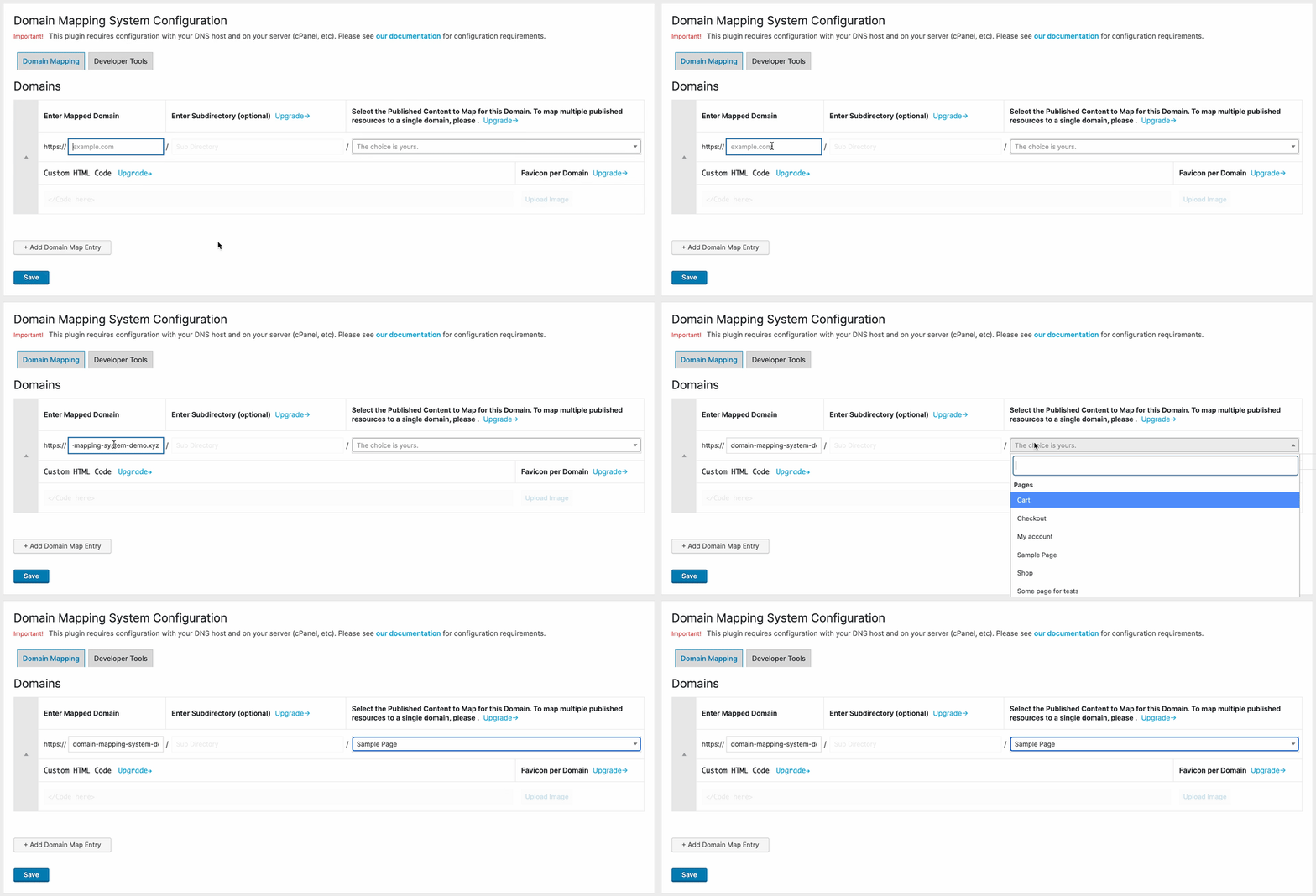
- Add your alias domain and the published resource you want to use to display content for the alias domain.
- Visit your alias domain!
- Be sure to visit our Troubleshooting Guide for any issues.
Frequently asked questions
What is Domain Mapping?
Domain Mapping is the process of adding multiple domains to a single website. Depending on your Content Management System or coding framework, mapping multiple domains to your site may be a more simple or more complex process. With WordPress, it’s very easy to map multiple domains to a single WordPress installation using either multisite or a plugin like Domain Mapping System.
What is a mapped domain?
A mapped domain in WordPress is a domain that has a specific page or group of pages associated with it. A mapped domain is usually not the website’s primary domain, but is usually an Alias or Addon Domain that is mapped to the primary site domain. The mapping then takes place at the website level, as the website should be configured to serve content for both the mapped domain and primary domain.
How do I add multiple domains to a WordPress website?
There are a few steps to map multiple domains to your WordPress website, including: Configure your DNS Records. Setup your server with an Alias or Addon Domain. The next step would be mapping content properly for your mapped domains. Read more in our Documentation.
How do I map a domain in WordPress?
There are 3 steps to mapping a domain in WordPress: Configure your DNS settings. Set up your server properly for an Alias or Addon domain. Install Domain Mapping System and map domains to the desired content. Once you’ve followed these steps, you should then be able to navigate your website with the content being served for your mapped domains. Read more in our Documentation.
How much does Domain Mapping cost? Is it free?
Yes! Domain mapping is free in WordPress. You can map unlimited domains to your WordPress website depending on your server configuration. To create Microsites with Domain Mapping System and access other powerful features, please see our pricing.
What are DNS Records?
DNS stands for Domain Name System. The purpose of DNS is to translate your server’s IP address into a friendly, easily-legible name that humans can remember. It’s much easier for humans to remember a name than it is a string of numbers. DNS Records direct the different types of traffic for a domain name to the proper server(s). Each DNS Record corresponds to a different type of service or traffic your domain might receive. For example: A records are set for “hosts” and standard website traffic CNAME records are set as “Aliases” or Canonical records MX records direct email traffic TXT records…
Where is my DNS hosted?
Your DNS is hosted where your Name Servers are pointing. Your Name Servers are specified with your Domain Name Registrar. If you’ve just purchased your domain, your DNS host will be your Domain Registrar. If you need to configure a website or email for your domain, you will need to change your DNS settings with your DNS host.
What is a DNS Zone?
A DNS Zone is where your DNS is managed. A DNS Zone is specified by your Name Server records. Your DNS zone is where you should manage DNS records to publicly identify different services for your domain on the internet. E.g. – If you need to set up a website or email for your domain, you can set up A Records, CNAME Records, or MX Records within your DNS Zone. If you are unsure where your DNS zone is set, contact your Domain Name Registrar or run a test of your Name Server records on a website like https://whatsmydns.net/.
How do I configure DNS for WordPress?
To set up DNS for your WordPress website, you must point your DNS A record to your website hosting server. For example, if your website hosting server has IP address 123.456.789.0, go to your DNS Zone (specified by where your Name Servers are pointing), and modify the A Record. The A Record is commonly denoted by an “@” symbol or by typing in the full URL in your DNS settings. You should also configure an A Record or CNAME record for the WWW version of your site, with CNAME being the preferred option if you want all website visitors to navigate to your site without WWW in the URL.
Why isn’t my site appearing after configuring DNS settings?
When you change your DNS settings, it takes up to 24-48 hours for those changes to propagate across the internet. This is called propagation time, and it’s a standard delay that Internet Service Providers around the world need in order to detect DNS changes. Frequently, DNS changes can propagate within a few hours to most locations. If you already have a website, it’s recommended to clear your browser cache after making DNS changes, as sometimes browsers will cache an old copy of a website from the previous server.
What is website caching?
Caching is a mechanism by which a browser stores data temporarily in order to serve it more quickly in the future. There is usually a limited time frame associated with a caching script, which determines when the cache should be refreshed automatically. E.g. – Every 4 hours or 8 hours. You can force the browser cache to be cleared manually, and the process is slightly different depending on your browser and the version of the browser. To find the latest process, run a Google search for “How to clear browser cache for” and then enter your browser type.
What is server caching?
Caching is a mechanism by which a server stores data temporarily in order to serve it more quickly in the future. Server caching is managed by Apache or NGINX, depending on your server configuration. There is usually a limited time frame associated with a caching script, which determines when the cache should be refreshed automatically. E.g. – Every 4 hours or 8 hours. You can force the server cache to be cleared manually, and the process is slightly different depending on your server access rights, server interface (cPanel, managed hosting, etc), and tools available to you (Command Line…
Is Domain Mapping System compatible with caching plugins?
Yes. Some plugins may require additional configuration. Please reference our Documentation regarding Integrations & Compatibility.
What is an Alias Domain?
Definition An Alias Domain is a domain name that can be used as an alternate name for another domain. For example, if you have two domain names pointing to your website, you can “map” the second domain as an “Alias” of the primary domain. Website visitors will see the Alias in their URL bar when navigating the site. Relevance to WordPress When you have a WordPress website (or website of any kind), you can assign Aliases to your website. However, not all servers are ready “out-of-the-box” to map domains to a single website and require additional configuration. Furthermore, your WordPress…
What hosting companies are supported?
Many hosting companies don’t support mapping multiple domains to your WordPress website. This is usually because managed hosts prefer to have control over how many domains are pointing to their servers. Please see our Documentation for a list of hosting companies we’ve found that are compatible with domain mapping and Alias Domains.
Why does my website show “Your connection is not private”?
This error means that your website does not have an SSL certificate properly configured. When you point a domain to a website hosting server, the server needs to have some kind of SSL certificate installed on it in order for the website to be secure. If the server doesn’t have an SSL certificate properly configured for your website, it will give an insecure website error on your browser.
Why isn’t my Alias domain secure?
By default, hosting servers will generally support securing the primary domain registered on a server with an SSL certificate out-of-the-box. Once you’ve added an Alias domain to your server, you should be able to add an SSL certificate for that domain, which is necessary to secure each domain. For more information about securing multiple domains on a single hosting server, see our Documentation.
Are multisite networks supported?
Yes – multisite networks are 100% supported in both the Free and PRO versions of the plugin. Just install the plugin, configure the proper settings, and activate it on your network. Then, all your network sites can map their own domains. Read about the steps to configure multisite in our Documentation.
I’ve found a bug! What now?
Please contact support to report the bug with any relevant screenshots/videos/notes.
Is Domain Mapping System compatible with WooCommerce?
Partly – you can currently map to Products and Product Archives. Full support is on our roadmap.
Changelog
2.2.7
- Fix TranslatePress mapped locale switching
- Fix Elementor Loop Grid post context on mapped domains
2.2.6
- Freemius SDK upgrade
- Fix TranslatePress mapped locale detection
- Fix nested child URLs for parent mappings
- Fix overlapping domain replacements
- Include global shop products in Yoast sitemaps
- Fix WooCommerce mapped login redirects
- Fix Elementor listing context on mapped domains
2.2.5.4
- Improvement: improved code performance by up to 50% on larger sites.
- Fix: fixed a PHP memory issue.
- Fix: fixed blank WooCommerce category pages.
- Other: updated minimum PHP version to 7.4.
2.2.5.3
- avoid fatal error when loading extensions early (required for TP)
2.2.5.2
- TranslatePress: fixed primary language redirection back to the original domain
- Yoast: fix links in mapped XML sitemaps
- prevent canonical redirect (unmapped scenario fallback)
- TranslatePress: fixed language switcher, redirection and switching stability on mapped domains
- TranslatePress: redirect primary language back to original domain when not explicitly mapped
- TranslatePress: improved link generation logic for mapped domains (slug preservation)
- TranslatePress: hardened integration against early initialization fatals
- TranslatePress: fixed asset 404 errors on mapped domains
- TranslatePress: improved mapping detection for language-specific links
- Helper: improved mapping specificity to prefer longest path matches
- Core: fixed case-correction redirects to stay on the mapped domain
2.2.5.1
- hotfix: wait for init on Elementor integration
Screenshots


For developers
Is this your plugin? Show off the numbers.
Add a live badge to your site, docs or GitHub README. It updates on its own — no account needed.
Best Domain Mapping System alternatives
All alias plugins →FAQ
Domain Mapping System: quick answers
Straight answers, pulled from live WordPress.org data.
Live data from WordPress.org · checked Sep 26, 2026
Is Domain Mapping System free?
Yes. Domain Mapping System is free to download and use from the official WordPress.org plugin directory. The developer also sells premium add-ons or a Pro version with extra features.
Is Domain Mapping System safe to use in 2026?
Domain Mapping System works, but test it on a staging site before relying on it in 2026. It runs on 2K+ sites, is rated 4.5/5 and was last updated 4 months ago, and scores 60/100 on our health check.
How many websites use Domain Mapping System?
Domain Mapping System is active on 2K+ WordPress websites and has been downloaded 112,309 times since it launched in May 2012. It was downloaded 1,034 times in the last 30 days.
Does Domain Mapping System work with WordPress 7.1?
Domain Mapping System is officially tested up to WordPress 7.0.6, while the latest release is 7.1.2. It may still work, but try it on a staging site first.
What PHP version does Domain Mapping System need?
Domain Mapping System requires PHP 7.4 or higher. Most hosts run PHP 8.x today, so it works on any modern WordPress hosting.
When was Domain Mapping System last updated?
The latest version, 2.2.7, was released on June 12, 2026 (4 months ago).
Who makes Domain Mapping System?
Domain Mapping System is developed and maintained by Maarten B.
What are the best alternatives to Domain Mapping System?
The most popular alternatives to Domain Mapping System are Redirect by Custom Field (600+ installs), Widget Alias (200+ installs) and HTTPS Domain Alias (40+ installs).
Powered by PageForge
Want thousands of pages that rank like these? Build them in an afternoon.
This directory runs on the same engine as PageForge. Turn any spreadsheet, CSV or API into thousands of fast, SEO-ready WordPress pages — with schema, internal links and AI-written copy baked in.
- CSV, Google Sheets & API data sources
- AI content, schema & internal links per page
- Works with Elementor, Gutenberg, Yoast & Rank Math
- Free on WordPress.org — no credit card


