


Display Server Info
Displays server, PHP, and database info in the dashboard, admin bar, and footer, with shortcode and multilingual support.

Solid choice
Display Server Info is a solid plugin choice in 2026, with a few things worth checking first. It runs on 100+ sites, is rated 5/5 and was last updated 2 weeks ago, and scores 75/100 on our health check.
- Actively developed — last update 2 weeks ago
- Tested with the latest WordPress (7.1)
- Small user base (100+ active installs)
- Very few reviews so far
How does it stack up?
Side-by-side on installs, updates, ratings & support



Daily downloads
Download spikes usually follow a new release — each site that auto-updates counts as a download.
Rankings
Where Display Server Info stands todayWordPress.org search rankings
Live position in the plugin search, top 100| Keyword | Position |
|---|---|
| dashboard widget | >100 |
| PHP Info | #9 |
| server info | #4 |
| shortcode | >100 |
| system info | #10 |
Version adoption
Share of active sites per release.
Rating breakdown
★★★★★★★★★★ 5 from 1 reviews
About Display Server Info
From the official readme · v2.2.1Description
Full Description:
Display Server Info is a powerful WordPress plugin that provides detailed server information for administrators directly within the dashboard.
It adds server, PHP, and database information to the dashboard, top admin bar, and footer for quick access.
The settings menu includes a “Display Server Info” submenu with two tabs:
-
Server Information Tab:
In this tab, you will see the information about:
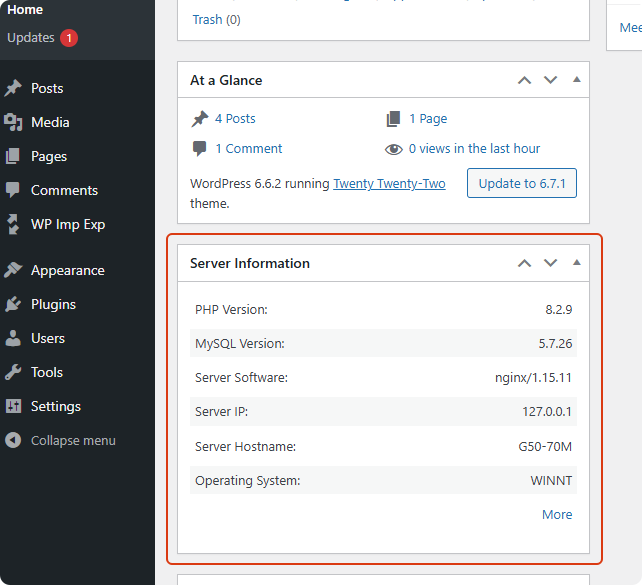
Operating System
Hostname
Server IP
Protocol
Server Software
Web Port
CGI VersionPHP Version
Memory Limit
Max Execution Time
Upload Max Filesize
Max File UploadsDatabase Server version
Database Client version
Database host
Database username
Database name
Table prefix
Database charset
Database collationPlease rate the Plugin if you find it useful, thanks.
-
Settings Tab:
Configure plugin behavior with four toggle switches to enable or disable server information display in the dashboard, admin bar, and footer.
Additionally, users can activate shortcode functionality, allowing[disi_server_info]to display server information anywhere in posts or pages. The shortcode supports ashowattribute to control exactly which fields are output, e.g.[disi_server_info show="php_version,mysql_version"]. For security, only the following fields are available to the shortcode: PHP Version, MySQL Version, Server Software, and Operating System. Sensitive fields such as Server IP and Server Hostname are never exposed through the shortcode.
The plugin is fully translated into 7 international languages, making it accessible for a global audience.
Privacy
This plugin respects your privacy. Any data collected (such as anonymous usage stats or optional feedback) is handled transparently and securely.
All data, including any optional email address, is transmitted securely (via TLS/HTTPS) and retained only as long as necessary. For example, feedback data is retained for a maximum of 12 months to help us improve the plugin.
For complete details on what data is collected, how it is stored (including hashing and encryption for email addresses), the legal basis under GDPR/CCPA, and your rights, please read our full privacy policy:
https://robertwp.com/privacy-policy
Installation
Installation from within WordPress
Visit Plugins > Add New.
Search for Display Server Info.
Install and activate the Display Server Info plugin.
Manual installation
Upload the entire display-server-info folder to the /wp-content/plugins/ directory.
Visit Plugins.
Activate the Display Server Info plugin.
If everything is all right, you will see the “Server Information” widget under the dashboard “At a Glance” widget.
Changelog
Added feedback form in settings page Implemented star rating system with half-star support Added option to leave feedback with email (optional) Enhanced user experience with toast notifications
2.2.1
- Security: Shortcode no longer exposes server IP address and hostname
- Added
showattribute to the [disi_server_info] shortcode to control which fields are displayed (whitelist-based) - Shortcode output is now escaped
2.2.0
- Added feedback form in settings page
- Implemented star rating system with half-star support
- Added option to leave feedback with email (optional)
- Enhanced user experience with toast notifications
2.1.3
- Update author name
2.1.2
- Added Author URI to the plugin header: https://robertwp.com
- Replaced namespace DisplayServerInfoPlugin with RobertWP\DisplayServerInfo
- Removed
load_plugin_textdomain()call since it’s no longer needed for WordPress 4.6 and above.
2.1.1
- Added uninstall cleanup functionality — plugin options will now be removed when uninstalled.
2.1.0
- Added uninstall cleanup functionality — plugin options will now be removed when uninstalled.
Screenshots


For developers
Is this your plugin? Show off the numbers.
Add a live badge to your site, docs or GitHub README. It updates on its own — no account needed.
Best Display Server Info alternatives
All dashboard widget plugins →


FAQ
Display Server Info: quick answers
Straight answers, pulled from live WordPress.org data.
Source: WordPress.org
Is Display Server Info free?
Yes. Display Server Info is free to download and use from the official WordPress.org plugin directory.
Is Display Server Info safe to use in 2026?
Display Server Info is a solid plugin choice in 2026, with a few things worth checking first. It runs on 100+ sites, is rated 5/5 and was last updated 2 weeks ago, and scores 75/100 on our health check.
How many websites use Display Server Info?
Display Server Info is active on 100+ WordPress websites and has been downloaded 2,553 times since it launched in December 2024. It was downloaded 442 times in the last 30 days.
Does Display Server Info work with WordPress 7.1?
Yes. The developer has tested Display Server Info up to WordPress 7.1.5, the latest release. It requires WordPress 5.6 or newer.
What PHP version does Display Server Info need?
Display Server Info requires PHP 7.2 or higher. Most hosts run PHP 8.x today, so it works on any modern WordPress hosting.
When was Display Server Info last updated?
The latest version, 2.2.1, was released on November 17, 2026 (2 weeks ago).
Who makes Display Server Info?
Display Server Info is developed and maintained by RobertWP.
What are the best alternatives to Display Server Info?
The most popular alternatives to Display Server Info are Error Log Monitor (20K+ installs), Dashboard Welcome for Eleme… (10K+ installs) and Dashboard Welcome for Beave… (2K+ installs).
Powered by PageForge
One template and a spreadsheet. A real page for every search.
PageForge turns each row of a CSV into a WordPress page with its own title, URL, SEO fields and schema, built on the layout you already designed. Free on WordPress.org.
- CSV and XLSX, plus Google Sheets on Professional and Enterprise
- Its own title, URL, SEO fields and schema for every page
- Works with the block editor, Elementor, Divi and Avada
- Free on WordPress.org, no credit card