


Display Event Location for The Events Calendar
This plugin works with The Events Calendar by Modern Tribe. It adds an event's location information to the tooltip on the monthly calendar view.

Solid choice
Display Event Location for The… is a solid plugin choice in 2026, with a few things worth checking first. It runs on 100+ sites, is rated 5/5 and was last updated 2 months ago, and scores 71/100 on our health check.
- Tested with the latest WordPress (7.1)
- Small user base (100+ active installs)
- Very few reviews so far
How does it stack up?
Side-by-side on installs, updates, ratings & support


Daily downloads
Download spikes usually follow a new release — each site that auto-updates counts as a download.
Rankings
Where Display Event Location for… stands todayWordPress.org search rankings
Live position in the plugin search, top 100| Keyword | Position |
|---|---|
| customization | >100 |
| events | >100 |
| modern tribe | #2 |
| override | #46 |
| template | >100 |
Version adoption
Share of active sites per release.
Rating breakdown
★★★★★★★★★★ 5 from 1 reviews
About Display Event Location for The Events C…
From the official readme · v4.8.0Description
This plugin overrides the template for the tooltip that is displayed when a user hovers over an event on the full month calendar view created by The Events Calendar or The Events Calendar Pro plugin. The name of the event’s venue/location that is entered with the event will be displayed under the date and time that the event occurs. The full street address for the location can also be displayed. All of the other elements of the tooltip remain unchanged.
The Events Calendar and The Events Calendar Pro are WordPress plugins developed by Modern Tribe.
Arbitrary section
CSS Classes:
.deltec-tooltip-message– Aparagraphelement that surrounds all of the information that is added to the tooltip by this plugin..deltec-location-name-prefix– Aspanelement that surrounds the prefix message that you can set in the Display Event Location for The Events Calendar settings area in the textfield labeled Tooltip Message Before Venue/Location Name.deltec-location-name– Aspanelement that surrounds the name of the event’s venue/location name..deltec-street-address– Aspanelement that surrounds the all elements of the street address for the event’s venue/location (if enabled in Display Event Location for The Events Calendar settings area)
Github Repository
The Github Repository for this plugin can be found here: https://github.com/mike-weiner/display-event-locations-tec.
References:
Below are resources and references that were used to help develop parts of this plugin.
- https://support.theeventscalendar.com/153124-Themers-Guide
- https://docs.theeventscalendar.com/reference/hooks/tribe_events_template_data_array/
- https://docs.theeventscalendar.com/reference/hooks/tribe_template_theme_path_list/
- https://docs.theeventscalendar.com/reference/functions/tribe_address_exists/
- https://docs.theeventscalendar.com/reference/functions/tribe_get_full_address/
- https://theeventscalendar.com/knowledgebase/k/custom-additional-template-locations/
- https://gist.github.com/cliffordp/b76421f2490a8b8995493f203e11b331
Special Thanks:
A special thank you to user @cliffordp on Github for several helpful gists that were used as boilerplates to achieve certain functionality within this plugin.
Thank you to Danielle Attinella for her amazing work on designing a new icon and banner image for the plugin.
Installation
This section describes how to install the plugin and activate it on your WordPress installation.
From the WordPress Plugin Directory
The official Display Event Location for The Events Calendar WordPress Plugin can be found at: https://wordpress.org/plugins/display-event-locations-tec/.
The plugin can be downloaded and installed right from your WordPress administration area by going to Plugins > Add New and searching for Display Event Location for The Events Calendar by Weiner and clicking “Install”. Once the installation completes, click the blue “Activate” button to activate the plugin on your website.
From the Github Repository
Go to the releases section of the repository and download the .zip named display-event-locations-tec.[version].zip from the most recent release listed in the repository.
Once you have downloaded the display-event-locations-tec.[version].zip from the releases section of the repository sign into the backend of your WordPress website. From your WordPress administration panel, go to Plugins > Add New and click the gray Upload Plugin button at the top of the page. Select the display-event-locations-tec.[version].zip file to upload from your machine when prompted.
WordPress will install the plugin. Once the installation is complete, you will be able to activate the plugin and begin using it. Enjoy!
If you have any questions or issues please open a new issue on the Github repository or submit a support ticket on the WordPress Plugin directory listing for this plugin.
Frequently asked questions
I have activated the plugin, but the tooltip still looks the same. Why does the tooltip not list the event’s location and/or address?
First, make sure that the plugin ‘Display Event Location for The Events Calendar’ is installed and activated on your website. To check this, click on the Plugins option from the left-hand administration sidebar in WordPress. Once the page loads, make sure Display Event Location for The Events Calendar is activated. Then try viewing your calendar again to see if the tooltip now displays the location of your events. If the Display Event Location for The Events Calendar plugin is activated and the tooltip still does not show the location of events in your calendar, try navigating your calendar…
Does this plugin display anything other than the name of the event’s venue/location?
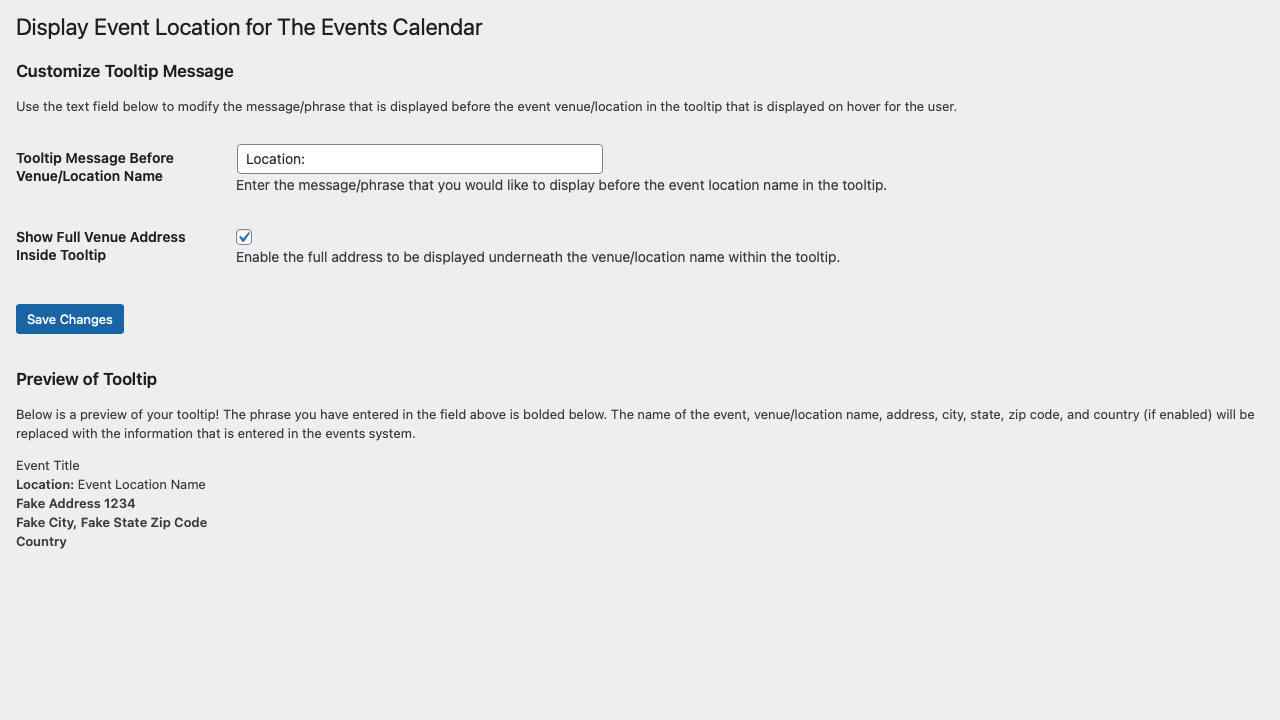
Yes! You can choose to display just the name of the location or the name of the location and the full address of the location underneath the location name. See the screenshots for all of the different ways you can display information within the tooltip.
How do I change OR remove the phrase “Location: ” that is displayed before the name of an event’s venue/location within the tooltip?
Hover over Settings in the left-hand sidebar within the administration area of your WordPress website. Click on Display Event Location for The Events Calendar from the flyout that appears. Once the page loads, find the Tooltip Message Before Venue/Location Name textbox. If you want to change the phrase that is displayed before the name of an event’s venue/location, change the text to what you would like it to display. If you do not want anything to appear before the name of the event’s venue/location, simply remove all text from this textbox. Once the you have made your desired change(s)…
How do I display the street address underneath the location name within the tooltip?
Hover over Settings in the left-hand sidebar within the administration area of your WordPress installation. Click on Display Event Location for The Events Calendar from the flyout that appears. Once the page loads, click the checkbox for the Show Full Venue Address Inside Tooltip option. Once the checkbox is checked, click the blue Save Changes button. Once the page reloads, scroll to the bottom of the page. Under the “Preview Tooltip” area, the fake tooltip should display both the location and fake street address underneath.
How do I change the font size of the event venue/location name and/or street address text within the tooltip?
A CSS class system can be used for greater control of the stylization of the elements added to the tooltip by this plugin. To change the font-size of the venue/location name and street address add the CSS code below to your website. .deltec-tooltip-message { font-size: 14px; } Note: This CSS is very basic and is just meant as a starting point. It could be overwritten by a more specific CSS call. Please see the Arbitrary Section on the WordPress Repository page or on the Github Repository README for a detailed list of the CSS classes in use by this plugin.
How do I change the name and/or street address for event locations?
This plugin uses the location/venue name and address that is entered within the Modern Tribe Event System itself. To change the name or street address of an event location/venue hover over Events in the administration sidebar and select Venue from the flyout that appears. Then select the location that you wish to change the name or address of. Once the page loads you will be able to change the name and address. Once you finish making updates, click the blue Update button. More information on creating venues can be found here…
What plugins are required for these changes to take effect?
Your website must use The Events Calendar 5.0+ OR The Events Calendar Pro 5.0+ for this plugin to correctly modify the tooltip in the month calendar view.
Does this plugin change the tooltip for both regular and featured events?
Yes. This will plugin will display the event’s venue name and street address (if you have enabled the address to be displayed) for both regular and featured events. See the screenshots to see how this would look.
Will this plugin work on both the legacy and v2 calendar views?
No. As of version 4.0.0 of this plugin, only the the new calendar views (v2 views) introduced with The Events Calendar 5.0+ and The Events Calendar Pro 5.0+.
Changelog
Version 4.8.0 is a recommended, minor update. Support for WordPress v7.1+ has been confirmed. Read the changelog for more details.
4.8.0
- Released on Sunday, August 16, 2026
- Support for WordPress v7.1+ has been confirmed.
- Edited:
display-event-locations-tec.php - Edited:
README.md
4.7.0
- Released on Wednesday, May 20, 2026
- Support for WordPress v7.0+ has been confirmed.
- Edited:
display-event-locations-tec.php - Edited:
README.md
4.6.0
- Released on Sunday, November 23, 2025
- Fixed logic to correctly provide safe default values for settings on plugin install.
- Support for WordPress v6.9+ has been confirmed.
- Edited:
display-event-locations-tec.php - Edited:
README.md - Edited:
tribe-templates/month/tooltip-venue.php
4.5.0
- Released on Wednesday, December 25, 2024
- Added a
Text Domainto the plugin. - Fixed all warnings from the WordPress Plugin Check tool.
- Formatted all code into a consistent manner.
- Support for WordPress v6.7+ has been confirmed.
- Edited:
display-event-locations-tec.php - Edited:
README.md - Edited:
includes/settings-page/admin-menu.php - Edited:
includes/settings-page/settings-callbacks.php - Edited:
includes/settings-page/settings-page.php - Edited:
includes/settings-page/settings-register.php - Edited:
includes/settings-page/settings-validate.php - Edited:
tribe-templates/month/tooltip-venue.php
4.4.0
- Released on Saturday, March 16, 2024
- Added: Display Event Locations for The Events Calendar now uses WordPress’s
Requires Pluginsfunctionality and has a formal dependency of The Events Calendar. - Removed: Custom logic that checked whether The Events Calendar was installed. Replaced with WordPress’s core
Requires Pluginsfunctionality introduced with WordPress 6.5. - Edited:
display-event-locations-tec.php - Edited:
README.md
4.3.0
- Released on Wednesday, June 14, 2023
- Added: DELTEC custom templates for The Events Calendar are now found in
/tribe-templates/. - Added: The custom DELTEC tooltip template now uses a WordPress action to inject the event’s venue information into the tooltip that is displayed when hovering over an event on the monthly calendar view. This work creates a clear path forward for future template customizations.
- Added: The WordPress Plugin Repository listing for this plugin now features the
Communitytag. - Added: The plugin
READMEincludes a simpler description on the plugin’s functionality and improved clarity to both the installation instructions and the plugin FAQs. All in an effort to make things clearer and less overwhelming to new users. - Added: The logic for the custom tooltip template has been moved into
/tribe-templates/month/tooltip-venue.phpand no longer relies on the title template. This decouples the plugin’s custom tooltip modification from changes that the developers of The Events Calendar might make to the title portion of the tooltip. - Fixed: Code throughout the plugin source code was cleaned and simplified for improved clarity and performance.
- Removed: DELTEC will no longer look in your active child theme for The Events Calendar templates since all of the custom templates are found within the source code for the DELTEC plugin only.
- Added:
tribe-templates/ - Added:
tribe-templates/month/ - Added:
tribe-templates/month/tooltip-venue.php - Renamed:
plugin.phptodisplay-event-locations-tec.php - Edited:
display-event-locations-tec.php - Edited:
README.md - Edited:
/includes/settings-page/admin-menu.php - Edited:
/includes/settings-page/settings-callbacks.php - Edited:
/includes/settings-page/settings-page.php - Edited:
/includes/settings-page/settings-register.php - Edited:
/includes/settings-page/settings-validate.php - Removed:
/tribe/events/month/calendar-body/day/calendar-events/calendar-event/tooltip/title.php
Screenshots


For developers
Is this your plugin? Show off the numbers.
Add a live badge to your site, docs or GitHub README. It updates on its own — no account needed.
Best Display Event Location for Th… alternatives
All customization plugins →


FAQ
Display Event Location for The Even…: quick answers
Straight answers, pulled from live WordPress.org data.
Live data from WordPress.org · checked Oct 12, 2026
Is Display Event Location for The… free?
Yes. Display Event Location for The… is free to download and use from the official WordPress.org plugin directory.
Is Display Event Location for The… safe to use in 2026?
Display Event Location for The… is a solid plugin choice in 2026, with a few things worth checking first. It runs on 100+ sites, is rated 5/5 and was last updated 2 months ago, and scores 71/100 on our health check.
How many websites use Display Event Location for The…?
Display Event Location for The… is active on 100+ WordPress websites and has been downloaded 7,817 times since it launched in April 2019. It was downloaded 198 times in the last 30 days.
Does Display Event Location for The… work with WordPress 7.1?
Yes. The developer has tested Display Event Location for The… up to WordPress 7.1.3, the latest release. It requires WordPress 5.0.0 or newer.
What PHP version does Display Event Location for The… need?
Display Event Location for The… requires PHP 7.0.0 or higher. Most hosts run PHP 8.x today, so it works on any modern WordPress hosting.
When was Display Event Location for The… last updated?
The latest version, 4.8.0, was released on August 16, 2026 (2 months ago).
Who makes Display Event Location for The…?
Display Event Location for The… is developed and maintained by Michael Weiner.
What are the best alternatives to Display Event Location for The…?
The most popular alternatives to Display Event Location for The… are Adminimize (100K+ installs), Favicon Rotator (20K+ installs) and Custom Login (10K+ installs).
Powered by PageForge
Want thousands of pages that rank like these? Build them in an afternoon.
This directory runs on the same engine as PageForge. Turn any spreadsheet, CSV or API into thousands of fast, SEO-ready WordPress pages — with schema, internal links and AI-written copy baked in.
- CSV, Google Sheets & API data sources
- AI content, schema & internal links per page
- Works with Elementor, Gutenberg, Yoast & Rank Math
- Free on WordPress.org — no credit card


