



Disable Media Sizes
Provides options to disable the extra images generated by WordPress.

Safe pick
Yes — Disable Media Sizes is a safe, well-maintained plugin to use in 2026. It runs on 10K+ sites, is rated 5/5 and was last updated 2 months ago, and scores 90/100 on our health check.
- Proven at scale on 10K+ active sites
- Loved by users — 5/5 from 23 reviews
- Tested with the latest WordPress (7.1)
How does it stack up?
Side-by-side on installs, updates, ratings & support



Daily downloads
Download spikes usually follow a new release — each site that auto-updates counts as a download.
Rankings
Where Disable Media Sizes stands todayWordPress.org search rankings
Live position in the plugin search, top 100| Keyword | Position |
|---|---|
| disable | #9 |
| disable image sizes | #1 |
| images | >100 |
| media | #12 |
| uploads | #49 |
Version adoption
Share of active sites per release.
Rating breakdown
★★★★★★★★★★ 5 from 23 reviews
About Disable Media Sizes
From the official readme · v2.6Description
Easily disable any extra image sizes
This plugin provides options to disable the extra images generated by WordPress.
Options include
- Disable Thumbnail Size
- Disable Medium Size
- Disable Large Size
- Disable Medium Large (768px)
- Disable 1536×1536 Size
- Disable 2048×2048 Size
- Disable Big/Scaled Size
The plugin settings screen does a good job of explaining the different image sizes. Should all be self-explanatory, let me know if anything can be improved.
Features
- Lightweight and secure
- Built with the WP API and standards
- Simple to use – anyone can do it
- One-click restore default options
- Easy peasy.
Why is this useful?
This article explains everything you need to know about the “hows” and the “whys” and such.
Important
Please understand that this plugin:
- Does not affect any existing images
- Only works while the plugin is active
- Does not delete any images
- Only prevents WordPress from generating extra sized images
- If all extra sizes are disabled, only original images will be uploaded
Learn more about the techniques and code used in this plugin.
Privacy
This plugin does not collect or store any user data. It does not set any cookies, and it does not connect to any third-party locations. Thus, this plugin does not affect user privacy in any way.
Disable Media Sizes is developed and maintained by Jeff Starr, 15-year WordPress developer and book author.
Support development
I develop and maintain this free plugin with love for the WordPress community. To show support, you can make a donation or purchase one of my books:
- The Tao of WordPress
- Digging into WordPress
- .htaccess made easy
- WordPress Themes In Depth
- Wizard’s SQL Recipes for WordPress
And/or purchase one of my premium WordPress plugins:
- BBQ Pro – Blazing fast WordPress firewall
- Blackhole Pro – Automatically block bad bots
- Banhammer Pro – Monitor traffic and ban the bad guys
- GA Google Analytics Pro – Connect WordPress to Google Analytics
- Head Meta Pro – Ultimate Meta Tags for WordPress
- REST Pro Tools – Awesome tools for managing the WP REST API
- Simple Ajax Chat Pro – Unlimited chat rooms
- USP Pro – Unlimited front-end forms
Links, tweets and likes also appreciated. Thank you! 🙂
Installation
Installing the plugin
Activate like any other plugin and done. Visit the plugin settings page to choose your options.
More info on installing WP plugins
Still getting extra images?
If you are noticing extra images that cannot be disabled by the plugin, most likely they are being generated by some other plugin or maybe your theme. In that case, you would need to do some investigating to determine which plugin or theme is causing it to happen. This plugin disables only the image/sizes that WordPress creates by default. So any extra image sizes added by other plugins and themes will need to be disabled in some other way. If in doubt, ask your plugin or theme provider. They will know the best steps.
Uninstalling
This plugin cleans up after itself. All plugin settings will be removed from the WordPress database when the plugin is deleted via the WP Plugins screen. Also, this plugin does not remove any existing images at any time. So it is safe to delete the plugin, it never touches any images.
Frequently asked questions
There are still some extra images generated?
If you are noticing extra images that cannot be disabled by the plugin, most likely they are being generated by some other plugin or maybe your theme. In that case, you would need to do some investigating to determine which plugin or theme is causing it to happen. This plugin can disable only the extra images generated by core WordPress functionality.
Got a question?
Send any questions or feedback via my contact form
Changelog
Visit the WordPress Plugins screen, locate the plugin, and click "Update" :) Note: Deleting this plugin via the WordPress Plugins screen will remove all of its settings from the WordPress database.
If you like Disable Media Sizes, please take a moment to give a 5-star rating. It helps to keep the plugin going strong, and is greatly appreciated.
2.6 (2026/07/18)
- Updates plugin settings page
- Tests on WordPress 7.1
2.5.1 (2026/04/17)
- Fixes bug with reset options
- Updates plugin settings page
- Tests on WordPress 7.0
Full changelog @ https://plugin-planet.com/wp/changelog/disable-media-sizes.txt
Screenshots
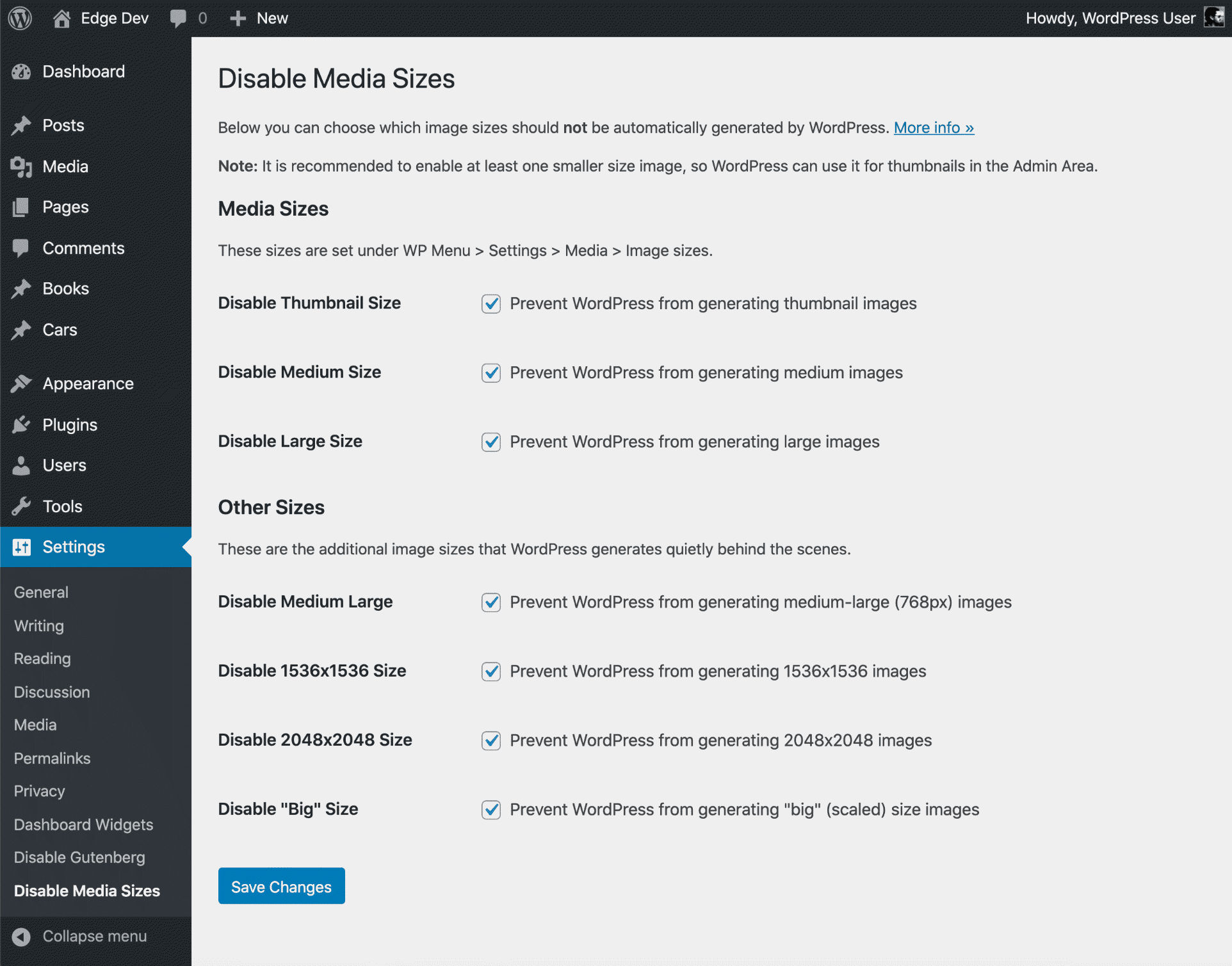
For developers
Is this your plugin? Show off the numbers.
Add a live badge to your site, docs or GitHub README. It updates on its own — no account needed.
Best Disable Media Sizes alternatives
All disable plugins →





FAQ
Disable Media Sizes: quick answers
Straight answers, pulled from live WordPress.org data.
Live data from WordPress.org · checked Sep 26, 2026
Is Disable Media Sizes free?
Yes. Disable Media Sizes is free to download and use from the official WordPress.org plugin directory.
Is Disable Media Sizes safe to use in 2026?
Yes — Disable Media Sizes is a safe, well-maintained plugin to use in 2026. It runs on 10K+ sites, is rated 5/5 and was last updated 2 months ago, and scores 90/100 on our health check.
How many websites use Disable Media Sizes?
Disable Media Sizes is active on 10K+ WordPress websites and has been downloaded 91,308 times since it launched in July 2020. It was downloaded 1,385 times in the last 30 days.
Does Disable Media Sizes work with WordPress 7.1?
Yes. The developer has tested Disable Media Sizes up to WordPress 7.1.2, the latest release. It requires WordPress 5.3 or newer.
What PHP version does Disable Media Sizes need?
Disable Media Sizes requires PHP 5.6.20 or higher. Most hosts run PHP 8.x today, so it works on any modern WordPress hosting.
When was Disable Media Sizes last updated?
The latest version, 2.6, was released on July 18, 2026 (2 months ago).
Who makes Disable Media Sizes?
Disable Media Sizes is developed and maintained by Jeff Starr.
What are the best alternatives to Disable Media Sizes?
The most popular alternatives to Disable Media Sizes are Classic Widgets (2M+ installs), Disable Comments (100K+ installs) and Disable Emojis (GDPR friend… (60K+ installs).
Powered by PageForge
Want thousands of pages that rank like these? Build them in an afternoon.
This directory runs on the same engine as PageForge. Turn any spreadsheet, CSV or API into thousands of fast, SEO-ready WordPress pages — with schema, internal links and AI-written copy baked in.
- CSV, Google Sheets & API data sources
- AI content, schema & internal links per page
- Works with Elementor, Gutenberg, Yoast & Rank Math
- Free on WordPress.org — no credit card


