



GM Digital Signature for Wpforms
Digital Signature for WPForms is the easiest way to collect legally binding electronic signatures through your WordPress forms.

Use with caution
GM Digital Signature for Wpforms works, but test it on a staging site before relying on it in 2026. It runs on 100+ sites, is rated 1/5 and was last updated 2 months ago, and scores 54/100 on our health check.
- Small user base (100+ active installs)
- Very few reviews so far
How does it stack up?
Side-by-side on installs, updates, ratings & support


Daily downloads
Download spikes usually follow a new release — each site that auto-updates counts as a download.
Rankings
Where GM Digital Signature for Wp… stands todayWordPress.org search rankings
Live position in the plugin search, top 100| Keyword | Position |
|---|---|
| digital signature | #16 |
| e-signature | #19 |
| signature field | #37 |
| WPForms | #81 |
| WPForms Addon | #44 |
Version adoption
Share of active sites per release.
Rating breakdown
★★★★★★★★★★ 1 from 1 reviews
About GM Digital Signature for Wpforms
From the official readme · v1.0Description
Digital Signature for WPForms is the easiest way to collect legally binding electronic signatures through your WordPress forms.
Stop printing, scanning, and emailing documents. With this free WPForms addon, your users can sign contracts, consent forms, service agreements, and legal documents directly inside any WPForm — on any device, in seconds.
Whether you’re a freelancer, business owner, legal professional, or WordPress developer, this plugin gives you a smooth, professional signature pad with zero coding required.
🔗 Get the Pro Version | Contact Support | Documentation
🖊️ What Is Digital Signature for WPForms?
This plugin adds a drag-and-drop digital signature field to the WPForms form builder. Once placed on your form, visitors can draw their signature using a mouse, stylus, or finger — and the signature is saved automatically with the form entry.
Ideal use cases:
– Business contracts and service agreements
– Client onboarding and consent forms
– Employee or volunteer agreements
– Event waivers and liability release forms
– Legal documents requiring a verified signature
✅ Free Features
- One-Click Installation — Up and running in minutes, no coding needed
- Drag-and-Drop Field — Add the signature field to any WPForm just like any standard field
- Multiple Signature Fields — Collect signatures from multiple parties on a single form
- Signature in Email Notifications — Submitted signatures are automatically included in WPForms email alerts
- Touchscreen & Mouse Support — Fully compatible with desktop, tablet, and mobile devices
- Responsive Signature Canvas — Clean, professional signing experience on any screen size
- Works with Free & Pro WPForms — No premium WPForms license required
⭐ Pro Features – Upgrade for Full Customization
Take full control of your signature field with Digital Signature for WPForms Pro:
- Custom Canvas Width & Height — Resize the signature pad to match your form layout
- Background Color Control — Match the signature pad to your brand or site design
- Pen/Ink Color Customization — Set a custom pen color for a polished, branded look
🔒 Secure Signature Storage
Every digital signature is stored securely alongside the form submission in your WordPress database. Signatures are tied to their specific form entry, providing a clear audit trail for authenticity and traceability.
❓ Frequently Asked Questions
Does this plugin require WPForms?
Yes. Digital Signature for WPForms is a WPForms addon. You must have the WPForms plugin (free or pro) installed and active on your WordPress site.
Can I add multiple signature fields to one form?
Yes! You can add as many signature fields as needed — perfect for agreements requiring signatures from multiple parties.
Will the signature appear in WPForms email notifications?
Yes. The captured signature image is automatically included in email notifications triggered by WPForms after form submission.
Does the signature field work on mobile and tablets?
Yes. The signature pad fully supports touch input and works seamlessly on smartphones, tablets, and desktop browsers.
Is the signature data stored securely?
Yes. Signature data is saved with the form entry in your WordPress database, linked to the specific submission for full traceability.
How do I change the size or color of the signature pad?
Custom canvas size, background color, and pen color are available exclusively in the Pro version.
Are electronic signatures collected by this plugin legally binding?
In many jurisdictions, electronic signatures are legally valid. However, legal requirements vary by country and use case. We recommend consulting a legal professional to confirm compliance for your specific situation.
🔌 More Plugins by the Same Author
- Date Picker for Gravity Form — Intuitive date selection for Gravity Forms
- Pixel Manager for Contact Form 7 — Add tracking pixels to CF7 forms for analytics
- Map Field for Contact Form 7 — Let users pick a location on a map inside CF7
- Autocomplete Location Field for Contact Form 7 — Smart location autocomplete for CF7
- Date Picker for Contact Form 7 — Simplified date input for CF7 forms
Installation
Option 1: Install from WordPress Plugin Directory
1. In your WordPress dashboard, go to Plugins > Add New.
2. Search for “Digital Signature for WPForms”.
3. Click Install Now, then Activate.
Option 2: Manual Upload
1. Download the plugin .zip file.
2. Go to Plugins > Add New > Upload Plugin.
3. Upload the file and click Install Now, then Activate.
After Activation:
1. Open any existing WPForm or create a new one.
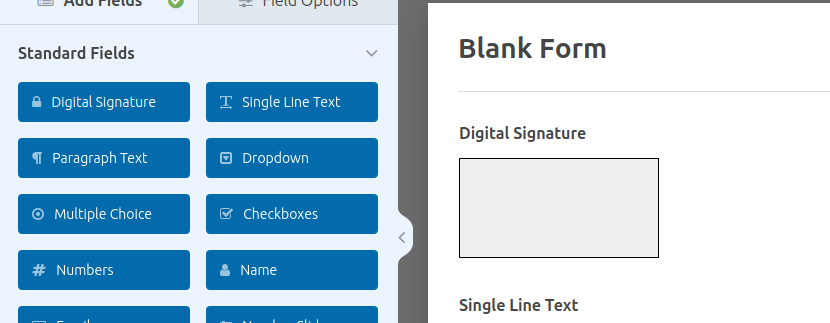
2. Drag the Digital Signature field from the field panel into your form.
3. Save your form — users can now sign digitally on submission!
Requirements:
– WordPress 5.0 or higher
– WPForms (free or pro) must be installed and active
– PHP 7.2 or higher
Changelog
Initial release of Digital Signature for WPForms. Install now to start collecting secure electronic signatures through your WordPress forms.
1.0
- Initial release
- Digital signature canvas field added to WPForms field library
- Support for multiple signature fields per form
- Signature image included in WPForms email notifications
Screenshots

For developers
Is this your plugin? Show off the numbers.
Add a live badge to your site, docs or GitHub README. It updates on its own — no account needed.
Best GM Digital Signature for Wpfo… alternatives
All digital signature plugins →





FAQ
GM Digital Signature for Wpforms: quick answers
Straight answers, pulled from live WordPress.org data.
Live data from WordPress.org · checked Oct 1, 2026
Is GM Digital Signature for Wpforms free?
Yes. GM Digital Signature for Wpforms is free to download and use from the official WordPress.org plugin directory.
Is GM Digital Signature for Wpforms safe to use in 2026?
GM Digital Signature for Wpforms works, but test it on a staging site before relying on it in 2026. It runs on 100+ sites, is rated 1/5 and was last updated 2 months ago, and scores 54/100 on our health check.
How many websites use GM Digital Signature for Wpforms?
GM Digital Signature for Wpforms is active on 100+ WordPress websites and has been downloaded 1,937 times since it launched in January 2024. It was downloaded 131 times in the last 30 days.
Does GM Digital Signature for Wpforms work with WordPress 7.1?
GM Digital Signature for Wpforms is officially tested up to WordPress 7.0.6, while the latest release is 7.1.2. It may still work, but try it on a staging site first.
What PHP version does GM Digital Signature for Wpforms need?
GM Digital Signature for Wpforms requires PHP 7.2 or higher. Most hosts run PHP 8.x today, so it works on any modern WordPress hosting.
When was GM Digital Signature for Wpforms last updated?
The latest version, 1.0, was released on July 19, 2026 (2 months ago).
Who makes GM Digital Signature for Wpforms?
GM Digital Signature for Wpforms is developed and maintained by theme funda.
What are the best alternatives to GM Digital Signature for Wpforms?
The most popular alternatives to GM Digital Signature for Wpforms are Digital Signature For Conta… (5K+ installs), Signature Add-On for Gravit… (1K+ installs) and Digital Signature For Gravi… (300+ installs).
Powered by PageForge
Want thousands of pages that rank like these? Build them in an afternoon.
This directory runs on the same engine as PageForge. Turn any spreadsheet, CSV or API into thousands of fast, SEO-ready WordPress pages — with schema, internal links and AI-written copy baked in.
- CSV, Google Sheets & API data sources
- AI content, schema & internal links per page
- Works with Elementor, Gutenberg, Yoast & Rank Math
- Free on WordPress.org — no credit card


