



Keyideas RingBuilder – Jewelry
Powerful RingBuilder plugin for WooCommerce jewelry stores. This customizable tool supports multiple languages and global ring sizes.

Use with caution
Keyideas RingBuilder – Jewelry works, but test it on a staging site before relying on it in 2026. It runs on 10+ sites and was last updated 9 hours ago, and scores 61/100 on our health check.
- Actively developed — last update 9 hours ago
- Small user base (10+ active installs)
- Very few reviews so far
How does it stack up?
Side-by-side on installs, updates, ratings & support
Daily downloads
Download spikes usually follow a new release — each site that auto-updates counts as a download.
Rankings
Where Keyideas RingBuilder stands todayWordPress.org search rankings
Live position in the plugin search, top 100| Keyword | Position |
|---|---|
| customize rings | #5 |
| Jewelry | #1 |
| ring builder | #5 |
| vdb | #1 |
Version adoption
Share of active sites per release.
About Keyideas RingBuilder – Jewelry
From the official readme · v1.2.15Description
Boost Your Jewelry Sales with Keyideas’ WooCommerce RingBuilder – Free to Start!
Enhance your WordPress jewelry store with our powerful, customizable RingBuilder plugin, designed to increase sales by up to 30%. Offer customers an engaging, interactive way to design their perfect ring.
Keyideas RingBuilder Plugin Overview
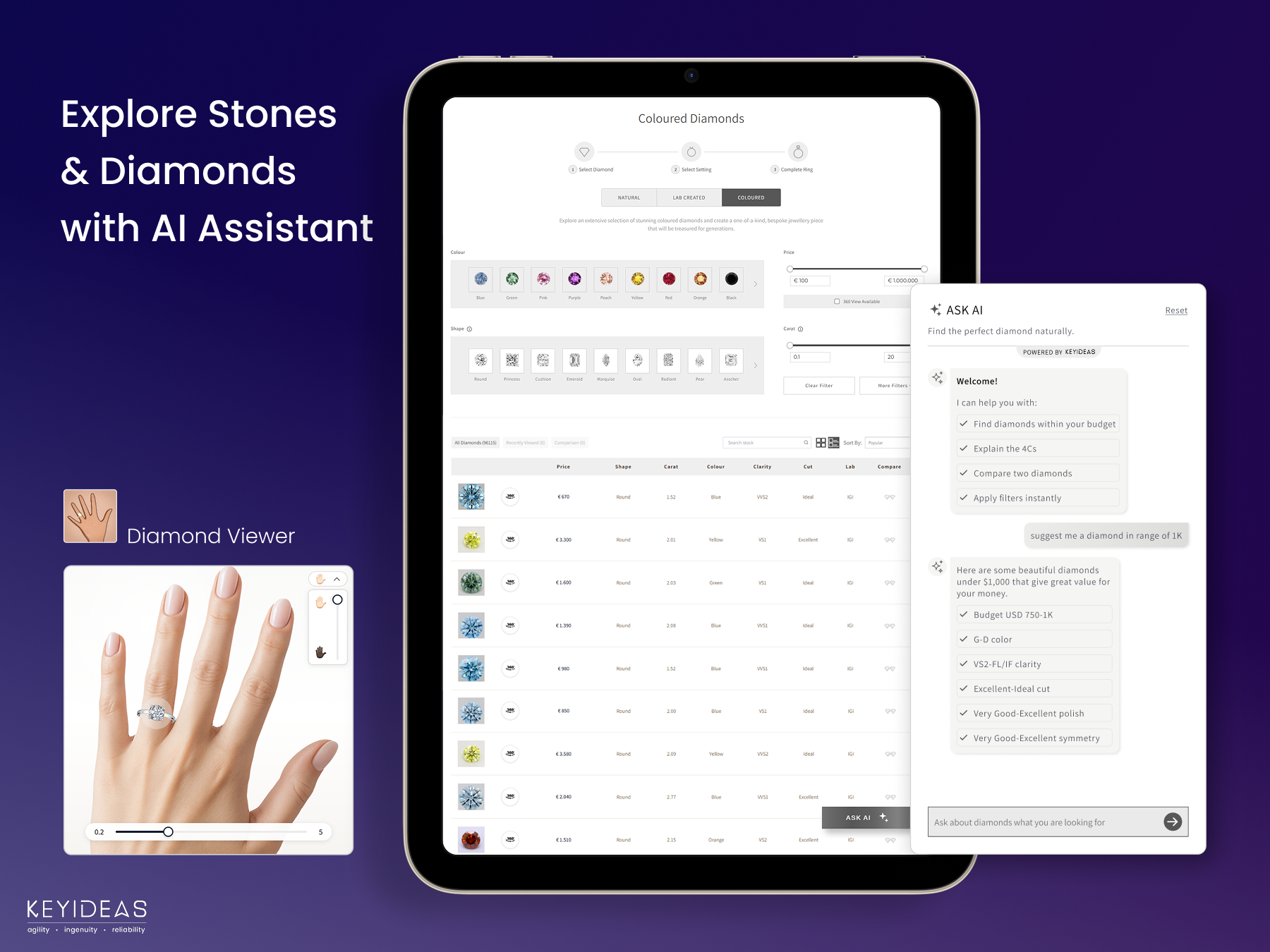
The RingBuilder is a complete WordPress & WooCommerce plugin that enables customers to design custom engagement rings. It offers access to an entire inventory of diamonds and gemstones (natural, lab-grown, and colored), advanced filtering, interactive ring building, and seamless integration with your existing store. The plugin is designed to increase sales by up to 30% through enhanced customer engagement.
View Demo Store
Build Your Own Ring (BYOR)
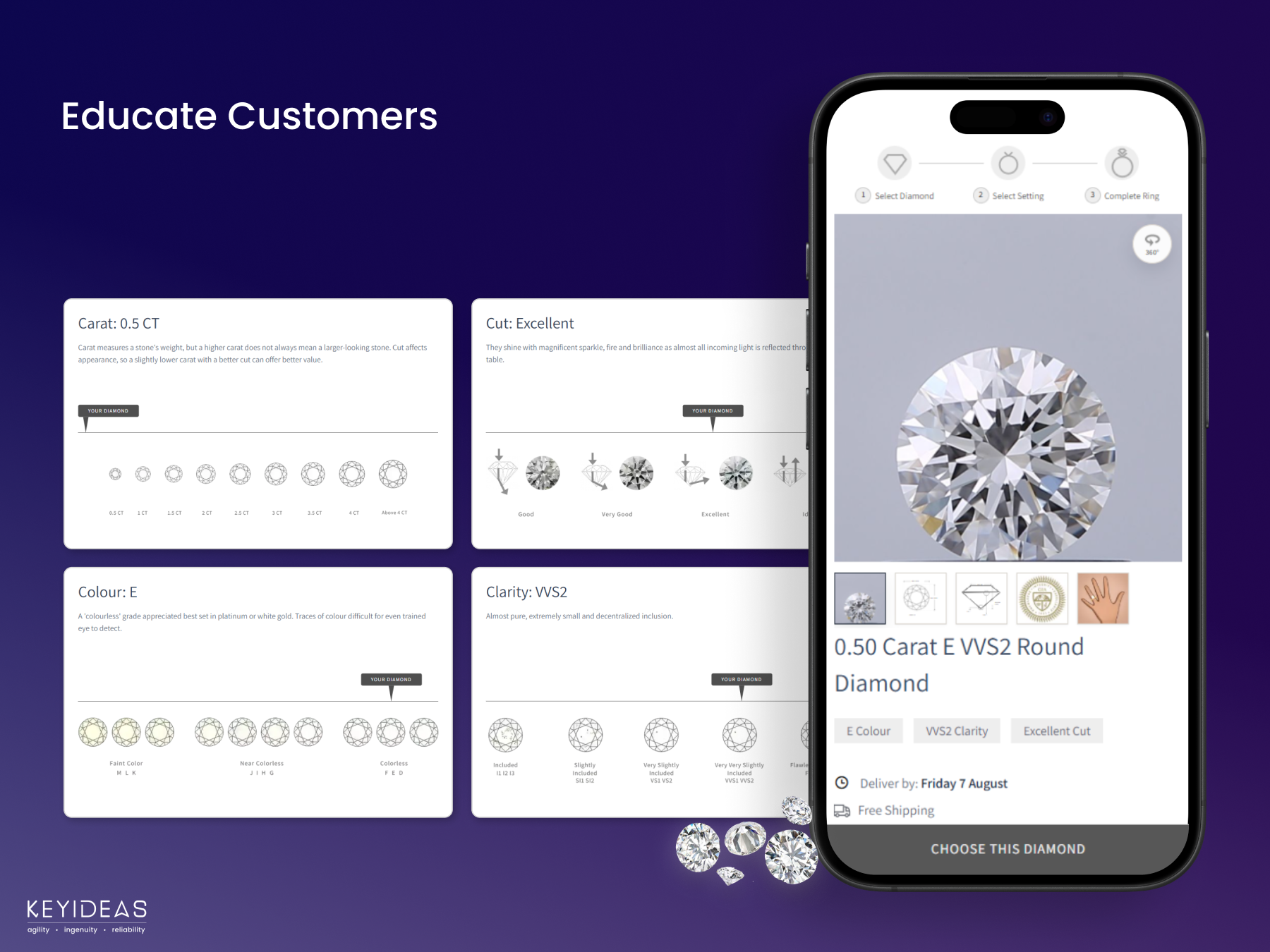
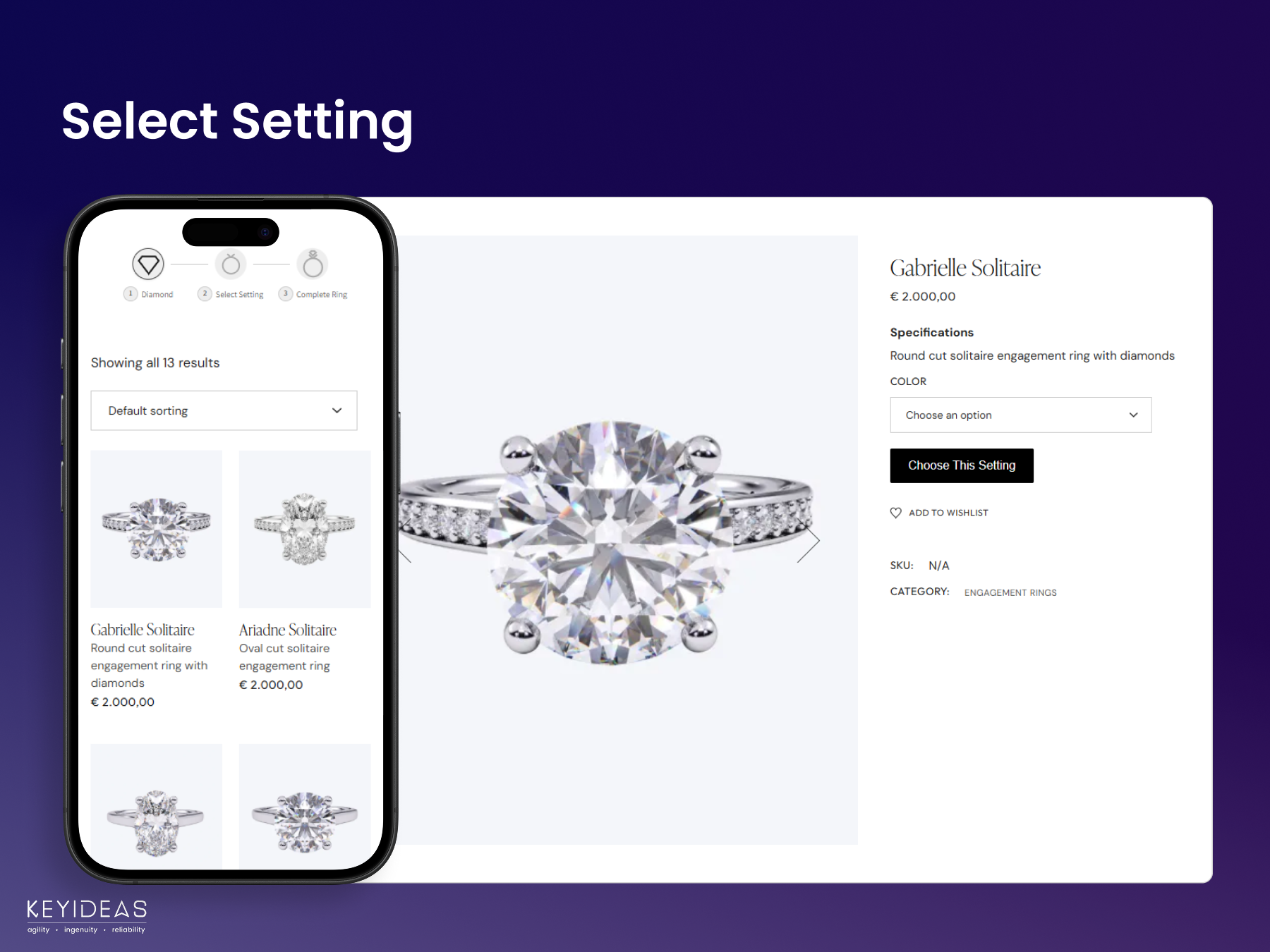
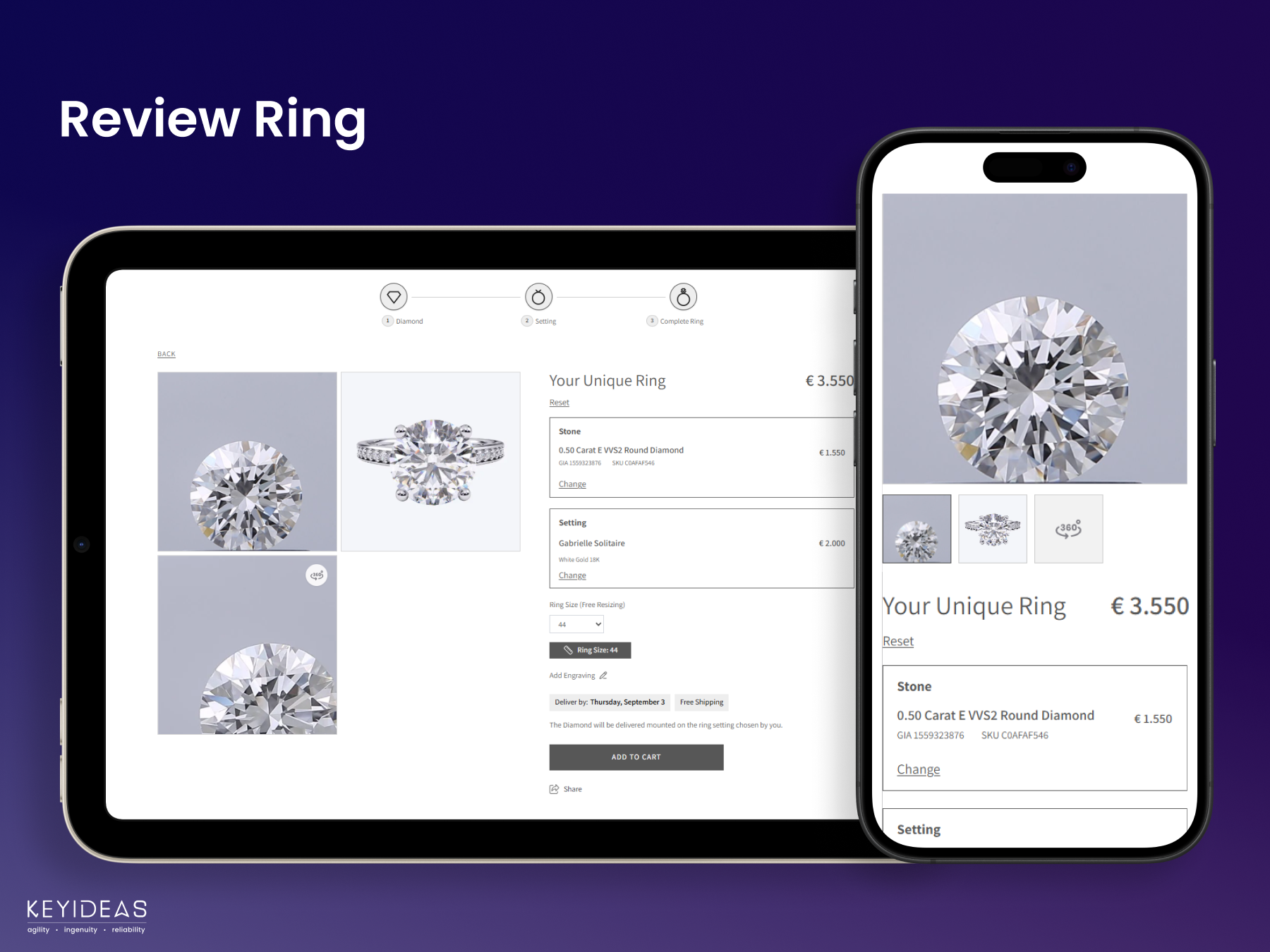
BYOR stands for ‘Build Your Own Ring.’ This feature allows customers to design their perfect ring by choosing a diamond or gemstone, selecting a setting or band design, picking metal type and finish, and previewing the final ring before adding to cart.
What makes our RingBuilder unique
Complete BYOR experience with real-time visualization, dynamic pricing updates, seamless WooCommerce integration with no coding required, mobile-optimized responsive design, diamond size viewer, colorless to colored diamond switcher for easy toggling between diamond types, and support for multiple languages, currencies, and global ring sizes.
Free Version Features
The free version includes access to entire inventory of diamonds & gemstones (lab-grown, natural, and colored), advanced diamond search and filtering, complete RingBuilder functionality, diamond size viewer, multilingual and multi-currency support, customizable design to match your brand, and mobile-optimized experience.
Note: The Add to Cart feature and Feed Center access are only available in the paid version.
Paid Version Features
The paid version includes everything in the free version, plus:
- Add to Cart functionality for customer purchases
- Email notifications when diamonds are added to cart
- Full Feed Center access with sales performance dashboard, custom margin control (including tiered margins based on carat weight or price), strike-through discount pricing, ability to upload your own inventory, robust inventory management tools, and supplier-specific shipping day management
Pricing
Annual Subscription: $1,450/year (or $145/month)
One-time Setup Fee: $550–$1,000 (based on your website complexity)
Payment Method: Wire transfer only
One-Time Setup Fee Coverage
The setup fee includes complete plugin installation and configuration, theme compatibility testing and adjustments, RingBuilder integration with your product categories, and complete workflow testing and quality assurance. Setup typically takes 3-5 business days. We charge this fee because WordPress environments vary significantly, and we ensure seamless integration rather than leaving you to troubleshoot compatibility issues.
Available Paid Add-ons
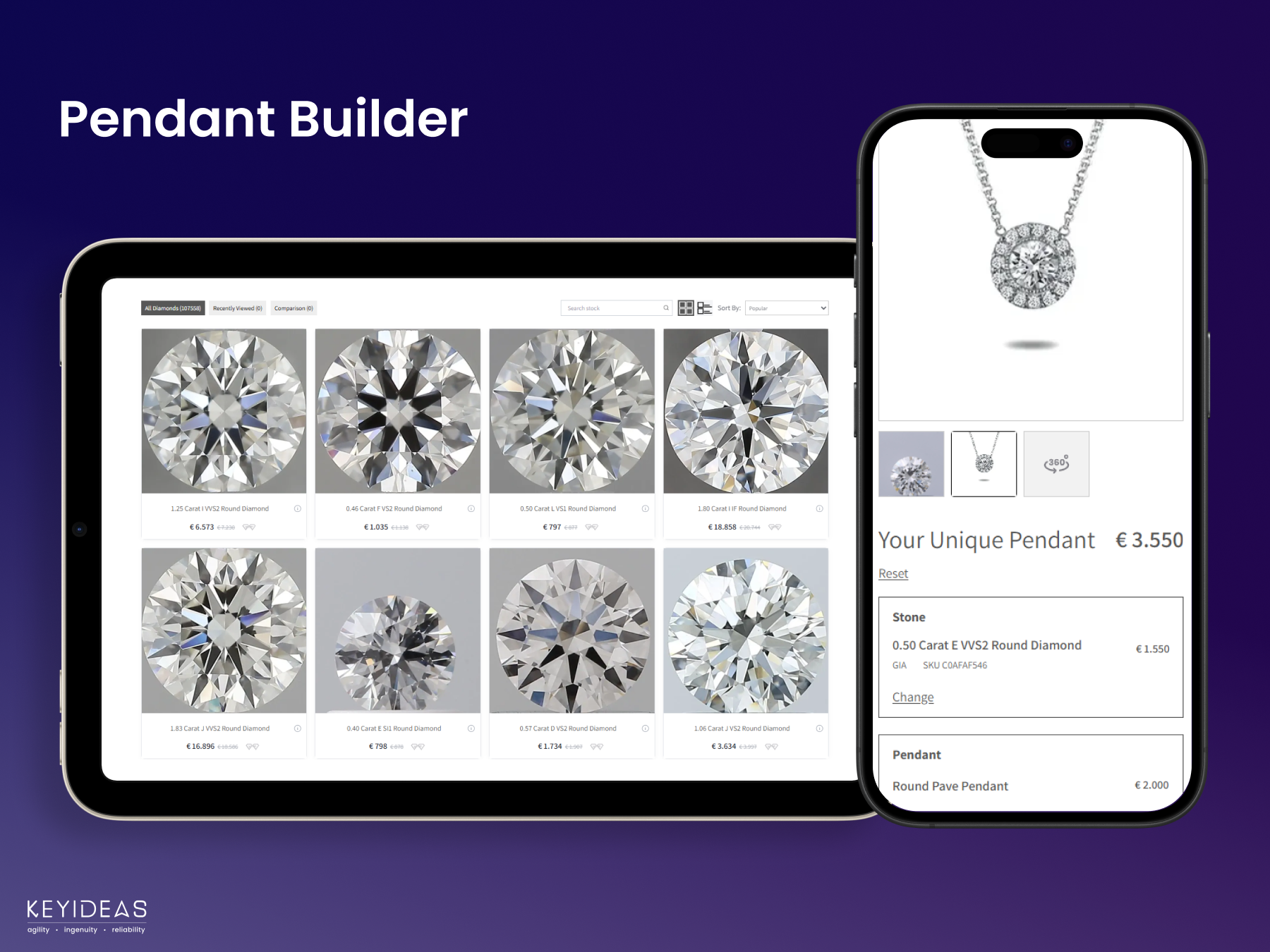
Pendant Builder: Customers can create custom pendants by selecting diamonds or gemstones and pairing them with pendant settings. Works just like the RingBuilder with the same intuitive design process. Yearly subscription required.
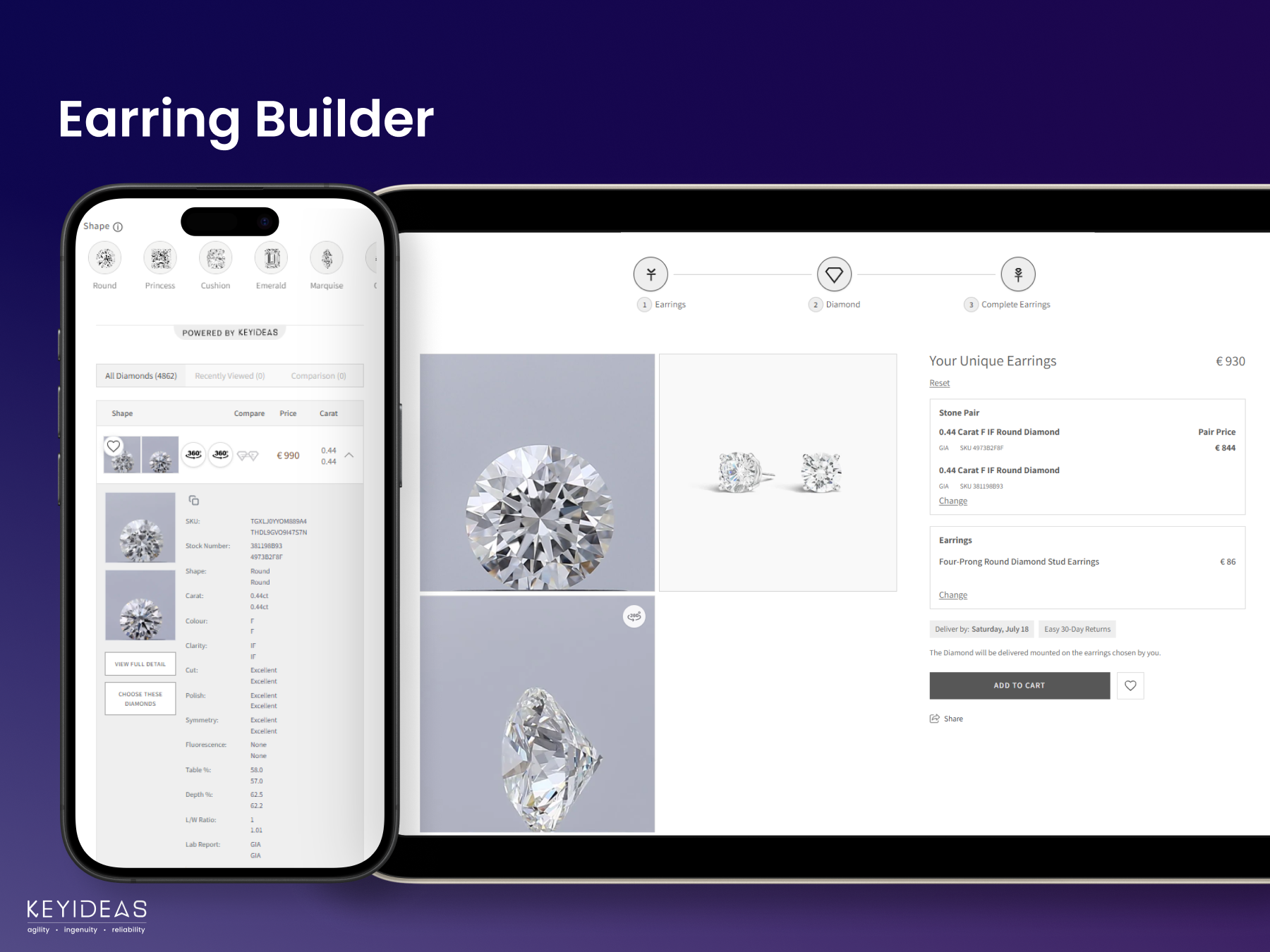
Earring Builder: Allows customers to design custom earrings by selecting a pair of diamonds or gemstones and choosing from various earring settings and styles. Yearly subscription required.
Engraving Options: Add personalized text engraving capabilities to your products. One-time fee.
Product Library: Access 100+ trending engagement and wedding ring designs with lifestyle 360° videos. Yearly fee.
Certificate Management: Mask or redact certificate numbers in PDF documents for privacy. One-time fee.
Custom Supplier Integration: Connect with RapNet, VDB, or any other diamond supplier via CSV or API. One-time setup fee plus server bandwidth and usage charges.
Contact our sales team through the plugin interface for pricing and custom feature requests.
Upgrading to the Paid Version
Upgrading from the free version to the paid version is available at any time by contacting the support team. It is recommended to evaluate the free version first to ensure it meets your business requirements.
Installation
Minimum Requirements:
- PHP 7.0 or higher
- MySQL 5.6 or higher
- WordPress 5.5 or higher
Recommended Requirements:
- PHP 8.1 or higher
- MySQL 5.7 or higher
- WordPress 6.7 or higher
Plugin Installation:
- Log in to your WordPress admin panel
- Navigate to Plugins → Add New
- Search for ‘Keyideas RingBuilder – Jewelry’
- Click Install Now, then Activate
- The plugin will appear in your WordPress left side menu
Plugin Link: Keyideas RingBuilder
Post-Installation Setup:
After installation, go to Settings → Permalinks and click Save Changes. This creates the necessary detail pages for diamonds and rings to display properly.
Accessing the Plugin Dashboard:
After activation, click on ‘Keyideas RingBuilder’ in your WordPress left side menu. From there, you can access Manage, Settings, Language & Region, Feed Center, and Help & Support sections.
Plugin Configuration:
Stone types can be configured from Settings → Choose Your Stones. Select the stone types you want to display (Natural Diamonds, Lab Diamonds, Gemstones, Colored Diamonds). When a stone type is selected, its listing page link is automatically created. You can also define how many products load initially on the listing page.
Frequently asked questions
What’s the Difference Between the Free and Paid Versions?
The free version allows you to explore the RingBuilder (BYOR) experience with access to the diamond and gemstone catalog, advanced search and filtering, diamond size viewer, multilingual and multi-currency support, customizable design, and a fully mobile-optimized interface. The paid version includes everything in the free version, plus: Add to Cart functionality to enable customer purchases Feed Center access with live pricing updates, margin control, sales tracking, and inventory management Supplier integrations including Nivoda and RapNet Global ring sizing (US, UK, EU, Australian, Asian…
How often does pricing change?
We review pricing annually to reflect new features and improvements. Any pricing changes are communicated in advance, and existing subscribers are notified before adjustments take effect.
Do you offer refunds?
No, we do not provide refunds after payment or subscription activation. This is because the process involves server setup, account configuration, diamond feed integration, and licensing. Please thoroughly test the free version before upgrading to ensure it meets your requirements.
How does the colorless to colored diamond switcher work?
The plugin includes an easy toggle that allows customers to switch between colorless (traditional white) diamonds and colored diamonds. This provides a seamless browsing experience and helps customers explore different diamond options without navigating away from their current view.
What diamonds and gemstones are available?
The plugin includes the entire inventory of diamonds and gemstones from Nivoda, featuring natural diamonds (all ten popular shapes), lab-grown diamonds (all ten popular shapes), colored diamonds, and gemstones. We can also integrate with any international supplier who provides data in CSV format. Additionally, you can import your own diamond and gemstone inventory through the Feed Center (paid version only).
Can I import my own inventory?
Yes, with the paid version, you can upload your own stock diamonds and gemstones via the Feed Center. We provide CSV templates (natural.csv, lab.csv, colored.csv, and gemstones.csv) to make the import process straightforward. CSV import guides are included to help you get started. The CSV formats available for download are: natural.csv lab.csv colored.csv gemstones.csv
What margins and shipping times are set during the free trial?
During evaluation with the free version, margins are set at 0% on all diamonds and gemstones, and shipping is set to 10 days (default). Once you upgrade to the paid version, you can customize margins and shipping times through the Feed Center.
How does the Feed Center work?
Once you activate a paid plan, our support team updates the diamonds in different categories through the Feed Center. This gives you access to inventory management, margin control, and performance tracking features.
How do I order a Nivoda diamond?
You’ll need a Nivoda account to order diamonds. In the paid version, when a customer adds a diamond to their cart, you’ll receive an email notification with the SKU/stock number. Contact Nivoda by phone or email to place your order. This notification system allows you to respond quickly and fulfill orders efficiently.
Can you integrate with other suppliers like RapNet or VDB?
Yes, custom supplier integrations are available as a paid add-on. While Nivoda comes pre-integrated (account required, no subscription to their app necessary), we can connect your store with RapNet, VDB, or any other supplier. Contact our sales team to discuss your specific needs.
How can I prevent search engines from indexing diamond inventory?
You don’t need to add any tags, feeds, or custom robots.txt rules. The plugin automatically applies noindex, nofollow to diamond inventory products, category archives, and selected pages at the page level, which is the safest and most reliable SEO method. If you’re using additional SEO, caching, or crawler plugins and still see diamond products being crawled, please ensure those plugins are not overriding page-level noindex rules or forcing indexing through global settings or sitemaps.Recommended fallback settings (only if required): For SEO plugins like Yoast or Rank Math: Set diamond…
Do you provide sample rings?
Yes, we provide sample engagement rings to demonstrate how the RingBuilder works. These samples also serve as a guide for categorizing and tagging your own rings for compatibility. You can easily import these sample rings using the ‘Import Sample Rings’ button in Settings → Settings Category. You can replace them with your own designs at any time—your products remain completely yours.
What if I don’t have my own ring settings?
We offer a Product Library (paid add-on) with 100+ engagement and wedding ring designs in various metal types, complete with product and 360° lifestyle videos. These designs can be licensed for your website. Contact our sales team for details. Note: We provide only digital assets. Design defects, manufacturing, and order fulfillment are your responsibility.
How does the RingBuilder increase sales?
Online retailers offering customization options like ring builders have seen conversion rates increase by 2-3x compared to stores without customization, and Average Order Value (AOV) boost of up to 30%. Customers are willing to pay more for personalized products and appreciate the ability to design their perfect ring.
How can I customize the RingBuilder?
You can add navigation menu links like ‘Start with a Setting’ or ‘Start with a Natural Diamond,’ select ring sizes for your region under Language & Region settings, adjust colors, fonts, and design elements in plugin settings to match your brand, and customers can preview the diamond and engagement ring setting before making a purchase.
Can I customize the appearance to match my brand?
Yes, the plugin is fully compatible with modern WordPress themes and WooCommerce. You can customize colors, fonts, and design elements through the plugin settings page. You can also hide specific elements on ring detail or review pages using custom CSS classes.
Can I see examples of stores using the RingBuilder?
Yes See how other jewelry stores have customized the RingBuilder to match their unique branding and style: dimendscaasi.com bongioielli.com ramziandco.com.au These examples showcase the flexibility and professional results possible with our plugin.
What if the plugin doesn’t load properly with my theme?
If plugin/filters are not loading, ensure your theme has proper WooCommerce container classes. For BYOR tab position issues, contact our support team for theme-specific CSS adjustments. Our support team is available to ensure seamless integration with your WordPress theme.
What permissions does the plugin require?
The plugin requires Read/Write Products (to create diamond products when added to cart), Read Orders (to access order details and mark diamonds as sold), Create Pages (to automatically generate diamond listings and detail pages), and Access WooCommerce Settings (to integrate with checkout and cart functionality).
What languages are supported?
The plugin supports multiple languages, including English (UK/US), French, Italian, German, Spanish, Arabic, Hebrew, and more. It supports both LTR (left-to-right) and RTL (right-to-left) languages and is compatible with popular translation plugins like WPML and Polylang. The default language is English.
Changelog
v1.0.0
- Initial release
v1.0.1
- Performance and UI Updates
v1.0.2
- Resolved UI issues on listing and detail pages.
v1.0.3
- Resolved performance and plugin activation related issues.
v1.0.4
- UI and performance updates with few bug fixes.
v1.0.5
- Overall plugin UI and performance updates with major bug fixes.
Screenshots

For developers
Is this your plugin? Show off the numbers.
Add a live badge to your site, docs or GitHub README. It updates on its own — no account needed.
Best Keyideas RingBuilder – Jewelry alternatives
All customize rings plugins →FAQ
Keyideas RingBuilder – Jewelry: quick answers
Straight answers, pulled from live WordPress.org data.
Live data from WordPress.org · checked Oct 7, 2026
Is Keyideas RingBuilder – Jewelry free?
Yes. Keyideas RingBuilder – Jewelry is free to download and use from the official WordPress.org plugin directory. The developer also sells premium add-ons or a Pro version with extra features.
Is Keyideas RingBuilder – Jewelry safe to use in 2026?
Keyideas RingBuilder – Jewelry works, but test it on a staging site before relying on it in 2026. It runs on 10+ sites and was last updated 9 hours ago, and scores 61/100 on our health check.
How many websites use Keyideas RingBuilder – Jewelry?
Keyideas RingBuilder – Jewelry is active on 10+ WordPress websites and has been downloaded 2,984 times since it launched in January 2025. It was downloaded 175 times in the last 30 days.
Does Keyideas RingBuilder – Jewelry work with WordPress 7.1?
Keyideas RingBuilder – Jewelry is officially tested up to WordPress 7.0.7, while the latest release is 7.1.3. It may still work, but try it on a staging site first.
What PHP version does Keyideas RingBuilder – Jewelry need?
Keyideas RingBuilder – Jewelry requires PHP 7.4 or higher. Most hosts run PHP 8.x today, so it works on any modern WordPress hosting.
When was Keyideas RingBuilder – Jewelry last updated?
The latest version, 1.2.15, was released on October 7, 2026 (9 hours ago).
Who makes Keyideas RingBuilder – Jewelry?
Keyideas RingBuilder – Jewelry is developed and maintained by Keyideas Infotech Private Limited.
What are the best alternatives to Keyideas RingBuilder – Jewelry?
The most popular alternatives to Keyideas RingBuilder – Jewelry are BuildARing (<10 installs), BuildABand (<10 installs) and BuildAPendant (<10 installs).
Powered by PageForge
Want thousands of pages that rank like these? Build them in an afternoon.
This directory runs on the same engine as PageForge. Turn any spreadsheet, CSV or API into thousands of fast, SEO-ready WordPress pages — with schema, internal links and AI-written copy baked in.
- CSV, Google Sheets & API data sources
- AI content, schema & internal links per page
- Works with Elementor, Gutenberg, Yoast & Rank Math
- Free on WordPress.org — no credit card


