



DevLab Maintenance Mode
Display a beautiful maintenance page with 10 templates, role-based bypass, IP whitelist, secret access links, and SEO-friendly 503 handling.

Consider an alternative
DevLab Maintenance Mode shows warning signs in 2026 — compare the alternatives below before installing. It runs on 20+ sites and was last updated 8 months ago, and scores 33/100 on our health check.
- Small user base (20+ active installs)
- Very few reviews so far
- Only tested up to WordPress 6.7 (latest is 7.1)
How does it stack up?
Side-by-side on installs, updates, ratings & support



Daily downloads
Download spikes usually follow a new release — each site that auto-updates counts as a download.
Rankings
Where DevLab Maintenance Mode stands todayWordPress.org search rankings
Live position in the plugin search, top 100| Keyword | Position |
|---|---|
| 503 | #46 |
| coming soon | >100 |
| maintenance | >100 |
| maintenance mode | >100 |
| under construction | >100 |
Version adoption
Share of active sites per release.
About DevLab Maintenance Mode
From the official readme · v1.0.2Description
DevLab Maintenance Mode lets you display a beautiful “Under Maintenance” or “Coming Soon” page to your visitors while you work on your site behind the scenes. No coding required.
Whether you’re launching a new site, performing updates, or making major changes, this plugin ensures your visitors see a professional holding page instead of broken layouts or error messages.
Why Choose DevLab Maintenance Mode?
Zero Lock-Out Risk – Maintenance mode is OFF by default. You control when it activates. Logged-in administrators always have access.
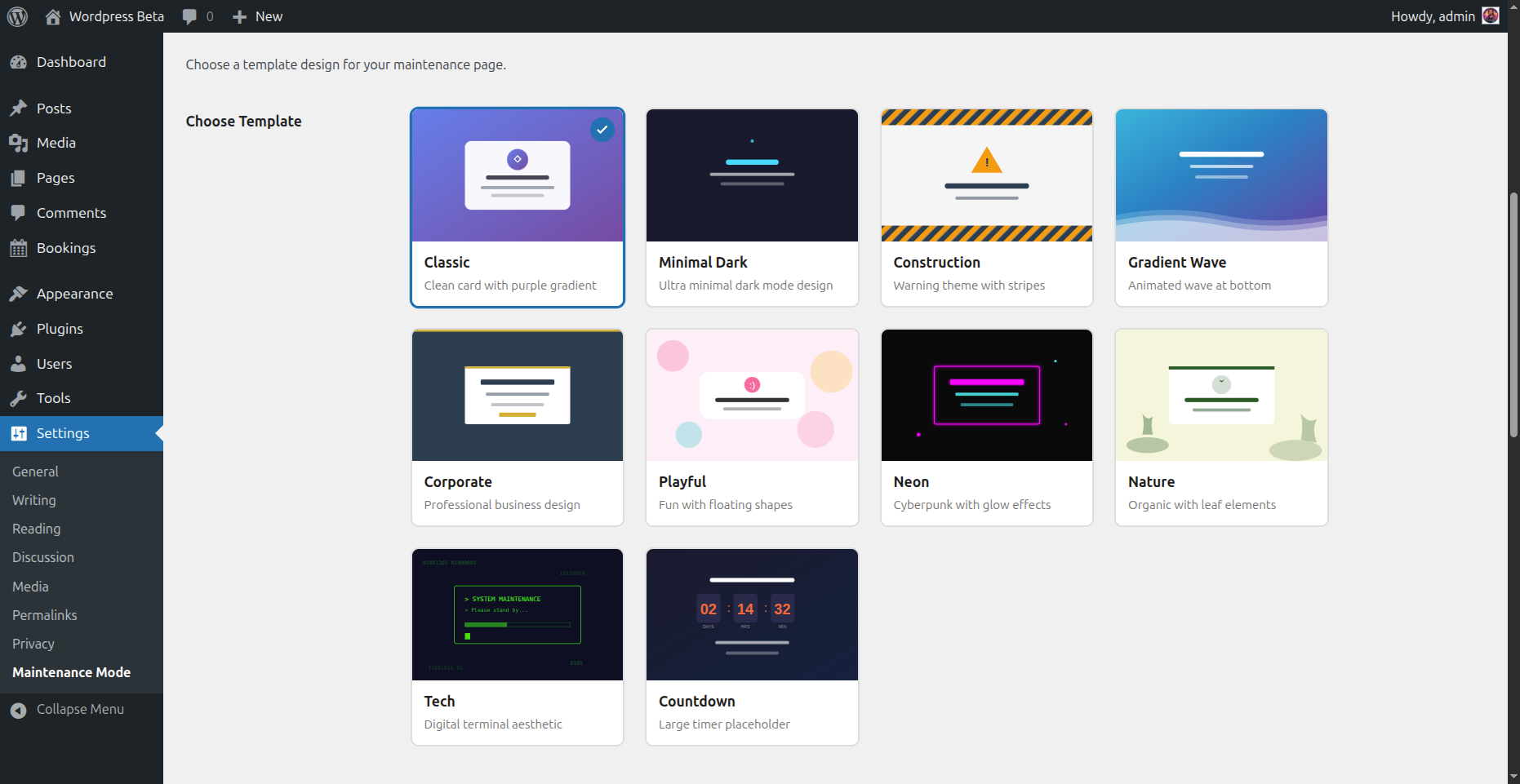
10 Stunning Templates – Not just one boring page. Choose from 10 professionally designed templates that match any brand or style.
Multiple Bypass Options – Grant access via user roles, IP addresses, or shareable secret links. Perfect for clients, team members, or testers.
SEO Done Right – Returns proper 503 status codes with Retry-After headers. Search engines understand your site is temporarily unavailable, not gone forever.
Features
- One-Click Activation – Enable or disable maintenance mode instantly
- 10 Beautiful Templates – From minimal to animated, corporate to playful
- Live Countdown Timer – Show visitors when you’ll be back (Countdown template)
- Custom Messages – Write your own text with full HTML support
- Role-Based Bypass – Let editors, authors, or any role access the site
- IP Whitelist – Always allow specific IP addresses through
- Secret Access Links – Share
yoursite.com?mmbd_bypass=secretfor temporary access - Cookie-Based Sessions – Bypass visitors stay logged in for your configured duration
- Theme Override Support – Copy templates to your theme for complete customization
- Multisite Ready – Works perfectly on WordPress multisite networks
- Clean Uninstall – Removes all data when deleted, leaves no trace
Template Collection
Your maintenance page should look as good as your site. Choose from:
- Classic – Clean centered card with elegant purple gradient background
- Minimal Dark – Ultra-modern dark theme with subtle cyan accents
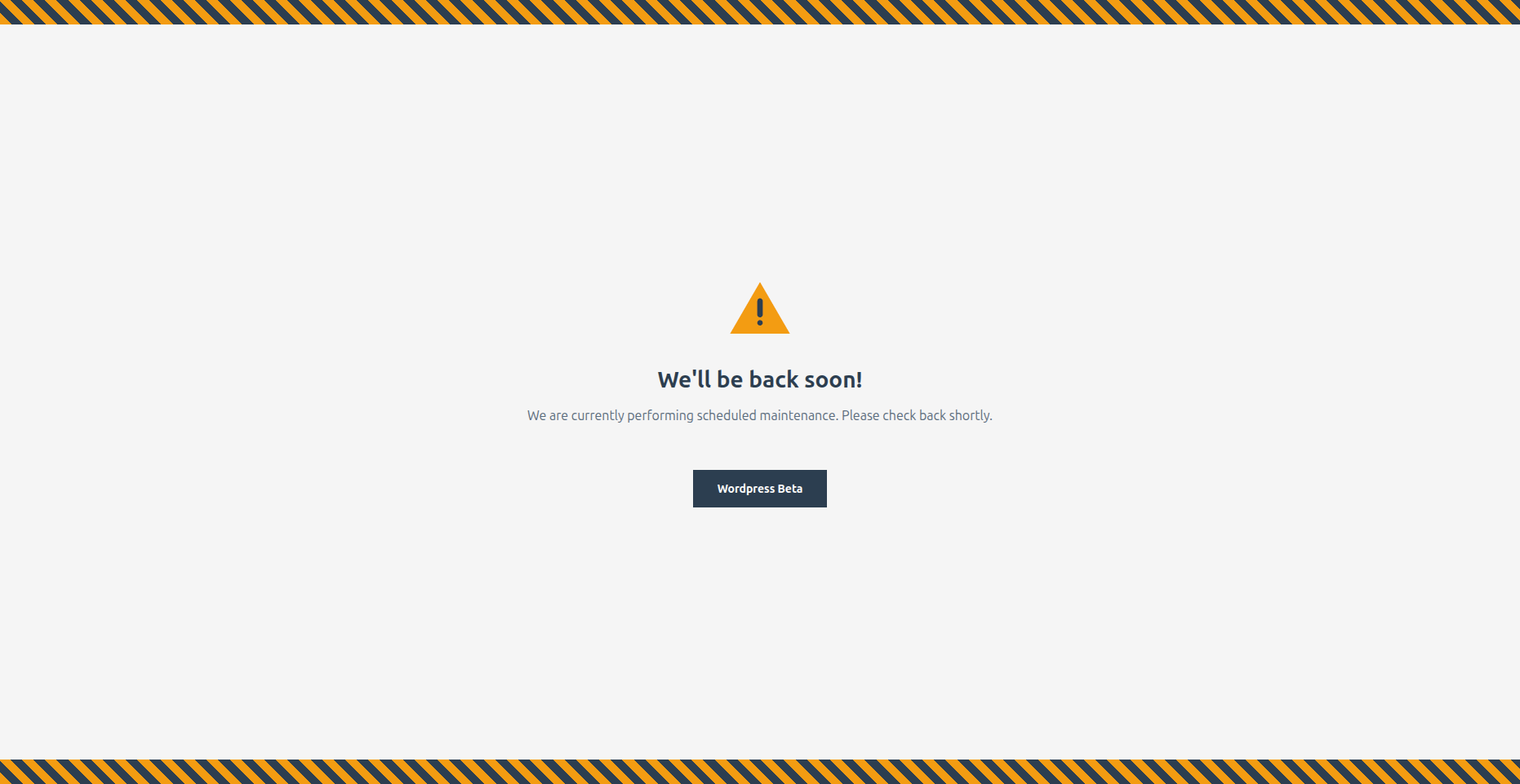
- Construction – Bold warning style with animated diagonal stripes
- Gradient Wave – Smooth animated wave effect for a dynamic feel
- Corporate – Professional business design with refined gold accents
- Playful – Fun and friendly with floating colorful shapes
- Neon – Cyberpunk-inspired with vibrant glow effects
- Nature – Calm organic design with gentle leaf elements
- Tech – Matrix-style digital aesthetic for tech brands
- Countdown – Includes live countdown timer to your launch date
Developer Friendly
- Override any template by copying it to
your-theme/devlab-maintenance-mode/ - Minimal footprint – single database query, lightweight hooks
- Clean, documented code following WordPress coding standards
- Filters and actions for extending functionality
Perfect For
- Site launches and “Coming Soon” pages
- Scheduled maintenance windows
- Major redesigns and migrations
- WooCommerce store updates
- Development and staging sites
- Client preview access during development
Installation
- Upload the
devlab-maintenance-modefolder to the/wp-content/plugins/directory - Activate the plugin through the ‘Plugins’ menu in WordPress
- Go to Settings > Maintenance Mode to configure
- Check the “Enable maintenance mode” checkbox and save
Frequently asked questions
Will I be locked out of my site?
No. Administrators are automatically allowed to bypass maintenance mode. The plugin is also disabled by default when you first activate it, so there’s no risk of accidental lockout. You can also configure additional roles, IP addresses, or a secret phrase for bypass access.
Does this affect SEO?
The plugin returns a proper 503 (Service Unavailable) status code with a Retry-After header, which tells search engines that the downtime is temporary and they should check back later. This is the SEO-recommended way to handle maintenance mode and won’t hurt your rankings.
Can I customize the maintenance page?
Yes! You have several options: Choose a Template – Select from 10 built-in templates in Settings > Maintenance Mode Edit the Message – Write your own message with full HTML support Theme Override – Copy any template file to your-theme/devlab-maintenance-mode/ for complete control over the design
How do I let my client see the site during maintenance?
You have three options: Secret Link – Set a secret phrase and share yoursite.com?mmbd_bypass=your-phrase IP Whitelist – Add their IP address to the whitelist User Role – Create an account for them with a role that has bypass access
How does the countdown timer work?
Select the “Countdown” template and set your target date/time in the settings. The template displays a live countdown showing days, hours, minutes, and seconds until your launch. When the countdown reaches zero, it displays “We’re Live!”
Can I use this as a Coming Soon page?
Absolutely! Many users install DevLab Maintenance Mode before launching a new site. Choose a template that fits your brand, customize the message to build anticipation, and use the countdown timer to show when you’ll launch.
Does it work with caching plugins?
Yes, but you may need to exclude the maintenance page from caching or clear your cache after enabling/disabling maintenance mode. Most caching plugins handle 503 responses correctly.
Does it work with WooCommerce?
Yes. The plugin works with WooCommerce and any other WordPress plugin. When maintenance mode is active, all pages including shop, cart, and checkout show the maintenance page to non-bypassed visitors.
How do I completely remove the plugin?
Simply deactivate and delete the plugin from your WordPress admin. The plugin includes a clean uninstall routine that removes all settings and data from your database automatically.
Changelog
Removed email subscription feature, code cleanup.
1.0.2
- Removed email subscription feature
- Fixed version consistency
- Code cleanup
1.0.1
- Added configurable countdown date picker
- Added Google Analytics integration
-
Added social media links (Facebook, Twitter/X, Instagram, LinkedIn)
-
Fixed template selection visual feedback
- Fixed countdown timer to use configured date
1.0.0
- Initial release
- 10 professionally designed templates
- Role-based bypass system
- IP whitelist functionality
- Secret phrase access links
- Custom message with HTML support
- SEO-friendly 503 status handling
- Theme template override support
- Multisite compatibility
- Clean uninstall
Screenshots

For developers
Is this your plugin? Show off the numbers.
Add a live badge to your site, docs or GitHub README. It updates on its own — no account needed.
Best DevLab Maintenance Mode alternatives
All 503 plugins →


FAQ
DevLab Maintenance Mode: quick answers
Straight answers, pulled from live WordPress.org data.
Live data from WordPress.org · checked Sep 29, 2026
Is DevLab Maintenance Mode free?
Yes. DevLab Maintenance Mode is free to download and use from the official WordPress.org plugin directory.
Is DevLab Maintenance Mode safe to use in 2026?
DevLab Maintenance Mode shows warning signs in 2026 — compare the alternatives below before installing. It runs on 20+ sites and was last updated 8 months ago, and scores 33/100 on our health check.
How many websites use DevLab Maintenance Mode?
DevLab Maintenance Mode is active on 20+ WordPress websites and has been downloaded 494 times since it launched in January 2026. It was downloaded 72 times in the last 30 days.
Does DevLab Maintenance Mode work with WordPress 7.1?
DevLab Maintenance Mode is officially tested up to WordPress 6.7.9, while the latest release is 7.1.2. It may still work, but try it on a staging site first.
What PHP version does DevLab Maintenance Mode need?
DevLab Maintenance Mode requires PHP 7.2 or higher. Most hosts run PHP 8.x today, so it works on any modern WordPress hosting.
When was DevLab Maintenance Mode last updated?
The latest version, 1.0.2, was released on January 27, 2026 (8 months ago).
Who makes DevLab Maintenance Mode?
DevLab Maintenance Mode is developed and maintained by CodersGround.
What are the best alternatives to DevLab Maintenance Mode?
The most popular alternatives to DevLab Maintenance Mode are BEAPI – Maintenance Mode (100+ installs), Offair – Branded Error Pages (10+ installs) and Maintenance mode by Juraj H… (10+ installs).
Powered by PageForge
Want thousands of pages that rank like these? Build them in an afternoon.
This directory runs on the same engine as PageForge. Turn any spreadsheet, CSV or API into thousands of fast, SEO-ready WordPress pages — with schema, internal links and AI-written copy baked in.
- CSV, Google Sheets & API data sources
- AI content, schema & internal links per page
- Works with Elementor, Gutenberg, Yoast & Rank Math
- Free on WordPress.org — no credit card


