



DebugPress: Debugger in Popup
Easy-to-use plugin for debugging and profiling website loading, SQL queries analysis, help with development, bug fixing, all in configurable popup.

Solid choice
DebugPress: Debugger in Popup is a solid plugin choice in 2026, with a few things worth checking first. It runs on 100+ sites, is rated 5/5 and was last updated 3 months ago, and scores 71/100 on our health check.
- Small user base (100+ active installs)
Daily downloads
Download spikes usually follow a new release — each site that auto-updates counts as a download.
Rankings
Where DebugPress: Debugger in Pop… stands todayWordPress.org search rankings
Live position in the plugin search, top 100| Keyword | Position |
|---|---|
| ajax monitor | #23 |
| debugging | #68 |
| dev4press | #7 |
| development | >100 |
| query monitor | #23 |
Version adoption
Share of active sites per release.
Rating breakdown
★★★★★★★★★★ 5 from 5 reviews
About DebugPress: Debugger in Popup
From the official readme · v4.2Description
DebugPress is an easy-to-use plugin implementing popup for debugging and profiling currently loaded WordPress powered website page with support for intercepting AJAX requests. The main debugger window is displayed as a popup, activated through the button with the Bug integrated into WordPress Toolbar, or floating on the page.
The plugin currently has a total of 22 tabs in the popup debugger window, showing all kinds of information relevant to the current page, WordPress setup, background AJAX calls, and much more.
The plugin doesn’t modify or replace any WordPress files or functions.
Home and GitHub
- Learn more about the plugin: DebugPress Website
- Contribute to plugin development: DebugPress on GitHub
Quick Overview Video
Pretty Print for objects
To display the content of objects or arrays, plugin has pretty print functionality through use of simpler PrettyPrint library, or more robust third-party library Kint. You can choose one or the other from the plugin Settings, Advanced tab.
Debugger Panels
Currently, the plugin has the following panels:
- Basic
- Request (optional)
- Query (for frontend only)
- Content (optional)
- Roles (optional)
- Constants (optional)
- Hooks (optional)
- PHP (optional)
- Server (optional)
- Enqueue (optional)
- SQL Queries (if SQL queries logging is enabled)
- User (optional, if user is logged in only)
- HTTP (optional, if HTTP API calls are captured)
- bbPress (optional, on bbPress forum pages only)
- Freemius (optional, if Freemius SDK is active)
- Plugins (optional, if plugins store data)
- Errors (for all captured PHP errors)
- Doing It Wrong (for captured WordPress Doing It Wrong warnings)
- Deprecated (for captured PHP deprecated warnings)
- AJAX (for captured AJAX calls while page is active)
- Store (for any user stored objects during the page loading)
- Tools (internal and external tools links)
- Debug Log (load content on demand from WordPress ‘debug.log’)
- Layout (control the size, position and activation of the popup)
SQL Queries
This panel lists all the queries WordPress has run. It allows you to order the queries by execution order or length of execution, and all queries can be filtered by the query type, database table it targets or the WordPress function that called it. Every query displays the execution time, order, caller functions stack and fully formatted SQL query that is easy to read. For some Dev4Press created plugins (and that list will grow), DebugPress can detect the source of the query and allow you to filter by the plugin calling the query.
PHP and WordPress Errors
Plugin has 3 panels dedicated to showing PHP and WordPress errors and warnings. The Plugin captures this information during the page load, and it shows full debug trace as returned by the PHP debug tracing function.
AJAX
The plugin tracks every AJAX call coming through WordPress admin-ajax.php handler, and with every response, it returns HTTP headers with AJAX request basic execution information. Right now, plugin is not returning a list of logged errors or SQL queries, because both can produce huge output that goes over the HTTP header limits. Plan is to introduce these in the future plugin versions.
Info Panels
In the administration Tools menu, the plugin adds a DebugPress Info page showing several panels
- PHP Info: full formatted results from
phpinfo()function - OPCache Info: full settings and statistics for the OPCache PHP extension
- MySQL Variables: full MySQL settings retrieved from the database
Plugin Settings
The plugin has various options controlling the plugin activation, button integration position, user roles that can see the debugger window, options to attempt overriding WordPress debug flags and options controlling the visibility of optional debugger panels.
Log into Database
Debugger popup is visible for the request running in the browser. But there are many requests that are happening in the background (AJAX calls, REST API calls…), and for them, you can’t see errors, call information and other stuff in the debugger. Because of that, DebugPress supports logging of various events into database with the use of ‘coreActivity’ plugin, and it is highly recommended to install and use coreActivity.
Log various debug events into a database with the free plugin: coreActivity Plugin, supporting over 120 events and 10 popular WordPress plugins. DebugPress related events will be logged and available for later analysis, and this includes errors, AJAX calls, and HTTP API calls.
Documentation and Support
To get help with the plugin, you can use WordPress.org support forums, or you can use Dev4Press.com support forums.
- Plugin Documentation: DebugPress Website
- Support Forum: Dev4Press Support
Installation
General Requirements
- PHP: 7.4 or newer
- Tested with the latest PHP, version 8.5
WordPress Requirements
- WordPress: 5.6 or newer
- Tested with the latest WordPress, version 7.0
Basic Installation
- Upload folder
debugpressto the/wp-content/plugins/directory - Activate the plugin through the ‘Plugins’ menu in WordPress
- Plugin settings are available under WordPress ‘Settings’ panel
Frequently asked questions
How can I enable WordPress Debug Mode?
To enable WordPress debug mode via wp-config.php, check out the article here: WordPress Setup.
How can I open Debugger popup?
If you have enabled debugger (for admin side and/or frontend), Debugger is activated via Bug button placed in the WordPress Toolbar or as a float button (depending on the settings). Since version 3.0, you can activate the button via keyboard shortcut, default combination is ctrl+shift+u, but it can be changed in the plugin settings.
Can I change the size and position of the popup?
Yes. Once the popup is open, you will find the Layout icon next to the button to close the popup. On the layout panel, you can change the location for the popup, size, modal status and auto activation on page load.
Where can I configure the plugin?
Open the WordPress ‘Settings’ menu, there you will find ‘DebugPress’ panel.
Changelog
Various updates and improvements. Updated Kint Library.
4.2 (2026.06.30)
- New: tested with WordPress 7.0
- New: tested and compatible with
PHP8.5 - New: eslint and stylelint support
- New: panel for Freemius
- Edit: reorganized SCSS code to modernize loading
- Edit: many improvements to the SCSS code and styling
- Edit: many improvements to the JS code
- Edit: Kint Pretty Print Library 6.1
4.1 (2025.09.18)
- New: tested with WordPress 6.8
- New: tested and compatible with
PHP8.4 - New: additional functions for logging
- Edit: improvements to plugin initialization
- Edit: various small improvements and tweaks
- Edit: expanded support for Dev4Press Library
- Edit: Kint Pretty Print Library 6.0.1
- Fix minor issue with PHP 8.4 and error reporting
4.0 (2024.11.02)
- New: tested with WordPress 6.7
- New: tested and compatible with
PHP8.4 RC 3 - New: using composer to load
Kintlibrary - New: various constants for KINT library control
3.9.2 (2024.08.23)
- Fix: one more issue with the access to OPCache status information
3.9.1 (2024.08.19)
- Fix: problem with the Tracker when closure makes a call #08
3.9 (2024.05.14)
- Edit: few more updates and improvements
- Edit: replacement of some native with WordPress functions
- Edit: various small updates and tweaks
- Edit: Kint Pretty Print Library 5.1.1
- Fix: various PHP notices related to PHP 8.1 and newer
Screenshots
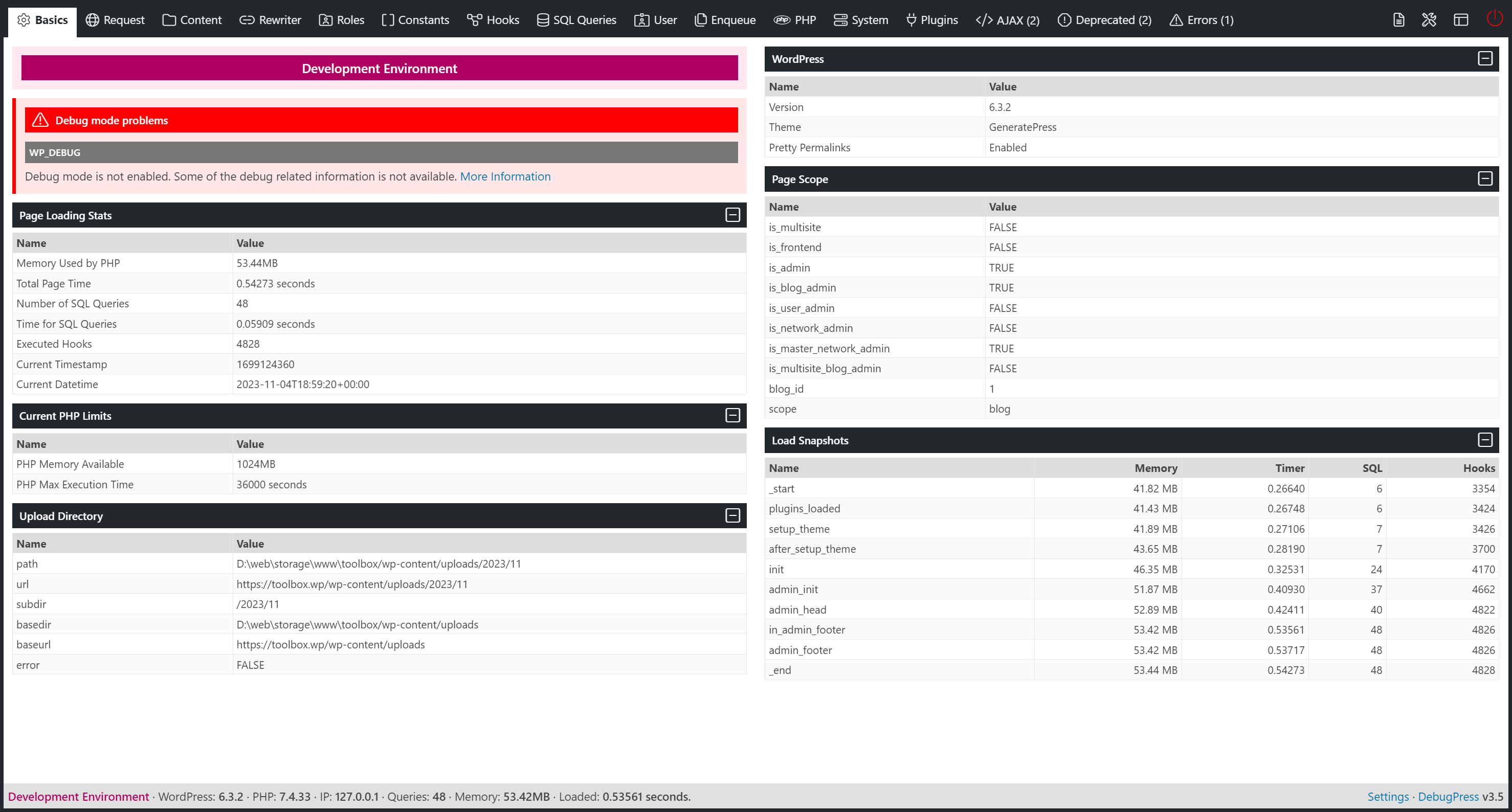


For developers
Is this your plugin? Show off the numbers.
Add a live badge to your site, docs or GitHub README. It updates on its own — no account needed.
FAQ
DebugPress: Debugger in Popup: quick answers
Straight answers, pulled from live WordPress.org data.
Live data from WordPress.org · checked Sep 29, 2026
Is DebugPress: Debugger in Popup free?
Yes. DebugPress: Debugger in Popup is free to download and use from the official WordPress.org plugin directory.
Is DebugPress: Debugger in Popup safe to use in 2026?
DebugPress: Debugger in Popup is a solid plugin choice in 2026, with a few things worth checking first. It runs on 100+ sites, is rated 5/5 and was last updated 3 months ago, and scores 71/100 on our health check.
How many websites use DebugPress: Debugger in Popup?
DebugPress: Debugger in Popup is active on 100+ WordPress websites and has been downloaded 15,920 times since it launched in September 2020. It was downloaded 147 times in the last 30 days.
Does DebugPress: Debugger in Popup work with WordPress 7.1?
DebugPress: Debugger in Popup is officially tested up to WordPress 7.0.6, while the latest release is 7.1.2. It may still work, but try it on a staging site first.
What PHP version does DebugPress: Debugger in Popup need?
DebugPress: Debugger in Popup requires PHP 7.4 or higher. Most hosts run PHP 8.x today, so it works on any modern WordPress hosting.
When was DebugPress: Debugger in Popup last updated?
The latest version, 4.2, was released on June 30, 2026 (3 months ago).
Who makes DebugPress: Debugger in Popup?
DebugPress: Debugger in Popup is developed and maintained by Milan Petrovic.
Powered by PageForge
Want thousands of pages that rank like these? Build them in an afternoon.
This directory runs on the same engine as PageForge. Turn any spreadsheet, CSV or API into thousands of fast, SEO-ready WordPress pages — with schema, internal links and AI-written copy baked in.
- CSV, Google Sheets & API data sources
- AI content, schema & internal links per page
- Works with Elementor, Gutenberg, Yoast & Rank Math
- Free on WordPress.org — no credit card


