



Debugger & Troubleshooter
A WordPress plugin for debugging & troubleshooting. Safely simulate plugin deactivation, theme switching, and WP_DEBUG.

Use with caution
Debugger & Troubleshooter works, but test it on a staging site before relying on it in 2026. It runs on 80+ sites, is rated 5/5 and was last updated 4 months ago, and scores 60/100 on our health check.
- Small user base (80+ active installs)
- Very few reviews so far
How does it stack up?
Side-by-side on installs, updates, ratings & support



Daily downloads
Download spikes usually follow a new release — each site that auto-updates counts as a download.
Rankings
Where Debugger & Troubleshooter stands todayWordPress.org search rankings
Live position in the plugin search, top 100| Keyword | Position |
|---|---|
| compatibility | >100 |
| debug | #56 |
| developer | >100 |
| PHP Info | #27 |
| troubleshoot | #9 |
Version adoption
Share of active sites per release.
Rating breakdown
★★★★★★★★★★ 5 from 1 reviews
About Debugger & Troubleshooter
From the official readme · v1.5.0Description
The “Debugger & Troubleshooter” plugin provides essential tools for WordPress site administrators to diagnose and resolve issues efficiently. It offers a dedicated section in the WordPress dashboard that displays comprehensive site health information and powerful debugging toggles.
Key Features:
- Troubleshooting Mode: Activate a unique, session-based “Troubleshooting Mode” for your current browser session. This means any changes you make are temporary and only visible to you. This mode allows you to:
- Simulate Plugin Deactivation: Selectively “deactivate” plugins. The plugin’s assets and code will be disabled for your session only.
- Simulate Theme Switching: Preview any installed theme, while the public-facing site continues to use the active theme.
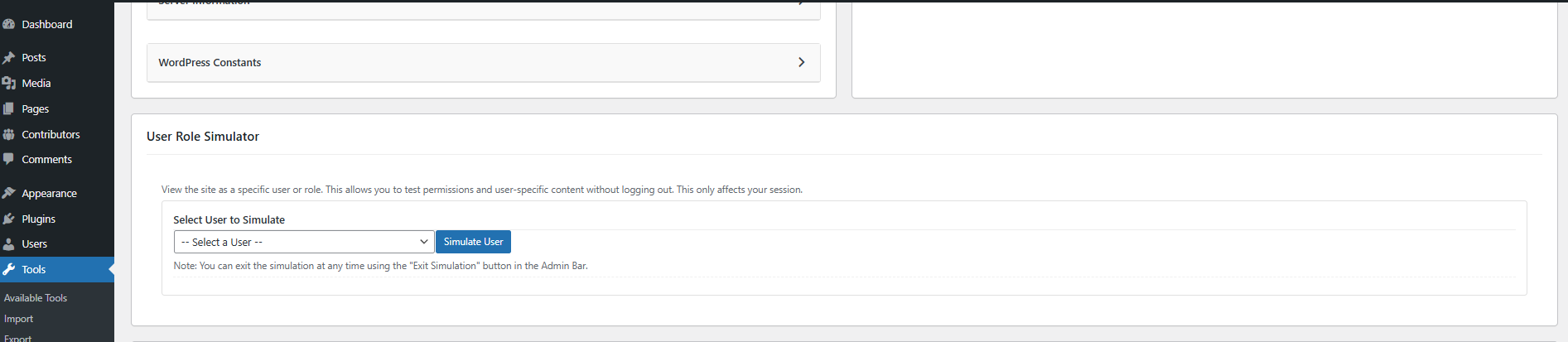
- User Role Simulator: View your site as any other user or role (e.g., Subscriber, Editor) to test permissions and content visibility. This is session-based and includes a safe “Exit” button in the Admin Bar.
- Live Debugging: Safely enable
WP_DEBUGwith a single click from the admin dashboard. Errors are logged todebug.logwithout being displayed on the site, and you can view the log file directly in the plugin’s interface. - Comprehensive Site Information: Get a quick, organized overview of your WordPress environment in collapsible cards. This includes detailed PHP, Database, and Server information, a full list of all themes and plugins with their status, and important WordPress constants.
- Copy to Clipboard: A one-click button allows you to copy all the site information, making it incredibly easy to share with support forums or developers.
- PHP Compatibility Checker: Scan all installed plugins for deprecated functions and syntax that may break when upgrading PHP. Results displayed in a responsive card layout with clear warnings and incompatibility counts.
- Conflict Checker: Systematically identify plugin conflicts through a binary search process. Narrow down suspect plugins by answering whether each group resolves the issue, all within a safe session-based mode.
- Safe Debugging & Cache Bypassing: All troubleshooting actions are session-based. The plugin automatically attempts to bypass caching when Troubleshooting Mode is active, ensuring your changes are reflected instantly.
- User-Friendly Interface: An intuitive dashboard interface makes it easy to access all features.
- Admin Notices: Clear notices alert you when Troubleshooting Mode is active.
This plugin is an invaluable tool for developers, site administrators, and anyone who needs to debug WordPress issues without risking site downtime or affecting user experience.
Usage
Once the plugin is installed and activated, navigate to Tools > Debugger & Troubleshooter in your WordPress dashboard.
1. Site Information
The top section provides a comprehensive overview of your WordPress environment, organized into collapsible cards that are closed by default. Click on any card title to expand it and view the details.
2. Troubleshooting Mode
This session-based feature allows you to simulate theme switches and plugin deactivations without affecting your live website for other visitors.
3. User Role Simulator
Safely view your site as another user or role (e.g., “Subscriber” or “Editor”) without knowing their password. This is perfect for testing capabilities and content restrictions.
4. Live Debugging
This section allows you to safely manage WordPress’s debugging features.
- Enable Live Debug: Click this button to programmatically enable
WP_DEBUGandWP_DEBUG_LOG, while keepingWP_DEBUG_DISPLAYoff. This logs errors towp-content/debug.logwithout showing them to visitors. - Debug Log Viewer: A text area displays the contents of your
debug.logfile, allowing you to see errors as they are generated. - Clear Log: Safely clear the
debug.logfile with a click.
5. PHP Compatibility Checker
Scan all installed plugins for deprecated PHP functions and syntax incompatible with your target PHP version. Select a target version and click “Start Scan” to receive a per-plugin compatibility report with clear warnings and incompatibility counts.
6. Conflict Checker
If you are experiencing an issue on your site, use the Conflict Checker to identify the culprit plugin. The plugin systematically deactivates groups of plugins using your session-based Troubleshooting Mode, asking whether the issue persists after each step. Once the culprit is found, you can deactivate it with one click.
Installation
- Download the plugin ZIP file.
- Upload the plugin to your WordPress site:
- Navigate to Plugins > Add New in your WordPress dashboard.
- Click the “Upload Plugin” button.
- Choose the downloaded ZIP file and click “Install Now”.
- Activate the plugin through the ‘Plugins’ menu in WordPress.
- Once activated, go to Tools > Debugger & Troubleshooter to access the plugin’s features.
Manual Installation (if needed):
- Extract the
debug-troubleshooter.zipfile. - Upload the
debug-troubleshooterfolder to the/wp-content/plugins/directory via FTP or your hosting’s file manager. - Activate the plugin through the ‘Plugins’ menu in WordPress.
Frequently asked questions
Q: How does Troubleshooting Mode work without affecting my live site?
A: Troubleshooting Mode uses a browser cookie specific to your session. When enabled, the plugin filters WordPress functions that determine active plugins and themes, redirecting them to your simulated settings. This happens only for your browser.
Q: Will this work if I have a caching plugin active?
A: Yes. When Troubleshooting Mode is active, the plugin defines the DONOTCACHEPAGE constant, which instructs most caching plugins and hosting environments to bypass the cache for your session.
Q: How does Live Debugging work without editing wp-config.php?
A: The plugin uses the plugins_loaded hook to define the WP_DEBUG constants programmatically. This happens very early in the WordPress loading sequence, effectively enabling debug mode for all requests while the feature is turned on.
Q: How does the PHP Compatibility Checker work?
A: The checker scans each plugin’s PHP files for deprecated functions, incompatible syntax, and other patterns known to break in newer PHP versions, then reports which plugins are compatible, have warnings, or are incompatible.
Q: How does the Conflict Checker work?
A: The Conflict Checker automates plugin conflict identification using a binary search — it splits plugins into groups and asks you whether the issue persists after each test, quickly narrowing down the exact culprit.
Changelog
This update introduces the Plugin Compatibility Checker and Conflict Checker features, plus UI improvements and bug fixes.
1.5.0 – 2026-06-04
- Feature: Added Plugin Compatibility Checker to scan and report PHP version compatibility across all installed plugins.
- Feature: Added Conflict Checker to systematically identify plugin conflicts through binary search.
- Fix: Added HTML escaping to all dynamically injected compatibility result content.
- Fix: Removed unused
$rolesvariable from User Simulation section.
1.4.1 – 2026-05-20
- Enhancement: Tested up to WordPress 7.0.
- Feature: Added “SMTP / Mail Debugger” to test and verify site mail configuration.
- Feature: Captures detailed WP_Error data and PHP environment diagnostics upon mail delivery failure.
- Enhancement: Improved AJAX feedback loops and visual status indicators in the dashboard.
- Fix: Resolved minor UI layout issues in the Site Information cards.
1.4.0 – 2026-03-19
- Security Fix (Critical): Resolved a privilege escalation vulnerability where unauthenticated users could bypass authentication via the User Simulation feature.
- Security Fix (High): Patched an authorization bypass in the Troubleshooting Mode configuration. State is now securely validated against database records using cryptographic tokens.
- Security Fix (Medium): Added strict nonces to the “Exit Simulation” admin bar action to prevent Cross-Site Request Forgery (CSRF).
- Fix: Completely overhauled the “Troubleshooting Mode” plugin logic. The plugin now correctly intercepts early plugin loading via an automatically dropping MU (Must-Use) plugin template, resolving the issue where plugins were not adequately disabled during simulations.
- Fix: Disconnected WP_Filesystem API usage from AJAX context actions down to native PHP handlers to prevent silent AJAX failures on servers requiring FTP credentials.
- Fix: Adjusted the “Exit Simulation” JavaScript rendering hook to ensure the “Exit Simulation” admin bar button functions properly on the front-end.
1.3.2 – 2026-02-11
- Fix: Resolved a UI conflict where the confirmation modal appeared automatically upon page load due to CSS class interference from other plugins.
- Fix: Improved modal layering (z-index) to ensure the Success/Error alert modal correctly appears above the confirmation modal.
- Fix: Updated the “Confirm” action in the Debug Log viewer to automatically close the confirmation dialog before showing the result, preventing the UI from becoming unclickable.
- Enhancement: Hardened the .hidden CSS utility with !important to prevent external themes or plugins from forcing hidden elements to display.
1.3.1 – 2025-11-21
- Fix: Resolved a critical issue where admin scripts were not loading due to a hook name mismatch.
- Fix: Addressed WordPress coding standard issues (deprecated functions, security hardening).
1.3.0 – 2025-11-21
- Feature: Added “User Role Simulator” to view the site as any user or role for the current session.
- Enhancement: Added an Admin Bar “Exit Simulation” button for safe return to the administrator account.
- Fix: Improved layout stability for the troubleshooting dashboard.
Screenshots




For developers
Is this your plugin? Show off the numbers.
Add a live badge to your site, docs or GitHub README. It updates on its own — no account needed.
Best Debugger & Troubleshooter alternatives
All compatibility plugins →





FAQ
Debugger & Troubleshooter: quick answers
Straight answers, pulled from live WordPress.org data.
Live data from WordPress.org · checked Sep 30, 2026
Is Debugger & Troubleshooter free?
Yes. Debugger & Troubleshooter is free to download and use from the official WordPress.org plugin directory.
Is Debugger & Troubleshooter safe to use in 2026?
Debugger & Troubleshooter works, but test it on a staging site before relying on it in 2026. It runs on 80+ sites, is rated 5/5 and was last updated 4 months ago, and scores 60/100 on our health check.
How many websites use Debugger & Troubleshooter?
Debugger & Troubleshooter is active on 80+ WordPress websites and has been downloaded 2,027 times since it launched in July 2025. It was downloaded 169 times in the last 30 days.
Does Debugger & Troubleshooter work with WordPress 7.1?
Debugger & Troubleshooter is officially tested up to WordPress 7.0.6, while the latest release is 7.1.2. It may still work, but try it on a staging site first.
What PHP version does Debugger & Troubleshooter need?
Debugger & Troubleshooter requires PHP 7.4 or higher. Most hosts run PHP 8.x today, so it works on any modern WordPress hosting.
When was Debugger & Troubleshooter last updated?
The latest version, 1.5.0, was released on June 4, 2026 (4 months ago).
Who makes Debugger & Troubleshooter?
Debugger & Troubleshooter is developed and maintained by Jhimross Olinares.
What are the best alternatives to Debugger & Troubleshooter?
The most popular alternatives to Debugger & Troubleshooter are Plugin Compatibility Checker (9K+ installs), Better Plugin Compatibility… (4K+ installs) and Eli's PHP Compatibility Sca… (500+ installs).
Powered by PageForge
Want thousands of pages that rank like these? Build them in an afternoon.
This directory runs on the same engine as PageForge. Turn any spreadsheet, CSV or API into thousands of fast, SEO-ready WordPress pages — with schema, internal links and AI-written copy baked in.
- CSV, Google Sheets & API data sources
- AI content, schema & internal links per page
- Works with Elementor, Gutenberg, Yoast & Rank Math
- Free on WordPress.org — no credit card


