



Datafeedr API
Connect to the Datafeedr API.

Solid choice
Datafeedr API is a solid plugin choice in 2026, with a few things worth checking first. It runs on 5K+ sites, is rated 4/5 and was last updated 3 months ago, and scores 65/100 on our health check.
How does it stack up?
Side-by-side on installs, updates, ratings & support


Daily downloads
Download spikes usually follow a new release — each site that auto-updates counts as a download.
Rankings
Where Datafeedr API stands todayWordPress.org search rankings
Live position in the plugin search, top 100| Keyword | Position |
|---|---|
| data feed | #65 |
| datafeed | #1 |
| import affiliate products | #23 |
| import csv | #54 |
| import datafeed | #3 |
Version adoption
Share of active sites per release.
Rating breakdown
★★★★★★★★★★ 4 from 13 reviews
About Datafeedr API
From the official readme · v1.4.2Description
Important
The Datafeedr API plugin requires that you have an active Datafeedr API Product subscription. Purchase Subscription.
The Datafeedr API provides access to our database of affiliate products. We have aggregated over 950,000,000 products from over 27,000+ merchants and 35+ affiliate networks. We have indexed and normalized the product data making it easy for you to search for and find products you want to promote on your website.
The Datafeedr API plugin currently integrates with the following plugins:
The Datafeedr API plugin provides the interface to connect to the Datafeedr API and perform the following tasks:
- Configure your API connection settings.
- Select affiliate networks you are a member of.
- Select merchants who have approved you.
- Add your affiliate network affiliate IDs.
- Import/export your selection of affiliate networks and/or merchants.
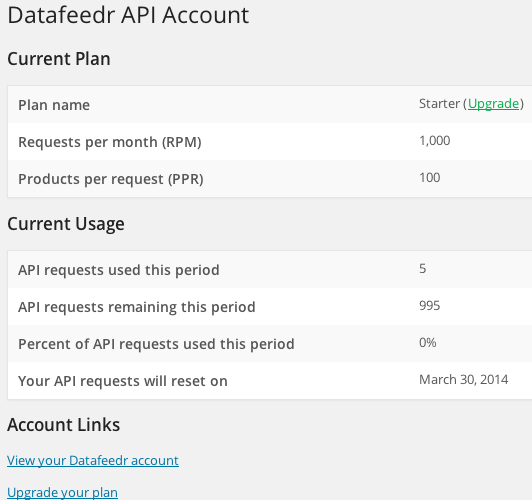
- View your API account usage.
The Datafeedr API plugin was built to be extended. The Datafeedr API plugin contains its own functions that third party developers can use to connect to the Datafeedr API, make search requests or display an ‘advanced search’ form. We encourage other developers to build on top of the Datafeedr API plugin.
Additionally, we have written plugins that integrate the Datafeedr API plugin with WooCommerce.
For personal-use only. Please contact us if you have any questions.
Requirements
- PHP 7.4 or greater
- MySQL version 5.6 or greater
- WordPress memory limit of 256 MB or greater
- PHP’s
CURLenabled - WordPress Cron enabled
- HTTPS support
Installation
This section describes how to install and configure the plugin:
- Upload the
datafeedr-apifolder to the/wp-content/plugins/directory. - Activate the Datafeedr API plugin through the ‘Plugins’ menu in WordPress.
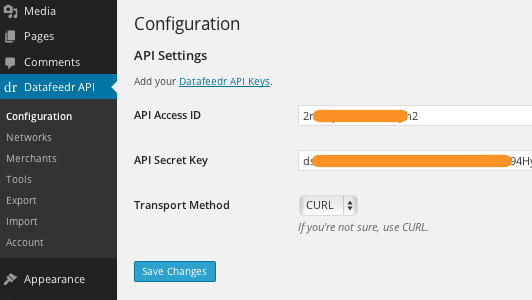
- Enter your Datafeedr API keys here: WordPress Admin Area > Datafeedr API > Configuration
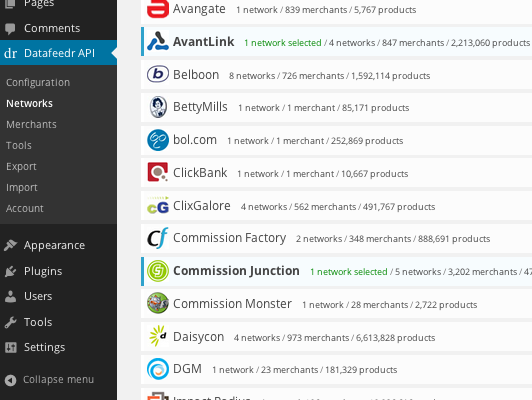
- Select the affiliate networks you are a member of here: WordPress Admin Area > Datafeedr API > Networks
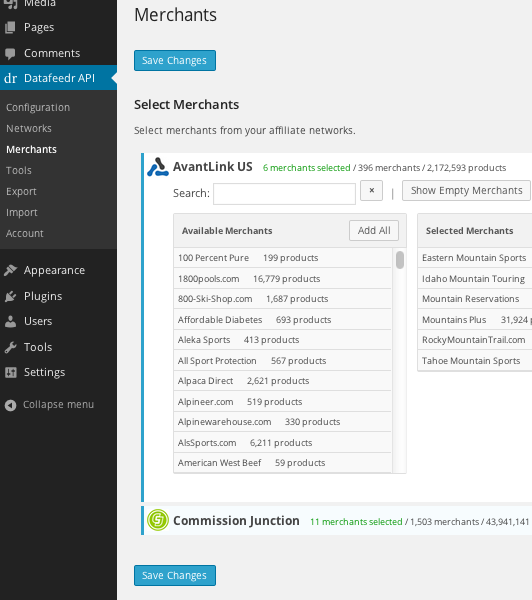
- Select the merchants who have approved you here: WordPress Admin Area > Datafeedr API > Merchants
Frequently asked questions
Where can I get help?
Our support area can be found here: https://datafeedrapi.helpscoutdocs.com/. This support area is open to everyone.
Changelog
None
1.4.2 – 2026/06/26
- Fixed Awin merchant list failing with a misleading credentials error when Awin’s API rate limit (20 requests/minute) was hit. The joined-programs list is now cached, and a 429 response triggers a short back-off instead of re-calling Awin on every page load.
- Added the Awin joined-programs cache and rate-limit back-off transients to the “Delete Cached API Data” tool so they can be purged.
1.4.1 – 2026/05/04
- Fixed Deprecated notice for dfrapi_admin_notice() function.
1.4.0 – 2026/03/23
- Added support for Amazon’s Creators API program.
1.3.25 – 2025/02/12
- Updated API Version selection to “stable” and “beta” and disabled the “beta” option as it’s not currently available.
1.3.24 – 2025/02/10
- Fixed drop down for Merchant Limit search filter
1.3.23 – 2025/02/10
- Added support for PriceRunner
Screenshots
For developers
Is this your plugin? Show off the numbers.
Add a live badge to your site, docs or GitHub README. It updates on its own — no account needed.
Best Datafeedr API alternatives
All data feed plugins →FAQ
Datafeedr API: quick answers
Straight answers, pulled from live WordPress.org data.
Live data from WordPress.org · checked Sep 27, 2026
Is Datafeedr API free?
Yes. Datafeedr API is free to download and use from the official WordPress.org plugin directory.
Is Datafeedr API safe to use in 2026?
Datafeedr API is a solid plugin choice in 2026, with a few things worth checking first. It runs on 5K+ sites, is rated 4/5 and was last updated 3 months ago, and scores 65/100 on our health check.
How many websites use Datafeedr API?
Datafeedr API is active on 5K+ WordPress websites and has been downloaded 254,769 times since it launched in February 2014. It was downloaded 545 times in the last 30 days.
Does Datafeedr API work with WordPress 7.1?
Datafeedr API is officially tested up to WordPress 7.0.6, while the latest release is 7.1.2. It may still work, but try it on a staging site first.
What PHP version does Datafeedr API need?
Datafeedr API requires PHP 7.4 or higher. Most hosts run PHP 8.x today, so it works on any modern WordPress hosting.
When was Datafeedr API last updated?
The latest version, 1.4.2, was released on June 26, 2026 (3 months ago).
Who makes Datafeedr API?
Datafeedr API is developed and maintained by datafeedr.
What are the best alternatives to Datafeedr API?
The most popular alternatives to Datafeedr API are DataFeedWatch Connector for… (600+ installs), JSON Data Feed (10+ installs) and XML Data Feed for Shopbot C… (<10 installs).
Powered by PageForge
Want thousands of pages that rank like these? Build them in an afternoon.
This directory runs on the same engine as PageForge. Turn any spreadsheet, CSV or API into thousands of fast, SEO-ready WordPress pages — with schema, internal links and AI-written copy baked in.
- CSV, Google Sheets & API data sources
- AI content, schema & internal links per page
- Works with Elementor, Gutenberg, Yoast & Rank Math
- Free on WordPress.org — no credit card


