


Customizer Export/Import
Easily export or import your WordPress customizer settings!

Solid choice
Customizer Export/Import is a solid plugin choice in 2026, with a few things worth checking first. It runs on 100K+ sites, is rated 4.8/5 and was last updated 3 months ago, and scores 76/100 on our health check.
- Proven at scale on 100K+ active sites
- Loved by users — 4.8/5 from 115 reviews
How does it stack up?
Side-by-side on installs, updates, ratings & support


Daily downloads
Download spikes usually follow a new release — each site that auto-updates counts as a download.
Rankings
Where Customizer Export/Import stands todayWordPress.org search rankings
Live position in the plugin search, top 100| Keyword | Position |
|---|---|
| customizer | #1 |
| customizer export | #1 |
| customizer import | #1 |
| export | #5 |
| import | #7 |
Version adoption
Share of active sites per release.
Rating breakdown
★★★★★★★★★★ 4.8 from 115 reviews
About Customizer Export/Import
From the official readme · v0.9.8Description
Customizer Export/Import
The Customizer Export/Import plugin allows you to export or import your WordPress customizer settings from directly within the customizer interface! If your theme makes use of the WordPress customizer for its settings, this plugin is for you!
Please visit our blog for more info on the Customizer Export/Import plugin.
New! Export Options
The Customizer Export/Import plugin previously only exported options saved as theme mods using the get_theme_mods function, but that is no more! The Customizer Export/Import plugin now exports settings saved as options as well!
How It Works
Exporting customizer settings is easy. Click the export button from within the customizer and a file will automatically begin downloading with your settings. Export files are named after your theme and can only be used to import settings for the theme or child theme that they came from. Export files contain a serialized dump of mods retrieved using the get_theme_mods function or customizer settings saved as options.
Importing customizer settings is just as easy. Choose the export file you would like to import, select whether you would like to download and import images (similar to importing posts), and finally, click the import button. Once your settings have been imported the page will refresh and your new design will be displayed.
Exporting Custom Options
Developers can also have arbitrary options that aren’t part of the customizer exported by using the cei_export_option_keys filter. Those options can be exported and imported by adding your option key to the array of options that will be exported as shown below.
function my_export_option_keys( $keys ) {
    $keys[] = 'my_option_key';
    $keys[] = 'another_option_key';
    return $keys;
}

add_filter( 'cei_export_option_keys', 'my_export_option_keys' );
Known Issues
This plugin currently only works for active themes, not themes that are being previewed with either the Theme Test Drive plugin or the new customizer theme preview.
Contribute!
We’d love to hear your feedback as to how we could improve the Customizer Export/Import plugin, or better yet, see theme developers actively contribute! Don’t hesitate to let us know if you’re interested in contributing as we would gladly have others on board.
The Customizer Export/Import plugin is brought to you by the fine folks at Beaver Builder.
Installation
-
Install the Customizer Export/Import plugin either via the WordPress plugin directory, or by uploading the files to your server at wp-content/plugins.
-
After activating, the export/import functionality will be available as a separate section within the WordPress customizer.
Changelog
Version 0.1
- Initial release.
Version 0.2
- Added cei_export_option_keys filter for exporting custom options.
Version 0.3
- Customizer settings saved as options are now exported and imported.
Version 0.5
- Fixed an issue with uploads in WordPress 4.7.1.
Version 0.6
- Trying another fix for the issue with uploads in WordPress 4.7.1.
Version 0.7
- Added support for exporting and importing custom CSS.
Screenshots
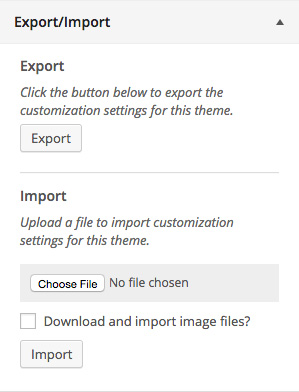
For developers
Is this your plugin? Show off the numbers.
Add a live badge to your site, docs or GitHub README. It updates on its own — no account needed.
Best Customizer Export/Import alternatives
All customizer plugins →


FAQ
Customizer Export/Import: quick answers
Straight answers, pulled from live WordPress.org data.
Live data from WordPress.org · checked Sep 27, 2026
Is Customizer Export/Import free?
Yes. Customizer Export/Import is free to download and use from the official WordPress.org plugin directory.
Is Customizer Export/Import safe to use in 2026?
Customizer Export/Import is a solid plugin choice in 2026, with a few things worth checking first. It runs on 100K+ sites, is rated 4.8/5 and was last updated 3 months ago, and scores 76/100 on our health check.
How many websites use Customizer Export/Import?
Customizer Export/Import is active on 100K+ WordPress websites and has been downloaded 2,830,543 times since it launched in December 2014. It was downloaded 6,866 times in the last 30 days.
Does Customizer Export/Import work with WordPress 7.1?
Customizer Export/Import is officially tested up to WordPress 7.0.6, while the latest release is 7.1.2. It may still work, but try it on a staging site first.
When was Customizer Export/Import last updated?
The latest version, 0.9.8, was released on June 16, 2026 (3 months ago).
Who makes Customizer Export/Import?
Customizer Export/Import is developed and maintained by Beaver Builder.
What are the best alternatives to Customizer Export/Import?
The most popular alternatives to Customizer Export/Import are Custom Login Page Customizer (90K+ installs), Customizer Search (40K+ installs) and Clever Fox (30K+ installs).
Powered by PageForge
Want thousands of pages that rank like these? Build them in an afternoon.
This directory runs on the same engine as PageForge. Turn any spreadsheet, CSV or API into thousands of fast, SEO-ready WordPress pages — with schema, internal links and AI-written copy baked in.
- CSV, Google Sheets & API data sources
- AI content, schema & internal links per page
- Works with Elementor, Gutenberg, Yoast & Rank Math
- Free on WordPress.org — no credit card


