

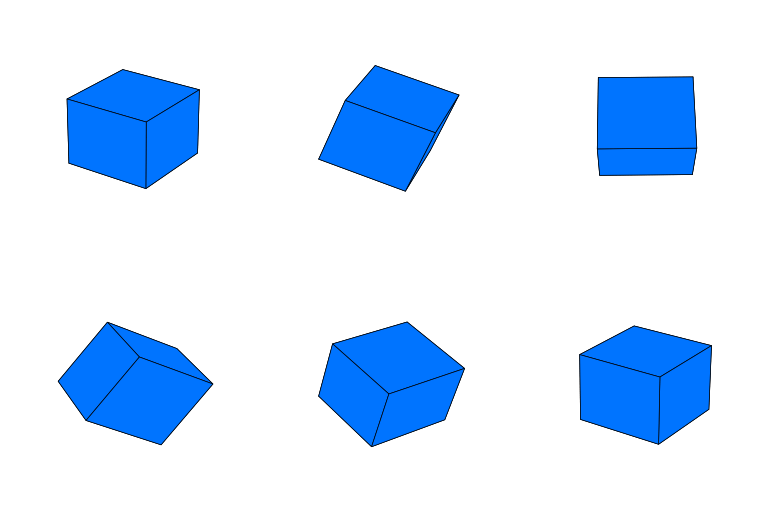
CubeLaunch
Embed interactive, rotatable, pinch and zoom 3D cubes or pyramids with custom faces via Gutenberg blocks, shortcodes, or a site-wide Coming Soon page.

Solid choice
CubeLaunch is a solid plugin choice in 2026, with a few things worth checking first. It runs on 10+ sites and was last updated 1 week ago, and scores 66/100 on our health check.
- Actively developed — last update 1 week ago
- Tested with the latest WordPress (7.1)
- Small user base (10+ active installs)
- Very few reviews so far
How does it stack up?
Side-by-side on installs, updates, ratings & support


Daily downloads
Download spikes usually follow a new release — each site that auto-updates counts as a download.
Rankings
Where CubeLaunch stands todayWordPress.org search rankings
Live position in the plugin search, top 100| Keyword | Position |
|---|---|
| 3d | >100 |
| block | >100 |
| coming soon | >100 |
| shortcode | >100 |
| webgl | #33 |
Version adoption
Share of active sites per release.
About CubeLaunch
From the official readme · v1.0.4Description
Bored of static content? CubeLaunch lets you embed interactive 3D cubes and pyramids powered by WebGL—via a Gutenberg block, a shortcode, or a site‑wide “Coming Soon” overlay.
Key features
* Interactive 3D: drag to spin (X/Y) with inertia; pinch to zoom on touch devices.
* Cubes & pyramids with custom faces (images from the Media Library; built‑in 1:1 cropper).
* Gutenberg block with Small / Medium / Large presets + optional background‑color override.
* Shortcode to embed anywhere shortcodes are supported.
* Mobile‑friendly scrolling: on phones we add slim, invisible “scroll rails” around the canvas so the page still scrolls naturally even when the cube is under your thumb (side rails via CSS; top/bottom rails via a tiny JS helper). All adjustable via CSS variables.
* Coming Soon overlay (optional): a full‑page teaser with your shape, copy and a form (shortcodes/HTML).
Quick mobile tips
– Want smaller cubes on phones? Set --cl-mobile-size per instance (or change the global defaults in :root).
– Want easier scrolling near the cube? We already add invisible “rails” on phones. Tweak --cl-rail-width (sides) and --cl-rail-height (top/bottom). Set them to 0 to disable.
Note: Mobile “rails” affect embedded cubes (Block/Shortcode), not the Coming Soon overlay.
Why Choose CubeLaunch?
Whether you’re looking to create a unique product highlight, an engaging call-to-action, or simply add a touch of interactive flair to your website, CubeLaunch provides an easy-to-use solution. Its “Coming Soon” mode is perfect for building anticipation and capturing leads before your full site goes live. Ideal for portfolios, digital agencies, product launches, or any site wanting to make a memorable first impression.
CubeLaunch Pro (optional)
Unlock extras when you need them:
* Video textures for dynamic faces
* Stocks & crypto charts on faces (auto‑updating)
* Clickable face URLs to link to products or pages
* Texture rotation options
* Optional Z‑axis spin
See it in action → DigiBrief.com
Basic Usage
A) Coming Soon overlay
– Admin → CubeLaunch → Coming Soon Settings.
– Configure the shape + faces, text, and (optionally) a signup form (shortcode or HTML).
– Enable the overlay. Visitors who aren’t logged in will see your Coming Soon page.
B) Gutenberg Block – Reusable shapes (CPT) for Posts & Pages
– Admin → CubeLaunch → Shapes for Pages & Posts → Add New Shape Configuration.
– Choose Cube or Pyramid, set faces/background, Publish.
– In the block editor, search for and insert the “CubeLaunch Shape” block and pick your saved configuration.
– Adjust “Small / Medium / Large” in block settings.
C) Shortcodes
– On the same Shapes for Pages & Posts screen, each saved shape shows a shortcode you can paste into page builders, widgets, or classic editor.
– Example (paste literally):
[cubelaunch_shape id="123"]
-
You can add your own class for per‑instance CSS:
[cubelaunch_shape id=”123″ class=”my-promo-cube”]
Third Party Libraries
This plugin incorporates the following third-party libraries. We are grateful to their developers for making their work available.
-
glMatrix
- Source: Official gl-matrix 3.4.4 npm package, https://registry.npmjs.org/gl-matrix/-/gl-matrix-3.4.4.tgz (bundled locally in
/vendor/js/) - License: MIT License
- License URI: https://github.com/toji/gl-matrix/blob/master/LICENSE.md
- Copyright (c) 2015-2025, Brandon Jones, Colin MacKenzie IV.
- Source: Official gl-matrix 3.4.4 npm package, https://registry.npmjs.org/gl-matrix/-/gl-matrix-3.4.4.tgz (bundled locally in
-
Cropper.js
- Source: Official Cropper.js 1.7.0 npm package, https://registry.npmjs.org/cropperjs/-/cropperjs-1.7.0.tgz (bundled locally in
/vendor/js/and/vendor/css/) - License: MIT License
- License URI: https://github.com/fengyuanchen/cropperjs/blob/v1.7.0/LICENSE
- Copyright (c) 2015-present Chen Fengyuan
- Source: Official Cropper.js 1.7.0 npm package, https://registry.npmjs.org/cropperjs/-/cropperjs-1.7.0.tgz (bundled locally in
Installation
- Automatic: Plugins → Add New → search “CubeLaunch” → Install → Activate.
- Manual: Upload the
cubelaunch.zipvia Plugins → Add New → Upload Plugin.
Changelog
1.0.4
- Update: Added compatibility with WordPress 7.1 and updated block metadata to Block API v3.
- Update: Raised the minimum supported WordPress version to 6.6.
- Update: Upgraded Cropper.js to 1.7.0 and gl-matrix to 3.4.4.
- Improvement: Improved the image cropper layout and usability on phones.
- Improvement: Restores the settings-page scroll position after saving cropped media.
- Improvement: Added additional Save Changes button near the top of the Coming Soon settings page.
- Improvement: Reworked Coming Soon request handling, redirects, REST access, robots and sitemap behaviour.
- Improvement: Added a configurable browser/search title suffix for Coming Soon mode.
- Fix: Improved settings sanitization and partial-form saving so unrelated CubeLaunch settings are preserved.
- Fix: Improved compatibility when Core and Pro are updated in different orders.
- Security/Standards: Hardened request handling and sanitization and resolved all Core Plugin Check warnings.
1.0.3
- Update: Confirmed compatibility with WordPress 6.9.
- Security/Standards: Replaced direct $_POST access with filter_input() and improved sanitization to comply with Plugin Check.
- Standards: Prefixed global-scope variables in template and uninstall files to prevent potential conflicts.
1.0.2
- Fix: Eliminated black halo/“shadow” around PNG/WebP textures with transparency on WebGL shapes.
The fragment shader now composites the sampled texel over white using its alpha
(mix(vec3(1.0), texel.rgb, texel.a)) instead of branching onalpha == 0.0.
This prevents black-matte bleed from straight/lossy alpha during filtering/mipmapping.
1.0.1
- Fix: Elementor placeholder visibility.
1.0.0
- Initial release.
Screenshots


For developers
Is this your plugin? Show off the numbers.
Add a live badge to your site, docs or GitHub README. It updates on its own — no account needed.
Best CubeLaunch alternatives
All 3d plugins →




FAQ
CubeLaunch: quick answers
Straight answers, pulled from live WordPress.org data.
Source: WordPress.org
Is CubeLaunch free?
Yes. CubeLaunch is free to download and use from the official WordPress.org plugin directory.
Is CubeLaunch safe to use in 2026?
CubeLaunch is a solid plugin choice in 2026, with a few things worth checking first. It runs on 10+ sites and was last updated 1 week ago, and scores 66/100 on our health check.
How many websites use CubeLaunch?
CubeLaunch is active on 10+ WordPress websites and has been downloaded 1,008 times since it launched in August 2025. It was downloaded 158 times in the last 30 days.
Does CubeLaunch work with WordPress 7.1?
Yes. The developer has tested CubeLaunch up to WordPress 7.1.5, the latest release. It requires WordPress 6.6 or newer.
What PHP version does CubeLaunch need?
CubeLaunch requires PHP 7.4 or higher. Most hosts run PHP 8.x today, so it works on any modern WordPress hosting.
When was CubeLaunch last updated?
The latest version, 1.0.4, was released on November 19, 2026 (1 week ago).
Who makes CubeLaunch?
CubeLaunch is developed and maintained by digibrief.
What are the best alternatives to CubeLaunch?
The most popular alternatives to CubeLaunch are Easy 3D Viewer (1K+ installs), 3D Viewer Block (1K+ installs) and 3DPrint Lite (600+ installs).
Powered by PageForge
One template and a spreadsheet. A real page for every search.
PageForge turns each row of a CSV into a WordPress page with its own title, URL, SEO fields and schema, built on the layout you already designed. Free on WordPress.org.
- CSV and XLSX, plus Google Sheets on Professional and Enterprise
- Its own title, URL, SEO fields and schema for every page
- Works with the block editor, Elementor, Divi and Avada
- Free on WordPress.org, no credit card